Welcome Guest ( Log In | Register )

Outline · [ Standard ] · Linear+

 TP-LINK Malaysia Official Thread, Technical Enquiries and Support

views
     
VeeJay
post Mar 4 2021, 04:12 PM

Look at all my stars!!
*******
Senior Member
3,853 posts

Joined: Aug 2005


QUOTE(TongCN @ Mar 4 2021, 02:52 PM)
Btw, wanna ask.

Getting the M4 mesh soon from Unifi pack and wanna pasang to my parent house since i'm not using.

Parent house still using the HyppTV but the port from M4 i think should be 2× Gigabit Ports , right ?

Port 1: From modem
Port 2: to unifi tv box

But if i wanna extend using ethernet hub, how is the setup ?
Since the VLAN setting i think need to adjust for Hub to use by using custom.

My Plan:-
Port 1: Connect modem
Port 2: Connect hub extension > Hypptv, Google chrome cast, laptop etc.
*
easiest is to reuse the current router.

Unifi Modem -> Unifi Router dual feed -> M4 (AP) and Switch

Make sure you have cat6 cable the least.

The router will continue to manage your unifiTV which has dedicated configuration at the port setting, it wont work on another port as plug and play.

As for switch, just get Mercusys, selling real cheap at shopee (i think around 50 bucks for 8port).

And the switch you can use it to fix the rest of the stuff

This post has been edited by VeeJay: Mar 4 2021, 04:13 PM
VeeJay
post Mar 15 2021, 12:40 AM

Look at all my stars!!
*******
Senior Member
3,853 posts

Joined: Aug 2005


QUOTE(Matchy @ Mar 14 2021, 11:13 PM)
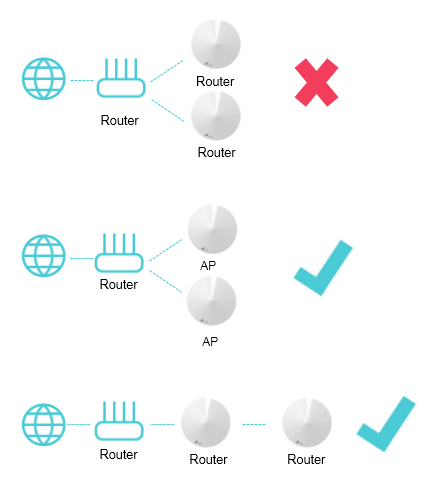
Currently using archer c6, but wifi signal a bit weak at certain location. Can I add 2 deco unit that will act as an satellite unit? Can the mesh wifi work? (Will be using gigabit ethernet backhaul that connect the c6 to the deco unit)
*
do you mean, modem->archer(router)->wiredDeco1->wifiDeco2 right, then it should be fine
VeeJay
post Mar 16 2021, 01:04 AM

Look at all my stars!!
*******
Senior Member
3,853 posts

Joined: Aug 2005


QUOTE(Matchy @ Mar 15 2021, 02:03 PM)
From tplink website, seems possible if use AP mode... but havent see any real life example yet.
Looking for option 2 below:-

user posted image
My main router/modem will be at the house entrance (due to the location, the wifi is weak in other part of the house). Pulled 2 cables to my living room and study room from the house entrace. so i'll put the deco unit at the living room and study room for better wifi signal.
*
Should be fine, pretty close to what I have setup.

Mine is Modem (wired)->DLINK (wired) -> Deco1 (wifi) ->Deco2
VeeJay
post Apr 23 2021, 01:29 PM

Look at all my stars!!
*******
Senior Member
3,853 posts

Joined: Aug 2005


QUOTE(a_dot_el @ Apr 23 2021, 12:18 PM)
Hi anyone knows how to connect another router to Deco M9?

The reason I want to do this is to connect other devices like smart switches/ cctv into another network (2.4) as they dont play well with M9. So I was thinking I have spare router, I can use it to run only 2.4G and connect those devices to that router and using current Deco M9 as the master router.
*
Since the Deco mesh cannot set separate SSID for 5/2.4Ghz, so I ended up using DL850L as my 2.4 router and M4 as 5Ghz and the second M4 as both 2.4/5Ghz since I need the range for equipment at 1st floor.

So all my wifi accessories (smarthome) connects to DL850

If you want to use as M9 as main router then you need to configure the port PPPoE mode and then set the other port on M( for unifiTV, if you have one.

see if this helps


Change to:
| Lo-Fi Version
0.0216sec    0.58    7 queries    GZIP Disabled
Time is now: 17th December 2025 - 11:32 PM