Outline ·
[ Standard ] ·
Linear+
TP-LINK Malaysia Official Thread, Technical Enquiries and Support
|
hshern95
|
 Jan 10 2021, 10:20 PM Jan 10 2021, 10:20 PM
|
Getting Started


|
Hi, I'm currently encountered an issue.
My setup is
living room: modem -> main deco x20
room next to living room: second unit deco x20
upstair living room: third unit deco x20
I found that when I'm trying to connect to my laptop via the second LAN port of main deco x20, the network is not able to identify... trying to connect to other devices via the second LAN port also got the same problem.
My first thought is, maybe the second LAN port on the main deco x20 is faulty, but when I tried to change the cable which connected from modem to second LAN port, it's worked....
Is the main deco x20 not able to connect to other devices when it's connecting to the modem?
|
|
|
|
|
|
blacktubi
|
Jan 10 2021, 10:52 PM
|
-

|
QUOTE(hshern95 @ Jan 10 2021, 10:20 PM) Hi, I'm currently encountered an issue. My setup is living room: modem -> main deco x20 room next to living room: second unit deco x20 upstair living room: third unit deco x20 I found that when I'm trying to connect to my laptop via the second LAN port of main deco x20, the network is not able to identify... trying to connect to other devices via the second LAN port also got the same problem. My first thought is, maybe the second LAN port on the main deco x20 is faulty, but when I tried to change the cable which connected from modem to second LAN port, it's worked.... Is the main deco x20 not able to connect to other devices when it's connecting to the modem? 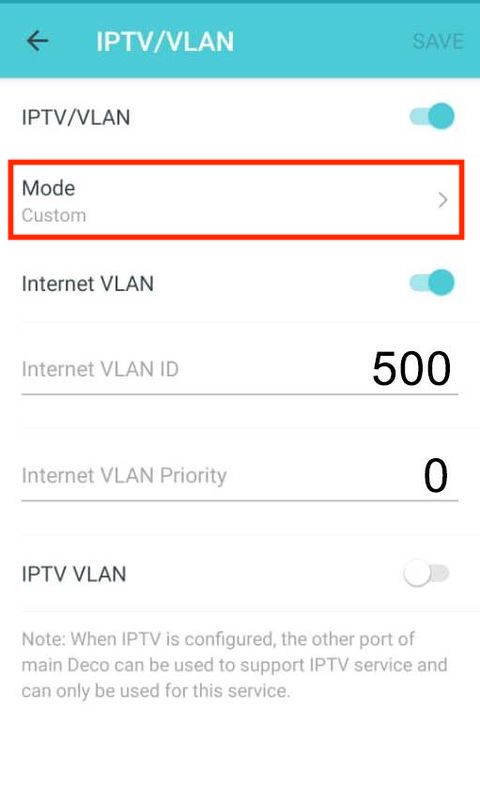 Change the VLAN/IPTV settings like the image above. TP-Link reserve the second LAN port for the HyppTV by default. The HyppTV uses a separate VLAN which is not the same as normal Internet connection. |
|
|
|
|
|
our_team89
|
Jan 11 2021, 06:24 PM
|
|
|
Issue solved
This post has been edited by our_team89: Jan 11 2021, 06:37 PM
|
|
|
|
|
|
altk1989
|
Jan 16 2021, 11:17 PM
|
Getting Started
|
Hi guys i bought another 2-pack Deco E4 to add into my current 2-Pack Deco E4...currently i only setup 3 Deco E4, to my surprise, the my 3rd Deco have worst speed despite its the same location as previous setup...
My second Deco can reach about 80-90 Mbps out of 100 Mbps... the third however only reach 9Mbps Max...i was hoping at lease 30-50Mbps at least...
Cant even imagine if add the 4th Deco E4 in the network......
What should i do in this case? i still able to top-up to purchase another things if i returned the 2-Pack Deco E4 in three days. Should i just go for better wireless receiver?
This post has been edited by altk1989: Jan 16 2021, 11:18 PM
|
|
|
|
|
|
tskhor
|
Jan 17 2021, 10:45 AM
|
|
|
Currently using Maxis 300Mpackage with TpLink Archer C5v(no WiFi6), is it possible to connect one DECO x60 direct to C5v using cable and the other unit DECO x60 I put it at second floor of my house to enjoy the full signal of 5G Wifi ?
Will it affect my current Maxis Voip DECK phone line ?
This post has been edited by tskhor: Jan 17 2021, 10:46 AM
|
|
|
|
|
|
justnits
|
Jan 17 2021, 11:29 PM
|
|
|
i'm using Time with the EC230-G1 TP router.
that model don't have Guest wifi function?
i want to set a Guest SSID with different IP address, noticed the Dual LAN and Second IP option there.
|
|
|
|
|
|
cannavaro
|
Jan 18 2021, 12:17 PM
|
|
|
QUOTE(altk1989 @ Jan 16 2021, 11:17 PM) Hi guys i bought another 2-pack Deco E4 to add into my current 2-Pack Deco E4...currently i only setup 3 Deco E4, to my surprise, the my 3rd Deco have worst speed despite its the same location as previous setup... My second Deco can reach about 80-90 Mbps out of 100 Mbps... the third however only reach 9Mbps Max...i was hoping at lease 30-50Mbps at least... Cant even imagine if add the 4th Deco E4 in the network...... What should i do in this case? i still able to top-up to purchase another things if i returned the 2-Pack Deco E4 in three days. Should i just go for better wireless receiver? Use the deco app and check the signal strength of the 3rd deco, how many bars and is it actually getting the link from the further deco instead of the nearer one? because I read that this happens a lot.. happened to me as well - 2 x M4, 1 x M5, the M5 being used as a slave, instead of linking with the nearer deco M4, it linked with the furthest M4 with weaker signal. A simple reboot fixed the issue for me. |
|
|
|
|
|
tpee P
|
Jan 29 2021, 08:54 PM
|
New Member
|
I want to setup Deco M4 as router directly connected to unifi modem, but the TM unifi VLAN profile also sets up the IPTV and it says that the other LAN port can only be used for IPTV. I don’t use the IPTV (although my home unifi package includes HyppTV). Instead, I need to use the other LAN port to connect to a network switch because I have a couple of devices that need to connect to the internet using LAN cable (those devices can’t have WiFi). This needs to be at the main M4 unit b'cos those devices are located near the unifi modem. How to configure M4 without the IPTV? If I don't enable the VLAN, then M4 won't connect to the unifi.
|
|
|
|
|
|
FusionXY
|
Jan 29 2021, 09:47 PM
|
|
|
QUOTE(tpee @ Jan 29 2021, 08:54 PM) I want to setup Deco M4 as router directly connected to unifi modem, but the TM unifi VLAN profile also sets up the IPTV and it says that the other LAN port can only be used for IPTV. I don’t use the IPTV (although my home unifi package includes HyppTV). Instead, I need to use the other LAN port to connect to a network switch because I have a couple of devices that need to connect to the internet using LAN cable (those devices can’t have WiFi). This needs to be at the main M4 unit b'cos those devices are located near the unifi modem. How to configure M4 without the IPTV? If I don't enable the VLAN, then M4 won't connect to the unifi. Hello, you can use custom VLAN Tag ID Mode. Thanks. |
|
|
|
|
|
tpee P
|
Jan 30 2021, 07:31 AM
|
New Member
|
QUOTE(FusionXY @ Jan 29 2021, 09:47 PM) Hello, you can use custom VLAN Tag ID Mode. Thanks. It works now; didn't know that have to scroll all the way down to find the Custom option. Thanks for your tip!  |
|
|
|
|
|
FusionXY
|
Jan 30 2021, 10:10 AM
|
|
|
QUOTE(tpee @ Jan 30 2021, 07:31 AM) It works now; didn't know that have to scroll all the way down to find the Custom option. Thanks for your tip! You're welcome. A few them ask this as well and using custom options. Glad to hear that it works now. Thanks |
|
|
|
|
|
knightdemon
|
Jan 30 2021, 10:10 PM
|
Getting Started
|
Can the TL-WDR4300 be setup as repeater and paired to the Unifi ac1200? If yes how do i go about it?
|
|
|
|
|
|
ab21cn
|
Feb 1 2021, 10:46 AM
|
Getting Started
|
AX6000 support unifi fibra ?
|
|
|
|
|
|
tachlio
|
Feb 1 2021, 09:07 PM
|
|
|
Deco M9 Plus show new FW on website but unable update? Any success to update? https://www.tp-link.com/en/support/download...-plus/#FirmwareUpdate Resolved. Need update via upgrade utility This post has been edited by tachlio: Feb 1 2021, 09:25 PM |
|
|
|
|
|
blacktubi
|
Feb 1 2021, 09:16 PM
|
-
|
QUOTE(tachlio @ Feb 1 2021, 09:07 PM) Deco M9 Plus show new FW on website but unable update? Any success to update? https://www.tp-link.com/en/support/download...-plus/#FirmwareThat firmware is just designated for EU region Since it is recently published on January 29th, expect it to come to our models in the coming weeks. |
|
|
|
|
|
tachlio
|
Feb 1 2021, 09:25 PM
|
|
|
QUOTE(blacktubi @ Feb 1 2021, 09:16 PM) That firmware is just designated for EU region Since it is recently published on January 29th, expect it to come to our models in the coming weeks. lol, too late. Update jor.. So far OK for Time |
|
|
|
|
|
kogul92
|
Feb 2 2021, 06:48 AM
|
Getting Started
|
Hi guys, just wonder when Archer AX73 will be available to purchase from retail store?
|
|
|
|
|
|
jetblast
|
Feb 3 2021, 07:05 PM
|
|
|
Does The AX73 support Maxis VOIP? Meaning connect ONU=>AX73=>maxis c5v=>phone. My current Asus router just have to plug the maxis c5v into Lan3 of the Asus router for VOIP to work.
|
|
|
|
|
|
sonicmaster
|
Feb 5 2021, 01:13 AM
|
|
|
Is ax50 suits 2 storey home
|
|
|
|
|
|
Xanxeviera.
|
Feb 5 2021, 01:11 PM
|
Getting Started
|
Hi sifus, How to change wifi-channel and channel width on tp-link ax20?
I can't find the settings
This post has been edited by Xanxeviera.: Feb 5 2021, 01:14 PM
|
|
|
|
|



 Quote
Quote








 0.0461sec
 0.67
0.67
 6 queries
 GZIP Disabled