Welcome Guest ( Log In | Register )

Outline · [ Standard ] · Linear+

 TP-LINK Malaysia Official Thread, Technical Enquiries and Support

views
     
Jjuggler
post Dec 31 2017, 11:24 PM

Narcissistic Genius
******
Senior Member
1,341 posts

Joined: Dec 2016
QUOTE(barney @ Dec 31 2017, 10:16 PM)
using your guide, will it not give problems like wireless devices not able to connect after 12 hours of up time? I upgraded to the latest AU firmware and it is still giving me the same problem. after 24 hours of uptime it will get worst where anything connected to the wifi will not be able to surf internet including the LAN. Do you face this problem?
*
It will not give any problem. Because I test the router before give the suggestion. I did not face such problem, infact, the router does handle the connected device well. (2 PC via lan port, 1 for hypptv). 8 smartphones, 2 wireless printers. The router seems can handle the device connected to it. I never face a single hang at all.

QUOTE(MrSpeedy @ Dec 31 2017, 10:23 PM)
I only see option to turn off the Print Server.
How do I turn off USB sharing?
*
[attachmentid=9472288]
Look at here. If your toggle is on for the sharing access, turn off it, and turn off anything in the page.


QUOTE(JohnLai @ Dec 31 2017, 10:28 PM)
-.- Should rename it as reduction of random reboot chance.

Auto reboot still happen even with those settings.
*
My friend, the solution is to reduce the auto reboot. Once i follow the mentioned settings, my router only reboots once a week (usually wed / thursday 3am to 4am - because usually i stay awake till that time). The solution for the people who don't wish to get an aftermarket router or have budget issue. It is a temporary solution only.

This post has been edited by Jjuggler: Dec 31 2017, 11:26 PM
Jjuggler
post Jan 2 2018, 10:33 AM

Narcissistic Genius
******
Senior Member
1,341 posts

Joined: Dec 2016
QUOTE(SilentVampire @ Jan 2 2018, 10:25 AM)
They will give you the DIR-850L lol, which is slightly better but not by much. Good luck.
*
QUOTE(barney @ Jan 2 2018, 10:18 AM)
i tried your method but same result. i declare c1200 is not usable at all. i am going to complain to tm and see if they can get me another model as in not c1200! Still not satisfied with the wifi router they gave me. my friend gave me a 2013 old wifi router that was given free to TM back then, its the riger model. I test using that no problem at all for 2 days and counting.
*
Based on SilentVampire bro's explanation, yes you can request to change your router, but you will get the cylindrical shaped router - dlink850l router which slightly better if you patched it to the latest firmware and stuck with suffix ssid "@unifi" or if you didn't patch, your router is vulnerable.


Jjuggler
post Jan 21 2018, 03:40 PM

Narcissistic Genius
******
Senior Member
1,341 posts

Joined: Dec 2016
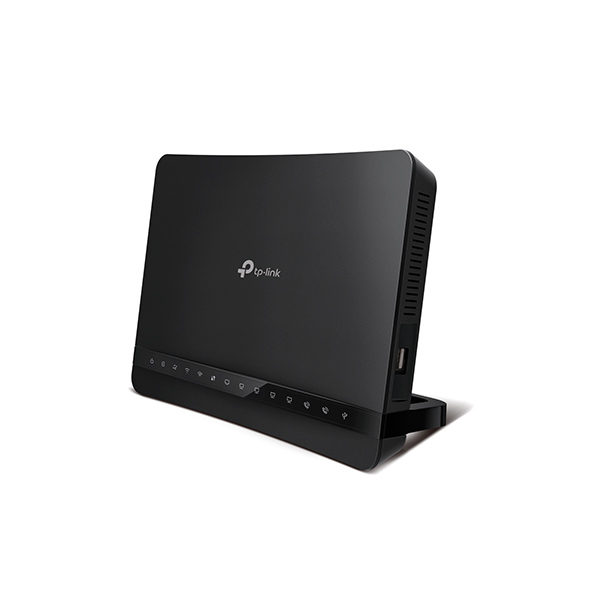
I like the design of this modem / router. Normally i don't prefer a router has external antennas. I much prefer those which has internal antennas except the stock tm router like rgx440 and innatech. lmao. I wonder how much it would cost since it is an ac1200 router/modem. hopefully below rm400.


user posted image
user posted image

This post has been edited by Jjuggler: Jan 21 2018, 03:40 PM
Jjuggler
post Jan 21 2018, 06:08 PM

Narcissistic Genius
******
Senior Member
1,341 posts

Joined: Dec 2016
hopefully bro Blacktubi. Initially saving money to buy tplink c3150 router since the review of the router from bro SilentVampire is good. after encounter with tplink Archer VR1200v's beauty. haha. can't wait to test out the combo.

This post has been edited by Jjuggler: Jan 21 2018, 06:09 PM
Jjuggler
post Jan 21 2018, 10:45 PM

Narcissistic Genius
******
Senior Member
1,341 posts

Joined: Dec 2016
QUOTE(ppfoong @ Jan 21 2018, 10:41 PM)
That one is for Streamyx instead of UniFi...
*
I feel the router may have similar functionalities like this router. Dlink already came up with such device. It is the time for tplink to rock again.
Jjuggler
post Jan 23 2018, 01:35 PM

Narcissistic Genius
******
Senior Member
1,341 posts

Joined: Dec 2016
QUOTE(eddyann @ Jan 23 2018, 01:19 PM)
the archer ac3150 is a great router. I'm using it now. daily connected devices around 16-22 units. no problem easy to monitor since this is a cloud router. the wifi coverage is quite strong too
I see. Thanks for the review thou.

QUOTE(SilentVampire @ Jan 23 2018, 01:27 PM)
I agree bro. Best WiFi coverage among routers that I have had in the past. Glad to see you are enjoying it.
I thought the combo router from tplink will support both unifi and streamyx since it has a wan poer (interent port) and 4 gigabit lan ports. The design attracts me thou.
Jjuggler
post Jan 23 2018, 02:47 PM

Narcissistic Genius
******
Senior Member
1,341 posts

Joined: Dec 2016
QUOTE(SilentVampire @ Jan 23 2018, 02:11 PM)
It does look good bro, and will definitely support both Streamyx and Unifi. Hope it will get a good firmware as well.
*
haha. hopefully bro. biggrin.gif
Jjuggler
post Jan 23 2018, 08:39 PM

Narcissistic Genius
******
Senior Member
1,341 posts

Joined: Dec 2016
QUOTE(chiucheng @ Jan 23 2018, 08:36 PM)
hi, ive been facing wifi dropping and cant connect to wif (both 2.4g and 5g) on time broadband provided tp link ac1200 router... anyone face similar issue? time service centre told me its tplink's firmware issue...

need to restart multiple times a day oh gawd.
*
if you're not upgrade to the latest firmware version of c1200 by TIME, then you're lucky where you can actually upgrade to the beta version of the firmware. Give a try.
Jjuggler
post Jan 23 2018, 09:07 PM

Narcissistic Genius
******
Senior Member
1,341 posts

Joined: Dec 2016
QUOTE(chiucheng @ Jan 23 2018, 08:45 PM)
no option for firmware upgrade in interface, does this mean TIME fucked me up?
*
well my friend...... there you go... the end is near you. nod.gif
Jjuggler
post Jan 23 2018, 09:24 PM

Narcissistic Genius
******
Senior Member
1,341 posts

Joined: Dec 2016
QUOTE(chiucheng @ Jan 23 2018, 08:45 PM)
no option for firmware upgrade in interface, does this mean TIME fucked me up?
*
to simplify the task, simply go this link attached below. Special thanks to bro Johnlai.

http://192.168.0.1/userRpm/firmwareUpgrade.htm
Jjuggler
post Jan 23 2018, 09:46 PM

Narcissistic Genius
******
Senior Member
1,341 posts

Joined: Dec 2016
QUOTE(chiucheng @ Jan 23 2018, 09:32 PM)
[attachmentid=9537861]
as u can see firmware upgrade really not in my menu lol
*
Look in the box I highlighted below. Click on the browse button to upload the beta firmware from your download file, once upload the firmware, then click on the upgrade button. done. Wait for 5 to 6 minutes and do the setup manually. your settings will be erased when you upgrade the firmware.

[attachmentid=9537867]
Jjuggler
post Jan 24 2018, 12:36 PM

Narcissistic Genius
******
Senior Member
1,341 posts

Joined: Dec 2016
QUOTE(alijoe @ Jan 24 2018, 12:30 PM)
is this for c1200? where to enable 5hhz beamforming? Dont see it in stock firmware or need beta?
*
system tools > system parameters. look here.
Jjuggler
post Feb 6 2018, 05:23 PM

Narcissistic Genius
******
Senior Member
1,341 posts

Joined: Dec 2016
QUOTE(Chrono-Trigger @ Feb 6 2018, 12:46 PM)
does anyone has any issue with unifi IPTV with this TPlink Archer c1200?

Mine seems to lag a bit when I flipped channels. Is this normal or a firmware problem? Currently using EU firmware.  Does IPV6 has anything to do with this ?
*
I do. The iptv is not stable. Only first 5 minute is okay. after that, it is showing the ethernet cable unplugged while the cable has been tightened. I feel like it is time to send the router to paper lama and currently using my asus ac58u.
Jjuggler
post Feb 15 2018, 11:51 AM

Narcissistic Genius
******
Senior Member
1,341 posts

Joined: Dec 2016
QUOTE(dimension77 @ Feb 8 2018, 12:07 AM)
rolleyes.gif Hi Customer and Tplink Fans, rolleyes.gif

Start from 1-2-2018 until 21-1-2018 have promotion Chinese New Year 2018-CNY 2018 freegift when you buy selected tplink router products.The freegift is tplink LB100 wifi bulb.So fast to grab and buy it if you want to change the router.Please hurry up to grab it.You can buy at retail shop like Sri Computer Sdn Bhd on second floor but the shop will not give you freegift(LB100 wifi bulb) then the freegift LB100 wifi bulb is claim from UG-CB4 tplink service centre .The LB100 wifi bulb freegift you should take at UG-CB4 tplink service centre at Low Yat Plaza.To get these free gift you should buy selected router below:

After that you buy the item you need to show the purchase receipt and device/router have serial number then you get the freegift wifi bulb  LB100.

1.)Deco M5 3 pack it.If buy one pack no free gift it.

[attachmentid=9576778]

2.)Archer AD7200

[attachmentid=9576780]
3.)Archer C5400

[attachmentid=9576782]

4.)Archer C3150

[attachmentid=9576786]

5.)Archer C2300

[attachmentid=9576788]

6.)Archer C7

[attachmentid=9576789]

These is the tplink flyer fregift.

[attachmentid=9576796]

[attachmentid=9576791]

P/S-If these period(1-2-2018 until 28-2-2018)you already buy selected above router with these period then you miss the freegift,you can photostat the purchase receipt then take out the box router serial number then courier to us so tplink service centre will verify the product then will courier to your house.

-Please read terms and condition freegift it.-

About freegift LB100 products and spec-Wifi Bulb LB100
nod.gif  At last,I would take these opportunity to the buyer and fans to support our products.Thank you very much to your support,we feel grateful it.  nod.gif
*
my question is, how can we come to the shop from far place when the price tag has been erased / marked? hmm.gif

Jjuggler
post Mar 9 2018, 12:33 PM

Narcissistic Genius
******
Senior Member
1,341 posts

Joined: Dec 2016
Dear tplink, I would like to question on, who is the responsible person to pass the c3150 router? How come, a router which considered a high end router for tplink brand doesn't come with cpu load and memory usage graph? I am currently testing this router and I would like to know the answer for my question from any of your representative. Thanks.
Jjuggler
post Mar 9 2018, 01:25 PM

Narcissistic Genius
******
Senior Member
1,341 posts

Joined: Dec 2016
QUOTE(SilentVampire @ Mar 9 2018, 12:36 PM)
Great question bro, but I don’t think TP Link will answer the question unfortunately. Better to email them directly: https://www.tp-link.com/my/support-contact....Hotline-Support
*
a good customer representative will always answer the questions no matter in which platforms we are using bro. That's how you always keep customer's loyalty to buy your product.
Jjuggler
post Mar 29 2018, 07:13 PM

Narcissistic Genius
******
Senior Member
1,341 posts

Joined: Dec 2016
QUOTE(AVFAN @ Mar 29 2018, 02:07 PM)
"bad wifi, what can i do".

many before u, many after u... this issue trashed to death, answers here:

Unifi standard download speed for 100mb
https://forum.lowyat.net/topic/4551990
2.4Ghz and 5Ghz connection, at different speed
https://forum.lowyat.net/topic/4195926
Need some advice on extending internet coverage, Condo,<2,000SqFt, thick walls
https://forum.lowyat.net/topic/4549805
Router replacement for unifi 100mbps, Router replacement
https://forum.lowyat.net/topic/4548858
Router recommendation, Need high gain and stable
https://forum.lowyat.net/topic/4538857
Best router for Maxis Fibre 30mbps, Best router for Maxis Fibre 30mbps (Home Networking)
https://forum.lowyat.net/topic/4547385
Router Recommendation
https://forum.lowyat.net/topic/4519582
wta unifi wifi extend, suggestion (Unifi)
https://forum.lowyat.net/topic/4514561
Need help for a router recommendation, Need a new router (Home Networking)
https://forum.lowyat.net/topic/4514835/+40#bottom
What's the disadvantage of using old dlink router, but subscribed to 50mb package
https://forum.lowyat.net/topic/4516416
*
wow. haha. kudos bro. rclxms.gif . I hope the next time forumers wish to ask any question, please use the given search feature to search so that, the next time you wish to ask, it will be something that not exist before.
Jjuggler
post Mar 29 2018, 10:40 PM

Narcissistic Genius
******
Senior Member
1,341 posts

Joined: Dec 2016
QUOTE(AVFAN @ Mar 29 2018, 07:29 PM)
becos there is no pinned thread.

and every week, a couple of people wil ask same thing, repeat, rinse repeat.
i try to help! laugh.gif
*
Hahaha. So kind of you. rclxms.gif
Jjuggler
post Aug 14 2018, 05:53 PM

Narcissistic Genius
******
Senior Member
1,341 posts

Joined: Dec 2016
QUOTE(SilentVampire @ Aug 13 2018, 10:47 PM)
I wouldn’t recommend it, if you want to watch UnifiTV. It screws that up. It would be better to get the C3150 v2.
*
Thinking about the router.. haiz...
Jjuggler
post Apr 22 2019, 11:03 AM

Narcissistic Genius
******
Senior Member
1,341 posts

Joined: Dec 2016
QUOTE(viiv1 @ Apr 22 2019, 10:35 AM)
Haha...definitely a good suggestion but that might be out of my budget for now. look at the RM500-700 range if possible.
*
go with tplink c3150. You won't feel bad for this decision.

3 Pages < 1 2 3 >Top
 

Change to:
| Lo-Fi Version
0.1081sec    0.34    7 queries    GZIP Disabled
Time is now: 5th December 2025 - 02:13 AM