Outline ·
[ Standard ] ·
Linear+
TP-LINK Malaysia Official Thread, Technical Enquiries and Support
|
calvinlaw510
|
 Jul 7 2017, 06:18 PM Jul 7 2017, 06:18 PM
|

|
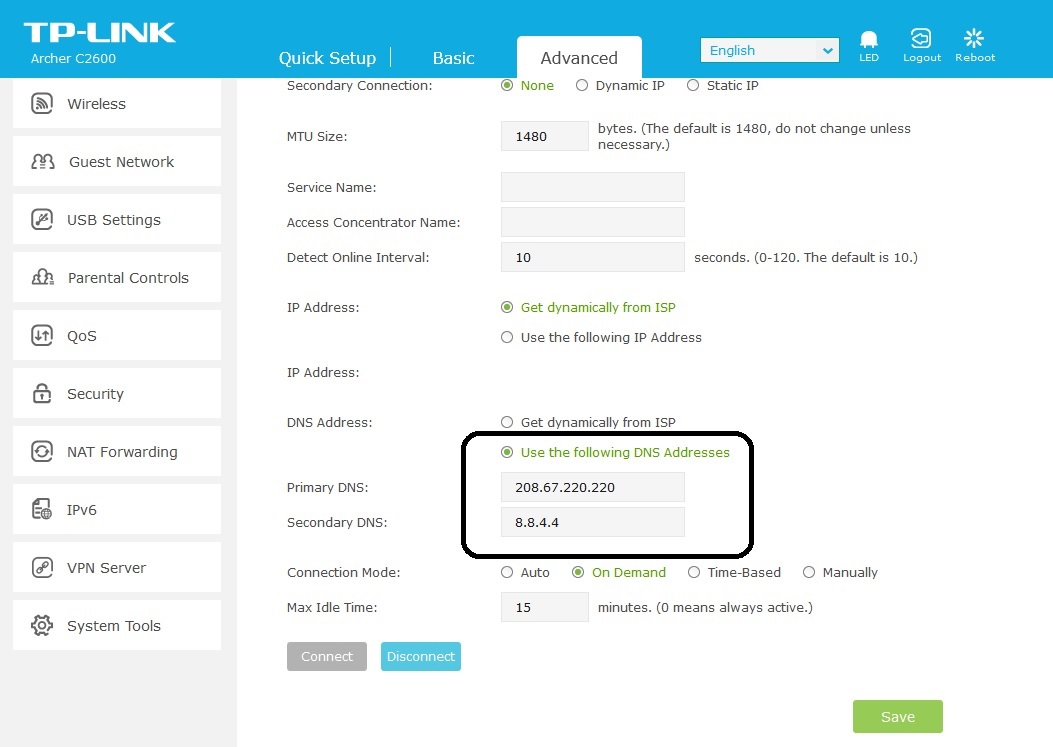
QUOTE(sean810818 @ Jul 7 2017, 05:22 PM) Dear all sifu. Can i know how to change/update tplink c3150 dns server to google dns ? I go to network -> dhcp server and enter the primary dns to 8.8.8.8. -> restart router but no luck. Thank you Go to Network -> Internet -> Advanced -> DNS Address -> Select Use the following DNS address -> Key in primary and sencondary google DNS. » Click to show Spoiler - click again to hide... « |
|
|
|
|
|
calvinlaw510
|
Oct 19 2017, 02:39 PM
|
|
|
QUOTE(lyt25_1234 @ Oct 19 2017, 02:28 PM) Die lor, TP-LINK still no firmware update for KRACK. I'm using TP-LINK Archer C1200 by TM... Please read the TP-Link WPA2 Security (KRACKs) Vulnerability Statement http://www.tp-link.com/en/faq-1970.html |
|
|
|
|
|
calvinlaw510
|
Oct 19 2017, 10:30 PM
|
|
|
QUOTE(ppfoong @ Oct 19 2017, 10:13 PM) I am using C2600. So how? Still supported? Do you read the statement? |
|
|
|
|
|
calvinlaw510
|
Dec 2 2017, 02:27 PM
|
|
|
QUOTE(razkal @ Dec 2 2017, 01:34 PM) Hello guys, just got my AC3150 router today. Have been trying to setup the router but it failed to connect to internet. Of course using password given by TM unifi. Any thought on this. On my first trial i did not switch of modem just setup normally on the router. Second trial i reset the router back to factory setting-->restart modem-->setup router. Still didnt work for me. I check the WAN light is switch on the router so should be any problem. Also checked connection no problem. After that i reattached my old router and the internet connection work as it should. Pls enable iptv and select unifi profile. |
|
|
|
|
|
calvinlaw510
|
Sep 22 2018, 11:09 PM
|
|
|
QUOTE(SilentVampire @ Sep 22 2018, 11:02 PM) Your device must support it too, bro. Huawei is only 2x2 MIMO. See here: https://forum.lowyat.net/topic/4658454There are limits to wireless speeds, so you can’t expect too much. Note8 also is 2x2 MIMO. i am using C2600 manage to get 500Mbps.  |
|
|
|
|
|
calvinlaw510
|
Oct 15 2018, 04:48 PM
|
|
|
QUOTE(scorpenez @ Oct 15 2018, 09:43 AM) sir, your result speedtest using wifi in 2.4Ghz or 5Ghz? Thank you AC 5Ghz Speedtest result after upgraded to 1Gbps Note8  iPad pro  |
|
|
|
|



 Quote
Quote
 0.0973sec
 0.49
0.49
 7 queries
 GZIP Disabled