Welcome Guest ( Log In | Register )

Bump Topic Topic Closed RSS Feed
110 Pages « < 43 44 45 46 47 > » Bottom

Outline · [ Standard ] · Linear+

Unifi Unifi Lite 10Mbps - v2.0 -, TM illegitimate child hidden in basement

views
     
wild_card_my
post Jun 7 2017, 02:38 PM

Look at all my stars!!
*******
Senior Member
6,562 posts

Joined: Jan 2003
From: Kuala Lumpur

QUOTE(TOMEI-R @ Jun 7 2017, 02:34 PM)
You have to download the hypp tv everywhere APP on your phone. You cant watch with your existing Hypp TV Stb.

After your registration is complete and unifi is installed, TM will send you the login name and password through text message.
*
The Hypp TV app is actually very well made. I love it, I prefer watching it on the phone vs on the STB or windows web browsers (I cant get it to work actually, they need some plugins)
faizdtk
post Jun 7 2017, 02:56 PM

Getting Started
**
Junior Member
136 posts

Joined: May 2008
From: Terengganu


QUOTE(TOMEI-R @ Jun 7 2017, 02:34 PM)
You have to download the hypp tv everywhere APP on your phone. You cant watch with your existing Hypp TV Stb.

After your registration is complete and unifi is installed, TM will send you the login name and password through text message.
*
Already tried it with the username and password from TM but still incorrect password.
TOMEI-R
post Jun 7 2017, 03:07 PM

Extraordinaire
*********
All Stars
24,219 posts

Joined: Mar 2007
From: Kuala Lumpur


QUOTE(wild_card_my @ Jun 7 2017, 02:38 PM)
The Hypp TV app is actually very well made. I love it, I prefer watching it on the phone vs on the STB or windows web browsers (I cant get it to work actually, they need some plugins)
*
Im using it on the original Huawei STB box now because I want to view it on my LED and yes, it requires some tweaking.
TOMEI-R
post Jun 7 2017, 03:08 PM

Extraordinaire
*********
All Stars
24,219 posts

Joined: Mar 2007
From: Kuala Lumpur


QUOTE(faizdtk @ Jun 7 2017, 02:56 PM)
Already tried it with the username and password from TM but still incorrect password.
*
TM limits the use of two devices per ID only. Have you exceeded your allowed quote of devices?
faizdtk
post Jun 7 2017, 03:13 PM

Getting Started
**
Junior Member
136 posts

Joined: May 2008
From: Terengganu


QUOTE(TOMEI-R @ Jun 7 2017, 03:08 PM)
TM limits the use of two devices per ID only. Have you exceeded your allowed quote of devices?
*
I don't think so because I tried it on my pc and phone only.

This post has been edited by faizdtk: Jun 7 2017, 03:13 PM
wild_card_my
post Jun 7 2017, 03:41 PM

Look at all my stars!!
*******
Senior Member
6,562 posts

Joined: Jan 2003
From: Kuala Lumpur

QUOTE(TOMEI-R @ Jun 7 2017, 03:08 PM)
TM limits the use of two devices per ID only. Have you exceeded your allowed quote of devices?
*
On your 3rd device Hypp TV would simply as which device you would log out of, and you can still login to the current device
TOMEI-R
post Jun 7 2017, 03:46 PM

Extraordinaire
*********
All Stars
24,219 posts

Joined: Mar 2007
From: Kuala Lumpur


QUOTE(faizdtk @ Jun 7 2017, 03:13 PM)
I don't think so because I tried it on my pc and phone only.
*
Have you successfully logged in before?
faizdtk
post Jun 7 2017, 04:10 PM

Getting Started
**
Junior Member
136 posts

Joined: May 2008
From: Terengganu


QUOTE(TOMEI-R @ Jun 7 2017, 03:46 PM)
Have you successfully logged in before?
*
Nope. The tm live chat already made a report for my problem. I need to wait for their reply.
TOMEI-R
post Jun 7 2017, 04:14 PM

Extraordinaire
*********
All Stars
24,219 posts

Joined: Mar 2007
From: Kuala Lumpur


QUOTE(faizdtk @ Jun 7 2017, 04:10 PM)
Nope.  The tm live chat already made a report for my problem. I need to wait for their reply.
*
hmm.gif
Strange. I would suspect they didn't activate the ID for you as it states it requires 24 hours for activation after receiving the login ID.
cucubud
post Jun 7 2017, 04:27 PM

Super Moderator
*******
Senior Member
3,076 posts

Joined: Jan 2008


QUOTE(TOMEI-R @ Jun 7 2017, 10:55 AM)
Sorry... But I dont get what you are trying to say. What I was trying to say was that the port 4 of our TM Router, which is normally used for hypp tv connection would be automatically disabled meaning we wont be able to get any HYPP TV connections. But Lite users can still view Hypp TV Everywhere through TM's App Hypp TV lite which would need to be downloaded into your smart phone as long as you are connected to the internet, then you can view it anywhere.
*
My problem was iPhones connected to router WiFi SSID get ip address 10.x.x.x while laptop connected to the same router SSID get ip address 192.168.x.x.
Iphones cannot get internet with ip address 10.x.x.x while laptop no problem getting the internet.
My TM router port 4 is still working good with HyppTv STB. I am on Unifi Lite 10 (free upgrade from VIP5).

kevyeoh
post Jun 7 2017, 04:34 PM

Look at all my stars!!
*******
Senior Member
4,717 posts

Joined: Jan 2003


Download safari and then download the plugins... it works for me flawlessly... like 5 mins installation job only... then straight away work already via web browser... safari.... smile.gif

QUOTE(wild_card_my @ Jun 7 2017, 02:38 PM)
The Hypp TV app is actually very well made. I love it, I prefer watching it on the phone vs on the STB or windows web browsers (I cant get it to work actually, they need some plugins)
*
tzh2001
post Jun 7 2017, 04:43 PM

Heart warming
***
Junior Member
385 posts

Joined: Jan 2008
QUOTE(cucubud @ Jun 7 2017, 04:27 PM)
My problem was iPhones connected to router WiFi SSID get ip address 10.x.x.x while laptop connected to the same router SSID get ip address 192.168.x.x.
Iphones cannot get internet with ip address 10.x.x.x while laptop no problem getting the internet.
My TM router port 4 is still working good with HyppTv STB. I am on Unifi Lite 10 (free upgrade from VIP5).
*
why not just put static IP instead using DHCP hmm.gif
kevyeoh
post Jun 7 2017, 04:53 PM

Look at all my stars!!
*******
Senior Member
4,717 posts

Joined: Jan 2003


Lol... my problem was with all my Android phones... today someone from telekom came over my place... my case was on certain app or certain website... can't upload... I ask the technician to try using his Asus phone also same issue... cannot upload... end up he call KL and the reply is sorry... for handphone not in scope of troubleshooting because hard to debug...

So I guess just accept my luck....

QUOTE(cucubud @ Jun 7 2017, 04:27 PM)
My problem was iPhones connected to router WiFi SSID get ip address 10.x.x.x while laptop connected to the same router SSID get ip address 192.168.x.x.
Iphones cannot get internet with ip address 10.x.x.x while laptop no problem getting the internet.
My TM router port 4 is still working good with HyppTv STB. I am on Unifi Lite 10 (free upgrade from VIP5).
*
totally_skint
post Jun 7 2017, 04:59 PM

Regular
******
Senior Member
1,185 posts

Joined: Mar 2007


QUOTE(kevyeoh @ Jun 7 2017, 04:53 PM)
Lol... my problem was with all my Android phones... today someone from telekom came over my place... my case was on certain app or certain website... can't upload... I ask the technician to try using his Asus phone also same issue... cannot upload... end up he call KL and the reply is sorry... for handphone not in scope of troubleshooting because hard to debug...

So I guess just accept my luck....
*
Which app doesn't work?
cucubud
post Jun 7 2017, 05:22 PM

Super Moderator
*******
Senior Member
3,076 posts

Joined: Jan 2008


QUOTE(tzh2001 @ Jun 7 2017, 04:43 PM)
why not just put static IP instead using DHCP  hmm.gif
*
QUOTE(kevyeoh @ Jun 7 2017, 04:53 PM)
Lol... my problem was with all my Android phones... today someone from telekom came over my place... my case was on certain app or certain website... can't upload... I ask the technician to try using his Asus phone also same issue... cannot upload... end up he call KL and the reply is sorry... for handphone not in scope of troubleshooting because hard to debug...

So I guess just accept my luck....
*
It was TM router problem.
TM technician came and replaced the router.
Now back to normal. No more getting ip address 10.x.x.x on iPhones.
elmond
post Jun 7 2017, 05:51 PM

Look at all my stars!!
*******
Senior Member
2,262 posts

Joined: Jul 2013
QUOTE(kevyeoh @ Jun 7 2017, 04:53 PM)
Lol... my problem was with all my Android phones... today someone from telekom came over my place... my case was on certain app or certain website... can't upload... I ask the technician to try using his Asus phone also same issue... cannot upload... end up he call KL and the reply is sorry... for handphone not in scope of troubleshooting because hard to debug...

So I guess just accept my luck....
*
if you dont mind, please list down the website and apps, i can help to try.
kevyeoh
post Jun 7 2017, 06:33 PM

Look at all my stars!!
*******
Senior Member
4,717 posts

Joined: Jan 2003


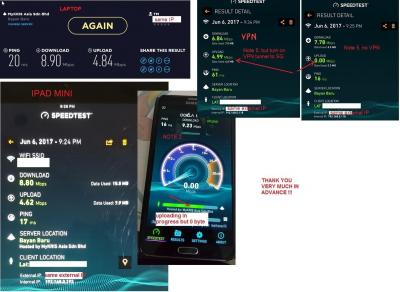
thanks guys, almost give up and was thinking of just buying a new router as last resort, potentially can still have the same issue and will waste money, but running out of luck... so here's my issue with my uniti lite.

At Speedtest, you can see the bar never moves and stuck at zero, because zero bytes transferred. I confirm using the exact same server on all my devices (desktop, laptop, ipad, and my android phones). Only the Android phones cannot upload at all. And this resulted in some issue such as:
- Mudah app, cannot upload picture. This is also the same at Mudah website, when I try to upload the file, it won't upload.
- Lowyat forum, when using via my phone, if I want to post a new Thread and upload a file attachment, it will stuck and nothing happens as well.
- Tried logging in to twitter via webpage, stuck. but once I turn to mobile data, I can login immediately...
- Soccernet page can never really load fully or if you click on the link, it will not load or takes a very very long time to load the page.
- However, surfing websites such as facebook, lowyat forum all seem OK.

Especially the Mudah app and website, it was very obvious, the moment I turn to mobile data, everything was fast, the upload, no issue at all.

One observation, using my phone, if I turn on VPN (tunnelbear) then the issue disappear and I can easily upload stuff and also speedtest can detect the upload speed.

thank you.....can only pray now what is causing the issue.....

All phones having this same issue:
Note 3 on Android 5
Mi Note on Android 6
Note 5 on Android 7
newly added, the TM technician own phone, Asus phone also having the same issue, cannot upload on certain app/website...

the funny thing is...when I use my phone at my relative's place (2 different places with Unifi), everything works fine and well....so I can't understand where or what is the issue here...
even going to public place like Subway and use the wifi, it was all good....

rclxub.gif

QUOTE(totally_skint @ Jun 7 2017, 04:59 PM)
Which app doesn't work?
*
QUOTE(elmond @ Jun 7 2017, 05:51 PM)
if you dont mind, please list down the website and apps, i can help to try.
*
This post has been edited by kevyeoh: Jun 7 2017, 06:42 PM


Attached thumbnail(s)
Attached Image
totally_skint
post Jun 7 2017, 11:14 PM

Regular
******
Senior Member
1,185 posts

Joined: Mar 2007


QUOTE(kevyeoh @ Jun 7 2017, 06:33 PM)
thank you.....can only pray now what is causing the issue.....

All phones having this same issue:
Note 3 on Android 5
Mi Note on Android 6
Note 5 on Android 7
newly added, the TM technician own phone, Asus phone also having the same issue, cannot upload on certain app/website...

the funny thing is...when I use my phone at my relative's place (2 different places with Unifi), everything works fine and well....so I can't understand where or what is the issue here...
even going to public place like Subway and use the wifi, it was all good....

rclxub.gif
*
Maybe same problem and solution as @cucubud?

This post has been edited by totally_skint: Jun 7 2017, 11:14 PM
kevyeoh
post Jun 7 2017, 11:20 PM

Look at all my stars!!
*******
Senior Member
4,717 posts

Joined: Jan 2003


haha...well...his problem is clearer and easier to debug...hence he get the replacement router...

I guess i'll have to try get another router and pray....

QUOTE(totally_skint @ Jun 7 2017, 11:14 PM)
Maybe same problem and solution as @cucubud?
*
dreamingguy2
post Jun 7 2017, 11:27 PM

New Member
*
Junior Member
27 posts

Joined: Aug 2009
any agent available in ipoh area? can PM is there any rebates for signing up?

TQ

110 Pages « < 43 44 45 46 47 > » Top
Topic ClosedOptions
 

Change to:
| Lo-Fi Version
0.0216sec    0.59    6 queries    GZIP Disabled
Time is now: 5th December 2025 - 02:21 AM

