Welcome Guest ( Log In | Register )

Bump Topic Topic Closed RSS Feed

Outline · [ Standard ] · Linear+

Unifi Unifi Lite 10Mbps - v2.0 -, TM illegitimate child hidden in basement

views
     
cucubud
post May 18 2017, 04:14 PM

Super Moderator
*******
Senior Member
3,076 posts

Joined: Jan 2008


QUOTE(y561994 @ May 18 2017, 03:47 PM)
Dont really understand you  sweat.gif  sweat.gif
This is what u said...
you are saying this:  black outdoor fiber -> FWS on first wall -> indoor fiber cable -> preinstalled FWS.

Wont there be 2 FWS? 1+1=2  blink.gif

Currently:        black outdoor fiber -> preinstalled FWS.
Before this:      black outdoor fiber -> FTB -> indoor fiber cable -> preinstalled FWS.
I am thinking:  black outdoor fiber -> FWS -> indoor fiber cable -> preinstalled FWS, since FTB is no longer provided.

I know it just act like a junction box, but having 2 shorter cable is better than 1 long cable. (other than the attenuation)
*
For me, I don't have the 2nd FWS.

Your Current, Before this and I am thinking options are correct.

I am thinking: black outdoor fiber -> FWS -> indoor fiber cable -> preinstalled FWS, since FTB is no longer provided.

This is workable.
Black outdoor fiber - TM responsibility
Indoor fiber cable - we responsible if rosak. TM does provide one during installation. If not long enough to reach your preinstalled FWS, then you have to pay for the actual length.
cucubud
post May 22 2017, 03:41 PM

Super Moderator
*******
Senior Member
3,076 posts

Joined: Jan 2008


QUOTE(msapi @ May 22 2017, 03:24 PM)
Installed hypptv on hp, but only tv1 is working. the rest of the channels, not working.
What about the rest?
Any of you managed to get hyyptv everywhere to work?
*
Mine is working fine on iphone and ipad.
I can watch those channels assigned for me.
cucubud
post May 24 2017, 07:37 AM

Super Moderator
*******
Senior Member
3,076 posts

Joined: Jan 2008


QUOTE(TOMEI-R @ May 23 2017, 11:36 PM)
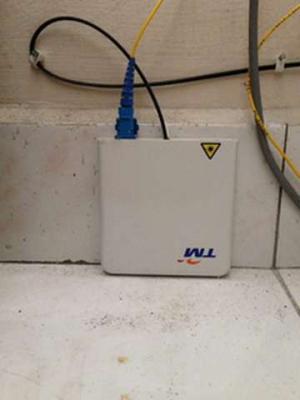
This is the only box I got. Installer mentioned this is replacing the old ftb.
*
Same for me.
This is what they gave me.
Attached Image
cucubud
post May 24 2017, 10:13 AM

Super Moderator
*******
Senior Member
3,076 posts

Joined: Jan 2008


QUOTE(coolguy_0925 @ May 24 2017, 09:32 AM)
Just curious, what is the function of FTB and by eliminating it is there any sacrifice to the quality of our Unifi connection?
*
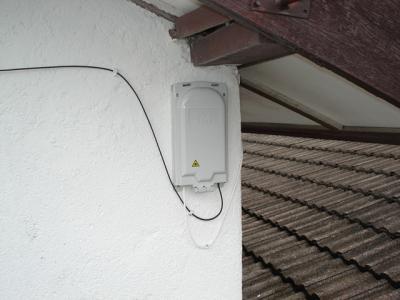
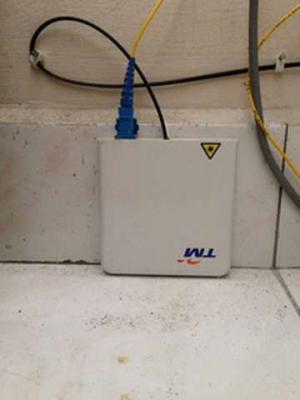
Looking at the photos below, FTB and FWS serve the same purpose.
Outdoor fiber cable goes into the box and indoor fiber cable goes to the BTU.
Attached Image Attached Image
cucubud
post May 24 2017, 10:34 AM

Super Moderator
*******
Senior Member
3,076 posts

Joined: Jan 2008


QUOTE(MGM @ May 24 2017, 10:27 AM)
Outdoor fiber cable goes into the FTB AND indoor fiber cable goes INTO FWS FIRST THEN to the BTU.
*
Too many joints. I prefer the fiber cable go straight into the BTU even if they give me the FTB.

cucubud
post May 24 2017, 10:56 AM

Super Moderator
*******
Senior Member
3,076 posts

Joined: Jan 2008


QUOTE(totally_skint @ May 24 2017, 10:48 AM)
Double ugly with upside down FWS doh.gif
*
Hahaha, no place to put. Just put it behind a bookshelf.
Double sided taped it to the floor tile.
cucubud
post May 24 2017, 03:33 PM

Super Moderator
*******
Senior Member
3,076 posts

Joined: Jan 2008


QUOTE(pikacu @ May 24 2017, 02:57 PM)
using unifi 30MBps now, and i have hypptv STB. if i downgrade, can i still use the STB?

LeonTanpwlowfarhansz
*
My VIP5 free upgrade to Unifi Lite 10, they also gave me HyppTv Everywhere and upgraded my basic package to Ruby package.
I still can use the STB to watch on the tv.
cucubud
post Jun 6 2017, 07:28 AM

Super Moderator
*******
Senior Member
3,076 posts

Joined: Jan 2008


QUOTE(socratesman @ Jun 5 2017, 05:45 PM)
Sorry.. i meant​ if you​ all  r getting WAN IP  like 10.x.x.x where TM nutz put you behind a NAT.  When it happens, many ppl found their cctv or port forwarding not working.
*
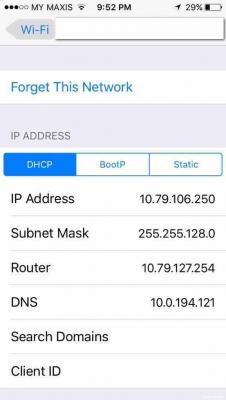
Past month I have been getting this ip address range on our iPhones only.
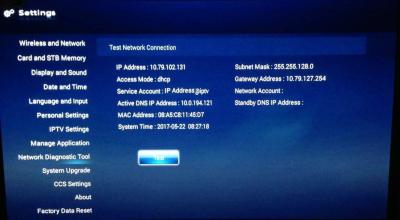
Attached Image
I found out this ip address is the same range as the HyppTv ip address.
Attached Image
Made a report to TM, they came and replaced the router.

cucubud
post Jun 6 2017, 09:18 AM

Super Moderator
*******
Senior Member
3,076 posts

Joined: Jan 2008


QUOTE(kevyeoh @ Jun 6 2017, 08:06 AM)
How you know it is the same range as hypptv address plz?
*
Did you see the second photo of the tv screen?
Compare the ip addresses between the iphone screen shot and the tv screen shot.
cucubud
post Jun 6 2017, 11:26 AM

Super Moderator
*******
Senior Member
3,076 posts

Joined: Jan 2008


Our iPhones were connected to the HyppTv gateway.
Cannot get internet service.

cucubud
post Jun 6 2017, 01:22 PM

Super Moderator
*******
Senior Member
3,076 posts

Joined: Jan 2008


QUOTE(kevyeoh @ Jun 6 2017, 01:13 PM)
Ok... I am having a problem now where all phones connected to Wi-Fi... the upload got limited or blocked...

I cannot solve this issue and very hard to explain to TM as well... already log a ticket but hopefully can solve this issue... else my usage on phone is quite limited...
*
Is your iPV6 switch ON?
If YES, switch it OFF and test again.
cucubud
post Jun 6 2017, 01:52 PM

Super Moderator
*******
Senior Member
3,076 posts

Joined: Jan 2008


QUOTE(kevyeoh @ Jun 6 2017, 01:38 PM)
I have tried with and without ipv6...

Whenever I use speedtest on my phones... there will be 0 bytes uploaded. On some app like Mudah...or Shopee.. no data uploaded and it will cause issue to my app...

Tried on all 3 phones...

Note 3 on Android 6
Note 5 on Android 7
MI Note

All phones got upload blocked...
sad.gif
*
If that is the case, wait for TM to check it out.
cucubud
post Jun 6 2017, 05:29 PM

Super Moderator
*******
Senior Member
3,076 posts

Joined: Jan 2008


QUOTE(TOMEI-R @ Jun 6 2017, 03:22 PM)
No problem with mine watching through the app.
*
That's strange. We can't get internet service while connected to the router with that ip address.
We have to try to get ip address starting with 192.168.x.x when connected to the router, then only can get to use the internet.

We are talking about the router ip address here, right?
Not BTU to the internet ip address.
cucubud
post Jun 7 2017, 04:27 PM

Super Moderator
*******
Senior Member
3,076 posts

Joined: Jan 2008


QUOTE(TOMEI-R @ Jun 7 2017, 10:55 AM)
Sorry... But I dont get what you are trying to say. What I was trying to say was that the port 4 of our TM Router, which is normally used for hypp tv connection would be automatically disabled meaning we wont be able to get any HYPP TV connections. But Lite users can still view Hypp TV Everywhere through TM's App Hypp TV lite which would need to be downloaded into your smart phone as long as you are connected to the internet, then you can view it anywhere.
*
My problem was iPhones connected to router WiFi SSID get ip address 10.x.x.x while laptop connected to the same router SSID get ip address 192.168.x.x.
Iphones cannot get internet with ip address 10.x.x.x while laptop no problem getting the internet.
My TM router port 4 is still working good with HyppTv STB. I am on Unifi Lite 10 (free upgrade from VIP5).

cucubud
post Jun 7 2017, 05:22 PM

Super Moderator
*******
Senior Member
3,076 posts

Joined: Jan 2008


QUOTE(tzh2001 @ Jun 7 2017, 04:43 PM)
why not just put static IP instead using DHCP  hmm.gif
*
QUOTE(kevyeoh @ Jun 7 2017, 04:53 PM)
Lol... my problem was with all my Android phones... today someone from telekom came over my place... my case was on certain app or certain website... can't upload... I ask the technician to try using his Asus phone also same issue... cannot upload... end up he call KL and the reply is sorry... for handphone not in scope of troubleshooting because hard to debug...

So I guess just accept my luck....
*
It was TM router problem.
TM technician came and replaced the router.
Now back to normal. No more getting ip address 10.x.x.x on iPhones.
cucubud
post Jun 8 2017, 09:06 AM

Super Moderator
*******
Senior Member
3,076 posts

Joined: Jan 2008


QUOTE(kevyeoh @ Jun 7 2017, 11:20 PM)
haha...well...his problem is clearer and easier to debug...hence he get the replacement router...

I guess i'll have to try get another router and pray....
*
Yes. Try with another router. Likely is your router problem.

cucubud
post Jun 17 2017, 02:06 PM

Super Moderator
*******
Senior Member
3,076 posts

Joined: Jan 2008


QUOTE(elmond @ Jun 16 2017, 03:33 PM)
TM having a new pack Jumbo Lite Pack rm30, do it also available for unifi lite customer?
*
I applied for the swap from Ruby Pack to Jumbo Lite Pack on Thursday. 20 minutes ago TM called to confirm the swap. 5 minutes ago received the SMS to inform the swap has completed. Checked and confirmed Jumbo Lite channels are in and Ruby channels are out.
cucubud
post Jun 17 2017, 03:20 PM

Super Moderator
*******
Senior Member
3,076 posts

Joined: Jan 2008


QUOTE(MGM @ Jun 17 2017, 02:44 PM)
Swapping means no extra charges?
*
Those packs are the same price. RM30 per month.
Cost RM5 to do the swap. There is a 1 year contract.
cucubud
post Jun 17 2017, 04:04 PM

Super Moderator
*******
Senior Member
3,076 posts

Joined: Jan 2008


QUOTE(alucard89 @ Jun 17 2017, 02:47 PM)
For unifi lite, does it use the 10mbps bandwidth or is it like unifi?
*
Mine was free upgrade from VIP5. So mine has the STB.
cucubud
post Jun 17 2017, 06:04 PM

Super Moderator
*******
Senior Member
3,076 posts

Joined: Jan 2008


QUOTE(5p3ak @ Jun 17 2017, 05:30 PM)
Is half day leave enough time for the installation? or better to take full day? Based on your experience. FAQ say 4-8hours laugh.gif

Other details,

Landed Terrace house, currently using streamyx.
*
Take 1 full day off.
You will want to clean up the place, test out everything and rearrange some of the stuffs.

2 Pages  1 2 >Top
Topic ClosedOptions
 

Change to:
| Lo-Fi Version
0.0753sec    0.58    7 queries    GZIP Disabled
Time is now: 3rd December 2025 - 05:13 PM