

Hi I know Digi has enabled Voice over WiFi today for iPhone user but I can't seem to be able to find the setting in my iPhone 5c setting page.
Digi Fans Club & Enquiries V13, Let's Inspire
Digi Fans Club & Enquiries V13, Let's Inspire
|
|
 Jun 6 2017, 11:09 PM Jun 6 2017, 11:09 PM
|
 
Senior Member
1,007 posts Joined: Nov 2006  
|
Hi I know Digi has enabled Voice over WiFi today for iPhone user but I can't seem to be able to find the setting in my iPhone 5c setting page.
|
|
|
|
|
|
Jun 6 2017, 11:14 PM
|

Senior Member
984 posts Joined: Nov 2006
|
QUOTE(Mr Gray @ Jun 6 2017, 10:54 PM) Yeah did ask them via email. Haven't got a reply yet. I'm not even in any jungle, my home is literally 3KM away from Midvalley. If they can't even serve the city centre properly, I don't even know what to say. Forget email and go directly to chat via the mydigi app. Estimates of downtime or maintenance will be given straight away. |
|
|
Jun 6 2017, 11:18 PM
|
|
Senior Member
984 posts Joined: Nov 2006
|
QUOTE(fruitie @ Jun 6 2017, 11:08 PM) It looks like it's really bad in you guys' areas. Me on another hand do not have so much of issues. Yes, I do experience slower speed at night. From 40Mbps to around 28 to 31Mbps, like now. PJ section 16 is improving tonight since issues for the past week. Download 20mbps now and ul crazy 30mbps lol 😂But still I subscribe it for mobility and the speed so far is sufficient for my usage. I am in PJ area near to SS2. |
|
|
Jun 6 2017, 11:23 PM
|

Senior Member
2,856 posts Joined: Mar 2012
|
QUOTE(Hummingbird @ Jun 6 2017, 11:09 PM) Hi I know Digi has enabled Voice over WiFi today for iPhone user but I can't seem to be able to find the setting in my iPhone 5c setting page. Update the carrier profile in About section. I think so. Forgot already. |
|
|
Jun 6 2017, 11:33 PM
Show posts by this member only | IPv6 | Post
#2245
|

Senior Member
1,304 posts Joined: Nov 2011
|
QUOTE(Hummingbird @ Jun 6 2017, 11:09 PM) Hi I know Digi has enabled Voice over WiFi today for iPhone user but I can't seem to be able to find the setting in my iPhone 5c setting page. I have a 5S and cannot find the setting also, installed the new carrier update already. |
|
|
Jun 6 2017, 11:53 PM
|
|
Senior Member
1,007 posts Joined: Nov 2006
|
QUOTE(jack2001 @ Jun 6 2017, 11:33 PM) I have a 5S and cannot find the setting also, installed the new carrier update already. Yeah there is a carrier update but there is nothing happen. |
|
|
|
|
|
Jun 7 2017, 12:43 AM
|
 
VIP
1,923 posts Joined: Jan 2003 From: NL/MY 
|
I reset my network settings and the WiFi calling option showed up after that.
But now after I enabled WiFi calling, it still doesn't show "DiGi Wifi Calling" in my carrier name... but that might be because I'm roaming. Maybe DiGi doesn't allow use while roaming? Umobile allowed it because I used WiFi calling on this exact phone in the exact same location... |
|
|
Jun 7 2017, 06:24 AM
|

Junior Member
275 posts Joined: Sep 2011
|
digi can buy topup and pay postpaid?
|
|
|
Jun 7 2017, 07:43 AM
|
|
Senior Member
1,007 posts Joined: Nov 2006
|
QUOTE(biatch0 @ Jun 7 2017, 12:43 AM) I reset my network settings and the WiFi calling option showed up after that. May I know what phone you're using?But now after I enabled WiFi calling, it still doesn't show "DiGi Wifi Calling" in my carrier name... but that might be because I'm roaming. Maybe DiGi doesn't allow use while roaming? Umobile allowed it because I used WiFi calling on this exact phone in the exact same location... |
|
|
Jun 7 2017, 08:06 AM
|

Senior Member
598 posts Joined: Jun 2010
|
QUOTE(air_pull91 @ Jun 7 2017, 06:24 AM) digi can buy topup and pay postpaid? Nope |
|
|
Jun 7 2017, 08:07 AM
|

Senior Member
6,381 posts Joined: Jun 2005 From: meow meow
|
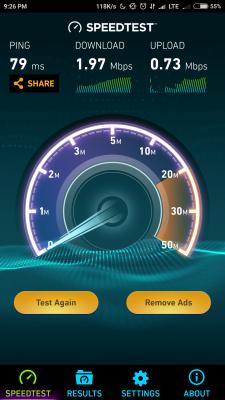
connection at night time my place..congested and slow like fark. during morning, daytime acceptable 15-30Mbps ..but once after 7pm+ ..barely can reach 1Mbps ..lol
tweeted digi since last night no reply.. guess gonna forward to skmm see if any improvement. later tonight will use opensignal/network signal guru to get the cellID This post has been edited by GameSky: Jun 7 2017, 08:48 AM Attached thumbnail(s) 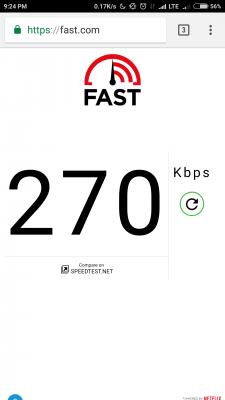


|
|
|
Jun 7 2017, 08:32 AM
|
|
Senior Member
2,428 posts Joined: Feb 2010 From: Alam Damai
|
QUOTE(GameSky @ Jun 7 2017, 08:07 AM) connection at night time my place..congested and slow like fark. during morning, daytime acceptable 15-30Mbps ..but once after 7pm+ ..barely can reach 1Mbps ..lol May i know ur location? Nearby where?tweeted digi since last night no reply.. guess gonna forward to skmm see if any improvement. Cant detect ur location based on ur cellid lolx... Please test 3g if ur 4g congest... Insider news that nobody use 3g at all nowadays... This post has been edited by prosibu: Jun 7 2017, 08:33 AM |
|
|
Jun 7 2017, 08:41 AM
|
|
Senior Member
6,796 posts Joined: Oct 2008 From: Kuala Lumpur
|
QUOTE(jack2001 @ Jun 7 2017, 12:33 AM) I have a 5S and cannot find the setting also, installed the new carrier update already. Same here. 5S updated carrier setting but cannot find the option. I tried reset network settings and still same. In about section it shows Digi 28.3. QUOTE(Hummingbird @ Jun 7 2017, 12:53 AM) Yeah there is a carrier update but there is nothing happen. I have a feeling that it's only enable for 4g+ capable devices, e.g. iPhone 6 and above which can support VO-LTE. Anyone with iPhone 6 and above please share your result. |
|
|
|
|
|
Jun 7 2017, 08:41 AM
|
|
Senior Member
2,428 posts Joined: Feb 2010 From: Alam Damai
|
QUOTE(Mr Gray @ Jun 6 2017, 09:12 PM) Wtf is wrong with digi. Speed is like 100kbs-200kbs after 5pm. It's completely unusable and unstable. It's been like this for a week. I'll have to port out to other telco again i guess. QUOTE(BaRT @ Jun 6 2017, 09:39 PM) Faking stupid digi infinite. Puchong area with 75% signal & 4g only get with 6mbps sppeed? Wtf is that...will port out once utilise the 2 month afvanve payment. QUOTE(pakmulau @ Jun 6 2017, 09:44 PM) happen to me also here in menggatal KK. it lasted 2-3 weeks. Did u guys tried 3g?but now the quite okay no more disconnecting and slow speed. Nowadays no congestion on 3g ah... |
|
|
Jun 7 2017, 08:44 AM
|
|
Senior Member
2,428 posts Joined: Feb 2010 From: Alam Damai
|
QUOTE(biatch0 @ Jun 7 2017, 12:43 AM) I reset my network settings and the WiFi calling option showed up after that. But now after I enabled WiFi calling, it still doesn't show "DiGi Wifi Calling" in my carrier name... but that might be because I'm roaming. Maybe DiGi doesn't allow use while roaming? Umobile allowed it because I used WiFi calling on this exact phone in the exact same location... QUOTE(YoungMan @ Jun 7 2017, 08:41 AM) Same here. 5S updated carrier setting but cannot find the option. I tried reset network settings and still same. U got latest ios? Update firmware 1st?In about section it shows Digi 28.3. I have a feeling that it's only enable for 4g+ capable devices, e.g. iPhone 6 and above which can support VO-LTE. Anyone with iPhone 6 and above please share your result. No wifi calling button = ios not up to date/ telco not support ... After having latest ios, Please make sure that ur number subscribed volte.... If subscribed volte, that means u have profile at ims network Hence u only can enter vowifi.... 5s n 5c users will not easily enter vowifi as they are not volte capable.... If u want details i can describe more..... Lolx.... This post has been edited by prosibu: Jun 7 2017, 08:50 AM |
|
|
Jun 7 2017, 08:44 AM
|
|
Senior Member
6,381 posts Joined: Jun 2005 From: meow meow
|
QUOTE(prosibu @ Jun 7 2017, 08:32 AM) May i know ur location? Nearby where? afaik most telco abandoning 3G.. forgot to capture, switch to 3G..it doesnt move at all instead, lol.Cant detect ur location based on ur cellid lolx... Please test 3g if ur 4g congest... Insider news that nobody use 3g at all nowadays... |
|
|
Jun 7 2017, 08:48 AM
|
|
Senior Member
2,428 posts Joined: Feb 2010 From: Alam Damai
|
QUOTE(GameSky @ Jun 7 2017, 08:44 AM) afaik most telco abandoning 3G.. forgot to capture, switch to 3G..it doesnt move at all instead, lol. Haha, but u still din answer my question?Where is ur location? height?  |
|
|
Jun 7 2017, 08:49 AM
|

Senior Member
924 posts Joined: Aug 2013
|
QUOTE(prosibu @ Jun 7 2017, 08:41 AM) Did u guys tried 3g? I tried everything. Lock to 4G only, 3G only and even 2G only. 4G max 500kbps, 3G like 100kbps, 2G like 20kbps. Nowadays no congestion on 3g ah...  |
|
|
Jun 7 2017, 08:51 AM
|
|
Senior Member
2,428 posts Joined: Feb 2010 From: Alam Damai
|
QUOTE(Mr Gray @ Jun 7 2017, 08:49 AM) I tried everything. Lock to 4G only, 3G only and even 2G only. 4G max 500kbps, 3G like 100kbps, 2G like 20kbps. Location? If west malaysia i hope i can help.... |
|
|
Jun 7 2017, 08:58 AM
|
|
Senior Member
6,796 posts Joined: Oct 2008 From: Kuala Lumpur
|
QUOTE(prosibu @ Jun 7 2017, 09:44 AM) U got latest ios? Update firmware 1st? My phone not support volte, so cannot subscribe. any way to enter vowifi with 5s since cannot subscribe volte?No wifi calling button = ios not up to date/ telco not support ... After having latest ios, Please make sure that ur number subscribed volte.... If subscribed volte, that means u have profile at ims network Hence u only can enter vowifi.... 5s n 5c users will not easily enter vowifi as they are not volte capable.... If u want details i can describe more..... Lolx.... |
|
Topic ClosedOptions
|
| Change to: |  0.0285sec 0.0285sec
 0.57 0.57
 6 queries 6 queries
 GZIP Disabled GZIP Disabled
Time is now: 3rd December 2025 - 09:22 PM |
 Quote
Quote