

newbie here, can i just modified my hypptv stb to cater for ahem services?
Android / Other TV Box, see Page 1 first... V2
Android / Other TV Box, see Page 1 first... V2
|
|
 Jul 24 2019, 09:53 AM Jul 24 2019, 09:53 AM
|
 
Senior Member
1,650 posts Joined: Jan 2005 
|
newbie here, can i just modified my hypptv stb to cater for ahem services?
|
|
|
|
|
|
Jul 24 2019, 11:31 AM
|

Junior Member
664 posts Joined: Nov 2016
|
Just found this: TVBOXBENCHS2019 - summary of most if not all Android TV box specs.
http://bit.ly/2HqxAy9 Not sure if it's the latest version. |
|
|
Jul 24 2019, 12:11 PM
|

Junior Member
460 posts Joined: Jun 2008 
|
|
|
|
Jul 24 2019, 06:26 PM
|
|
Junior Member
99 posts Joined: Jul 2015
|
QUOTE(gedebe @ Jul 24 2019, 09:53 AM) newbie here, can i just modified my hypptv stb to cater for ahem services? Yes search in fb  QUOTE(tertiary @ Jul 24 2019, 11:31 AM) Just found this: TVBOXBENCHS2019 - summary of most if not all Android TV box specs. Nopehttp://bit.ly/2HqxAy9 Not sure if it's the latest version. |
|
|
Jul 24 2019, 06:49 PM
|
|
Junior Member
664 posts Joined: Nov 2016
|
QUOTE(Marilynlai513 @ Jul 24 2019, 06:26 PM) Nope |
|
|
Jul 24 2019, 10:58 PM
Show posts by this member only | IPv6 | Post
#5766
|

Senior Member
7,120 posts Joined: Oct 2011 From: Wakanda
|
QUOTE(gedebe @ Jul 24 2019, 09:53 AM) newbie here, can i just modified my hypptv stb to cater for ahem services? Yes you can.. Just don't expect even much performance from that box.. PQ is also terrible.IMHOQUOTE(szecheng @ Jul 24 2019, 12:11 PM) We'll believe it when we see it.. Meanwhile, boxes out there still advertising as MCMC & SIRIM certified.. I wonder what they'll do to those ones then? Gave license and certified good.. Then now want to ban?  QUOTE(tertiary @ Jul 24 2019, 06:49 PM) So where is the latest? Any particular reason? |
|
|
|
|
|
Jul 25 2019, 09:08 AM
|
|
Senior Member
1,650 posts Joined: Jan 2005
|
QUOTE(voncrane @ Jul 24 2019, 10:58 PM) Yes you can.. Just don't expect even much performance from that box.. PQ is also terrible.IMHO what is PQ? Can you just recommend me a box that is around rm200+?We'll believe it when we see it.. Meanwhile, boxes out there still advertising as MCMC & SIRIM certified.. I wonder what they'll do to those ones then? Gave license and certified good.. Then now want to ban? Any particular reason? This post has been edited by gedebe: Jul 25 2019, 09:09 AM |
|
|
Jul 25 2019, 09:25 AM
Show posts by this member only | IPv6 | Post
#5768
|
|
Junior Member
36 posts Joined: Jan 2007
|
Please find below my review for AceMax X96S android stick. Forgive me if I left out anything as this is my first review. Thank you voncrane, apologies but I follow your style of review to ensure I cover as much info required in a review as possible
Basics: *Specs: SoC – Amlogic S905Y2 quad core ARM Cortex-A53 @ up to 2.0 GHz with Mali-G31 MP2 “Dvalin” GPU, Dual band Wifi ac 2.4/5GHz, 4GB LPDDR4 RAM and 32GB eMMC ROM, 1 USB port, 1 micro SD card, 1 infrared jack, 1 micro USB power port. No Ethernet port *Powered by microusb port connected to power supply. Alternatively, if you don’t want clutter/ too many wires, can power it up using any spare USB port on your TV. I use the USB port denoted HDD on my TV as I believe it supplies more power (or maybe any USB port can be used). *Portability: For travelling, I only need to bring this X96S android stick, a micro USB cable to connect to the TV USB port, and the 2.4G wireless air mouse remote *Once it's plugged in, it automatically switches itself on. Comes with infrared extension for switch on/off. But I tried disconnecting this, and found I can do all functions with my 2.4G wireless air mouse remote. So, now I don’t use the IR extension anymore to reduce clutter *Switched on and immediately firmware is updated OTA to Android 9 (I believe it came with Android 8.1). Firmware build now: X96S V311 P 201907161948 *UI is basic with Youtube, Kodi, Playstore, Apps, and cannot be customized. No navigation bar available. Contacted Acemax and they said updated firmware will have this soon. So, a bit difficult at first to navigate, but once get used to it, it is ok, because found out that I only use mostly home button and back button which is available on the remote *Out of the 32GB, there's 24GB of total internal space available upon first boot. *Bluetooth: works well- I connected my bluetooth mouse to set up the stick for the first time, as I found using air mouse a bit difficult. After setting up is complete, I just use the airmouse. But the bluetooth is still connected just in case *The bundled remote is basic, no air mouse mode. So, I used a third party air mouse with keyboard for easier data entry. One USB port available to connect the 2.4G dongle. The remote’s power key can be set as either “Sleep Now”, “Shutdown”, or “Restart”. I maintain default “Shutdown” *Speed Test over 2.4GHz: 19.3Mbps (Download), and 21.8Mbps (uploads). This is over powerline wifi extender as this stick is in my bedroom. However, was able to watch one full 1080p movie in Kodi with no problem (the main wifi with 5GHz is in living room which I have another android box). I then brought the stick to living room TV and tested on 5GHz with following results: 102Mbps (Download), and 67.6Mbps (uploads). 2.4Ghz (without powerline extender) results: 24.9Mbps (Download), and 44.8Mbps (uploads). *Temperature (measured using CPU float app) does not go beyond 60degC while watching movie, which is about the same as Beelink GT-1 Mini *Device is rooted *HDMI-CEC works for elementum and YouTube, but not As*** Go (need to turn on HDMI-CEC switch first in Droid settings app) *As per review from popular review website, Antutu benchmark score is 57379, which is about equivalent to my other proper android box, Beelink GT-1 mini Programs/ Apps: *AdAway works. Great for most pesky ads. *Elementum works well *Official As*** Go cannot be run on it, probably because rooted. The workaround works though, however, a bit stuttering when used in my room with powerline wifi extender. *Pre-loaded YouTube works ok, however, somehow, 2.4g wireless air mouse only can do navigation, but cannot press ok & qwerty keyboard cannot type anything. Need to use original mouse for ok button, and on-screen keyboard to type *There's also pre-loaded Netflix, but need to update, but in play store it said app is incompatible *ATV launcher installs ok for those who needs it Overall, I am very happy with the performance, bonus is that it is portable and reduces clutter 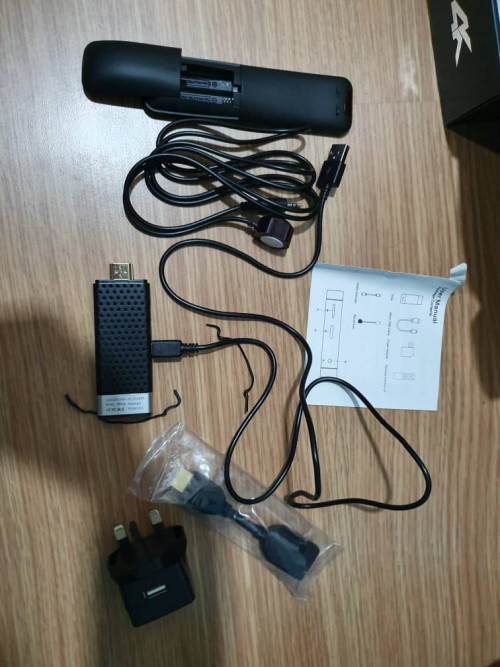 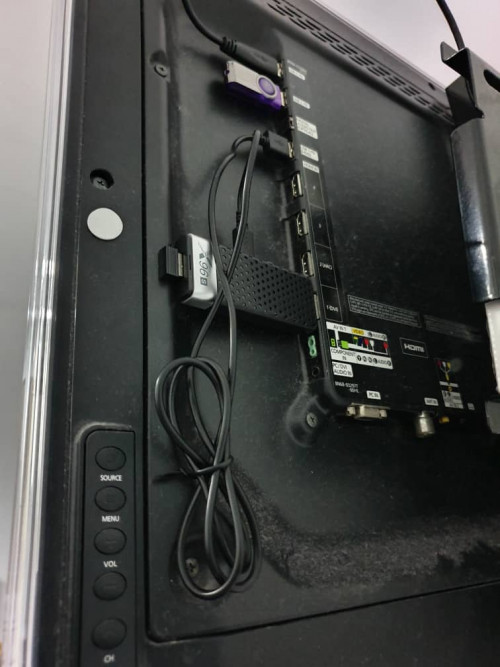 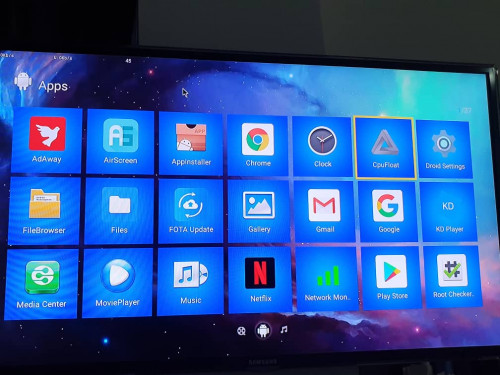 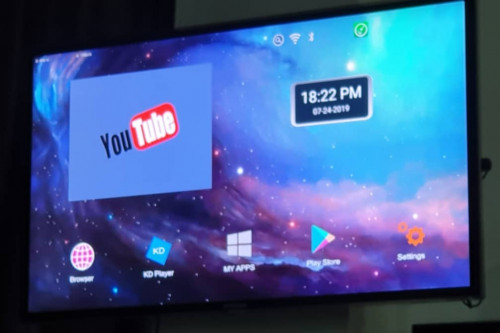 This post has been edited by emy_77: Jul 25 2019, 01:30 PM |
|
|
Jul 25 2019, 11:06 AM
|

Junior Member
694 posts Joined: Jan 2010
|
QUOTE(emy_77 @ Jul 25 2019, 09:25 AM) Please find below my review for AceMax X96S android stick. Wah nice..just need to upload some pic..and it's complete..Forgive me if I left out anything as this is my first review. Thank you voncrane, apologies but I follow your style of review to ensure I cover as much info required in a review as possible » Click to show Spoiler - click again to hide... « |
|
|
Jul 25 2019, 11:53 AM
|
|
Junior Member
460 posts Joined: Jun 2008
|
QUOTE(gedebe @ Jul 25 2019, 09:08 AM) what is PQ? Can you just recommend me a box that is around rm200+? PQ = picture quality |
|
|
Jul 25 2019, 12:34 PM
|
|
Junior Member
36 posts Joined: Jan 2007
|
QUOTE(asrin @ Jul 25 2019, 11:06 AM) Wah nice..just need to upload some pic..and it's complete.. Done  |
|
|
Jul 25 2019, 05:24 PM
|
|
Junior Member
664 posts Joined: Nov 2016
|
QUOTE(voncrane @ Jul 24 2019, 10:58 PM) Any particular reason? Just when I come to buy my next box would be good to have up-to-date specs to compare.@emy_77 Nice review - worthy of posting here: https://forum.lowyat.net/ReviewsandGuides where more people will see it. |
|
|
Jul 26 2019, 04:40 AM
|

All Stars
33,696 posts Joined: May 2008
|
QUOTE(emy_77 @ Jul 25 2019, 09:25 AM) *There's also pre-loaded Netflix, but need to update, but in play store it said app is incompatible From the picture I see that the Netflix icon is the big N with a black background, this is the mobile phone version of Netflix. It is difficult to navigate on TV and also unable to stream to 4k. So this is likely a non-widevine L1 and none netflix certified stick. This post has been edited by puchongite: Jul 26 2019, 08:43 AM |
|
|
|
|
|
Jul 26 2019, 11:00 AM
|
|
Senior Member
1,650 posts Joined: Jan 2005
|
the below like a lot ppl buying basing on the monthly sold, is this device ok?
https://shopee.com.my/MX10-PRO-Android-9.0-...2295.1428398408 |
|
|
Jul 27 2019, 05:49 PM
Show posts by this member only | IPv6 | Post
#5775
|
|
Senior Member
7,120 posts Joined: Oct 2011 From: Wakanda
|
QUOTE(gedebe @ Jul 25 2019, 09:08 AM) what is PQ? Can you just recommend me a box that is around rm200+? As offered earlier.. Picture Quality... Look at Mecool and Beelink.. Find models within your budget. Use search feature to see what has been said about em and narrow down to 2 or 3 options max.. Easier to comment on specifics then.QUOTE(emy_77 @ Jul 25 2019, 09:25 AM) Please find below my review for AceMax X96S android stick. Forgive me if I left out anything as this is my first review. Thank you voncrane, apologies but I follow your style of review to ensure I cover as much info required in a review as possible No apologies necessary but thanks anyways. Basics: *Specs: SoC – Amlogic S905Y2 quad core ARM Cortex-A53 @ up to 2.0 GHz with Mali-G31 MP2 “Dvalin” GPU, Dual band Wifi ac 2.4/5GHz, 4GB LPDDR4 RAM and 32GB eMMC ROM, 1 USB port, 1 micro SD card, 1 infrared jack, 1 micro USB power port. No Ethernet port *Powered by microusb port connected to power supply. Alternatively, if you don’t want clutter/ too many wires, can power it up using any spare USB port on your TV. I use the USB port denoted HDD on my TV as I believe it supplies more power (or maybe any USB port can be used). *Portability: For travelling, I only need to bring this X96S android stick, a micro USB cable to connect to the TV USB port, and the 2.4G wireless air mouse remote *Once it's plugged in, it automatically switches itself on. Comes with infrared extension for switch on/off. But I tried disconnecting this, and found I can do all functions with my 2.4G wireless air mouse remote. So, now I don’t use the IR extension anymore to reduce clutter *Switched on and immediately firmware is updated OTA to Android 9 (I believe it came with Android 8.1). Firmware build now: X96S V311 P 201907161948 *UI is basic with Youtube, Kodi, Playstore, Apps, and cannot be customized. No navigation bar available. Contacted Acemax and they said updated firmware will have this soon. So, a bit difficult at first to navigate, but once get used to it, it is ok, because found out that I only use mostly home button and back button which is available on the remote *Out of the 32GB, there's 24GB of total internal space available upon first boot. *Bluetooth: works well- I connected my bluetooth mouse to set up the stick for the first time, as I found using air mouse a bit difficult. After setting up is complete, I just use the airmouse. But the bluetooth is still connected just in case *The bundled remote is basic, no air mouse mode. So, I used a third party air mouse with keyboard for easier data entry. One USB port available to connect the 2.4G dongle. The remote’s power key can be set as either “Sleep Now”, “Shutdown”, or “Restart”. I maintain default “Shutdown” *Speed Test over 2.4GHz: 19.3Mbps (Download), and 21.8Mbps (uploads). This is over powerline wifi extender as this stick is in my bedroom. However, was able to watch one full 1080p movie in Kodi with no problem (the main wifi with 5GHz is in living room which I have another android box). I then brought the stick to living room TV and tested on 5GHz with following results: 102Mbps (Download), and 67.6Mbps (uploads). 2.4Ghz (without powerline extender) results: 24.9Mbps (Download), and 44.8Mbps (uploads). *Temperature (measured using CPU float app) does not go beyond 60degC while watching movie, which is about the same as Beelink GT-1 Mini *Device is rooted *HDMI-CEC works for elementum and YouTube, but not As*** Go (need to turn on HDMI-CEC switch first in Droid settings app) *As per review from popular review website, Antutu benchmark score is 57379, which is about equivalent to my other proper android box, Beelink GT-1 mini Programs/ Apps: *AdAway works. Great for most pesky ads. *Elementum works well *Official As*** Go cannot be run on it, probably because rooted. The workaround works though, however, a bit stuttering when used in my room with powerline wifi extender. *Pre-loaded YouTube works ok, however, somehow, 2.4g wireless air mouse only can do navigation, but cannot press ok & qwerty keyboard cannot type anything. Need to use original mouse for ok button, and on-screen keyboard to type *There's also pre-loaded Netflix, but need to update, but in play store it said app is incompatible *ATV launcher installs ok for those who needs it Overall, I am very happy with the performance, bonus is that it is portable and reduces clutter IMO, not a fan of sticks anything.. As they grossly underpowered (won't be able to playback certain common high bitrates x265 files) and overheat easily, partly on account of being run behind what will be an inefficiently cooled TV too. As we know, heat and dust are major problems for electronics.. Sure it's portable, can fit in pockets, etc. Though I already find the Neo U1 quite portable and the GT-King even more portable and packs a heavier punch. So I tend to just tag mine along. Weight wise, also negligible. That's that.. Basically, it works as expected.. Definitely not Netflix certified, no surprises there.. Speed over 5Ghz wireless AC is alright for the most part. Hopefully that isn't the max. No surprise there either as the better wifi performing devices tend to have better chips and antennas. As for the keyboard/airmouse not working properly? Probably an incompatibility and a different more "built for generic Android" airmouse is needed. Oh yeah, me thinks you confused on the HDMI-CEC part.. No relations with Kodi, Elementum addon and or YouTube app. Perhaps you meant casting? Lastly, since rooted.. Toss the a**** beta app on it. Should work. Question is if it's capable of and has the right codecs + HW decoding to play smoothly... Overall... Gooding review for those whom are interested in its portability and don't mind it being used for simple playback. Thanks for sharing  QUOTE(tertiary @ Jul 25 2019, 05:24 PM) Just when I come to buy my next box would be good to have up-to-date specs to compare. Oh I see.. Don't worry too much.. Tech moves fast today. Once released its almost guaranteed to be obsolete.. Well except the Nvidia Shield TV.. Still kicking a**... When you are ready, just survey then from the list of recently released devices.. QUOTE(puchongite @ Jul 26 2019, 04:40 AM) From the picture I see that the Netflix icon is the big N with a black background, this is the mobile phone version of Netflix. It is difficult to navigate on TV and also unable to stream to 4k. Yep.. Obviously... Those who want portability, reliability and Netflix? Just choose a Chromecast or Amazon Fire Stick.So this is likely a non-widevine L1 and none netflix certified stick. QUOTE(gedebe @ Jul 26 2019, 11:00 AM) the below like a lot ppl buying basing on the monthly sold, is this device ok? Pls do a search of this thread with the keywords "mx10"... Its been discussed, last year too..https://shopee.com.my/MX10-PRO-Android-9.0-...2295.1428398408 |
|
|
Jul 27 2019, 11:57 PM
|
|
Senior Member
1,650 posts Joined: Jan 2005
|
QUOTE(voncrane @ Jul 27 2019, 05:49 PM) As offered earlier.. Picture Quality... Look at Mecool and Beelink.. Find models within your budget. Use search feature to see what has been said about em and narrow down to 2 or 3 options max.. Easier to comment on specifics then. what is em? |
|
|
Jul 28 2019, 12:06 AM
|
 
Staff
72,847 posts Joined: Sep 2005 From: KUL 
|
QUOTE(gedebe @ Jul 27 2019, 11:57 PM) what is em? 'em = them |
|
|
Jul 28 2019, 01:51 AM
Show posts by this member only | IPv6 | Post
#5778
|
|
Junior Member
460 posts Joined: Jun 2008
|
Anyone successfully configured s905x2 box to work on astro go?
Same steps as s912? |
|
|
Jul 28 2019, 07:53 AM
|
|
Senior Member
7,120 posts Joined: Oct 2011 From: Wakanda
|
QUOTE(szecheng @ Jul 28 2019, 01:51 AM) Anyone successfully configured s905x2 box to work on astro go? You need to rephrase and offer more info. It's not just about the SoC, but about other things including the device itself. Dunno why many ppl who die die want Astrogo go and buy boxes where the app doesn't simply work and play.. Save yourself the constant headachesSame steps as s912? Also you still never offer me for that Unifi STB..  This post has been edited by voncrane: Jul 28 2019, 07:55 AM |
|
|
Jul 28 2019, 11:24 AM
Show posts by this member only | IPv6 | Post
#5780
|
|
All Stars
33,696 posts Joined: May 2008
|
QUOTE(szecheng @ Jul 28 2019, 01:51 AM) Anyone successfully configured s905x2 box to work on astro go? This question is a bit strange.Same steps as s912? |
| Change to: |  0.0351sec 0.0351sec
 0.59 0.59
 6 queries 6 queries
 GZIP Disabled GZIP Disabled
Time is now: 15th December 2025 - 09:26 AM |
 Quote
Quote