Welcome Guest ( Log In | Register )

475 Pages « < 416 417 418 419 420 > » Bottom

Outline · [ Standard ] · Linear+

 AMD Ryzen, AM4 / AM5 Platform

views
     
TristanX
post Jul 21 2021, 10:52 AM

Where is my stars?
Group Icon
Elite
24,351 posts

Joined: Nov 2004
From: Setapak, Kuala Lumpur


QUOTE(AMD64 FX51 @ Jul 21 2021, 02:28 AM)
user posted image
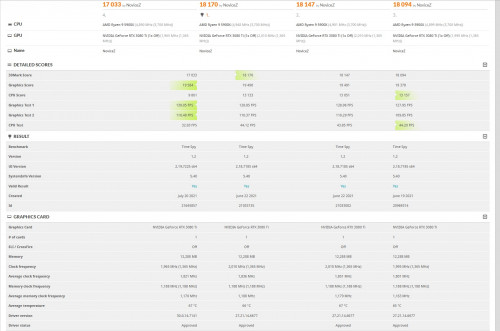
guys how come my timespy 3dmark cpu score so low ?
the 4. is lastest bios and lastest gpu driver.
im noob here
*
Close all the apps and any background apps before running it.

This is mine.
https://www.3dmark.com/spy/15912150

My RAM is DDR4-3800 C16

This post has been edited by TristanX: Jul 21 2021, 12:43 PM
AMD64 FX51
post Jul 21 2021, 03:18 PM

Getting Started
**
Junior Member
157 posts

Joined: Jan 2003
QUOTE(TristanX @ Jul 21 2021, 10:52 AM)
Close all the apps and any background apps before running it.

This is mine.
https://www.3dmark.com/spy/15912150

My RAM is DDR4-3800 C16
*
try d.not much improve cpu score 10xxx only dunnon why.
this is my cinebenchR23 score , how abt u?


Attached thumbnail(s)
Attached Image
TristanX
post Jul 21 2021, 03:22 PM

Where is my stars?
Group Icon
Elite
24,351 posts

Joined: Nov 2004
From: Setapak, Kuala Lumpur


QUOTE(AMD64 FX51 @ Jul 21 2021, 03:18 PM)
try d.not much improve cpu score 10xxx only dunnon why.
this is my cinebenchR23 score , how abt u?
*
My result here:
https://forum.lowyat.net/index.php?showtopi...&#entry98907686

Didn't test with current BIOS yet. Still waiting for them to stop updating it.
thankyou
post Jul 21 2021, 04:29 PM

Regular
******
Senior Member
1,941 posts

Joined: Jan 2003
Hello, I need some advice regarding to the CPU cooler.

CPU - HP Omen 25L
Processor - 5700G

I have recently upgraded the processor cooler to NH-U9S after watching video it provides better cooling.

So with NH-U9S (single fan) installed, the idle temperature is 50-51c which is great as compared to the stock cooler.

I noticed the idle temperature increased by 10c (to 60-61c) when I install additional fan to make it push/pull setup.

Question: By using splitter, does it mean the fans are going to spin slower?

I can't seems to find any settings with Omen to increase the fan speed. Looks like the additional fan is going to be wasted...

coolkwc
post Jul 21 2021, 10:17 PM

Fall in love with audio again.
*******
Senior Member
3,112 posts

Joined: Jul 2006
QUOTE(thankyou @ Jul 21 2021, 04:29 PM)
Hello, I need some advice regarding to the CPU cooler.

CPU - HP Omen 25L
Processor - 5700G

I have recently upgraded the processor cooler to NH-U9S after watching video it provides better cooling.

So with NH-U9S (single fan) installed, the idle temperature is 50-51c which is great as compared to the stock cooler.

I noticed the idle temperature increased by 10c (to 60-61c) when I install additional fan to make it push/pull setup.

Question: By using splitter, does it mean the fans are going to spin slower?

I can't seems to find any settings with Omen to increase the fan speed. Looks like the additional fan is going to be wasted...
*
It shouldn't affect the speed, check ur fan speed using whatever program like HWinfo64
1024kbps
post Jul 21 2021, 10:34 PM

李素裳
*******
Senior Member
6,015 posts

Joined: Feb 2007


QUOTE(thankyou @ Jul 21 2021, 04:29 PM)
Hello, I need some advice regarding to the CPU cooler.

CPU - HP Omen 25L
Processor - 5700G

I have recently upgraded the processor cooler to NH-U9S after watching video it provides better cooling.

So with NH-U9S (single fan) installed, the idle temperature is 50-51c which is great as compared to the stock cooler.

I noticed the idle temperature increased by 10c (to 60-61c) when I install additional fan to make it push/pull setup.

Question: By using splitter, does it mean the fans are going to spin slower?

I can't seems to find any settings with Omen to increase the fan speed. Looks like the additional fan is going to be wasted...
*
typical fan header provide 1 Ampere, if both of your fan draw more than 1 Amp (eg one is 0.5A and one is 0.7A), they will slow down.
most pc fan dont draw that much, 0.5a fan is usually high speed fan, 1A is server fan and 3A is ~6000 rpm fan that will create black holes in your pc tongue.gif
Bonchi
post Jul 22 2021, 12:19 AM

KittehPowah
******
Senior Member
1,649 posts

Joined: Sep 2008
QUOTE(1024kbps @ Jul 21 2021, 10:34 PM)
typical fan header provide 1 Ampere, if both of your fan draw more than 1 Amp (eg one is 0.5A and one is 0.7A), they will slow down.
most pc fan dont draw that much, 0.5a fan is usually high speed fan, 1A is server fan and 3A is ~6000 rpm fan that will create black holes in your pc tongue.gif
*
doesnt work that way lol. fan speed is controlled by voltage and their current is fixed so maybe his fan curve something wrong... running pushpull will make the cpu max temp cooler so fan speed will stay lower... or perhaps he is using a Y splitter that have a resistor aka low noise adapater. Generally if exceed 1A, its very likely he will smell something burning from the motherboard laugh.gif

This post has been edited by Bonchi: Jul 22 2021, 12:19 AM
thankyou
post Jul 22 2021, 10:43 AM

Regular
******
Senior Member
1,941 posts

Joined: Jan 2003
QUOTE(coolkwc @ Jul 21 2021, 10:17 PM)
It shouldn't affect the speed, check ur fan speed using whatever program like HWinfo64
*
QUOTE(1024kbps @ Jul 21 2021, 10:34 PM)
typical fan header provide 1 Ampere, if both of your fan draw more than 1 Amp (eg one is 0.5A and one is 0.7A), they will slow down.
most pc fan dont draw that much, 0.5a fan is usually high speed fan, 1A is server fan and 3A is ~6000 rpm fan that will create black holes in your pc tongue.gif
*
QUOTE(Bonchi @ Jul 22 2021, 12:19 AM)
doesnt work that way lol. fan speed is controlled by voltage and their current is fixed so maybe his fan curve something wrong... running pushpull will make the cpu max temp cooler so fan speed will stay lower... or perhaps he is using a Y splitter that have a resistor aka low noise adapater. Generally if exceed 1A, its very likely  he will smell something burning from the motherboard laugh.gif
*
Thanks. Will check HWinfo64 first over the weekend.
BOTAK_WAI
post Jul 22 2021, 11:56 AM

Blow Water First Class
*******
Senior Member
4,157 posts

Joined: Jan 2003
From: Cheras, KL


QUOTE(Bonchi @ Jul 22 2021, 12:19 AM)
doesnt work that way lol. fan speed is controlled by voltage and their current is fixed so maybe his fan curve something wrong... running pushpull will make the cpu max temp cooler so fan speed will stay lower... or perhaps he is using a Y splitter that have a resistor aka low noise adapater. Generally if exceed 1A, its very likely  he will smell something burning from the motherboard laugh.gif
*
his pre-built pc can't adjust fan curve if not mistaken.

yea, cpu fan speed is control by voltage 100% or 0% and their current is fixed.

for those who don't know what is PWM, it's Pulse-Width Modulation, means fan speed is controlled by feeding the voltage in different interval duration.

user posted image

so he might have used the Low-Noise Adaptor or installed the fan in wrong direction.

This post has been edited by BOTAK_WAI: Jul 22 2021, 12:05 PM
BOTAK_WAI
post Jul 22 2021, 11:57 AM

Blow Water First Class
*******
Senior Member
4,157 posts

Joined: Jan 2003
From: Cheras, KL


QUOTE(1024kbps @ Jul 21 2021, 10:34 PM)
typical fan header provide 1 Ampere, if both of your fan draw more than 1 Amp (eg one is 0.5A and one is 0.7A), they will slow down.
most pc fan dont draw that much, 0.5a fan is usually high speed fan, 1A is server fan and 3A is ~6000 rpm fan that will create black holes in your pc tongue.gif
*
each NF-A9 draws 12V 0.1a only
edmund_yung
post Jul 22 2021, 12:24 PM

Regular
******
Senior Member
1,198 posts

Joined: Aug 2009


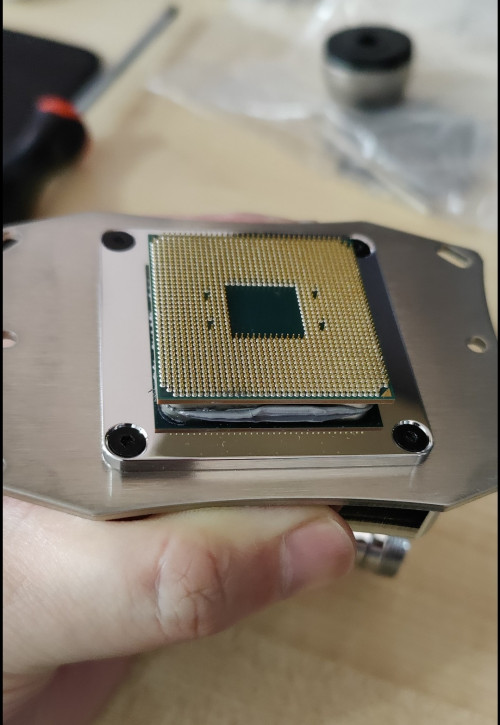
QUOTE(llk @ Jul 18 2021, 05:33 PM)
This is AMD 😅

user posted image
*
QUOTE(sai86 @ Jul 18 2021, 08:08 PM)
yeap. this happen to me with kryonaut smth n scare the shit out of me. now i'll stress it 1st before remove the cooler.

intel is way safer.
*
Happened to my too with Kryonaut, stopped using that for my Ryzen no matter how good is it, switched back to older tube inferior MX-4. I do use the Kryonaut on GPU, not bad!
coolkwc
post Jul 22 2021, 01:38 PM

Fall in love with audio again.
*******
Senior Member
3,112 posts

Joined: Jul 2006
QUOTE(BOTAK_WAI @ Jul 22 2021, 11:56 AM)
his pre-built pc can't adjust fan curve if not mistaken.

yea, cpu fan speed is control by voltage 100% or 0% and their current is fixed.

for those who don't know what is PWM, it's Pulse-Width Modulation, means fan speed is controlled by feeding the voltage in different interval duration.

user posted image

so he might have used the Low-Noise Adaptor or installed the fan in wrong direction.
*
Since you guys go into technical, might as well share my technical knowledge on this. icon_idea.gif

Mobo fan header only provide 12V, GND and PWM to the fan, while fan feedback speed through tacho signal to the board.
The supply/signal from the fan header isn't drive the motor winding directly but instead there is a motor driver IC in between motor and fan header.

The motor used is normally multiphase BLDC, and is driven by multi-phase inverter bridge integrated in the driver IC.

Here the catch. Motor current ISN'T fixed, the label just tell you the rated current at the rated maximum speed and flow.

Current affected by speed, speed affected by flow restriction, flow restriction depends on heatsink/fan shroud.

PC fan control is open loop, means it will not monitor and correct the speed itself provided the PWM duty remained the same.
It means given a same PWM duty, a high output flow restriction will slow down the fan, causing the back EMF of the winding to reduce (back EMF is proportional to speed), hence the effective voltage applied to the winding is increase, thus increase the current of the fan.
Whereas exactly opposite for a high input flow restriction.

Example, given a same fan and same heatsink fin density, fan configured in push or pull will definitely affect the current/speed of the fan.
Speed will reduce and current will increase in push while speed increase with current reduce in pull config.

Another example, a clog intake fan mesh is going to increase the fan speed and reduce the current.
Whereas a clog exhaust fan mesh is going to decrease the fan speed and increase the current.

But anyway, the fan header is designed to give adequate headroom for the current supply, so no need to give a damn on the fan config affect the current consumption, just need to take care how many 'C of reduction for your object to be cooled will do. laugh.gif
BOTAK_WAI
post Jul 22 2021, 02:05 PM

Blow Water First Class
*******
Senior Member
4,157 posts

Joined: Jan 2003
From: Cheras, KL


QUOTE(coolkwc @ Jul 22 2021, 01:38 PM)
Since you guys go into technical, might as well share my technical knowledge on this.  icon_idea.gif

Mobo fan header only provide 12V, GND and PWM to the fan, while fan feedback speed through tacho signal to the board.
The supply/signal from the fan header isn't drive the motor winding directly but instead there is a motor driver IC in between motor and fan header.

The motor used is normally multiphase BLDC, and is driven by multi-phase inverter bridge integrated in the driver IC.

Here the catch. Motor current ISN'T fixed, the label just tell you the rated current at the rated maximum speed and flow.

Current affected by speed, speed affected by flow restriction, flow restriction depends on heatsink/fan shroud.

PC fan control is open loop, means it will not monitor and correct the speed itself provided the PWM duty remained the same.
It means given a same PWM duty, a high output flow restriction will slow down the fan, causing the back EMF of the winding to reduce (back EMF is proportional to speed), hence the effective voltage applied to the winding is increase, thus increase the current of the fan.
Whereas exactly opposite for a high input flow restriction.

Example, given a same fan and same heatsink fin density, fan configured in push or pull will definitely affect the current/speed of the fan.
Speed will reduce and current will increase in push while speed increase with current reduce in pull config.

Another example, a clog intake fan mesh is going to increase the fan speed and reduce the current.
Whereas a clog exhaust fan mesh is going to decrease the fan speed and increase the current.

But anyway, the fan header is designed to give adequate headroom for the current supply, so no need to give a damn on the fan config affect the current consumption, just need to take care how many 'C of reduction for your object to be cooled will do. laugh.gif

*
i don't understand here, mind to further explain?

pwm voltage is either 100% or 0% means 12v or 0v feed into the motor, if the air flow restriction slow down the fan rpm, the feedback shall increase the width of the pulse to gain back the desire rpm, the current still constant there, so how does it increase the current? (wrong concept)

This post has been edited by BOTAK_WAI: Jul 22 2021, 04:09 PM
coolkwc
post Jul 22 2021, 02:32 PM

Fall in love with audio again.
*******
Senior Member
3,112 posts

Joined: Jul 2006
QUOTE(BOTAK_WAI @ Jul 22 2021, 02:05 PM)
i don't understand here, mind to further explain?

pwm voltage is either 100% or 0% means 12v or 0v feed into the motor, if the air flow restriction slow down the fan rpm, the feedback shall increase the width of the pulse to gain back the desire rpm, the current still constant there, so how does it increase the current?
*
The PWM here is just a 'signal' to tell the driver IC inside the fan controller board, not a voltage that directly drive it.

No, the fan control is open loop, means %PWM is tie to your set temperature vs % PWM curve in the mobo/or fan control SW, if the fan is slowdown due to high air flow resistance, it will stay at that speed without corrected back.
A simple experiment you can try is use a cardboard to fully cover your exhaust fan outlet and monitor the fan speed, the RPM will drop and will stay there.

Even if it corrected back to the desired speed by using increase PWM duty, your current will definitely increase.

You need to understand there is no 'free' work in the world. In order to let the fan work harder to overcome restriction, you need more work, means more energy/power needed. In electrical term, more current to do more work, as simple as that.

This post has been edited by coolkwc: Jul 22 2021, 02:41 PM
BOTAK_WAI
post Jul 22 2021, 02:35 PM

Blow Water First Class
*******
Senior Member
4,157 posts

Joined: Jan 2003
From: Cheras, KL


QUOTE(coolkwc @ Jul 22 2021, 02:32 PM)
The PWM here is just a 'signal' to tell the driver IC inside the fan controller board, not a voltage that directly drive it.

No, the fan control is open loop, means %PWM is tie to your set temperature vs % PWM curve in the mobo/or fan control SW, if the fan is slowdown due to high air flow resistance, it will stay at that speed without corrected back.
A simple experiment you can try is use a cardboard to fully cover your exhaust fan outlet and monitor the fan speed, the RPM will drop and will stay there.

Even if it corrected back to the desired speed by using increase PWM duty, your current will definitely increase.

You need understand there is no 'free' work in the world. In order to let the fan work harder to overcome restriction, you need more work, means more energy/power needed. In electrical term, more current to do more work, as simple as that.
*
get it, thanks for the explanation. notworthy.gif
BOTAK_WAI
post Jul 22 2021, 04:16 PM

Blow Water First Class
*******
Senior Member
4,157 posts

Joined: Jan 2003
From: Cheras, KL


QUOTE(coolkwc @ Jul 22 2021, 02:32 PM)
"if the fan is slowdown due to high air flow resistance, it will stay at that speed without corrected back."
*
one more question, if the pwm fan "is slow down and stay at that speed" due to high air flow resistance, will it cause the current increase?
coolkwc
post Jul 22 2021, 04:40 PM

Fall in love with audio again.
*******
Senior Member
3,112 posts

Joined: Jul 2006
QUOTE(BOTAK_WAI @ Jul 22 2021, 04:16 PM)
one more question, if the pwm fan "is slow down and stay at that speed" due to high air flow resistance, will it cause the current increase?
*
Yes, it will increase. That's due to reduced back EMF at reduced speed.
Let me simplify the theory here.
By right the motor winding can allow 1A to flow when the impeller is stop.
As soon as the motor start rotate, the back EMF inside the winding was induced such that it counteract with the applied voltage supply and the current to flow inside the winding, hence you have reduced 0.5A current flow into now.
Hence when the motor speed is no longer change, this is the equilibrium condition where the back EMF and applied voltage counter balanced with each other and the current is lowest at this point.

It will increase even further if the system is self corrected to the normal speed.

Just an example, a motor could overheat and burn if its jam.


BOTAK_WAI
post Jul 22 2021, 05:25 PM

Blow Water First Class
*******
Senior Member
4,157 posts

Joined: Jan 2003
From: Cheras, KL


QUOTE(coolkwc @ Jul 22 2021, 04:40 PM)
Yes, it will increase. That's due to reduced back EMF at reduced speed.
Let me simplify the theory here.
By right the motor winding can allow 1A to flow when the impeller is stop.
As soon as the motor start rotate, the back EMF inside the winding was induced such that it counteract with the applied voltage supply and the current to flow inside the winding, hence you have reduced 0.5A current flow into now.
Hence when the motor speed is no longer change, this is the equilibrium condition where the back EMF and applied voltage counter balanced with each other and the current is lowest at this point.

It will increase even further if the system is self corrected to the normal speed.

Just an example, a motor could overheat and burn if its jam.
*
just like when the fan is stop and need more current to start to spin due to back EMF is low, am i right?

let's say the exhaust fan speed is reduced into half due to dust, then how much current will be increased? is there any simple formula for calculation?
llk
post Jul 22 2021, 05:34 PM

Look at all my stars!!
*******
Senior Member
4,158 posts

Joined: Jan 2003
From: KL
QUOTE(edmund_yung @ Jul 22 2021, 12:24 PM)
Happened to my too with Kryonaut, stopped using that for my Ryzen no matter how good is it, switched back to older tube inferior MX-4. I do use the Kryonaut on GPU, not bad!
*
I used Kryonaut and CM Nano Gel, all same. Now switching to Artic MX-5, only can tell next time when i do cleaning.
llk
post Jul 22 2021, 05:45 PM

Look at all my stars!!
*******
Senior Member
4,158 posts

Joined: Jan 2003
From: KL
QUOTE(coolkwc @ Jul 22 2021, 04:40 PM)
Just an example, a motor could overheat and burn if its jam.
*
I have this problem few times for my Noctua A12X25 fan, the motor was damn hot when i touched it, luckily it didn't burnt and i have to shut down/on the PC to get it run normally. Not sure what's wrong with is issue?

475 Pages « < 416 417 418 419 420 > » Top
 

Change to:
| Lo-Fi Version
0.0307sec    0.78    6 queries    GZIP Disabled
Time is now: 14th December 2025 - 03:09 PM