Welcome Guest ( Log In | Register )

Bump Topic Topic Closed RSS Feed
255 Pages « < 23 24 25 26 27 > » Bottom

Outline · [ Standard ] · Linear+

Samsung Samsung pay beta launched!

views
     
SUSMaiden222
post Jun 27 2017, 09:51 AM

Getting Started
**
Junior Member
180 posts

Joined: May 2017
QUOTE(dr2k3 @ Jun 27 2017, 07:15 AM)
some terminal not supported??....i doubt so....

i actually like older model terminal, as they are more receptive to my samsung pay mst compare to new version.

my very first samsung pay transaction is with a very old, no idea what model credit card terminal.....older than verifone 520, that time still beta testing, not open to public.

even the terminal got paywave, i still like to use mst.

have yet to encounter number 2....will try this coming week, when my transaction cross the RM250

problem with number 3 mostly on new terminal where it support both paywave and mst, please be reminded the mst is very powerful, even at 2-3 inch distance it will still detect, if you want to use mst, keep some distance between the terminal, else you will easily get error as both  paywave and swipe slot detected the signal.

my first mst transaction at mcdonald, still new....dont know how to tap properly, i stick my phone on the swipe slot, when the receipt come out....is pay wave transaction
*
I am very sure its not working because your first tried at mcd. My first try are those old hardware shop in Pantai Remis


I tried 3 times and all also card error and i go to their 2nd outlet also 2 times card error so i very sure its not working. So only their outlet not working machine show from heong leong bank.

For me tap on top is easier than touch on the side so i always avoid MST if machine have visa wave.
dr2k3
post Jun 27 2017, 11:18 AM

Speculator
*******
Senior Member
3,569 posts

Joined: Sep 2006
From: Bermuda Triangle
QUOTE(Maiden222 @ Jun 27 2017, 09:51 AM)
I am very sure its not working because your first tried at mcd. My first try are those old hardware shop in Pantai Remis
I tried 3 times and all also card error and i go to their 2nd outlet also 2 times card error so i very sure its not working. So only their outlet not working machine show from heong leong bank.

For me tap on top is easier than touch on the side so i always avoid MST if machine have visa wave.
*
sorry for confusing,

my very first samsung pay transaction is with a restaurant, using mst, around nov-dec last year ( still in beta testing, not yet official launch) as their terminal is very old model, no paywave from public bank

i was saying, my first mst transaction attempt at mcdonald, when their terminal accept both pay wave and mst.

i would not call it failed because paywave intercept and process the signal first, my second attempt, i pull some distance, still using mst, it works fine, same location....

also, if you encounter error, remember to log the time, model and merchant name, report to samsung pay, so they can follow up and check with the bank or merchant.

i am actually reverse, i encounter more card read error if i use paywave, need few more attempt.

only with terminal that dont have special stand alone paywave reader, because i cannot grasp the exact location to beam.

just curious, what kind of error message did you get when it failed??

i don't believe it is not supported, more to bank block or disallow this kind of transaction or they did not set the terminal properly??

in singapore, they actually block my mst at mcdonald, only paywave goes through.

This post has been edited by dr2k3: Jun 27 2017, 11:34 AM
CyberKewl
post Jun 27 2017, 01:38 PM

Look at all my stars!!
*******
Senior Member
2,900 posts

Joined: Dec 2004


QUOTE(dr2k3 @ Jun 27 2017, 11:18 AM)
sorry for confusing,

my very first samsung pay transaction is with a restaurant, using mst, around nov-dec last year ( still in beta testing, not yet official launch) as their terminal is very old model, no paywave from public bank

i was saying, my first mst transaction attempt at mcdonald, when their terminal accept both pay wave and mst.

i would not call it failed because paywave intercept and process the signal first, my second attempt, i pull some distance, still using mst, it works fine, same location....

also, if you encounter error, remember to log the time, model and merchant name, report to samsung pay, so they can follow up and check with the bank or merchant.

i am actually reverse, i encounter more card read error if i use paywave, need few more attempt.

only with terminal that dont have special stand alone paywave reader, because i cannot grasp the exact location to beam.

just curious, what kind of error message did you get when it failed??

i don't believe it is not supported, more to bank block or disallow this kind of transaction or they did not set the terminal properly??

in singapore, they actually block my mst at mcdonald, only paywave goes through.
*
i think you guys are not using paywave right. i NEVER ever get paywave wrong for common merchants like mcdonalds, guardian, giant, etc.

The best way is to hold the phone in landscape orientation and tap it on the paywave machine at the top portion where it shows the amount. confirm will go through unless the staff did NOT key in the amount. The rule is to key in the amount first, then when the panel is ready then you can tap away.

MST is much more challenging for me because i noticed most shops their MST is not configured - they tend to prefer physical card slot in, so the magnetic part wasnt configured or calibrated, causing errors.
dr2k3
post Jun 27 2017, 01:51 PM

Speculator
*******
Senior Member
3,569 posts

Joined: Sep 2006
From: Bermuda Triangle
QUOTE(CyberKewl @ Jun 27 2017, 01:38 PM)
i think you guys are not using paywave right. i NEVER ever get paywave wrong for common merchants like mcdonalds, guardian, giant, etc.

The best way is to hold the phone in landscape orientation and tap it on the paywave machine at the top portion where it shows the amount. confirm will go through unless the staff did NOT key in the amount. The rule is to key in the amount first, then when the panel is ready then you can tap away.

MST is much more challenging for me because i noticed most shops their MST is not configured - they tend to prefer physical card slot in, so the magnetic part wasnt configured or calibrated, causing errors.
*
what to do when the cashier them self not sure..... ...all these is learn from trial and error..


SUSMaiden222
post Jun 27 2017, 03:12 PM

Getting Started
**
Junior Member
180 posts

Joined: May 2017
QUOTE(dr2k3 @ Jun 27 2017, 11:18 AM)
sorry for confusing,

my very first samsung pay transaction is with a restaurant, using mst, around nov-dec last year ( still in beta testing, not yet official launch) as their terminal is very old model, no paywave from public bank

i was saying, my first mst transaction attempt at mcdonald, when their terminal accept both pay wave and mst.

i would not call it failed because paywave intercept and process the signal first, my second attempt, i pull some distance, still using mst, it works fine, same location....

also, if you encounter error, remember to log the time, model and merchant name, report to samsung pay, so they can follow up and check with the bank or merchant.

i am actually reverse, i encounter more card read error if i use paywave, need few more attempt.

only with terminal that dont have special stand alone paywave reader, because i cannot grasp the exact location to beam.

just curious, what kind of error message did you get when it failed??

i don't believe it is not supported, more to bank block or disallow this kind of transaction or they did not set the terminal properly??

in singapore, they actually block my mst at mcdonald, only paywave goes through.
*
It show card error on the screen. Only problem about pay wave I encounter need touch a few times at mcd drive thru


tcsee
post Jun 30 2017, 04:37 PM

Getting Started
**
Junior Member
88 posts

Joined: Mar 2006
From: Penang Island
Today I tried for the first time using Samsung Pay, at Penang Queensbay Mall Morganfield.
Transaction going smoothly.
The cashier was hesitate at first, but I convinced her to treat it just like a creditcard, at the end of transaction she said "wow, that is new"
The terminal is wave type, so I just tap the back of S8+ to the credit card terminal, success!
This encourage me to use it even more, so much convenience

This post has been edited by tcsee: Jun 30 2017, 04:37 PM
SUSDavid83
post Jun 30 2017, 05:51 PM

20k VIP Club
*********
All Stars
52,874 posts

Joined: Jan 2003
QUOTE(tcsee @ Jun 30 2017, 04:37 PM)
Today I tried for the first time using Samsung Pay, at Penang Queensbay Mall Morganfield.
Transaction going smoothly.
The cashier was hesitate at first, but I convinced her to treat it just like a creditcard, at the end of transaction she said "wow, that is new"
The terminal is wave type, so I just tap the back of S8+ to the credit card terminal, success!
This encourage me to use it even more, so much convenience
*
If you tap on the top side, it'll be using Wave (NFC).
If you tap on the side side, it'll be using MST. You need to enter PIN or sign the merchant copy printout.
SUSDavid83
post Jul 2 2017, 11:30 AM

20k VIP Club
*********
All Stars
52,874 posts

Joined: Jan 2003
Noticed that the card number in Samsung Pay is not same as the physical card number.
Not just the last 4 digits
mrl
post Jul 3 2017, 08:41 PM

Enthusiast
*****
Senior Member
977 posts

Joined: Jan 2009
From: In the middle...


Store name/location: McDonalds Setia Pearl, Penang
Nfc/non nfc terminal: NFC
Success/fail: Success

Store name/location: Aeon Queensbay Mall
Nfc/non nfc terminal: NFC
Success/fail: Success

Store name/location: Coffee Bean Queensbay Mall
Nfc/non nfc terminal: NFC
Success/fail: Success

Store name/location: Samsung Service Centre E-Gate Penang
Nfc/non nfc terminal: Non-NFC
Success/fail: Didn't actually try, the rep says still cannot use because tokey dont want to upgrade machine, kedekut (his word, not mine). But the machine is actually pin capable, so I reckon they can actually accept Samsung Pay but I am not in the mood of trying... Though, Samsung rep can't use Samsung own service? funny...

tcsee
post Jul 3 2017, 09:52 PM

Getting Started
**
Junior Member
88 posts

Joined: Mar 2006
From: Penang Island
Great, here are other successful terminals in Penang:
MorganField NFC queensbay mall
Petronas MST Kg Jawa
Shell MST Bayan Baru

SUSDavid83
post Jul 3 2017, 10:05 PM

20k VIP Club
*********
All Stars
52,874 posts

Joined: Jan 2003
QUOTE(mrl @ Jul 3 2017, 08:41 PM)
» Click to show Spoiler - click again to hide... «

*
QUOTE(tcsee @ Jul 3 2017, 09:52 PM)
Great, here are other successful terminals in Penang:
» Click to show Spoiler - click again to hide... «

*
Guys, don't be overexcited. After usage of 2 weeks, I came to conclusion that 95% of all the terminals out there support Samsung Pay.

There's a higher acceptance rate if you're using Wave/NFC but bear in mind that the limit is capped at RM 250. For this, the terminal doesn't even need to be Samsung Pay compliant.

As for MST, before July 1st, you're required to sign the printout. Not sure for now that you still need to sign it or just input the 6 digits PIN. The success rate of MST could be lower as you may encountered errors. I tried once at Caffe Bene before July 1st.

Another problem I noticed is some merchant especially the electronic cash register is linked up with the card terminal may require the cashier to put the 16 digits card number. You may need to make this available if somehow, the physical card is not available or the merchant electronic cash register is not able to read from the card terminal. I encountered this at Crocs Gurney Paragon.

This post has been edited by David83: Jul 4 2017, 08:37 AM
tcsee
post Jul 4 2017, 08:35 AM

Getting Started
**
Junior Member
88 posts

Joined: Mar 2006
From: Penang Island
QUOTE(David83 @ Jul 3 2017, 10:05 PM)
Guys, don't be overexcited. After usage of 2 weeks, I came to conclusion that 95% of all the terminals out there support Samsung Pay.

There's a higher acceptance rate if you're using Wave/NFC but bear in mind that the limit is capped at RM 250. For this, the terminal doesn't even need to be Samsung Pay compliant.

As for MST, before July 1st, you're required to sign the printout. Not sure for now, you still need to sign it or just input the 6 digits PIN. The success rate of MST could be lower as you may encountered errors. I tried once at Caffe Bene before July 1st.

Another problem I noticed that, some merchant especially the electronic cash register is linked up with the card terminal may require the cashier to put the 16 digits card number. You may need to make this available if somehow, the physical card is not available or the merchant electronic cash register is not able to read from the card terminal. I encountered this at Crocs Gurney Paragon.
*
Thanks for the summary. I also came to conclusion that no need to track already. Samsung pay success rate is pretty high.
azhar75
post Jul 4 2017, 01:11 PM

10k Club
********
All Stars
17,224 posts

Joined: Dec 2015


QUOTE(tcsee @ Jul 4 2017, 08:35 AM)
Thanks for the summary. I also came to conclusion that no need to track already.  Samsung pay success rate is pretty high.
*
We just need to track WHO is the CASHIER at the terminal(s)... it's the CASHIER that creates the problem... not the terminal(s)....
mrg220t
post Jul 4 2017, 01:17 PM

Getting Started
**
Junior Member
177 posts

Joined: Jan 2006


Anyone received their Gear Icon X from Samsung Pay May ranking promo?
dr2k3
post Jul 5 2017, 10:08 AM

Speculator
*******
Senior Member
3,569 posts

Joined: Sep 2006
From: Bermuda Triangle
QUOTE(David83 @ Jul 3 2017, 10:05 PM)
Guys, don't be overexcited. After usage of 2 weeks, I came to conclusion that 95% of all the terminals out there support Samsung Pay.

There's a higher acceptance rate if you're using Wave/NFC but bear in mind that the limit is capped at RM 250. For this, the terminal doesn't even need to be Samsung Pay compliant.

As for MST, before July 1st, you're required to sign the printout. Not sure for now that you still need to sign it or just input the 6 digits PIN. The success rate of MST could be lower as you may encountered errors. I tried once at Caffe Bene before July 1st.

Another problem I noticed is some merchant especially the electronic cash register is linked up with the card terminal may require the cashier to put the 16 digits card number. You may need to make this available if somehow, the physical card is not available or the merchant electronic cash register is not able to read from the card terminal. I encountered this at Crocs Gurney Paragon.
*
With cimb bank, more than 250 is allowed, but abit troublesome, I partially successfully, only to be blocked by Bank * do not honor * because I didn't do below

1st need to call the bank to increase the limit, but be aware it will also increase your limit for pay wave.
The limit is up until your total credit limit

2nd, need to inform bank in advance the big amount transaction

But for 2nd I think they will call you to verify instead of you calling bank to pre authorise, tmy case is special because I didn't bring my phone that's registered with the card, they attempt to call to verify, plus it's a 2k plus amount, I didn't pickup so they block the transaction, which to me is consider a plus,

As for the signature, the merchant copy still require signature, no idea why still need... Maybe system not properly configured, already informed bank and Samsung, hopefully they can fix this soon. Don't want complication from the uninformed cashier

This post has been edited by dr2k3: Jul 5 2017, 10:37 AM
SUSDavid83
post Jul 8 2017, 07:07 PM

20k VIP Club
*********
All Stars
52,874 posts

Joined: Jan 2003
Anybody sees this in your Samsung Pay?

user posted image


CyberKewl
post Jul 8 2017, 08:34 PM

Look at all my stars!!
*******
Senior Member
2,900 posts

Joined: Dec 2004


nope. btw did anyone got their powerbank from the last spay survey?
tcsee
post Jul 9 2017, 08:43 AM

Getting Started
**
Junior Member
88 posts

Joined: Mar 2006
From: Penang Island
QUOTE(David83 @ Jul 8 2017, 07:07 PM)
Anybody sees this in your Samsung Pay?

user posted image
*
Nope, didn't see this. I only see Auntie Anne pretzel offer.
SUSDavid83
post Jul 9 2017, 08:44 AM

20k VIP Club
*********
All Stars
52,874 posts

Joined: Jan 2003
QUOTE(tcsee @ Jul 9 2017, 08:43 AM)
Nope, didn't see this. I only see Auntie Anne pretzel offer.
*
Let's see on July 10th which is tomorrow.
xisan
post Jul 9 2017, 02:11 PM

≥< • BOXKEEPERS • ≥<
*******
Senior Member
5,261 posts

Joined: Oct 2013
From: Lampkin Lane, Haddonfield
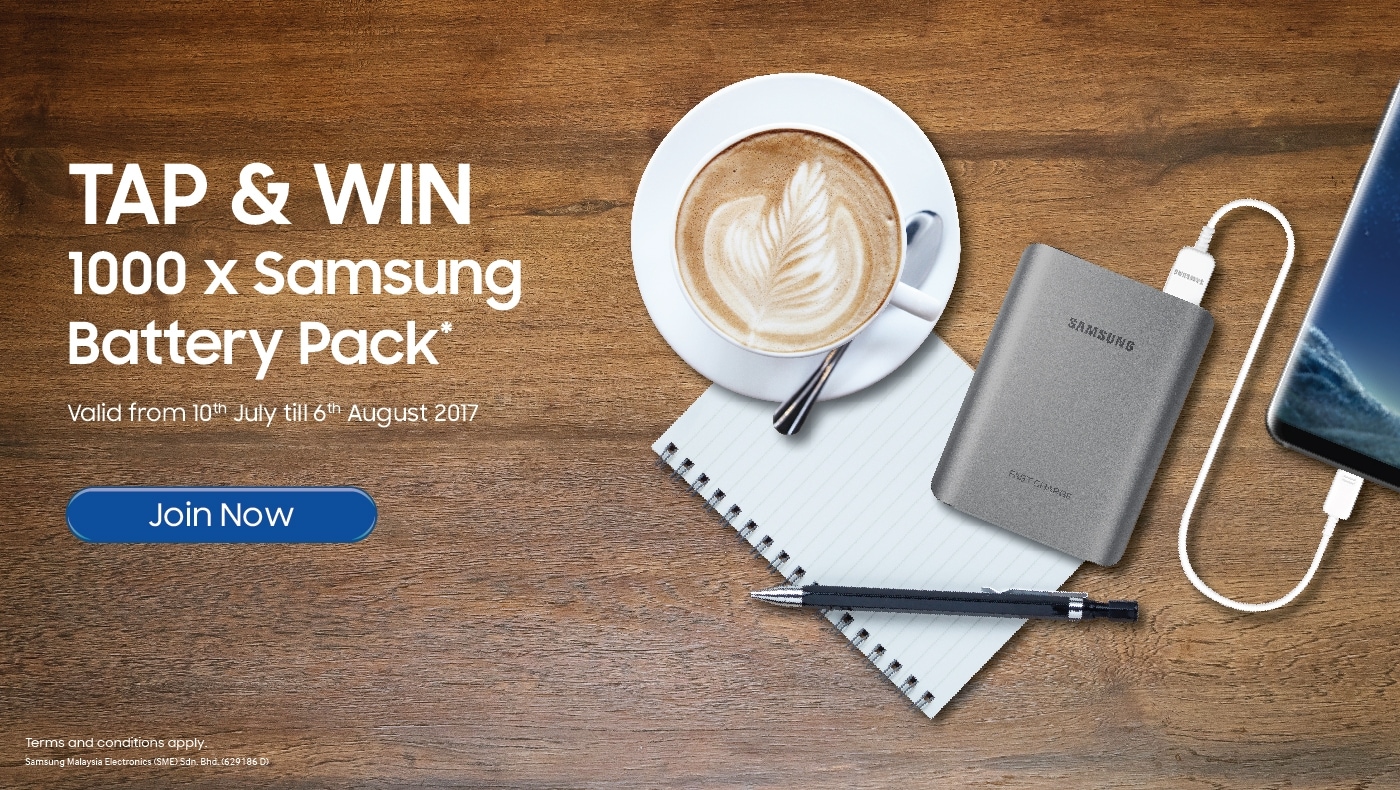
That battery pack is 10200mAh fast charge, I got it from Note7 bundle last year. Which is better than newer battery pack that only has 5100mAh fast charge that bundle with S8/+. Definitely a go.

255 Pages « < 23 24 25 26 27 > » Top
Topic ClosedOptions
 

Change to:
| Lo-Fi Version
0.0189sec    0.98    6 queries    GZIP Disabled
Time is now: 17th December 2025 - 02:27 AM