Welcome Guest ( Log In | Register )

119 Pages « < 113 114 115 116 117 > » Bottom

Outline · [ Standard ] · Linear+

 Cheap Asus Wifi Router Alternative, Huawei WS880 & Others

views
     
phoenixxx
post Mar 24 2019, 10:10 PM

Sesquipedalian hittin' the quasihemdemisemiquaver
******
Senior Member
1,241 posts

Joined: Mar 2005
QUOTE(SilentVampire @ Mar 24 2019, 09:57 PM)
Top up a little, and get TP-Link AC2300. If you can't find it, get it from OOKAS online. The price is more reasonable. I am including the link for you: https://shopee.com.my/TP-LINK-C2300-AC2300-...80984.826943513

Once you get that, use that AC2300 as the main router, and use that DIR-850 as the wired AP.
*
Thanks! I have some dilemma though, if use as main router it will be in the back room at the back of the house. It will be furthest away from living hall and my bedroom where I'm hoping to get the 5Ghz... is it really not advisable to use it as AP with better placement location?

I was even thinking to disable wifi on the Dlink 850 and use solely from the new router AP since it is more central.

This post has been edited by phoenixxx: Mar 24 2019, 10:11 PM
TSKiding
post Mar 24 2019, 10:59 PM

Regular
******
Senior Member
1,135 posts

Joined: Jan 2003
From: Seri Kembangan


QUOTE(phoenixxx @ Mar 24 2019, 09:46 PM)
Any router recommendation for double storey home.

My ONU is at the back room (downstairs), direct LAN cable to my PC, using stock router from Unifi (DIR 850)...

I have extra LAN port upstairs hall, which plan to put this new router and hopefully can get better 5Ghz signal throughout the house (currently using an old router as AP)

I am on unifi 300mbps (need to support Hypptv, so those Deco models cannot use)

So far surveyed a few model based on the thread here and blacktubi...

1. TP Link AC1200 (blacktubi recommend AC2300 but I cant find)
2. Tenda AC18, seems quite popular brand. However digimall / lowyat seller seems less enthusiastic and keep pushing TP Link instead :S also, seems to have a noticeable rate of lemon unit based on user feedback online, however Tenda seems to honor 1 to 1 exchange
3. ASUS 68 or 86 ... a bit too expensive for me

Any advise from sifus here? Maybe below RM500 range if possible.
*
If you want 5Ghz to cover entire two storey house, better get mesh wifi system such as Asus lyra or linksys velop

Taobao selling dual band linksys velop AC2600 for RM610
SilentVampire
post Mar 24 2019, 11:25 PM

Networking Enthusiast
*******
Senior Member
5,714 posts

Joined: Mar 2007


QUOTE(phoenixxx @ Mar 24 2019, 10:10 PM)
Thanks! I have some dilemma though, if use as main router it will be in the back room at the back of the house. It will be furthest away from living hall and my bedroom where I'm hoping to get the 5Ghz... is it really not advisable to use it as AP with better placement location?

I was even thinking to disable wifi on the Dlink 850 and use solely from the new router AP since it is more central.
*
I suggest using mesh wifi if that's the case. You can still use the D-Link DIR850 as a main router and set up the mesh wifi as WAP.
phoenixxx
post Mar 24 2019, 11:31 PM

Sesquipedalian hittin' the quasihemdemisemiquaver
******
Senior Member
1,241 posts

Joined: Mar 2005
Thanks, I'll check it out biggrin.gif
phoenixxx
post Mar 30 2019, 03:28 PM

Sesquipedalian hittin' the quasihemdemisemiquaver
******
Senior Member
1,241 posts

Joined: Mar 2005
QUOTE(SilentVampire @ Mar 24 2019, 09:57 PM)
Top up a little, and get TP-Link AC2300. If you can't find it, get it from OOKAS online. The price is more reasonable. I am including the link for you: https://shopee.com.my/TP-LINK-C2300-AC2300-...80984.826943513

Once you get that, use that AC2300 as the main router, and use that DIR-850 as the wired AP.
*
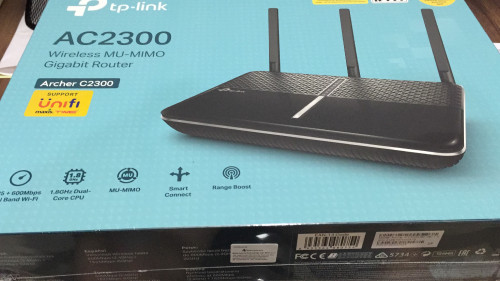
Decided to try out AC2300. Just ordered from Lazada. Thanks for the tip & I think it might serve me well in the long run thumbup.gif
SilentVampire
post Mar 30 2019, 03:47 PM

Networking Enthusiast
*******
Senior Member
5,714 posts

Joined: Mar 2007


QUOTE(phoenixxx @ Mar 30 2019, 03:28 PM)
Decided to try out AC2300. Just ordered from Lazada. Thanks for the tip & I think it might serve me well in the long run  thumbup.gif
*
Good choice. Remember to update the firmware once you get it. You will be very satisfied. The coverage is much better than the DIR-850L.
phoenixxx
post Apr 3 2019, 10:07 PM

Sesquipedalian hittin' the quasihemdemisemiquaver
******
Senior Member
1,241 posts

Joined: Mar 2005
My package is here biggrin.gif so far full 5GHZ bar in the places that matter (tv in living room and bedroom). I am streaming Chromecast from one end of the house to my tv at another end biggrin.gif

Thanks Sifus for the recommendation smile.gif

user posted image
Wan
post Apr 14 2019, 02:32 PM

Glory Hunter
Group Icon
Elite
4,174 posts

Joined: Jan 2003
From: Gua


What's the fastest speed you can get on WiFi on this Ws880 router? My UNIFI is 800Mbps. But with my phone(Poco F1) only can get around 300Mbps. I've been changing routers for Unifi users, and I swear on some house I can reach about 500Mbps, same with the customers on their Iphones using the Dlink Ac1200 Unifi provided. But really hard to get that speed since everything is set to auto on the routers. Anyone got any ideas?

sHawTY
post Apr 14 2019, 06:33 PM

Frequent Reporter
********
All Stars
14,908 posts

Joined: Jul 2005

QUOTE(Wan @ Apr 14 2019, 02:32 PM)
What's the fastest speed you can get on WiFi on this Ws880 router? My UNIFI is 800Mbps. But with my phone(Poco F1) only can get around 300Mbps
1. Set the wireless mode to: N/AC Mixed
2. Set the 5GHz channel bandwidth to: 80MHz

user posted image
muncheno
post Apr 14 2019, 08:16 PM

Enthusiast
*****
Senior Member
736 posts

Joined: Jun 2006
From: Ipoh
QUOTE(Wan @ Apr 14 2019, 02:32 PM)
What's the fastest speed you can get on WiFi on this Ws880 router? My UNIFI is 800Mbps. But with my phone(Poco F1) only can get around 300Mbps. I've been changing routers for Unifi users, and I swear on some house I can reach about 500Mbps, same with the customers on their Iphones using the Dlink Ac1200 Unifi provided. But really hard to get that speed since everything is set to auto on the routers. Anyone got any ideas?
*
For me, around 3X0 mbps after reboot, thrn later drop to around 280-300mbps download, upload can go around 380mbps.

But for sure wont reach 500mbps on wifi.
For Lan no problem.
heidarren
post May 14 2019, 11:52 PM

Getting Started
**
Junior Member
248 posts

Joined: Aug 2018
Btw, I found this unit has 802.11k/v (the roaming method which Netgear Orbi is using) supported after flashing to AsusWRT, according to wifianalyzer on Android, not sure if it's working.

With 802.11k/v, basically it can work with any router as an AP with fast roaming capability, just plug in LAN cable and set it to AP mode, your connection will automatically switch to the nearest AP (once ur devices has below -70dBm, it will start to look for stronger AP) automatically.

This post has been edited by heidarren: May 14 2019, 11:53 PM
heidarren
post Jun 8 2019, 06:10 AM

Getting Started
**
Junior Member
248 posts

Joined: Aug 2018
If anyone out there still using this WS880 with AsusWRT mod, remember to set your Wi-Fi txpower to 25%, any higher will drop your Wi-Fi speed greatly

my experience with iPhone XS Max:
25% 510mbps
50% 370mbps
100% 275mbps

You might notice the Wi-Fi bar will drop a bit by setting it to 25%, but the actual coverage doesn't have much difference, this might due to this WS880 antenna design doesn't handle high power well and created a lot of noise or a bug of this AsusWRT mod
fkinmeng
post Jun 8 2019, 09:04 PM

Look at all my stars!!
*******
Senior Member
6,373 posts

Joined: May 2007
My WS880 died already, suddenly can't detect WAN port, not even 3 years. doh.gif
sHawTY
post Jun 8 2019, 09:11 PM

Frequent Reporter
********
All Stars
14,908 posts

Joined: Jul 2005

QUOTE(fkinmeng @ Jun 8 2019, 09:04 PM)
My WS880 died already, suddenly can't detect WAN port, not even 3 years.  doh.gif
Have you tried a different AC adaptor? (same voltage but same or higher amps) Do not go with a lower amp even if the voltage is the same
heidarren
post Jun 8 2019, 09:38 PM

Getting Started
**
Junior Member
248 posts

Joined: Aug 2018
QUOTE(fkinmeng @ Jun 8 2019, 09:04 PM)
My WS880 died already, suddenly can't detect WAN port, not even 3 years.  doh.gif
*
Just use LAN1 as ur WAN port
fkinmeng
post Jun 8 2019, 09:51 PM

Look at all my stars!!
*******
Senior Member
6,373 posts

Joined: May 2007
QUOTE(sHawTY @ Jun 8 2019, 09:11 PM)
Have you tried a different AC adaptor? (same voltage but same or higher amps) Do not go with a lower amp even if the voltage is the same
*
No, didn't know it might help.

QUOTE(heidarren @ Jun 8 2019, 09:38 PM)
Just use LAN1 as ur WAN port
*
Can just swap?

This post has been edited by fkinmeng: Jun 8 2019, 09:54 PM
heidarren
post Jun 8 2019, 10:06 PM

Getting Started
**
Junior Member
248 posts

Joined: Aug 2018
QUOTE(fkinmeng @ Jun 8 2019, 09:51 PM)
No, didn't know it might help.
Can just swap?
*
I remember there is a DualWAN page in WAN tab, where u can play this magic.
fkinmeng
post Jun 8 2019, 10:26 PM

Look at all my stars!!
*******
Senior Member
6,373 posts

Joined: May 2007
QUOTE(heidarren @ Jun 8 2019, 10:06 PM)
I remember there is a DualWAN page in WAN tab, where u can play this magic.
*
I found DualWan page, but what setting should i do?
ycs
post Jun 9 2019, 02:48 PM

MEMBER
*******
Senior Member
4,225 posts

Joined: Jan 2003
From: Selangor


QUOTE(fkinmeng @ Jun 8 2019, 10:26 PM)
I found DualWan page, but what setting should i do?
*
i think like this
[attachmentid=10261542]
fkinmeng
post Jun 23 2019, 01:09 AM

Look at all my stars!!
*******
Senior Member
6,373 posts

Joined: May 2007
QUOTE(heidarren @ Jun 8 2019, 09:38 PM)
Just use LAN1 as ur WAN port
*
QUOTE(ycs @ Jun 9 2019, 02:48 PM)
i think like this
[attachmentid=10261542]
*
Tried playing around, same result, can't detect any WAN.

Didn't expect my ws880 to die in less than 3 years. sad.gif

119 Pages « < 113 114 115 116 117 > » Top
 

Change to:
| Lo-Fi Version
0.0314sec    0.55    6 queries    GZIP Disabled
Time is now: 4th December 2025 - 01:34 AM