

QUOTE(Snuffykl @ Jun 6 2007, 04:10 AM)
download it at first page. the unknown device is the hp quick launch button.

I have that driver, and that is not the problem I am trying to solve. I am trying to get the Conexant to be installed in my laptop.hp-compaq Presario V3000 series AMD & intel V2, Owners, Comments, Drivers, Support n Etc
|
|
 Jun 6 2007, 07:58 AM Jun 6 2007, 07:58 AM
|
 
Junior Member
16 posts Joined: May 2005 
|
QUOTE(Snuffykl @ Jun 6 2007, 04:10 AM) download it at first page. the unknown device is the hp quick launch button. I have that driver, and that is not the problem I am trying to solve. I am trying to get the Conexant to be installed in my laptop. |
|
|
|
|
|
Jun 6 2007, 09:59 AM
|

Senior Member
2,477 posts Joined: Feb 2005 
|
Here you go again..the audio driver problems for Intel Models.
http://forum.lowyat.net/index.php?showtopi...post&p=10587957 This post has been edited by mindkiller6610: Jun 6 2007, 10:02 AM |
|
|
Jun 6 2007, 10:01 AM
|

Junior Member
216 posts Joined: Oct 2005 From: Selangor 
|
my hdd got crackin noise ady, plus it juz freeze for the 1st time since i bought it. can i send it to hp?
|
|
|
Jun 6 2007, 10:11 AM
|

Senior Member
1,739 posts Joined: Jun 2005
|
QUOTE(ryder @ Jun 5 2007, 12:09 PM) what do you mean by unreconised sound? i'm also not sure what sound was that.. something like a sharp sound..  Added on June 6, 2007, 10:13 am QUOTE(Notoriez @ Jun 5 2007, 01:25 PM) What brand?? I knew the speed oledi mah.. Me also using v3250Au kingston 1gb-667mhz also can detected. I had tried to plug into 1st slot and 2nd slot it also works fine.You used Kingston on ur V3250AU?? Why mine kenot  Tried my friend's Kingston DDR2-667MHz but can't detect Tried my friend's Kingston DDR2-667MHz but can't detect  This post has been edited by bububang: Jun 6 2007, 10:13 AM |
|
|
Jun 6 2007, 10:18 AM
|

Senior Member
1,177 posts Joined: Jul 2006 From: Pulao Penang  
|
I've some problem when installing the audio driver.
After i installed the UAA thingy, i can't get through the 2nd and the 3rd driver. It come out error message that said "Driver Installation Failed: Could not find the MEDIA device for this driver." Anyway, I'm using V3203AU. So anyone know how to fix it, please please post it up here. Thanks in advance. |
|
|
Jun 6 2007, 10:25 AM
|
|
Senior Member
2,477 posts Joined: Feb 2005
|
QUOTE(lAh0S @ Jun 6 2007, 10:18 AM) I've some problem when installing the audio driver. try this..After i installed the UAA thingy, i can't get through the 2nd and the 3rd driver. It come out error message that said "Driver Installation Failed: Could not find the MEDIA device for this driver." Anyway, I'm using V3203AU. So anyone know how to fix it, please please post it up here. Thanks in advance. http://forum.lowyat.net/index.php?showtopi...post&p=10587957 |
|
|
|
|
|
Jun 6 2007, 10:44 AM
|
|
Junior Member
16 posts Joined: May 2005
|
QUOTE(mindkiller6610 @ Jun 6 2007, 10:25 AM) I am in the same boat. Thanks for helping. I clicked on the link, but it directed me to the mainboard. Is there something wrong with the link?Added on June 6, 2007, 10:45 am QUOTE(mindkiller6610 @ Jun 6 2007, 09:59 AM) Here you go again..the audio driver problems for Intel Models. Thanks Mindkiller. I have done those steps, but I cannot find in my Device Manager that 'High Definition Audio ....' Did I overlook something?http://forum.lowyat.net/index.php?showtopi...post&p=10587957 Thanks again. Jon This post has been edited by starlight_pg: Jun 6 2007, 10:45 AM |
|
|
Jun 6 2007, 11:29 AM
|

Senior Member
875 posts Joined: Jan 2006 From: The Obsidian Order 
|
QUOTE(starlight_pg @ Jun 6 2007, 12:26 AM) Ryder, or anyone - please help! I am in the same position. Just got myself Compaq Presario v3252AU, and sheer happiness of 1 hour vanished when I realized that there was no drivers provided. I had done my homework and managed to get all the proper drivers needed. My only problem is the same - audio. I had installed that Microsoft UUA or something, but when I installed Conexant, I faced the same problem mentioned - cannot detect the media. The audio driver is actually one of the pci devices...1 is the audio..the other is the modemI tried to follow your instruction, happy to think that there is a solution at last, but I am stuck at No.2. Where do I find this 'conxetant high definition..' in my device manager? I have only this -  Please help. I really do not want to be stuck with a bohsia laptop. Thank you. Anyone, please. Just help. Jon both also must force install...just follow the link given by mindkiller |
|
|
Jun 6 2007, 01:20 PM
|
|
Junior Member
16 posts Joined: May 2005
|
QUOTE(ryder @ Jun 6 2007, 11:29 AM) The audio driver is actually one of the pci devices...1 is the audio..the other is the modem Ryder and Mindkiller, thank you for your patience so far, and anyone else who is helping.both also must force install...just follow the link given by mindkiller I have done as instructed, and it led me to this dead end. So, I thought I show you guys what I had seen. 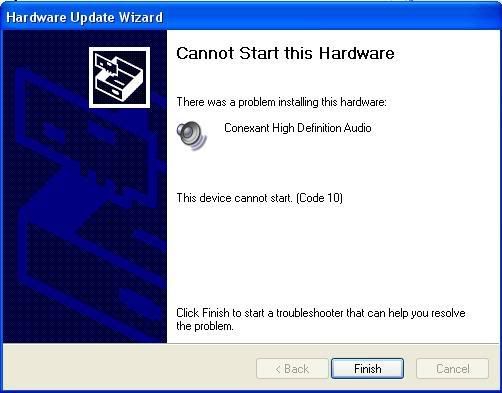 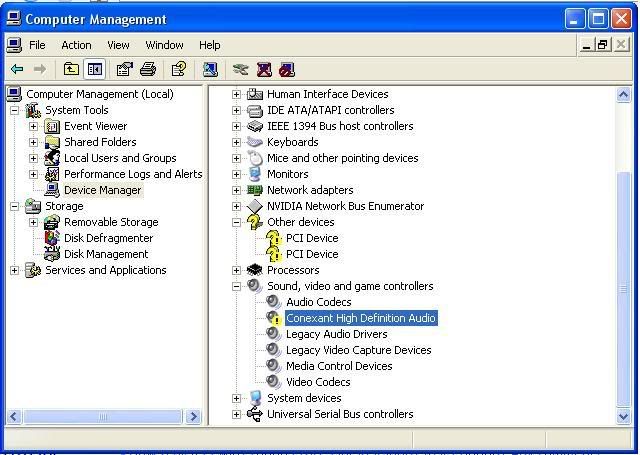 And trying to force it to install again.. I am seeing this.. 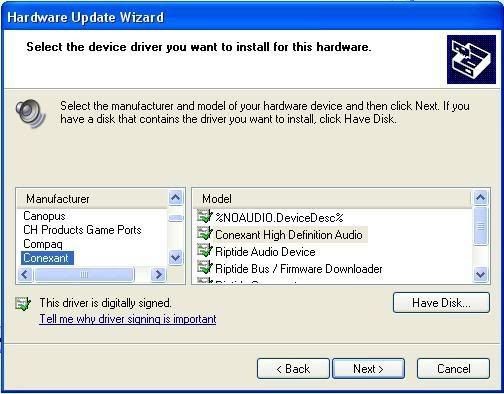 Can someone help? I pray for miracle. Jon |
|
|
Jun 6 2007, 01:51 PM
|
|
Senior Member
875 posts Joined: Jan 2006 From: The Obsidian Order
|
you are supposed to click on have disk and go to the location of the driver exe file and select it
|
|
|
Jun 6 2007, 02:00 PM
|
|
Junior Member
16 posts Joined: May 2005
|
QUOTE(ryder @ Jun 6 2007, 01:51 PM) you are supposed to click on have disk and go to the location of the driver exe file and select it Did that, and I am still with Code 10 - This device cannot start. |
|
|
Jun 6 2007, 03:30 PM
|
|
Senior Member
875 posts Joined: Jan 2006 From: The Obsidian Order
|
hmmm.....
try to rollback driver then reinstall the driver again |
|
|
Jun 6 2007, 07:06 PM
|

Senior Member
2,499 posts Joined: Apr 2005 From: Tyneside
|
QUOTE(emofags @ Jun 5 2007, 10:13 PM) Lol, mine also can't detect too before. Already curse curse the shop and the card, then open the mem-slot back to check and figured what the problem really is - the second slot (upper one) really need to push really deep for it to slot properly. it turns out i didn't properly slot it in making it nonfunctional. Place it with 50° angle to the slot, push in harder, snap!, close the lid and boot the nb back - problem solved for me. Tried to slot the RAM into the first slot (took out the old one) but also no avail..maybe i'll try Corsair...well.. maybe not a solution for you, but it is for me. first time changing ram for notebooks   and yeah, my nb is v3250au. and yeah, my nb is v3250au. |
|
|
|
|
|
Jun 7 2007, 12:04 AM
|
|
Junior Member
16 posts Joined: May 2005
|
Hey guys, esp Ryder and Mindkiller - thanks for all the guides and patience with me so far. Well, the good news is - I am hearing audio on my computer now. But it is not an easy task.
Somehow, I believe eventually that my real problem was that I was running on WINXP SP1. So, I went out and bought a new copy of WIN XP SP2. Re-formatted my laptop one more time and did as instructed on page 1 , as guided by Shinjin. However, I did find some drivers of my own, as they were more appropriate for my Compaq Presario V3252AU. Windows XP SP2 Setup & Installation Guide for V3119AU/V3009AU courtesy of shinjin (only for Windows XP SP2) 1. Install the OS. 2. Install the NVIDIA nForce Chipset Driver (I use sp33031.exe) 3. Install the NVIDIA GeForce Go 6150 Graphics Driver (I use sp33549.exe) 4. Install the AMD Processor Update for Microsoft Windows XP to optimized the processor for the system (I use sp35445.exe) 5. Install Microsoft Universal Audio Architecture (UAA) Bus Driver for High Definition Audio (I use sp32646.exe) 6. Install Conexant High Definition Audio (for AMD) (I use sp34386.exe) 7. Install Conexant HDAUDIO Soft Data Fax Modem with SmartCP Driver (I use 33839.exe) 8. Install Ricoh 5-in-1 Card Reader Host Controller and Driver (I use sp33020 - do not know if it works - have yet to try.) 9. Install Broadcom Wireless LAN Driver (I use sp34152.exe) 10. Install Software and Drivers for HP Integrated Module with Bluetooth Wireless (For V3119AU) ( I don't have this ) 11. Install HP Wireless Assistant (sp34510.exe) 12. Install System Default Settings (Did not do this.) Anyway, I can hear the audio now, but it just got me thinking that my old Compaq Presario V1200 sounds better. Hmmm... Thanks all. |
|
|
Jun 7 2007, 12:32 AM
|

Junior Member
197 posts Joined: Aug 2006 From: i7viL
|
This go back to HP towers again to send my V3313tu..
this time i play it till hang then only enter the service center. Call the technician to see it and he look a bit confuse... after taking out battery to shut it down. my pc as usual show all light on but no screen. He say maybe hardware total malfunction or something. now at least he can see my misery and maybe believe what i tell him before. guess i have to wait 3 days till he call Vista on V3313Tu rocks.. aero all the way.... can't wait to get my pc back |
|
|
Jun 7 2007, 09:36 AM
|
|
Senior Member
1,739 posts Joined: Jun 2005
|
QUOTE(-i7- @ Jun 7 2007, 12:32 AM) This go back to HP towers again to send my V3313tu.. Owh.. sad to hear this.. this time i play it till hang then only enter the service center. Call the technician to see it and he look a bit confuse... after taking out battery to shut it down. my pc as usual show all light on but no screen. He say maybe hardware total malfunction or something. now at least he can see my misery and maybe believe what i tell him before. guess i have to wait 3 days till he call Vista on V3313Tu rocks.. aero all the way.... can't wait to get my pc back Me also planning to install vista but if i installed vista, many application, driver, games some not compatible.. |
|
|
Jun 7 2007, 10:15 AM
|

Senior Member
576 posts Joined: Jan 2005
|
Yep...I also have to face with Vista incompatibilty when comes to installing programs. I I have at least 5 bluescreen crashes on my V3242 since I bought 3 weeks ago but it's okay since I took the risk of unstalling those programs that still not 100% Vista certified compatible. So far, I still very happy with Vista cause I believe it will take a while before more programs will be Vista friendly. One piece of advice to all new buyer of Vista, your notebook must have at least 1G of RAM for Vista. You cannot budget or save on this otherwise your Vista will be damn slow. |
|
|
Jun 7 2007, 10:22 AM
|

Junior Member
475 posts Joined: Jan 2003 From: Klang
|
mine is using Windows XP with Vista Transformation Pack .... haha.. at least it will look like vista ..
|
|
|
Jun 7 2007, 11:20 AM
|

Senior Member
3,196 posts Joined: Feb 2006
|
I just upgrade the OS on my compaq v3310tu. to vista ultimate..and it support aero glass..!!
so confirm intel gma 900 can support aero glass... |
|
|
Jun 7 2007, 11:36 AM
|

Senior Member
913 posts Joined: Feb 2005 From: Ampang, Kuala Lumpur, Seremban...
|
QUOTE(hellfire8888 @ Jun 7 2007, 11:20 AM) I just upgrade the OS on my compaq v3310tu. to vista ultimate..and it support aero glass..!! its 950 so confirm intel gma 900 can support aero glass...  neway, try running dreamscene.... neway, try running dreamscene....  |
|
Topic ClosedOptions
|
| Change to: |  0.0182sec 0.0182sec
 0.67 0.67
 6 queries 6 queries
 GZIP Disabled GZIP Disabled
Time is now: 17th December 2025 - 09:00 PM |
 Quote
Quote