

but in bios oso it show d same temp wif my easy tune..the big diff betw both core is oso another headache..is it somethg wrong wth my proc?
Problem with temperature? Seek consultation here, DO NOT OPEN NEW THREAD
Problem with temperature? Seek consultation here, DO NOT OPEN NEW THREAD
|
|
 Jan 4 2007, 08:40 PM Jan 4 2007, 08:40 PM
|
 
Junior Member
140 posts Joined: Jul 2006 From: Kepong / KL / Perlis  
|
but in bios oso it show d same temp wif my easy tune..the big diff betw both core is oso another headache..is it somethg wrong wth my proc?
|
|
|
|
|
|
Jan 4 2007, 09:49 PM
|

Senior Member
2,295 posts Joined: Jan 2005 From: Penang 
|
ok, which readings more accurate, core temp shows 10c++ vs Smartguardian for my water cooling kit... 38c idle for core temp... 29c-31c for smartguardina idle depends on ambient... 51c for both core for opty 170 for core temp and 38c for smartguardian...
|
|
|
Jan 8 2007, 12:08 AM
|

Senior Member
743 posts Joined: Feb 2006
|
Hm.. I dunno whether this post will help me with this, i recently just bought a thermaltake btvx with the coolmaster nanofusion thermalpaste. My question now is:
1. The thermaltake btvx seems so freaking heavy, will my motherboard and processor be able to handle the weight when it stays sidewords? 2. Hm.. Is there a guide or somesort to apply the correct method for the nanofusion. Thx alot xD This post has been edited by CyberTroop: Jan 8 2007, 12:19 AM |
|
|
Jan 8 2007, 03:41 AM
|
|
Junior Member
140 posts Joined: Jul 2006 From: Kepong / KL / Perlis
|
QUOTE(vassalle @ Jan 4 2007, 07:46 PM) I would say that the TAT temperature would count. i had bought myself a new hsf but d temp juz reduced +-10...is it somthg wrong wif my mobo or other hw?btw dis is my new screenies..80c is scorching hot! and the other core @ 75c ?? thats the biggest difference i've seen so far. You should seriously consider reapplying AS5 to your heatsink if not get an aftermarket one.  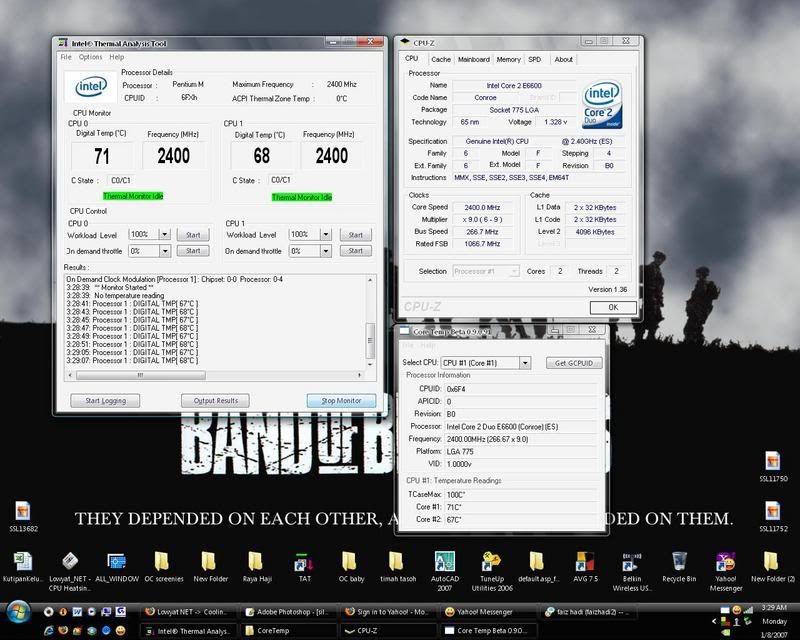 thx  This post has been edited by frank_fusion: Jan 8 2007, 03:42 AM |
|
|
Jan 8 2007, 04:06 AM
|

Senior Member
3,567 posts Joined: Jan 2003 From: Paradise
|
QUOTE(deric88 @ Jan 4 2007, 07:34 PM) my temperaute with case open 55C and close is 60C the c5 is designed for exhaust>input. if don't like u can change to any expensive high end aluminium casing any time as u like. i didnt face any air flow problem. closed case temp almost 1-2c difference only with open case.caused by airflow? how to improve without any chopping..... using centurion 5, the famous bad engineered 80mm input 120mm output..... cables all hide adi not blocking airflow |
|
|
Jan 8 2007, 10:41 AM
|

Senior Member
2,603 posts Joined: Sep 2006
|
damn, stupid WiFi, so slow, sori for the double post
 This post has been edited by E-J@1: Jan 8 2007, 10:43 AM |
|
|
|
|
|
Jan 8 2007, 10:42 AM
|
|
Senior Member
2,603 posts Joined: Sep 2006
|
QUOTE(CyberTroop @ Jan 8 2007, 12:08 AM) Hm.. I dunno whether this post will help me with this, i recently just bought a thermaltake btvx with the coolmaster nanofusion thermalpaste. My question now is: 1. the mobo can support the weight 1. The thermaltake btvx seems so freaking heavy, will my motherboard and processor be able to handle the weight when it stays sidewords? 2. Hm.. Is there a guide or somesort to apply the correct method for the nanofusion. Thx alot xD  no point they produced one & having problems with it, otherwise the product won't sell a lot no point they produced one & having problems with it, otherwise the product won't sell a lot  2. just use the grain method -> apply a little TIM in a size of a rice grain & then mount ur heatsink, no need to spread it evenly as the heatsink will do that for you  & one more thing better u goolgle a lot for these kind of question, helps better understanding & faster instead waiting for people replying it  QUOTE(basSist @ Jan 8 2007, 04:06 AM) the c5 is designed for exhaust>input. if don't like u can change to any expensive high end aluminium casing any time as u like. i didnt face any air flow problem. closed case temp almost 1-2c difference only with open case. wah, lucky for u didn't have any prob with air flow, cause i did with my previous c534 case, damn  |
|
|
Jan 8 2007, 08:36 PM
|

All Stars
10,859 posts Joined: Jan 2003 From: Sarawak
|
my e6300 oced to 2.66ghz at 380x7 with vcore 1.248v, when idle, i am getting 58c at 1st core and 56c and 2nd core with TAT reading. When under orthos stress, i am getting 70c and 68c highest. Is this normal? I am using mini typhoon with normal thermal paste.
|
|
|
Jan 8 2007, 10:45 PM
|
 
VIP
4,809 posts Joined: Jan 2005 
|
QUOTE(ben3003 @ Jan 8 2007, 08:36 PM) my e6300 oced to 2.66ghz at 380x7 with vcore 1.248v, when idle, i am getting 58c at 1st core and 56c and 2nd core with TAT reading. When under orthos stress, i am getting 70c and 68c highest. Is this normal? I am using mini typhoon with normal thermal paste. im afraid it doesnt seem very normal, have u tried to reapply the hsf? and maybe throw some AS5 in too! |
|
|
Jan 8 2007, 11:40 PM
|

Senior Member
1,201 posts Joined: Dec 2004 From: Kuala Lumpur
|
when re installing your heatsink, test and see whether is there a good contact between the processor and heatsink. if not, DIY to make it better contact.
|
|
|
Jan 9 2007, 08:24 AM
|
|
All Stars
10,859 posts Joined: Jan 2003 From: Sarawak
|
kk. I will try this in the weekend and if there's any prob i will seek u all again
 i also think should be the thermal paste prob, becos it use stock thermal paste. Normally the temp is how much for a e6300 clocked to 2.8ghz? I mean normally la, just rough figure for me to know. i also think should be the thermal paste prob, becos it use stock thermal paste. Normally the temp is how much for a e6300 clocked to 2.8ghz? I mean normally la, just rough figure for me to know. |
|
|
 Jan 9 2007, 10:40 AM Jan 9 2007, 10:40 AM
|

Senior Member
775 posts Joined: Sep 2006 From: Sungai Mati, Muar, Johor ; Now at Wangsa Maju, KL.
|
QUOTE(ben3003 @ Jan 9 2007, 08:24 AM) kk. I will try this in the weekend and if there's any prob i will seek u all again Check it out here i also think should be the thermal paste prob, becos it use stock thermal paste. Normally the temp is how much for a e6300 clocked to 2.8ghz? I mean normally la, just rough figure for me to know. |
|
|
Jan 11 2007, 05:28 AM
|

Senior Member
740 posts Joined: Jan 2003 From: Langkawi
|
i hav a question here..
before this i used GIgabyte GA-8N-SLi mobo.. and i can use everest ultimate edition to monitor my cpu temp.. but now after change to a new mobo (Foxconn, see my sig) i cant see the cpu temp in the everest software. anyone know how to solve this? now i'm using FOxconn software (it's called FoxOne) to monitor it, which i don't quite like..cuz it cant display the temps on system tray.  |
|
|
|
|
|
Jan 11 2007, 02:45 PM
|
|
Senior Member
3,567 posts Joined: Jan 2003 From: Paradise
|
QUOTE(ben3003 @ Jan 9 2007, 08:24 AM) kk. I will try this in the weekend and if there's any prob i will seek u all again of clocked till 2.8Ghz.. around 50c +_ 5. depends on ur air flow in ur case and ur vcore applied. i also think should be the thermal paste prob, becos it use stock thermal paste. Normally the temp is how much for a e6300 clocked to 2.8ghz? I mean normally la, just rough figure for me to know.QUOTE(coolmast3r @ Jan 11 2007, 05:28 AM) i hav a question here.. hm.. maybe the Everest doesn't support the mobo. try to find other software. Speedfan?before this i used GIgabyte GA-8N-SLi mobo.. and i can use everest ultimate edition to monitor my cpu temp.. but now after change to a new mobo (Foxconn, see my sig) i cant see the cpu temp in the everest software. anyone know how to solve this? now i'm using FOxconn software (it's called FoxOne) to monitor it, which i don't quite like..cuz it cant display the temps on system tray. |
|
|
Jan 11 2007, 05:18 PM
|
|
Senior Member
740 posts Joined: Jan 2003 From: Langkawi
|
QUOTE(basSist @ Jan 11 2007, 02:45 PM) hm.. maybe the Everest doesn't support the mobo. try to find other software. Speedfan? speedfan can minimize to system tray?with my cpu temp shown as an icon in system tray? |
|
|
Jan 11 2007, 05:18 PM
|
|
Senior Member
740 posts Joined: Jan 2003 From: Langkawi
|
edit: sorry double post. crappy hostel internet connection. damn it
This post has been edited by coolmast3r: Jan 11 2007, 05:20 PM |
|
|
Jan 11 2007, 05:22 PM
|
|
Senior Member
3,567 posts Joined: Jan 2003 From: Paradise
|
QUOTE(coolmast3r @ Jan 11 2007, 05:18 PM) speedfan can minimize to system tray?with my cpu temp shown as an icon in system tray? i am not sure can minimize not but when u open speedfan there is a icon in system tray showing the temp. but .. not showing the core temp just cpu temp (in case u are using dual core) |
|
|
Jan 11 2007, 05:53 PM
|

Junior Member
23 posts Joined: Jan 2007
|
i feel my cpu temperature is quiet high .. 35 when just start computer , 45'c after dota(play 1hr)
but i am using watercooling ... my room temperature is about 30-33'c .. y still so high .. |
|
|
Jan 11 2007, 09:03 PM
|
|
VIP
4,809 posts Joined: Jan 2005
|
1) what type of watercooling are u using?
2) are u sure the contact between the CPU and the Wc block is good? maybe try re-installing and replace the thermal paste |
|
|
Jan 12 2007, 12:42 AM
|
|
Junior Member
23 posts Joined: Jan 2007
|
just install oh ... everything is ok de ..
wat is ur normal temperature ? |
| Change to: |  0.0267sec 0.0267sec
 0.98 0.98
 6 queries 6 queries
 GZIP Disabled GZIP Disabled
Time is now: 19th December 2025 - 05:45 AM |
 Quote
Quote