

now it happened again..sigh
Can't update/download apps via Unifi WIFI, Stuck at 'Waiting' or extremely slow
Can't update/download apps via Unifi WIFI, Stuck at 'Waiting' or extremely slow
|
|
 Oct 14 2015, 12:00 PM Oct 14 2015, 12:00 PM
|
 
Senior Member
638 posts Joined: Feb 2009  
|
now it happened again..sigh
|
|
|
|
|
|
Oct 14 2015, 12:54 PM
|

Junior Member
80 posts Joined: Nov 2009
|
damnnnnn!!! 17kbs- 50kbs download on appstore waterparkkkkk!!! aiyooo... nose bleed la like this.. i was updating my whatsapp update so slowwwww like going back to 65k modem hahhaha!!
This post has been edited by ulart_mie: Oct 14 2015, 12:58 PM Attached thumbnail(s) 
|
|
|
Oct 14 2015, 01:02 PM
|

All Stars
32,468 posts Joined: Mar 2005
|
My OS X upgrade will take 3 days 18 hours... well done, TM
 |
|
|
Oct 14 2015, 02:02 PM
|
|
Senior Member
638 posts Joined: Feb 2009
|
so try change DNS to usa dns..speed is fast
http://www.iphonehacks.com/2015/10/ios-itu...campaign=buffer |
|
|
Oct 14 2015, 04:20 PM
|

Senior Member
1,123 posts Joined: Jan 2003
|
Issue came back... But not just appstore... My youtube also slow
|
|
|
Oct 14 2015, 04:49 PM
Show posts by this member only | IPv6 | Post
#286
|

Junior Member
145 posts Joined: Jan 2008
|
Same here. Very slow
|
|
|
|
|
|
Oct 14 2015, 05:42 PM
|

Junior Member
57 posts Joined: Apr 2008
|
wat is USA dns ?
|
|
|
Oct 14 2015, 06:27 PM
|

Senior Member
890 posts Joined: Oct 2011
|
previously i was using a DNS from Japan, not blazing fast but enough to get the job done though. btw i already Tweeted @TMConnects, here's the usual response;
QUOTE Hi. Fyi, our team still diagnose on the issue. We unable to provide the time frame. Sorry for the inconvenience. |
|
|
Oct 14 2015, 09:18 PM
|
 
Elite
7,826 posts Joined: Jan 2003  
|
I am still facing the same error. So many apps to update but only slow via Unifi. I really wonder why as it does affect TIME
|
|
|
Oct 15 2015, 09:29 AM
|

Junior Member
11 posts Joined: Dec 2007 From: KL
|
I'm on UNIFI 20. It was fine until the last few months. I suspect, UNIFI has either a botched caching server or they throttled anything *.apple.com.
 This post has been edited by cBiSu: Oct 15 2015, 09:30 AM |
|
|
Oct 15 2015, 10:02 AM
Show posts by this member only | IPv6 | Post
#291
|
 
Staff
12,089 posts Joined: Dec 2004 From: Malaysia
|
I believe Apple made changes on their side which affected many.
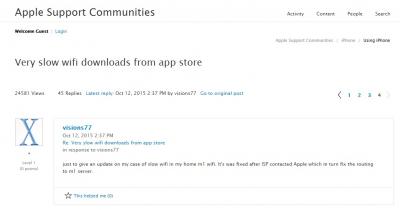
This user is on M1 Singapore, reported the issue to his ISP and was resolved few days later. I think it all goes down to how the ISP communicates and works with Apple on this. This post has been edited by OKLY: Oct 15 2015, 10:02 AM |
|
|
Oct 15 2015, 10:27 AM
|

Senior Member
1,589 posts Joined: Sep 2008
|
QUOTE(cBiSu @ Oct 15 2015, 09:29 AM) I'm on UNIFI 20. It was fine until the last few months. I suspect, UNIFI has either a botched caching server or they throttled anything *.apple.com. restore my backup took 3 days to complete on UNifi20   |
|
|
Oct 15 2015, 10:39 AM
Show posts by this member only | IPv6 | Post
#293
|
|
Staff
12,089 posts Joined: Dec 2004 From: Malaysia
|
So far if we are to use telco like Maxis, Celcom etc there are no issues right?
|
|
|
|
|
|
Oct 15 2015, 11:23 AM
|
|
Elite
7,826 posts Joined: Jan 2003
|
QUOTE(OKLY @ Oct 15 2015, 10:39 AM) So far if we are to use telco like Maxis, Celcom etc there are no issues right? Yes, I don't face any of these issues with Maxis as well as TIME. Seems to affect the folks on Unifi. |
|
|
Oct 16 2015, 04:01 PM
|
|
Senior Member
890 posts Joined: Oct 2011
|
guys check your downloads. i got a few updates just now so i just thought of leaving to update at its usual slow pace. but all of the sudden the downloads blazed through and was done in seconds. i tried downloading a random app and again it downloaded really fast for me. please check guys and report your findings. thanks.
|
|
|
Oct 16 2015, 04:27 PM
|
|
Senior Member
890 posts Joined: Oct 2011
|
here are my results just now:
Unifi 50 (WIFI for now it's a hit and miss, sometimes 50mbps but mostly 35mbps) Wake Alarm Clock [89mb] - 13 seconds Start 4.25pm - End 4.25pm Card Wars Adventure Time [347mb] - 1 minute Start 4.26pm - End 4.27pm Marvel Contest of Champions [681mb] - 3 minutes Start 4.21pm - End 4.24pm Immortals [1.14gb] - 4 minutes Start 4.16pm - End 4.20pm |
|
|
Oct 16 2015, 08:37 PM
|

Senior Member
1,748 posts Joined: Mar 2010
|
QUOTE(jin_akira @ Oct 16 2015, 04:01 PM) guys check your downloads. i got a few updates just now so i just thought of leaving to update at its usual slow pace. but all of the sudden the downloads blazed through and was done in seconds. i tried downloading a random app and again it downloaded really fast for me. please check guys and report your findings. thanks. The problem comes and goes. Sometimes it crawls and sometimes it blazes. To add to that, Apple seem to be having some issues of their own. There have been (afaik) two documented outages for iTunes and/or the App Store in the past 7 days, and in between that people from all over the world have had issues with downloads stopping midway, apps not updating properly, etc. Yesterday while I was in Singapore, there were a couple of instances where downloading an app wouldn't start, so I had to stop the download and start it again, and then it blazed through. Also one app update completely downloaded (the circle filled completely) but than just stayed like that forever without changing to the "Open" icon like usual. Had to completely delete the app and install it again. Now back in JB and had 1GB worth of updates (Pages + Numbers + Keybnote) in the morning and the speed was normal, but just now I needed to update a 50MB app and it started crawling again. At this point, I'm not even sure if it's a TM caching/throttling problem or some issue on Apple's side. Also experienced this same slow download or stuck at waiting issue with my Singapore ISP (MyRepublic Internet) a few days ago, but they managed to resolve it in two days. |
|
|
Oct 16 2015, 09:11 PM
|
|
Senior Member
591 posts Joined: May 2005 
|
QUOTE(jin_akira @ Oct 16 2015, 04:01 PM) guys check your downloads. i got a few updates just now so i just thought of leaving to update at its usual slow pace. but all of the sudden the downloads blazed through and was done in seconds. i tried downloading a random app and again it downloaded really fast for me. please check guys and report your findings. thanks. Slightly improve only manage upgrade iOS9 in 20mins non-peak hrs morning, but at night you will get mad with 14.4kb modem speed yours apps forever downloadUnifi 30mbps user here |
|
|
Oct 16 2015, 11:03 PM
|
|
Senior Member
890 posts Joined: Oct 2011
|
QUOTE(G-17 @ Oct 16 2015, 08:37 PM) The problem comes and goes. Sometimes it crawls and sometimes it blazes. To add to that, Apple seem to be having some issues of their own. There have been (afaik) two documented outages for iTunes and/or the App Store in the past 7 days, and in between that people from all over the world have had issues with downloads stopping midway, apps not updating properly, etc. Yesterday while I was in Singapore, there were a couple of instances where downloading an app wouldn't start, so I had to stop the download and start it again, and then it blazed through. Also one app update completely downloaded (the circle filled completely) but than just stayed like that forever without changing to the "Open" icon like usual. Had to completely delete the app and install it again. Now back in JB and had 1GB worth of updates (Pages + Numbers + Keybnote) in the morning and the speed was normal, but just now I needed to update a 50MB app and it started crawling again. At this point, I'm not even sure if it's a TM caching/throttling problem or some issue on Apple's side. Also experienced this same slow download or stuck at waiting issue with my Singapore ISP (MyRepublic Internet) a few days ago, but they managed to resolve it in two days. Dang just read your post, tried it out and yeah, back to crawling speed. I read somewhere online about ISP providers needing to download a firmware or something from Apple, so they should communicate with each other. Don't know whether it's true or not though |
|
|
Oct 16 2015, 11:06 PM
|
|
Senior Member
890 posts Joined: Oct 2011
|
QUOTE(devil98 @ Oct 16 2015, 09:11 PM) Slightly improve only manage upgrade iOS9 in 20mins non-peak hrs morning, but at night you will get mad with 14.4kb modem speed yours apps forever download Ugh you're right. Tried downloading an app i downloaded earlier; Wake Alarm Clock. Was way slower compared to just now. At least we roughly know the 'normal speed' window, which is around 3-5pm. I'll try to download around that time again tomorrow to test it out.Unifi 30mbps user here |
| Change to: |  0.0476sec 0.0476sec
 0.36 0.36
 6 queries 6 queries
 GZIP Disabled GZIP Disabled
Time is now: 5th December 2025 - 05:52 PM |
 Quote
Quote