

previously im using bitcomet..utorrent wont lag out games..while bitcomet will totally lag out games..but bitcomet have faster speed..
well back to my Q,any sifu know wats wrong?

This post has been edited by NewbieBetta: Jul 3 2007, 08:06 PM
P2P ĀµTorrent Thread, version 3
|
|
 Jul 3 2007, 07:58 PM Jul 3 2007, 07:58 PM
|
 
Senior Member
3,706 posts Joined: Aug 2005   
|
need help here..you guys can view my screenie..how come the 2 recently added torrent which is dead silence & 1408 are not running..too slow for the seed & peer available..shrek3 is my few days ago torrent which im downloading..any idea whats wrong..
previously im using bitcomet..utorrent wont lag out games..while bitcomet will totally lag out games..but bitcomet have faster speed.. well back to my Q,any sifu know wats wrong?
This post has been edited by NewbieBetta: Jul 3 2007, 08:06 PM |
|
|
|
|
|
Jul 4 2007, 09:50 AM
|

Junior Member
110 posts Joined: Oct 2004 From: Ampang
|
QUOTE(NewbieBetta @ Jul 3 2007, 07:58 PM) need help here..you guys can view my screenie..how come the 2 recently added torrent which is dead silence & 1408 are not running..too slow for the seed & peer available..shrek3 is my few days ago torrent which im downloading..any idea whats wrong.. waaaah.. so many people got throttled by streamyx eh. so lucky those who r not.
 in my case, i know for sure taht streamyx throttled my connection. I already format my laptop, connect my laptop directly to modem (currently i'm using router) and also i've tried all possible suggestion available in the world, still the speed is slow given large amount of seeders and peers. last night i try VPN with secureIX. my download speed boast from 5-10kb/s to 20-25kb/s! according to secureIX, using the free service, they give us download speed only max of 31kb/s. so getting 25kb/s using the free service is quite okay. now i'm considering to purchase the premium account, which they claim can provide download speed to the max of 625kb/s. (the max speed that streamyx will achieve after year 2050)  . . Very lucky to those who r not being throttled by streamyx and to those who r staying in KL area. In Kuantan, there's only one ISP: streamyx by tmnet. we don't have any other choice. Later, just like in newspaper a few months ago, Tmnet can proudly announce that majority residence in Malaysia choose streamyx as they broadband. Guess why? because we don't have any other choice!  please and please.. oh God, pleaseee (we cannot beg the authority or government because hell no they are going to help us). let other ISP eg from Singapore come in and let us use the advance technology before we go to heaven. please and please.. oh God, pleaseee (we cannot beg the authority or government because hell no they are going to help us). let other ISP eg from Singapore come in and let us use the advance technology before we go to heaven.ohhhh.. after alll that "membebel", I realize that i'm still in Malaysia. sorry to those who already read that. just expressing my feelings to tm.nut. currently i'm waiting a few words from networking-expert at technician at my dad's office whether purchasing premium account at secureix will increase my download speed from current 25kb/s. |
|
|
Jul 4 2007, 10:23 PM
|

All Stars
10,596 posts Joined: Jan 2003 From: Hinamizawa
|
what is the reason I get this error:
DHT:0 nodes (login) ? I has not change any setting at all, and my friend com. who is behind the same router and switch can use utorrent |
|
|
Jul 7 2007, 11:17 PM
|

Senior Member
639 posts Joined: May 2007 From: In The Middle Of Nowhere 
|
Uwaa, how to use uTorrent.. anyone please ..
Y downloading n uploading so slow la ... juz 0.++Kb/s.. any way to speed up uTorrent |
|
|
Jul 7 2007, 11:23 PM
|

Junior Member
75 posts Joined: Dec 2006
|
use back 1.6.1.0 , u1.7 still is beta version not very stable connection
|
|
|
Jul 8 2007, 12:06 AM
|
|
Senior Member
639 posts Joined: May 2007 From: In The Middle Of Nowhere
|
i thing, is there any software/ application can support to speed up uTorrent.. like proxy or else...
anyone, please .. ?? |
|
|
|
|
|
Jul 8 2007, 01:05 PM
|
|
Junior Member
75 posts Joined: Dec 2006
|
or u can try setting utorrent like this
preferences----> advanced option net.outgoing.ip 1 net.outgoing.port 1 net.maxhalfopen 100 ipfilter.enable false bt.enable.tracker true bt.connect.speed 100 bt.allow same ip true and upload speed set to 30kbps me is use 1.0mb streamyx + utorrent 1.6.1.0 everyday bandwidth around 50K~~70K |
|
|
Jul 8 2007, 06:00 PM
|

Senior Member
2,627 posts Joined: Jan 2003 From: Sepang,Cheras,Jupiter
|
QUOTE(baby2000 @ Jul 8 2007, 01:05 PM) or u can try setting utorrent like this thanks for your sharing your setting.anybody wish to share their others setting in order to boost the speed?preferences----> advanced option net.outgoing.ip 1 net.outgoing.port 1 net.maxhalfopen 100 ipfilter.enable false bt.enable.tracker true bt.connect.speed 100 bt.allow same ip true and upload speed set to 30kbps me is use 1.0mb streamyx + utorrent 1.6.1.0 everyday bandwidth around 50K~~70K |
|
|
Jul 8 2007, 06:43 PM
|

Junior Member
21 posts Joined: Apr 2007
|
QUOTE(scorps @ May 15 2007, 12:35 AM) do your speed of download is high?? nope, download speed is very low i.e. alwiz at 10kB/s for each file. i think all the bandwidth used by torrent,that's why u can't surf website.. Note: using ver 1.6.1 Max active torrents: 6 Max active downloads: 3 Upload slots: 3 by the way, anyway to increase speed? have done everything except that i have not changed the max halfopen to 50 (still at 8 coz i dunno how to patch file  ) why is it some of you can get 60kB to 70kB. i hadnt been able to get pass 15 before, man... (location: peel road, cheras) ) why is it some of you can get 60kB to 70kB. i hadnt been able to get pass 15 before, man... (location: peel road, cheras)  Also, strange things happen lately. the logger shows unable to map port yesterday, and today, logger is empty/blank i.e. no records at all.  have done port forwarding long long long time ago... and when test port again today, it says port has been forwarded and i have a green badge at the bottom of the page. just wonder if the problems will further reduce the download speed. have done port forwarding long long long time ago... and when test port again today, it says port has been forwarded and i have a green badge at the bottom of the page. just wonder if the problems will further reduce the download speed.  appreciate your swift reply. thanks!!  This post has been edited by vnewee: Jul 8 2007, 08:24 PM |
|
|
Jul 9 2007, 03:16 AM
|
|
Senior Member
639 posts Joined: May 2007 From: In The Middle Of Nowhere
|
QUOTE(vnewee @ Jul 8 2007, 08:43 PM) nope, download speed is very low i.e. alwiz at 10kB/s for each file. Note: using ver 1.6.1 Max active torrents: 6 Max active downloads: 3 Upload slots: 3 Hi there, i think you should try CfosSpeed. it can speed up your torrent even your IE also la Added on July 9, 2007, 3:23 am QUOTE(jasonkwk @ Jul 5 2007, 12:23 AM) what is the reason I get this error: this bcoz torrent file corrupted / setting change..DHT:0 nodes (login) ? you can try this, goto C:\Documents and Settings\(username)\Application Data\uTorrent, replace setting.dat file with settings.dat.old. n don't forget to change the *.old extention to *.dat Daa This post has been edited by LittleCordines: Jul 9 2007, 03:26 AM |
|
|
Jul 9 2007, 03:58 AM
|
|
Senior Member
639 posts Joined: May 2007 From: In The Middle Of Nowhere
|
QUOTE(baby2000 @ Jul 8 2007, 03:05 PM) or u can try setting utorrent like this but i get 90kbps. TQ baby2000preferences----> advanced option net.outgoing.ip 1 net.outgoing.port 1 net.maxhalfopen 100 ipfilter.enable false bt.enable.tracker true bt.connect.speed 100 bt.allow same ip true and upload speed set to 30kbps me is use 1.0mb streamyx + utorrent 1.6.1.0 everyday bandwidth around 50K~~70K Attached thumbnail(s) 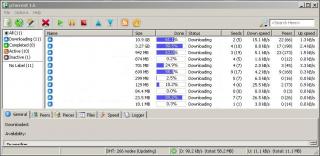
|
|
|
Jul 9 2007, 08:53 PM
|
|
Junior Member
21 posts Joined: Apr 2007
|
QUOTE(baby2000 @ Jul 8 2007, 01:05 PM) or u can try setting utorrent like this didnt seem to increase speed after adjusted to your setting... any other settings to be changed? do i need to patch any file before i change to the above setting? why is there an asterik besides each change? preferences----> advanced option net.outgoing.ip 1 net.outgoing.port 1 net.maxhalfopen 100 ipfilter.enable false bt.enable.tracker true bt.connect.speed 100 bt.allow same ip true and upload speed set to 30kbps me is use 1.0mb streamyx + utorrent 1.6.1.0 everyday bandwidth around 50K~~70K thanks for your help! Added on July 9, 2007, 8:57 pm QUOTE(LittleCordines @ Jul 9 2007, 03:16 AM) Hi there, i think you should try CfosSpeed. it can speed up your torrent even your IE also la r u using CfosSpeed now? Does it help?This post has been edited by vnewee: Jul 9 2007, 08:57 PM |
|
|
Jul 9 2007, 10:39 PM
|
|
Senior Member
2,627 posts Joined: Jan 2003 From: Sepang,Cheras,Jupiter
|
QUOTE(vnewee @ Jul 9 2007, 08:53 PM) didnt seem to increase speed after adjusted to your setting... any other settings to be changed? do i need to patch any file before i change to the above setting? why is there an asterik besides each change? same here.applied the setting but become even worse! thanks for your help! Added on July 9, 2007, 8:57 pm r u using CfosSpeed now? Does it help?  |
|
|
|
|
|
Jul 9 2007, 11:55 PM
|
|
Junior Member
75 posts Joined: Dec 2006
|
its no need patch any files .... if want increase speed add more tracker server address per torrent if you can
|
|
|
Jul 10 2007, 12:20 AM
|
|
Senior Member
639 posts Joined: May 2007 From: In The Middle Of Nowhere
|
Attached thumbnail(s) 
|
|
|
Jul 10 2007, 09:00 AM
|

Junior Member
204 posts Joined: Mar 2006
|
everytime i use utorrent since today my internet hanged.
i even patched the evid4226 again and reboot also same results what else can i do? i even set the maxhalfopen to 100 just like normal when i can usually surf but now it hanged |
|
|
Jul 10 2007, 01:33 PM
|

Senior Member
2,236 posts Joined: Dec 2006
|
ermm..hi all
i just install a new modem router d-link 2640t in my house what shld i do to speed up my utorrent ? i using bolehvpn as well Added on July 10, 2007, 1:49 pmok i think i port-forward'ed waiting to test the speed Added on July 10, 2007, 2:15 pmhow to reboot my router? manual switch on and off ? This post has been edited by underGr0und_8: Jul 10 2007, 02:15 PM |
|
|
Jul 10 2007, 11:00 PM
|
|
Junior Member
21 posts Joined: Apr 2007
|
QUOTE(LittleCordines @ Jul 10 2007, 12:20 AM) Hi amenlo9 n vnewee... hi littlecordines,yes, i'm currently using CfosSpeed. it really can speed up uTorrent, Mozilla n else. IDM also la... huhu, i'm enjoying the throttled speed.. keep on tryin' ... dun be sad Aja - Aja Fighting .. !! -------------------------- i've juz start this application man..!! refer to the image attached .. 1. CfosSpeed keep throttleling 2. Download speed at 96 kps 3. The DHT still updating. When this finish, the download speed may increase a little bit more ... Thanks to J-Slade suggested this application.. could u give some constructive suggestions? installed cfosspeed but it doesnt help increase the speed. not only that, m still having problem surfing net while the utorrent is on. must alwiz turn off utorrent when surf net. help please... Added on July 10, 2007, 11:07 pm QUOTE(baby2000 @ Jul 8 2007, 01:05 PM) or u can try setting utorrent like this hi, how and where to set the upload speed to 30kbps? please forgive my ignorance. preferences----> advanced option net.outgoing.ip 1 net.outgoing.port 1 net.maxhalfopen 100 ipfilter.enable false bt.enable.tracker true bt.connect.speed 100 bt.allow same ip true and upload speed set to 30kbps me is use 1.0mb streamyx + utorrent 1.6.1.0 everyday bandwidth around 50K~~70K This post has been edited by vnewee: Jul 10 2007, 11:07 PM |
|
|
Jul 10 2007, 11:21 PM
|

Senior Member
3,110 posts Joined: Jun 2005
|
QUOTE(underGr0und_8 @ Jul 10 2007, 01:33 PM) how to reboot my router? go to your router page (usually at http://192.168.1.1/ )manual switch on and off ? type in the username and password then go to * Admin > Commit & Reboot > Reboot * ** if you cant find any option at above, then your router is different from us... juz explore yourself and it should be very easy to find the reboot option QUOTE(vnewee @ Jul 10 2007, 11:00 PM) hi littlecordines, could u give some constructive suggestions? installed cfosspeed but it doesnt help increase the speed. not only that, m still having problem surfing net while the utorrent is on. must alwiz turn off utorrent when surf net. help please... Added on July 10, 2007, 11:07 pm hi, how and where to set the upload speed to 30kbps? please forgive my ignorance.  This post has been edited by tan_pang: Jul 10 2007, 11:24 PM |
|
|
Jul 11 2007, 01:42 AM
|
|
Senior Member
639 posts Joined: May 2007 From: In The Middle Of Nowhere
|
Speed up uTorrent, CHECK THIS OUT..!!
CfosSpeed not need to setting it, juz attach uTorrent application into it.. better reboot your PC.. Added on July 11, 2007, 1:45 am QUOTE(vnewee @ Jul 11 2007, 01:00 AM) hi littlecordines, you can also put your browser to use with CfosSpeed. look at the pict, i use Mozilla, together with uTorrent n other apps. CfosSpeed may running at full speed..could u give some constructive suggestions? installed cfosspeed but it doesnt help increase the speed. not only that, m still having problem surfing net while the utorrent is on. must alwiz turn off utorrent when surf net. help please... Added on July 11, 2007, 1:56 am QUOTE(tan_pang @ Jul 11 2007, 01:21 AM) go to your router page (usually at http://192.168.1.1/ ) juz change the value, 15 to 30.. donetype in the username and password then go to * Admin > Commit & Reboot > Reboot * ** if you cant find any option at above, then your router is different from us... juz explore yourself and it should be very easy to find the reboot option QUOTE(tan_pang @ Jul 11 2007, 01:21 AM) go to your router page (usually at http://192.168.1.1/ ) juz change the value, 15 to 30.. apply then donetype in the username and password then go to * Admin > Commit & Reboot > Reboot * ** if you cant find any option at above, then your router is different from us... juz explore yourself and it should be very easy to find the reboot option This post has been edited by LittleCordines: Jul 11 2007, 01:56 AM Attached thumbnail(s) 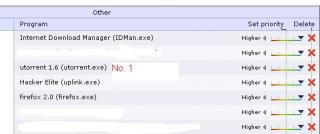
|
| Change to: |  0.0261sec 0.0261sec
 0.21 0.21
 6 queries 6 queries
 GZIP Disabled GZIP Disabled
Time is now: 3rd December 2025 - 04:51 PM |
 Quote
Quote