

QUOTE(MystiqueLife @ Dec 19 2015, 03:12 AM)
What game? I play several games which goes through Equinix SG and also games on Valve servers.
No issues.

No issues.
The Official Maxis FTTH Thread | v5, Maxis Home Fibre Internet, from RM89
|
|
 Dec 19 2015, 07:10 AM Dec 19 2015, 07:10 AM
|
 
Senior Member
3,033 posts Joined: Dec 2011  
|
Thumb up!!
QUOTE(MystiqueLife @ Dec 19 2015, 03:12 AM) What game? I play several games which goes through Equinix SG and also games on Valve servers. No issues. |
|
|
|
|
|
Dec 19 2015, 07:55 PM
|

Senior Member
4,490 posts Joined: Oct 2014
|
QUOTE(MystiqueLife @ Dec 16 2015, 12:41 AM) And from your post, you clearly didn't look at the location of the server when performing speedtest. Go try and find any ISP that will give you <100ms to US. Too much schizophrenic patient ranting about poor service while not knowing the actual issue and bitching about it. It's common Malaysian tradition  Bothering with schizophrenic patients are tedious and you shouldn't do it Bothering with schizophrenic patients are tedious and you shouldn't do it  This post has been edited by zher4883: Dec 19 2015, 07:55 PM |
|
|
Dec 20 2015, 12:23 AM
|

Junior Member
475 posts Joined: Feb 2010
|
The comment above, kind of win.
 Harsh but true. |
|
|
Dec 20 2015, 09:42 PM
|

Senior Member
3,460 posts Joined: Nov 2009 From: KL
|
QUOTE(MystiqueLife @ Dec 19 2015, 03:12 AM) What game? I play several games which goes through Equinix SG and also games on Valve servers. Tracing route to 202.9.67.59 over a maximum of 30 hopsNo issues. 1 3 ms 3 ms 3 ms 192.168.1.254 2 15 ms 7 ms 8 ms 58.71.244.113 3 7 ms 5 ms 5 ms 58.71.244.114 4 7 ms 8 ms 7 ms 58.71.243.53 5 6 ms 8 ms 8 ms 58.71.243.49 6 8 ms 9 ms 7 ms 58.71.244.246 7 8 ms 9 ms 10 ms 58.71.241.21 8 * * * Request timed out. 9 25 ms 208 ms 207 ms 172.22.144.82 10 8 ms 7 ms 8 ms xe-0-1-0.r02.kslrml01.my.bb.gin.ntt.net [203.78.193.17] 11 110 ms 109 ms 110 ms ae-9.r23.osakjp02.jp.bb.gin.ntt.net [129.250.6.94] 12 154 ms 155 ms 156 ms ae-5.r31.tokyjp05.jp.bb.gin.ntt.net [129.250.7.80] 13 237 ms * 233 ms ae-10.r26.tokyjp05.jp.bb.gin.ntt.net [129.250.2.152] 14 154 ms * 146 ms p16-5-0-2.r26.tokyjp05.jp.ce.gin.ntt.net [61.120.145.146] 15 146 ms 142 ms 147 ms 203.118.15.186 16 140 ms 139 ms 141 ms an-ats-int11.starhub.net.sg [203.118.15.110] 17 147 ms 148 ms 153 ms 203.117.163.142 18 154 ms 152 ms 151 ms xe-1-1-0.gw401.sg1.ap.equinix.com [27.111.222.104] 19 151 ms 154 ms 170 ms xe-1-1-1.gw401.sg2.ap.equinix.com [27.111.222.107] 20 111 ms 114 ms 110 ms 202.79.216.154 21 108 ms 105 ms 107 ms 10.100.64.134 22 * * * Request timed out. 23 * * * Request timed out. 24 * * * Request timed out. 25 * * * Request timed out. 26 * * * Request timed out. 27 * * * Request timed out. 28 * * * Request timed out. 29 * * * Request timed out. 30 * * * Request timed out. Trace complete. |
|
|
Dec 21 2015, 01:15 AM
|
|
Junior Member
150 posts Joined: May 2015
|
Alright guys,no more argue please.
Maxis has confirm with me that they are aware of this issue.  http://i.imgur.com/bS1XNQ9.png  There is a problem.Stop saying no problem,kinda annoy.TY. |
|
|
Dec 21 2015, 01:21 AM
|
|
Junior Member
475 posts Joined: Feb 2010
|
 |
|
|
|
|
|
Dec 21 2015, 01:23 AM
|
|
Junior Member
150 posts Joined: May 2015
|
QUOTE(MystiqueLife @ Dec 21 2015, 01:21 AM) Check that packet lost TY. |
|
|
Dec 21 2015, 01:35 AM
|
|
Junior Member
150 posts Joined: May 2015
|
QUOTE(MystiqueLife @ Dec 21 2015, 01:21 AM) http://www.mediafire.com/download/u5ubwhr6...er+Freeware.rar Download it and open the exe. Select forum.lol.garena.com and start trace. When the trace count is reached 150,you should see the hop 16 and hop 6 experience the packet loss. Hop 9 and hop 14 is 100% packet loss.That's it,the problem.FAHAM ke? This post has been edited by Lee Hoe Mun: Dec 21 2015, 01:36 AM |
|
|
Dec 21 2015, 02:16 AM
|
|
Junior Member
475 posts Joined: Feb 2010
|
 As long there's no packet loss to the destination and from the source, it means that packets get sent to the server and client correctly and that's not a problem. The 100% packet loss you see indicates that the hops blocks ICMP packets or have network firewall. Don't assume based on what you see. |
|
|
Dec 21 2015, 07:33 AM
|
|
Senior Member
3,033 posts Joined: Dec 2011
|
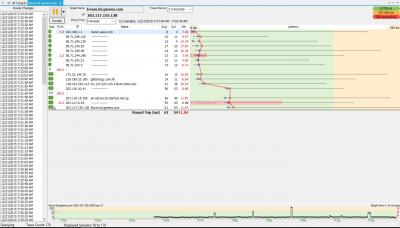
traceroute and pingplotter.
Attached thumbnail(s) 
|
|
|
Dec 21 2015, 11:48 AM
|
|
Junior Member
150 posts Joined: May 2015
|
QUOTE(MystiqueLife @ Dec 21 2015, 02:16 AM) As long there's no packet loss to the destination and from the source, it means that packets get sent to the server and client correctly and that's not a problem. The 100% packet loss you see indicates that the hops blocks ICMP packets or have network firewall. Don't assume based on what you see. |
|
|
Dec 21 2015, 01:43 PM
|
|
Senior Member
3,460 posts Joined: Nov 2009 From: KL
|
QUOTE(MystiqueLife @ Dec 21 2015, 01:21 AM) thanks and btw, maxis fibre still higher ping than streamy-x 512kbps 
This post has been edited by h@ksam: Dec 21 2015, 01:47 PM |
|
|
Dec 22 2015, 09:25 PM
|

Junior Member
70 posts Joined: Dec 2004
|
QUOTE(MystiqueLife @ Dec 16 2015, 12:41 AM) And from your post, you clearly didn't look at the location of the server when performing speedtest. Go try and find any ISP that will give you <100ms to US. Hi Boss, i am using fixed IP 30Mbps, what you mean router IP and user IP? does it mean you have 2 public IP? Unifi fixed IP got 2 public IP wor, one for router, another one will auto be assigned from LAN port1 ( Lanport 2~4 will be disable automatically)Are you subscribing fixed IP or dynamic IP? I have one fixed IP service in my office and they provide router IP and user IP, similar to UniFi. You also can get additional IPs at extra cost. |
|
|
|
|
|
Dec 22 2015, 10:19 PM
|
|
Junior Member
475 posts Joined: Feb 2010
|
Yes, you have two public fixed IPs.
Say your fixed IP is 123.123.123.123, which is your router IP; your user IP is 123.123.123.124 / subnet 255.255.255.252 by default. If you have more IPs, then the subnet value is lower. |
|
|
Dec 22 2015, 11:58 PM
|

Junior Member
72 posts Joined: Aug 2013
|
I've been playing Armored Warfare on its US servers and I usually get ping counts in between 200 and 250ms. However, there are times where this happens:
 And it's been becoming more common as of late, regardless of whether I'm using WiFi or Ethernet or the time of day. I've even reinstalled the drivers for my network card to no avail. Is something going on? |
|
|
Dec 23 2015, 09:46 AM
|
|
Senior Member
3,460 posts Joined: Nov 2009 From: KL
|
QUOTE(Krieger22 @ Dec 22 2015, 11:58 PM) I've been playing Armored Warfare on its US servers and I usually get ping counts in between 200 and 250ms. However, there are times where this happens: 1. how long does the high ping persist? is it a daily affair?And it's been becoming more common as of late, regardless of whether I'm using WiFi or Ethernet or the time of day. I've even reinstalled the drivers for my network card to no avail. Is something going on? 2. what is the server IP? |
|
|
Dec 23 2015, 04:10 PM
|
|
Junior Member
72 posts Joined: Aug 2013
|
QUOTE(h@ksam @ Dec 23 2015, 09:46 AM) 1. how long does the high ping persist? is it a daily affair? 1. Previously it was momentary rubberbanding, now it often lasts for over 10 minutes during matches (in other words the full duration of the longer ones). And yes, it's happened regardless of day.2. what is the server IP? 2. 192.31.179.40. I tried ping testing it and got my usual pre-match ping counts:  |
|
|
Dec 23 2015, 05:51 PM
|
|
Senior Member
3,460 posts Joined: Nov 2009 From: KL
|
QUOTE(Krieger22 @ Dec 23 2015, 04:10 PM) 1. Previously it was momentary rubberbanding, now it often lasts for over 10 minutes during matches (in other words the full duration of the longer ones). And yes, it's happened regardless of day. nothing that I can see right now having the issues you mentioned.2. 192.31.179.40. I tried ping testing it and got my usual pre-match ping counts: maxis problems can be a more permanent feature and mostly happens at night during peak, definitely more than 10 minute sessions. it might be the game server issue. |
|
|
Dec 23 2015, 06:00 PM
|
|
Junior Member
72 posts Joined: Aug 2013
|
Booted up Battlefield 3, the Battlelog site claimed that the Singaporean server ping was 56 ms, ingame was 103ms, complete with packet loss and repeated disconnects.
Is something wrong with the Puchong area's Maxis Fibre connection, or is this actually par for the course? |
|
|
Dec 23 2015, 06:18 PM
|
|
Senior Member
3,460 posts Joined: Nov 2009 From: KL
|
QUOTE(Krieger22 @ Dec 23 2015, 06:00 PM) Booted up Battlefield 3, the Battlelog site claimed that the Singaporean server ping was 56 ms, ingame was 103ms, complete with packet loss and repeated disconnects. battlelog is my fav subject since the bulk of complaints initiated from here.Is something wrong with the Puchong area's Maxis Fibre connection, or is this actually par for the course? the average optimal ping for b-log SG server should be between 15-20+ give and take. I'd say if you're getting 100+ms right now at 6pm it's time to fire up that customer hotline and open case ID for a rebate. here's a traceroute on one of the battlefield servers as at 6:20pm Tracing route to a4.d0.0cd8.ip4.static.sl-reverse.com [216.12.208.164] over a maximum of 30 hops: 1 3 ms 3 ms 3 ms 192.168.1.254 2 16 ms 8 ms 6 ms 58.71.244.89 3 6 ms 6 ms 4 ms 58.71.244.114 4 19 ms 7 ms 6 ms 58.71.243.53 5 8 ms 6 ms 7 ms 58.71.243.49 6 9 ms * 8 ms 58.71.244.246 7 9 ms 8 ms 7 ms 58.71.241.21 8 * * * Request timed out. 9 21 ms 19 ms 19 ms se1-0-0.kchp-pe201.maxis.net.my [202.122.151.186] 10 18 ms 18 ms 16 ms 36351.sgw.equinix.com [202.79.197.69] 11 18 ms 18 ms 16 ms ae5.dar01.sr03.sng01.networklayer.com [50.97.18.197] 12 * * * Request timed out. 13 18 ms 17 ms 18 ms a4.d0.0cd8.ip4.static.sl-reverse.com [216.12.208.164] Trace complete. This post has been edited by h@ksam: Dec 23 2015, 06:24 PM |
| Change to: |  0.0225sec 0.0225sec
 0.58 0.58
 6 queries 6 queries
 GZIP Disabled GZIP Disabled
Time is now: 5th December 2025 - 11:00 PM |
 Quote
Quote