Outline ·
[ Standard ] ·
Linear+
The Official Maxis FTTH Thread | v5, Maxis Home Fibre Internet, from RM89
|
Konohamaru
|
 Dec 12 2015, 02:36 PM Dec 12 2015, 02:36 PM
|
Getting Started


|
Dear SIFU all, i just installed Maxis fiber broadband fixed IP package 30Mbps yesterday. can i configure the maxis router from WAN? example: router is located in office, can i configure the router from home? i can ping the IP with 100% response from home, but when i key http://123.133.xx.xx at browser, nothing came out.............(although inside office LAN, i can access router easily)  just wonder any special setting need to choose inside maxis router? |
|
|
|
|
|
Konohamaru
|
Dec 12 2015, 03:21 PM
|
Getting Started
|
QUOTE(jusbella @ Dec 12 2015, 02:40 PM) Use teamviewer.. Or else buy fortinet firewall router and set VPN server, den at home connect office VPN den u can configure ad. this the "workaround" currently what i do (remote access software & VPN)  .... just wonder any other way can direct open the router login page by browserfrom WAN which is same like Ohana (another ISP). actually my final plan is set a mail server, using DMZ feature at router side forward packets from router to mail server another story, i found that both Maxis & Ohana not provided addtional public IP like Unifi, example if using fixed IP Unifi , my unifi router get the public IP 17x.xxx.xxx.133, and then my device (server/pc/firewall) which is connecting to router with LAN Port1 will get the public ip 17x.xxx.xxx.134, but the disadvantage is router Lan port 2,3,4 cannot be used for other PC/acess point/router This post has been edited by Konohamaru: Dec 12 2015, 03:28 PM |
|
|
|
|
|
Konohamaru
|
Dec 22 2015, 09:25 PM
|
Getting Started
|
QUOTE(MystiqueLife @ Dec 16 2015, 12:41 AM) And from your post, you clearly didn't look at the location of the server when performing speedtest. Go try and find any ISP that will give you <100ms to US. Are you subscribing fixed IP or dynamic IP? I have one fixed IP service in my office and they provide router IP and user IP, similar to UniFi. You also can get additional IPs at extra cost. Hi Boss, i am using fixed IP 30Mbps, what you mean router IP and user IP? does it mean you have 2 public IP? Unifi fixed IP got 2 public IP wor, one for router, another one will auto be assigned from LAN port1 ( Lanport 2~4 will be disable automatically) |
|
|
|
|
|
Konohamaru
|
Jan 5 2016, 02:28 PM
|
Getting Started
|
QUOTE(MystiqueLife @ Dec 22 2015, 10:19 PM) Yes, you have two public fixed IPs. Say your fixed IP is 123.123.123.123, which is your router IP; your user IP is 123.123.123.124 / subnet 255.255.255.252 by default. If you have more IPs, then the subnet value is lower. Hi boss , this is exactly what i want. but my situation is i get the fixed IP is 123.123.123.123 for router , but i don't have user IP is 123.123.123.124, i suspected is the given maxis router can't support this kind of feature? or because my fixed IP package is belongs to " special offer price RM499 30Mbps package"? now my maxis router all 4 LAN port can be used, but the obtained IP will be 192.168.xx.xx ( not public IP) , my TM modem is an old unifi modem which is white color one, the weird thing is maxis router connect to TM modem by using LAN port no 3, usually should be using Lan port No 2, but i got no response if plug to port no 2.... is your router same like me? i think that router maybe is suit for home user, not for company use? 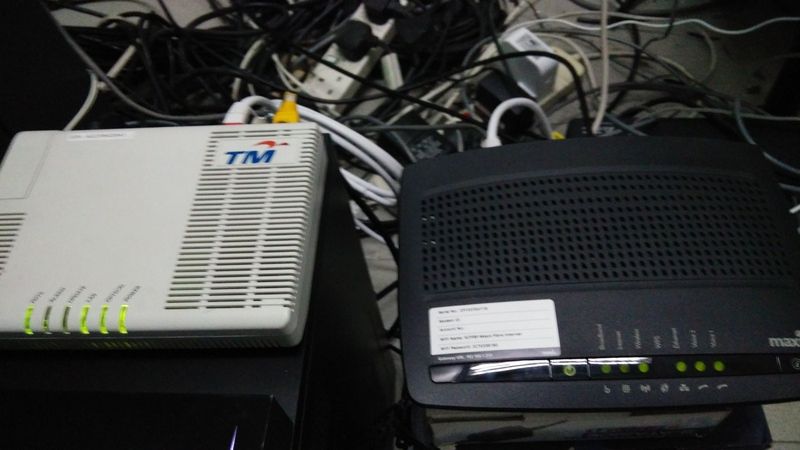 This post has been edited by Konohamaru: Jan 5 2016, 02:41 PM This post has been edited by Konohamaru: Jan 5 2016, 02:41 PM |
|
|
|
|
|
Konohamaru
|
Jan 7 2016, 08:52 AM
|
Getting Started
|
QUOTE(blacktubi @ Jan 5 2016, 05:53 PM) Why you want external IP on your PC? 192.168.x.x is the internal NATed IP address. If you want to host anything you can just setup port forwarding. for my server use loh. i will be more easier for me if there is a public IP for server, especially my server is linux base which is using iptable to do routing, somemore performing 4 virtualization....... |
|
|
|
|



 Quote
Quote


 0.1851sec
 0.30
0.30
 7 queries
 GZIP Disabled