QUOTE(WhitE LighteR @ Jul 21 2015, 10:04 AM)
i just bought rt-n18u, flash latest official firmware and factory reset.
but i ran into some problem where the wifi speed drop when my pc which is connected to the ethernet do speed test. in fact any internet activity will drop the wifi speed significantly. it drop very significantly from whatever max i have example 60Mbps down to like 250Kbps. Once the internet load go down, my wifi speed goes up max again. Funny. I would expect a drop of 10Mbps (Unifi 10Mbps) at most. But this doesnt seems to be the case. Any idea?
did you try flash shibby's latest firmware for this particular router ?
http://tomato.groov.pl/download/K26ARM/This one "tomato-RT-N18U-ARM--130-AIO-64K.zip"
I think once downloaded, you need to extract the zip. then from your router gui, browse to the file to flash. Once done, access router, then factory reset. Make sure you nvram is ticked for enabled, so it does a clean factory reset.
After that you can change your router lan ip from default if you want. also add a secure password you can remember, or a complicated one which you save in a notepad somewhere, also on lastpass for convenience

then setup wifi, and make sure using WPA2 with a complicated password. If too easy, people can easily crack. But then if the people in your immediate vicinity accessible to your wifi are idiots, then this is probably a non issue. But i prefer safety than being sorry later

Anyway, if you have any issues performance or bugs with shibbys firmware, make sure you report to him over in his official thread here, then he can make a fix and upload into a new firmware.
http://www.linksysinfo.org/index.php?threa...releases.33858/For Unifi setup, you need to do vlan tagging. You can do this for tomato. If i'm not mistaken this is the guide for doing that
QUOTE
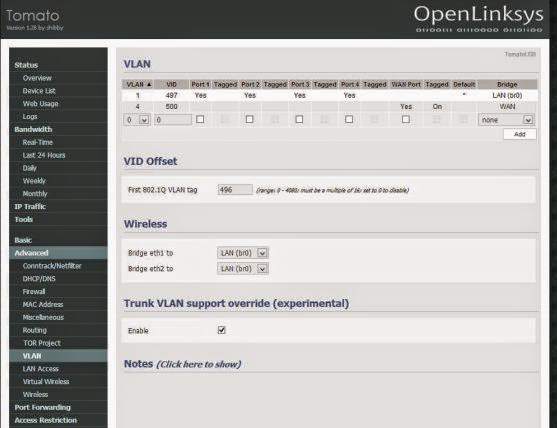
Go to Advanced -> VLAN
Set VLAN 1, VID = 497
Set VLAN 4, VID = 500, WAN Port = Yes, Tagged = ON
Set VID Offset = 496
Enable Trunk VLAN
Done, Reboot your router
theres also a unifi tomato help thread here
https://forum.lowyat.net/topic/2571693/allhope this helped

PS: only internet and iphone work. not the hypptv if your okay with that.
This post has been edited by Moogle Stiltzkin: Jul 21 2015, 11:14 AM 

 Jul 21 2015, 10:55 AM


 Quote
Quote








 0.0315sec
 0.51
0.51
 6 queries
 GZIP Disabled