

i have an asus rt-n16... if i get unifi can i use tomato firmware with unifi somehow? can tomato do those what vlan tagging etc..
Unifi unifi & tomato firmware -- possible?
Unifi unifi & tomato firmware -- possible?
|
|
 Nov 1 2012, 06:00 PM, updated 9y ago Nov 1 2012, 06:00 PM, updated 9y ago
Show posts by this member only | Post
#1
|
 
Senior Member
1,649 posts Joined: Jan 2003 
|
i have an asus rt-n16... if i get unifi can i use tomato firmware with unifi somehow? can tomato do those what vlan tagging etc..
|
|
|
|
|
|
Nov 2 2012, 10:44 AM
Show posts by this member only | Post
#2
|

Senior Member
3,000 posts Joined: Aug 2008 From: PeeJay
|
why you need to put a fruit inside?
The asus n16 already can do vlan tagging with the original firmware eh |
|
|
Nov 2 2012, 12:01 PM
Show posts by this member only | Post
#3
|

Junior Member
257 posts Joined: Dec 2007
|
QUOTE(biatche @ Nov 1 2012, 06:00 PM) i have an asus rt-n16... if i get unifi can i use tomato firmware with unifi somehow? can tomato do those what vlan tagging etc.. refer here.... http://tomato.groov.pl/?page_id=164 Thank you.  This post has been edited by kaisam: Nov 2 2012, 12:01 PM |
|
|
Nov 5 2012, 10:58 AM
Show posts by this member only | Post
#4
|
|
Senior Member
1,649 posts Joined: Jan 2003
|
so.. so long as tomato has vlan tagging i can do unifi?
|
|
|
Nov 6 2012, 05:24 PM
Show posts by this member only | Post
#5
|

Junior Member
135 posts Joined: Jan 2003
|
can anyone help? i'm interested to know too
|
|
|
Nov 7 2012, 06:43 PM
Show posts by this member only | Post
#6
|
|
Senior Member
1,649 posts Joined: Jan 2003
|

mind helping me with this? this is currently the setup on streamyx still, gonna have unifi soon. this is shibby tomato latest ver. i'm currently referring to http://klseet.com/index.php/setup-walk-thr...setup-for-unifi for setup but i'm still a little confused what should it look like ultimately? as in the screenshot should I modify VLAN1 and set the vid to 500 as well as tag it? or should i add VLAN3 and set vid to 500, tag it an set as wan port? so currently its like this: vlan[1] vid[1] port1[y] tag[n] port2[y] tag[n] port3[y] tag[n] port4[y] tag[n] wanport[n] tag[n] default[y] bridge[LAN (br0)] vlan[2] vid[2] port1[n] tag[n] port2[n] tag[n] port3[n] tag[n] port4[n] tag[n] wanport[y] tag[n] default[n] bridge[WAN] what should it look like for unifi setup? thanks in advance |
|
|
|
|
|
May 24 2013, 11:39 AM
Show posts by this member only | Post
#7
|
|
Junior Member
257 posts Joined: Dec 2007
|
QUOTE(biatche @ Nov 7 2012, 06:43 PM)
mind helping me with this? this is currently the setup on streamyx still, gonna have unifi soon. this is shibby tomato latest ver. i'm currently referring to http://klseet.com/index.php/setup-walk-thr...setup-for-unifi for setup but i'm still a little confused what should it look like ultimately? as in the screenshot should I modify VLAN1 and set the vid to 500 as well as tag it? or should i add VLAN3 and set vid to 500, tag it an set as wan port? so currently its like this: vlan[1] vid[1] port1[y] tag[n] port2[y] tag[n] port3[y] tag[n] port4[y] tag[n] wanport[n] tag[n] default[y] bridge[LAN (br0)] vlan[2] vid[2] port1[n] tag[n] port2[n] tag[n] port3[n] tag[n] port4[n] tag[n] wanport[y] tag[n] default[n] bridge[WAN] what should it look like for unifi setup? thanks in advance success already ? Thank you.  |
|
|
May 28 2013, 07:41 PM
Show posts by this member only | Post
#8
|
|
Senior Member
1,649 posts Joined: Jan 2003
|
yes it works already
Thanks so much |
|
|
May 30 2013, 12:52 PM
Show posts by this member only | Post
#9
|
|
Junior Member
257 posts Joined: Dec 2007
|
QUOTE(biatche @ May 28 2013, 07:41 PM) yes it works already can u sharing the VLAN tag to all member here ?Thanks so much Thank you. |
|
|
May 30 2013, 06:16 PM
|
|
Senior Member
1,649 posts Joined: Jan 2003
|
You'll need a VLAN for just the port connected to the BTU.
Enable that port and tag it with a VID value of 500. As simple as that. This post has been edited by biatche: May 30 2013, 06:18 PM |
|
|
May 30 2013, 06:42 PM
|
|
All Stars
10,429 posts Joined: Jan 2003  
|
anyone using shibby's tomato firmware on wrt54gl? Does it support vlan500 for unifi?
|
|
|
May 30 2013, 06:48 PM
|
|
Senior Member
1,649 posts Joined: Jan 2003
|
shibby's firmware definitely works... but for some reason it was unstable on my n16. so ive switched to toastman
|
|
|
May 30 2013, 07:03 PM
|
|
All Stars
10,429 posts Joined: Jan 2003
|
toastman also have vlan500? hmm...but seems like shibby's firmware have more features..
|
|
|
|
|
|
May 31 2013, 02:22 PM
|
|
Junior Member
257 posts Joined: Dec 2007
|
QUOTE(biatche @ May 30 2013, 06:16 PM) You'll need a VLAN for just the port connected to the BTU. Can show the pic here ?Enable that port and tag it with a VID value of 500. As simple as that. or u can show a pic at https://forum.lowyat.net/topic/2831931 bz i'm open a new thread at there for tomato firmware and can sharing to everybody. Thank you. This post has been edited by kaisam: May 31 2013, 03:54 PM |
|
|
Jun 1 2013, 09:32 AM
|
|
Senior Member
1,649 posts Joined: Jan 2003
|
Hope this helps. Do subscribe unifi through me - anywhere in Msia. I'll be glad to offer further assistance in setting up -- as well as guest networks, etc.This post has been edited by biatche: Jun 1 2013, 09:33 AM |
|
|
Jun 1 2013, 12:07 PM
|
|
Junior Member
257 posts Joined: Dec 2007
|
QUOTE(biatche @ Jun 1 2013, 09:32 AM) Hope this helps. Do subscribe unifi through me - anywhere in Msia. I'll be glad to offer further assistance in setting up -- as well as guest networks, etc.So VLAN600 so how ? If ppl want to use ? Thank you. |
|
|
Jun 1 2013, 02:32 PM
|
|
Senior Member
1,649 posts Joined: Jan 2003
|
If my memory serves me right,
Create a new VLAN number of your choice (e.g. 3) Set VID to 600 If you choose to use port 4 for IpTV, Select Port [4] [TAG] Select Port [WAN] [TAG] So result is: VLAN3 | VID 600 | Port 4 [x] Tagged [x] | WAN Port [x] Tagged [x] However, this is untested, but it works on my openwrt router. |
|
|
Jun 1 2013, 03:04 PM
|
|
Junior Member
257 posts Joined: Dec 2007
|
QUOTE(biatche @ Jun 1 2013, 02:32 PM) If my memory serves me right, Thanks for ur information....Create a new VLAN number of your choice (e.g. 3) Set VID to 600 If you choose to use port 4 for IpTV, Select Port [4] [TAG] Select Port [WAN] [TAG] So result is: VLAN3 | VID 600 | Port 4 [x] Tagged [x] | WAN Port [x] Tagged [x] However, this is untested, but it works on my openwrt router. U now not use tomato firmware already for unifi ? Thank you. |
|
|
Jun 1 2013, 04:01 PM
|
|
Senior Member
1,649 posts Joined: Jan 2003
|
Im using tomato right now, but had previously used another openwrt router but had to use that unit for other purpose.
|
|
|
Jun 2 2013, 12:17 AM
|
|
Junior Member
257 posts Joined: Dec 2007
|
QUOTE(biatche @ Jun 1 2013, 04:01 PM) Im using tomato right now, but had previously used another openwrt router but had to use that unit for other purpose. for ur connection, tomato stable or Open Wrt more stable ?Thank you. |
|
|
Jun 2 2013, 12:32 AM
|
|
Senior Member
1,649 posts Joined: Jan 2003
|
openwrt is more stable
|
|
|
Jun 2 2013, 12:59 PM
|
|
Junior Member
257 posts Joined: Dec 2007
|
QUOTE(biatche @ Jun 2 2013, 12:32 AM) openwrt is more stable oic.Thank you. |
|
|
Jun 2 2013, 01:05 PM
|
|
Senior Member
1,649 posts Joined: Jan 2003
|
as well as a lot more customizable. However, openwrt is much more difficult to use and customize. So don't take my full recommendation for it.
|
|
|
Aug 27 2013, 05:26 PM
|

Senior Member
795 posts Joined: Jan 2003
|
tried with Linksys E2500. Managed to flash Shibby 1.28 to my unit but after tagging vlan 500 to WAN port unifi does not seem to connect. At preview page, WAN port status shown as "unplugged" but actual port has light...
Configured port 4 to be tagged in vlan 500 but still fail to connect to unifi. This time port status shows its connected but unable to connect... Any help guys |
|
|
Aug 28 2013, 09:51 AM
|
|
Senior Member
795 posts Joined: Jan 2003
|
 Hi this is the VLAN setting I've done but still failed with connecting to Unifi |
|
|
Aug 28 2013, 10:25 AM
|
|
All Stars
10,429 posts Joined: Jan 2003
|
try changing your VLAN to 4 instead of 2.
Also, first 802.1q vlan tag to 492. Then disable that experimental trunk vlan. This post has been edited by abubin: Aug 28 2013, 10:26 AM |
|
|
Aug 28 2013, 12:44 PM
|
|
Senior Member
795 posts Joined: Jan 2003
|
Thanks abudin for the reply, I need to ask, what do you mean by "Also, first 802.1q vlan tag to 492."
And I could no disable experimental trunk because without it, i would not be able to Tagged WAN port for vlan 500. Hope to hear from you soon |
|
|
Aug 28 2013, 12:48 PM
|
|
All Stars
10,429 posts Joined: Jan 2003
|
look at your VID Offset. Change "first 802.1q vlan tag" to 492. Yours is 0.
|
|
|
Aug 28 2013, 12:53 PM
|
|
Senior Member
795 posts Joined: Jan 2003
|
lemme try it tonight and see how does it go. Just wondering what will this do when i change to 492 ? It says it must be increment of 16...
I'd test and post results here. |
|
|
Aug 28 2013, 01:26 PM
|
|
All Stars
10,429 posts Joined: Jan 2003
|
yes..it should be in increment of 16. Sorry for my typo. It should be 496.
|
|
|
Aug 28 2013, 09:12 PM
|
|
Senior Member
795 posts Joined: Jan 2003
|
Thanks abubin, I'm connected via tomato firmware now. Putting vlan to 4 solved the problem. A bit strange why, could be a bug from them but it works now. Cheers!
|
|
|
Aug 29 2013, 12:08 PM
|
|
All Stars
10,429 posts Joined: Jan 2003
|
VLAN 4 is due to the way this firmware works. I am using linksys wrt54gl. This router have the limit of VLAN 16 only. So in order to overcome this, the firmware modder created multiplier for the vlan. So if you want to use VLAN 500, you need to create VLAN offset up to 496 (16 x 31). So from this 496, you add 4 (which is your VLAN 4). So you get VLAN 500.
|
|
|
Aug 30 2013, 10:35 AM
|
|
Senior Member
795 posts Joined: Jan 2003
|
QUOTE(abubin @ Aug 29 2013, 12:08 PM) VLAN 4 is due to the way this firmware works. I am using linksys wrt54gl. This router have the limit of VLAN 16 only. So in order to overcome this, the firmware modder created multiplier for the vlan. So if you want to use VLAN 500, you need to create VLAN offset up to 496 (16 x 31). So from this 496, you add 4 (which is your VLAN 4). So you get VLAN 500. aha! Very informative to lotsa new users for Tomato firmware especially trying to connect with Unifi! Thanks again abubin! |
|
|
Oct 23 2013, 09:32 PM
|

Senior Member
4,459 posts Joined: Jan 2003
|
 This post has been edited by Moogle Stiltzkin: Jul 15 2017, 10:39 AM |
|
|
Nov 6 2013, 03:40 PM
|
|
Senior Member
795 posts Joined: Jan 2003
|
QUOTE(Moogle Stiltzkin @ Oct 23 2013, 09:32 PM) can see your current vlan setting screenshot for tomato here you go! ? ?Are u using shibby, victek or toastman's release by the way ?  Uploaded with ImageShack.us |
|
|
Nov 6 2013, 04:04 PM
|
|
Senior Member
4,459 posts Joined: Jan 2003
|
This post has been edited by Moogle Stiltzkin: Jul 15 2017, 10:45 AM |
|
|
Nov 7 2013, 03:03 PM
|
|
Senior Member
795 posts Joined: Jan 2003
|
QUOTE(Moogle Stiltzkin @ Nov 6 2013, 04:04 PM) thk you. nah actually not interested with their crappy hyppo TV... just a waste of time with it...Just wondering though, didn't you forget to vlan 600 as well ?my microtik works. apparently i plugged in an extra cable to the btu causing a loop thus the disconnection x_x; |
|
|
Nov 7 2013, 09:41 PM
|
|
Senior Member
4,459 posts Joined: Jan 2003
|
This post has been edited by Moogle Stiltzkin: Jul 15 2017, 10:45 AM |
|
|
Nov 8 2013, 02:31 PM
|

Junior Member
112 posts Joined: Sep 2006
|
QUOTE(abubin @ Aug 29 2013, 12:08 PM) VLAN 4 is due to the way this firmware works. I am using linksys wrt54gl. This router have the limit of VLAN 16 only. So in order to overcome this, the firmware modder created multiplier for the vlan. So if you want to use VLAN 500, you need to create VLAN offset up to 496 (16 x 31). So from this 496, you add 4 (which is your VLAN 4). So you get VLAN 500. Thanks to the guide, finally i manage to use my old "buffalo router@tomato firmware" with maxis FTTH,but not yet try to set the voip, it's not so important to me seen I never use it. Thanks!! Thanks so much!!!!  |
|
|
Nov 19 2013, 12:24 AM
|

Junior Member
208 posts Joined: May 2005
|
QUOTE(tycheah_7 @ Nov 7 2013, 03:03 PM) nah actually not interested with their crappy hyppo TV... just a waste of time with it... bro, if i really want to use hypptv. i should set it 600?vlan 3 600 port 4 tagged? |
|
|
 Jan 26 2014, 12:26 PM Jan 26 2014, 12:26 PM
|

Junior Member
27 posts Joined: Dec 2007
|
I really need help on the iptv setup.
Im using e2500 on tomato 1.28 r116 If the offset is 496, to get vid of 600, the vlan has to be more 104. But we only can enter up to 15 only. Pls advice, tq 
and the port the port state is not reporting the right ports being used. I used ports 1,2 & 3. it showed 1,3&4 (see pic) 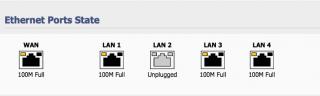
This post has been edited by kasmankk: Jan 26 2014, 12:56 PM |
|
|
Apr 1 2014, 04:57 PM
|
|
Newbie
0 posts Joined: Apr 2014
|
QUOTE(biatche @ Nov 1 2012, 06:00 PM) i have an asus rt-n16... if i get unifi can i use tomato firmware with unifi somehow? can tomato do those what vlan tagging etc.. Desperately HOPE someone will post a TOTAL TUTORIAL from A-Z on how to connect unifi thru tomato. Been trying almost a month now. Subscribe to purevpn, yet I cant connect my xbox one directly to router for vpn. HELP!!! |
|
|
May 30 2015, 07:26 PM
|

Junior Member
85 posts Joined: Dec 2004
|
QUOTE(tycheah_7 @ Nov 6 2013, 03:40 PM) followed exactly same config. PPPoE showing connected but not able to ping the internet. The connected WAN IP always start from 172.20.100.xx. Somewhere wrong  |
|
|
Jan 11 2017, 12:28 PM
|

Junior Member
664 posts Joined: Nov 2016
|
QUOTE(qSKYDRIFTERp @ Apr 1 2014, 04:57 PM) Desperately HOPE someone will post a TOTAL TUTORIAL from A-Z on how to connect unifi thru tomato. Been trying almost a month now. Subscribe to purevpn, yet I cant connect my xbox one directly to router for vpn. HELP!!! Apologies for reviving an old thread but I just got my Netgear WNR3500L working with Unifi and I hope this helps others.Klseet shows that newer routers can use Shibby builds 136 and above to set VID of 500: https://klseet.com/index.php/15-tomato/toma...vlan500-vlan600 However, older routers like mine have a hardware limitation that requires another method, VID offset as featured in Shibby build numbers <136. I'm using build 132. I struggled to get the right values in the VLAN table, but eventually found the answer here: http://tomatousb.org/forum/t-430053/suppor...-console-or-gui Thanks to Kanuki! My settings are: VLAN1 (LAN) / VID = 497 VLAN4 (WAN) / VID = 500 / 'Tagged' box checked VID Offset = 496 Screenshot attached. Reboot the router after saving, then enter your PPPoE login and save. NB I had to turn off both the BTU and router, then allow the BTU to boot fully before turning on the router in order to get it to connect to TM via PPPoE. Now I have internet from my WNR3500L  But it isn't possible to get HyppTV working with these old routers, I think. No loss for all I care. But it isn't possible to get HyppTV working with these old routers, I think. No loss for all I care.Attached thumbnail(s) 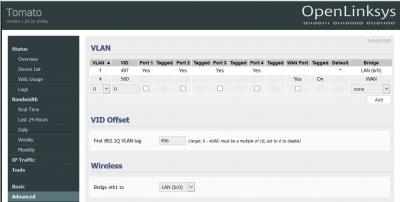
|
|
|
Jan 12 2017, 02:12 PM
|
|
Senior Member
1,649 posts Joined: Jan 2003
|
QUOTE(tertiary @ Jan 11 2017, 12:28 PM) Apologies for reviving an old thread but I just got my Netgear WNR3500L working with Unifi and I hope this helps others. VID = 497? LAN? why's this in the tutorialKlseet shows that newer routers can use Shibby builds 136 and above to set VID of 500: https://klseet.com/index.php/15-tomato/toma...vlan500-vlan600 However, older routers like mine have a hardware limitation that requires another method, VID offset as featured in Shibby build numbers <136. I'm using build 132. I struggled to get the right values in the VLAN table, but eventually found the answer here: http://tomatousb.org/forum/t-430053/suppor...-console-or-gui Thanks to Kanuki! My settings are: VLAN1 (LAN) / VID = 497 VLAN4 (WAN) / VID = 500 / 'Tagged' box checked VID Offset = 496 Screenshot attached. Reboot the router after saving, then enter your PPPoE login and save. NB I had to turn off both the BTU and router, then allow the BTU to boot fully before turning on the router in order to get it to connect to TM via PPPoE. Now I have internet from my WNR3500L But it isn't possible to get HyppTV working with these old routers, I think. No loss for all I care. |
|
|
Jan 12 2017, 02:30 PM
|
|
Junior Member
664 posts Joined: Nov 2016
|
QUOTE(biatche @ Jan 12 2017, 02:12 PM) VID = 497? LAN? why's this in the tutorial Because the offset of 496 is added to both VLAN IDs, 1 and 4. It works anyway.You can see the same in the top pic in Kasmankk's post #41. This post has been edited by tertiary: Jan 12 2017, 02:31 PM |
|
|
Jan 12 2017, 02:40 PM
|
|
Junior Member
383 posts Joined: May 2005
|
QUOTE(tertiary @ Jan 12 2017, 02:30 PM) Because the offset of 496 is added to both VLAN IDs, 1 and 4. It works anyway. Your WNR3500L has BCM53115 switch chip which does support 4K VLAN. That offset VLAN is for switch chip with VLAN 16 limit. Broadcom gigabit switch such as BCM53XXX & some of the newer 100mbit switch chip support 4K VLAN.You can see the same in the top pic in Kasmankk's post #41. |
|
|
Jan 12 2017, 03:44 PM
|
|
Junior Member
664 posts Joined: Nov 2016
|
QUOTE(jio @ Jan 12 2017, 02:40 PM) Your WNR3500L has BCM53115 switch chip which does support 4K VLAN. That offset VLAN is for switch chip with VLAN 16 limit. Broadcom gigabit switch such as BCM53XXX & some of the newer 100mbit switch chip support 4K VLAN. I tried DualWAN Shibby builds 137 and 138 with the VLAN settings advised by Klseet and the router would not connect via PPPoE, no matter how many times I tried, double checked settings, password etc. I reverted to build 132 and the offset method and it connected. |
|
|
Jan 12 2017, 04:40 PM
|
|
Junior Member
383 posts Joined: May 2005
|
QUOTE(tertiary @ Jan 12 2017, 03:44 PM) I tried DualWAN Shibby builds 137 and 138 with the VLAN settings advised by Klseet and the router would not connect via PPPoE, no matter how many times I tried, double checked settings, password etc. I reverted to build 132 and the offset method and it connected. That is could be due to incomplete 4K vlan support in some of the codepath in shibby (but I'm sure toastman build had the support for it) or you didn't enable the experimental support for it IIRC. I used tomato toastman for Belkin F7D4301, which had the same chip as your WNR3500L. Back when 4K vlan first added to tomato, not all codepath (K24, K26, K26RT-N etc) had it implemented & I have to manually patch & compile my own. But that should be all fixed (toastman at least) since 2014 & I don't even have to custom compile it. |
|
|
Jan 12 2017, 05:05 PM
|
|
Junior Member
664 posts Joined: Nov 2016
|
QUOTE(jio @ Jan 12 2017, 04:40 PM) That is could be due to incomplete 4K vlan support in some of the codepath in shibby (but I'm sure toastman build had the support for it) or you didn't enable the experimental support for it IIRC. I used tomato toastman for Belkin F7D4301, which had the same chip as your WNR3500L. Back when 4K vlan first added to tomato, not all codepath (K24, K26, K26RT-N etc) had it implemented & I have to manually patch & compile my own. But that should be all fixed (toastman at least) since 2014 & I don't even have to custom compile it. I see. I tried Toastman a few years ago but Shibby seemed easier to use for some reason I can no longer remember. I think Shibby had 3G modem support and Toastman didn't and I needed it back then - something like that.I'm not competent to patch and compile my own build and don't really have the interest. Thanks for your input. If I get round to it I'll give Toastman a try. But as I don't need HyppTV then my present setup is fine. |
|
|
Jan 12 2017, 05:07 PM
Show posts by this member only | IPv6 | Post
#51
|
|
Senior Member
628 posts Joined: Apr 2016
|
can openwrt for RT-N14UHP ?
|
|
|
Jan 13 2017, 12:57 PM
|
|
Junior Member
664 posts Joined: Nov 2016
|
QUOTE(dannielshazmeer @ Jan 12 2017, 05:07 PM) can openwrt for RT-N14UHP ? Not trying to be rude, but if you're not competent to research that question for yourself by using Google, then you are going to find installing and configuring OpenWRT a challenge. Try Tomato or DD-WRT, if they have suitable builds. |
|
|
Jan 15 2017, 06:01 PM
|

Junior Member
137 posts Joined: Dec 2008 From: Somewhere between my chair and computer
|
So I have been trying to get tomato or DD wrt to work on my Asus RT N18U with Unifi but no luck. I used to use it with TIME without a problem but now with this VLAN tagging stuff, I just can't get it to connect to WAN. I have created a VLAN2 with VID as 500 and set it to the WAN port and still nothing. I have double checked my Unifi login credentials and everything is correct. The stock firmware works fine but tomato doesn't. Any ideas?
|
|
|
Jan 15 2017, 07:04 PM
|
|
Junior Member
664 posts Joined: Nov 2016
|
QUOTE(PeacefulDiscord @ Jan 15 2017, 06:01 PM) So I have been trying to get tomato or DD wrt to work on my Asus RT N18U with Unifi but no luck. I used to use it with TIME without a problem but now with this VLAN tagging stuff, I just can't get it to connect to WAN. I have created a VLAN2 with VID as 500 and set it to the WAN port and still nothing. I have double checked my Unifi login credentials and everything is correct. The stock firmware works fine but tomato doesn't. Any ideas? Which Tomato build number are you trying, and which flavour - Shibby or Toastman? |
|
|
Jan 15 2017, 08:05 PM
|
|
Junior Member
137 posts Joined: Dec 2008 From: Somewhere between my chair and computer
|
QUOTE(tertiary @ Jan 15 2017, 07:04 PM) Which Tomato build number are you trying, and which flavour - Shibby or Toastman? I am running Shibby build 138. |
|
|
Jan 15 2017, 08:31 PM
|
|
Junior Member
664 posts Joined: Nov 2016
|
QUOTE(PeacefulDiscord @ Jan 15 2017, 08:05 PM) I am running Shibby build 138. I tried that build on my Netgear router and couldn't get Unifi to work. Maybe there's a VLAN problem with that build (and 137 also didn't work). I reverted to build 132 and used the VLAN ID offset method detailed above and internet works (but not HyppTV). |
|
|
Jan 15 2017, 08:35 PM
|
|
Junior Member
137 posts Joined: Dec 2008 From: Somewhere between my chair and computer
|
QUOTE(tertiary @ Jan 15 2017, 08:31 PM) I tried that build on my Netgear router and couldn't get Unifi to work. Maybe there's a VLAN problem with that build (and 137 also didn't work). I tried the same thing. Reverted to build 132 and do VID offset but my router wouldn't boot to the admin interface anymore. The LEDs turn on but I couldn't actually access anything.I reverted to build 132 and used the VLAN ID offset method detailed above and internet works (but not HyppTV). I am gonna try Toastman's build to see if it works. Will report back if all goes well. |
|
|
Jan 15 2017, 09:50 PM
|
|
Junior Member
664 posts Joined: Nov 2016
|
QUOTE(PeacefulDiscord @ Jan 15 2017, 08:35 PM) I tried the same thing. Reverted to build 132 and do VID offset but my router wouldn't boot to the admin interface anymore. The LEDs turn on but I couldn't actually access anything. Did you get a 404 error when trying to get to the web interface? I had that in Chrome although it had worked fine until the latest flash. Changed to Firefox and I could log in as usual.I am gonna try Toastman's build to see if it works. Will report back if all goes well. |
|
|
Jan 18 2017, 07:58 PM
|

Senior Member
3,902 posts Joined: Jul 2007
|
QUOTE(PeacefulDiscord @ Jan 15 2017, 06:01 PM) So I have been trying to get tomato or DD wrt to work on my Asus RT N18U with Unifi but no luck. I used to use it with TIME without a problem but now with this VLAN tagging stuff, I just can't get it to connect to WAN. I have created a VLAN2 with VID as 500 and set it to the WAN port and still nothing. I have double checked my Unifi login credentials and everything is correct. The stock firmware works fine but tomato doesn't. Any ideas? hmmm.... could it be some config issue with VID offset?when the VLAN2 with VID500, did you use 496 VID offset?  i think it's worth to try set VLAN2 with VID500, and disable the VID offset... |
|
|
Jan 19 2017, 03:09 PM
|
|
Junior Member
383 posts Joined: May 2005
|
QUOTE(tertiary @ Jan 12 2017, 05:05 PM) I see. I tried Toastman a few years ago but Shibby seemed easier to use for some reason I can no longer remember. I think Shibby had 3G modem support and Toastman didn't and I needed it back then - something like that. I can confirm Shibby build don't have the 4K VLAN properly supported for BCM53115. Toastman build works till RT-VLAN 7508.2 & RT-N-VLAN 0508.2. 7509/0509 onwards had Shibby code base merged to it & 4K VLAN for BCM53115 no longer working. You can try to submit bug or contact toastman or shibby to fix it. The code file bcmrobo.c.I'm not competent to patch and compile my own build and don't really have the interest. Thanks for your input. If I get round to it I'll give Toastman a try. But as I don't need HyppTV then my present setup is fine. So probably time to say goodbye to tomato firmware. I don't recommend tomato for anything other than Broadcom MIPS platform anyway. No point supporting newer hardware (issues with hardware accelerations, wifi power amp, etc) if it is poorly supported. |
|
|
Jan 20 2017, 09:49 AM
|
|
Junior Member
664 posts Joined: Nov 2016
|
QUOTE(jio @ Jan 19 2017, 03:09 PM) I can confirm Shibby build don't have the 4K VLAN properly supported for BCM53115. Toastman build works till RT-VLAN 7508.2 & RT-N-VLAN 0508.2. 7509/0509 onwards had Shibby code base merged to it & 4K VLAN for BCM53115 no longer working. You can try to submit bug or contact toastman or shibby to fix it. The code file bcmrobo.c. Really useful info - thanks So probably time to say goodbye to tomato firmware. I don't recommend tomato for anything other than Broadcom MIPS platform anyway. No point supporting newer hardware (issues with hardware accelerations, wifi power amp, etc) if it is poorly supported.  |
|
|
Jan 21 2017, 01:41 PM
|
|
Junior Member
137 posts Joined: Dec 2008 From: Somewhere between my chair and computer
|
QUOTE(tertiary @ Jan 15 2017, 09:50 PM) Did you get a 404 error when trying to get to the web interface? I had that in Chrome although it had worked fine until the latest flash. Changed to Firefox and I could log in as usual. Nope, it just never connected to the router in the first place. I decided not to try Shibby and go with Toastman and it worked fine. Setting VID 500 and tagging WAN was working perfectly fine. So for anyone with the RT-N18U, give Toastman a try.QUOTE(lamode @ Jan 18 2017, 07:58 PM) hmmm.... could it be some config issue with VID offset? I actually don't know what it could be as I tried doing various things to fix it. Even tried doing a full NVRAM wipe, and then setting VID offset but still my router was inaccessible. Did the same thing and just set VID straight to 500 and no connection. I gave up and tried Toastman's build and it worked perfectly fine so the problem is probably in Shibby's build.when the VLAN2 with VID500, did you use 496 VID offset? i think it's worth to try set VLAN2 with VID500, and disable the VID offset... QUOTE(jio @ Jan 19 2017, 03:09 PM) I can confirm Shibby build don't have the 4K VLAN properly supported for BCM53115. Toastman build works till RT-VLAN 7508.2 & RT-N-VLAN 0508.2. 7509/0509 onwards had Shibby code base merged to it & 4K VLAN for BCM53115 no longer working. You can try to submit bug or contact toastman or shibby to fix it. The code file bcmrobo.c. Yea, I wen't with Toastman's build and now things are working fine. I wouldn't say Tomato firmware doesn't work well with our ARM devices. Just have to find the right build I guess.So probably time to say goodbye to tomato firmware. I don't recommend tomato for anything other than Broadcom MIPS platform anyway. No point supporting newer hardware (issues with hardware accelerations, wifi power amp, etc) if it is poorly supported. But oddly enough, I tried DD-WRT and the same issues were happening |
|
|
Jan 21 2017, 02:46 PM
|
|
Junior Member
383 posts Joined: May 2005
|
QUOTE(PeacefulDiscord @ Jan 21 2017, 01:41 PM) Yea, I wen't with Toastman's build and now things are working fine. I wouldn't say Tomato firmware doesn't work well with our ARM devices. Just have to find the right build I guess. The 4K VLAN for BCM53115 is not related to your case at all. In fact it is on separate code path. Maybe it's good enough for you, but tomato arm does not meet my requirement for a stable use. Broadcom ARM are mostly newer AC routers (Asus RT-N18U is an exception). If you have Asus Broadcom ARM based router & supported by AsusWRT-Merlin (not for RT-N18U), use that instead. Just because there is build for your device, doesn't mean it is properly supported. This is especially true with OpenWRT & DD-WRT. No point making your network less stable just to have some fancy features.But oddly enough, I tried DD-WRT and the same issues were happening |
|
|
Apr 10 2017, 06:08 PM
|

Senior Member
2,281 posts Joined: Feb 2012
|
Hi all. Just to confirmed, tomatoUSB firmware r/w speed for usb disk in ntfs format are slow compare to ext2/ext3 or fat32?
i tested fat32 and ext3 can get decent speed but not ntfs...... is there any solution for that? or is it just as it is? |
|
|
May 7 2017, 06:01 PM
|
|
Junior Member
23 posts Joined: Apr 2017
|
I am planning to flash shibby's tomato build 138 (tomato-K26-1.28.RT-N5x-MIPSR2-138-Max.zip) on my RT-N12HP_B1.
Will both unifi and hypptv work with this build on my router? EDIT: I am flashing custom firmware so that I could use both ssh and openVPN with it. This post has been edited by Matt3226: May 7 2017, 06:03 PM |
|
|
Feb 14 2019, 11:29 PM
|

All Stars
11,456 posts Joined: Oct 2007 From: KL
|
QUOTE(biatche @ Jun 1 2013, 09:32 AM) Hope this helps. Do subscribe unifi through me - anywhere in Msia. I'll be glad to offer further assistance in setting up -- as well as guest networks, etc.Speedtest Turbo800 with BCM_NAT: ON  This post has been edited by soonwai: Feb 14 2019, 11:29 PM |
|
|
Feb 24 2019, 07:52 PM
|
|
Newbie
3 posts Joined: Nov 2011
|
Is there anything that i need to take note? I’m using tomatousb on netgear R7000 but only get 50mbps despite I’m subscribed to 300mbps unifi. Thanks
QUOTE(soonwai @ Feb 14 2019, 11:29 PM) Thanks biatche, still works in 2019 with Asus RT-N16 Tomato 1.28.0000 MIPSR2-3.5-140 K26 USB AIO Speedtest Turbo800 with BCM_NAT: ON |
|
|
Feb 25 2019, 01:06 AM
|
|
All Stars
11,456 posts Joined: Oct 2007 From: KL
|
QUOTE(tchwue @ Feb 24 2019, 07:52 PM) Is there anything that i need to take note? I’m using tomatousb on netgear R7000 but only get 50mbps despite I’m subscribed to 300mbps unifi. Thanks 50Mbps on wired LAN? |
|
|
Feb 25 2019, 06:07 AM
|
|
Newbie
3 posts Joined: Nov 2011
|
Yeah, only 50mbps on gb LAN. It’s bad right?
QUOTE(soonwai @ Feb 25 2019, 01:06 AM) 50Mbps on wired LAN? |
|
|
Jun 15 2021, 11:06 PM
|
|
Junior Member
47 posts Joined: May 2005
|
Im not too sure still got people using this tomato firmware to connect Unifi.
I try for few hour still not able to get it to work. Is anyone can post some screenshot? tq |
| Change to: |  0.0416sec 0.0416sec
 0.34 0.34
 6 queries 6 queries
 GZIP Disabled GZIP Disabled
Time is now: 6th December 2025 - 08:35 AM |
 Quote
Quote
