Welcome Guest ( Log In | Register )

81 Pages « < 52 53 54 55 56 > » Bottom

Outline · [ Standard ] · Linear+

 AMD K8 Family Overclocking (754/939/940/AM2/1207), General discussions and newbies' guide

views
     
rainingzero
post Dec 11 2007, 06:25 PM

I miss my student life~
*******
Senior Member
2,497 posts

Joined: Jan 2006
From: Selangor


QUOTE(tapirus @ Dec 11 2007, 01:30 PM)
use divider 400..no need up vcore..just up ur vdim...use timing 5-5-5-15 2T...then try up ur bus speed little by little with ur current vcore..when bsod or hang appeared,u up vcore a little bit..then try back..until u reach ur limit...that how i'm doing with my proc..

EDIT :- tight is good..but u need to loosen ur ram timing 1st..to find good core speed..then when u satisfied with ur speed..u can tighten ur ram..
*
follow tapirus advices. but u need to loosen ur rams 1st so ur rams doesn't limited ur ocing. try to pump ur Vdimm as high as u can. but dont be too high la. later burned...laugh.gif
after good good ocing result, then u may try to find sweet spot of ur ram timings.remember, tighter timings need higher Vdimm..nod.gif
ktek
post Dec 11 2007, 09:09 PM

小喇叭
********
All Stars
13,202 posts

Joined: Jul 2006
QUOTE(muh_is @ Dec 10 2007, 09:16 PM)
well.. erm.. need some help.. i got 2.6GHz with my F2 Windsor 3800+
but then, everytime 10 minits orthos, the pc will auto restart.. what's u guys opinion? is it cos of the vcore? or it's the limit edi? or issit RAM timings? here's my screenshot..
user posted image
btw, my sig shows the spec..
*

by the way , new speedfan 4.33 is out .
no more funny fan speed reading laugh.gif
rainingzero
post Dec 12 2007, 08:00 AM

I miss my student life~
*******
Senior Member
2,497 posts

Joined: Jan 2006
From: Selangor


QUOTE(ktek @ Dec 11 2007, 09:09 PM)
by the way , new speedfan 4.33 is out .
no more funny fan speed reading laugh.gif
*
at last...no more funny fan speed readings... rclxm9.gif
MizuChi
post Dec 12 2007, 04:14 PM

Casual
***
Junior Member
363 posts

Joined: Jan 2003
From: Not where you are obviously..


hey guys.. I'm looking to do 3GHz on an X2 4400+.. here are my specs..

AMD Athlon64 X2 4400+ (Brisbane)
Biostar TF7050-M2
2GB OCZ PC2-6400 Dual Channel SLI-Ready
XFX 7800GTX 490/1300
Keian 550W PSU

here's where I am at the moment..

user posted image

vdimm is at 2.2V and it's holding.. I've done orthos for 9 hours and it's pretty stable so far.. however.. when I try to do anything over 285MHz for the FSB, it just locks up.. it wont even load Vista..

the temps are somewhat acceptable.. it's doing 36C at idle.. and shoots up to about 61C on full load.. this is all at room temp (when I say room temp, I mean around 21-23C.. it's winter) the CPU temp in speedfan (in the pic) is the temp for when I was running a UT3 timedemo (for about 3mins)..

any advice?
alive88
post Dec 12 2007, 04:49 PM

Pata Pata Pon! Pon Pon Pata Pon!!
******
Senior Member
1,406 posts

Joined: Jun 2007


i think ur multiplier should be higher rite?mybe 11 or 12 isnt it?coz my 4000 brisby is 10.5..
remember, my brisby can only achieve 280 fsb..more than that, wont boot..
u better change ur multiplier
muh_is
post Dec 12 2007, 06:19 PM

Getting Started
**
Junior Member
195 posts

Joined: Jun 2006


QUOTE(rainingzero @ Dec 11 2007, 06:25 PM)
follow tapirus advices. but u need to loosen ur rams 1st so ur rams doesn't limited ur ocing. try to pump ur Vdimm as high as u can. but dont be too high la. later burned...laugh.gif
after good good ocing result, then u may try to find sweet spot of ur ram timings.remember, tighter timings need higher Vdimm..nod.gif
*
u mean, i have to try with 5-5-15 2T first? i tried.. but can't hold up for 10 mins at 264MHz FSB.. vcore at 1.52 n vdimm at 2.09..

This post has been edited by muh_is: Dec 12 2007, 06:25 PM
alive88
post Dec 12 2007, 06:33 PM

Pata Pata Pon! Pon Pon Pata Pon!!
******
Senior Member
1,406 posts

Joined: Jun 2007


QUOTE(muh_is @ Dec 12 2007, 06:19 PM)
u mean, i have to try with 5-5-15 2T first? i tried.. but can't hold up for 10 mins at 264MHz FSB.. vcore at 1.52 n vdimm at 2.09..
*
vcore 1.52 i think is enough for F2..vdimm at 2.1?it should be enuf if u r using ddr400 divider..what type of ram r u using?ur timing?
muh_is
post Dec 12 2007, 06:42 PM

Getting Started
**
Junior Member
195 posts

Joined: Jun 2006


QUOTE(alive88 @ Dec 12 2007, 06:33 PM)
vcore 1.52 i think is enough for F2..vdimm at 2.1?it should be enuf if u r using ddr400 divider..what type of ram r u using?ur timing?
*
KVR with hynix chipset.. i used both timings that was told to.. 5-4-4-14 n 5-5-15-2T... same result..
rainingzero
post Dec 12 2007, 06:46 PM

I miss my student life~
*******
Senior Member
2,497 posts

Joined: Jan 2006
From: Selangor


QUOTE(muh_is @ Dec 12 2007, 06:42 PM)
KVR with hynix chipset.. i used both timings that was told to.. 5-4-4-14 n 5-5-15-2T... same result..
*
same proc speed result??but in benchmarking, i believe those 2 timings brings different result...nod.gif
Hynix chips?? wht chips?? FP-Y5??

edit: maybe u can try to pump more Vcore up to 1.55-1.57v. nod.gif

This post has been edited by rainingzero: Dec 12 2007, 06:47 PM
muh_is
post Dec 12 2007, 06:55 PM

Getting Started
**
Junior Member
195 posts

Joined: Jun 2006


QUOTE(rainingzero @ Dec 12 2007, 06:46 PM)
same proc speed result??but in benchmarking, i believe those 2 timings brings different result...nod.gif
Hynix chips?? wht chips?? FP-Y5??

edit: maybe u can try to pump more Vcore up to 1.55-1.57v. nod.gif
*
yah same speed.. n yes FP-Y5... 1.57 rr? issit okay with only tuniq tower 120? so afraid anything happen LOL laugh.gif
MizuChi
post Dec 12 2007, 06:58 PM

Casual
***
Junior Member
363 posts

Joined: Jan 2003
From: Not where you are obviously..


QUOTE(alive88 @ Dec 12 2007, 04:49 PM)
i think ur multiplier should be higher rite?mybe 11 or 12 isnt it?coz my 4000 brisby is 10.5..
remember, my brisby can only achieve 280 fsb..more than that, wont boot..
u better change ur multiplier
*
hey thanks for the reply.. this is a list of what I've tried..

try 1:
Multiplier: x11
FSB: 280Mhz
vcore: stock + 0.200V
vdimm: 2.2V
NB: 1.36V

will POST but wont boot into Vista (BSOD)

try 2:
Multiplier: x11
FSB: 280MHz
vcore: +0.250V

will POST and boot into Vista but immediately BSOD

try 3:
Multiplier: x11
FSB: 275MHz
vcore: +0.250V

will POST and boot into Vista but starting any programs will induce BSOD

try 4:
Multiplier: x11
FSB: 275MHz
vcore: +0.275V

will POST and boot into Vista.. starting programs kinda works but only in some cases (corruption?) eg. CPU-Z runs but UT3 time demo wont.. at this time CPU temp was 40-42C at idle..

try 5:
Multiplier: x11
FSB: 273MHz
vcore: +0.275V

about the same as try 4..

right now I've reverted back to 280x10 @ +0.200V which seems to be the most stable so far.. I have a policy of keeping the idle CPU temp below 40C.. maybe I should look into some better cooling? how's your system handling the heat?
alive88
post Dec 12 2007, 07:20 PM

Pata Pata Pon! Pon Pon Pata Pon!!
******
Senior Member
1,406 posts

Joined: Jun 2007


QUOTE(MizuChi @ Dec 12 2007, 06:58 PM)
right now I've reverted back to 280x10 @ +0.200V which seems to be the most stable so far.. I have a policy of keeping the idle CPU temp below 40C.. maybe I should look into some better cooling? how's your system handling the heat?
*
u may stay at the most stable speed...
my cpu at 2.9ghz(278X10.5), vcore 1.5v vdimm 2.1,ram@970mhz 5-4-4-13-23-2T
temp, 42-43C.load temp, 65-68C..using stock cooler and SHARP stand fan with its speed set at 3 tongue.gif
muh_is
post Dec 13 2007, 02:52 AM

Getting Started
**
Junior Member
195 posts

Joined: Jun 2006


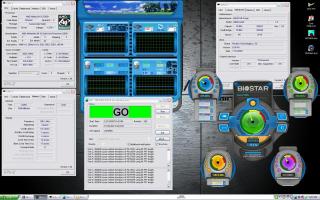
here's my current settings..

user posted image
user posted image

so what do u guys think? any opininion? currently trying with 5-4-4-17-1T
jeromeccm
post Dec 13 2007, 09:53 AM

On my way
****
Senior Member
545 posts

Joined: Nov 2006
Hi Guys..

noob here.. he he..
actually i have been following up the OC K8 for quite a while. Never tried to OC but once i OC i got addicted..
I have quite a number of question here, so dont mind if i can bombard the question to get more understanding..

My RIG
AMD X2 5200+ @ 2.6GHz stock with Zalman S8700 heatsink and fan.
Biostar TF7050-M2
2GHz Kingston RAM DDR667 (running pair-1GHz each)
Zotac 8800GT amp! (700/2000) stock cooler.


I finally tried to Oc yesterday and here is what i've got.

I am using the default OC software given by Biostar to OC the buss speed.
Here is what i did before OC the buss speed.
- Lower the HT Lnk to X4
- Reduce the RAM speed to 566MHz
During OC time, the incremental of the Buss speed is 5MHz each time and test Ortho for 15m. If stable then increase 5MHz again.

I didnt change the voltage at first.
Multiplier remain at X13.
My RAM speed was about 297MHz.

However when i hit 230MHz, my PC black out and restart by it self. Then suddenly it jump into blue screen for 1/2sec and restart again. This time, the Bus speed have been automatically change to 215MHz once i boot to window. MY HTT was 920MHz.

Hence i have reduce the buss speed to 225MHz as shown in the picture below.

My question is,
1) Is my initial setting correct for the HT link, The RAM frequency as well as for the multiplier?
2) Is the blue screen happened because of not enough voltage during OC?
3) My Temp is idle at around 36deg C and load is 45deg C. Is it normal?
4) Is my Processror F3 version?
5) Is there anything to do with the HTT?

Please please provide me advise how to clock it further... below is a snap shot of my current setting..
Please comment... thanks...


Attached thumbnail(s)
Attached Image
alive88
post Dec 13 2007, 10:44 AM

Pata Pata Pon! Pon Pon Pata Pon!!
******
Senior Member
1,406 posts

Joined: Jun 2007


My answer is,
1) yup..still in safe position..increase ur vdimm till 2.1
2) thers possibility, but sometimes its about ur ram..as i told u,increase ur vdimm
3) normal
4) yup,it is
5) nope
jeromeccm
post Dec 13 2007, 12:19 PM

On my way
****
Senior Member
545 posts

Joined: Nov 2006
QUOTE(alive88 @ Dec 13 2007, 10:44 AM)
My answer is,
1) yup..still in safe position..increase ur vdimm till 2.1
2) thers possibility, but sometimes its about ur ram..as i told u,increase ur vdimm
3) normal
4) yup,it is
5)  nope
*
thnaks for the reply.. I will try to increase abit the voltage.. may i know why? I just want to understand the theory so that i dont do it blindly. At lease next time people ask i am able to to share my experience as well..

in your opinion, what are the foot extra foot step that i should take which you think i am lack off in my case of OC.

normally how high the buss can go to? i saw some forumer can go as high as 320MHz but mine reach 230 already koyak.... sigh... need to reboot again.


Added on December 13, 2007, 12:30 pmfurther questions...

1) since my RAM is DDR667, the actual clock is 333Mhz. During the OC can the memory frequency go beyond 333MHz? I assume 333MHz is the limit and anything go beyond that is consider OC.
2) What if the memory is beyond the 333MHz, will there be a risk that the memory will burn?
3) I notice some people said lowering the CPU multiplier able to push the bus speed further.. Why is that so?
4) What will be my safe margin of the CPU temp when OC. some says 50C, some say 55C and some even said 60C.. confuse.
5) Yesterday my bus speed hit 230MHz, CPU Multiplier is 13, HT link 920MHz, and the Memory speed is about 300MHZ, i tested with Ortho for 6 hours.. stable and no error. But when i tested with the 3Dmark03, the graphic teste was ok.. but when come to the CPU test where the Orgs were playing stone game, the PC black out and reboot.... may i know why? I thought the Ortho already stressing the CPU and should be fine in running other programs...

sorry guys... i am a technical person so everything i do i have to understand.,, if not i am like a copier machine but not knowing the content..

This post has been edited by jeromeccm: Dec 13 2007, 12:30 PM
rainingzero
post Dec 13 2007, 07:45 PM

I miss my student life~
*******
Senior Member
2,497 posts

Joined: Jan 2006
From: Selangor


1)yeah, ur rams can go beyond 333Mhz, anything beyond 333mhz (for 667mhz rams) considered oced already.
2)u keep ur Vdimm around 2.1-2.2v, no worries.
3)coz ur rams might hold back ur ocing.
4) around 60'c in full load considered save already.
5) maybe u need to pump more Vcore?? not sure about that..
muh_is
post Dec 13 2007, 08:51 PM

Getting Started
**
Junior Member
195 posts

Joined: Jun 2006


why is it with my current speed, using prime 95, no errors for couple of hours.. but when running OCCT or Orthos, can't even stand for half an hour? n can play NFS carbon + movie making from morning till evening without a single lag?
alive88
post Dec 14 2007, 01:42 AM

Pata Pata Pon! Pon Pon Pata Pon!!
******
Senior Member
1,406 posts

Joined: Jun 2007


QUOTE(muh_is @ Dec 13 2007, 08:51 PM)
why is it with my current speed, using prime 95, no errors for couple of hours.. but when running OCCT or Orthos, can't even stand for half an hour? n can play NFS carbon + movie making from morning till evening without a single lag?
*
orthos stress both of ur core..prime 95 only single,correct me if im wrong..probably ur prob is not enuf vcore or vdimm..i also experience this b4.. i set my brisby to 2.8ghz wih 1.36vcore,orthos 4 minutes failed alrdy,i add till 1.4vcore,no prob at all..
muh_is
post Dec 14 2007, 03:10 AM

Getting Started
**
Junior Member
195 posts

Joined: Jun 2006


i've reached my mobo's vcore limit edi, at 1.55... but my vdim is oredi at 2.1... i'm afraid if i go higher my ram will burn since i've got no cooling for ram laugh.gif

This post has been edited by muh_is: Dec 14 2007, 03:32 AM

81 Pages « < 52 53 54 55 56 > » Top
 

Change to:
| Lo-Fi Version
0.0297sec    0.47    6 queries    GZIP Disabled
Time is now: 10th December 2025 - 11:43 AM