Welcome Guest ( Log In | Register )

Outline · [ Standard ] · Linear+

 AMD K8 Family Overclocking (754/939/940/AM2/1207), General discussions and newbies' guide

views
     
jeromeccm
post Apr 11 2007, 05:32 PM

On my way
****
Senior Member
545 posts

Joined: Nov 2006
hi Guys....

I just got my self a AMD X2 dual 4600+ Stock speed 2.4G, Socket AM2

I am thinking of overclocking it abit.. Anybody know how? I am totally zero in this new processor overclocking...

I am using a MSI K9N Neo board.
Any advise? if got step by step then better... he he he
thanks thanks thanks...
jeromeccm
post Apr 14 2007, 12:12 AM

On my way
****
Senior Member
545 posts

Joined: Nov 2006
QUOTE(edwin3210 @ Apr 13 2007, 03:38 PM)
just hit a new record with my old sempron 2500 E6 socket 754:

default speed at 1.4GHz.
by lowering my RAM speed (which hurt alot in performance) im able to get 2.250GHz.
user posted image
*
Hi there...
I try to run CPU-Z on my computer and it did but i have a few question. How come my PC never sate any name for the "Code name"?

This goes the same for the memory. In the Memory tab, mine only shows the type and size thats all.. didnt show the frequency and other stuff.... i wonder...
Do you have to register first to have all these features?
jeromeccm
post Apr 17 2007, 12:32 PM

On my way
****
Senior Member
545 posts

Joined: Nov 2006
QUOTE(edwin3210 @ Apr 14 2007, 04:13 AM)
no, u dont need to register. all u hv to do is to go to http://www.cpuid.com/cpuz.php and download the latest version. i hv mine updated once there is a new version out, is like 2-3 months/1 new version.
*
thanks... i downloaded the new version and it works... he he...

jeromeccm
post May 16 2007, 01:49 AM

On my way
****
Senior Member
545 posts

Joined: Nov 2006
HI Guys..

New in Overclock CPU. It seems to be more complicated than last time where changing the multiplier will do.

I have a AMD64X2 4600 2.4GHz (Windsor) 200MHz X 12
Single slot Kingston 1G Kingston DDR667MHz at 300MHz 5-5-5-15
MSI K9n Neo

Anybody have the same specs as mine? I am thinking of OC step by step...

need help.

OC graphic card is easy....

using MSI6800GS OC (550/1400)

This post has been edited by jeromeccm: May 16 2007, 01:51 AM
jeromeccm
post Dec 13 2007, 09:53 AM

On my way
****
Senior Member
545 posts

Joined: Nov 2006
Hi Guys..

noob here.. he he..
actually i have been following up the OC K8 for quite a while. Never tried to OC but once i OC i got addicted..
I have quite a number of question here, so dont mind if i can bombard the question to get more understanding..

My RIG
AMD X2 5200+ @ 2.6GHz stock with Zalman S8700 heatsink and fan.
Biostar TF7050-M2
2GHz Kingston RAM DDR667 (running pair-1GHz each)
Zotac 8800GT amp! (700/2000) stock cooler.


I finally tried to Oc yesterday and here is what i've got.

I am using the default OC software given by Biostar to OC the buss speed.
Here is what i did before OC the buss speed.
- Lower the HT Lnk to X4
- Reduce the RAM speed to 566MHz
During OC time, the incremental of the Buss speed is 5MHz each time and test Ortho for 15m. If stable then increase 5MHz again.

I didnt change the voltage at first.
Multiplier remain at X13.
My RAM speed was about 297MHz.

However when i hit 230MHz, my PC black out and restart by it self. Then suddenly it jump into blue screen for 1/2sec and restart again. This time, the Bus speed have been automatically change to 215MHz once i boot to window. MY HTT was 920MHz.

Hence i have reduce the buss speed to 225MHz as shown in the picture below.

My question is,
1) Is my initial setting correct for the HT link, The RAM frequency as well as for the multiplier?
2) Is the blue screen happened because of not enough voltage during OC?
3) My Temp is idle at around 36deg C and load is 45deg C. Is it normal?
4) Is my Processror F3 version?
5) Is there anything to do with the HTT?

Please please provide me advise how to clock it further... below is a snap shot of my current setting..
Please comment... thanks...


Attached thumbnail(s)
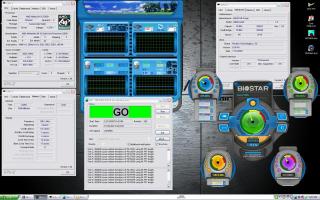

Attached Image
jeromeccm
post Dec 13 2007, 12:19 PM

On my way
****
Senior Member
545 posts

Joined: Nov 2006
QUOTE(alive88 @ Dec 13 2007, 10:44 AM)
My answer is,
1) yup..still in safe position..increase ur vdimm till 2.1
2) thers possibility, but sometimes its about ur ram..as i told u,increase ur vdimm
3) normal
4) yup,it is
5)  nope
*
thnaks for the reply.. I will try to increase abit the voltage.. may i know why? I just want to understand the theory so that i dont do it blindly. At lease next time people ask i am able to to share my experience as well..

in your opinion, what are the foot extra foot step that i should take which you think i am lack off in my case of OC.

normally how high the buss can go to? i saw some forumer can go as high as 320MHz but mine reach 230 already koyak.... sigh... need to reboot again.


Added on December 13, 2007, 12:30 pmfurther questions...

1) since my RAM is DDR667, the actual clock is 333Mhz. During the OC can the memory frequency go beyond 333MHz? I assume 333MHz is the limit and anything go beyond that is consider OC.
2) What if the memory is beyond the 333MHz, will there be a risk that the memory will burn?
3) I notice some people said lowering the CPU multiplier able to push the bus speed further.. Why is that so?
4) What will be my safe margin of the CPU temp when OC. some says 50C, some say 55C and some even said 60C.. confuse.
5) Yesterday my bus speed hit 230MHz, CPU Multiplier is 13, HT link 920MHz, and the Memory speed is about 300MHZ, i tested with Ortho for 6 hours.. stable and no error. But when i tested with the 3Dmark03, the graphic teste was ok.. but when come to the CPU test where the Orgs were playing stone game, the PC black out and reboot.... may i know why? I thought the Ortho already stressing the CPU and should be fine in running other programs...

sorry guys... i am a technical person so everything i do i have to understand.,, if not i am like a copier machine but not knowing the content..

This post has been edited by jeromeccm: Dec 13 2007, 12:30 PM


Change to:
| Lo-Fi Version
0.0360sec    0.74    7 queries    GZIP Disabled
Time is now: 10th December 2025 - 03:34 PM