Welcome Guest ( Log In | Register )

235 Pages « < 25 26 27 28 29 > » Bottom

Outline · [ Standard ] · Linear+

Streamyx Streamyx 4Mbps Club V6

views
     
arimii
post Jan 23 2015, 11:43 AM

___________
*****
Senior Member
817 posts

Joined: Jul 2011
QUOTE(kaiserreich @ Jan 23 2015, 11:21 AM)
Check in the software that you used to do live stream, to limit the connection numbers to 500 or less.
With the 500kbps upload speed, that's the most you can. Some people recommend 350 max connections for optimum speed.

For uploads, limit upload speed to 80% of your max upload speed from speed test.
8M package cap at 8072, or 4M Package cap at 4096 constitutes a miscap.
If you are cap at you package speed, you will never get full speed. This is due to ADSL overhead. Generally, the cap has to be 20% above your package speed in order for you to get Max speed.

It is very hard to convince the techs this. Some CSR knows, but some ignore what you say to them. It used to be that the CSR is able to change the cap for you by contacting some of their internal teams. Now, only technicians are allowed to do it.
*
Is it possible to convince the technician to give me 8mb rate when they come to my place in this few days? Current rate is 2mb before I terminated 384kbps. I was opted for 4mbps but planning to upgrade to 8mb by the next month. Yet they haven't come to install. It has been 5 days .

andyng38
post Jan 23 2015, 11:44 AM

Look at all my stars!!
*******
Senior Member
2,399 posts

Joined: Jun 2007
QUOTE(kaiserreich @ Jan 23 2015, 11:21 AM)
For uploads, limit upload speed to 80% of your max upload speed from speed test.
8M package cap at 8072, or 4M Package cap at 4096 constitutes a miscap.
If you are cap at you package speed, you will never get full speed. This is due to ADSL overhead. Generally, the cap has to be 20% above your package speed in order for you to get Max speed.

It is very hard to convince the techs this. Some CSR knows, but some ignore what you say to them. It used to be that the CSR is able to change the cap for you by contacting some of their internal teams. Now, only technicians are allowed to do it.
*
Ah yes...I had forgotten about ADSL overhead. The last words the tech said as he left my place was that he would get a 5 meg port assigned to me. I was puzzled and just thought he had meant 4 meg instead. It's been a boggling journey to get back my old speed, with them initially blaming my wiring and equipment. New modem, 2 new microfilters, 2 new sets of network and phone cables, almost was convinced to change all my phone wiring...and it turns out to be a miscap. My old stuff was and is working as it should. Thank you for your input! smile.gif

user posted image
supfinal
post Jan 23 2015, 02:51 PM

Getting Started
**
Junior Member
72 posts

Joined: Jun 2008
QUOTE(kaiserreich @ Jan 23 2015, 11:21 AM)
Check in the software that you used to do live stream, to limit the connection numbers to 500 or less.
With the 500kbps upload speed, that's the most you can. Some people recommend 350 max connections for optimum speed.

For uploads, limit upload speed to 80% of your max upload speed from speed test.
how to limit upload speed to 80%?

for streaming using OBS use this setting?
user posted image
kaiserreich
post Jan 23 2015, 10:20 PM

Pendekar Papan Kekunci
*******
Senior Member
4,234 posts

Joined: Sep 2006
QUOTE(arimii @ Jan 23 2015, 11:43 AM)
Is it possible to convince the technician to give me 8mb rate when they come to my place in this few days? Current rate is 2mb before I terminated 384kbps. I was opted for 4mbps but planning to upgrade to 8mb by the next month. Yet they haven't come to install. It has been 5 days .
*
Sorry, i don't understand.
You want 8M cap but you have 2M now. TM wanted to give you 4M and you plan to upgrade to 8M? rclxub.gif

QUOTE(supfinal @ Jan 23 2015, 02:51 PM)
how to limit upload speed to 80%?

for streaming using OBS use this setting?
*
I do not really know how to use OBS. Under 'Broadcast settings', try selecting 'Minimize network impact'
If this does not help, do try the software recommended by blacktubi, or you'd need to look for other software that is able to control network connections and uploads speeds for OBS.

This post has been edited by kaiserreich: Jan 23 2015, 10:25 PM
arimii
post Jan 24 2015, 12:44 AM

___________
*****
Senior Member
817 posts

Joined: Jul 2011
QUOTE(kaiserreich @ Jan 23 2015, 10:20 PM)
Sorry, i don't understand.
You want 8M cap but you have 2M now. TM wanted to give you 4M and you plan to upgrade to 8M?  rclxub.gif
I do not really know how to use OBS. Under 'Broadcast settings', try selecting 'Minimize network impact'
If this does not help, do try the software recommended by blacktubi, or you'd need to look for other software that is able to control network connections and uploads speeds for OBS.
*
Yes. My area support 8MB but I didn't know if my Attenuation is good for 8MB or not so I picked 4MB first .


Attached thumbnail(s)
Attached Image
mentibang
post Jan 24 2015, 04:55 AM

New Member
*
Junior Member
8 posts

Joined: Jan 2012
QUOTE(andyng38 @ Jan 22 2015, 02:29 PM)
Problem resolved! rclxms.gif  Hoping it stays fixed.
Now my IP address shows on TM's speed test, unlike before.

user posted image
*
wow nice..can u show us this thing?
and ur downloading speed for any file.

user posted image


This post has been edited by mentibang: Jan 24 2015, 05:01 AM
namzaaa2006
post Jan 24 2015, 08:27 AM

New Member
*
Newbie
4 posts

Joined: Jul 2012
naahhh.. its jason bourne sweat.gif

This post has been edited by namzaaa2006: Jan 24 2015, 08:32 AM
TSblacktubi
post Jan 24 2015, 10:01 AM

-
Group Icon
Elite
8,400 posts

Joined: Jul 2008

QUOTE(arimii @ Jan 24 2015, 12:44 AM)
Yes. My area support 8MB but I didn't know if my Attenuation is good for 8MB or not so I picked 4MB first .
*
Not the best but looks okay, go or it if it support it. smile.gif
eddytan95
post Jan 24 2015, 11:17 AM

Casual
***
Junior Member
346 posts

Joined: Aug 2011
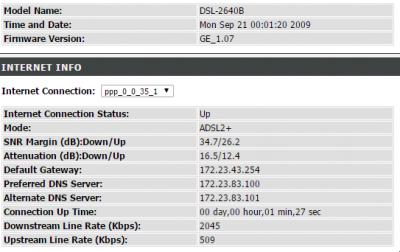
Hi guys,

i just receive my 4mbps package and port. (took 4 days for them to change my port)

But why am i assigned to

Downstream Line Rate (Kbps): 4094
Upstream Line Rate (Kbps): 509

As i though that was for 2mbps user?

User who subscribe 4mbps should get a port of 5mbps which is

Downstream Line Rate (Kbps): 5xxx
Upstream Line Rate (Kbps): 509

Isn't that correct?

Consistenly receiving 350kb/s to 390kb/s or 2.8mbps to 3.12mbps < Not even 80% best effort speed lol...

This post has been edited by eddytan95: Jan 24 2015, 11:20 AM
andyng38
post Jan 24 2015, 11:43 AM

Look at all my stars!!
*******
Senior Member
2,399 posts

Joined: Jun 2007
QUOTE(mentibang @ Jan 24 2015, 04:55 AM)
wow nice..can u show us this thing?
and ur downloading speed for any file.

user posted image
*
Attached are a printscreen of my ADSL statistics for today 24th Jan 15, and photo of torrent speeds (taken with cellphone to whatsapp to a friend) yesterday...am not downloading anything right now. With enough seeders, can sustain 405-450kB/s. thumbup.gif
user posted image

user posted image
neokyo
post Jan 24 2015, 11:37 PM

Getting Started
**
Junior Member
248 posts

Joined: Nov 2009


yeah... for torrent one, are there any special setting needed? cause i've tried but yield less than 10kbps. before installing streamyx, i can get 1MBps (celcom) using default 'new installation' setting.
kaiserreich
post Jan 25 2015, 12:28 PM

Pendekar Papan Kekunci
*******
Senior Member
4,234 posts

Joined: Sep 2006
QUOTE(eddytan95 @ Jan 24 2015, 11:17 AM)
Hi guys,

i just receive my 4mbps package and port. (took 4 days for them to change my port)

But why am i assigned to

Downstream Line Rate (Kbps): 4094
Upstream Line Rate (Kbps):          509

As i though that was for 2mbps user?

User who subscribe 4mbps should get a port of 5mbps which is

Downstream Line Rate (Kbps): 5xxx
Upstream Line Rate (Kbps):          509

Isn't that correct?

Consistenly receiving 350kb/s to 390kb/s or 2.8mbps to 3.12mbps < Not even 80% best effort speed lol...
*
Line miscap.
Need to ask TM to adjust. Maybe call your installer.
gee^gee
post Jan 27 2015, 07:35 AM

Getting Started
**
Junior Member
105 posts

Joined: Nov 2012
From: BBB.
QUOTE(supfinal @ Jan 23 2015, 02:51 PM)
how to limit upload speed to 80%?

for streaming using OBS use this setting?
user posted image
*
https://obsproject.com/estimator

put in ur upload speed to get a est setting for ur OBS... btw if u use streamyx upload speed very slow u can streaming when u play game the ping 600-1k for dota im test myself .. so better change to unifi.. lol
chikuera
post Jan 27 2015, 09:54 PM

Nora Bagi 4 Stars!!
*****
Senior Member
749 posts

Joined: Aug 2011


QUOTE(kaiserreich @ Jan 25 2015, 01:28 PM)
Line miscap.
Need to ask TM to adjust. Maybe call your installer.
*
so mine is also miscap? cry.gif

noobie here..just realized of this thing..


Attached image(s)
Attached Image
kiritoffx
post Jan 27 2015, 10:05 PM

Enthusiast
*****
Junior Member
728 posts

Joined: Feb 2013
From: Malaysia


QUOTE(chikuera @ Jan 27 2015, 09:54 PM)
so mine is also miscap?  cry.gif

noobie here..just realized of this thing..
*
dont think so. ur data rate is capped at 4mbs. ur can even apply 8mbs here and even more

This post has been edited by kiritoffx: Jan 27 2015, 10:07 PM
Madd3rz
post Jan 27 2015, 10:07 PM

Getting Started
**
Junior Member
183 posts

Joined: Apr 2014
From: Bandar Sri Damansara


QUOTE(chikuera @ Jan 27 2015, 09:54 PM)
so mine is also miscap?  cry.gif

noobie here..just realized of this thing..
*
Everything's alright ,no miscapped.
chikuera
post Jan 27 2015, 10:13 PM

Nora Bagi 4 Stars!!
*****
Senior Member
749 posts

Joined: Aug 2011


QUOTE(kiritoffx @ Jan 27 2015, 11:05 PM)
dont think so.  ur data rate is capped at 4mbs. ur can even apply 8mbs here and even more
*
my connection is so laggy..just now, experienced limited connectivity for the millionth time. took a reset and a 15 minute to restore connection just to reply this comment vmad.gif
chikuera
post Jan 27 2015, 10:15 PM

Nora Bagi 4 Stars!!
*****
Senior Member
749 posts

Joined: Aug 2011


QUOTE(Madd3rz @ Jan 27 2015, 11:07 PM)
Everything's alright ,no miscapped.
*
maybe it's time for me to change the router..why la streamyx always give the bad ones.. mad.gif
kiritoffx
post Jan 27 2015, 10:18 PM

Enthusiast
*****
Junior Member
728 posts

Joined: Feb 2013
From: Malaysia


QUOTE(chikuera @ Jan 27 2015, 10:13 PM)
my connection is so laggy..just now, experienced limited connectivity for the millionth time. took a reset and a 15 minute to restore connection just to reply this comment  vmad.gif
*
change router. cheaper tp-link quite okay for me so far
chikuera
post Jan 27 2015, 10:22 PM

Nora Bagi 4 Stars!!
*****
Senior Member
749 posts

Joined: Aug 2011


QUOTE(kiritoffx @ Jan 27 2015, 11:18 PM)
change router.  cheaper tp-link quite okay for me so far
*
will do after i get my first job hopefully

235 Pages « < 25 26 27 28 29 > » Top
 

Change to:
| Lo-Fi Version
0.0229sec    0.31    6 queries    GZIP Disabled
Time is now: 1st December 2025 - 07:43 PM