Welcome Guest ( Log In | Register )

Bump Topic Topic Closed RSS Feed
248 Pages « < 111 112 113 114 115 > » Bottom

Outline · [ Standard ] · Linear+

 Android TV Box

views
     
SUSDaprind
post Jul 22 2016, 12:22 PM

Getting Started
**
Junior Member
144 posts

Joined: Jun 2014
From: Kuala Lumpur
QUOTE(plumberly @ Jul 22 2016, 11:56 AM)
Since you have a Q10 Pro, interested to know more on the HDR and 10 bits colour.

Are the HDR and 10 bits colour only in theory or something you can easily notice on the TV screen? Hope it is the later.

I guess it also depends on the video signal. It cannot give a better picture than what was recorded. Or can it?

Thanks.
*
Ermm.. i can't give comment on both cause I only owned LG UHD TV. I'm very satisfied with this product. It really delivered the quality as per my TV & soundbar.

I know, its not up to my TV standard, even my seller recommend Minix and almost bought it. But deep down i know, this box will serve me right in future (2-3 more years).

No one will stick with 1 TV forever. So If there is a chance to upgrade, it will maximize my Q10pro function.

Sorry, could not be of help doh.gif
voncrane
post Jul 22 2016, 12:34 PM

Noir et fier!
*******
Senior Member
7,118 posts

Joined: Oct 2011
From: Wakanda


QUOTE(plumberly @ Jul 22 2016, 11:56 AM)
Since you have a Q10 Pro, interested to know more on the HDR and 10 bits colour.

Are the HDR and 10 bits colour only in theory or something you can easily notice on the TV screen? Hope it is the later.

I guess it also depends on the video signal. It cannot give a better picture than what was recorded. Or can it?

Thanks.
*
HDR... Tries to mimick the human eye, as close as possible..
10 Bit... Deeper colors.

That's like the summary of both concepts. In order to benefit from em, one requires the appropriate source file, a device capable of processing both and a compatible display set.. With these, there's definitely a difference in PQ.. So yeah, it does depend on several factors, all of which must be present for full effect. The HEVC h.265 format supports 10 bit color.

QUOTE(blurjoey @ Jul 22 2016, 12:05 PM)
The Beelink miniMXIII is good... Wifey enjoying her Taiwanese series... The mini m8s II still haven't got time to setup...

I'm still reading through this thread... So much to digest... Got confused with the DTS stuff... laugh.gif  laugh.gif  laugh.gif
*
Happy Wifey.. Happy home.. brows.gif brows.gif

This post has been edited by voncrane: Jul 22 2016, 12:40 PM
plumberly
post Jul 22 2016, 12:38 PM

Look at all my stars!!
*******
Senior Member
4,761 posts

Joined: Jun 2007
From: My house


QUOTE(Daprind @ Jul 22 2016, 12:22 PM)
Ermm.. i can't give comment on both cause I only owned LG UHD TV. I'm very satisfied with this product. It really delivered the quality as per my TV & soundbar.

I know, its not up to my TV standard, even my seller recommend Minix and almost bought it. But deep down i know, this box will serve me right in future (2-3 more years).

No one will stick with 1 TV forever. So If there is a chance to upgrade, it will maximize my Q10pro function.

Sorry, could not be of help doh.gif
*
Ha ha. No problem. I saw a video showing the HDR and also the 8 vs 10 bits colour effects.

My guess is the effects are exaggerated to show the differences. Thus the question to you as a customer whether one can really notice the differences.

I will be trying out Q5 Pro soon. Hope to be impressed with the better picture quality! Ha.
AVFAN
post Jul 22 2016, 12:58 PM

20k VIP Club
*********
All Stars
24,454 posts

Joined: Nov 2010
QUOTE(Daprind @ Jul 22 2016, 12:15 PM)
Couldn't agree more  rclxms.gif  Watch heavily in Kodi & stand alone apps for 5-6 hours straight, the device stays cool and no heating at all. Thanks to the aluminum case & build-in fans! I barely hear the noise too.

Yup, i have those apps running in my device. Just want to have more selection of choices. But to think of them, 2-3 reliable apps is actually good enough rather than having so many apps installed but end up restricted. Can save some storage out of it.

Currently, my fav combo for chinese contents : dianshimao + HDP. Best.
*
more is no better!

i find myself using really only 3 apps. biggrin.gif

however, no harm having a couple light ones as backup.

e.g. if hd sports channels in kodi not smooth, can always go to hdp or tvplus2.0 for cctv5/cctv5+.

for news, mobdro is good enough as backup.

for anime, nothing beats kissanime app.
cyrobytes
post Jul 22 2016, 01:26 PM

Getting Started
**
Junior Member
238 posts

Joined: Jun 2013
QUOTE(plumberly @ Jul 22 2016, 11:56 AM)
Since you have a Q10 Pro, interested to know more on the HDR and 10 bits colour.

Are the HDR and 10 bits colour only in theory or something you can easily notice on the TV screen? Hope it is the later.

I guess it also depends on the video signal. It cannot give a better picture than what was recorded. Or can it?

Thanks.
*
I have an Q10 Pro + a HDR TV. With the Q10 Pro setting set to HDR10 mode and play the HDR coded video, the TV will automatic switch to HDR mode. You must have an HDR capable tv to see the different between HDR and SDR. i have tested Q10 Pro setting with HDR & SDR. Played Life of Pi HDR demo, can see the washed out color if SDR mode set but excellent color in HDR mode.
GuyM
post Jul 22 2016, 02:07 PM

Regular
******
Senior Member
1,787 posts

Joined: Jul 2007
QUOTE(cyrobytes @ Jul 22 2016, 01:26 PM)
I have an Q10 Pro + a HDR TV. With the Q10 Pro setting set to HDR10 mode and play the HDR coded video, the TV will automatic switch to HDR mode. You must have an HDR capable tv to see the different between HDR and SDR. i have tested Q10 Pro setting with HDR & SDR. Played Life of Pi HDR demo, can see the washed out color if SDR mode set but excellent color in HDR mode.
*
I don't get it, why must one have hdr TV if one has the device that's able/capable to process hdr video? The TV only handles the picture, while the device to produce the desired output, no?
ranger2020
post Jul 22 2016, 02:37 PM

Getting Started
**
Junior Member
214 posts

Joined: Sep 2013
QUOTE(Daprind @ Jul 22 2016, 12:15 PM)
Couldn't agree more  rclxms.gif  Watch heavily in Kodi & stand alone apps for 5-6 hours straight, the device stays cool and no heating at all. Thanks to the aluminum case & build-in fans! I barely hear the noise too.

Yup, i have those apps running in my device. Just want to have more selection of choices. But to think of them, 2-3 reliable apps is actually good enough rather than having so many apps installed but end up restricted. Can save some storage out of it.

Currently, my fav combo for chinese contents : dianshimao + HDP. Best.
*
Bro,

who apk is "dianshimao"? from shafa?

eclectice
post Jul 22 2016, 03:15 PM

Look at all my stars!!
*******
Senior Member
2,734 posts

Joined: Mar 2008
QUOTE(GuyM @ Jul 22 2016, 02:07 PM)
I don't get it, why must one have hdr TV if one has the device that's able/capable to process hdr video? The TV only handles the picture, while the device to produce the desired output, no?
*
The Android box (as different from Android TV) only gives HDR metadata instructions over HDMI from the video source file/stream. The HDR effect must be handled by the HDR-capable TV main processor to be output to the HDR-capable LCD display controller in the TV.

This post has been edited by eclectice: Jul 22 2016, 03:19 PM
plumberly
post Jul 22 2016, 03:28 PM

Look at all my stars!!
*******
Senior Member
4,761 posts

Joined: Jun 2007
From: My house


QUOTE(cyrobytes @ Jul 22 2016, 01:26 PM)
I have an Q10 Pro + a HDR TV. With the Q10 Pro setting set to HDR10 mode and play the HDR coded video, the TV will automatic switch to HDR mode. You must have an HDR capable tv to see the different between HDR and SDR. i have tested Q10 Pro setting with HDR & SDR. Played Life of Pi HDR demo, can see the washed out color if SDR mode set but excellent color in HDR mode.
*
Noted and thanks!

Good to know that one can indeed notice the better HDR.

Looks like I may need to check my TV for HDR!

P/S Did some study on the web. HDR for TV is rather new, produced limited HDR TV in 2015. My Pana TV is about 5 yrs old now. So definitely not HDR capable! Pity! After 4K, guess HDR is the next wave for a better TV!

This post has been edited by plumberly: Jul 22 2016, 04:00 PM
voncrane
post Jul 22 2016, 03:32 PM

Noir et fier!
*******
Senior Member
7,118 posts

Joined: Oct 2011
From: Wakanda


QUOTE(plumberly @ Jul 22 2016, 12:38 PM)
Ha ha. No problem. I saw a video showing the HDR and also the 8 vs 10 bits colour effects.

My guess is the effects are exaggerated to show the differences. Thus the question to you as a customer whether one can really notice the differences.

I will be trying out Q5 Pro soon. Hope to be impressed with the better picture quality! Ha.
*
Im guessing you watched the video on a HDR capable display? IMO, there is a difference between them. Probably not for everyone though... It's the same with audio formats, some ears can detect changes, while others can't or simply don't care.

QUOTE(GuyM @ Jul 22 2016, 02:07 PM)
I don't get it, why must one have hdr TV if one has the device that's able/capable to process hdr video? The TV only handles the picture, while the device to produce the desired output, no?
*
*Why do F1 cars use special fuel, injectors and engine?
*Why do you need a 4K TV + 4K source file + perhaps a 4K compatible media player like Kodi where you can download subtitles?

Cuz at each stage, a dedicated equipment/item tends to fare better than an all-in-one.. Processing happens at different stages.. Even the HDMI version and cable type plays a part.
plumberly
post Jul 22 2016, 03:33 PM

Look at all my stars!!
*******
Senior Member
4,761 posts

Joined: Jun 2007
From: My house


QUOTE(voncrane @ Jul 22 2016, 12:34 PM)
HDR... Tries to mimick the human eye, as close as possible..
10 Bit... Deeper colors.

That's like the summary of both concepts. In order to benefit from em, one requires the appropriate source file, a device capable of processing both and a compatible display set.. With these, there's definitely a difference in PQ.. So yeah, it does depend on several factors, all of which must be present for full effect. The HEVC h.265 format supports 10 bit color.
Noted and thanks.

HDR - basically brings out the hidden details in the shadow and overblown areas. For DSLR, one has to take at least 3 shots at different exposures to get a HDR shot. Wonder how do they do that for videos. 3 different sync cameras and then combine them together?

8 vs 10 bits colour - more gradual change in the colors.
GuyM
post Jul 22 2016, 04:20 PM

Regular
******
Senior Member
1,787 posts

Joined: Jul 2007
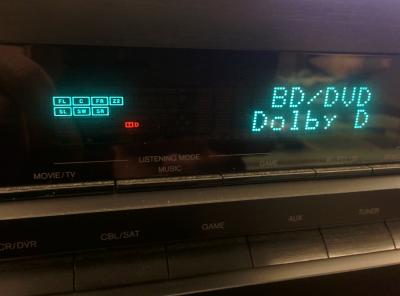
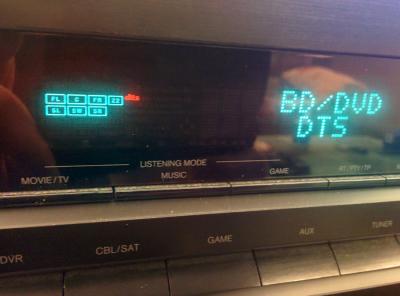
Ok, arrived just in time for the weekend....

Will try out the hdr thingy just to kill the curiosity

Just tested with multiple files, DTS Dolby all available!


This post has been edited by GuyM: Jul 22 2016, 07:28 PM


Attached thumbnail(s)
Attached Image Attached Image Attached Image Attached Image
cyrobytes
post Jul 22 2016, 04:23 PM

Getting Started
**
Junior Member
238 posts

Joined: Jun 2013
QUOTE(plumberly @ Jul 22 2016, 03:28 PM)
Noted and thanks!

Good to know that one can indeed notice the better HDR.

Looks like I may need to check my TV for HDR!
*
Problem is we don't have much HDR contents at this moments. My HDR source is from Netflix, play via the tv's built-in app.
Netlfix won't have 4K /HD on android tv box except Nvidia Sheild and Wetek.
AVFAN
post Jul 22 2016, 04:29 PM

20k VIP Club
*********
All Stars
24,454 posts

Joined: Nov 2010
QUOTE(plumberly @ Jul 22 2016, 12:38 PM)
I will be trying out Q5 Pro soon. Hope to be impressed with the better picture quality! Ha.
*
q5pro has same capabilities as q10pro - processing 4k60fps, HDR, 10bit, dtsx, ddatmos.

BUT... to see or hear the diff:

.. the content you play with the device must be of those types.

.. the TV u use must be 4k, HDR.

.. the home theater must be dtsx/ddatmos capable, set up as such.


if your TV is a fullHD one, those advanced videos will not be displayed on your TV at all.

in fact, the device will not allow you to set to 2160p or HDR.

will default to 1080p once it detects the TV.
plumberly
post Jul 22 2016, 04:50 PM

Look at all my stars!!
*******
Senior Member
4,761 posts

Joined: Jun 2007
From: My house


QUOTE(AVFAN @ Jul 22 2016, 04:29 PM)
q5pro has same capabilities as q10pro - processing 4k60fps, HDR, 10bit, dtsx, ddatmos.

BUT... to see or hear the diff:

.. the content you play with the device must be of those types.

.. the TV u use must be 4k, HDR.

.. the home theater must be dtsx/ddatmos capable, set up as such.
if your TV is a fullHD one, those advanced videos will not be displayed on your TV at all.

in fact, the device will not allow you to set to 2160p or HDR.

will default to 1080p once it detects the TV.
*
Thanks.

What about the 10 bits colors? Can a normal HD TV handle that? Or need UHD TV?


SUSDaprind
post Jul 22 2016, 05:00 PM

Getting Started
**
Junior Member
144 posts

Joined: Jun 2014
From: Kuala Lumpur
QUOTE(ranger2020 @ Jul 22 2016, 02:37 PM)
Bro,

who apk is "dianshimao"? from shafa?
*
Yes, can get it from Shafa.
AVFAN
post Jul 22 2016, 05:04 PM

20k VIP Club
*********
All Stars
24,454 posts

Joined: Nov 2010
QUOTE(plumberly @ Jul 22 2016, 04:50 PM)
Thanks.

What about the 10 bits colors? Can a normal HD TV handle that? Or need UHD TV?
*
fullhd TV, no.

current UHD4k TV models, can. HDR rated, sure can.

however, some "claimed UHD" cannot, so be careful:

http://www.cnet.com/forums/discussions/whi...in-chip-630431/

that article seems to say if u can get Netflix UHD4K to play on the TV, it's good.

my advice for buying UHD tv... do not stinge, buy the better ones.

if not, don't buy! biggrin.gif

This post has been edited by AVFAN: Jul 22 2016, 05:16 PM
cyrobytes
post Jul 22 2016, 06:03 PM

Getting Started
**
Junior Member
238 posts

Joined: Jun 2013
QUOTE(plumberly @ Jul 22 2016, 04:50 PM)
Thanks.

What about the 10 bits colors? Can a normal HD TV handle that? Or need UHD TV?
*
Older tv is using 8 bit panel. So, you can see the 10 bit color
Here is the some interested article to read although is in France language.
Link
plumberly
post Jul 22 2016, 06:23 PM

Look at all my stars!!
*******
Senior Member
4,761 posts

Joined: Jun 2007
From: My house


QUOTE(cyrobytes @ Jul 22 2016, 06:03 PM)
Older tv is using 8 bit panel. So, you can see the 10 bit color
Here is the some interested article to read although is in France language.
Link
*
Thanks for the French link. Reminds me of one French paper that I sat in uni. Not really French paper but so difficult it was like sitting for a French paper when my sister asked me on how the exam went!

Though in French, one can still read the pictures and tables. Already going for 8K?! That makes HD so small and low quality!

Off topic, so we better stop chatting on TV here. Ha.

Thanks.
cyrobytes
post Jul 22 2016, 07:59 PM

Getting Started
**
Junior Member
238 posts

Joined: Jun 2013
QUOTE(plumberly @ Jul 22 2016, 06:23 PM)
Thanks for the French link. Reminds me of one French paper that I sat in uni. Not really French paper but so difficult it was like sitting for a French paper when my sister asked me on how the exam went!

Though in French, one can still read the pictures and tables. Already going for 8K?! That makes HD so small and low quality!

Off topic, so we better stop chatting on TV here. Ha.

Thanks.
*
No need to be sarcastic.

248 Pages « < 111 112 113 114 115 > » Top
Topic ClosedOptions
 

Change to:
| Lo-Fi Version
0.0207sec    0.70    6 queries    GZIP Disabled
Time is now: 4th December 2025 - 01:35 AM