Outline ·
[ Standard ] ·
Linear+
Unifi TMnet Streamyx/Unifi & IPv6, Now live!
|
JohnLai
|
 Jun 3 2015, 10:24 PM Jun 3 2015, 10:24 PM
|

|
QUOTE(michaelkkl @ Jun 3 2015, 08:59 PM) May I know which time range that you experience slow youtube over IPV6 so that I can test the speed Before this, TM limit Youtube IPV6 connection from 11am to 1am (UTC+8) to 50KB/s on Streamyx (30KB/s for 512Kb Streamyx) Not sure about UniFi because of no coverage Generally, my throttling case is 12am to 10am, but the first variable, this depends on what IP assigned by TM to my adsl router. Example: 124.82x.x =11am to 1am 60.52.x.x = 2am to 8am 118.x.x.x =12am to 12pm Second variable, it will depend on which CDN serves my youtube content, this was randomly assigned by youtube. Different CDN also has different throttling hours. |
|
|
|
|
|
Kanuki
|
Jun 4 2015, 10:13 AM
|
Getting Started

|
QUOTE(JohnLai @ Jun 3 2015, 07:11 PM) Not yet, try to check on different time range. Yup... It's improve a bit but not 100% fixed. |
|
|
|
|
|
lkchoong
|
Jun 9 2015, 06:10 PM
|
New Member
|
QUOTE(feedzz @ Jan 1 2015, 11:44 PM) After much pain and experimenting, I got ipv6 working on OpenWRT Barrier Breaker 14.07 by disabling Request IPv6-address. Seems to work so far and survives reboots and PPPOE reconnections. Will update if it breaks again.
at post 882
thanks feedzz, your info is very usefull, streamyx 1m ipv6 running on openwrt CC r44510 |
|
|
|
|
|
rioven
|
Jun 24 2015, 09:58 AM
|
|
|
asellus any simple to enable ipv6 for mikrotik? my head already  I only manage at DHCP client only 
|
|
|
|
|
|
asellus
|
Jun 24 2015, 02:53 PM
|
#gompusas

|
QUOTE(rioven @ Jun 24 2015, 09:58 AM) asellus any simple to enable ipv6 for mikrotik? my head already I only manage at DHCP client only  Also need to set up neigbour discovery too. |
|
|
|
|
|
rioven
|
Jun 24 2015, 03:54 PM
|
|
|
Hey thanks..i think I got my IPv6 on mikrotik based on your example and IPv6 over PPPoE RouterOS v5-10. Somehow I have to (manually) adding a publically reachable router address, is there to do automatically if my IPv6 address change? |
|
|
|
|
|
asellus
|
Jun 24 2015, 04:07 PM
|
#gompusas
|
QUOTE(rioven @ Jun 24 2015, 03:54 PM) Hey thanks..i think I got my IPv6 on mikrotik based on your example and IPv6 over PPPoE RouterOS v5-10. Somehow I have to (manually) adding a publically reachable router address, is there to do automatically if my IPv6 address change? Remove the manually added router address, and then add a new entry that can be configured dymanically when the /64 prefix address changed as shown below.  |
|
|
|
|
|
ikhwanZulkefli
|
 Jun 24 2015, 06:48 PM Jun 24 2015, 06:48 PM
|
New Member
|
hi guys. could you help me with the set up to enable ipv6? i've tried so many times to no avail.  this is my current working setting. 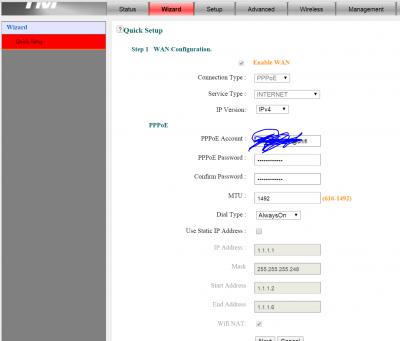
|
|
|
|
|
|
michaelkkl
|
Jun 24 2015, 08:08 PM
|
|
|
QUOTE(ikhwanZulkefli @ Jun 24 2015, 06:48 PM) hi guys. could you help me with the set up to enable ipv6? i've tried so many times to no avail. this is my current working setting.
Select IP version IPv4/IPv6 |
|
|
|
|
|
ikhwanZulkefli
|
Jun 24 2015, 08:24 PM
|
New Member
|
QUOTE(michaelkkl @ Jun 24 2015, 08:08 PM) Select IP version IPv4/IPv6 i did. and how about the other settings ? im not sure what ive done wrong, but if i pick ipv4/ipv6, i lost connection. |
|
|
|
|
|
rioven
|
Jun 24 2015, 08:31 PM
|
|
|
QUOTE(asellus @ Jun 24 2015, 04:07 PM) Remove the manually added router address, and then add a new entry that can be configured dymanically when the /64 prefix address changed as shown below. Thanks again..will try later. Try to figure out why ::1/64 doesn't work in my mikrotik, most of example I read using ::1/64 will do the trick  |
|
|
|
|
|
ikhwanZulkefli
|
Jun 24 2015, 08:45 PM
|
New Member
|
okay i got that figured out. so now this normal that mine avoiding the ipv6 usage? 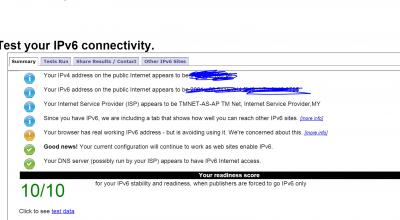
|
|
|
|
|
|
asellus
|
Jun 24 2015, 08:49 PM
|
#gompusas
|
QUOTE(rioven @ Jun 24 2015, 08:31 PM) Thanks again..will try later. Try to figure out why ::1/64 doesn't work in my mikrotik, most of example I read using ::1/64 will do the trick ::1/64 should've worked too in theory. QUOTE(ikhwanZulkefli @ Jun 24 2015, 08:45 PM) okay i got that figured out. so now this normal that mine avoiding the ipv6 usage?
It may be browser's quirks. Firefox usually acts that way in my experience. |
|
|
|
|
|
RoofTopPrince
|
Jun 24 2015, 10:38 PM
|
|
|
hi there any idea how to enable ipv6 on TL-WR841N?
|
|
|
|
|
|
rioven
|
Jun 24 2015, 10:58 PM
|
|
|
QUOTE(asellus @ Jun 24 2015, 08:49 PM) ::1/64 should've worked too in theory. Somehow it doesn't working, mikrotik flag it as invalid (I copy example from wKkaY and rizvanrp) edit: I think its related to this IPv6 address from Pool stays invalidThis post has been edited by rioven: Jun 24 2015, 11:06 PM |
|
|
|
|
|
asellus
|
Jun 25 2015, 12:03 AM
|
#gompusas
|
You need to reboot the router to make it valid, or make the entry first before activating the DHCPv6 client.
|
|
|
|
|
|
weihan1102
|
Jun 29 2015, 07:30 PM
|
New Member
|
Deleted
This post has been edited by weihan1102: Jul 9 2015, 04:55 PM
|
|
|
|
|
|
weihan1102
|
Jul 10 2015, 05:30 PM
|
New Member
|
Did you guys still experiencing slow youtube on ipv6?
|
|
|
|
|
|
neuromancerx
|
Jul 10 2015, 09:30 PM
|
|
|
QUOTE(weihan1102 @ Jul 10 2015, 05:30 PM) Did you guys still experiencing slow youtube on ipv6? Not for me. I don't have any issue on ipv6, yet. |
|
|
|
|
|
OKLY
|
Jul 10 2015, 10:18 PM
|
The Penguin Vader

|
QUOTE(weihan1102 @ Jul 10 2015, 05:30 PM) Did you guys still experiencing slow youtube on ipv6? Most likely MTU issues, what router are you using? |
|
|
|
|



 Quote
Quote


 0.0237sec
 0.38
0.38
 6 queries
 GZIP Disabled