


This post has been edited by Moogle Stiltzkin: Jul 16 2017, 01:46 PM
Unifi TMnet Streamyx/Unifi & IPv6, Now live!
|
|
 Feb 11 2015, 12:52 AM Feb 11 2015, 12:52 AM
Show posts by this member only | IPv6 | Post
#921
|
 
Senior Member
4,454 posts Joined: Jan 2003 
|
This post has been edited by Moogle Stiltzkin: Jul 16 2017, 01:46 PM |
|
|
|
|
|
Feb 28 2015, 11:41 AM
|

Senior Member
5,591 posts Joined: Apr 2011 From: Kuala Lumpur  
|
My Android phone and Windows phone have slow WiFi with Unifi. Not with my iPhone and iPad tho. Anyone having this issue?
|
|
|
Mar 25 2015, 08:32 PM
|

Senior Member
4,522 posts Joined: Jan 2009
|
If modem do support IPV6 but wireless router not, will the connection connected as IPV6?
|
|
|
Mar 25 2015, 09:25 PM
|

Senior Member
1,725 posts Joined: Jan 2003
|
QUOTE(bingozero @ Mar 25 2015, 08:32 PM) If modem do support IPV6 but wireless router not, will the connection connected as IPV6? modem as bridge can pass through everything, so it dont need to support ipv6, but the wireless router, need to support ipv6, if u want to use it natively. |
|
|
Mar 27 2015, 08:17 AM
|
|
Senior Member
4,522 posts Joined: Jan 2009
|
Bought one tplink modem where do support IPv6.
Follow the configuration on this page but no response on internet.  http://www.tp-link.com.pl/article/?faqid=855 |
|
|
Mar 30 2015, 11:48 AM
Show posts by this member only | IPv6 | Post
#926
|

Newbie
12 posts Joined: Jul 2009
|
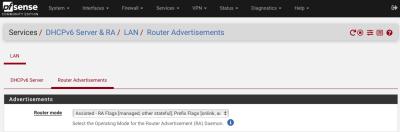
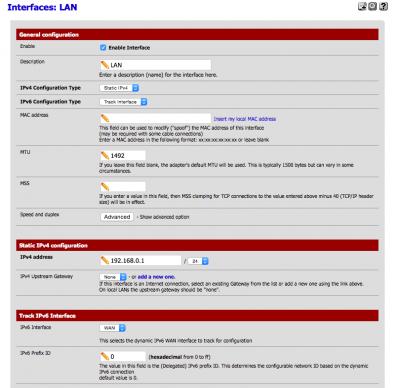
After much try and error and research, I've managed to get pfSense to work with UniFi's IPv6 allocation. For a bit of a background, I'm running the latest release of pfSense i.e. 2.2.1 and also I got this to work with my office's UniFi which is on Biz 10. I'd just like to share my settings here to benefit those who might want to get IPv6 to work for their pfSense box. 1. Under "System -> Advanced -> Networking", make sure "Allow IPv6" is checked. Then go to "Interfaces", click on "WAN". Under IPv6 Configuration Type, choose "DHCP6". MTU should be 1492. 2. Under DHCP6 client configuration section, put a tick mark on "Request a IPv6 prefix/information through the IPv4 connectivity link". In the drop down list for DHCPv6 Prefix Delegation size, choose "56". (I have no idea why this is the case, but the allocated subnet for both the PPPoE and LAN are actually 64. I've tried choosing 64 here, but it doesn't work. Maybe 56 is for a Biz account. If 56 doesn't work for you, try choosing 64 especially if you're on home UniFi account.) Also, put a tick mark for "Send an IPv6 prefix hint to indicate the desired prefix size for delegation". Click on "Save". 3. Now, go to "Interfaces", click on "LAN". Under IPv6 Configuration Type, choose "Track Interface". Type 1492 for MTU. 4. Under Track IPv6 Interface section, ensure IPv6 Interface "WAN" is selected and as for IPv6 Prefix ID, just type 0 (zero) here. 5. Under Private networks section, ensure "Block Bogons networks" is unchecked. Then, click "Save". 6. Finally, I've read that IPv6 requires ICMP to work. So under Firewall -> Rules, I've also created a rule to allow ICMP IPv6 traffic for both WAN and LAN. I'm not entirely certain what the security implications are with the above settings to the firewall, so please be forewarned. With the above settings, I'm able to get IPv6 addresses for PPPoE and LAN interfaces for pfSense and also devices connected to the LAN. Hope this helps those who are using pfSense. [Update: 31 October 2022]: A forumer (@Moogle Stiltzkin) asked if I have changed my IPv6 settings on pfSense, so I have now attached updated screenshots of my setup. Compared to my previous setup, I have changed slightly the MTU, MSS for both WAN and LAN, also disabled DHCPv6 server on pfSense (I don't have a need to manage the IPs given out in my network) and Router Advertisements set to 'Assisted'. This is running on pfSense CE version 2.6.0. I'm not certain if my setup would help with the latest issues that some of you are experiencing. But I've been running with this setup with no issues. 


This post has been edited by ansonlos: Oct 31 2022, 11:38 AM Attached thumbnail(s) 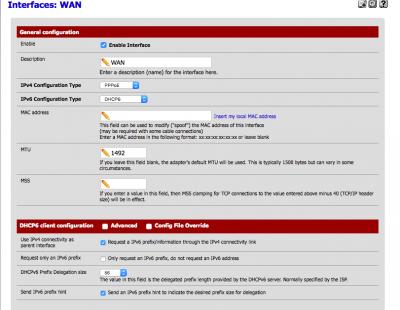
Moogle Stiltzkin liked this post
|
|
|
|
|
|
Apr 4 2015, 02:57 AM
Show posts by this member only | IPv6 | Post
#927
|
|
Senior Member
4,454 posts Joined: Jan 2003
|
This post has been edited by Moogle Stiltzkin: Jul 16 2017, 02:55 PM |
|
|
Apr 4 2015, 05:28 PM
Show posts by this member only | IPv6 | Post
#928
|

Senior Member
3,669 posts Joined: Apr 2006
|
I tested with my D-LINK 2750u with shell access through putty ;
echo 1420 > /proc/sys/net/ipv6/conf/br0/mtu and verify it throught 'cat', but ipv6 youtube still stucks at 50kb/s. I try other value 1280 , 1400 , 1432 , 1480, 1492 and 1500. Doesn't make any different for ipv6 youtube. Disabling ipv6 = results in 400kb/s Any suggestion? |
|
|
Apr 4 2015, 05:43 PM
Show posts by this member only | IPv6 | Post
#929
|
|
Newbie
2 posts Joined: Jan 2003
|
No problems for me. Getting 2000KB/s downloading the stream from youtube. Currently running mtu 1492 on MikroTik. Tried to remove the mtu setting and can also watch YouTube, but could not access Wikipedia, though.
|
|
|
Apr 4 2015, 06:01 PM
Show posts by this member only | IPv6 | Post
#930
|
|
Senior Member
3,669 posts Joined: Apr 2006
|
QUOTE(speck123 @ Apr 4 2015, 05:43 PM) No problems for me. Getting 2000KB/s downloading the stream from youtube. Currently running mtu 1492 on MikroTik. Tried to remove the mtu setting and can also watch YouTube, but could not access Wikipedia, though. Doesn't work for me though, removing the MTU for ipv6 = ipv6 gone. It just fallback to ipv4.The only website that I have problem is youtube alone. 50kb/s!? Really? How am I suppose to stream any of the video?  |
|
|
Apr 4 2015, 06:12 PM
|
|
Junior Member
679 posts Joined: Oct 2008
|
Hi. My unifi is having a problem for the first time in 1 year.
It appears that on my modem, only the TM logo is blinking. Previously when it's normal, LEDs for Internet and DSL should turn on/blinking and the TM logo should just light up (no blinking). Does this mean the modem is kaput already? Or just local unifi network at my area is having a problem? My modem is ZTE H268 btw. Thanks in advance. |
|
|
Apr 4 2015, 06:19 PM
Show posts by this member only | IPv6 | Post
#932
|
|
Senior Member
3,669 posts Joined: Apr 2006
|
QUOTE(un.deux.trois @ Apr 4 2015, 06:12 PM) Hi. My unifi is having a problem for the first time in 1 year. Please create your own thread. This thread is about IPV6 implementation and issue.It appears that on my modem, only the TM logo is blinking. Previously when it's normal, LEDs for Internet and DSL should turn on/blinking and the TM logo should just light up (no blinking). Does this mean the modem is kaput already? Or just local unifi network at my area is having a problem? My modem is ZTE H268 btw. Thanks in advance. Tested ip6tables -A FORWARD -p tcp -t mangle --tcp-flags SYN,RST SYN -j TCPMSS --set-mss 1392. Doesn't work, still 50kb/s This post has been edited by JohnLai: Apr 4 2015, 09:41 PM |
|
|
Apr 6 2015, 01:13 AM
Show posts by this member only | IPv6 | Post
#933
|
|
Senior Member
3,669 posts Joined: Apr 2006
|
=.=
Didn't modify anything this time, apparently TM seems to implement traffic shaping on youtube ipv6 CDN. Exactly at 1AM just now, I can confirm IPV6 youtube can stream at 400kb/s. Will report back here on when the throttling will start tomorrow. Update 1 : Now is 9.43AM, IPV6 Youtube full speed ahead at 400kb/s..... Update 2 : 10.30AM, turbo at 400kb/s Update 3 : DARN, 11.00AM, IPV6 Youtube back to louse 50kb/s!!!! Note : at 10.59AM, still turbo, exactly 11AM slow down back to pointless 50kb/s!!! Conclusion, TM is throttling IPV6 Youtube connection from 1AM to 11 AM. As for those who claim my MTU is too high or low, it isn't. My adsl router ip6tables log: Chain FORWARD (policy ACCEPT 16 packets, 1382 bytes) pkts bytes target prot opt in out source destination 0 0 TCPMSS tcp any any anywhere anywhere tcp flags:SYN,RST/SYN TCPMSS clamp to PMTU MTU is never an issue in first place. This is pure automated throttling. IPV4 Youtube isn't affected. Back to using pure IPV4, screw this useless throttling. This post has been edited by JohnLai: Apr 6 2015, 11:13 AM |
|
|
|
|
|
Apr 6 2015, 03:59 PM
Show posts by this member only | IPv6 | Post
#934
|
|
Newbie
12 posts Joined: Jul 2009
|
@Moogle
I didn't try, because I'm running the pfSense box in the office, so it's a biz account without HyppTV. I find that it's fairly easy to create a VLAN for the Internet, so I'm sure it's doable for HyppTV too. Sorry I couldn't be of more help here. @JohnLai I think I have to agree with you on that MTU. On my pfSense box, I've initially set the MTU for my LAN network to 1492 based on the comments here in this thread. But I found that the MTU setting has no apparent effect on my LAN network as I'm still seeing MTU 1500 for computers connected to LAN. But I'm also not seeing any apparent network degradation connecting to the Internet (youtube, wikipedia, etc). So if we're seeing any slow streaming from youtube, it might just be due to throttling. But I'm not able to confirm this as I don't experience any slow down within those hours you mentioned. |
|
|
Apr 6 2015, 04:07 PM
Show posts by this member only | IPv6 | Post
#935
|
|
Senior Member
4,454 posts Joined: Jan 2003
|
This post has been edited by Moogle Stiltzkin: Jul 16 2017, 02:55 PM |
|
|
Apr 6 2015, 04:16 PM
|

Junior Member
164 posts Joined: Feb 2008
|
any openwrt users here ?
|
|
|
Apr 6 2015, 09:06 PM
Show posts by this member only | IPv6 | Post
#937
|

Senior Member
4,092 posts Joined: Jan 2003 From: USJ
|
QUOTE(piju @ Apr 6 2015, 04:16 PM) any openwrt users here ? i'm using openwrt Barrier Breaker 14.07 |
|
|
Apr 6 2015, 10:10 PM
|

Junior Member
26 posts Joined: Apr 2005
|
QUOTE(Moogle Stiltzkin @ Apr 6 2015, 04:07 PM) np. i doubt it matters anyway because hypptv channel selection is pathethic. Pardon me to butt in since i'm catching up with this thread.people would rather pay for netflix with vpn  anyhow i was planning on getting a Asus RT-AC56U router and use shibby tomato on it for my brother's unifi. But since you got a pfsense, is there a settings for google ipv6 dns ? I'd also ask how much but you mentioned for business so it's probably now a budget pfsense build you got there  I personally can confirmed what ansonlos's findings on how to run pfSense 2.1.x & 2.2.x version with IPv6 supplied from TM by adjusting the MTU . I've tested on my Virtualbox (dual physical NIC bridged inside Virtualbox setup) on pfSense 2.2.1 and 2.1.5 both are working with some minor warning which i had on my box (YMMV as ansonlos did mention he/she didn't get any warning as i am). As of now, it's not too much to say that pfSense support TM IPv6. Coming to @Moogle quote: Btw @Moogle, i'm on Streamyx 8Mbps (Home) with DSL-526B (D-Link) Modem only. My pfSense is running Virtualbox via Win 7 64bit and i have 2 physical NIC (one onboard and another one is Mini-PCI card). If i may share my experience with pfSense physical setup. Well i do run into a bump whereby i ditch my physical hard disk due to pfSense doesn't like it . It was working quite fine in Linux environment and i have the idea it can work in Unix (FreeBSD too which pfSense base OS). But i was wrong when things gone bad for my HDD (SATA), i should've gone for a new HDD btw lol. If you want to build physical pfSense, i would suggest something like Dual Core spec or maybe Core 2 Duo. Pentium D is nice too btw. Surely it can handle with our TM connection generally (unless you're a home user not ISP level). Add more physical RAM if needed, my suggest maybe start off with 512MB DDR2 and go from there. P/S: Pls do pardon me if i had the wrong idea on your question. Regards |
|
|
Apr 7 2015, 03:35 AM
Show posts by this member only | IPv6 | Post
#939
|
|
Senior Member
4,454 posts Joined: Jan 2003
|
This post has been edited by Moogle Stiltzkin: Jul 16 2017, 02:55 PM |
|
|
Apr 7 2015, 02:26 PM
|
|
Junior Member
26 posts Joined: Apr 2005
|
Yeah i guess you should stick to Asus AC. if you changed your mind, you can find a good old used cpu just under somewhere around rm 200 (cpu only with ram, decent hdd, dvdrom). i got mine in seremban 2 which is nearby from my home.
|
| Change to: |  0.0206sec 0.0206sec
 0.86 0.86
 6 queries 6 queries
 GZIP Disabled GZIP Disabled
Time is now: 1st December 2025 - 01:39 PM |
 Quote
Quote