Welcome Guest ( Log In | Register )

102 Pages « < 68 69 70 71 72 > » Bottom

Outline · [ Standard ] · Linear+

 NETWORK ATTACHED STORAGE (NAS) V2

views
     
stormer.lyn
post Apr 11 2021, 12:21 PM

Regular
******
Senior Member
1,132 posts

Joined: Apr 2014
From: Shah Alam, Selangor
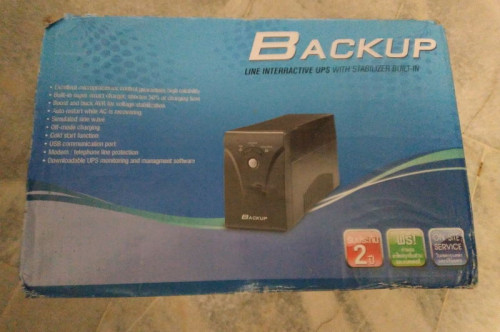
I used to work from a shared office, and the cleaning lady just asked me to help sell some of the old stuff that was left behind by a tenant that has moved out. Included were 2 generic UPS units. Near as I can tell it is made in China by Voltronic Power, and then rebranded by the local (to the origin) seller. (Strange setup, the sockets are US style 3 pin, but the voltage is 220Vac)
user posted image

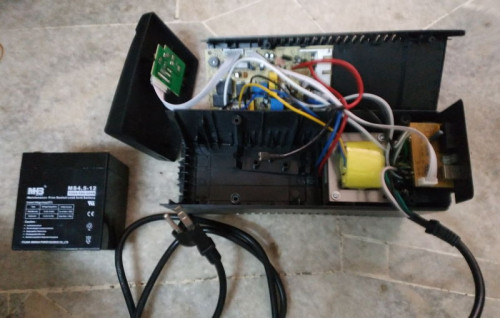
Batteries were dead, (12V, 4.5Ah) but measured and saw that there is space for a larger battery. So upgraded to 12V, 7.2Ah costing RM 55.
user posted image

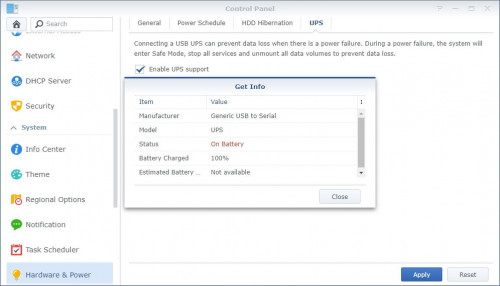
Plugging in the UPS via USB cable, and the Synology recognises the device.
user posted image

Both when mains power, or when battery power.
user posted image

One thing I noticed is that the NAS does not shut down after the specified time. It just unmounts the HDDs and shuts down all services, ready for a power off. You can ensure power off when you check the box "Shut down UPS when the system enters safe mode". The UPS will power off. shutting everything down.
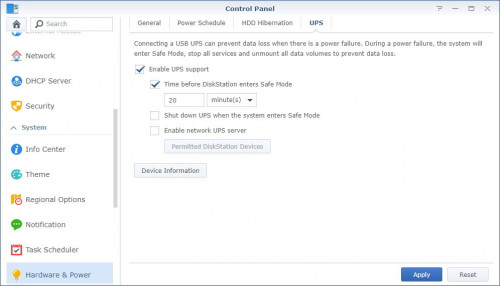
user posted image

If you don't check the box mentioned above, and check at this "Restart automatically when power supply issue is fixed" box instead, the Synology will restart all the services and wake the HDDs, ready for action again after mains power is restored.
user posted image

So that's my experience with a UPS (with USB connection) on a Synology (DSM v6.2.4-25556). I now think any UPS with a USB that does reporting can be used, and the advice I got from the All IT Hypermarket person previously is incorrect. Unfortunately I won't be testing with the Right Power model I was previously interested in anymore, since I have these 2 UPSs.
~~~ Sekian report of my experience ~~~
haturaya
post Apr 11 2021, 12:30 PM

Look at all my stars!!
Group Icon
Elite
2,553 posts

Joined: Jan 2003
For a Synology NAS, most APC UPS will work. Just get the cheapest APC UPS with USB communication capability. What I did, I 'enlarge' the battery capacity by using larger 12v battery. Put the battery outside UPS. Longer backup time with cheaper price. The 7.2Ah 12V SLA battery cost about RM50 a piece. Double that - it's just an additional RM50 for nearly double the capacity. sweat.gif
ozak
post Apr 11 2021, 12:40 PM

10k Club
********
All Stars
17,018 posts

Joined: Jan 2005


QUOTE(haturaya @ Apr 11 2021, 12:30 PM)
For a Synology NAS, most APC UPS will work. Just get the cheapest APC UPS with USB communication capability. What I did, I 'enlarge' the battery capacity by using larger 12v battery. Put the battery outside UPS. Longer backup time with cheaper price. The 7.2Ah 12V SLA battery cost about RM50 a piece. Double that - it's just an additional RM50 for nearly double the capacity. sweat.gif
*
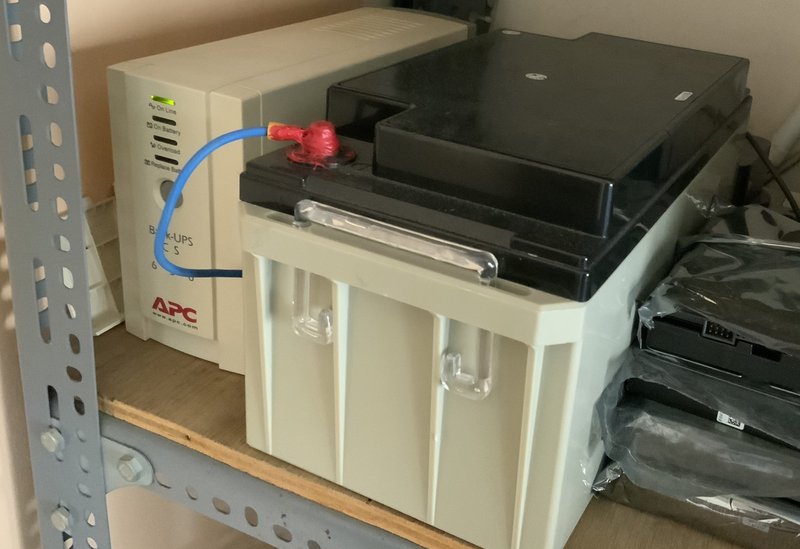
The battery is bigger than the UPS for my NAS. biggrin.gif

12V 65AH lead seal battery.


user posted image
haturaya
post Apr 11 2021, 12:43 PM

Look at all my stars!!
Group Icon
Elite
2,553 posts

Joined: Jan 2003
QUOTE(ozak @ Apr 11 2021, 12:40 PM)
The battery is bigger than the UPS for my NAS.  biggrin.gif

12V 65AH lead seal battery.
user posted image
*
Waaah notworthy.gif Can sustain for hours.

I have similar UPS like in your picture too. Use 2 7.2Ah 12v battery only. sweat.gif
stormer.lyn
post Apr 11 2021, 01:50 PM

Regular
******
Senior Member
1,132 posts

Joined: Apr 2014
From: Shah Alam, Selangor
QUOTE(ozak @ Apr 11 2021, 12:40 PM)
The battery is bigger than the UPS for my NAS.  biggrin.gif
12V 65AH lead seal battery.
*
As an EE, I'm going for multiple smaller, more common batteries, instead of one large single battery. Buying a 65Ah battery online shows prices starting at RM 435, with the average being about RM 500. 9x units of 7.2Ah batteries costs about RM 450 - RM 500, getting almost the same capacity as the large battery. Costs me almost nothing in materials as I already have it, and a bit of my time, to wire them all up.
» Click to show Spoiler - click again to hide... «
The real question though, why do you want your NAS running for 24 hours during a power outage? tongue.gif
xxboxx
post Apr 11 2021, 03:34 PM

The mind is for having ideas, not holding them
*******
Senior Member
5,261 posts

Joined: Oct 2004
From: J@Y B33


QUOTE(stormer.lyn @ Apr 11 2021, 12:21 PM)
» Click to show Spoiler - click again to hide... «

*
That's a good info. Maybe the guy bring it from his country that is Lebanon or Philippines.

QUOTE(ozak @ Apr 11 2021, 12:40 PM)
The battery is bigger than the UPS for my NAS.  biggrin.gif

12V 65AH lead seal battery.
» Click to show Spoiler - click again to hide... «

*
Almost 10 times the capacity biggrin.gif

QUOTE(stormer.lyn @ Apr 11 2021, 01:50 PM)
The real question though, why do you want your NAS running for 24 hours during a power outage?  tongue.gif
*
Can also power the router and other network components. The network will never have any downtime. thumbup.gif
WaNaWe900
post Apr 11 2021, 05:00 PM

చąហ ąచҽ™
******
Senior Member
1,397 posts

Joined: Feb 2012
From: sOuL SoCiETY.. iSKaNDaRPuTeRi.. JB.. JDT


QUOTE(ozak @ Apr 11 2021, 12:40 PM)
The battery is bigger than the UPS for my NAS.  biggrin.gif

12V 65AH lead seal battery.
user posted image
*
notworthy.gif notworthy.gif notworthy.gif fuh that's huge shocking.gif sweat.gif everything can remain online when power breakdown thumbup.gif
ozak
post Apr 11 2021, 05:42 PM

10k Club
********
All Stars
17,018 posts

Joined: Jan 2005


QUOTE(stormer.lyn @ Apr 11 2021, 01:50 PM)
As an EE, I'm going for multiple smaller, more common batteries, instead of one large single battery. Buying a 65Ah battery online shows prices starting at RM 435, with the average being about RM 500. 9x units of 7.2Ah batteries costs about RM 450 - RM 500, getting almost the same capacity as the large battery. Costs me almost nothing in materials as I already have it, and a bit of my time, to wire them all up.
» Click to show Spoiler - click again to hide... «
The real question though, why do you want your NAS running for 24 hours during a power outage?  tongue.gif
*
The NAS is access by my friend and family. I share my pic, video and contain.

The battery is for Solar system. Got 2 set. 1 spoiled. So left this I use it for NAS lor. The battery lifespan actually left not much..
WaNaWe900
post Apr 18 2021, 08:51 PM

చąហ ąచҽ™
******
Senior Member
1,397 posts

Joined: Feb 2012
From: sOuL SoCiETY.. iSKaNDaRPuTeRi.. JB.. JDT


Sifus notworthy.gif

Almost 10 days my NAS in degraded conditions sweat.gif hopefully tomorrow the rma disk arrive and will be ok.

Just curios, should I just insert & populate the new disk or better create whole new volume hmm.gif

After all I want to go with Raid-6 sweat.gif and now Raid-5
xxboxx
post Apr 19 2021, 12:04 PM

The mind is for having ideas, not holding them
*******
Senior Member
5,261 posts

Joined: Oct 2004
From: J@Y B33


QUOTE(WaNaWe900 @ Apr 18 2021, 08:51 PM)
Sifus  notworthy.gif

Almost 10 days my NAS in degraded conditions  sweat.gif  hopefully tomorrow the rma disk arrive and will be ok.

Just curios, should I just insert & populate the new disk or better create whole new volume  hmm.gif

After all I want to go with Raid-6  sweat.gif  and now Raid-5
*
If you got backup at other place then can just delete the RAID and create new one so that no need do twice.
WaNaWe900
post Apr 19 2021, 01:08 PM

చąហ ąచҽ™
******
Senior Member
1,397 posts

Joined: Feb 2012
From: sOuL SoCiETY.. iSKaNDaRPuTeRi.. JB.. JDT


QUOTE(xxboxx @ Apr 19 2021, 12:04 PM)
If you got backup at other place then can just delete the RAID and create new one so that no need do twice.
*
Yes I've got backup icon_idea.gif still waiting arrival sweat.gif haiyaa feels very slow shakehead.gif

ok the rma just arrived whistling.gif

This post has been edited by WaNaWe900: Apr 19 2021, 04:00 PM
yaphong
post Apr 20 2021, 11:29 PM

On my way
****
Senior Member
659 posts

Joined: Apr 2005


I am wondering, anyone of you looking for a 6TB WD Red? I got one brand new extra looking to sell.
puifah
post Apr 21 2021, 03:45 PM

Casual
***
Junior Member
451 posts

Joined: Aug 2008
QUOTE(yaphong @ Apr 20 2021, 11:29 PM)
I am wondering, anyone of you looking for a 6TB WD Red? I got one brand new extra looking to sell.
*
sorry to say that the hard disk u want to sell is SMR drive, totally not recommended for NAS users
yaphong
post Apr 21 2021, 09:52 PM

On my way
****
Senior Member
659 posts

Joined: Apr 2005


QUOTE(puifah @ Apr 21 2021, 03:45 PM)
sorry to say that the hard disk u want to sell is SMR drive, totally not recommended for NAS users
*
cry.gif cry.gif cry.gif
ozak
post Apr 22 2021, 09:14 AM

10k Club
********
All Stars
17,018 posts

Joined: Jan 2005


QUOTE(puifah @ Apr 21 2021, 03:45 PM)
sorry to say that the hard disk u want to sell is SMR drive, totally not recommended for NAS users
*
My NAS has 2 set of 6TB WD red brought in 2014. Mix running with sg iron wolf 16tb.

Any problem? I m waiting it to die and replace it. 6yrs is almost end of the lifespan.

This post has been edited by ozak: Apr 22 2021, 09:29 AM
Lurker
post Apr 22 2021, 09:53 AM

L U R K I N G
Group Icon
Elite
4,420 posts

Joined: Jan 2003
https://www.extremetech.com/computing/31118...o-nas-customers

https://www.extremetech.com/computing/31185...smr-in-nas-hdds
WaNaWe900
post Apr 22 2021, 10:30 PM

చąហ ąచҽ™
******
Senior Member
1,397 posts

Joined: Feb 2012
From: sOuL SoCiETY.. iSKaNDaRPuTeRi.. JB.. JDT


Sifus notworthy.gif

What actually is SSL Certificate rclxub.gif it seems expired or not match between Synology apps shakehead.gif

Oso received email to renew the certificate for the "mydomain.synology.me" doh.gif

This Integration Guide not really helpful to me icon_question.gif

Is this something that we need to renew every time ?

When I click renew in the Control Panel Security it download 2 files (server.csr & server.key) which do I need to use for what ya icon_question.gif

This post has been edited by WaNaWe900: Apr 22 2021, 10:31 PM
xxboxx
post Apr 23 2021, 09:19 AM

The mind is for having ideas, not holding them
*******
Senior Member
5,261 posts

Joined: Oct 2004
From: J@Y B33


QUOTE(WaNaWe900 @ Apr 22 2021, 10:30 PM)
Sifus  notworthy.gif

What actually is SSL Certificate  rclxub.gif  it seems expired or not match between Synology apps  shakehead.gif

Oso received email to renew the certificate for the "mydomain.synology.me"  doh.gif

This Integration Guide not really helpful to me  icon_question.gif

Is this something that we need to renew every time ?

When I click renew in the Control Panel Security it download 2 files (server.csr & server.key) which do I need to use for what ya  icon_question.gif
*
A Beginner's Guide to SSL: What It is & Why It Makes Your Website More Secure

If you connect from internet to your NAS and using DDNS or your own domain you'll need SSL certificate to make it secure. If connect through QuickConnect or not access it from internet then don't need it.
WaNaWe900
post Apr 23 2021, 11:43 PM

చąហ ąచҽ™
******
Senior Member
1,397 posts

Joined: Feb 2012
From: sOuL SoCiETY.. iSKaNDaRPuTeRi.. JB.. JDT


QUOTE(xxboxx @ Apr 23 2021, 09:19 AM)
A Beginner's Guide to SSL: What It is & Why It Makes Your Website More Secure

If you connect from internet to your NAS and using DDNS or your own domain you'll need SSL certificate to make it secure. If connect through QuickConnect or not access it from internet then don't need it.
*
notworthy.gif I'm not sure wat I tekan2 then change it to DSmy.me suddenly it's renew till July 2021 whistling.gif so temporary resolve sweat.gif

if from office computer access thru QuickConnect icon_rolleyes.gif only the Android Apps require the certificate when access from outside home networking doh.gif
xxboxx
post May 6 2021, 06:11 PM

The mind is for having ideas, not holding them
*******
Senior Member
5,261 posts

Joined: Oct 2004
From: J@Y B33


I been using SSD drive as the storage for files in Drive and Moments for more than a month now. Before this it store in HDD. I always open files ranging from few hundreds kilobyte or few megabytes, or loading thumbnails for pictures, with HDD it always takes few seconds and feel laggy. Especially more when I access it remotely. I also got nvme cache but it can't cache all the files all the time. Now with SSD it's noticably faster, no more waiting few seconds for it to load the files or thumbnails.

Since I'm only using 1 SSD, there's no redundancy, so what I do is I set Hyperbackup to make backup of Homes folder every hour.

Having SSD for your active folders is worth the upgrade for NAS in my opinion.

102 Pages « < 68 69 70 71 72 > » Top
 

Change to:
| Lo-Fi Version
0.0788sec    0.37    6 queries    GZIP Disabled
Time is now: 4th December 2025 - 09:20 PM