Welcome Guest ( Log In | Register )

102 Pages « < 66 67 68 69 70 > » Bottom

Outline · [ Standard ] · Linear+

 NETWORK ATTACHED STORAGE (NAS) V2

views
     
mostwanted82
post Mar 8 2021, 10:40 PM

On my way
****
Senior Member
603 posts

Joined: Apr 2011
QUOTE(xxboxx @ Feb 26 2021, 08:29 PM)
I don't think it's the NAS that detect bad sector. The HDD itself that detect it and inform the OS. The HDD also will do marking on the map table that the sector cannot be used anymore. What's the ID number and attribute from S.M.A.R.T info?

You can try hook the HDD to PC and check for any error or bad sector using program such as CrystalDiskInfo.
Firstly, you need to understand what is DNS and DNS Server. From Cloudflare site:
» Click to show Spoiler - click again to hide... «


DNS Server is the one that manage DNS. It will periodically connect with other server to update the ip address for url.

Pi-hole mostly used for DNS server. Do you change your DNS server to use Google's 8.8.8.8 or Cloudflare's 1.1.1.1?
The reason to use other DNS server instead of default ISP is for bypassing blocked site or security purpose.
Now more people are using pi-hole instead because the DNS list also include list of url to block, such as harmful site url or advertising url.
Usually you will install adblock on every computer browser or phone, but if the router is configured to use pi-hole for DNS, all the devices that use the router connection will be filtered by pi-hole.

Jdownloader is usually used for direct download. Some download site limit your ip can only download 1 time then have to wait how many hours/day. JDwonloader if configured, can make your router disconnect from isp and then connect back to get different ip. It also block cookie and change it's id so that the download site can't identified you, unlike internet browser. Jdownloader also can be used to download youtube video/audio/subtitle.

Edit: added the bold
*
My problem is whenever I run data scrubbing the synology NAS will throw error like "I/O error" on disk 4, after few months it become got bad sector (only 1).

Even after I replaced with new drive from RMA it still encountered same issue when running data scrubbing.

I did again RMA and replaced second replacement drive but the problem become worst - when copying certain file it will stuck and keep throw bad sector found. I'm running extended smart test for the particular drive but but it stuck at 90% (already more than 24h).

The storage pool now is in warning status with drive 4 status in critical.

I really stuck and do not know what to do next.


xxboxx
post Mar 9 2021, 01:17 AM

The mind is for having ideas, not holding them
*******
Senior Member
5,261 posts

Joined: Oct 2004
From: J@Y B33


QUOTE(mostwanted82 @ Mar 8 2021, 10:40 PM)
My problem is whenever I run data scrubbing the synology NAS will throw error like "I/O error" on disk 4, after few months it become got bad sector (only 1).

Even after I replaced with new drive from RMA it still encountered same issue when running data scrubbing.

I did again RMA and replaced second replacement drive but the problem become worst - when copying certain file it will stuck and keep throw bad sector found. I'm running extended smart test for the particular drive but but it stuck at 90% (already more than 24h).

The storage pool now is in warning status with drive 4 status in critical.

I really stuck and do not know what to do next.
*
Bad SATA cable or connector also can cause communication error thus report it as bad sector. It's more usually happen to cable as can easily damage or low build quality cable. Try to clean the connector slot.

1 new drive and then 2 RMA drive, all end with bad sector? Is the HDD for usage in NAS? You could try getting HDD from different brand to eliminate the possibility the RMA HDD is problematic. But I feel most likely communication error due to damage or dirty connector.

First thing you should do is make a backup of your data, if you don't have it. Doing rebuilding put a lot of stress on the remaining HDD and if another HDD died all the data will be gone. This is assuming you are using RAID5 or SHR.
mostwanted82
post Mar 9 2021, 12:31 PM

On my way
****
Senior Member
603 posts

Joined: Apr 2011
QUOTE(xxboxx @ Mar 9 2021, 01:17 AM)
Bad SATA cable or connector also can cause communication error thus report it as bad sector. It's more usually happen to cable as can easily damage or low build quality cable. Try to clean the connector slot.

1 new drive and then 2 RMA drive, all end with bad sector? Is the HDD for usage in NAS? You could try getting HDD from different brand to eliminate the possibility the RMA HDD is problematic. But I feel most likely communication error due to damage or dirty connector.

First thing you should do is make a backup of your data, if you don't have it. Doing rebuilding put a lot of stress on the remaining HDD and if another HDD died all the data will be gone. This is assuming you are using RAID5 or SHR.
*
I already vacuum the NAS and its connector, first drive only detected I/O error and bad sector when running data scrubbing, I plugged it to PC and executed extended smart test with Western D Dashboard but didnt found any problem.

For the second RMA drive, it is indeed a defective drive as the western D dashboard showed "poor" status, extended smart test cant be executed due to error code 4.

It is western D drive for NAS, however the drives I got from RMA are not with RED label.


Lurker
post Mar 9 2021, 01:30 PM

L U R K I N G
Group Icon
Elite
4,420 posts

Joined: Jan 2003
QUOTE(mostwanted82 @ Mar 9 2021, 12:31 PM)
I already vacuum the NAS and its connector, first drive only detected I/O error and bad sector when running data scrubbing, I plugged it to PC and executed extended smart test with Western D Dashboard but didnt found any problem.

For the second RMA drive, it is indeed a defective drive as the western D dashboard showed "poor" status, extended smart test cant be executed due to error code 4.

It is western D drive for NAS, however the drives I got from RMA are not with RED label.
*
recertified/refurbished drive don't hv red labels if not mistaken
mostwanted82
post Mar 9 2021, 03:31 PM

On my way
****
Senior Member
603 posts

Joined: Apr 2011
QUOTE(Lurker @ Mar 9 2021, 01:30 PM)
recertified/refurbished drive don't hv red labels if not mistaken
*
Yes, i saw there is a "recertified" word.

Is it RMA can only can "recertified" drive? Is it only in Malaysia?
AbbyCom
post Mar 9 2021, 03:38 PM

Casual
***
Junior Member
453 posts

Joined: Mar 2020
QUOTE(mostwanted82 @ Mar 9 2021, 03:31 PM)
Yes, i saw there is a "recertified" word.

Is it RMA can only can "recertified" drive? Is it only in Malaysia?
*
I think you should get a new drive that you buy from store (or borrow a drive that you know is good, or maybe just swap the slots - to confirm this is a drive issue or slot issue).

'Recertified' means the drive are most likely RMA'ed drives but went through a short retest at vendor site to map out the bad sectors or to temporarily 'fix' the original errors (sometimes just by resetting the SMART logs) and then sent to another customer who RMA, hopefully this customer won't see the issue or the drive manage to run/survive until after warranty period is over before the error comes out again.
mostwanted82
post Mar 9 2021, 03:57 PM

On my way
****
Senior Member
603 posts

Joined: Apr 2011
QUOTE(AbbyCom @ Mar 9 2021, 03:38 PM)
I think you should get a new drive that you buy from store (or borrow a drive that you know is good, or maybe just swap the slots - to confirm this is a drive issue or slot issue).

'Recertified' means the drive are most likely RMA'ed drives but went through a short retest at vendor site to map out the bad sectors or to temporarily 'fix' the original errors (sometimes just by resetting the SMART logs) and then sent to another customer who RMA, hopefully this customer won't see the issue or the drive manage to run/survive until after warranty period is over before the error comes out again.
*
I though after 1 year, I can't directly get a new replacement from the same shop. Hence I go thru Western D RMA, never expect got this kind of recertified drive.


The second replacement drive now with health status = "poor", cant even run quick SMART test.

If that is possible if NAS slot with problem can caused the drive SMART Status in poor?


xxboxx
post Mar 9 2021, 07:59 PM

The mind is for having ideas, not holding them
*******
Senior Member
5,261 posts

Joined: Oct 2004
From: J@Y B33


QUOTE(mostwanted82 @ Mar 9 2021, 03:57 PM)
I though after 1 year, I can't directly get a new replacement from the same shop. Hence I go thru Western D RMA, never expect got this kind of recertified drive.
The second replacement drive now with health status = "poor", cant even run quick SMART test.

If that is possible if NAS slot with problem can caused the drive SMART Status in poor?
*
I also got RMA 1 WD HDD last time, sticker write as RED but it's not red colour sticker.
After use about 1 year the drive died. sad.gif
AbbyCom
post Mar 9 2021, 09:28 PM

Casual
***
Junior Member
453 posts

Joined: Mar 2020
QUOTE(mostwanted82 @ Mar 9 2021, 03:57 PM)
I though after 1 year, I can't directly get a new replacement from the same shop. Hence I go thru Western D RMA, never expect got this kind of recertified drive.
The second replacement drive now with health status = "poor", cant even run quick SMART test.

If that is possible if NAS slot with problem can caused the drive SMART Status in poor?
*
Sorry, I actually meant you go and buy a new drive, not ask for replacement from the shop or use a RMA drive since an array rebuild (but I'm not sure what scrubbing does) usually involve a lot of read and write from the drives in the array and these 'recertified' drives could be just working well enough to pass but might not last long. The intense read/write during array rebuild will stress/cause these 'recertified'/'walking wounded' drives to fail prematurely.

I hope you find out what's causing the failures.
mostwanted82
post Mar 18 2021, 12:13 PM

On my way
****
Senior Member
603 posts

Joined: Apr 2011
QUOTE(Lurker @ Mar 9 2021, 01:30 PM)
recertified/refurbished drive don't hv red labels if not mistaken
*
QUOTE(xxboxx @ Mar 9 2021, 07:59 PM)
I also got RMA 1 WD HDD last time, sticker write as RED but it's not red colour sticker.
After use about 1 year the drive died. sad.gif
*
QUOTE(AbbyCom @ Mar 9 2021, 09:28 PM)
Sorry, I actually meant you go and buy a new drive, not ask for replacement from the shop or use a RMA drive since an array rebuild (but I'm not sure what scrubbing does) usually involve a lot of read and write from the drives in the array and these 'recertified' drives could be just working well enough to pass but might not last long. The intense read/write during array rebuild will stress/cause these 'recertified'/'walking wounded' drives to fail prematurely.

I hope you find out what's causing the failures.
*
Finally I think my bad sector/IO error issue is resolved.

I got the NAS RED HD from Western D RMA, as I escalated to them 2 recertified drives failed.

Done Data Scrubbing and no more Bad Sector and IO error warning.
SUSEnterYourName
post Mar 22 2021, 02:56 PM

Getting Started
**
Junior Member
186 posts

Joined: Jul 2006
newbie to nas, if i use 3x 4TB with SHR/RAID5, i got 8TB usable space and 4TB redundant, and if one of the drive kaput, i still can recover all 8TB data?

just considering what's the best for my NAS initial setup
xxboxx
post Mar 22 2021, 06:39 PM

The mind is for having ideas, not holding them
*******
Senior Member
5,261 posts

Joined: Oct 2004
From: J@Y B33


QUOTE(EnterYourName @ Mar 22 2021, 02:56 PM)
newbie to nas, if i use 3x 4TB with SHR/RAID5, i got 8TB usable space and 4TB redundant, and if one of the drive kaput, i still can recover all 8TB data?

just considering what's the best for my NAS initial setup
*
Yes, can. If 1 more drive fail during rebuild, all the data will be gone.
Also would be better to use BTRFS filesystem with SHR/RAID5, this filesystem when doing reading/writing will calculate checksum to make sure there's no data error.
If during rebuild and there's data error also will caused all data to be gone.
ozak
post Mar 22 2021, 08:36 PM

10k Club
********
All Stars
17,018 posts

Joined: Jan 2005


QUOTE(EnterYourName @ Mar 22 2021, 02:56 PM)
newbie to nas, if i use 3x 4TB with SHR/RAID5, i got 8TB usable space and 4TB redundant, and if one of the drive kaput, i still can recover all 8TB data?

just considering what's the best for my NAS initial setup
*
QUOTE(xxboxx @ Mar 22 2021, 06:39 PM)
Yes, can. If 1 more drive fail during rebuild, all the data will be gone.
Also would be better to use BTRFS filesystem with SHR/RAID5, this filesystem when doing reading/writing will calculate checksum to make sure there's no data error.
If during rebuild and there's data error also will caused all data to be gone.
*
Been experience such drive kaput 2x.

The latest is even severe with 2 drive in bad sector in 1 volume. And later another drive bad sector in another volume.

Both experience recover and built back the data without any problem.

From this, I learn, do not buy the HDD in 1 go. Buy in different time and date or different place. That reduce the drive bad in the same time.

Clean the dust frequent to reduce the temperature and blocking the HDD.

Make sure the NAS have adequate airflow to reduce the temperature.

Have a UPS to give the time for the HDD to stop the write and park the reader head. Before shutdown.
xxboxx
post Mar 22 2021, 11:06 PM

The mind is for having ideas, not holding them
*******
Senior Member
5,261 posts

Joined: Oct 2004
From: J@Y B33


Mix different brands of HDD on the setup also helps to have different failure time for each HDD.
tishaban
post Mar 23 2021, 09:30 AM

Look at all my stars!!
*******
Senior Member
3,615 posts

Joined: Feb 2007
QUOTE(EnterYourName @ Mar 22 2021, 02:56 PM)
newbie to nas, if i use 3x 4TB with SHR/RAID5, i got 8TB usable space and 4TB redundant, and if one of the drive kaput, i still can recover all 8TB data?

just considering what's the best for my NAS initial setup
*
Yes but the important part is to configure the alerts correctly so that you know when there is an error and respond appropriately whether it's a minor error (bad sector count starting to increase) or a major error (complete drive failure)

Some drives die slowly giving minor errors first. Others die suddenly.

If you don't have alerts configured (email etc) then you won't know when an error occurs. Some NAS will make a beeping/buzzing sound or blinking LEDs when there is a major error, but many people keep their NAS hidden in store rooms etc where you cannot hear or see these alerts

Also RAID is not backups.


ozak
post Mar 23 2021, 09:43 AM

10k Club
********
All Stars
17,018 posts

Joined: Jan 2005


QUOTE(xxboxx @ Mar 22 2021, 11:06 PM)
Mix different brands of HDD on the setup also helps to have different failure time for each HDD.
*
I have WD mix with seagate. Samsung mix with WD in another volume.

Now I standby an extra HDD in case it kaput.

The last kaput time, it took me 3 weeks to order the HDD from Amazon to replace. In order not to lose the data, I got to shut it down while wait for the HDD come.
WaNaWe900
post Mar 23 2021, 06:00 PM

చąហ ąచҽ™
******
Senior Member
1,397 posts

Joined: Feb 2012
From: sOuL SoCiETY.. iSKaNDaRPuTeRi.. JB.. JDT


QUOTE(xxboxx @ Mar 22 2021, 11:06 PM)
Mix different brands of HDD on the setup also helps to have different failure time for each HDD.
*
QUOTE(ozak @ Mar 23 2021, 09:43 AM)
I have WD mix with seagate. Samsung mix with WD in another volume.

Now I standby an extra HDD in case it kaput.

The last kaput time, it took me 3 weeks to order the HDD from Amazon to replace. In order not to lose the data, I got to shut it down while wait for the HDD come.
*
To mix HDD we need SHR/SHR-2 config is it hmm.gif if using Raid-5/6/10 can we still mix HDD sweat.gif
ozak
post Mar 23 2021, 08:48 PM

10k Club
********
All Stars
17,018 posts

Joined: Jan 2005


QUOTE(WaNaWe900 @ Mar 23 2021, 06:00 PM)
To mix HDD we need SHR/SHR-2 config is it  hmm.gif  if using Raid-5/6/10 can we still mix HDD  sweat.gif
*
SHR/SHR-2 is for mix volume. But have the rule.

Normal raid or SHR with mix HDD no problem.

Just Use SHR/SHR-2.
WaNaWe900
post Mar 26 2021, 05:06 PM

చąហ ąచҽ™
******
Senior Member
1,397 posts

Joined: Feb 2012
From: sOuL SoCiETY.. iSKaNDaRPuTeRi.. JB.. JDT


QUOTE(ozak @ Mar 23 2021, 08:48 PM)
SHR/SHR-2 is for mix volume. But have the rule.

Normal raid or SHR with mix HDD no problem.

Just Use SHR/SHR-2.
*
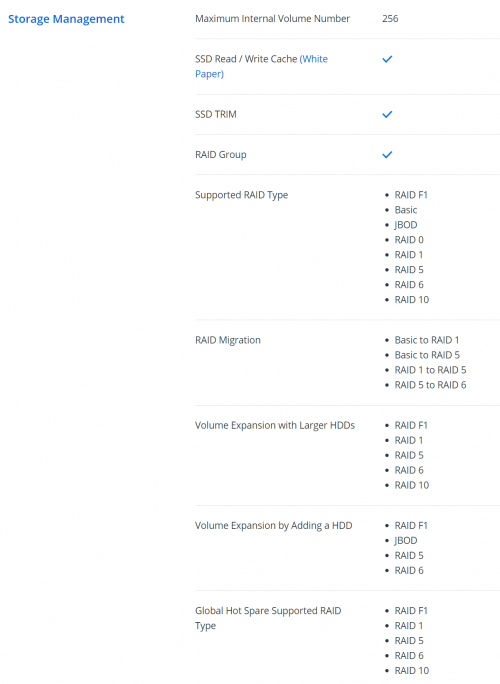
sweat.gif I don't have SHR, only normal RAID-5/6/10 notworthy.gif

Normal raid can mix different size HDD shocking.gif hurmm good news icon_rolleyes.gif

user posted image

This post has been edited by WaNaWe900: Mar 26 2021, 05:09 PM
ozak
post Mar 26 2021, 05:23 PM

10k Club
********
All Stars
17,018 posts

Joined: Jan 2005


QUOTE(WaNaWe900 @ Mar 26 2021, 05:06 PM)
sweat.gif  I don't have  SHR, only normal RAID-5/6/10  notworthy.gif 

Normal raid can mix different size HDD  shocking.gif  hurmm good news  icon_rolleyes.gif

user posted image
*
Normal RAID if mix HDD will not optimize the space.

Example, if you mix 4tb,6tb,8tb and 10tb together, Raid will use 4tb for all 4 hdd.

102 Pages « < 66 67 68 69 70 > » Top
 

Change to:
| Lo-Fi Version
0.0313sec    0.68    6 queries    GZIP Disabled
Time is now: 5th December 2025 - 02:08 PM