Welcome Guest ( Log In | Register )

Outline · [ Standard ] · Linear+

 NETWORK ATTACHED STORAGE (NAS) V2

views
     
stormer.lyn
post Feb 21 2021, 11:58 AM

Regular
******
Senior Member
1,132 posts

Joined: Apr 2014
From: Shah Alam, Selangor
QUOTE(xxboxx @ Jun 4 2020, 12:35 AM)
Is there anyone else that use Asustor here?
Now it got pi-hole app!  rclxm9.gif

Was thinking to buy raspberry pi just for running pi-hole as DNS server then found out now there's pi-hole app in Asustor App Central. Been running for few hours and it does block ads as it supposed to. Only the Dashboard not very stable, refresh too many times and DNS Resolver and FTL goes offline. After few hours it keep spiking the CPU constantly but after flush logs it seem to use less CPU again. Need to monitor more if it is stable for daily use.
*
I see from your later pasts that you have a Synology DS920+. Can you report if you are using pi-hole on it, and how is the stability? I currently run Pi-hole off a RPi, and it works beautifully. I will be upgrading my NAS one day (target is DS220+), and will be running Pi-hole in Docker on it.

My current NAS is a Synology DS212j, and although it works well, the interface is incredibly slow and there are less updates for it. I just use it for the occasional torrent, where I have a browser plugin to right-click and send the download task to the NAS. Also do an auto backup of the important documents from my work (using Cloud Station Backup on the PC), which is then also backed up to the cloud. (Using Cloud Sync on the NAS) I am quite happy with the data redundancy since the NAS is also using SHR mirrored. Meaning I have a data copy on my PC, one on each NAS HDD, and one in the cloud, and is accessible when I am out and about.

The icing on the cake would be running Pi-hole on the NAS too! Other than wanting Docker on it, and being a bit slow, the NAS has been almost flawless (the external PSU has died once....) in all the time I have been using it. 7 years running 24/7! wub.gif Highly recommended.

Does anyone have any recommendation for a UPS? I was thinking of this RightPower. Would appreciate it if anyone has any experience and able to report back.
user posted image
Edit: spelling and grammar

This post has been edited by stormer.lyn: Feb 21 2021, 12:07 PM
stormer.lyn
post Feb 21 2021, 09:34 PM

Regular
******
Senior Member
1,132 posts

Joined: Apr 2014
From: Shah Alam, Selangor
QUOTE(xxboxx @ Feb 21 2021, 06:32 PM)
Ya, I'm running pihole on DS920+, install from docker. Just updated it few days ago, with docker it is so easy.
No issue with stability or any other issue. With intel Celeron/Pentium CPU, it's powerful enough to run pihole effortlessly.
How much RAM do you have in total? I'll probably only be running 3 Docker containers, in addition to what I already run now on the DS212j (Single core! 1.2GHz!! 256MB RAM!!!)
QUOTE
I see your NAS is single core 1.2GHz, that is very slow by todays standard. I think your router have more powerful CPU than that. Can use router to download torrent, less strain on NAS.
Yes, it is slow when you login to the admin page. But it works flawlessly for everything I need; torrents, file sharing, local and cloud backup, and remote access. But it can't do Docker, so I have to run Pi-hole separately. But it is time for an upgrade, and I also thought to repurpose the RPi that is running Pi-hole.
QUOTE
If you get new NAS, can use your old NAS as additional backup for your important files. Can even use it as offsite backup if can put at other place and have fast internet.

Don't have experience with that UPS. Another thing to consider is the UPS battery can easily get and easy to replace. Battery doesn't last long, few years then it will die. Changing it's battery will be cheaper than getting a new UPS.
*
Not too worried about the battery of the UPS, as I am familiar with electronics. Only need knowledge if the USB control works. But thanks for the tip.
stormer.lyn
post Feb 27 2021, 01:09 AM

Regular
******
Senior Member
1,132 posts

Joined: Apr 2014
From: Shah Alam, Selangor
QUOTE(WaNaWe900 @ Feb 26 2021, 09:36 PM)
Correct me if I'm wrong ar  sweat.gif
So what I get is by using Pi-hole thru Dockers in NAS can create safer & secure DNS  hmm.gif  for not just accessing our NAS from external network but also overall home networking safety ?
How this different from using VPN  sweat.gif  rclxub.gif
*
Pi-hole is a DNS server, and a VPN is a, well, VPN. How did you come to the above bolded conclusion? As xxboxx said, if your router is set to process DNS from a Pi-hole, that Pi-hole can block any site that is in its block list, on any device on the network.

Let's say you include lowyat.net into Pi-hole's block list. When any device on the network tries to load LYN, it will not be able to load that website. This is similar to M'sia gumbiment trying to block porn websites, where if you look for a porn website, you are redirected to the "Laman sesawang in something something..." or whatever it is webpage. In this case, you could change your DNS server, and get back access to porn sites.

In Pi-hole's case, most of the lists are blocking known malware sites, and also known advertising content servers. This means any device on your network will not load the ads that are listed in Pi-hole's block list. Any device... your phone, tablet, computer, TV, etc, etc. Apps that are ad supported magically don't have ads, when you use the app while on your network.

Note that no where in my post did I mention safer connection to your NAS externally, although you will get a safer network since known malware sites are blocked as a benefit.
stormer.lyn
post Feb 27 2021, 11:18 AM

Regular
******
Senior Member
1,132 posts

Joined: Apr 2014
From: Shah Alam, Selangor
QUOTE(WaNaWe900 @ Feb 27 2021, 01:52 AM)
so when install/docker Pi-hole in our NAS it will capable of controlling/filtering Router's access more effective is it  rclxub.gif
*
I don't know why you keep talking about router access.

A DNS server is an "address book" of all the computers that have websites (aka web servers) in the world.

When you type "pornwebsite.com" into your browser.....
If you use Cloudflare DNS server, the data returned will be "Look for the webserver at No 1, Pornwebsite street, USA" and the browser will display that porn page
If you use TM DNS server, the data returned will be "Look for the webserver at Tingkat atas, goverment M'sia building" and the browser will display the page "Laman sesawang ini something something is prohibited"
If you use your own DNS server (aka Pi-hole), you can resolve the address to any webserver you want (because it is your own private address book, right?) You could even point it to lowyat.net, and your browser will display lowyat.net every time you type pornwebsite.com into your browser.

In Pi-hole's case, it is meant to block known ad and malicious webservers. When you type "general-interest-hobbies.com" into your browser, and that website asks for a banner advertisement from "ad-data-webserver.com", Pi-hole will give the correct address of general-interest-hobbies.com, but will not give the address of ad-data-webserver.com, because that is in the blocklist. You end up only seeing the website, and not the banner ad in your browser.

Disclaimer : All the websites stated are made-up for this post, but they could be real for all I know. And the addresses too. IRL the addresses would be a number, either in IPv4 or IPv6, or both. Some of the information is not exactly accurate because I have tried to explain it in people understandable language

This post has been edited by stormer.lyn: Feb 27 2021, 12:53 PM
stormer.lyn
post Mar 3 2021, 07:26 PM

Regular
******
Senior Member
1,132 posts

Joined: Apr 2014
From: Shah Alam, Selangor
QUOTE(Lurker @ Mar 3 2021, 10:10 AM)
» Click to show Spoiler - click again to hide... «

may I pick your mind on this back up.
While I understand for mirror in NAS/PC, how do you sync the files in PC>NAS>Cloud?
Does this mean all the files (in 3 locations) are the same all the time?
*
Can, I'll try to explain what I have done...

On my PC I have installed Cloud Station Backup. This app always runs and monitors the folder "My Documents" only. Whenever I create a new document, or update one, or save anything to "My Documents", the app copies it to the NAS. NAS username and password has to be saved in the app.

On the NAS I have installed Cloud Sync. Cloud Sync is also monitoring the specific folder that I backup the PC files to, and it will backup to the cloud when there are changes to this folder. Cloud username and password has to be saved in the app, in my case it is to Google Drive.

There is another way to do this, which is called Synology Snapshot, where the NAS keeps previous versions of your files. This might save your ass if you ever get ransomware and all your files are encrypted, as it allows you to recover files from their previous state (...before encryption) I am thinking to use this method too, that's why looking to do an upgrade to the NAS.

So, right now this is the way I do it. If I'm up and about, and have to refer to an invoice, for example, I can log directly into the NAS using DS File, or can just check on Google Drive. The files are the same in all 3 locations, and are the latest ones. But the "master" copy is on the PC, and all others follow that one.
stormer.lyn
post Mar 3 2021, 10:16 PM

Regular
******
Senior Member
1,132 posts

Joined: Apr 2014
From: Shah Alam, Selangor
QUOTE(Lurker @ Mar 3 2021, 09:07 PM)
Thanks! noted on the master copy being the one on the PC HDD
So anything modified on the master will be reflected to the others...

but what if NAS files were modified instead(or files other than the master', what effect will that cause to the set of data?
*
Since PC > NAS > Cloud, if you edit the file in in the NAS directly, the Cloud one changes, but the PC one does not. Do note that if you change the name of the file, the file on the NAS and Cloud is NOT deleted, but rather a new file is created. I'm counting on this to save me from ransomware, as the name of the file is changed if you get infected.
QUOTE
end up my UnifiTV box unable to connect
anyone with UnifiTV can assist?

I don't have UnifiTV (UTV), so I am just guessing for this. Firstly, can you check if PiHole is actually stopping UTV?
In PiHole, Disable > 5 minutes, and check if UTV works.
See in Query Log any Unifi domains are blocked? If Yes, then whitelist
In Settings > DNS, include back the DNS for UTV under the Upstream DNS Servers Custom 1 to Custom 4

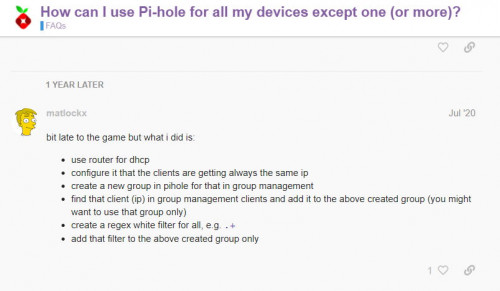
There is also this below, where you would allow the UTV box IP address to bypass PiHole filtering, but I'm not so sure how it is done
user posted image
Hope this helps
stormer.lyn
post Mar 3 2021, 10:30 PM

Regular
******
Senior Member
1,132 posts

Joined: Apr 2014
From: Shah Alam, Selangor
QUOTE(AtMostFear @ Mar 3 2021, 10:21 PM)
For me I'll just set manual DNS to opendns/google/etc. on any device that wants to bypass pihole. did this for my wife's phone since she complained she has trouble going on pinterest.
*
I thought of suggesting this, but I don't know if the UnifiTV box can set it's own DNS in the box. Plus I think you actually have to use the Unifi DNS, as using the PiHole already uses the external DNS servers Google/Cloudflare/OpenDNS/etc

This post has been edited by stormer.lyn: Mar 3 2021, 10:43 PM
stormer.lyn
post Mar 4 2021, 08:05 AM

Regular
******
Senior Member
1,132 posts

Joined: Apr 2014
From: Shah Alam, Selangor
QUOTE(Lurker @ Mar 3 2021, 11:45 PM)
Noted on the backups, my main storage would be my digital photos
so if the master files corrupt, it will affect the rest? am I understanding it correctly?
Your syncing is done weekly? or more frequent?
*
The sync is not time based, but the app does it immediately if there are changes to the folder. And you are right about if the master gets corrupted, all the files will get corrupted also. As xxboxx says, use Snapshot better to prevent this.
stormer.lyn
post Mar 31 2021, 09:15 PM

Regular
******
Senior Member
1,132 posts

Joined: Apr 2014
From: Shah Alam, Selangor
UPS Update : Models Right Power PowerTank P1250T and APC BX-1400U-MS, both with USB
TL;DR - Not personally tested, but shop guy at All IT Hypermarket said cannot be used. He was very specific that these models cannot be used with a NAS.

---
I stopped by at Digital Mall to check out the UPS that might be compatible with my Synology DS212j. (and future NAS) All IT Hypermarket had in stock, the Right Power at RM499 and the APC at RM699, both with USB. So I got to talking to the sales guy, and when I asked if these models could trigger a shutdown for the Synology NAS, he said that these models could not. We also talked about the Right Power that I was originally interested in, model P800T. It seems that the USB is for monitoring only.

Now, of course the USB is for monitoring, and when the UPS signals that it is running on battery or running out of power, the NAS will shutdown, right? That's how it is supposed to work. But then, the sales guy was very specific that these models would not work with a NAS, and not just very vaguely saying "maybe will work, maybe won't" or "try first if can", or straight out saying "I donno if can work", so take that for what it's worth. He told me to look for different models or order online as All IT does not carry any UPS that will work with a NAS.

As for me, since these models are not on the Synology compatibility list anyway, I'll pass on the personal testing for now, and not waste money. The search continues for a UPS ....
stormer.lyn
post Apr 1 2021, 12:51 PM

Regular
******
Senior Member
1,132 posts

Joined: Apr 2014
From: Shah Alam, Selangor
QUOTE(xxboxx @ Apr 1 2021, 10:04 AM)
What other things to monitor by the NAS other than whether there's power being fed to UPS? hmm.gif
That's why I said "take that for what it's worth" about the sales person's advice. I don't absolutely believe what he said is right, as you should have been able to infer from my post.
QUOTE
Now, of course the USB is for monitoring
If they had the P800T in stock, I would have bought one to test for myself, but I wasn't willing to spend RM499 to test with the higher end model. I still will try once I can get the UPS I want.

QUOTE
And since WaNaWe900 have same APC model but different capacity, I believe it can work.
This is the problem, you believe it can work, but you don't know for sure. You're just guessing. It's an intelligent guess, but still a guess. At least WaNaWe900 has confirmed with his experience. That's one good data point from WaNaWe900.

The other reason I mentioned the name of the shop, and what exactly transpired, is also so that a person now doesn't have to go through the same experience I did. We still are unsure of which UPS to use, but we now know what going to All IT and asking will result in.
QUOTE
He got mention what model that can work with NAS?
*
Said to look at enterprise level UPS models. shocking.gif
stormer.lyn
post Apr 11 2021, 12:21 PM

Regular
******
Senior Member
1,132 posts

Joined: Apr 2014
From: Shah Alam, Selangor
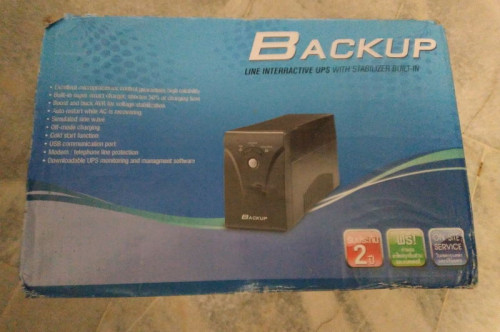
I used to work from a shared office, and the cleaning lady just asked me to help sell some of the old stuff that was left behind by a tenant that has moved out. Included were 2 generic UPS units. Near as I can tell it is made in China by Voltronic Power, and then rebranded by the local (to the origin) seller. (Strange setup, the sockets are US style 3 pin, but the voltage is 220Vac)
user posted image

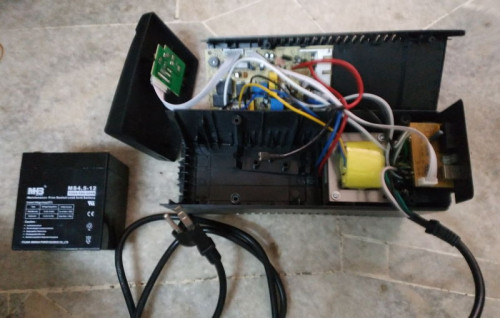
Batteries were dead, (12V, 4.5Ah) but measured and saw that there is space for a larger battery. So upgraded to 12V, 7.2Ah costing RM 55.
user posted image

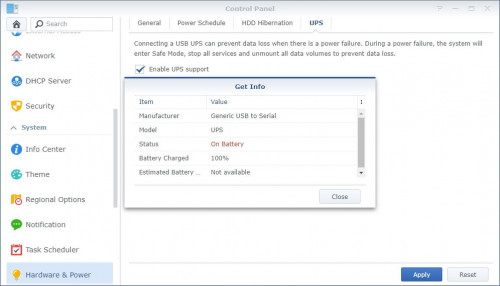
Plugging in the UPS via USB cable, and the Synology recognises the device.
user posted image

Both when mains power, or when battery power.
user posted image

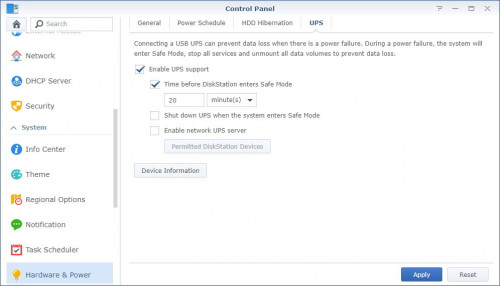
One thing I noticed is that the NAS does not shut down after the specified time. It just unmounts the HDDs and shuts down all services, ready for a power off. You can ensure power off when you check the box "Shut down UPS when the system enters safe mode". The UPS will power off. shutting everything down.
user posted image

If you don't check the box mentioned above, and check at this "Restart automatically when power supply issue is fixed" box instead, the Synology will restart all the services and wake the HDDs, ready for action again after mains power is restored.
user posted image

So that's my experience with a UPS (with USB connection) on a Synology (DSM v6.2.4-25556). I now think any UPS with a USB that does reporting can be used, and the advice I got from the All IT Hypermarket person previously is incorrect. Unfortunately I won't be testing with the Right Power model I was previously interested in anymore, since I have these 2 UPSs.
~~~ Sekian report of my experience ~~~
stormer.lyn
post Apr 11 2021, 01:50 PM

Regular
******
Senior Member
1,132 posts

Joined: Apr 2014
From: Shah Alam, Selangor
QUOTE(ozak @ Apr 11 2021, 12:40 PM)
The battery is bigger than the UPS for my NAS.  biggrin.gif
12V 65AH lead seal battery.
*
As an EE, I'm going for multiple smaller, more common batteries, instead of one large single battery. Buying a 65Ah battery online shows prices starting at RM 435, with the average being about RM 500. 9x units of 7.2Ah batteries costs about RM 450 - RM 500, getting almost the same capacity as the large battery. Costs me almost nothing in materials as I already have it, and a bit of my time, to wire them all up.
» Click to show Spoiler - click again to hide... «
The real question though, why do you want your NAS running for 24 hours during a power outage? tongue.gif
stormer.lyn
post May 6 2021, 09:21 PM

Regular
******
Senior Member
1,132 posts

Joined: Apr 2014
From: Shah Alam, Selangor
QUOTE(xxboxx @ May 6 2021, 06:11 PM)
I been using SSD drive as the storage for files in Drive and Moments for more than a month now. Before this it store in HDD. I always open files ranging from few hundreds kilobyte or few megabytes, or loading thumbnails for pictures, with HDD it always takes few seconds and feel laggy. Especially more when I access it remotely. I also got nvme cache but it can't cache all the files all the time. Now with SSD it's noticably faster, no more waiting few seconds for it to load the files or thumbnails.

Since I'm only using 1 SSD, there's no redundancy, so what I do is I set Hyperbackup to make backup of Homes folder every hour.

Having SSD for your active folders is worth the upgrade for NAS in my opinion.
*
Expensive la.... Right now 2 TB SSD about RM 800 - RM 1000. 2 TB Ironwolf RM 300+. 4TB RM 500+. I would really like to try, but the cost... ugh! But I'm surprised that you feel HDD is laggy. I would think the data connection is the problem, not the speed of the HDD.

So I have dug out some old PCs, and now trying Open Media Vault. Wow, I'm blown away! Really responsive and fast! Reading up to see how the setup for OMV is, and also adding all the necessary software. Quite a steep learning curve, but OMV seems to be able to do everything a pre-built NAS can. I'll try to write up the experience when I can.

Hardware that I'm playing around with:
1. Intel D945GCLF mainboard, integrated Atom 230, 2 GB DDR2, 10/100 network. OMV installed on old 3.5" 80 GB HDD.
- Very low power consumption, (Atom TDP only 4W!) but the built in 10/100 limits speed to about 20+ MB/s file transfer over the network.
- Expansion is PCI slot, so no way of adding Giga network. Bummer.
- 10/100 network no buffering with 1080p 5.1 playback.

2. Gigabyte GA-A55M-DS2 mainboard, AMD A6-3500 3 core, 4 GB DDR3, built in Atheros 10/100/1000, OMV installed on 8 GB USB Flash drive. 2 different sized 2.5" HDD spanned together to make one bigger drive.
- Performs absolutely stellar as compared to my Synology DS212j. Snappy web interface, boots up fast, shutdown fast. Speedy.
- Network file copying at 100+ MB/s, to and from the NAS. Tested with 4 GB iso file. Slowest I see is when there are a lot of small files being copied.

3. Dell Vostro, i3 2120, 4 GB DDR3, built in Realtek 10/100/1000. Just started, but I think might be like #2 above.

So before you all say it, yes, I'm a cheapskate. Yes, I'm still using a DS212j from donkey's years ago. It still works fine for what I want it to do. And yes, I should get rid of some of the crap I have lying around. laugh.gif

I must add the biggest con of using OMV that I'm facing right now - The information is out there for anything you want to do, but that information is all over the place. You end up reading on multiple forums, watching multiple videos on YT, reading and searching for everything. Very tedious and time consuming.

This post has been edited by stormer.lyn: May 6 2021, 09:29 PM
stormer.lyn
post Jun 19 2021, 06:33 PM

Regular
******
Senior Member
1,132 posts

Joined: Apr 2014
From: Shah Alam, Selangor
Just a follow up on my experiment with building my own NAS using PC components.

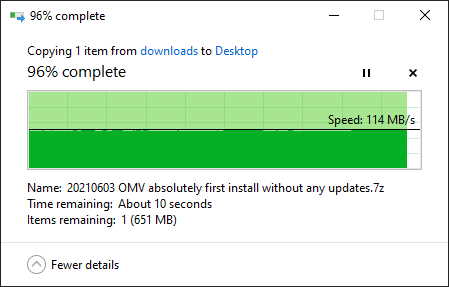
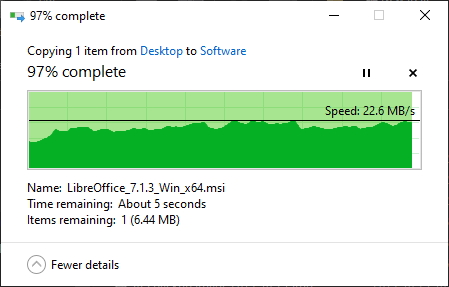
I've gone with the Dell motherboard and i3-2120 instead of the AMD A6 that I had. Reason being Intel raw power is better, instead of AMD graphics is better, as the NAS will be headless anyway. Running for more than a week already, fully stable and performing well. Copy to-from NAS is in excess of 100 MB/s, when my old Synology was around 20 MB/s usually.

Running Docker, with Pi-hole (separate IP using vlan), Deluge, qBittorrent and Syncthing. Perhaps will add Plex and Shinobi, but not really required. The NAS has 2 drives, so there is a rsync backup between them, and also UPS is attached and tested working shutdown. Auto backup of my documents every time I plug in a USB drive, without any intervention from me. It's working so well that I have shut down the Synology.

I splurged and bought a Jonsbo C2 case for RM 45. And the RAM was RM 35. Using all the items I already had, and the HDDs from the Synology, I think it is extremely good value at under RM 100 extra outlay. Maybe I'll splurge again and get the highest efficiency PSU that I can. Will be getting a power meter soon to see the actual consumption from the wall socket.

So this is my strangest observation. Yes, it took time to learn how to set up Open Media Vault. But I now have a better grasp of shares and permissions on the OMV NAS than the Synology. Since I'm retiring the Synology, I've put in another HDD, and trying to set it up again is confusing as hell! DSM is seriously unfriendly.

This is typical for the OMV NAS. 19 GB file!
user posted image

This is typical for the Synology NAS
user posted image

Anyway.... if you only think of a brand name for your NAS, then go right ahead. But if you are willing to see what alternatives are out there, and don't mind doing a little work, well, I think self built NASes are a valid path no matter if you choose OMV, FreeNAS, XigmaNAS, or something like DietPi. Good luck, you can do it!
stormer.lyn
post Jul 20 2021, 04:09 PM

Regular
******
Senior Member
1,132 posts

Joined: Apr 2014
From: Shah Alam, Selangor
QUOTE(taqu @ Jul 20 2021, 03:55 PM)
I'm starting to use my Raspberry Pi 4, connected to 1 SSD & 1 HDD, as Samba server & Resilio Sync. Is this considered NAS?
*
Of course!


Change to:
| Lo-Fi Version
0.0810sec    0.56    7 queries    GZIP Disabled
Time is now: 1st December 2025 - 11:49 PM