

guys, is it advisable to turn on hibernation for WD NAS hard disk? will hibernation shorter hard disk life span?
NETWORK ATTACHED STORAGE (NAS) V2
NETWORK ATTACHED STORAGE (NAS) V2
|
|
 Jul 18 2017, 03:15 PM Jul 18 2017, 03:15 PM
Return to original view | Post
#1
|
 
Senior Member
603 posts Joined: Apr 2011 
|
guys, is it advisable to turn on hibernation for WD NAS hard disk? will hibernation shorter hard disk life span?
|
|
|
|
|
|
Apr 4 2018, 10:56 AM
Return to original view | IPv6 | Post
#2
|
|
Senior Member
603 posts Joined: Apr 2011
|
Guys, did u recently encountered someone trying to access ur synology NAS with admin account?
I have some keywords configured to trigger security alert to my email, starting this year I found quite a number of attempts to access my NAS with admin account. Lucky all failed and IP was blocked after 3 failed attempts. |
|
|
Apr 4 2018, 11:16 AM
Return to original view | IPv6 | Post
#3
|
|
Senior Member
603 posts Joined: Apr 2011
|
QUOTE(ozak @ Apr 4 2018, 11:10 AM) The NAS should have Log for you to check the IP from where. Copy paste the IP in google and see where it from. Last time got such experience before. Whole day for whole month kena hack. After I comeback from China. And guess what, the IP is from China.   Yeah, I chked and the IP is from Russia (95.70.26.60). My question how does one knw our IP since we using dynamic IP. I worry synology exposed our NAS IP. |
|
|
Feb 26 2021, 11:05 AM
Return to original view | Post
#4
|
|
Senior Member
603 posts Joined: Apr 2011
|
Guys, anyone experienced synology NAS detected Bad Sector on the Hard Disk drive? I mean how accurate it can be or it could be NAS false alarm?
FYI, I got a new replacement drive from RMA, but again the Synology NAS detected Bad sector. |
|
|
Mar 8 2021, 10:40 PM
Return to original view | Post
#5
|
|
Senior Member
603 posts Joined: Apr 2011
|
QUOTE(xxboxx @ Feb 26 2021, 08:29 PM) I don't think it's the NAS that detect bad sector. The HDD itself that detect it and inform the OS. The HDD also will do marking on the map table that the sector cannot be used anymore. What's the ID number and attribute from S.M.A.R.T info? My problem is whenever I run data scrubbing the synology NAS will throw error like "I/O error" on disk 4, after few months it become got bad sector (only 1). You can try hook the HDD to PC and check for any error or bad sector using program such as CrystalDiskInfo. Firstly, you need to understand what is DNS and DNS Server. From Cloudflare site: » Click to show Spoiler - click again to hide... « DNS Server is the one that manage DNS. It will periodically connect with other server to update the ip address for url. Pi-hole mostly used for DNS server. Do you change your DNS server to use Google's 8.8.8.8 or Cloudflare's 1.1.1.1? The reason to use other DNS server instead of default ISP is for bypassing blocked site or security purpose. Now more people are using pi-hole instead because the DNS list also include list of url to block, such as harmful site url or advertising url. Usually you will install adblock on every computer browser or phone, but if the router is configured to use pi-hole for DNS, all the devices that use the router connection will be filtered by pi-hole. Jdownloader is usually used for direct download. Some download site limit your ip can only download 1 time then have to wait how many hours/day. JDwonloader if configured, can make your router disconnect from isp and then connect back to get different ip. It also block cookie and change it's id so that the download site can't identified you, unlike internet browser. Jdownloader also can be used to download youtube video/audio/subtitle. Edit: added the bold Even after I replaced with new drive from RMA it still encountered same issue when running data scrubbing. I did again RMA and replaced second replacement drive but the problem become worst - when copying certain file it will stuck and keep throw bad sector found. I'm running extended smart test for the particular drive but but it stuck at 90% (already more than 24h). The storage pool now is in warning status with drive 4 status in critical. I really stuck and do not know what to do next. |
|
|
Mar 9 2021, 12:31 PM
Return to original view | Post
#6
|
|
Senior Member
603 posts Joined: Apr 2011
|
QUOTE(xxboxx @ Mar 9 2021, 01:17 AM) Bad SATA cable or connector also can cause communication error thus report it as bad sector. It's more usually happen to cable as can easily damage or low build quality cable. Try to clean the connector slot. I already vacuum the NAS and its connector, first drive only detected I/O error and bad sector when running data scrubbing, I plugged it to PC and executed extended smart test with Western D Dashboard but didnt found any problem.1 new drive and then 2 RMA drive, all end with bad sector? Is the HDD for usage in NAS? You could try getting HDD from different brand to eliminate the possibility the RMA HDD is problematic. But I feel most likely communication error due to damage or dirty connector. First thing you should do is make a backup of your data, if you don't have it. Doing rebuilding put a lot of stress on the remaining HDD and if another HDD died all the data will be gone. This is assuming you are using RAID5 or SHR. For the second RMA drive, it is indeed a defective drive as the western D dashboard showed "poor" status, extended smart test cant be executed due to error code 4. It is western D drive for NAS, however the drives I got from RMA are not with RED label. |
|
|
|
|
|
Mar 9 2021, 03:31 PM
Return to original view | Post
#7
|
|
Senior Member
603 posts Joined: Apr 2011
|
QUOTE(Lurker @ Mar 9 2021, 01:30 PM) recertified/refurbished drive don't hv red labels if not mistaken Yes, i saw there is a "recertified" word. Is it RMA can only can "recertified" drive? Is it only in Malaysia? |
|
|
Mar 9 2021, 03:57 PM
Return to original view | Post
#8
|
|
Senior Member
603 posts Joined: Apr 2011
|
QUOTE(AbbyCom @ Mar 9 2021, 03:38 PM) I think you should get a new drive that you buy from store (or borrow a drive that you know is good, or maybe just swap the slots - to confirm this is a drive issue or slot issue). I though after 1 year, I can't directly get a new replacement from the same shop. Hence I go thru Western D RMA, never expect got this kind of recertified drive.'Recertified' means the drive are most likely RMA'ed drives but went through a short retest at vendor site to map out the bad sectors or to temporarily 'fix' the original errors (sometimes just by resetting the SMART logs) and then sent to another customer who RMA, hopefully this customer won't see the issue or the drive manage to run/survive until after warranty period is over before the error comes out again. The second replacement drive now with health status = "poor", cant even run quick SMART test. If that is possible if NAS slot with problem can caused the drive SMART Status in poor? |
|
|
Mar 18 2021, 12:13 PM
Return to original view | Post
#9
|
|
Senior Member
603 posts Joined: Apr 2011
|
QUOTE(Lurker @ Mar 9 2021, 01:30 PM) recertified/refurbished drive don't hv red labels if not mistaken QUOTE(xxboxx @ Mar 9 2021, 07:59 PM) I also got RMA 1 WD HDD last time, sticker write as RED but it's not red colour sticker. After use about 1 year the drive died.  QUOTE(AbbyCom @ Mar 9 2021, 09:28 PM) Sorry, I actually meant you go and buy a new drive, not ask for replacement from the shop or use a RMA drive since an array rebuild (but I'm not sure what scrubbing does) usually involve a lot of read and write from the drives in the array and these 'recertified' drives could be just working well enough to pass but might not last long. The intense read/write during array rebuild will stress/cause these 'recertified'/'walking wounded' drives to fail prematurely. Finally I think my bad sector/IO error issue is resolved. I hope you find out what's causing the failures. I got the NAS RED HD from Western D RMA, as I escalated to them 2 recertified drives failed. Done Data Scrubbing and no more Bad Sector and IO error warning. WaNaWe900 liked this post
|
|
|
Sep 24 2021, 04:13 PM
Return to original view | Post
#10
|
|
Senior Member
603 posts Joined: Apr 2011
|
Anyone upgraded to synology DSM 7? any issue?
Also, anyone can recommend IP camera that compatible with Synology surveillance station? |
|
|
Sep 28 2021, 05:09 PM
Return to original view | Post
#11
|
|
Senior Member
603 posts Joined: Apr 2011
|
QUOTE(xxboxx @ Sep 24 2021, 07:14 PM) I upgraded to DSM7 2 months ago. I got write here some feedback. Thanks for sharing, upgraded to DSM 7 so far so good.https://forum.lowyat.net/index.php?showtopi...ost&p=101511491 |
|
|
Jun 25 2022, 04:56 PM
Return to original view | Post
#12
|
|
Senior Member
603 posts Joined: Apr 2011
|
Hi Guys, I'm facing issue "read error at disk[x]" when copying file to my synology nas, the file just stuck with very slower copying speed.
Below are the S.M.A.R.T attributes from a good drive and a drive with issue (rhs) Is it due the the drive itself is failure? 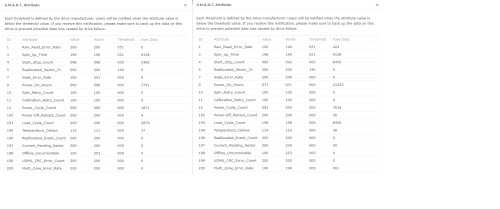 |
|
|
Jun 25 2022, 10:56 PM
Return to original view | Post
#13
|
|
Senior Member
603 posts Joined: Apr 2011
|
QUOTE(xxboxx @ Jun 25 2022, 10:23 PM) Possible. The second disk have Current Pending Sector. See after the number decrease if it will operate back as normal. I just replaced the second disk, repairing the storage pool now.https://kb.acronis.com/content/9133 Multi-Zone Error Rate also could be indicative there's something wrong with the surface or read/write heads. If you have redundancy, can just left it like that and see if it fix itself. If no then backup your data. https://kb.acronis.com/content/9136 The failed disk been used for 5y 2m, the NAS is running 7x24 non stop. Is this life span consider normal? I have another one with increasing bad sectors.... |
|
|
Nov 18 2023, 04:29 PM
Return to original view | Post
#14
|
|
Senior Member
603 posts Joined: Apr 2011
|
Guys, any of you ever purchased additional synology license for camera? Where in KL we can purchase it?
|
| Change to: |  0.0215sec 0.0215sec
 1.28 1.28
 7 queries 7 queries
 GZIP Disabled GZIP Disabled
Time is now: 9th December 2025 - 04:13 PM |
 Quote
Quote