Welcome Guest ( Log In | Register )

102 Pages « < 59 60 61 62 63 > » Bottom

Outline · [ Standard ] · Linear+

 NETWORK ATTACHED STORAGE (NAS) V2

views
     
HandsomeDupe
post Dec 21 2020, 06:58 PM

New Member
*
Junior Member
45 posts

Joined: Apr 2014
QUOTE(ozak @ Dec 21 2020, 05:57 PM)
I m using maxis too.

Router side got port forward?

In the NAS setting quickconnect/ general or advannced, everything filled up correct?
*
Thanks for your reply.
All set correctly, my maxis router got port forwarding in uPnP section. How about yours?
ozak
post Dec 21 2020, 07:05 PM

10k Club
********
All Stars
17,021 posts

Joined: Jan 2005


QUOTE(HandsomeDupe @ Dec 21 2020, 06:58 PM)
Thanks for your reply.
All set correctly, my maxis router got port forwarding in uPnP section. How about yours?
*
No problem with my NAS connection. Been run for many yrs.

Even after change to the new router, connect as usual. Maxis contractor help me setup the router.

Go to Synology port forward list and check what port needs forward.


xxboxx
post Dec 21 2020, 08:59 PM

The mind is for having ideas, not holding them
*******
Senior Member
5,261 posts

Joined: Oct 2004
From: J@Y B33


QUOTE(HandsomeDupe @ Dec 21 2020, 10:42 AM)
Hi guys, need some help here.

Just purchased DS220j last week to play around with.

Managed to setup using DDNS from synology, but I'm unable to access it from the internet. I have :
1. Enable port forwarding in my maxis router
2. Whitelist port both in my synology router and maxis router

Any clue on where else to look for ?
*
Let's say your DDNS name is HandsomeDupe, and you choose synology.me as the service provider. So your web address is "HandsomeDupe.synology.me"
Then you also need your DSM ports, let's say it is 5001 for https, so the address would be "https://HandsomeDupe.synology.me:5001"

Additionally, go to Control Panel > External Access > Router Configuration, and click Test Connection to see if the connection is ok.
HandsomeDupe
post Dec 21 2020, 09:45 PM

New Member
*
Junior Member
45 posts

Joined: Apr 2014
QUOTE(xxboxx @ Dec 21 2020, 08:59 PM)
Let's say your DDNS name is HandsomeDupe, and you choose synology.me as the service provider. So your web address is "HandsomeDupe.synology.me"
Then you also need your DSM ports, let's say it is 5001 for https, so the address would be "https://HandsomeDupe.synology.me:5001"

Additionally, go to Control Panel > External Access > Router Configuration, and click Test Connection to see if the connection is ok.
*
Connection tested ok. But the port forwarding does not work.

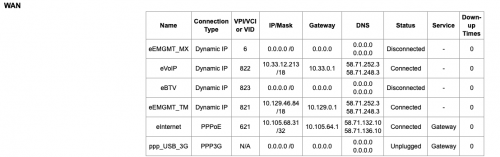
Just notice that I don't have any public IP assigned to me by Maxis


user posted image
xxboxx
post Dec 22 2020, 12:36 AM

The mind is for having ideas, not holding them
*******
Senior Member
5,261 posts

Joined: Oct 2004
From: J@Y B33


QUOTE(HandsomeDupe @ Dec 21 2020, 09:45 PM)
Connection tested ok. But the port forwarding does not work.

Just notice that I don't have any public IP assigned to me by Maxis
user posted image
*
Can you request Maxis to assign you with public IP? With TM, request reason for CCTV usually can get it.

If not then delete your DDNS and just use QuickConnect
ozak
post Dec 22 2020, 08:23 AM

10k Club
********
All Stars
17,021 posts

Joined: Jan 2005


QUOTE(xxboxx @ Dec 22 2020, 12:36 AM)
Can you request Maxis to assign you with public IP? With TM, request reason for CCTV usually can get it.

If not then delete your DDNS and just use QuickConnect
*
Why need a DDNS when already have quickconnect?

Quickconnect is the most easiest and simple to use.
xxboxx
post Dec 22 2020, 03:52 PM

The mind is for having ideas, not holding them
*******
Senior Member
5,261 posts

Joined: Oct 2004
From: J@Y B33


QUOTE(ozak @ Dec 22 2020, 08:23 AM)
Why need a DDNS when already have quickconnect?

Quickconnect is the most easiest and simple to use.
*
QuickConnect is easy but it's not direct connection to NAS. Transfer speed is slower.
If you want to get https certificate signed also have to use DDNS.

What are the differences between QuickConnect and DDNS?
ozak
post Dec 22 2020, 06:18 PM

10k Club
********
All Stars
17,021 posts

Joined: Jan 2005


QUOTE(xxboxx @ Dec 22 2020, 03:52 PM)
QuickConnect is easy but it's not direct connection to NAS. Transfer speed is slower.
If you want to get https certificate signed also have to use DDNS.

What are the differences between QuickConnect and DDNS?
*
Before quickconnect available, I use free DDNS connect.

Pain in the ass using free DDNS. Have to log in to the DDNS website once a month to make sure you’re still here. Cannot detect NAS and no connection is high %. Lost track your IP.

If don’t want those trouble, probably got to pay.

Been using quickconnect for 6yrs. Really stable.
xxboxx
post Dec 22 2020, 07:32 PM

The mind is for having ideas, not holding them
*******
Senior Member
5,261 posts

Joined: Oct 2004
From: J@Y B33


QUOTE(ozak @ Dec 22 2020, 06:18 PM)
Before quickconnect available, I use free DDNS connect.

Pain in the ass using free DDNS. Have to log in to the DDNS website once a month to make sure you’re still here. Cannot detect NAS and no connection is high %. Lost track your IP.

If don’t want those trouble, probably got to pay.

Been using quickconnect for 6yrs. Really stable.
*
Last time Synology don't have their own DDNS service yet?
Now is very easy, just set a hostname and select service provider or use Synology one. It will periodically auto check and establish the connection.
ozak
post Dec 22 2020, 07:54 PM

10k Club
********
All Stars
17,021 posts

Joined: Jan 2005


QUOTE(xxboxx @ Dec 22 2020, 07:32 PM)
Last time Synology don't have their own DDNS service yet?
Now is very easy, just set a hostname and select service provider or use Synology one. It will periodically auto check and establish the connection.
*
Nothing.

And setup is difficult for normal people.
WaNaWe900
post Dec 23 2020, 03:55 PM

చąហ ąచҽ™
******
Senior Member
1,397 posts

Joined: Feb 2012
From: sOuL SoCiETY.. iSKaNDaRPuTeRi.. JB.. JDT


QUOTE(xxboxx @ Nov 24 2020, 08:50 AM)
Hye.. read the review thumbup.gif and thinking getting 1 too... still try to understand a bit more before make the purchase thou hmm.gif

So far NAS + SHR + BTFRS + UPS!!! + RAM upgrade + ... sweat.gif

Will keep reading icon_rolleyes.gif

This post has been edited by WaNaWe900: Dec 23 2020, 03:55 PM
xxboxx
post Dec 23 2020, 06:43 PM

The mind is for having ideas, not holding them
*******
Senior Member
5,261 posts

Joined: Oct 2004
From: J@Y B33


QUOTE(WaNaWe900 @ Dec 23 2020, 03:55 PM)
Hye.. read the review  thumbup.gif  and thinking getting 1 too... still try to understand a bit more before make the purchase thou  hmm.gif

So far NAS + SHR + BTFRS + UPS!!! + RAM upgrade + ... sweat.gif

Will keep reading  icon_rolleyes.gif
*
Ya, if go full package will be expensive sweat.gif
You can get the essential first only then only slowly get more. NAS must get first. HDD if your PC already got and you going to move the data to NAS, you can reuse first, if got 1 HDD only then just get another first, at least must have RAID-1 for redundancy.

UPS can get later, unless your place always have power failure. RAM upgrade not really necessary unless you going to run VM or a lot of apps.
mystvearn
post Dec 23 2020, 09:29 PM

...
*******
Senior Member
6,639 posts

Joined: Jan 2003
From: "New Castle"


Was going to purchase the a synology.,but decided to wait until my onedrive enterprise account space max out at 1 tb. Also waiting for final release of dsm 7.0
WaNaWe900
post Dec 25 2020, 02:23 AM

చąហ ąచҽ™
******
Senior Member
1,397 posts

Joined: Feb 2012
From: sOuL SoCiETY.. iSKaNDaRPuTeRi.. JB.. JDT


QUOTE(xxboxx @ Dec 23 2020, 06:43 PM)
Ya, if go full package will be expensive sweat.gif
You can get the essential first only then only slowly get more. NAS must get first. HDD if your PC already got and you going to move the data to NAS, you can reuse first, if got 1 HDD only then just get another first, at least must have RAID-1 for redundancy.

UPS can get later, unless your place always have power failure. RAM upgrade not really necessary unless you going to run VM or a lot of apps.
*
Indeed 😪😪😪... don't have any HDD now thou... store setup also hefty a price... is it difficult to do on our own 🤔
ahngao_23
post Dec 28 2020, 05:52 PM

New Member
*
Junior Member
25 posts

Joined: Nov 2009
Hi all sifus,

I'm new to NAS and have a tight budget. I'm looking for these 2 entry level NAS: Synology DS220J and QNAP TS230, which 1 is better?

What I will do in NAS:
- Backup photos
- Store Movies (using SMB to watch movie in laptop and tablet)
- Store Musics
- Download BT (light download)

plan to use Toshiba 2x4TB NAS HDD

Thank You!


WaNaWe900
post Dec 29 2020, 12:39 AM

చąហ ąచҽ™
******
Senior Member
1,397 posts

Joined: Feb 2012
From: sOuL SoCiETY.. iSKaNDaRPuTeRi.. JB.. JDT


Hye Sifus notworthy.gif

Finally settled for below items sweat.gif puke.gif mega_shok.gif

1. DS1621xs+
2. 8+8GB DDR4 ECC SODIMM
3. IronWolf 4TB x3
4. SSD Cache HP 500gb x2
5. APC Back-UPS BX950U-MS 950VA

Maybe tomorrow can receive it and start exploring the NAS world and may come with weird icon_question.gif

Hopefully this can last for coming 5 years hmm.gif

btw... can I add 2 old 512GB 2.5" SSD on top of the IronWolf as storage or better separate volume as backup hmm.gif
xxboxx
post Dec 29 2020, 02:03 AM

The mind is for having ideas, not holding them
*******
Senior Member
5,261 posts

Joined: Oct 2004
From: J@Y B33


QUOTE(ahngao_23 @ Dec 28 2020, 05:52 PM)
Hi all sifus,

I'm new to NAS and have a tight budget. I'm looking for these 2 entry level NAS: Synology DS220J and QNAP TS230, which 1 is better?

What I will do in NAS:
- Backup photos
- Store Movies (using SMB to watch movie in laptop and tablet)
- Store Musics
- Download BT (light download)

plan to use Toshiba 2x4TB NAS HDD

Thank You!
*
Both have same CPU, but DS220J only 512MB RAM while TS230 have 2GB RAM. More RAM advantage will be more cache. But both doesn't support BTRFS which is suck.

Another thing is which OS more suitable for you. Can find at youtube to see the interface.

QUOTE(WaNaWe900 @ Dec 29 2020, 12:39 AM)
Hye Sifus  notworthy.gif

Finally settled for below items  sweat.gif  puke.gif  mega_shok.gif

1. DS1621xs+
2. 8+8GB DDR4 ECC SODIMM
3. IronWolf 4TB x3
4. SSD Cache HP 500gb x2
5. APC Back-UPS BX950U-MS 950VA

Maybe tomorrow can receive it and start exploring the NAS world and may come with weird  icon_question.gif

Hopefully this can last for coming 5 years  hmm.gif

btw... can I add 2 old 512GB 2.5" SSD on top of the IronWolf as storage or better separate volume as backup  hmm.gif
*
That is not cheap. Powerful NAS sweat.gif

I think better use the 2 old SSD as separate volume for backup, at least you got additional backup in case something goes wrong.

WaNaWe900
post Dec 29 2020, 10:54 AM

చąហ ąచҽ™
******
Senior Member
1,397 posts

Joined: Feb 2012
From: sOuL SoCiETY.. iSKaNDaRPuTeRi.. JB.. JDT


QUOTE(xxboxx @ Dec 29 2020, 02:03 AM)

That is not cheap. Powerful NAS sweat.gif

I think better use the 2 old SSD as separate volume for backup, at least you got additional backup in case something goes wrong.
*
really nooo shakehead.gif ... maybe 1st round on the unit then in few years time can just add hdd sweat.gif great will do as separate backup volume thumbup.gif

whistling.gif still waiting eagerly drool.gif
WaNaWe900
post Dec 31 2020, 05:05 AM

చąហ ąచҽ™
******
Senior Member
1,397 posts

Joined: Feb 2012
From: sOuL SoCiETY.. iSKaNDaRPuTeRi.. JB.. JDT


Sifus... Morning yawn.gif

Guess almost complete the initial setup... I had created;

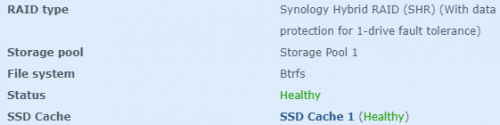
1. Storage Pool 1 (from all 3 disk in RAID-5)
- Later plan to add another pool from old small SSD as backup if workable

2. Volume 1, Volume 2 & Volume 3
- Guess I should wait for the verification complete before start populate the space is it hmm.gif
- or should I just use 1 volume icon_question.gif read below by "xxboxx" but really blur now confused.gif
- user posted image

3. SSD Cache 1 for Volume 1
- Just cannot create another Cache for Volume 2 & 3... sweat.gif
- or I should create only 1 volume and assign 1 cache rclxub.gif

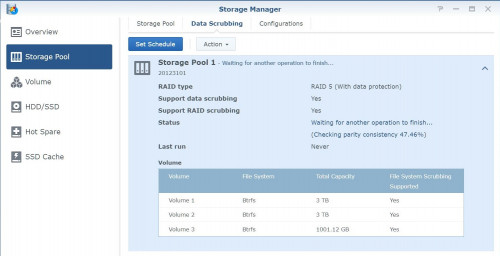
4. Do I need to perform Data Scrubbing after verification completed?
- user posted image

5. Saw that "Hot-swappable drive = Yes"... Is this means I can put new drive (HDD/SSD) in the empty bay while the power still on? is it wise & ok to do that flex.gif


thanks a lot notworthy.gif

This post has been edited by WaNaWe900: Dec 31 2020, 05:20 AM
xxboxx
post Dec 31 2020, 09:12 AM

The mind is for having ideas, not holding them
*******
Senior Member
5,261 posts

Joined: Oct 2004
From: J@Y B33


WaNaWe900
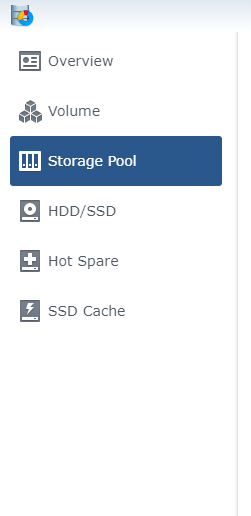
That's strange, your Storage Pool is above Volume while mine the opposite
user posted image

In my Storage Pool, Device is name of my NAS, Number corresponding to HDD drive.


While in Volume, it will show which Storage Pool used for the Volume

user posted image

For my case, first I create Storage Pool. My 1 Pool is with 3 HDD drives. After that I create Volume, here I can have multiple volumes if I wish for, let's say I want 1 volume with BTRFS while another volume is EXT4 (these are filesystem type, such as FAT32 or NTFS in Windows). I see you have created 3 Volumes for your Storage Pool.


Wait for Verification first before started create folders and files.

To create Folder, go to Control Panel > Shared Folder. Press Create button on top
user posted image


When creating Folder, you can set it to use which Volume. Each Folder created will be seen separately when in Windows or DSM's File Station

user posted image

This post has been edited by xxboxx: Dec 31 2020, 09:16 AM

102 Pages « < 59 60 61 62 63 > » Top
 

Change to:
| Lo-Fi Version
0.0325sec    0.53    6 queries    GZIP Disabled
Time is now: 16th December 2025 - 04:43 AM