Welcome Guest ( Log In | Register )

102 Pages « < 57 58 59 60 61 > » Bottom

Outline · [ Standard ] · Linear+

 NETWORK ATTACHED STORAGE (NAS) V2

views
     
Andrewtst
post Nov 20 2020, 12:57 PM

Forgiveness is Happiness
*********
All Stars
29,764 posts

Joined: Jan 2009
From: Johor, Malaysia.


QUOTE(xxboxx @ Nov 20 2020, 12:10 PM)
Important as in the data cannot be damage or missing? Then you will need store in system which have checksum to maintain it's integrity such as RAID-5 or BTRFS. You also need to have backup of the data. If use prebuilt NAS get at least 8 bays. 8TB HDD won't cut it anymore. 12TB HDD x 8 you will have 84TB usable space if use SHR-1 or RAID-5, this method 1 HDD failure you still can replace it and get back all data. But too many HDD means chance of more than 1 HDD failing is higher, use SH-2 or RAID-6 can have 2 HDD failure and still get back all data, but this RAID type only 72TB usable space. You also need to get additional HDD as backup copies. So maybe around 12TB x 8 for storage and 8TB x 7 for backup.

If it's just video where file integrity is not really important, example if some bit-rot, the video will have glitch on some time frame, it's still acceptable. Then you can just use each HDD as own volume without any RAID, then get same total capacity of HDD for backup so that when main HDD fail you still have another backup.

If the data is super important, best practice is to have 3-2-1 backup rule. Have 3 copies of the same data, at least have 2 different storage media (another in dvd, bluray, tape drive) of the 3 copies, and store 1 copy offsite (in the cloud or at other home/location)
*

Thanks a lot for the value information, I will check it out accordingly. smile.gif

Andrewtst
post Nov 20 2020, 12:59 PM

Forgiveness is Happiness
*********
All Stars
29,764 posts

Joined: Jan 2009
From: Johor, Malaysia.


QUOTE(sHawTY @ Nov 20 2020, 12:34 PM)
Wouldn't it be better to suggest him 12 or 16 bay instead as he doesn't seem the type to have a limited budget
This way, he can actually achieve the 100TB he wanted
*
I didn’t set budget yet but off course the most value the best. Haha! Probably next year target, this year I had spend too much already.
thankyou
post Nov 20 2020, 01:02 PM

Regular
******
Senior Member
1,941 posts

Joined: Jan 2003
QUOTE(Andrewtst @ Nov 20 2020, 12:59 PM)
I didn’t set budget yet but off course the most value the best. Haha! Probably next year target, this year I had spend too much already.
*
With the storage requirement, you may want to consider unraid setup with 2 parity drives?
xxboxx
post Nov 20 2020, 01:08 PM

The mind is for having ideas, not holding them
*******
Senior Member
5,261 posts

Joined: Oct 2004
From: J@Y B33


QUOTE(sHawTY @ Nov 20 2020, 12:34 PM)
Wouldn't it be better to suggest him 12 or 16 bay instead as he doesn't seem the type to have a limited budget
This way, he can actually achieve the 100TB he wanted
*
Initially I thought not important data so can use hot swappable method and use 6 or 8 bays, then it leads on from there. Now you mention it, 12 bays will be a better choice.
ozak
post Nov 20 2020, 01:27 PM

10k Club
********
All Stars
17,018 posts

Joined: Jan 2005


QUOTE(Andrewtst @ Nov 20 2020, 11:15 AM)
I use around 3 years fill up 50 TB. So I think another 50 TB is another 3 years.
*
That is fast phase.

So you have to start with 50tb initial.

The best way I think is 12bay for the start.

7 x 16tb hdd with SHR Raid 5 to begin.

That would give you 6 x 16tb = 96tb and 1 redundacy. 96tb - 50tb =46tb free. This should last you for 2yrs+.

And each yrs, you can add 1pcs hdd or 2 to increase the size. Till max 176tb.

176tb max on 12bay can last you for 8yrs+ and more.

The 12bay is not limit yet. If use Synology.

12bay NAS can expand the storage to another 24bay. (12 bay expansion x 2 only storage without CPU)

That is the cheapest cost for easy setup and maintain I guess.

This post has been edited by ozak: Nov 20 2020, 02:54 PM
sHawTY
post Nov 20 2020, 02:42 PM

Frequent Reporter
********
All Stars
14,908 posts

Joined: Jul 2005

QUOTE(xxboxx @ Nov 20 2020, 01:08 PM)
Now you mention it, 12 bays will be a better choice.
Synology DiskStation DS2419+ with 10 x 16TB HDD for 160TB storage
Another 2 x 16TB for redundancy. Should be good

And extendable in the future with another Synology DiskStation DS2419+
Andrewtst
post Nov 20 2020, 02:57 PM

Forgiveness is Happiness
*********
All Stars
29,764 posts

Joined: Jan 2009
From: Johor, Malaysia.


QUOTE(thankyou @ Nov 20 2020, 01:02 PM)
With the storage requirement, you may want to consider unraid setup with 2 parity drives?
*
QUOTE(ozak @ Nov 20 2020, 01:27 PM)
That is fast phase.

So you have to start with 50tb initial.

The best way I think is 12bay for the start.

7 x 16tb hdd with SHR Raid 5 to begin.

That would give you 6 x 16tb = 96tb and 1 redundacy. 96tb - 50tb =46tb free. This should last you for 2yrs+.

And each yrs, you can add 1pcs hdd or 2 to increase the size. Till max 176tb.

176tb max on 12bay can last you for 8yrs+ and more.

The 12bay is not limit yet. If use Synology.

12bay NAS can expand the storage to another 24bay. (12 bay expansion x 2 only storage without CPU)

That is the cheapest cost for easy setup and maintain I guess.
*

Appreciate much with all the value input, will check it out accordingly.

xxboxx
post Nov 20 2020, 04:22 PM

The mind is for having ideas, not holding them
*******
Senior Member
5,261 posts

Joined: Oct 2004
From: J@Y B33


QUOTE(sHawTY @ Nov 20 2020, 02:42 PM)
Synology DiskStation DS2419+ with 10 x 16TB HDD for 160TB storage
Another 2 x 16TB for redundancy. Should be good

And extendable in the future with another Synology DiskStation DS2419+
*
Really similar like having platinum credit card? laugh.gif

Usable storage if SHR-1/RAID-5 is 144TB, but since 10 HDD pool, having 1 HDD failure protection is kinda risky. SHR-2/RAID-6 would be better.


Andrewtst
If buy few HDD first and in future keep adding HDD with different size, it would be better to use SHR since it allow to maximized the pool according to HDD space


ozak
It seems there's no way in DiskStation to set a HDD as removable drive? I doesn't find if there's such option.
Andrewtst
post Nov 20 2020, 04:24 PM

Forgiveness is Happiness
*********
All Stars
29,764 posts

Joined: Jan 2009
From: Johor, Malaysia.


QUOTE(xxboxx @ Nov 20 2020, 04:22 PM)
Really similar like having platinum credit card? laugh.gif

Usable storage if SHR-1/RAID-5 is 144TB, but since 10 HDD pool, having 1 HDD failure protection is kinda risky. SHR-2/RAID-6 would be better.
Andrewtst
If buy few HDD first and in future keep adding HDD with different size, it would be better to use SHR since it allow to maximized the pool according to HDD space
ozak
It seems there's no way in DiskStation to set a HDD as removable drive? I doesn't find if there's such option.
*
Hi, sorry may I know what is SHR. Thanks.
xxboxx
post Nov 20 2020, 04:33 PM

The mind is for having ideas, not holding them
*******
Senior Member
5,261 posts

Joined: Oct 2004
From: J@Y B33


QUOTE(Andrewtst @ Nov 20 2020, 04:24 PM)
Hi, sorry may I know what is SHR. Thanks.
*
It's a RAID type, develop by Synology and only usable for their NAS. Classic RAID type size limited by the smallest HDD in the pool. SHR can maximized the storage without being limited by the smallest HDD. Can read here to understand more.
https://www.synology.com/en-global/knowledg...Hybrid_RAID_SHR
Andrewtst
post Nov 20 2020, 04:50 PM

Forgiveness is Happiness
*********
All Stars
29,764 posts

Joined: Jan 2009
From: Johor, Malaysia.


QUOTE(xxboxx @ Nov 20 2020, 04:33 PM)
It's a RAID type, develop by Synology and only usable for their NAS. Classic RAID type size limited by the smallest HDD in the pool. SHR can maximized the storage without being limited by the smallest HDD. Can read here to understand more.
https://www.synology.com/en-global/knowledg...Hybrid_RAID_SHR
*
Oh, thanks a lot, appreciate much.
ozak
post Nov 20 2020, 07:39 PM

10k Club
********
All Stars
17,018 posts

Joined: Jan 2005


QUOTE(xxboxx @ Nov 20 2020, 04:22 PM)
ozak
It seems there's no way in DiskStation to set a HDD as removable drive? I doesn't find if there's such option.
*
Remove able drive?


xxboxx
post Nov 20 2020, 08:43 PM

The mind is for having ideas, not holding them
*******
Senior Member
5,261 posts

Joined: Oct 2004
From: J@Y B33


QUOTE(ozak @ Nov 20 2020, 07:39 PM)
Remove able drive?
*
I guess that is a no? sweat.gif
Something like this MyArchive
Internal HDD can be used as removable storage for keeping additional storage.
I guess having external HDD reader + internal HDD also can achieve same thing, only need additional hardware.

This post has been edited by xxboxx: Nov 20 2020, 08:43 PM
ozak
post Nov 20 2020, 10:25 PM

10k Club
********
All Stars
17,018 posts

Joined: Jan 2005


QUOTE(xxboxx @ Nov 20 2020, 08:43 PM)
I guess that is a no?  sweat.gif
Something like this MyArchive
Internal HDD can be used as removable storage for keeping additional storage.
I guess having external HDD reader + internal HDD also can achieve same thing, only need additional hardware.
*
I prefer to have fix NAS hdd inside.

But how about RAID if using as removeable?
xxboxx
post Nov 21 2020, 02:51 AM

The mind is for having ideas, not holding them
*******
Senior Member
5,261 posts

Joined: Oct 2004
From: J@Y B33


QUOTE(ozak @ Nov 20 2020, 10:25 PM)
I prefer to have fix NAS hdd inside.

But how about RAID if using as removeable?
*
For the removable drive bay, it can't be part of RAID. Example usage on 4-bays NAS, 3 HDD in RAID, 1 bay for hot swappable HDD.
ozak
post Nov 21 2020, 09:36 AM

10k Club
********
All Stars
17,018 posts

Joined: Jan 2005


QUOTE(xxboxx @ Nov 21 2020, 02:51 AM)
For the removable drive bay, it can't be part of RAID. Example usage on 4-bays NAS, 3 HDD in RAID, 1 bay for hot swappable HDD.
*
Ya I think my NAS have 1 hot swappable bay.

But put all in raid. I don't no what it is for. Feel kind of waste away the bay.
mystvearn
post Nov 21 2020, 02:01 PM

...
*******
Senior Member
6,639 posts

Joined: Jan 2003
From: "New Castle"


QUOTE(xxboxx @ Nov 20 2020, 10:15 AM)
Usually can last around 5 years, but actual is depends on usage, how take care, type of HDD.
Best is get NAS HDD, as it design for continuous running and have vibration protection.
*
Mostly is to backup work files and images. Not streaming media unless want to get files for work. Like onedrive now.

QUOTE(ozak @ Nov 20 2020, 10:57 AM)
My experience from 2 bay to 4 bay and last, 8 bay.

If for personnel use less traffic, 2bay is ok.

The cons about 2bay is,

1) The only way to expand if run out of space is by HDD. No extra bay to expand. Both HDD have to change together.
2) The chance of both hdd spoil is high. Cause you normally buy the hdd together. Backup is like no backup. Unless you can buy hdd separate time and place.
3) it only provided 1 LAN to communicate. If the LAN port spoil, you can't access your data anymore. No spare LAN.

My 2bay last about 5yrs, 4bay last about 6-7yrs. Now using 8bay.

HDD lifespan very much depend on brand I guess.

I have WD red last 5yrs and some still running. Have Samsung last 8yrs and some still running. Have new seagate stil running fine.l
*
Will use home unifi at 100mbs down 50 Mbs up. Makes a difference?

How much ram do I need? I am thinking of synology 4 bays. Can upscale right if use their shr technology?

xxboxx
post Nov 21 2020, 07:43 PM

The mind is for having ideas, not holding them
*******
Senior Member
5,261 posts

Joined: Oct 2004
From: J@Y B33


QUOTE(ozak @ Nov 21 2020, 09:36 AM)
Ya I think my NAS have 1 hot swappable bay.

But put all in raid. I don't no what it is for. Feel kind of waste away the bay.
*
Is there anything on DSM that indicate you can create pool/volume that can be removable?
I can't find such options. I google also can't find it got such function.

QUOTE(mystvearn @ Nov 21 2020, 02:01 PM)
Mostly is to backup work files and images. Not streaming media unless want to get files for work. Like onedrive now.
Will use home unifi at 100mbs down 50 Mbs up. Makes a difference?

How much ram do I need? I am thinking of synology 4 bays. Can upscale right if use their shr technology?
*
Unless your work files in GB size every time upload/download, 100/50 MB is enough. Depends on model, some can add/change RAM.
ozak
post Nov 21 2020, 09:57 PM

10k Club
********
All Stars
17,018 posts

Joined: Jan 2005


QUOTE(xxboxx @ Nov 21 2020, 07:43 PM)
Is there anything on DSM that indicate you can create pool/volume that can be removable?
I can't find such options. I google also can't find it got such function.
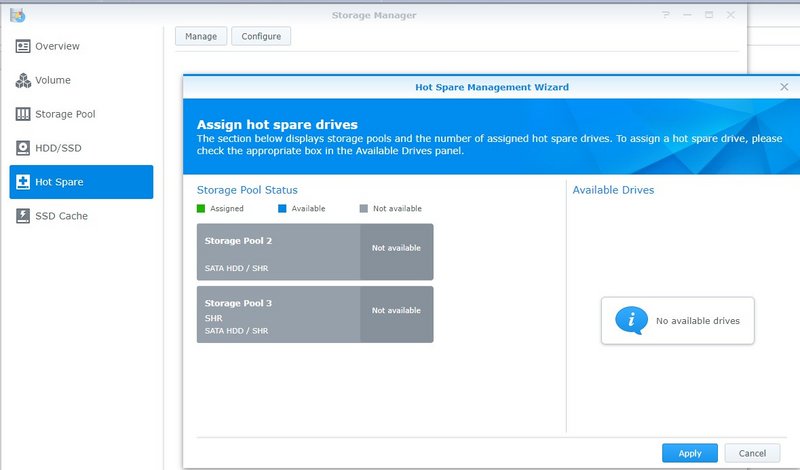
This ?

user posted image
xxboxx
post Nov 22 2020, 03:26 PM

The mind is for having ideas, not holding them
*******
Senior Member
5,261 posts

Joined: Oct 2004
From: J@Y B33


QUOTE(ozak @ Nov 21 2020, 09:57 PM)
This ?

user posted image
*
No. That's hot spare. eg. If assign one of the drive as hot spare, once one of the HDD in RAID died, the OS will auto use the hot spare as replacement for the dead HDD.

102 Pages « < 57 58 59 60 61 > » Top
 

Change to:
| Lo-Fi Version
0.0268sec    0.47    6 queries    GZIP Disabled
Time is now: 2nd December 2025 - 12:26 PM