Outline ·
[ Standard ] ·
Linear+
NETWORK ATTACHED STORAGE (NAS) V2
|
HandsomeDupe
|
 Dec 21 2020, 10:42 AM Dec 21 2020, 10:42 AM
|
New Member


|
Hi guys, need some help here.
Just purchased DS220j last week to play around with.
Managed to setup using DDNS from synology, but I'm unable to access it from the internet. I have :
1. Enable port forwarding in my maxis router
2. Whitelist port both in my synology router and maxis router
Any clue on where else to look for ?
|
|
|
|
|
|
HandsomeDupe
|
Dec 21 2020, 03:42 PM
|
New Member
|
QUOTE(ozak @ Dec 21 2020, 11:52 AM) Log in to synology website and check your quickconnect it register already. See also the way you input site is correct or not. In the nas setting, enable quickconnect and input your ddns. Yup done all the above. The ddns only survive for few hours then become inaccessible. My home network is using maxis (piggy back TM) |
|
|
|
|
|
HandsomeDupe
|
Dec 21 2020, 06:58 PM
|
New Member
|
QUOTE(ozak @ Dec 21 2020, 05:57 PM) I m using maxis too. Router side got port forward? In the NAS setting quickconnect/ general or advannced, everything filled up correct? Thanks for your reply. All set correctly, my maxis router got port forwarding in uPnP section. How about yours? |
|
|
|
|
|
HandsomeDupe
|
Dec 21 2020, 09:45 PM
|
New Member
|
QUOTE(xxboxx @ Dec 21 2020, 08:59 PM) Let's say your DDNS name is HandsomeDupe, and you choose synology.me as the service provider. So your web address is "HandsomeDupe.synology.me" Then you also need your DSM ports, let's say it is 5001 for https, so the address would be "https://HandsomeDupe.synology.me:5001" Additionally, go to Control Panel > External Access > Router Configuration, and click Test Connection to see if the connection is ok. Connection tested ok. But the port forwarding does not work. Just notice that I don't have any public IP assigned to me by Maxis 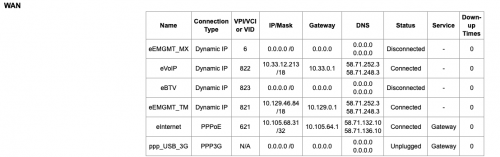 |
|
|
|
|



 Quote
Quote

 0.0191sec
 0.55
0.55
 7 queries
 GZIP Disabled