

get intel SSD....
been using mine for almost 2 years... no problem at all....
The SSD Thread V4, Solid State Drive
The SSD Thread V4, Solid State Drive
|
|
 Feb 14 2014, 05:34 PM Feb 14 2014, 05:34 PM
|
 
Senior Member
1,081 posts Joined: Nov 2005  
|
get intel SSD....
been using mine for almost 2 years... no problem at all.... |
|
|
|
|
|
Feb 15 2014, 03:27 PM
|

Senior Member
3,569 posts Joined: Apr 2007
|
QUOTE(Uncle Ron @ Feb 14 2014, 10:14 AM) Want to know any WD Black2 Hybrid user here? Hybrid drive are not SSD. They are still from good despite of rave reviews.  |
|
|
Feb 15 2014, 04:23 PM
|

Senior Member
743 posts Joined: Jun 2008 From: Penang 
|
QUOTE(300thecat @ Feb 12 2014, 07:51 PM) Noticed that while an SSD will speed up boot time dramatically, it doesn't do anything to shutdown time. i agree with u..my Samsung 830 that i bought early 2013, now took longer to shutdown..and very noticeable under performanceboot time also kinda slow..maybe i need to do fresh format windows so it will be back like new..havent formatted my windows since i got the SSD |
|
|
Feb 15 2014, 04:36 PM
|

Senior Member
679 posts Joined: Nov 2012
|
QUOTE(ronaldjoe @ Feb 15 2014, 03:27 PM) Hybrid drive are not SSD. They are still from good despite of rave reviews. but it's a SSD + a HDDand the Black2 doesn't use the SSD component to cache your frequently accessed files, the SSD component is independent and Windows recognizes it as a partition itself 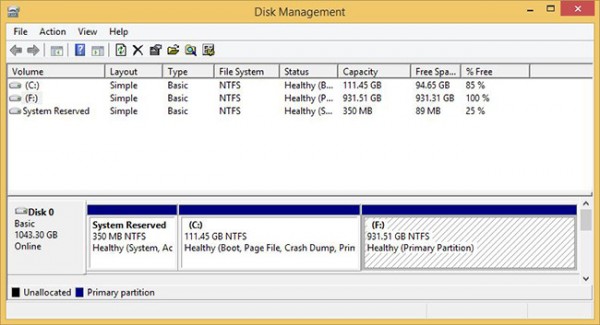 so IMO, it isn't fair to just call the Black2 a 'Hybrid' drive |
|
|
Feb 15 2014, 05:02 PM
|

Senior Member
1,301 posts Joined: Feb 2010 From: FSN9 CenTToll
|
my fren use KingSpec 128GB msata SSD (KSM-mSATA.5i-128MJ)
but gaming on this SSD suffer with stuttering and spiking issue.. (other 2.5" SSD and hardisk no issue) any sifu can help? i do google but not much info... This post has been edited by huzzLEE_82: Feb 15 2014, 05:16 PM |
|
|
Feb 15 2014, 05:19 PM
|

Senior Member
3,038 posts Joined: Nov 2009
|
QUOTE(udin901 @ Feb 15 2014, 04:23 PM) i agree with u..my Samsung 830 that i bought early 2013, now took longer to shutdown..and very noticeable under performance when it slows down, just use disk management to delete all partitions to unallocated space. it will be like new again. given enough idle time (a few hours) and free space, the drive can maintain speed quite well.boot time also kinda slow..maybe i need to do fresh format windows so it will be back like new..havent formatted my windows since i got the SSD i haven't had such problems with my 830. it's a storage drive but then i give it some 15% space as unallocated. |
|
|
|
|
|
Feb 15 2014, 08:34 PM
|
|
Senior Member
743 posts Joined: Jun 2008 From: Penang
|
QUOTE(horns @ Feb 15 2014, 05:19 PM) when it slows down, just use disk management to delete all partitions to unallocated space. it will be like new again. given enough idle time (a few hours) and free space, the drive can maintain speed quite well. what do u mean by deleting all partitions? i havent make any partitions on my SSD as it is only drive C where my windows 7 stored..if i delete it, my windows and all data will be gone right? my problem is my boot time and shutdown took longer than it is used when it was still new..i haven't had such problems with my 830. it's a storage drive but then i give it some 15% space as unallocated. u said that ur 830 is for storage, mine is windows  |
|
|
Feb 15 2014, 10:01 PM
|
|
Senior Member
3,038 posts Joined: Nov 2009
|
QUOTE(udin901 @ Feb 15 2014, 08:34 PM) what do u mean by deleting all partitions? i havent make any partitions on my SSD as it is only drive C where my windows 7 stored..if i delete it, my windows and all data will be gone right? my problem is my boot time and shutdown took longer than it is used when it was still new.. i mean delete all the partitions literally. if you have one partition only then delete that one partition. this means to say that you will recreate everything if your windows is on it. (you're correct, it means your windows and all data will be gone). of course there are other factors involved, for instance, the system will slow down because more and more apps were installed over time.u said that ur 830 is for storage, mine is windows to recover the disk performance, normally people will do secure erase. deleting partitions with disk management on windows is one way of doing it. (alternatively, you could use magician's secure erase function) |
|
|
Feb 16 2014, 02:18 PM
|

Senior Member
790 posts Joined: Mar 2012
|
CCleaner has a 'wipe drive' function as well.
|
|
|
Feb 17 2014, 09:49 AM
|
|
Senior Member
3,038 posts Joined: Nov 2009
|
QUOTE(300thecat @ Feb 16 2014, 02:18 PM) CCleaner has a 'wipe drive' function as well. oh.. normally i do two steps: delete the partitions using disk management; then use diskpart's clean to clear all attributes in the ssd. reboot the machine after that. |
|
|
Feb 18 2014, 08:55 AM
|

Junior Member
477 posts Joined: Feb 2012 From: Kuala Selangor - Shah Alam 
|
QUOTE(ronaldjoe @ Feb 15 2014, 03:27 PM) Hybrid drive are not SSD. They are still from good despite of rave reviews. QUOTE(kenysl @ Feb 15 2014, 04:36 PM) but it's a SSD + a HDD But they have 120GB SSD inside Black2 for cache am i right? and the Black2 doesn't use the SSD component to cache your frequently accessed files, the SSD component is independent and Windows recognizes it as a partition itself so IMO, it isn't fair to just call the Black2 a 'Hybrid' drive  That's mean SSD inside Black2 is not function same like Seagate SSHD? So why the price so Expensive one?  |
|
|
Feb 18 2014, 09:17 AM
|
|
Senior Member
679 posts Joined: Nov 2012
|
QUOTE(Uncle Ron @ Feb 18 2014, 08:55 AM) But they have 120GB SSD inside Black2 for cache am i right? the 120gb SSD is not used for caching, it is recognized as a separate drive instead. That's mean SSD inside Black2 is not function same like Seagate SSHD? So why the price so Expensive one? therefore it is more flexible than SSHDs because you can choose what programs you want on the Black2's SSD while in Seagate's SSHD case, the drive will determine which programs you use the most and cache them instead IIRC |
|
|
Feb 18 2014, 09:30 AM
|

Senior Member
2,215 posts Joined: Jul 2005
|
QUOTE(Uncle Ron @ Feb 18 2014, 08:55 AM) But they have 120GB SSD inside Black2 for cache am i right? You get 2 disk in 1 package, means you get the SSD as a start, after you installed your OS, and installed the appropriate driver and you get the extra 1TB partition. That's mean SSD inside Black2 is not function same like Seagate SSHD? So why the price so Expensive one? Notice that it shares a single SATA interface thus the bandwidth is cut in half if 2 of the disk is operate simultaneously. Reviews also shows that the SSD and the HDD is not up to par of current SSD & HDD performance but the only advantage is you get 2 in a single package, also it's much more expensive than you get a single 120GB SSD and a 1TB HDD, a very-very niche market I would say.  |
|
|
|
|
|
Feb 18 2014, 11:10 AM
|
|
Junior Member
477 posts Joined: Feb 2012 From: Kuala Selangor - Shah Alam
|
QUOTE(kenysl @ Feb 18 2014, 09:17 AM) the 120gb SSD is not used for caching, it is recognized as a separate drive instead. therefore it is more flexible than SSHDs because you can choose what programs you want on the Black2's SSD while in Seagate's SSHD case, the drive will determine which programs you use the most and cache them instead IIRC QUOTE(wildwestgoh @ Feb 18 2014, 09:30 AM) You get 2 disk in 1 package, means you get the SSD as a start, after you installed your OS, and installed the appropriate driver and you get the extra 1TB partition. Owh, i see... That's mean this drive performance is not so good for gaming... Notice that it shares a single SATA interface thus the bandwidth is cut in half if 2 of the disk is operate simultaneously. Reviews also shows that the SSD and the HDD is not up to par of current SSD & HDD performance but the only advantage is you get 2 in a single package, also it's much more expensive than you get a single 120GB SSD and a 1TB HDD, a very-very niche market I would say. Btw thanks for ur information sifoo...  |
|
|
Feb 18 2014, 11:29 AM
|
|
Senior Member
2,215 posts Joined: Jul 2005
|
QUOTE(Uncle Ron @ Feb 18 2014, 11:10 AM) Owh, i see... That's mean this drive performance is not so good for gaming... Gaming? Btw thanks for ur information sifoo...  I'm not sure what performance do you seek in gaming from SSD but I don't think you will be getting higher frames from using SSD aside from faster loading of games or possibly in between chapters load. |
|
|
Feb 18 2014, 01:01 PM
|
|
Junior Member
477 posts Joined: Feb 2012 From: Kuala Selangor - Shah Alam
|
QUOTE(wildwestgoh @ Feb 18 2014, 11:29 AM) Gaming? I mean for cut loading time... Bcoz sometime i have to wait for long time when my game is loading... I'm not sure what performance do you seek in gaming from SSD but I don't think you will be getting higher frames from using SSD aside from faster loading of games or possibly in between chapters load. |
|
|
Feb 18 2014, 01:15 PM
|
|
Senior Member
679 posts Joined: Nov 2012
|
QUOTE(Uncle Ron @ Feb 18 2014, 01:01 PM) I mean for cut loading time... Bcoz sometime i have to wait for long time when my game is loading... IMO, getting a SSD will improve your overall experience of using your PC.Of course games would load a tad faster but is it a drastic difference? Depends on what kind of HDD you are currently using honestly.. |
|
|
Feb 18 2014, 01:17 PM
|
|
Junior Member
477 posts Joined: Feb 2012 From: Kuala Selangor - Shah Alam
|
QUOTE(kenysl @ Feb 18 2014, 01:15 PM) IMO, getting a SSD will improve your overall experience of using your PC. I'm just using WD Scorpio Black 500GB Sata II for gaming... Of course games would load a tad faster but is it a drastic difference? Depends on what kind of HDD you are currently using honestly.. |
|
|
Feb 18 2014, 01:18 PM
|
|
Senior Member
2,215 posts Joined: Jul 2005
|
QUOTE(Uncle Ron @ Feb 18 2014, 01:01 PM) I mean for cut loading time... Bcoz sometime i have to wait for long time when my game is loading... If you want pure performance, Samsung 840 EVO seems to be the deal right now, performance/value.Getting a single SSD is always better than the WD Black2.  |
|
|
Feb 18 2014, 01:49 PM
|
|
Junior Member
477 posts Joined: Feb 2012 From: Kuala Selangor - Shah Alam
|
QUOTE(wildwestgoh @ Feb 18 2014, 01:18 PM) If you want pure performance, Samsung 840 EVO seems to be the deal right now, performance/value. But Samsung 840 EVO 500GB is so expensive... Bcoz my games & software is more than 400GB inside that HDD... Getting a single SSD is always better than the WD Black2. |
|
Topic ClosedOptions
|
| Change to: |  0.0382sec 0.0382sec
 0.46 0.46
 6 queries 6 queries
 GZIP Disabled GZIP Disabled
Time is now: 12th December 2025 - 07:14 AM |
 Quote
Quote