Outline ·
[ Standard ] ·
Linear+
The SSD Thread V4, Solid State Drive
|
wildwestgoh
|
 Feb 18 2014, 02:22 PM Feb 18 2014, 02:22 PM
|

|
QUOTE(Uncle Ron @ Feb 18 2014, 01:49 PM) But Samsung 840 EVO 500GB is so expensive... Bcoz my games & software is more than 400GB inside that HDD...  Organize all your stuff, only put your frequently accessed to the SSD, preferable left around 15% free (according to some users here) to preserve the optimum performance. You can take the 256GB (~RM600?) for instance, or if you can't then squeeze to 128GB (~RM350?), put 1~2 games in the SSD, finish them first, uninstall and install next one, don't think you'll play 3+ games at one time? Unless you are...  (The World God Only Knows, Otaku should know this  ) This post has been edited by wildwestgoh: Feb 18 2014, 02:23 PM |
|
|
|
|
|
Uncle Ron
|
Feb 18 2014, 04:35 PM
|
|
|
QUOTE(wildwestgoh @ Feb 18 2014, 02:22 PM) Organize all your stuff, only put your frequently accessed to the SSD, preferable left around 15% free (according to some users here) to preserve the optimum performance. You can take the 256GB (~RM600?) for instance, or if you can't then squeeze to 128GB (~RM350?), put 1~2 games in the SSD, finish them first, uninstall and install next one, don't think you'll play 3+ games at one time? Unless you are... (The World God Only Knows, Otaku should know this ) Actually i already have Samsung 840 Evo 128GB But just using for Os only but for games & software i put to WD Scorpio (Got free giving by my friend...  ) & I play games more than 10++ even the game i play is already finish if i really like that's games i'll play again & again... That's why i'm not uninstall them... So u know what type i'm right?  That's why i need more space for that's thing...  |
|
|
|
|
|
Jyi
|
Feb 18 2014, 05:06 PM
|
Getting Started

|
Hi all, hope everyone is doing fine. I just benchmarked my 840 Evo with Rapid enabled. Got it from ronaldjoe last night, great seller. Here's a screenshot of crystaldiskmark: 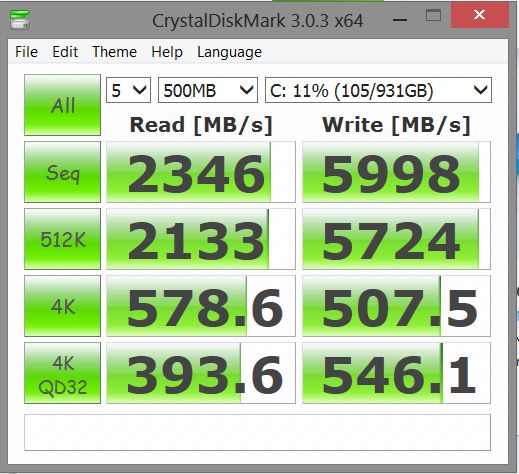 Let me know what you think! |
|
|
|
|
|
ronaldjoe
|
Feb 18 2014, 11:40 PM
|
|
|
QUOTE(Jyi @ Feb 18 2014, 05:06 PM) Hi all, hope everyone is doing fine. I just benchmarked my 840 Evo with Rapid enabled. Got it from ronaldjoe last night, great seller. Here's a screenshot of crystaldiskmark: Let me know what you think! Enjoy your 1TB SSD. I reckon there are only hanful of ppl using it. It actually caught my surprise knowing that you were that young when we met  |
|
|
|
|
|
Alexdp21
|
Feb 19 2014, 01:38 PM
|
Getting Started
|
QUOTE(Jyi @ Feb 18 2014, 05:06 PM) Hi all, hope everyone is doing fine. I just benchmarked my 840 Evo with Rapid enabled. Got it from ronaldjoe last night, great seller. Here's a screenshot of crystaldiskmark: Let me know what you think! 1TB!  First time I saw a user using 1TB SSD. No wonder the benchmark is so high. Lol by the way enjoy your Evo. You wont regret it!  |
|
|
|
|
|
1024kbps
|
Feb 19 2014, 06:21 PM
|
|
|
QUOTE(Alexdp21 @ Feb 19 2014, 01:38 PM) 1TB! First time I saw a user using 1TB SSD. No wonder the benchmark is so high. Lol by the way enjoy your Evo. You wont regret it! 1TB =/ fast, the user enabled RAPID mode which will cache the data to system RAM to improve I/O performance. (which the benchmark data happen to be cached, hence the superb performance) RAPID mode is exclusive feature on Samsung 840 SSD only and the data has to be cached to RAM to improve performance. the alternative and much "safer" way is RAID 0 your SSD, although it isnt as fast as RAPID mode, but the performance will still almost doubled. |
|
|
|
|
|
kenysl
|
Feb 19 2014, 07:29 PM
|
|
|
QUOTE(Jyi @ Feb 18 2014, 05:06 PM) Hi all, hope everyone is doing fine. I just benchmarked my 840 Evo with Rapid enabled. Got it from ronaldjoe last night, great seller. Here's a screenshot of crystaldiskmark: Let me know what you think! wowzers... 1TB... just wowzers... |
|
|
|
|
|
Uncle Ron
|
Feb 20 2014, 10:00 AM
|
|
|
QUOTE(Alexdp21 @ Feb 19 2014, 01:38 PM) 1TB! First time I saw a user using 1TB SSD. No wonder the benchmark is so high. Lol by the way enjoy your Evo. You wont regret it! Can i know do u also turn on ur Rapid Mode on ur Samsung 840 Evo? |
|
|
|
|
|
Alexdp21
|
Feb 20 2014, 12:32 PM
|
Getting Started
|
QUOTE(Uncle Ron @ Feb 20 2014, 10:00 AM) Can i know do u also turn on ur Rapid Mode on ur Samsung 840 Evo? Nope. Rapid Mode disable. Using only AHCI configuration. Why? |
|
|
|
|
|
Uncle Ron
|
Feb 20 2014, 12:41 PM
|
|
|
QUOTE(Alexdp21 @ Feb 20 2014, 12:32 PM) Nope. Rapid Mode disable. Using only AHCI configuration. Why? Owh, juz wanna ask so many ppl got probs when enabling that's Rapid Mode so scared to do... |
|
|
|
|
|
Alexdp21
|
Feb 20 2014, 01:45 PM
|
Getting Started
|
QUOTE(Uncle Ron @ Feb 20 2014, 12:41 PM) Owh, juz wanna ask so many ppl got probs when enabling that's Rapid Mode so scared to do... Is it?? if thats the case lucky me and you. Lol. The performance already good even Rapid mode disable. Been using for 2 months already and happy with its silky smooth.  |
|
|
|
|
|
Uncle Ron
|
Feb 20 2014, 03:09 PM
|
|
|
QUOTE(Alexdp21 @ Feb 20 2014, 01:45 PM) Is it?? if thats the case lucky me and you. Lol. The performance already good even Rapid mode disable. Been using for 2 months already and happy with its silky smooth. Yeah, same with me... LoL... But not sure is truth or not... |
|
|
|
|
|
1024kbps
|
Feb 20 2014, 03:12 PM
|
|
|
QUOTE(Uncle Ron @ Feb 20 2014, 12:41 PM) Owh, juz wanna ask so many ppl got probs when enabling that's Rapid Mode so scared to do... RAPID mode use your RAM to cache the hot data, RAM caching tend to be risky as our system ram are volatile memory, power loss may result in data corruption. |
|
|
|
|
|
Uncle Ron
|
Feb 20 2014, 03:26 PM
|
|
|
QUOTE(1024kbps @ Feb 20 2014, 03:12 PM) RAPID mode use your RAM to cache the hot data, RAM caching tend to be risky as our system ram are volatile memory, power loss may result in data corruption. Owh, i see... That's why ppl said it's risky to do...  |
|
|
|
|
|
Alexdp21
|
Feb 20 2014, 04:53 PM
|
Getting Started
|
QUOTE(1024kbps @ Feb 20 2014, 03:12 PM) RAPID mode use your RAM to cache the hot data, RAM caching tend to be risky as our system ram are volatile memory, power loss may result in data corruption. Then is there a way to overcome the problem? A firmware update by Samsung is possible to solve it?? |
|
|
|
|
|
1024kbps
|
Feb 20 2014, 05:12 PM
|
|
|
QUOTE(Alexdp21 @ Feb 20 2014, 04:53 PM) Then is there a way to overcome the problem? A firmware update by Samsung is possible to solve it?? QUOTE(Uncle Ron @ Feb 20 2014, 03:26 PM) Owh, i see... That's why ppl said it's risky to do... Err, firmware cant solve such problem, unless Samsung firmware can predict when your pc going to crash or when TNB gonna cut off your power UPS is the only solution, which will give the SSD limited time to flush it buffer to disk, usually very fast lah, then shutdown pc = problem solved. |
|
|
|
|
|
Uncle Ron
|
Feb 20 2014, 08:01 PM
|
|
|
QUOTE(1024kbps @ Feb 20 2014, 05:12 PM) Err, firmware cant solve such problem, unless Samsung firmware can predict when your pc going to crash or when TNB gonna cut off your power UPS is the only solution, which will give the SSD limited time to flush it buffer to disk, usually very fast lah, then shutdown pc = problem solved. [U] Yea u also right get ups is the better solution but me still scared to do that's rapid mode thing... |
|
|
|
|
|
1024kbps
|
Feb 20 2014, 09:25 PM
|
|
|
QUOTE(Uncle Ron @ Feb 20 2014, 08:01 PM) [U] Yea u also right get ups is the better solution but me still scared to do that's rapid mode thing... If i have the EVO SSD i'd enable it, i mean, why not? extra performance that utilize the excessive system resource, that's smart actually, and they claim otherwise it's safe to use, it wotn be as fragile as RAM disk cache http://www.samsung.com/global/business/sem..._Whitepaper.pdf |
|
|
|
|
|
Alexdp21
|
Feb 21 2014, 09:08 AM
|
Getting Started
|
QUOTE(1024kbps @ Feb 20 2014, 09:25 PM) If i have the EVO SSD i'd enable it, i mean, why not? extra performance that utilize the excessive system resource, that's smart actually, and they claim otherwise it's safe to use, it wotn be as fragile as RAM disk cache http://www.samsung.com/global/business/sem..._Whitepaper.pdfAhh nice information. Thanks!  Will try to enable it later. |
|
|
|
|
|
genjo
|
Feb 21 2014, 09:16 AM
|
|
|
I just using 120 samsung evo... 1TB the last time i see cost around 1.5k +
|
|
|
|
|



 Quote
Quote







 0.0395sec
 0.38
0.38
 6 queries
 GZIP Disabled