Welcome Guest ( Log In | Register )

Bump Topic Topic Closed RSS Feed
3 Pages  1 2 3 >Bottom

Outline · [ Standard ] · Linear+

 Alcatel One Touch Glory 2S [Official Thread], AKA T'POP

views
     
TSbesheda
post Apr 24 2013, 12:05 AM, updated 13y ago

Getting Started
**
Junior Member
142 posts

Joined: Dec 2007
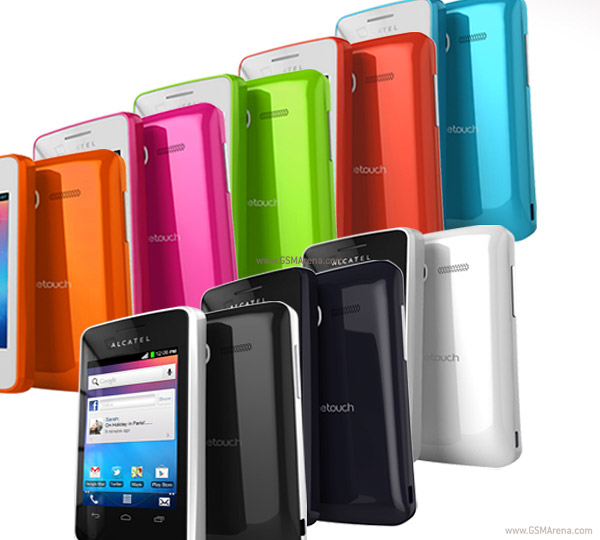
ALCATEL ONE TOUCH Glory 2S

user posted image

user posted image


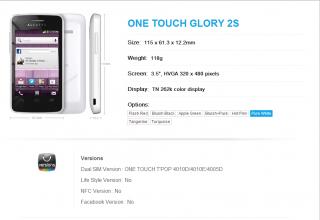
SPECIFICATION

QUOTE
DISPLAY
Display size: 3.5"
Display resolution: 320 x 480
Color depth: 256K
Display type: TFT capacitive
Multi-touch screen: 2 Point
CAMERA
Max resolution, still: 2 MP
Max resolution, video: Yes
Secondary camera: No
HARDWARE, SOFTWARE
Operation system: Android OS, v2.3
Processor: 1 GHz
MEMORY
Internal storage: N/A
Internal memory: 150MB ROM, 256 MB RAM
Card slot: microSD, max. 32 GB
AUDIO
Extension: MP3
Loudspeaker: Yes
3.5mm jack: Yes
FM radio: Yes
NETWORK
GPS: Yes
Wireless: Wi-Fi 802.11 b/g/n, Wi-Fi hotspot
Bluetooth: v 4.0
NFC: No
Max data transfer speed: HSDPA 7.2 Mbps
GPRS: Yes
EDGE: Yes
2G: GSM 850 / 900 / 1800 / 1900
3G: HSDPA 850 / 900 / 1900 / 2100
USB connection: microUSB 2.0
BATTERY
Type: Li-Ion 1400 mAh
Stand by time: N/A
Talk time: N/A
PHYSICAL PARAMETERS
Body dimensions: 115 x 62.3 x 12.2 mm
Weight: 118 g
Announced: 2013


UNLOCKING

» Click to show Spoiler - click again to hide... «


ROOTING & INSTALL CWM


Root Method A - Easy (Thanks to hddesire & mR.hyDE)

» Click to show Spoiler - click again to hide... «


Root Method B - Easy (Thanks to jayXzMx)

» Click to show Spoiler - click again to hide... «


Root Method C - Hard ( I don't recommend for newbie)

» Click to show Spoiler - click again to hide... «


FIXING BRICK

» Click to show Spoiler - click again to hide... «


OWNER LIST

» Click to show Spoiler - click again to hide... «


Let me know if I'm missing something or if u want me to add u to the user list. Cheers~

This post has been edited by besheda: Jun 20 2013, 11:40 PM
shadowglow
post Apr 24 2013, 12:22 AM

Casual
***
Junior Member
462 posts

Joined: Aug 2006
From: Ampang


bro could u also display s pop which is the actual glory 2, sold at aeon nation wide,
source
https://www.facebook.com/photo.php?fbid=591...elevant_count=1


shadowglow
post Apr 24 2013, 12:22 AM

Casual
***
Junior Member
462 posts

Joined: Aug 2006
From: Ampang


slightly better price for jelly bean os straight away, better camera too.
PrincZe
post Apr 24 2013, 12:23 AM

Look at all my stars!!
*******
Senior Member
3,050 posts

Joined: Oct 2008
reporting in. blue color user
wwl86
post Apr 24 2013, 12:26 AM

Casual
***
Junior Member
371 posts

Joined: Aug 2008
reporting in. got the mighty White.. rclxm9.gif
hazard_puppet
post Apr 24 2013, 12:28 AM

On my way
****
Senior Member
561 posts

Joined: May 2012


pls if someone could guide, how to swap internal storage with micro sd?

the internal space is too few!
airspeeder
post Apr 24 2013, 01:06 AM

Casual
***
Junior Member
314 posts

Joined: Mar 2009


cute phone...
wicktoria
post Apr 24 2013, 02:45 AM

Getting Started
**
Junior Member
81 posts

Joined: Apr 2013


I have arrived! With the blue-coloured 4010x! biggrin.gif Btw, anyone got the orange-coloured 1 ka?


QUOTE(hazard_puppet @ Apr 24 2013, 12:28 AM)
pls if someone could guide, how to swap internal storage with micro sd?

the internal space is too few!
*
Maybe you can try this?

http://forum.xda-developers.com/showthread.php?t=1517974

Remember to try it with a fast sd, like Class 6 and up.
mR.hyDE
post Apr 24 2013, 02:59 AM

Getting Started
**
Junior Member
186 posts

Joined: May 2012

QUOTE(shadowglow @ Apr 24 2013, 12:22 AM)
bro could u also display s pop which is the actual glory 2, sold at aeon nation wide,
source
https://www.facebook.com/photo.php?fbid=591...elevant_count=1
*
this is more likely to be t'pop rather than s'pop
differences between the internal memory,front camera,stock android version,4gramme and PRICE
source http://www.gsmarena.com/compare.php3?idPho...9&idPhone2=5228
nse890514
post Apr 24 2013, 04:37 AM

New Member
*
Junior Member
48 posts

Joined: Dec 2009
at step 9, when i load into CWM and then connect to pc, it shows me

-- logo.bin ...it is copied
-- __nodl_expdb ...it is copied
-- __nodl_yaffs_system.img ...it is copied
-- __nodl_custpack ...it is copied
-- __nodl_mobile_info ...it is copied
--- task is complete ---
--- Unknown ROM structure, backup NOT possible!
--- ATTENTION! Recovery doesn't suit this phone!
--- Unknown ROM structure, backup NOT possible!


why is this so?

i did step 7 and 8 very nicely...but this mad.gif mad.gif
nse890514
post Apr 24 2013, 07:12 AM

New Member
*
Junior Member
48 posts

Joined: Dec 2009
wooho...bricked my phone and one touch upgrade cant unbrick it. after downloading all stuff..when i proceed to plug in the phone, it says [COM0] 4050 error.....zzz

then it asked me to unplugged and plug again...(all with battery out) followed all the instructions and still fail.zzz
shinningteen
post Apr 24 2013, 07:38 AM

Casual
***
Junior Member
339 posts

Joined: Feb 2009
nice got thread..

babienn
post Apr 24 2013, 09:01 AM

On my way
****
Junior Member
510 posts

Joined: Nov 2011
Why not add in "glory 2s" in the title? That's more well known. Not everyone knows about 4010X
TSbesheda
post Apr 24 2013, 09:10 AM

Getting Started
**
Junior Member
142 posts

Joined: Dec 2007
Done smile.gif


TSbesheda
post Apr 24 2013, 12:08 PM

Getting Started
**
Junior Member
142 posts

Joined: Dec 2007
QUOTE(nse890514 @ Apr 24 2013, 07:12 AM)
wooho...bricked my phone and one touch upgrade cant unbrick it. after downloading all stuff..when i proceed to plug in the phone, it says [COM0] 4050 error.....zzz

then it asked me to unplugged and plug again...(all with battery out) followed all the instructions and still fail.zzz
*
Connect ur phone without battery first. Windows detect or not?

If detect, check at device manager if the correct driver is installed. If not installed the driver first

If i'm not mistaken error 4050 is due to driver. Do try
Asurada
post Apr 24 2013, 12:38 PM

Casual
***
Junior Member
370 posts

Joined: Jan 2003
From: Kuala Lumpur, Malaysia


Reporting in - Bluish Black
wicktoria
post Apr 24 2013, 01:28 PM

Getting Started
**
Junior Member
81 posts

Joined: Apr 2013


QUOTE(nse890514 @ Apr 24 2013, 04:37 AM)
at step 9, when i load into CWM and then connect to pc, it shows me

  -- logo.bin ...it is copied
    -- __nodl_expdb ...it is copied
    -- __nodl_yaffs_system.img ...it is copied
    -- __nodl_custpack ...it is copied
    -- __nodl_mobile_info ...it is copied
--- task is complete  ---
--- Unknown ROM structure, backup NOT possible!
  --- ATTENTION! Recovery doesn't suit this phone!
--- Unknown ROM structure, backup NOT possible!


why is this so?

i did step 7 and 8 very nicely...but this  mad.gif  mad.gif
*
Did any steps before went smoothly? In step 8, u didn't get a 8038 error?

QUOTE(nse890514 @ Apr 24 2013, 07:12 AM)
wooho...bricked my phone and one touch upgrade cant unbrick it. after downloading all stuff..when i proceed to plug in the phone, it says [COM0] 4050 error.....zzz

then it asked me to unplugged and plug again...(all with battery out) followed all the instructions and still fail.zzz
*
Hurm, how bricked? When you boot, does the screen only went as far as the white screen with alcatel logo on it? If so, maybe you can try this; when you arrived at that white screen, press and hold the power button until the phone turns off, then try booting up again. Repeat for 4-5 times (maybe even 10 times? lol!).

My phone now have this issue where it was stuck there at the white screen, but, after some tries with the method above, it eventually manages to boot up normally. Happens every time i boot up, even after i managed to root it.

sleep.gif
engine_expert
post Apr 24 2013, 03:22 PM

Getting Started
**
Junior Member
134 posts

Joined: Aug 2007


checking in...
finally...
official thread for 4010x aka glory2s.....
btw, still haven't successfully root the phone...
still stuck at step 7 with the same error...
still haven't try using oneclickroot since each time try to download the app thru it own installer, always got time out (slow connection, finished my quota.. tongue.gif)

mine is blue... or is it black... muahahaha...
want an orange one... cry.gif

This post has been edited by engine_expert: Apr 24 2013, 03:29 PM
ahnee92
post Apr 24 2013, 03:30 PM

Home sweet home
*****
Senior Member
908 posts

Joined: Aug 2011
From: seremban,malaysia


QUOTE(mR.hyDE @ Apr 24 2013, 02:59 AM)
this is more likely to be t'pop rather than s'pop
differences between the internal memory,front camera,stock android version,4gramme and PRICE
source http://www.gsmarena.com/compare.php3?idPho...9&idPhone2=5228
*
agree icon_rolleyes.gif
ahnee92
post Apr 24 2013, 03:41 PM

Home sweet home
*****
Senior Member
908 posts

Joined: Aug 2011
From: seremban,malaysia


Attached Image
nse890514
post Apr 24 2013, 03:51 PM

New Member
*
Junior Member
48 posts

Joined: Dec 2009
QUOTE(besheda @ Apr 24 2013, 01:08 PM)
Connect ur phone without battery first. Windows detect or not?

If detect, check at device manager if the correct driver is installed. If not installed the driver first

If i'm not mistaken error 4050 is due to driver. Do try
*
yes i did it without battery, windows detect...

but i still not satisfied with my drivers, i see Alcatel Andriod ADB and DA USB VCOM Port installed. is this correct?

sometimes it shows YELLOW warning, sometime not. f***ED UP PC!

wicktoria
post Apr 24 2013, 03:52 PM

Getting Started
**
Junior Member
81 posts

Joined: Apr 2013


QUOTE(engine_expert @ Apr 24 2013, 03:22 PM)
checking in...
finally...
official thread for 4010x aka glory2s.....
btw, still haven't successfully root the phone...
still stuck at step 7 with the same error...
still haven't try using oneclickroot since each time try to download the app thru it own installer, always got time out (slow connection, finished my quota.. tongue.gif)

mine is blue... or is it black... muahahaha...
want an orange one...  cry.gif
*
i actually want the orange 1 too! But, it seems not available on digi. cry.gif

QUOTE(ahnee92 @ Apr 24 2013, 03:41 PM)
Attached Image
*
Hurm, while i won't argue about the T'POP. the product code there doesn't show 4010x. What's happening here? unsure.gif
nse890514
post Apr 24 2013, 03:55 PM

New Member
*
Junior Member
48 posts

Joined: Dec 2009
QUOTE(wicktoria @ Apr 24 2013, 02:28 PM)
Did any steps before went smoothly? In step 8, u didn't get a 8038 error?
Hurm, how bricked? When you boot, does the screen only went as far as the white screen with alcatel logo on it? If so, maybe you can try this; when you arrived at that white screen, press and hold the power button until the phone turns off, then try booting up again. Repeat for 4-5 times (maybe even 10 times? lol!).

My phone now have this issue where it was stuck there at the white screen, but, after some tries with the method above, it eventually manages to boot up normally. Happens every time i boot up, even after i managed to root it.

sleep.gif
*
1) yes, step 1-8 went smoothly, NO 8030 error (cause i change those custpack, nodl mobile info...bla bla)

2) then in step 9, when i boot into recovery, plug in to MTK driodtools, then it shows the unknown device bla bla..

3) the back up button, super su, delete china all "GREYED" cant click

after duno what happen, my phone only boot into grey screen, without white alcatel screen where there is animations

so i plugged into oneotuchupgrades, and it show me wrong device even thou i chose 4010.

does anyone have the STOCK boot.img? maybe i can try to flash the stock boot into it. cry.gif cry.gif
hddesire
post Apr 24 2013, 03:59 PM

New Member
*
Junior Member
43 posts

Joined: May 2011
i try many times but still cant root my phone ~~
shinningteen
post Apr 24 2013, 05:35 PM

Casual
***
Junior Member
339 posts

Joined: Feb 2009
can add me user of Bluish Black
dineshmike
post Apr 24 2013, 06:25 PM

Casual
***
Junior Member
344 posts

Joined: Oct 2006
From: Kulaijaya, Johor


Add me to the list pls. Pure White User here
Zeong6969
post Apr 24 2013, 07:15 PM

New Member
*
Newbie
3 posts

Joined: Apr 2013


QUOTE(nse890514 @ Apr 24 2013, 03:55 PM)
1) yes, step 1-8 went smoothly, NO 8030 error (cause i change those custpack, nodl mobile info...bla bla)

2) then in step 9, when i boot into recovery, plug in to MTK driodtools, then it shows the unknown device bla bla..

3) the back up button, super su, delete china all "GREYED" cant click

after duno what happen, my phone only boot into grey screen, without white alcatel screen where there is animations

so i plugged into oneotuchupgrades, and it show me wrong device even thou i chose 4010.

does anyone have the STOCK boot.img? maybe i can try to flash the stock boot into it. cry.gif  cry.gif
*
same here...all grey button....cant unbrick
BOTT
post Apr 24 2013, 10:58 PM

Getting Started
**
Junior Member
70 posts

Joined: Apr 2012
Pure White User here.
TSbesheda
post Apr 24 2013, 11:01 PM

Getting Started
**
Junior Member
142 posts

Joined: Dec 2007
QUOTE(shadowglow @ Apr 24 2013, 12:22 AM)
bro could u also display s pop which is the actual glory 2, sold at aeon nation wide,
source
https://www.facebook.com/photo.php?fbid=591...elevant_count=1
*
Just looking for the phone Glory 2 and its reasonably price aswell. Do refer the link below-

http://www.lelong.com.my/alcatel-glory-2-3...4-04-Sale-P.htm

And a preview by lowyat itself-

http://www.lowyat.net/2013/02/05/4961/firs...sim-smartphone/


Since it a dual sim, its a better alternative if u compare to Sony Xperia E and Samsung Y Duos. Pricing as for now is RM349 nod.gif
nse890514
post Apr 24 2013, 11:01 PM

New Member
*
Junior Member
48 posts

Joined: Dec 2009
Pure white user reporting with bricked phone
mR.hyDE
post Apr 24 2013, 11:02 PM

Getting Started
**
Junior Member
186 posts

Joined: May 2012

QUOTE(nse890514 @ Apr 24 2013, 11:01 PM)
Pure white user reporting with bricked phone
*
bricked in the proccess of rooting ?
wwl86
post Apr 24 2013, 11:19 PM

Casual
***
Junior Member
371 posts

Joined: Aug 2008
Aiseh, internal memory too small. you guys already successful doing the memory swap?
TSbesheda
post Apr 25 2013, 12:02 AM

Getting Started
**
Junior Member
142 posts

Joined: Dec 2007
QUOTE(Zeong6969 @ Apr 24 2013, 07:15 PM)
same here...all grey button....cant unbrick
*
QUOTE(nse890514 @ Apr 24 2013, 11:01 PM)
Pure white user reporting with bricked phone
*
Edited. Will upload stock rom for u guys

If still can turn on, boot to recovery and detect by windows it still far from totally 'bricked'

This post has been edited by besheda: Apr 25 2013, 12:11 AM
wicktoria
post Apr 25 2013, 12:15 AM

Getting Started
**
Junior Member
81 posts

Joined: Apr 2013


QUOTE(nse890514 @ Apr 24 2013, 03:55 PM)
1) yes, step 1-8 went smoothly, NO 8030 error (cause i change those custpack, nodl mobile info...bla bla)

2) then in step 9, when i boot into recovery, plug in to MTK driodtools, then it shows the unknown device bla bla..

3) the back up button, super su, delete china all "GREYED" cant click

after duno what happen, my phone only boot into grey screen, without white alcatel screen where there is animations

so i plugged into oneotuchupgrades, and it show me wrong device even thou i chose 4010.

does anyone have the STOCK boot.img? maybe i can try to flash the stock boot into it. cry.gif  cry.gif
*
QUOTE(besheda @ Apr 25 2013, 12:02 AM)
Edited. Will upload stock rom for u guys

If still can turn on, boot to recovery and detect by windows it still far from totally 'bricked'
*
Erm, could it be because of a wrong CWM install?

Edit: oppss, my bad. But, the error seems to state a wrong CWM.

This post has been edited by wicktoria: Apr 25 2013, 12:17 AM
nse890514
post Apr 25 2013, 12:32 AM

New Member
*
Junior Member
48 posts

Joined: Dec 2009
QUOTE(besheda @ Apr 25 2013, 01:02 AM)
Edited. Will upload stock rom for u guys

If still can turn on, boot to recovery and detect by windows it still far from totally 'bricked'
*
Now can't turn on already. But still can be detected by windows as MTK port.

The blue charging light still got when plugged in.

Tried to flash with recovery.img and boot.IMG but error 8030 pop out

Ps: I actually think it the driver/port that makes the problem.
I can't seems to install driver as it is not digitally signed and even if I manage to install, it shows could not start(code 10)

This post has been edited by nse890514: Apr 25 2013, 12:34 AM
shadowglow
post Apr 25 2013, 12:41 AM

Casual
***
Junior Member
462 posts

Joined: Aug 2006
From: Ampang


QUOTE(mR.hyDE @ Apr 24 2013, 02:59 AM)
this is more likely to be t'pop rather than s'pop
differences between the internal memory,front camera,stock android version,4gramme and PRICE
source http://www.gsmarena.com/compare.php3?idPho...9&idPhone2=5228
*
that is my point, t''pop is being sold by digi, s''pop which is running on jelly bean 4.1, is being sold in Aeon nationwide, double ram then the current t'pop or known as glory2s here

TSbesheda
post Apr 25 2013, 01:06 AM

Getting Started
**
Junior Member
142 posts

Joined: Dec 2007
QUOTE(nse890514 @ Apr 25 2013, 12:32 AM)
Now can't turn on already. But still can be detected by windows as MTK port.

The blue charging light still got when plugged in.

Tried to flash with recovery.img and boot.IMG but error 8030 pop out

Ps: I actually think it the driver/port that makes the problem.
I can't seems to install driver as it is not digitally signed and even if I manage to install, it shows could not start(code 10)
*
Install this driver. Its the complete set for MTK device. This should be no problem in unbricking & rooting. Im using on windows 7 x64

- http://d-h.st/p3m

Btw, uploading rom on broadband took ages rclxub.gif
nse890514
post Apr 25 2013, 01:24 AM

New Member
*
Junior Member
48 posts

Joined: Dec 2009
QUOTE(besheda @ Apr 25 2013, 02:06 AM)
Install this driver. Its the complete set for MTK device. This should be no problem in unbricking & rooting. Im using on windows 7 x64

- http://d-h.st/p3m

Btw, uploading rom on broadband took ages  rclxub.gif
*
tried to install and it shows code10 error, driver could not start..

in MTK folder>backup>got recovery.img and boot.img, is it the STOCK.img? how do i flash back into the phone?

i tried, loading the scatter file, then TICKED this 2 .img, the i run DOWNLOAD, plugged in the phone, and done(OK)

then i put in the battery and turn on the phone, still FAILED. no response.

P/S: what does the FORMAT, FIRMWARE>UPGRADE, and DOWNLOAD button does in SPFT?

see what i did here(DOWNLOAD):

Attached Image

This post has been edited by nse890514: Apr 25 2013, 01:27 AM
azha1234
post Apr 25 2013, 01:55 AM

New Member
*
Junior Member
15 posts

Joined: Apr 2013
black 4010x. . .
stuck at step 7 @xda, shows, unknown preloader.
hope can root this small tiny cutie phone
TSbesheda
post Apr 25 2013, 07:50 AM

Getting Started
**
Junior Member
142 posts

Joined: Dec 2007
One thing I notice is that u guys must have forgot to uncheck Preloader,Dsp BL & so on as suggested in the guide.

As thats the common cause for bricked. Anyway, upload the ROM already

Download here - ROM
dineshmike
post Apr 25 2013, 12:19 PM

Casual
***
Junior Member
344 posts

Joined: Oct 2006
From: Kulaijaya, Johor


Can anyone reupload these or provide mirrors? The links are down.
1. MTK DROID ROOT & TOOLS + SP FLASH TOOL
nse890514
post Apr 25 2013, 02:21 PM

New Member
*
Junior Member
48 posts

Joined: Dec 2009
QUOTE(besheda @ Apr 25 2013, 08:50 AM)
One thing I notice is that u guys must have forgot to uncheck Preloader,Dsp BL & so on as suggested in the guide.

As thats the common cause for bricked. Anyway, upload the ROM already

Download here - ROM
*
i actually purposely check everything because i tried to check ONLY recovery.img but it does not work as well.

finish downloaded your ROM, what are the steps to flash it properly into the bricked phone.


This post has been edited by nse890514: Apr 25 2013, 02:23 PM
TSbesheda
post Apr 25 2013, 02:26 PM

Getting Started
**
Junior Member
142 posts

Joined: Dec 2007
QUOTE(nse890514 @ Apr 25 2013, 02:21 PM)
i actually purposely check everything because i tried to check ONLY recovery.img but it does not work as well.
*
No wonder u got it bricked. If u still have driver error, try flashing from other pc with the driver i just posted
dineshmike
post Apr 25 2013, 04:29 PM

Casual
***
Junior Member
344 posts

Joined: Oct 2006
From: Kulaijaya, Johor


Successfully rooted the device. Not bad for a First-Time Android User.
I just follow the procedures step by step.
mR.hyDE
post Apr 25 2013, 04:44 PM

Getting Started
**
Junior Member
186 posts

Joined: May 2012

QUOTE(dineshmike @ Apr 25 2013, 04:29 PM)
Successfully rooted the device. Not bad for a First-Time Android User.
I just follow the procedures step by step.
*
welcome dude,the first time i rooted my devices is like WOW so happy , but now macam eat sayur
TSbesheda
post Apr 25 2013, 06:13 PM

Getting Started
**
Junior Member
142 posts

Joined: Dec 2007
QUOTE(dineshmike @ Apr 25 2013, 04:29 PM)
Successfully rooted the device. Not bad for a First-Time Android User.
I just follow the procedures step by step.
*
Cheers~

If we follow the guide properly and not rushing things, almost impossible to get bricked
shinningteen
post Apr 25 2013, 07:14 PM

Casual
***
Junior Member
339 posts

Joined: Feb 2009
sry noob here, if root already, will got what effect?

hamizi
post Apr 25 2013, 08:48 PM

New Member
*
Junior Member
34 posts

Joined: Nov 2010


can this phone use JB?

wicktoria
post Apr 25 2013, 09:10 PM

Getting Started
**
Junior Member
81 posts

Joined: Apr 2013


QUOTE(shinningteen @ Apr 25 2013, 07:14 PM)
sry noob here, if root already, will got what effect?
*
You can uninstall the system apps you don't want for extra space, overclock/underclock the cpu, change fonts (on phones that normally don't support it), etc.

QUOTE(hamizi @ Apr 25 2013, 08:48 PM)
can this phone use JB?
*
Don't think so, specs are so low. At least for stock JB.
akustuk
post Apr 25 2013, 09:59 PM

New Member
*
Junior Member
47 posts

Joined: Feb 2008
From: 3rd String


hi all

4010x owner reporting in


i got stuck at step 9 while try to rrotin my phone...
i went to recovery mode, but the MTK software wont detect my phone at all..
any solution from expert here?
wicktoria
post Apr 25 2013, 10:39 PM

Getting Started
**
Junior Member
81 posts

Joined: Apr 2013


QUOTE(akustuk @ Apr 25 2013, 09:59 PM)
hi all

4010x owner reporting in
i got stuck at step 9 while try to rrotin my phone...
i went to recovery mode, but the MTK software wont detect my phone at all..
any solution from expert here?
*
Are all drivers intact? Or did CWM successfully installed on your phone?
akustuk
post Apr 26 2013, 01:31 AM

New Member
*
Junior Member
47 posts

Joined: Feb 2008
From: 3rd String


yes..all driver installed n cwm also installed correctly..but when i boot into cwm, MTK didnt detect my phone
akustuk
post Apr 26 2013, 02:01 AM

New Member
*
Junior Member
47 posts

Joined: Feb 2008
From: 3rd String


do i need to unlock this phone 1st before root it?

btw im using win8 32bit

This post has been edited by akustuk: Apr 26 2013, 02:16 AM
engine_expert
post Apr 26 2013, 05:13 AM

Getting Started
**
Junior Member
134 posts

Joined: Aug 2007


will give another try to root the phone tonite...
tongue.gif
engine_expert
post Apr 26 2013, 05:33 AM

Getting Started
**
Junior Member
134 posts

Joined: Aug 2007


d*mn...
still getting the same error...

--- The preservation folder on the computer: F:\Glory\MtkDroidTools\backups\ALCATEL-ONE-TOUCH-4010X_130301_ForFlashtoolFromReadBack_130426-053232\
--- scatter is write to the file:
F:\Glory\MtkDroidTools\backups\ALCATEL-ONE-TOUCH-4010X_130301_ForFlashtoolFromReadBack_130426-053232\MT6575_Android_scatter.txtcopying is complete
-- preloader.bin ...it is copied ... cut OK
-- DSP_BL - The signature isn't found!
--- ERROR of a signature, ROM file is read from phone incorrectly!
--- task end with ERROR ---
mR.hyDE
post Apr 26 2013, 08:54 AM

Getting Started
**
Junior Member
186 posts

Joined: May 2012

QUOTE(engine_expert @ Apr 26 2013, 05:33 AM)
d*mn...
still getting the same error...

--- The preservation folder on the computer: F:\Glory\MtkDroidTools\backups\ALCATEL-ONE-TOUCH-4010X_130301_ForFlashtoolFromReadBack_130426-053232\
--- scatter is write to the file:
F:\Glory\MtkDroidTools\backups\ALCATEL-ONE-TOUCH-4010X_130301_ForFlashtoolFromReadBack_130426-053232\MT6575_Android_scatter.txtcopying is complete
    -- preloader.bin ...it is copied  ... cut OK
    -- DSP_BL - The signature isn't found!
  --- ERROR of a signature,  ROM file is read from phone incorrectly!
--- task end with ERROR  ---
*
i see u 5AM to wake up and root ur phone there thumbup.gif
max123
post Apr 26 2013, 10:49 AM

New Member
*
Junior Member
24 posts

Joined: Sep 2010
Hi Bro,
Can i upgrade onetouch glory 2s to android 4.x ?
Thanks.
azha1234
post Apr 26 2013, 01:06 PM

New Member
*
Junior Member
15 posts

Joined: Apr 2013
QUOTE(engine_expert @ Apr 26 2013, 05:33 AM)
d*mn...
still getting the same error...

--- The preservation folder on the computer: F:\Glory\MtkDroidTools\backups\ALCATEL-ONE-TOUCH-4010X_130301_ForFlashtoolFromReadBack_130426-053232\
--- scatter is write to the file:
F:\Glory\MtkDroidTools\backups\ALCATEL-ONE-TOUCH-4010X_130301_ForFlashtoolFromReadBack_130426-053232\MT6575_Android_scatter.txtcopying is complete
    -- preloader.bin ...it is copied  ... cut OK
    -- DSP_BL - The signature isn't found!
  --- ERROR of a signature,  ROM file is read from phone incorrectly!
--- task end with ERROR  ---
*
same goes here...what the hell this happen? why always dsp bl error.
i already uncheck the list(it is auto unchecked at spft 3.1224.01)
can the success root person show their step.
tq.
akustuk
post Apr 26 2013, 02:11 PM

New Member
*
Junior Member
47 posts

Joined: Feb 2008
From: 3rd String


QUOTE(akustuk @ Apr 25 2013, 09:59 PM)
hi all

4010x owner reporting in
i got stuck at step 9 while try to rrotin my phone...
i went to recovery mode, but the MTK software wont detect my phone at all..
any solution from expert here?
*
anyone got same prob like mine???
wicktoria
post Apr 26 2013, 02:52 PM

Getting Started
**
Junior Member
81 posts

Joined: Apr 2013


QUOTE(azha1234 @ Apr 26 2013, 01:06 PM)
same goes here...what the hell this happen? why always dsp bl error.
i already uncheck the list(it is auto unchecked at spft 3.1224.01) 
can the success root person show their step. 
tq.
*
Just asking, at step 5, did you check the read page only?

Ok, i will try to upload both my scatters and anything else i think that will help you guys to root later, maybe tonight. Also a detailed guide.
portal00
post Apr 26 2013, 04:55 PM

New Member
*
Newbie
3 posts

Joined: Feb 2013


new pure white reporting here.....
akustuk
post Apr 26 2013, 05:52 PM

New Member
*
Junior Member
47 posts

Joined: Feb 2008
From: 3rd String


QUOTE(wicktoria @ Apr 25 2013, 10:39 PM)
Are all drivers intact? Or did CWM successfully installed on your phone?
*
Problem solved..to make connection with the MTK software in cwm recovery mode, u need to install alcatel one touch manager software first.. smile.gif
dinie74
post Apr 26 2013, 08:02 PM

New Member
*
Junior Member
27 posts

Joined: Mar 2012
From: Kuala Lumpur


i am too afraid to root it myself..can anyone do it for me..ill treat with ice cream after that..heheh
syahmie_dbf1430
post Apr 26 2013, 08:42 PM

Casual
***
Junior Member
356 posts

Joined: Oct 2011
From: Shah Alam


reporting here, bluish black colour... rclxms.gif
shinningteen
post Apr 26 2013, 11:16 PM

Casual
***
Junior Member
339 posts

Joined: Feb 2009
anyone buy casing for the phone?
portal00
post Apr 27 2013, 01:10 PM

New Member
*
Newbie
3 posts

Joined: Feb 2013


QUOTE(shinningteen @ Apr 26 2013, 11:16 PM)
anyone buy casing for the phone?
*
cannot find any cover suitable for it n also i already ruin the sreen protector..haishhhh mad.gif

shinningteen
post Apr 27 2013, 04:31 PM

Casual
***
Junior Member
339 posts

Joined: Feb 2009
QUOTE(portal00 @ Apr 27 2013, 01:10 PM)
cannot find any cover suitable for it  n also i already ruin the sreen protector..haishhhh  mad.gif
*
i got ask at the alcatel under TEN TEN but no reply yet

portal00
post Apr 27 2013, 07:01 PM

New Member
*
Newbie
3 posts

Joined: Feb 2013


QUOTE(shinningteen @ Apr 27 2013, 04:31 PM)
i got ask at the alcatel under TEN TEN but no reply yet
*
good, if got any reply from them comment here ok rclxms.gif
anyway, is screen protector for this phone is sell outside there

hamizi
post Apr 27 2013, 07:25 PM

New Member
*
Junior Member
34 posts

Joined: Nov 2010


anyone know how to swap sd to internal?
engine_expert
post Apr 28 2013, 01:31 AM

Getting Started
**
Junior Member
134 posts

Joined: Aug 2007


QUOTE(mR.hyDE @ Apr 26 2013, 08:54 AM)
i see u 5AM to wake up and root ur phone there  thumbup.gif
*
hehehe....
but still failed..
hahahaha....

QUOTE(wicktoria @ Apr 26 2013, 02:52 PM)
Just asking, at step 5, did you check the read page only?

Ok, i will try to upload both my scatters and anything else i think that will help you guys to root later, maybe tonight. Also a detailed guide.
*
actually i was thinking bout the same thing...
can upload ur scatter file [i guess it's the same for all 4010x] and CWM [which is the boot.img i suppose since if refer to other android, it's the CWM or kernel i think] since i failed to generate it in steps 7.

what i understand from all this rooting steps is:
step 1-create scatter file: generate file/block location for system and other thing such as cache and recovery so that when u download [or better term, flash] the CWM, it will go to correct block
step 2-7 -SPFT will read back [or dump] the ROM. MTK Droid Tools will read the ROM file and unpack it. Then it will basically edit the boot.img file and compile a CWM to it [is dat correct?]
step 8- flash back the edited boot.img to the phone.
step 9- the actual rooting steps which is installing superuser [root]... hahaha....

so the real file needed to root is only edited boot.img
btw, how to load the phone in CWM? normally will need to have some button combination.

have any of u which successfully rooted ur phone make any changes to build.prop and improve the kernel?
cekodok11
post Apr 28 2013, 04:15 AM

Getting Started
**
Junior Member
110 posts

Joined: Jan 2010
i use samsung galaxy ace silicon casing. quite fit. only it covers up all the camera, speaker, charger and earphone jack. then i "gunting2" tongue.gif
kysl
post Apr 28 2013, 11:13 AM

Casual
***
Junior Member
319 posts

Joined: Jan 2003
QUOTE(besheda @ Apr 24 2013, 12:05 AM)
Bro, cant dowload from dropbox, says traffic full sweat.gif . mind giving another link notworthy.gif

hddesire
post Apr 28 2013, 02:50 PM

New Member
*
Junior Member
43 posts

Joined: May 2011
hi, i manage to root my phone via some software similar to one click root.

here's the download link http://www.mgyun.com/

dinie74
post Apr 28 2013, 09:59 PM

New Member
*
Junior Member
27 posts

Joined: Mar 2012
From: Kuala Lumpur


hi,,can anyone know how to change the default save location when downloading using google play.?i want it to be save in the sd card.tq
mR.hyDE
post Apr 28 2013, 10:44 PM

Getting Started
**
Junior Member
186 posts

Joined: May 2012

QUOTE(hddesire @ Apr 28 2013, 02:50 PM)
hi, i manage to root my phone via some software similar to one click root.

here's the download link http://www.mgyun.com/
*
200% confirm working~
gonna throw some script to speed up this phone

This post has been edited by mR.hyDE: Apr 29 2013, 02:31 AM
mR.hyDE
post Apr 28 2013, 11:11 PM

Getting Started
**
Junior Member
186 posts

Joined: May 2012

QUOTE(dinie74 @ Apr 28 2013, 09:59 PM)
hi,,can anyone know how to change the default save location when downloading using google play.?i want it to be save in the sd card.tq
*
setting>application>preferred installation location>sd card, i suppose this is the one, long time din use gingerbread

azha1234
post Apr 28 2013, 11:36 PM

New Member
*
Junior Member
15 posts

Joined: Apr 2013
QUOTE(wicktoria @ Apr 26 2013, 02:52 PM)
Just asking, at step 5, did you check the read page only?

Ok, i will try to upload both my scatters and anything else i think that will help you guys to root later, maybe tonight. Also a detailed guide.
*
i already checked the read page only.
hope can root this pop
azha1234
post Apr 28 2013, 11:40 PM

New Member
*
Junior Member
15 posts

Joined: Apr 2013
QUOTE(mR.hyDE @ Apr 28 2013, 10:44 PM)
great ! THANKS FOR SHARING DUDE  rclxms.gif
200% confirm working~
gonna throw some script to speed up this phone
*
the software name 'Romaster lab' eh?
can someone upload the picture and the step to root
mR.hyDE
post Apr 29 2013, 12:02 AM

Getting Started
**
Junior Member
186 posts

Joined: May 2012

QUOTE(azha1234 @ Apr 28 2013, 11:40 PM)
the software name  'Romaster lab' eh?
can someone upload the picture and the step to root
*
hmmm, i try update later, pls check this thread again tml morning
21th century apes
post Apr 29 2013, 01:48 AM

Getting Started
**
Junior Member
106 posts

Joined: Aug 2008
From: Texas,Kemaman


just purchased 1 unit of pure white.keep playing them for almost half an hour and then found out that its not smooth as i am expected.btw,its ok lah for 50 phone.dun need to demand too much :-D !

This post has been edited by 21th century apes: Apr 29 2013, 01:48 AM
mR.hyDE
post Apr 29 2013, 02:13 AM

Getting Started
**
Junior Member
186 posts

Joined: May 2012

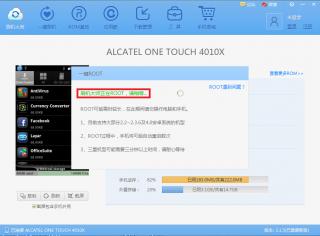
to gain superuser at this alcatel 4010x (easier method)
http://www.mgyun.com/
DO THIS AT UR OWN RISK

in my case i have did this twice in 2 sets
-root it in current using state or u in factory reseted state both fine
-installed pdanet for android 4.12
-installed alcatel one touch manager
-and the most important root tools->刷机大师

if u cant read chinese/no experince on rooting please refer picture i had uploaded
1st- download the root tool from this website http://www.mgyun.com/
Attached Image
then install it on ur computer

2nd- in the phone pls check/tick the USB DEBUGGING(always check this when u root any phone) under phone setting>application>development

3rd- launch 刷机大师 and connect ur phone
Attached Image
connecting...
Attached Image
this mean box showing current root status=NO(one click root)
so click the red boxed area

4th- confirmation before root>click the red area to confirm root the phone
Attached Image
ps:it tells process will reboot ur phone(of course u can click the cancel right beside if u will lose ur ball when the phone happen sudden reboot)

5th- checking and all bla bla bla rooting process (takes around a minutes in my 2nd gen core i7 )
Attached Image

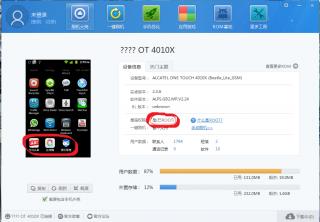
6th- phone rooted when on the 2nd boot with around 10 usb plugin and out sound around 10times please check the status same as mine means ur phone are ROOTED
Attached Image

for UNROOTING factory reset not working , i used the ONE TOUCH UPGRADE S 2.7.5 to reflash stock rom

beside i have tested the recovery provided by this 刷机大师 software Attached Image
-factory reset
-backup(file store at /sdcard)(takes more than 5 mins)
-restore(choose a file named userdata_xxxxxx_xxxxx.backup)


so,i guess this is the noob proof guide i can provide,any problem on the tutorial pm me to change,goodluck


This post has been edited by mR.hyDE: Apr 29 2013, 02:35 AM
SimpleasABC
post Apr 29 2013, 03:53 AM

Getting Started
**
Junior Member
107 posts

Joined: May 2011
From: where eh?


where to buy around damansara area? Ou got eh?
hddesire
post Apr 29 2013, 11:03 AM

New Member
*
Junior Member
43 posts

Joined: May 2011
QUOTE(mR.hyDE @ Apr 28 2013, 10:44 PM)
200% confirm working~
gonna throw some script to speed up this phone
*
brows.gif u can oso use tis software to remove alot those useless app in the phone ~~ but be careful when u remove
SUSmonoikhwan
post Apr 29 2013, 11:34 AM

Casual
***
Junior Member
385 posts

Joined: Apr 2013


QUOTE(mR.hyDE @ Apr 29 2013, 02:13 AM)
» Click to show Spoiler - click again to hide... «

*
how about the drivers?
mR.hyDE
post Apr 29 2013, 01:23 PM

Getting Started
**
Junior Member
186 posts

Joined: May 2012

QUOTE(monoikhwan @ Apr 29 2013, 11:34 AM)
how about the drivers?
*
i got those driver by
-installed pdanet for android 4.12
-installed alcatel one touch manager

try without those first, bcz i think the root tool will download the related driver online
mR.hyDE
post Apr 29 2013, 02:05 PM

Getting Started
**
Junior Member
186 posts

Joined: May 2012

QUOTE(hddesire @ Apr 29 2013, 11:03 AM)
brows.gif u can oso use tis software to remove alot those useless app in the phone ~~ but be careful when u remove
*
thanks for reminding~
Zeong6969
post Apr 29 2013, 04:45 PM

New Member
*
Newbie
3 posts

Joined: Apr 2013


QUOTE(besheda @ Apr 25 2013, 07:50 AM)
One thing I notice is that u guys must have forgot to uncheck Preloader,Dsp BL & so on as suggested in the guide.

As thats the common cause for bricked. Anyway, upload the ROM already

Download here - ROM
*
SPFT can't load the scatter, even i change edit it or rename the folder.
can't turn on the phone yesterday but manage to unbricked my phone using one touch upgrade today
but still can't boot like normal...only can open CWM...any solution for that..?
BOTT
post Apr 29 2013, 07:46 PM

Getting Started
**
Junior Member
70 posts

Joined: Apr 2012
» Click to show Spoiler - click again to hide... «


why when i run the software i got this error?
[attachmentid=3416975]

I'm using win7 64bit.
mR.hyDE
post Apr 29 2013, 08:11 PM

Getting Started
**
Junior Member
186 posts

Joined: May 2012

QUOTE(BOTT @ Apr 29 2013, 07:46 PM)
» Click to show Spoiler - click again to hide... «


why when i run the software i got this error?
[attachmentid=3416975]

I'm using win7 64bit.
*
try other pc,root usually brings threat report by anti virus software,maybe u could try to temporary disable first
namasayadin
post Apr 30 2013, 01:28 AM

Getting Started
**
Junior Member
138 posts

Joined: Jul 2012


currently waiting for the phone..haha..
Ronald_loulan
post Apr 30 2013, 11:27 AM

Regular
******
Senior Member
1,132 posts

Joined: Dec 2006


Pure white user reporting... smile.gif
I just bought it and call digi to unlock like 15min after purchase...
They give me the unlock 8digit code but is not permanently unlock as it will prompt unlock pin every reboot...
I use this setting provided by Besheda....(Thanks alot Besheda)

Dial this number in the dialer - *#*#3646633#*#*

Go to SIMMELOCK -> Select Sim personalization -> Select unlock permanently -> Enter 8 Digit code

But i still cant permanently unlock it... cry.gif

This post has been edited by Ronald_loulan: Apr 30 2013, 11:49 AM
11768
post Apr 30 2013, 01:42 PM

Casual
***
Junior Member
372 posts

Joined: Nov 2006


» Click to show Spoiler - click again to hide... «


Thank you. It work flawlessly. thumbup.gif
hamizi
post Apr 30 2013, 02:01 PM

New Member
*
Junior Member
34 posts

Joined: Nov 2010


anyone can tech me how to root? custom rom? swap internal to sd? for this phone? pleaseee
mR.hyDE
post Apr 30 2013, 02:06 PM

Getting Started
**
Junior Member
186 posts

Joined: May 2012

QUOTE(Ronald_loulan @ Apr 30 2013, 11:27 AM)
Pure white user reporting... smile.gif
I just bought it and call digi to unlock like 15min after purchase...
They give me the unlock 8digit code but is not permanently unlock as it will prompt unlock pin every reboot...
I use this setting provided by Besheda....(Thanks alot Besheda)

Dial this number in the dialer - *#*#3646633#*#*

Go to SIMMELOCK -> Select Sim personalization -> Select unlock permanently -> Enter 8 Digit code

But i still cant permanently unlock it...  cry.gif
*
same here lar, unlock until i can remember the code ady

QUOTE(11768 @ Apr 30 2013, 01:42 PM)
» Click to show Spoiler - click again to hide... «


Thank you. It work flawlessly.  thumbup.gif
*
good job

QUOTE(hamizi @ Apr 30 2013, 02:01 PM)
anyone can tech me how to root? custom rom? swap internal to sd? for this phone? pleaseee
*
tutorial is a page 5 1st post,no custom rom
hamizi
post Apr 30 2013, 02:11 PM

New Member
*
Junior Member
34 posts

Joined: Nov 2010


don't understand chiness
mR.hyDE
post Apr 30 2013, 02:25 PM

Getting Started
**
Junior Member
186 posts

Joined: May 2012

QUOTE(hamizi @ Apr 30 2013, 02:11 PM)
don't understand chiness
*
thats why i made the turotial with picture and translation bro
jackz08
post Apr 30 2013, 02:27 PM

New Member
*
Junior Member
9 posts

Joined: Oct 2009


any working solution for bricked 4010x ?? sad.gif
mR.hyDE
post Apr 30 2013, 02:29 PM

Getting Started
**
Junior Member
186 posts

Joined: May 2012

QUOTE(jackz08 @ Apr 30 2013, 02:27 PM)
any working solution for bricked 4010x ?? sad.gif
*
just use one touch upgrade manager connect ur phone without battery then wait for stock rom download finish (20 mins on 200kbps) then settle i guess
jackz08
post Apr 30 2013, 03:07 PM

New Member
*
Junior Member
9 posts

Joined: Oct 2009


QUOTE(mR.hyDE @ Apr 30 2013, 02:29 PM)
just use one touch upgrade manager connect ur phone without battery then wait for stock rom download finish (20 mins on 200kbps) then settle i guess
*
erm, kinda tried that earlier.. Didn't work, then I got a bit crazy vmad.gif
and end up flashing everything (including preloader and stuff)..
And now, the phone is bricked but still recognized by the computer but I need a complete working stock ROM to make mine work again.. icon_question.gif


hamizi
post Apr 30 2013, 03:15 PM

New Member
*
Junior Member
34 posts

Joined: Nov 2010


QUOTE(mR.hyDE @ Apr 30 2013, 02:25 PM)
thats why i made the turotial with picture and translation bro
*
cannot install la bro....win7 64bit
azha1234
post Apr 30 2013, 05:07 PM

New Member
*
Junior Member
15 posts

Joined: Apr 2013
QUOTE(mR.hyDE @ Apr 29 2013, 02:13 AM)
to gain superuser at this alcatel 4010x (easier method)
http://www.mgyun.com/
DO THIS AT UR OWN RISK

in my case i have did this twice in 2 sets
-root it in current using state or u in factory reseted state both fine
-installed pdanet for android 4.12
-installed alcatel one touch manager
-and the most important root tools->刷机大师

if u cant read chinese/no experince on rooting please refer picture i had uploaded
1st- download the root tool from this website http://www.mgyun.com/
Attached Image
then install it on ur computer

2nd- in the phone pls check/tick the USB DEBUGGING(always check this when u root any phone) under phone setting>application>development

3rd- launch 刷机大师 and connect ur phone
Attached Image
connecting...
Attached Image
this mean box showing current root status=NO(one click root)
so click the red boxed area

4th- confirmation before root>click the red area to confirm root the phone
Attached Image
ps:it tells process will reboot ur phone(of course u can click the cancel right beside if u will lose ur ball when the phone happen sudden reboot)

5th- checking and all bla bla bla rooting process (takes around a minutes in my 2nd gen core i7 )
Attached Image

6th- phone rooted when on the 2nd boot with around 10 usb plugin and out sound around 10times please check the status same as mine means ur phone are ROOTED
Attached Image

for UNROOTING factory reset not working , i used the ONE TOUCH UPGRADE S 2.7.5 to reflash stock rom

beside i have tested the recovery provided by this 刷机大师 software Attached Image
-factory reset
-backup(file store at /sdcard)(takes more than 5 mins)
-restore(choose a file named userdata_xxxxxx_xxxxx.backup)
so,i guess this is the noob proof guide i can provide,any problem on the tutorial pm me to change,goodluck
*
Thank you very much. thanks a lot. terima kasih. xie xie. nandre. argato. syukran... for this complete guide. im sure many out there will pray good things to you.


mR.hyDE
post Apr 30 2013, 05:24 PM

Getting Started
**
Junior Member
186 posts

Joined: May 2012

QUOTE(azha1234 @ Apr 30 2013, 05:07 PM)
Thank you very much. thanks a lot. terima kasih. xie xie. nandre. argato. syukran... for this complete guide. im sure many out there will pray good things to you.
*
no problem dude, if any mistake or not proper pls let me know , so i edit b4 disaster happen wink.gif
mR.hyDE
post Apr 30 2013, 05:29 PM

Getting Started
**
Junior Member
186 posts

Joined: May 2012

QUOTE(jackz08 @ Apr 30 2013, 03:07 PM)
erm, kinda tried that earlier.. Didn't work, then I got a bit crazy vmad.gif
and end up flashing everything (including preloader and stuff).. 
And now, the phone is bricked but still recognized by the computer but I need a complete working stock ROM to make mine work again..  icon_question.gif
*
maybe u try to read the first 4 pages , i gues thr is sth worth to try, based on my exp,just try another computer,driver issue not easy to solve

QUOTE(hamizi @ Apr 30 2013, 03:15 PM)
cannot install la bro....win7 64bit
*
just try another computer or u can try temporary disable ur antivir,usually this helps
namasayadin
post May 1 2013, 01:33 PM

Getting Started
**
Junior Member
138 posts

Joined: Jul 2012


QUOTE(mR.hyDE @ Apr 29 2013, 02:13 AM)

6th- phone rooted when on the 2nd boot with around 10 usb plugin and out sound around 10times please check the status same as mine means ur phone are ROOTED
Attached Image

for UNROOTING factory reset not working , i used the ONE TOUCH UPGRADE S 2.7.5 to reflash stock rom

beside i have tested the recovery provided by this 刷机大师 software Attached Image
-factory reset
-backup(file store at /sdcard)(takes more than 5 mins)
-restore(choose a file named userdata_xxxxxx_xxxxx.backup)
so,i guess this is the noob proof guide i can provide,any problem on the tutorial pm me to change,goodluck
*
so is the software will automatically backup the phone?
lch36
post May 1 2013, 08:46 PM

~Testing~
******
Senior Member
1,452 posts

Joined: Mar 2008


I m stuck at sep 8. And I m sure have only tick recovery but keep getting error 8038. Anyone can help?
mR.hyDE
post May 1 2013, 09:21 PM

Getting Started
**
Junior Member
186 posts

Joined: May 2012

to ppl who brick their devices can digging here instead waiting for help
http://4pda.ru/forum/index.php?showtopic=4...0#entry21359916
u can right click choose translate to english in case u dont know russian
BOTT
post May 3 2013, 03:24 PM

Getting Started
**
Junior Member
70 posts

Joined: Apr 2012
QUOTE(mR.hyDE @ Apr 29 2013, 08:11 PM)
try other pc,root usually brings threat report by anti virus software,maybe u could try to temporary disable first
*
Try with other pc also got same error. 1st win7 64 bit. 2nd win7 32bit. Both got same problem and both pc dont have anti virus. How? Any other solution.
mR.hyDE
post May 4 2013, 12:35 AM

Getting Started
**
Junior Member
186 posts

Joined: May 2012

QUOTE(BOTT @ May 3 2013, 03:24 PM)
Try with other pc also got same error. 1st win7 64 bit. 2nd win7 32bit. Both got same problem and both pc dont have anti virus. How? Any other solution.
*
did u have ur usb debugging on? if yes maybe driver problem,or come to my area i can do it for u
faux_pas
post May 4 2013, 06:32 AM

New Member
*
Junior Member
13 posts

Joined: May 2013
QUOTE(mR.hyDE @ May 4 2013, 12:35 AM)
did u have ur usb debugging on? if yes maybe driver problem,or come to my area i can do it for u
*
Where can i meet u sir hyde? i dun have any idea on how to root my phone. mayb i can meet up wif u and ask u a favour to root up my phone.
BOTT
post May 4 2013, 09:13 AM

Getting Started
**
Junior Member
70 posts

Joined: Apr 2012
QUOTE(mR.hyDE @ May 4 2013, 12:35 AM)
did u have ur usb debugging on? if yes maybe driver problem,or come to my area i can do it for u
*
Where can we meet?

https://forum.lowyat.net/index.php?showtopi...post&p=60013028

Can u translate for me what error mean in this post
jayXzMx
post May 4 2013, 07:57 PM

Getting Started
**
Junior Member
100 posts

Joined: Mar 2013
Hi All, i found 1 app that able to root alcatel 4010x glory 2s, this apps in chinese and this application is very2 easy as using binary root app. download this.

https://www.dropbox.com/s/f77twwjxhimocxv/i...aji_root_sj.exe

install and just press green button..

1st make sure installed Universal ADB driver if not it will not work..
2nd install this app
3rd enable usb debuging on phone and thick allow mock location.

run app and click GREEN Button shown ROOT, just leave it.. it will restart several times. wait until it finish it self done.

THANKS to the ishuaji.
mR.hyDE
post May 5 2013, 01:34 AM

Getting Started
**
Junior Member
186 posts

Joined: May 2012

maybe u try the method above this post using ishuaji first,china have the best tool nor skill in rooting

faux_pas
post May 5 2013, 01:43 AM

New Member
*
Junior Member
13 posts

Joined: May 2013
QUOTE(mR.hyDE @ May 5 2013, 01:34 AM)
maybe u try the method above this post using ishuaji first,china have the best tool nor skill in rooting
*
i've tried and it does work but the app is in chinese and i hev hard times to figure it out. rclxub.gif rclxub.gif
mR.hyDE
post May 5 2013, 02:10 AM

Getting Started
**
Junior Member
186 posts

Joined: May 2012

QUOTE(faux_pas @ May 5 2013, 01:43 AM)
i've tried and it does work but the app is in chinese and i hev hard times to figure it out.  rclxub.gif  rclxub.gif
*
im in kl area start from nex week,do u have some fren that have exp in rooting?
faux_pas
post May 5 2013, 02:20 AM

New Member
*
Junior Member
13 posts

Joined: May 2013
QUOTE(mR.hyDE @ May 5 2013, 02:10 AM)
im in kl area start from nex week,do u have some fren that have exp in rooting?
*
Haha! most of my fren they are IT blind. they dun even know how to format laptop. mayb i can meet u up when u are in KL.
mR.hyDE
post May 5 2013, 02:22 AM

Getting Started
**
Junior Member
186 posts

Joined: May 2012

QUOTE(faux_pas @ May 5 2013, 02:20 AM)
Haha! most of my fren they are IT blind. they dun even know how to format laptop. mayb i can meet u up when u are in KL.
*
no problem , do follow and read my guide again, im sure u miss somewhere,if really cant , then arrange the meet up with others whoever need root at once
faux_pas
post May 5 2013, 02:28 AM

New Member
*
Junior Member
13 posts

Joined: May 2013
QUOTE(mR.hyDE @ May 5 2013, 02:22 AM)
no problem , do follow and read my guide again, im sure u miss somewhere,if really cant , then arrange the meet up with others whoever need root at once
*
alright! thx! ur cooperation is much appreciated.
jayXzMx
post May 5 2013, 05:29 PM

Getting Started
**
Junior Member
100 posts

Joined: Mar 2013
QUOTE(faux_pas @ May 5 2013, 01:43 AM)
i've tried and it does work but the app is in chinese and i hev hard times to figure it out.  rclxub.gif  rclxub.gif
*
ive done on 2 phone, 1 let it run it self until it finish it self but another 1 i have plug out when in first boot then reconnect what ive got is only superuser only without that chinese shell root apps then i update the binary from the superuser itself and working 100% in english, but it just happen..

Note : its still not unlock ur network lock if u got root, still figure it out, how to delete/remove the network lock. rclxub.gif
mR.hyDE
post May 6 2013, 04:12 AM

Getting Started
**
Junior Member
186 posts

Joined: May 2012

QUOTE(jayXzMx @ May 5 2013, 05:29 PM)
ive done on 2 phone, 1 let it run it self until it finish it self but another 1 i have plug out when in first boot then reconnect what ive got is only superuser only without that chinese shell root apps then i update the binary from the superuser itself and working 100% in english, but it just happen..

Note : its still not unlock ur network lock if u got root, still figure it out, how to delete/remove the network lock.  rclxub.gif
*
i did this
ask unlock code from dg
put other telco sim
enter unlock code
go unlock permantly for all
put digi sim
enter unlock code
go unlock permanently for all also
then reflash the stock rom using the one touch upgrade manager
now seems no need to enter unlock code ady

try urself wink.gif
tonton
post May 6 2013, 12:50 PM

Getting Started
**
Junior Member
156 posts

Joined: Jul 2007
got my set last thursday, at first i'm happy using it. but the internal memory is so low, so i decide to root the phone so that i can remove the bloatware.

but something happen, i dont know what kind of damage, but the symptoms goes like this

i no longer can detect any sd card, first i thought my sd card broken, change it with another sd card that working, from a same model, but still cannot detect any sd card. meanwhile when i put mine in other hp, the sd card works just fine

secondly, my battery runs considerably hotter than normal, this start happening when i'm try to charge the phone, the battery goes way beyond the safe temperature and a warning message says that my battery temperature is too high, and asking to snooze and dismiss

this not only happen when i'm charging the phone, it happen also when i left the phone just idle, with all task have been killed. the phone kind of warm

thirdly, i notice that my battery perfomance is getting worse. just one hour of idle, the battery level drops from 99 to 68.

i've already use the alcatel upgrade s to reflash the stock rom
i've already use other charger, still no difference

anyone have any idea? do the warranty still valid for the case like this?
jayXzMx
post May 6 2013, 01:02 PM

Getting Started
**
Junior Member
100 posts

Joined: Mar 2013
QUOTE(mR.hyDE @ May 6 2013, 04:12 AM)
i did this
ask unlock code from dg
put other telco sim
enter unlock code
go unlock permantly for all
put digi sim
enter unlock code
go unlock permanently for all also
then reflash the stock rom using the one touch upgrade manager
now seems no need to enter unlock code ady

try urself wink.gif
*
abit confuse.. hehehe.. thanks mr.hyde. will try later on.. hehehehehe.. icon_rolleyes.gif thumbup.gif
jayXzMx
post May 6 2013, 01:08 PM

Getting Started
**
Junior Member
100 posts

Joined: Mar 2013
mR.hyde.. can u upload and share ur back up data.. just wanna give a try if its work only with restore.. hehehe
mR.hyDE
post May 6 2013, 01:41 PM

Getting Started
**
Junior Member
186 posts

Joined: May 2012

» Click to show Spoiler - click again to hide... «

sure got , this is manufacture error, even sony,samsung,apple huge manufacture also have such problem,and maybe its the only piece in a thousand,and so this is why warranty exists.

QUOTE(jayXzMx @ May 6 2013, 01:08 PM)
mR.hyde.. can u upload and share ur back up data.. just wanna give a try if its work only with restore.. hehehe
*
u mean u wan my cwm restore ? i guess no
-i dont know how to upload
-and after i pimped my rom, the whole os is like running the deepest sleep mode when i try to unlock
maybe until i free to solve it 1st

css9028
post May 6 2013, 02:57 PM

Getting Started
**
Junior Member
63 posts

Joined: Dec 2009
hey guy,i just get alcatel one glory 2s from digi with that skmm package...here's come trouble happen on me...this device have wifi problem...when the time i connected to a wifi,ok,it let me surf the web or download things from play store...few minutes later,that data is not transferring,cannot download thing,cannot surf web...i tried others wifi hotspot as well and it come out the same result...i need to restart the wifi many times...it keep came out wifi error...and i restart and restart finally it connected...somehow,problem happen again few minutes later...anyone having the same problem as me?and anyone know the solution to fix it?please....thank you...
jayXzMx
post May 6 2013, 04:04 PM

Getting Started
**
Junior Member
100 posts

Joined: Mar 2013
QUOTE(mR.hyDE @ May 6 2013, 01:41 PM)
» Click to show Spoiler - click again to hide... «

sure got , this is manufacture error, even sony,samsung,apple huge manufacture also have such problem,and maybe its the only piece in a thousand,and so this is why warranty exists.
u mean u wan my cwm restore ?  i guess no
-i dont know how to upload
-and after i pimped my rom, the whole os is like running the deepest sleep mode when i try to unlock
maybe until i free to solve it 1st
*
not from cwm but from official recovery, u have the CWM for this device? give the link or u just use the root apps u have? not understand in chinese with this ishuaji root apps.. pfftttttt... i am trying to convert some file on the system file for this root program.. hope its work.. hehehe laugh.gif laugh.gif
mR.hyDE
post May 6 2013, 11:55 PM

Getting Started
**
Junior Member
186 posts

Joined: May 2012

QUOTE(jayXzMx @ May 6 2013, 04:04 PM)
not from cwm but from official recovery, u have the CWM for this device? give the link or u just use the root apps u have? not understand in chinese with this ishuaji root apps.. pfftttttt... i am trying to convert some file on the system file for this root program.. hope its work.. hehehe laugh.gif  laugh.gif
*
i suppose u mentioning the one i downloaded from one touch upgrade recovery?
BOTT
post May 6 2013, 11:59 PM

Getting Started
**
Junior Member
70 posts

Joined: Apr 2012
QUOTE(mR.hyDE @ May 5 2013, 01:34 AM)
maybe u try the method above this post using ishuaji first,china have the best tool nor skill in rooting
*
i have try and the software run without error.but
how to know if my phone already root or not? rclxub.gif rclxub.gif
mR.hyDE
post May 7 2013, 12:12 AM

Getting Started
**
Junior Member
186 posts

Joined: May 2012

QUOTE(BOTT @ May 6 2013, 11:59 PM)
i have try and the software run without error.but
how to know if my phone already root or not? rclxub.gif  rclxub.gif
*

thr is a superuse app in the app drawer
craziemunkie
post May 7 2013, 12:14 AM

New Member
*
Newbie
1 posts

Joined: Jul 2008


QUOTE(BOTT @ Apr 29 2013, 07:46 PM)
» Click to show Spoiler - click again to hide... «


why when i run the software i got this error?
[attachmentid=3416975]

I'm using win7 64bit.
*


you need to download applocale and follow the step from this video :


hamizi
post May 7 2013, 01:34 AM

New Member
*
Junior Member
34 posts

Joined: Nov 2010


yeay! done rooted! thanks guys! rclxms.gif rclxms.gif

but 1 question......how to exit? how to remove phone? can simply remove like that? hmm.gif


can i change the language to English?

This post has been edited by hamizi: May 7 2013, 01:37 AM
hamizi
post May 7 2013, 02:36 AM

New Member
*
Junior Member
34 posts

Joined: Nov 2010


anyone have swap internal to sd?
joe ieyl
post May 7 2013, 04:59 PM

New Member
*
Newbie
3 posts

Joined: Mar 2013
Reporting in. Just got Pure White 4010x today.
Loc: DiGi Megamall Kuantan. rclxms.gif
Elvin00
post May 7 2013, 05:12 PM

Getting Started
**
Junior Member
54 posts

Joined: May 2013
Anyone know which area at Penang still available? Thanks...
jayXzMx
post May 7 2013, 09:10 PM

Getting Started
**
Junior Member
100 posts

Joined: Mar 2013
OK.. i have done working on ishuaji root tool, ive change the shell root to english version which is original from superuser DEV. hehehehe.. @mR.hyde.. can u post the step for me.. im to lazy to post with picture instruction.. plus not understand chinese.. hehehe..

here the step..

1st google superuser binary download, download from superuser website better. Here Superuser binary
2nd : download ishuaji root tool root tool

3rd : install root tool

4th : open superuser binary via zip program

5th : open My Computer and go to this directory : C:\Program Files (x86)\RootTool\Android_Root (windows 8/7) C:\Program Files \RootTool\Android_Root (windows XP)

6th : delete ld_superuser.apk inside the folder or u can move to other folder as a backup (recommended if anything goes wrong n u can use back this file)

7th : replace with superuser binary that u have downloaded (just drag n drop) then RENAME it to ld_superuser.apk


Then run the root tool as per normal. and root ur device just by clicking the green button. wait unil it finish. and u will have normal superuser which is in English.


HAVE FUN GUYS.. hehhehe thumbup.gif
tonton
post May 8 2013, 02:31 AM

Getting Started
**
Junior Member
156 posts

Joined: Jul 2007
QUOTE(Elvin00 @ May 7 2013, 05:12 PM)
Anyone know which area at Penang still available? Thanks...
*
i got mine at perda digi specialized store last friday. they have a lot of stock last time, but better fast, because this unit is selling like a hot cake

btw, the store is around the same street with maybank perda
hamizi
post May 8 2013, 05:22 AM

New Member
*
Junior Member
34 posts

Joined: Nov 2010


QUOTE(jayXzMx @ May 7 2013, 09:10 PM)
OK.. i have done working on ishuaji root tool, ive change the shell root to english version which is original from superuser DEV. hehehehe.. @mR.hyde.. can u post the step for me.. im to lazy to post with picture instruction.. plus not understand chinese.. hehehe..

here the step..

1st google superuser binary download, download from superuser website better. Here Superuser binary
2nd : download ishuaji root tool root tool

3rd : install root tool

4th : open superuser binary via zip program

5th : open My Computer and go to this directory : C:\Program Files (x86)\RootTool\Android_Root (windows 8/7) C:\Program Files \RootTool\Android_Root (windows XP)

6th : delete ld_superuser.apk inside the folder or u can move to other folder as a backup (recommended if anything goes wrong n u can use back this file)

7th : replace with superuser binary that u have downloaded (just drag n drop) then RENAME it to ld_superuser.apk
Then run the root tool as per normal. and root ur device just by clicking the green button. wait unil it finish. and u will have normal superuser which is in English.
HAVE FUN GUYS.. hehhehe thumbup.gif
*
ishuaji root tool
Trojan detect by kaspersky Internet Security 2013 rclxub.gif
ntuser88
post May 8 2013, 06:59 AM

New Member
*
Junior Member
23 posts

Joined: May 2013


QUOTE(jayXzMx @ May 7 2013, 09:10 PM)
OK.. i have done working on ishuaji root tool, ive change the shell root to english version which is original from superuser DEV. hehehehe.. @mR.hyde.. can u post the step for me.. im to lazy to post with picture instruction.. plus not understand chinese.. hehehe..

here the step..

1st google superuser binary download, download from superuser website better. Here Superuser binary
2nd : download ishuaji root tool root tool

3rd : install root tool

4th : open superuser binary via zip program

5th : open My Computer and go to this directory : C:\Program Files (x86)\RootTool\Android_Root (windows 8/7) C:\Program Files \RootTool\Android_Root (windows XP)

6th : delete ld_superuser.apk inside the folder or u can move to other folder as a backup (recommended if anything goes wrong n u can use back this file)

7th : replace with superuser binary that u have downloaded (just drag n drop) then RENAME it to ld_superuser.apk
Then run the root tool as per normal. and root ur device just by clicking the green button. wait unil it finish. and u will have normal superuser which is in English.
HAVE FUN GUYS.. hehhehe thumbup.gif
*
do i have to extract the su binary? which file i need to copy to android_root? can u provide cwm recovery download link to me? thanks...
ntuser88
post May 8 2013, 07:05 AM

New Member
*
Junior Member
23 posts

Joined: May 2013


QUOTE(hamizi @ May 8 2013, 05:22 AM)
ishuaji root tool
Trojan detect by kaspersky Internet Security 2013 rclxub.gif
*
not virus.. just disable your antivirus and you will able to download and install it.. thumbup.gif
ntuser88
post May 8 2013, 07:26 AM

New Member
*
Junior Member
23 posts

Joined: May 2013


QUOTE(jayXzMx @ May 7 2013, 09:10 PM)
OK.. i have done working on ishuaji root tool, ive change the shell root to english version which is original from superuser DEV. hehehehe.. @mR.hyde.. can u post the step for me.. im to lazy to post with picture instruction.. plus not understand chinese.. hehehe..

here the step..

1st google superuser binary download, download from superuser website better. Here Superuser binary
2nd : download ishuaji root tool root tool

3rd : install root tool

4th : open superuser binary via zip program

5th : open My Computer and go to this directory : C:\Program Files (x86)\RootTool\Android_Root (windows 8/7) C:\Program Files \RootTool\Android_Root (windows XP)

6th : delete ld_superuser.apk inside the folder or u can move to other folder as a backup (recommended if anything goes wrong n u can use back this file)

7th : replace with superuser binary that u have downloaded (just drag n drop) then RENAME it to ld_superuser.apk
Then run the root tool as per normal. and root ur device just by clicking the green button. wait unil it finish. and u will have normal superuser which is in English.
HAVE FUN GUYS.. hehhehe thumbup.gif
*
hi im already rooted my phone without replace superuser binary file and its in china.. how do i change it to english..?
joe ieyl
post May 8 2013, 09:18 AM

New Member
*
Newbie
3 posts

Joined: Mar 2013
Call the DiGi Helpline. Got the unlock code but when I try to unlock permanently, It doesn't ask for the code but come out either finish or cancel button. When I choose finish the menu turned grey and disabled. When I reboot the phone stil need to be unlock first. Help anyone?
LeaRi
post May 8 2013, 10:34 AM

New Member
*
Junior Member
13 posts

Joined: Mar 2011
QUOTE(joe ieyl @ May 8 2013, 10:18 AM)
Call the DiGi Helpline. Got the unlock code but when I try to unlock permanently, It doesn't ask for the code but come out either finish or cancel button. When I choose finish the menu turned grey and disabled. When I reboot the phone stil need to be unlock first. Help anyone?
*
Please go to first page to fix the brick, after fixing it , u just need to key in once to unlock the phone.
Elvin00
post May 8 2013, 03:25 PM

Getting Started
**
Junior Member
54 posts

Joined: May 2013
QUOTE(tonton @ May 8 2013, 02:31 AM)
i got mine at perda digi specialized store last friday. they have a lot of stock last time, but better fast, because this unit is selling like a hot cake

btw, the store is around the same street with maybank perda
*
Thanks for your info, can you send me the shop address or phone number?
I'm from Penang so if got phone number then i can call to check de stock.


ntuser88
post May 8 2013, 06:33 PM

New Member
*
Junior Member
23 posts

Joined: May 2013


QUOTE(LeaRi @ May 8 2013, 10:34 AM)
Please go to first page to fix the brick, after fixing it , u just need to key in once to unlock the phone.
*
root n uninstall em sim me lock.. settle problem..
thumbup.gif

This post has been edited by ntuser88: May 8 2013, 07:26 PM
ntuser88
post May 9 2013, 01:12 AM

New Member
*
Junior Member
23 posts

Joined: May 2013


QUOTE(jayXzMx @ May 7 2013, 09:10 PM)
OK.. i have done working on ishuaji root tool, ive change the shell root to english version which is original from superuser DEV. hehehehe.. @mR.hyde.. can u post the step for me.. im to lazy to post with picture instruction.. plus not understand chinese.. hehehe..

here the step..

1st google superuser binary download, download from superuser website better. Here Superuser binary
2nd : download ishuaji root tool root tool

3rd : install root tool

4th : open superuser binary via zip program

5th : open My Computer and go to this directory : C:\Program Files (x86)\RootTool\Android_Root (windows 8/7) C:\Program Files \RootTool\Android_Root (windows XP)

6th : delete ld_superuser.apk inside the folder or u can move to other folder as a backup (recommended if anything goes wrong n u can use back this file)

7th : replace with superuser binary that u have downloaded (just drag n drop) then RENAME it to ld_superuser.apk
Then run the root tool as per normal. and root ur device just by clicking the green button. wait unil it finish. and u will have normal superuser which is in English.
HAVE FUN GUYS.. hehhehe thumbup.gif
*
hi... done root.. how about intalls clockword mod recovery... hmm.gif
ntuser88
post May 9 2013, 01:14 AM

New Member
*
Junior Member
23 posts

Joined: May 2013


is there ics or jb rom for this one touch 4010x?
joe ieyl
post May 9 2013, 01:35 AM

New Member
*
Newbie
3 posts

Joined: Mar 2013
biggrin.gif Hahah. Done with upgrade via One touch Upgrade s. took 2 hours to download on slow internet connection. Then root the phone using Romaster Pc.
but before that need to update the language pack for Chinese and install applocal in order to avoid application error.
Run the romaster under applocal and follow the mr.hide instruction.
and yay. rclxms.gif
icon_idea.gif successfully root the phone. smile.gif rclxm9.gif

Oh yea.. uninstall em sim me lock. reboot usint other sim card. seems okay (no need to unlock) thank you everyone.

This post has been edited by joe ieyl: May 9 2013, 02:32 AM
engine_expert
post May 9 2013, 09:41 AM

Getting Started
**
Junior Member
134 posts

Joined: Aug 2007


QUOTE(joe ieyl @ May 9 2013, 01:35 AM)
biggrin.gif  Hahah. Done with upgrade via One touch Upgrade s. took 2 hours to download on slow internet connection. Then root the phone using Romaster Pc.
but before that need to update the language pack for Chinese and install applocal in order to avoid application error.
Run the romaster under applocal and follow the mr.hide instruction.
and yay. rclxms.gif
icon_idea.gif successfully root the phone.  smile.gif  rclxm9.gif

Oh yea.. uninstall em sim me lock. reboot usint other sim card. seems okay (no need to unlock) thank you everyone.
*
hehehe..
u uninstall the system apps em sim me lock is it..
nice move..
forgot bout dat apps thingy..
hahaha...
will try later..
tired of entering code each time reboot..
SUSmonoikhwan
post May 9 2013, 09:41 AM

Casual
***
Junior Member
385 posts

Joined: Apr 2013


else to make it simpler, install superuser first, root the phone, and u didnt have to go through all the hassle of renaming, replacing and all.
kingmafia
post May 9 2013, 01:11 PM

Casual
***
Junior Member
457 posts

Joined: Nov 2008
QUOTE(jayXzMx @ May 7 2013, 09:10 PM)
OK.. i have done working on ishuaji root tool, ive change the shell root to english version which is original from superuser DEV. hehehehe.. @mR.hyde.. can u post the step for me.. im to lazy to post with picture instruction.. plus not understand chinese.. hehehe..

here the step..

1st google superuser binary download, download from superuser website better. Here Superuser binary
2nd : download ishuaji root tool root tool

3rd : install root tool

4th : open superuser binary via zip program

5th : open My Computer and go to this directory : C:\Program Files (x86)\RootTool\Android_Root (windows 8/7) C:\Program Files \RootTool\Android_Root (windows XP)

6th : delete ld_superuser.apk inside the folder or u can move to other folder as a backup (recommended if anything goes wrong n u can use back this file)

7th : replace with superuser binary that u have downloaded (just drag n drop) then RENAME it to ld_superuser.apk
Then run the root tool as per normal. and root ur device just by clicking the green button. wait unil it finish. and u will have normal superuser which is in English.
HAVE FUN GUYS.. hehhehe thumbup.gif
*
Help, i alry finish root the phone but it's keep on restarting...
jayXzMx
post May 9 2013, 01:42 PM

Getting Started
**
Junior Member
100 posts

Joined: Mar 2013
QUOTE(monoikhwan @ May 9 2013, 09:41 AM)
else to make it simpler, install superuser first, root the phone, and u didnt have to go through all the hassle of renaming, replacing and all.
*
Yes bro.. Thats is the simpler way, but the program will not root, because the root button will deem if it detect superuser apk in the phone, and what i've done is install apk then unintall it back..right after that only i can run and root button highlighted. And yes its working in english version, thanks for the help bro..
jayXzMx
post May 9 2013, 01:45 PM

Getting Started
**
Junior Member
100 posts

Joined: Mar 2013
QUOTE(kingmafia @ May 9 2013, 01:11 PM)
Help, i alry finish root the phone but it's keep on restarting...
*
Ermmmmm... U need to reinstall ur rom using one touch upgrade, i thing u have done wrong.. After that just follow the instruction again..
SUSmonoikhwan
post May 9 2013, 08:12 PM

Casual
***
Junior Member
385 posts

Joined: Apr 2013


QUOTE(jayXzMx @ May 9 2013, 01:42 PM)
Yes bro.. Thats is the simpler way, but the program will not root, because the root button will deem if it detect superuser apk in the phone, and what i've done is install apk then unintall it back..right after that only i can run and root button highlighted. And yes its working in english version, thanks for the help bro..
*
im not sure bro, i just install superuser, root the phone, voila, rooted with the english superuser, it didnt install any chinese app.
kingmafia
post May 9 2013, 09:22 PM

Casual
***
Junior Member
457 posts

Joined: Nov 2008
QUOTE(jayXzMx @ May 9 2013, 01:45 PM)
Ermmmmm... U need to reinstall ur rom using one touch upgrade, i thing u have done wrong.. After that just follow the instruction again..
*
Thanks its working greatly now thumbup.gif thumbup.gif

This post has been edited by kingmafia: May 9 2013, 09:23 PM
jayXzMx
post May 9 2013, 10:22 PM

Getting Started
**
Junior Member
100 posts

Joined: Mar 2013
QUOTE(monoikhwan @ May 9 2013, 08:12 PM)
im not sure bro, i just install superuser, root the phone, voila, rooted with the english superuser, it didnt install any chinese app.
*
good.. rclxms.gif problem solved, so the simpler way is install superuser then root via root tool by ishuaji.

OK guys sorry for the wrong info on previous post.

Install superuser via playstore then root using root tool by ishuaji.. so u guys will not get the chinese root apps. i have try done that before i post so i done know which 1 is correct way, done this on 4 device. 1 normal, 2nd with superuser installed first, 3rd by replace the binary apk, 4th by replace superuser apk. rclxub.gif rclxub.gif

but 2 phones have successful full root, which is by normal without replace binary, and with installed superuser apk first. doh.gif
by replace the binary its still require to download and install the chinese version of superuser create by ishuji. blush.gif

thanks @monoikhwan thumbup.gif
SUSmonoikhwan
post May 9 2013, 10:59 PM

Casual
***
Junior Member
385 posts

Joined: Apr 2013


QUOTE(jayXzMx @ May 9 2013, 10:22 PM)
good..  rclxms.gif problem solved, so the simpler way is install superuser then root via root tool by ishuaji.

OK guys sorry for the wrong info on previous post.

Install superuser via playstore then root using root tool by ishuaji.. so u guys will not get the chinese root apps. i have try done that before i post so i done know which 1 is correct way, done this on 4 device. 1 normal, 2nd with superuser installed first, 3rd by replace the binary apk, 4th by replace superuser apk. rclxub.gif  rclxub.gif

but 2 phones have successful full root, which is by normal without replace binary, and with installed superuser apk first. doh.gif
by replace the binary its still require to download and install the chinese version of superuser create by ishuji. blush.gif

thanks @monoikhwan thumbup.gif
*
actually rooting using ishuaji is not recommended because it is not as clean compared to using romaster. ishuaji installed some nasty exploits which will make ur phone hang during booting. better go for romaster
dinie74
post May 10 2013, 12:31 AM

New Member
*
Junior Member
27 posts

Joined: Mar 2012
From: Kuala Lumpur


can someone help to root my phone..i dont think i can do it by using my latptop since my laptop kind of ting tong..i study in kl..if anyone willing to root it for me pliz do pm me..thanks in advance smile.gif
BOTT
post May 10 2013, 07:07 AM

Getting Started
**
Junior Member
70 posts

Joined: Apr 2012
done rooted! thanks guys.

but how to remove default apps like sim me lock. look like superuser app can,t do anything.
i have no idea.. new android user here..
!@#$%^
post May 10 2013, 12:48 PM

Safe Trader
********
All Stars
17,497 posts

Joined: Feb 2006
From: KL
QUOTE(BOTT @ May 10 2013, 07:07 AM)
done rooted! thanks guys.

but how to remove default apps like sim me lock. look like superuser app can,t do anything.
i have no idea.. new android user here..
*
u'll need to install something like titanium backup to uninstall or freeze d app
Skudeng
post May 10 2013, 03:15 PM

New Member
*
Junior Member
13 posts

Joined: Mar 2009
From: Seremban


hye.. after 4 days of trying..i get to root my phone..=.=
how to enable swap for this phone?
any upgrade rom to ics?
any custom kernel?
coz im zero about android..=.=..juz want use swap only...=.=arghhh
SUSmonoikhwan
post May 10 2013, 03:58 PM

Casual
***
Junior Member
385 posts

Joined: Apr 2013


managed to swap the internal storage to sd, however i still need time to evaluate its stability
IvanWong1989
post May 10 2013, 04:16 PM

!StringTheory!
*******
Senior Member
4,297 posts

Joined: Jul 2009


Hi.... I am having trouble in step six.

Disconnect phone, off phone, take out battery, replug in with phone offed. Press read back. Nothing happens... and deveice manager doesn't detect the offed phone


Help
IvanWong1989
post May 10 2013, 05:10 PM

!StringTheory!
*******
Senior Member
4,297 posts

Joined: Jul 2009


When my phone is offed and connected nothing happens. Device manager does no detect anything.

when my phone is on and i press read back, also nothing happens.
hamizi
post May 10 2013, 05:49 PM

New Member
*
Junior Member
34 posts

Joined: Nov 2010


QUOTE(ntuser88 @ May 8 2013, 06:33 PM)
root n uninstall em sim me lock.. settle problem..
thumbup.gif
*
how to uninstall em sim me lock?? tech me please
IvanWong1989
post May 10 2013, 05:54 PM

!StringTheory!
*******
Senior Member
4,297 posts

Joined: Jul 2009


.. trouble rooting....

is it normal the Preloader VCOM in device manager only appearing briefly when plug in and then it is gone?

when it appears briefly, SP Flash is able to detect and starts. but then it errors , possibly because the Preloader VCOM dissapears again.

HELP HELP>>> anybody. T>T

hamizi
post May 10 2013, 10:17 PM

New Member
*
Junior Member
34 posts

Joined: Nov 2010


anyone please....please....please..... cry.gif cry.gif

how to swap internal memory to sd?
wmr91
post May 10 2013, 10:53 PM

Getting Started
**
Junior Member
54 posts

Joined: Mar 2011
hi..wanna know whether can i immediately unlock this phone or do i need to use it for 3 months?and where can i buy the casing for this phone?
Asurada
post May 11 2013, 02:01 AM

Casual
***
Junior Member
370 posts

Joined: Jan 2003
From: Kuala Lumpur, Malaysia


QUOTE(wmr91 @ May 10 2013, 10:53 PM)
hi..wanna know whether can i immediately unlock this phone or do i need to  use it for 3 months?and where can i buy the casing for this phone?
*
Just call to Digi service center and you can get the unlock code anytime.
jambubatu1000
post May 11 2013, 03:02 AM

New Member
*
Newbie
1 posts

Joined: May 2013


i bought this last week.. overall its quite ok, but the problem is if i installed a new app/games, it said that i have insufficient mmory but my mc still have spaces.. how can i overcme this prob??
hamizi
post May 11 2013, 05:33 AM

New Member
*
Junior Member
34 posts

Joined: Nov 2010


rclxms.gif rclxub.gif

This post has been edited by hamizi: May 11 2013, 05:34 AM
wmr91
post May 11 2013, 11:44 AM

Getting Started
**
Junior Member
54 posts

Joined: Mar 2011
QUOTE(jambubatu1000 @ May 11 2013, 03:02 AM)
i bought this last week.. overall its quite ok, but the problem is if i installed a new app/games, it said that i have insufficient mmory but my mc still have spaces.. how can i overcme this prob??
*
i also encounter the same problem.. rclxub.gif
shinningteen
post May 11 2013, 01:36 PM

Casual
***
Junior Member
339 posts

Joined: Feb 2009
QUOTE(wmr91 @ May 11 2013, 11:44 AM)
i also encounter the same problem.. rclxub.gif
*
same also...how to solve it?
wmr91
post May 11 2013, 01:48 PM

Getting Started
**
Junior Member
54 posts

Joined: Mar 2011
QUOTE(shinningteen @ May 11 2013, 01:36 PM)
same also...how to solve it?
*
i just accept the fact that its a RM50 phone.. tongue.gif
SUSmonoikhwan
post May 11 2013, 06:12 PM

Casual
***
Junior Member
385 posts

Joined: Apr 2013


swap internal memory to external memory. btw, right now i only have class 4 sdcard, and i can tell u the overall performance is very low, not worth doing it.
hamizi
post May 11 2013, 11:25 PM

New Member
*
Junior Member
34 posts

Joined: Nov 2010


class 4 is already okay to swap....but HOW TO SWAP?
pojhe
post May 12 2013, 12:34 PM

New Member
*
Newbie
2 posts

Joined: Jun 2010
QUOTE(hamizi @ May 11 2013, 11:25 PM)
class 4 is already okay to swap....but HOW TO SWAP?
*
1st u need to partition your sdcard to ext2. Then use link2sd to swap your apps to ext2. Just search tutorial how to use link2sd.

This post has been edited by pojhe: May 12 2013, 12:35 PM
shinningteen
post May 12 2013, 05:02 PM

Casual
***
Junior Member
339 posts

Joined: Feb 2009
may ask anyone using what luncher in your phone? i using go luncher ex like too big already..sometimes lag
hamizi
post May 12 2013, 10:54 PM

New Member
*
Junior Member
34 posts

Joined: Nov 2010


My Alcatel One Touch Glory sS biggrin.gif

Attached Image Attached Image Attached Image
flex.dev22
post May 13 2013, 04:47 PM

New Member
*
Junior Member
5 posts

Joined: Oct 2012
QUOTE(hamizi @ May 12 2013, 10:54 PM)
My Alcatel One Touch Glory sS  biggrin.gif

Attached Image   Attached Image   Attached Image
*
bro,how you make the screen shot? icon_question.gif
Faeez Ezuan
post May 13 2013, 11:58 PM

Getting Started
**
Junior Member
61 posts

Joined: Feb 2011
QUOTE(mR.hyDE @ Apr 29 2013, 02:13 AM)
to gain superuser at this alcatel 4010x (easier method)
http://www.mgyun.com/
DO THIS AT UR OWN RISK

in my case i have did this twice in 2 sets
-root it in current using state or u in factory reseted state both fine
-installed pdanet for android 4.12
-installed alcatel one touch manager
-and the most important root tools->刷机大师

if u cant read chinese/no experince on rooting please refer picture i had uploaded
1st- download the root tool from this website http://www.mgyun.com/
Attached Image
then install it on ur computer

2nd- in the phone pls check/tick the USB DEBUGGING(always check this when u root any phone) under phone setting>application>development

3rd- launch 刷机大师 and connect ur phone
Attached Image
connecting...
Attached Image
this mean box showing current root status=NO(one click root)
so click the red boxed area

4th- confirmation before root>click the red area to confirm root the phone
Attached Image
ps:it tells process will reboot ur phone(of course u can click the cancel right beside if u will lose ur ball when the phone happen sudden reboot)

5th- checking and all bla bla bla rooting process (takes around a minutes in my 2nd gen core i7 )
Attached Image

6th- phone rooted when on the 2nd boot with around 10 usb plugin and out sound around 10times please check the status same as mine means ur phone are ROOTED
Attached Image

for UNROOTING factory reset not working , i used the ONE TOUCH UPGRADE S 2.7.5 to reflash stock rom

beside i have tested the recovery provided by this 刷机大师 software Attached Image
-factory reset
-backup(file store at /sdcard)(takes more than 5 mins)
-restore(choose a file named userdata_xxxxxx_xxxxx.backup)
so,i guess this is the noob proof guide i can provide,any problem on the tutorial pm me to change,goodluck
*
please help me
I already try many times but still cant root.... and at the application on my computer did not show the green text root... i already reset to factory setting but application at my phone still have from software ( tools ) that u give at thread... and cant unistall

This post has been edited by Faeez Ezuan: May 14 2013, 12:02 AM
hamizi
post May 14 2013, 01:12 AM

New Member
*
Junior Member
34 posts

Joined: Nov 2010


QUOTE(flex.dev22 @ May 13 2013, 04:47 PM)
bro,how you make the screen shot? icon_question.gif
*
just use GO LAUNCHER EX.......can screen shoot biggrin.gif
jayXzMx
post May 14 2013, 01:21 AM

Getting Started
**
Junior Member
100 posts

Joined: Mar 2013
QUOTE(Faeez Ezuan @ May 13 2013, 11:58 PM)
please help me
I already try many times but still cant root.... and at the application on my computer did not show the green text root... i already reset to factory setting but application at my phone still have from software ( tools ) that u give at thread... and cant unistall
*
use ishuaji root tool easier.. just install superuser from playstore 1st then root via ishuaji root tool... simple..
flex.dev22
post May 14 2013, 03:46 AM

New Member
*
Junior Member
5 posts

Joined: Oct 2012
do you guy have any issue on the wifi connection? It is connected but no connection, i have to restart several times. I had upgrade to latest firmware now, lets see the problem still exists or not.

By the way, you guys on the wifi all the time when you at home? even you are sleeping?
Skudeng
post May 14 2013, 05:57 AM

New Member
*
Junior Member
13 posts

Joined: Mar 2009
From: Seremban


QUOTE(pojhe @ May 12 2013, 12:34 PM)
1st u need to partition your sdcard to ext2. Then use link2sd to swap your apps to ext2. Just search tutorial how to use link2sd.
*
u sure ur swap are enable?
coz our current rom does not support swap..
or u already flash rom?
aku46
post May 14 2013, 02:40 PM

Getting Started
**
Junior Member
111 posts

Joined: Apr 2009
From: Selangor


mighty white reporting in whistling.gif
successfully root thumbup.gif
currently removing junkware doh.gif
juanhomies
post May 14 2013, 04:32 PM

Getting Started
**
Junior Member
57 posts

Joined: Jan 2010
From: Kuala Lumpur


I owned a Bluish Black set.

Reporting in.

Rooted success with mygun app
dreamwar
post May 14 2013, 04:45 PM

Getting Started
**
Junior Member
281 posts

Joined: Aug 2005
From: Kuala Lumpur


Hi guys, anyone of you know which digi outlet in KL still got stock left?
muhamad_asyraf
post May 14 2013, 07:40 PM

Getting Started
**
Junior Member
168 posts

Joined: Jun 2012
my wifi kinda weird, connected but cannot surf.. im having another phone, samsung which got no problem.. HELPPPP
tonton
post May 14 2013, 07:59 PM

Getting Started
**
Junior Member
156 posts

Joined: Jul 2007
most probably the ip address for your phone wifi is somekind of 169.254.x.x.

just manual set your wifi setting
muhamad_asyraf
post May 14 2013, 09:12 PM

Getting Started
**
Junior Member
168 posts

Joined: Jun 2012
i do not assign any ip address, since my samsung galaxy can connect and surf..

any idea ?
justyn
post May 14 2013, 09:50 PM

Getting Started
**
Junior Member
84 posts

Joined: Oct 2010


Anyone know how to permanent get rid of the sim me lock? I haven root my phone btw
Racerx
post May 14 2013, 11:55 PM

Tell Your World
*******
Senior Member
8,461 posts

Joined: Mar 2007
From: Kota Bharu,Kelantan


A question,this phone runs Gingerbread or Jelly Bean actually? If it still runs GB,can it be upgraded to JB?
syahmie_dbf1430
post May 15 2013, 12:11 AM

Casual
***
Junior Member
356 posts

Joined: Oct 2011
From: Shah Alam


it is running 2.3 which is Gingerbread.. currently, no news on Jelly Bean for this phone, not even ICS.. biggrin.gif
cheewee830
post May 15 2013, 12:19 AM

New Member
*
Junior Member
11 posts

Joined: Nov 2010


i jas get my new phone by today...
however, i ady get the unlock code from digihelpline..
but the code invalid..
then i call digi again..
it say my IMEI not exist.. rclxub.gif

any1 can hlp me?
but the way.. how to root it? using which software better?
i m newbie to android

syahmie_dbf1430
post May 15 2013, 12:23 AM

Casual
***
Junior Member
356 posts

Joined: Oct 2011
From: Shah Alam


QUOTE(cheewee830 @ May 15 2013, 12:19 AM)
i jas get my new phone by today...
however, i ady get the unlock code from digihelpline..
but the code invalid..
then i call digi again..
it say my IMEI not exist.. rclxub.gif

any1 can hlp me?
but the way.. how to root it? using which software better?
i m newbie to android
*
wow.. weird case..
already double check the imei number??? try call them again.. make sure the imei is correct..

regarding to root, try mgyun.. https://forum.lowyat.net/topic/2785866/+80
credit to mr.hyde..
most user successfully root using this.. biggrin.gif

This post has been edited by syahmie_dbf1430: May 15 2013, 12:23 AM
cheewee830
post May 15 2013, 12:27 AM

New Member
*
Junior Member
11 posts

Joined: Nov 2010


then u all got upgrade android version?

may i knw how to improve my phone..

syahmie_dbf1430
post May 15 2013, 12:33 AM

Casual
***
Junior Member
356 posts

Joined: Oct 2011
From: Shah Alam


QUOTE(cheewee830 @ May 15 2013, 12:27 AM)
then u all got upgrade android version?

may i knw how to improve my phone..
*
i dont think so.. im not getting any update for this phone..
mine also using standard gingerbread...

how to improved?? root the phone.. and remove all junkware from the phone such as alcatel help, wireless keyboard, etc.. n do not install to much apps as it will consume the ram n make ur phones lag.. thumbup.gif
Sub4Crew
post May 15 2013, 12:50 AM

Getting Started
**
Junior Member
244 posts

Joined: Apr 2013
any custom for this phone? custom rom such as jelly bean or ICS rom?

stock rom gingerbread is quite laggy
21th century apes
post May 15 2013, 12:53 AM

Getting Started
**
Junior Member
106 posts

Joined: Aug 2008
From: Texas,Kemaman


hye there.
just wanna ask y certain apps keeps force close by itself.For example.while im txting and then its closed by itself.And i think its touch screen isn't not so accurate.lets say im wanna push dotted then its detect m (for example)

sorry coz my bad english
Sub4Crew
post May 15 2013, 12:58 AM

Getting Started
**
Junior Member
244 posts

Joined: Apr 2013
QUOTE(21th century apes @ May 15 2013, 12:53 AM)
hye there.
just wanna ask y certain apps keeps force close by itself.For example.while im txting and then its closed by itself.And i think its touch screen isn't not so accurate.lets say im wanna push dotted then its detect m (for example)

sorry coz my bad english
*
Apps force close due to ram too low.

regarding inaccurate touch screen, it should be quality problem.
syahmie_dbf1430
post May 15 2013, 02:24 AM

Casual
***
Junior Member
356 posts

Joined: Oct 2011
From: Shah Alam


QUOTE(Sub4Crew @ May 15 2013, 12:50 AM)
any custom for this phone? custom rom such as jelly bean or ICS rom?

stock rom gingerbread is quite laggy
*
no custom rom yet..

just use gingerbread.. its smooth.. plus, i use xperia launcher minimal icon.. biggrin.gif
acidglory
post May 15 2013, 02:02 PM

New Member
*
Junior Member
12 posts

Joined: Jun 2005
actually the RAM is 512 or 256?
girlgeneration
post May 15 2013, 03:46 PM

New Member
*
Newbie
3 posts

Joined: May 2013
my phone failed to setup.. plz help me.. i cannot touch the ''next'' font to move further.. btw i have hard format this phone before because of system failure sad.gif


Attached thumbnail(s)
Attached Image
tboonc
post May 15 2013, 08:51 PM

Getting Started
**
Junior Member
157 posts

Joined: Oct 2006


this phone still available for sale? any idea where can i get around johor bahru area.. all shops say no stock.... sad.gif
mastering89
post May 15 2013, 09:40 PM

miao miao
*******
Senior Member
2,546 posts

Joined: Jan 2009
From: Cyberjaya
new user reporting for duty biggrin.gif
p.s - too little internal memory, rooting n cfw later :3
muhamad_asyraf
post May 15 2013, 11:20 PM

Getting Started
**
Junior Member
168 posts

Joined: Jun 2012
just found my own solution for wifi connectivity..
need to assign ip address manually for the phone inside router
mastering89
post May 16 2013, 12:17 AM

miao miao
*******
Senior Member
2,546 posts

Joined: Jan 2009
From: Cyberjaya
QUOTE(jayXzMx @ May 9 2013, 10:22 PM)
good..  rclxms.gif problem solved, so the simpler way is install superuser then root via root tool by ishuaji.

OK guys sorry for the wrong info on previous post.

Install superuser via playstore then root using root tool by ishuaji.. so u guys will not get the chinese root apps. i have try done that before i post so i done know which 1 is correct way, done this on 4 device. 1 normal, 2nd with superuser installed first, 3rd by replace the binary apk, 4th by replace superuser apk. rclxub.gif  rclxub.gif

but 2 phones have successful full root, which is by normal without replace binary, and with installed superuser apk first. doh.gif
by replace the binary its still require to download and install the chinese version of superuser create by ishuji. blush.gif

thanks @monoikhwan thumbup.gif
*
Hi i did this, but getting sad face on the ishuaji tool . which i think means fail sweat.gif

my steps :
-install superuser
-dl root tool by ishuaji
-install root tool
-run and click green button


should i do the one touch upgrade to 2-7-5 or 2-8-0 first? hmm.gif
cnvery
post May 16 2013, 12:59 AM

Regular
******
Senior Member
1,831 posts

Joined: Dec 2009

Alcatel cheaper smartphone finally come.
mastering89
post May 16 2013, 02:42 AM

miao miao
*******
Senior Member
2,546 posts

Joined: Jan 2009
From: Cyberjaya
This one means Rooted right? biggrin.gif
i got the sad.gif ones before this...

then after root, what should i do? hmm.gif *noobie here haha*

This post has been edited by mastering89: May 16 2013, 02:48 AM


Attached thumbnail(s)
Attached Image
x132755
post May 16 2013, 02:43 AM

How To Own A Property Without Spending Your Money? Got 1 Way....
********
All Stars
13,313 posts

Joined: Jan 2008


Simple n nice fon..
mR.hyDE
post May 16 2013, 02:54 AM

Getting Started
**
Junior Member
186 posts

Joined: May 2012

i heard that stock is available by road show of local U from 15-16 MAY so grab faster ya

to root check my siggy
mastering89
post May 16 2013, 08:12 AM

miao miao
*******
Senior Member
2,546 posts

Joined: Jan 2009
From: Cyberjaya
QUOTE(mR.hyDE @ May 16 2013, 02:54 AM)
i heard that stock is available by road show of local U from 15-16 MAY so grab faster ya

to root check my siggy
*
ok i restored , then rooted with ur method.
then how to remove the EM Sim thingy?

i tried using terminal mount remount, but comes out read only error sad.gif
and the superuser is in chinese language , can change to english in anyway? hmm.gif

This post has been edited by mastering89: May 16 2013, 08:13 AM
SUSmonoikhwan
post May 16 2013, 09:10 AM

Casual
***
Junior Member
385 posts

Joined: Apr 2013


QUOTE(girlgeneration @ May 15 2013, 03:46 PM)
my phone failed to setup.. plz help me.. i cannot touch the ''next'' font to move further.. btw i have hard format this phone before because of system failure sad.gif
*
restore ur phone back. use alcatel one touch upgrade
wiera
post May 16 2013, 11:38 AM

New Member
*
Junior Member
5 posts

Joined: May 2013
From: Under My Bed


QUOTE(monoikhwan @ May 16 2013, 09:10 AM)
restore ur phone back. use alcatel one touch upgrade
*
hi..im new with android...

now my phone already brick and my phone cannot on any more.

when i try to restore using alcatel one touch upgrade, the error come out at 3rd step, fail to download image...

how im suppose to do?? how about if i sent to centre??
any suggestion or method to solve his problem?

This post has been edited by wiera: May 16 2013, 11:39 AM
wiera
post May 16 2013, 11:44 AM

New Member
*
Junior Member
5 posts

Joined: May 2013
From: Under My Bed


thnx to besheda for sharing this tuto... i manage until step 8..and cant boot in cwm mode where my phone stuck alcatel logo and wont go into cwm mode...

then my phone got brick and cannot on anymore...so i try restore but fail at 3rd step, where error appear - failed to download image...

anybody can help? n thnx
blur88
post May 16 2013, 12:50 PM

New Member
*
Junior Member
39 posts

Joined: Nov 2009


hie anyone know where can i find this phone.. i live in shah alam and most of digi store is out of stock.. please help
BOTT
post May 16 2013, 04:24 PM

Getting Started
**
Junior Member
70 posts

Joined: Apr 2012
I always get storage error when I try to install an apps. How to avoid this error. I still got a lot of empty space at both memory.
SUSmonoikhwan
post May 16 2013, 06:22 PM

Casual
***
Junior Member
385 posts

Joined: Apr 2013


QUOTE(wiera @ May 16 2013, 11:38 AM)
hi..im new with android...

now my phone already brick and my phone cannot on any more.

when i try to restore using alcatel one touch upgrade, the error come out at 3rd step, fail to download image...

how im suppose  to do?? how about if i sent to centre??
any suggestion or method to solve his problem?
*
fail to download image? do u have reliable internet connection?

QUOTE(blur88 @ May 16 2013, 12:50 PM)
hie anyone know where can i find this phone.. i live in shah alam and most of digi store is out of stock.. please help
*
my friend want to sell her phone. only used for about 3 days for rm200. do u want? ill inform her if u want
blur88
post May 16 2013, 06:47 PM

New Member
*
Junior Member
39 posts

Joined: Nov 2009


QUOTE(monoikhwan @ May 16 2013, 07:22 PM)
fail to download image? do u have reliable internet connection?
my friend want to sell her phone. only used for about 3 days for rm200. do u want? ill inform her if u want
*
I want to buy a new one using my rebate
wiera
post May 16 2013, 07:22 PM

New Member
*
Junior Member
5 posts

Joined: May 2013
From: Under My Bed


QUOTE(blur88 @ May 16 2013, 06:47 PM)
I want to buy a new one using my rebate
*
go uitm shah alam, register 1st then bring fotocopy ic..
they start sell after 6 pm until 10 pm...at dataran cendekia...
wiera
post May 16 2013, 07:24 PM

New Member
*
Junior Member
5 posts

Joined: May 2013
From: Under My Bed


QUOTE(monoikhwan @ May 16 2013, 06:22 PM)
fail to download image? do u have reliable internet connection?
im using unifi..i dont think i have problem with internet connection
heata
post May 16 2013, 07:25 PM

Getting Started
**
Junior Member
82 posts

Joined: Jun 2009
hi all.. can anyone tell me hw to make my comp ot recognize the phone? just want to access the internal storage. Tried the usb driver from official website but to no avail.. Thanks ><
Faeez Ezuan
post May 16 2013, 10:56 PM

Getting Started
**
Junior Member
61 posts

Joined: Feb 2011
QUOTE(blur88 @ May 16 2013, 12:50 PM)
hie anyone know where can i find this phone.. i live in shah alam and most of digi store is out of stock.. please help
*
Here friends you can contact this person... normally at uitm shah alam ( dataran centikia ) digi booth

7pm-11pm

http://www.mudah.my/Alcatel+Glory+2S-21433071.htm
Faeez Ezuan
post May 16 2013, 10:57 PM

Getting Started
**
Junior Member
61 posts

Joined: Feb 2011
anyone tried to upgrade 4.1 jelly bean... is ok or not?
mR.hyDE
post May 17 2013, 05:12 AM

Getting Started
**
Junior Member
186 posts

Joined: May 2012

QUOTE(mastering89 @ May 16 2013, 08:12 AM)
ok i restored , then rooted with ur method.
then how to remove the EM Sim thingy?

i tried using terminal mount remount, but comes out read only error  sad.gif
and the superuser is in chinese language , can change to english in anyway?  hmm.gif
*
this phone is really funny , same phone same method,everyone got different problem when try to root or use, i cant help much bro, that is exactly step to step how i did N times , and its englis version,maybe u just install the latest super su then only uninstall the old superuser
ComradeZ
post May 17 2013, 12:39 PM

Feelwayoveryourhead
******
Senior Member
1,460 posts

Joined: May 2007
From: Shah Alam


QUOTE(Faeez Ezuan @ May 16 2013, 10:56 PM)
Here friends you can contact this person... normally at uitm shah alam ( dataran centikia ) digi booth

7pm-11pm

http://www.mudah.my/Alcatel+Glory+2S-21433071.htm
*
not even one replied back lol. I'm guessing the phone already sold out
toofat
post May 17 2013, 01:40 PM

New Member
*
Junior Member
34 posts

Joined: Oct 2004


checking in....mine is pure white

here are some of my question:
1) can anyone turn off the camera shuttle sound?
2)my system locale is English (US), can i add chinese input method with this locale? I can add chinese and english input method with system locale set to chinese (simplified).
justyn
post May 17 2013, 02:07 PM

Getting Started
**
Junior Member
84 posts

Joined: Oct 2010


QUOTE(toofat @ May 17 2013, 01:40 PM)
checking in....mine is pure white

here are some of my question:
1) can anyone turn off the camera shuttle sound?
2)my system locale is English (US), can i add chinese input method with this locale? I can add chinese and english input method with system locale set to  chinese (simplified).
*
yes u may. By using the touchpal input which is another pre installed keyboard by alcatel. I found it quite handy. Hope you like it as well icon_rolleyes.gif
toofat
post May 17 2013, 02:23 PM

New Member
*
Junior Member
34 posts

Joined: Oct 2004


QUOTE(justyn @ May 17 2013, 02:07 PM)
yes u may. By using the touchpal input which is another pre installed keyboard by alcatel. I found it quite handy. Hope you like it as well icon_rolleyes.gif
*
thanks, the touchpal input is quite amazing. rclxms.gif

btw, anyone know how to close the camera shuttle sound?
wiera
post May 17 2013, 03:07 PM

New Member
*
Junior Member
5 posts

Joined: May 2013
From: Under My Bed


QUOTE(ComradeZ @ May 17 2013, 12:39 PM)
not even one replied back lol. I'm guessing the phone already sold out
*
just come and check bro...say u form sabah to see your brother or sister at dataran cendikia....lol
!@#$%^
post May 17 2013, 03:51 PM

Safe Trader
********
All Stars
17,497 posts

Joined: Feb 2006
From: KL
hey, wanna ask you guys about screen protector for this device. any other phone's that is compatible with this phone? seemed hard to get screen protector specific for this phone
blur88
post May 17 2013, 06:04 PM

New Member
*
Junior Member
39 posts

Joined: Nov 2009


QUOTE(Faeez Ezuan @ May 16 2013, 11:56 PM)
Here friends you can contact this person... normally at uitm shah alam ( dataran centikia ) digi booth

7pm-11pm

http://www.mudah.my/Alcatel+Glory+2S-21433071.htm
*
I will check then tq very much
raphealo
post May 17 2013, 11:41 PM

New Member
*
Junior Member
11 posts

Joined: Mar 2010
Hi there, I think I brick my phone...I manage to install the CWM into my phone but when I reboot my phone, the logo come out 2 times and it stuck after that....Waited for hours also same...I used the Alcatel official software to unbrick also cannot, the phone stuck after the logo...Plz help!!!
toofat
post May 17 2013, 11:52 PM

New Member
*
Junior Member
34 posts

Joined: Oct 2004


yess!! I rooted my phone using method provided by mr.hyde. Its easy!!

just a little bit different with pic on mr.hyde tutorial, my 刷机大师display my phone as ??? OT4010X, how come like this? But never mind, at least it is rooted.

which app is safe to remove? I see someone managed to uninstall wireless keyboard, but i can't find it in application list in phone or in 刷机大师software.

I saw sim me lock in刷机大师application list, can the phone become sim unlocked by just removing this?
toofat
post May 18 2013, 12:32 AM

New Member
*
Junior Member
34 posts

Joined: Oct 2004


QUOTE(hamizi @ May 14 2013, 01:12 AM)
just use GO LAUNCHER EX.......can screen shoot  biggrin.gif
*
bro...how can u make screen shot? I've installed go launcher ex too, but can't figure out how to make screen shot.


arghh!!!!! internal memory too low, 10++mb left!!!!
rioven
post May 18 2013, 08:16 AM

Enthusiast
*****
Senior Member
975 posts

Joined: Sep 2004
From: Setapak


new user here..white color. Try to root & install cwm but got error at step 8..the error is after i edit the scatter file
Attached Image

This post has been edited by rioven: May 18 2013, 08:20 AM
css9028
post May 18 2013, 09:00 AM

Getting Started
**
Junior Member
63 posts

Joined: Dec 2009
QUOTE(muhamad_asyraf @ May 15 2013, 11:20 PM)
just found my own solution for wifi connectivity..
need to assign ip address manually for the phone inside router
*
hi bro...i oso facing thiskind of wifi problem with connected but no data flowing (white wifi icon)...any solution can fix it other manually setting the ip address?i think this is ridiculous if need to set he ip into the router since other device no need...haiz...
muhamad_asyraf
post May 18 2013, 10:38 AM

Getting Started
**
Junior Member
168 posts

Joined: Jun 2012
QUOTE(css9028 @ May 18 2013, 09:00 AM)
hi bro...i oso facing thiskind of wifi problem with connected but no data flowing (white wifi icon)...any solution can fix it other manually setting the ip address?i think this is ridiculous if need to set he ip into the router since other device no need...haiz...
*
i also think this is totally ridiculous, but this method works..
maybe its a driver problem i guess. come think of it, why when i assign ip address it can connect and surf ?
any sifu here know how to patch an update into this device?
muhamad_asyraf
post May 18 2013, 11:18 AM

Getting Started
**
Junior Member
168 posts

Joined: Jun 2012
QUOTE(mR.hyDE @ Apr 29 2013, 02:13 AM)
to gain superuser at this alcatel 4010x (easier method)
http://www.mgyun.com/
DO THIS AT UR OWN RISK

in my case i have did this twice in 2 sets
-root it in current using state or u in factory reseted state both fine
-installed pdanet for android 4.12
-installed alcatel one touch manager
-and the most important root tools->刷机大师

if u cant read chinese/no experince on rooting please refer picture i had uploaded
1st- download the root tool from this website http://www.mgyun.com/
Attached Image
then install it on ur computer

2nd- in the phone pls check/tick the USB DEBUGGING(always check this when u root any phone) under phone setting>application>development

3rd- launch 刷机大师 and connect ur phone
Attached Image
connecting...
Attached Image
this mean box showing current root status=NO(one click root)
so click the red boxed area

4th- confirmation before root>click the red area to confirm root the phone
Attached Image
ps:it tells process will reboot ur phone(of course u can click the cancel right beside if u will lose ur ball when the phone happen sudden reboot)

5th- checking and all bla bla bla rooting process (takes around a minutes in my 2nd gen core i7 )
Attached Image

6th- phone rooted when on the 2nd boot with around 10 usb plugin and out sound around 10times please check the status same as mine means ur phone are ROOTED
Attached Image

for UNROOTING factory reset not working , i used the ONE TOUCH UPGRADE S 2.7.5 to reflash stock rom

beside i have tested the recovery provided by this 刷机大师 software Attached Image
-factory reset
-backup(file store at /sdcard)(takes more than 5 mins)
-restore(choose a file named userdata_xxxxxx_xxxxx.backup)
so,i guess this is the noob proof guide i can provide,any problem on the tutorial pm me to change,goodluck
*
i have downloaded the software, but when i start it, the user interface is not the same as ur screenshot
muhamad_asyraf
post May 18 2013, 11:21 AM

Getting Started
**
Junior Member
168 posts

Joined: Jun 2012
this is how it looks like, i dont dare to start root 1st before u cnfrm this, tq icon_question.gif

Attached Image

This post has been edited by muhamad_asyraf: May 18 2013, 11:22 AM
toofat
post May 18 2013, 01:26 PM

New Member
*
Junior Member
34 posts

Joined: Oct 2004


QUOTE(muhamad_asyraf @ May 18 2013, 11:21 AM)
this is how it looks like, i dont dare to start root 1st before u cnfrm this, tq  icon_question.gif

Attached Image
*
this also happened on my pc, but the rooting process went all fine.
muhamad_asyraf
post May 18 2013, 01:56 PM

Getting Started
**
Junior Member
168 posts

Joined: Jun 2012
so just click root and followed by green button ?
muhamad_asyraf
post May 18 2013, 02:00 PM

Getting Started
**
Junior Member
168 posts

Joined: Jun 2012
i just click root, hope it will work.. too long waiting for responses during weekend

toofat
post May 18 2013, 02:13 PM

New Member
*
Junior Member
34 posts

Joined: Oct 2004


ya..just click root....
but after root ur phone will have 2 chinese apps....
one is super user in chinese
the other one is apps management software
muhamad_asyraf
post May 18 2013, 02:23 PM

Getting Started
**
Junior Member
168 posts

Joined: Jun 2012
so this is how it ends up... i believe u can tell im not a chinese from my userID...
so pls explain me more about this matter, what does that things really do...

and those chinese apps eats my internal storage, can i put it on SD..?
and also, suggest me what to do since i have rooted my phone, apps.. swap internal-SDcard and whatsoever.. pls teach me sifu icon_question.gif

Attached Image

Attached Image
toofat
post May 18 2013, 02:40 PM

New Member
*
Junior Member
34 posts

Joined: Oct 2004


the 1st pic(icon from left to right)
left: this is the apps management app i mention b4, it shows u have apps which can be updated, it will always show on notification.
middle:i m not sure wat is tat, never shown on my phone.
right: shows that ur phone is connected with 刷机大师

the 2nd pic: the right side shows that ur hp has been rooted
3 icon (left to right):
left:今日头条,tis is an app which show news, save to remove.
middle: tis is apps management software, it will mention u about apps update. I find it quite handy, but for those don understand chinese maybe annoying.
right: superuser in mandarin (i think it is).

and those apps actually eat up not tat much internal storage, 1 facebook apps is bigger than 3 of them.

i not yet try link2sd since i don have bigger sd card on hand.

This post has been edited by toofat: May 18 2013, 02:43 PM
muhamad_asyraf
post May 18 2013, 02:43 PM

Getting Started
**
Junior Member
168 posts

Joined: Jun 2012
so any chance to translate it in english..?
blur88
post May 18 2013, 06:53 PM

New Member
*
Junior Member
39 posts

Joined: Nov 2009


finaly get white set.. can anyone tech me how to root??? because it look harder than jailbreak
mastering89
post May 18 2013, 06:58 PM

miao miao
*******
Senior Member
2,546 posts

Joined: Jan 2009
From: Cyberjaya
QUOTE(muhamad_asyraf @ May 18 2013, 02:43 PM)
so any chance to translate it in english..?
*
install from Play Store, Super SU.
then authenticate using the root Superuser, then it will update to latest one and poof the chinese one gone (in my case lah). laugh.gif

im also new in android , this phone my first android icon_rolleyes.gif
slow slow learn. but first thing i did after root is settle the Superuser thingy, then install link2sd. then 'freeze' unnecessary stuff. After did that now my ram when not using anyting is about 60-70mb.

did the benchmark, ok lah for rm50 punya phone laugh.gif
Attached Image
muhamad_asyraf
post May 18 2013, 07:03 PM

Getting Started
**
Junior Member
168 posts

Joined: Jun 2012
ok, i have one more confusion, pls reply ASAP..

i have downloaded titanium explorer which require root, when i run it, it says my device not rooted properly.. what to do..? any help ?

!@#$%^
post May 18 2013, 07:46 PM

Safe Trader
********
All Stars
17,497 posts

Joined: Feb 2006
From: KL
QUOTE(mastering89 @ May 18 2013, 06:58 PM)
install from Play Store, Super SU.
then authenticate using the root Superuser, then it will update to latest one and poof the chinese one gone (in my case lah).  laugh.gif
*
Yeap. This method works. Bought mine today and wasted no time rooting it. Have a few questions though.

1. I installed Titanium Backup, but when i tried to uninstall some of them, it says apk not found. But I'm able to freeze it. Any ideas where are the apks?
2. What the name of the app to remove for the wireless keyboard? cant find it anywhere
3. Cant seemed to restore my contacts from my previous vcf file. it just copies then nothing happened.
4. I realised that when I installed some apps that doesn't require root, the chinese app does ask whether to allow or not. something like that.

This post has been edited by alexanderclz: May 18 2013, 07:57 PM
blur88
post May 18 2013, 08:38 PM

New Member
*
Junior Member
39 posts

Joined: Nov 2009


i have root my phone
after that when i lock my phone i got blink white lockscreen... can anyone help
muhamad_asyraf
post May 18 2013, 09:43 PM

Getting Started
**
Junior Member
168 posts

Joined: Jun 2012
QUOTE(alexanderclz @ May 18 2013, 07:46 PM)
Yeap. This method works. Bought mine today and wasted no time rooting it. Have a few questions though.

1. I installed Titanium Backup, but when i tried to uninstall some of them, it says apk not found. But I'm able to freeze it. Any ideas where are the apks?
2. What the name of the app to remove for the wireless keyboard? cant find it anywhere
3. Cant seemed to restore my contacts from my previous vcf file. it just copies then nothing happened.
4. I realised that when I installed some apps that doesn't require root, the chinese app does ask whether to allow or not. something like that.
*
i laso experience the problem cannot copy vcf file to phone, it show the progress but when i open contact, nothing happens
!@#$%^
post May 18 2013, 09:50 PM

Safe Trader
********
All Stars
17,497 posts

Joined: Feb 2006
From: KL
QUOTE(muhamad_asyraf @ May 18 2013, 09:43 PM)
i laso experience the problem cannot copy vcf file to phone, it show the progress but when i open contact, nothing happens
*
i found a partial solution already. when u restore ur vcf file, it will be stored 'somewhere'. however when you go to your contacts, select 'group' then add members. the list that you copied is there. then you select all and done.
muhamad_asyraf
post May 18 2013, 09:55 PM

Getting Started
**
Junior Member
168 posts

Joined: Jun 2012
how do i delete it 1st cause i already have 4 copies of the same contact... i did the vcf file 4 times... cntct that i want to save is 569, dont tell me i have to click 1 by 1
!@#$%^
post May 18 2013, 10:11 PM

Safe Trader
********
All Stars
17,497 posts

Joined: Feb 2006
From: KL
QUOTE(muhamad_asyraf @ May 18 2013, 09:55 PM)
how do i delete it 1st cause i already have 4 copies of the same contact... i did the vcf file 4 times... cntct that i want to save is 569, dont tell me i have to click 1 by 1
*
i had the same prob. 4 or 5 copies. i only have a partial solution. i used titanium backup, froze the 'contact' apps and defrost them again. then it's 'new'. you can try wiping the data 1st. didnt work for me
muhamad_asyraf
post May 18 2013, 10:16 PM

Getting Started
**
Junior Member
168 posts

Joined: Jun 2012
i solve it by just adding it into contact, then delete it all

ComradeZ
post May 18 2013, 10:52 PM

Feelwayoveryourhead
******
Senior Member
1,460 posts

Joined: May 2007
From: Shah Alam


Anyone can tell me why my phone can't sync properly? it establishes the connection and fail
saudagar kaero
post May 19 2013, 03:54 AM

New Member
*
Junior Member
13 posts

Joined: Sep 2012


QUOTE(muhamad_asyraf @ May 15 2013, 11:20 PM)
just found my own solution for wifi connectivity..
need to assign ip address manually for the phone inside router
*
how you that? dying to connect wifi. rclxub.gif
ComradeZ
post May 19 2013, 07:35 AM

Feelwayoveryourhead
******
Senior Member
1,460 posts

Joined: May 2007
From: Shah Alam


Guys, would like to know if these means I've rooted my phone

» Click to show Spoiler - click again to hide... «


ps: I've already tried the supersu thing to try and change it to english but... it gives option between a normal update which failed and twrp/cwm update which I'm still hesitant to go for it.

This post has been edited by ComradeZ: May 19 2013, 07:39 AM
blur88
post May 19 2013, 10:44 AM

New Member
*
Junior Member
39 posts

Joined: Nov 2009


why my phone not fully charge? i have charge it from night..
ComradeZ
post May 19 2013, 10:55 AM

Feelwayoveryourhead
******
Senior Member
1,460 posts

Joined: May 2007
From: Shah Alam


Weird that my phone can't be detected via onetouch manager but detected by mgyun
muhamad_asyraf
post May 19 2013, 11:15 AM

Getting Started
**
Junior Member
168 posts

Joined: Jun 2012
QUOTE(saudagar kaero @ May 19 2013, 03:54 AM)
how you that? dying to connect wifi. rclxub.gif
*
the simplest way is just assign ip address within the phone, no need to do it in router..
goto wireless>select menu>advance>assign ip address there

Example:

ip address : 192.168.0.10
gateway : 192.168.0.1
netmask : 255.255.255.0
dns1 : 8.8.8.8
dns2 : 8.8.4.4

this is for unifi, for streamyx just change 192.168.0.1 to 192.168.1.1
and 192.168.0.10 to 192.168.1.10
ComradeZ
post May 19 2013, 11:38 AM

Feelwayoveryourhead
******
Senior Member
1,460 posts

Joined: May 2007
From: Shah Alam


did you guys reflashed back via onetouch upgrade after rooted? because my onetouch manager can't detect the phone because somehow it is isn't onetouch 4010 anymore.
saudagar kaero
post May 19 2013, 11:50 AM

New Member
*
Junior Member
13 posts

Joined: Sep 2012


QUOTE(muhamad_asyraf @ May 19 2013, 11:15 AM)
the simplest way is just assign ip address within the phone, no need to do it in router..
goto wireless>select menu>advance>assign ip address there

Example:

ip address : 192.168.0.10
gateway : 192.168.0.1
netmask : 255.255.255.0
dns1 : 8.8.8.8
dns2 : 8.8.4.4

this is for unifi, for streamyx just change 192.168.0.1 to 192.168.1.1
and 192.168.0.10 to 192.168.1.10
*
no it won't work.

tried many time but still no good result
cry.gif
muhamad_asyraf
post May 19 2013, 12:54 PM

Getting Started
**
Junior Member
168 posts

Joined: Jun 2012
QUOTE(saudagar kaero @ May 19 2013, 11:50 AM)
no it won't work.

tried many time but still no good result
cry.gif
*
weird, mine works flawlessly
saudagar kaero
post May 19 2013, 01:08 PM

New Member
*
Junior Member
13 posts

Joined: Sep 2012


QUOTE(muhamad_asyraf @ May 19 2013, 12:54 PM)
weird, mine works flawlessly
*
it keep connect and disconnecting. this is too much annoying.
blur88
post May 19 2013, 01:09 PM

New Member
*
Junior Member
39 posts

Joined: Nov 2009


QUOTE(saudagar kaero @ May 19 2013, 02:08 PM)
it keep connect and disconnecting. this is too much annoying.
*
did u set MAC filtering on ur modem or router?
muhamad_asyraf
post May 19 2013, 01:12 PM

Getting Started
**
Junior Member
168 posts

Joined: Jun 2012
just sharing my experience, at 1st i set manually ip address even within the router.. then i just disable it, but still assigning within my alcatel, still working
Faeez Ezuan
post May 19 2013, 02:44 PM

Getting Started
**
Junior Member
61 posts

Joined: Feb 2011
still find how to swap the memory... and already unistall the sim me lock using link2sd... after root the phone and using super su
Faeez Ezuan
post May 19 2013, 03:11 PM

Getting Started
**
Junior Member
61 posts

Joined: Feb 2011
done all my application already swap to another partition at sd card smile.gif
muhamad_asyraf
post May 19 2013, 03:20 PM

Getting Started
**
Junior Member
168 posts

Joined: Jun 2012
i have installed titanium backup but it says my phone does not root properly, how can i fix this

im rooting using that china application
Faeez Ezuan
post May 19 2013, 03:26 PM

Getting Started
**
Junior Member
61 posts

Joined: Feb 2011
QUOTE(muhamad_asyraf @ May 19 2013, 03:20 PM)
i have installed titanium backup but it says my phone does not root properly, how can i fix this

im rooting using that china application
*
root using china app... after that install super SU... and grant using super SU... the app china will be gone... after that make a partition on your SD...


follow this tutorial


http://forum.xda-developers.com/showthread.php?t=2126363
saudagar kaero
post May 19 2013, 03:41 PM

New Member
*
Junior Member
13 posts

Joined: Sep 2012


QUOTE(blur88 @ May 19 2013, 01:09 PM)
did u set MAC filtering on ur modem or router?
*
disabled. but still no data flow.the white wifi icon still not go green.
muhamad_asyraf
post May 19 2013, 03:58 PM

Getting Started
**
Junior Member
168 posts

Joined: Jun 2012
I've already tried the supersu thing to try and change it to english but... it gives option between a normal update which failed and twrp/cwm update.. when i click normal, it gives me error cannot update..
cwm option nothing happens


This post has been edited by muhamad_asyraf: May 19 2013, 04:09 PM
Mista Chev
post May 19 2013, 04:17 PM

New Member
*
Newbie
1 posts

Joined: May 2013
where can i get the alcatel one touch glory 2S case and screen protector???


muhamad_asyraf
post May 19 2013, 04:34 PM

Getting Started
**
Junior Member
168 posts

Joined: Jun 2012
hope someone come with new solution for rooting issue..
!@#$%^
post May 19 2013, 05:18 PM

Safe Trader
********
All Stars
17,497 posts

Joined: Feb 2006
From: KL
QUOTE(muhamad_asyraf @ May 19 2013, 03:20 PM)
i have installed titanium backup but it says my phone does not root properly, how can i fix this

im rooting using that china application
*
QUOTE(muhamad_asyraf @ May 19 2013, 03:58 PM)
I've already tried the supersu thing to try and change it to english but... it gives option between a normal update which failed and twrp/cwm update.. when i click  normal, it gives me error cannot update..
cwm option nothing happens
*
1st of all, before you can proceed to change the SU to english, you need to have a proper root. Is your device rooted properly as in it functions with other apps besides titanium? if it's not rooted properly, then of course u'll need to root it again.

probably need to restore your alcatel with one touch upgrade 2.7.5 then proceed to root it again with mgyun. working fine
muhamad_asyraf
post May 19 2013, 05:38 PM

Getting Started
**
Junior Member
168 posts

Joined: Jun 2012
QUOTE(alexanderclz @ May 19 2013, 05:18 PM)
1st of all, before you can proceed to change the SU to english, you need to have a proper root. Is your device rooted properly as in it functions with other apps besides titanium? if it's not rooted properly, then of course u'll need to root it again.

probably need to restore your alcatel with one touch upgrade 2.7.5 then proceed to root it again with mgyun. working fine
*
would u assist me through the process, cause the interface is totally different from the guide step at page 5
saudagar kaero
post May 19 2013, 06:42 PM

New Member
*
Junior Member
13 posts

Joined: Sep 2012


QUOTE(muhamad_asyraf @ May 14 2013, 07:40 PM)
my wifi kinda weird, connected but cannot surf.. im having another phone, samsung which got no problem.. HELPPPP
*
solved. but this may seem stupid.

you need to
-uninstall one touch upgrade
-delete the folder in c:/ completely.
-reinstall
-then re-flash.

and then pofffff!!

icon_rolleyes.gif
raz4forex
post May 19 2013, 06:59 PM

New Member
*
Newbie
1 posts

Joined: May 2013
QUOTE(muhamad_asyraf @ May 19 2013, 03:20 PM)
i have installed titanium backup but it says my phone does not root properly, how can i fix this

im rooting using that china application
*
hi bro..newB here. rooted with china APP dan dah install Su. BIla aku bukak Su tu xda apa dalam..kosong jer. But in china Su ada pulak. But in chines language lah..how ar bro?.
toofat
post May 19 2013, 07:07 PM

New Member
*
Junior Member
34 posts

Joined: Oct 2004


anyone here facing over heat issue?
mine just now warn me about battery overheat issue while I'm on 3g connection, it ask me to remove the battery .
muhamad_asyraf
post May 19 2013, 09:41 PM

Getting Started
**
Junior Member
168 posts

Joined: Jun 2012
unroot, ill be waiting for english version such as Super One Click as this china apps kind confusing, dont understand the language lol
!@#$%^
post May 19 2013, 10:15 PM

Safe Trader
********
All Stars
17,497 posts

Joined: Feb 2006
From: KL
QUOTE(muhamad_asyraf @ May 19 2013, 09:41 PM)
unroot, ill be waiting for english version such as Super One Click as this china apps kind confusing, dont understand the language lol
*
think this is quite an 'old' model d. if there is, should already be around for some time. but who knows. lol
jayXzMx
post May 20 2013, 01:41 AM

Getting Started
**
Junior Member
100 posts

Joined: Mar 2013
QUOTE(raz4forex @ May 19 2013, 06:59 PM)
hi bro..newB here. rooted with china APP dan dah install Su. BIla aku bukak Su tu xda apa dalam..kosong jer. But in china Su ada pulak. But in chines language lah..how ar bro?.
*
REFLASH ROM or unroot, reflash to original rom via Alcatel ONE TOUCH upgrade program, then install superuser from play store, then root via ishuaji root tool.. u will not have the superuser chinese version. try it..
House of Jersey
post May 20 2013, 04:11 AM

New Member
*
Junior Member
12 posts

Joined: Mar 2013
Hi can I know any digi outlet still has stock? I'm in sunway pj or serdang area smile.gif
Faeez Ezuan
post May 20 2013, 10:24 AM

Getting Started
**
Junior Member
61 posts

Joined: Feb 2011
QUOTE(House of Jersey @ May 20 2013, 04:11 AM)
Hi can I know any digi outlet still has stock? I'm in sunway pj or serdang area smile.gif
*
you can call this... at uitm shah alam
http://www.mudah.my/Alcatel+Glory+2S-21433071.htm
SUSmonoikhwan
post May 20 2013, 02:48 PM

Casual
***
Junior Member
385 posts

Joined: Apr 2013


QUOTE(jayXzMx @ May 20 2013, 01:41 AM)
REFLASH ROM or unroot, reflash to original rom via Alcatel ONE TOUCH upgrade program, then install superuser from play store, then root via ishuaji root tool.. u will not have the superuser chinese version. try it..
*
please, by all means dont use ishuaji, or recommend people on using ishuaji.
it install nasty exploits into ur android system that makes ur phone vulnerable interms of security
!@#$%^
post May 20 2013, 05:24 PM

Safe Trader
********
All Stars
17,497 posts

Joined: Feb 2006
From: KL
any of you found a way to adjust the media volume without actually going into any app that requires them (via the volume up and down)?
mastering89
post May 20 2013, 10:18 PM

miao miao
*******
Senior Member
2,546 posts

Joined: Jan 2009
From: Cyberjaya
ok i just finished rooting for my friends device.
-note that this is my first android device and i dunno much, only follow steps and try luck. i didnt try the other root method, the ishuaji works fine with me smile.gif
-having problem with the chinese superuser but after a while figured out the function ( i dont understand the language). if im not mistaken in the settings there is update app, turn on/off root, delete bloatware. go figure notworthy.gif
- ishuaji tool install few things in the phone, superuser , something like play store to dl crack apps

steps i gone:
1) root via myguntool (https://forum.lowyat.net/index.php?showtopic=2785866&st=80&p=59997547&#entry59997547)
2) install link2sd from google store
3) open the chinese superuser, delete unwanted bloatware (only some can)
4) authenticate link2sd
5) install SuperSU from google store
6) open SuperSU>Settings>Install SuperSU into system (authenticate first from chinese superuser)
7) automatically the chinese superuser is removed
8) use link2sd to freeze and uninstall useless app (batterysaver , google search, etc)
9) change location of link2sd and superSU from SD to internal memory
10) swap memory
11) use the other chinese app (something like google play store), to download 'cracked' apps biggrin.gif


*step 9 maybe if can change to earlier step then u can do step 10 before that.

This post has been edited by mastering89: May 20 2013, 10:26 PM
superronaldo
post May 20 2013, 11:54 PM

New Member
*
Newbie
1 posts

Joined: Jul 2011
help!!!! my fon cant boot... dunno wat went wrong. any1 can help me? newbies here
muhamad_asyraf
post May 21 2013, 12:41 AM

Getting Started
**
Junior Member
168 posts

Joined: Jun 2012
i will make another guide using that china app at page 5.. wait if i have time
mR.hyDE
post May 21 2013, 09:39 AM

Getting Started
**
Junior Member
186 posts

Joined: May 2012

QUOTE(muhamad_asyraf @ May 18 2013, 11:21 AM)
this is how it looks like, i dont dare to start root 1st before u cnfrm this, tq  icon_question.gif

Attached Image
*
they could have updated their apps ady ,maybe i will try update the guide again

im sorry bcz china apps update frequently , and this thread host did not update the first post make all user have to re read over the whole thread

This post has been edited by mR.hyDE: May 21 2013, 09:44 AM
muhamad_asyraf
post May 21 2013, 09:44 AM

Getting Started
**
Junior Member
168 posts

Joined: Jun 2012
yes u should, if u have time.. everyone really need root in this phone.. one of the main concern is the phone memory storage is too low..

using root privilege, link2sd can be used

mR.hyDE
post May 21 2013, 10:07 AM

Getting Started
**
Junior Member
186 posts

Joined: May 2012

QUOTE(muhamad_asyraf @ May 21 2013, 09:44 AM)
yes u should, if u have time.. everyone really need root in this phone.. one of the main concern is the phone memory storage is too low..

using root privilege, link2sd can be used
*
yea , my phone is collecting dust in the drawer since my schedule is abit tight these day haha,thx for remind-ing so u got everything works?
muhamad_asyraf
post May 21 2013, 12:34 PM

Getting Started
**
Junior Member
168 posts

Joined: Jun 2012
finally, all went good.. end up 3 times root and unroot before it happens, yeah it happened biggrin.gif
Sub4Crew
post May 21 2013, 02:22 PM

Getting Started
**
Junior Member
244 posts

Joined: Apr 2013
QUOTE(toofat @ May 19 2013, 07:07 PM)
anyone here facing over heat issue?
mine just now warn me about battery overheat issue while I'm on 3g connection, it ask me to remove the battery .
*
yup, my friend using it when the phone is charging, the phone warm up till feel uncomfortable. So warm untill can cook an egg.
AhPang92
post May 21 2013, 06:04 PM

Casual
***
Junior Member
346 posts

Joined: May 2011
From: Seremban, NSDK


Pure White reporting in!
muhamad_asyraf
post May 21 2013, 06:12 PM

Getting Started
**
Junior Member
168 posts

Joined: Jun 2012
its not that warm until can cook eggs dude..if that is true,post video here..cook some eggs


!@#$%^
post May 21 2013, 06:38 PM

Safe Trader
********
All Stars
17,497 posts

Joined: Feb 2006
From: KL
despite rooting and uninstalling a lot of bloatware, i guess the RAM is still an issue. can't use whatsapp and browser simultaneously. either 1 will force close sweat.gif
justyn
post May 21 2013, 07:36 PM

Getting Started
**
Junior Member
84 posts

Joined: Oct 2010


After root (or no need root), DOes anyone know how to permanently destroy the sim me lock?
ntuser88
post May 21 2013, 07:51 PM

New Member
*
Junior Member
23 posts

Joined: May 2013


QUOTE(justyn @ May 21 2013, 07:36 PM)
After root (or no need root), DOes anyone know how to permanently destroy the sim me lock?
*
after root uninstall sim me lock with root uninstaller..
toofat
post May 21 2013, 07:55 PM

New Member
*
Junior Member
34 posts

Joined: Oct 2004


QUOTE(justyn @ May 21 2013, 07:36 PM)
After root (or no need root), DOes anyone know how to permanently destroy the sim me lock?
*
according to previous post ,you can get unlock code by calling digi helpline. prepare your imei and puk before calling.
for those who have root their device, did you guys see an apps named simlock me via pc ? I wonder this phone can be unlocked by remove this app? any one tried ?


azyz333
post May 21 2013, 07:58 PM

New Member
*
Junior Member
41 posts

Joined: Apr 2010


hi. pls icon_question.gif me with Google Play insuffiecient storage error on my Alcatel One Touch Glory 2S. what to do? thanks biggrin.gif
!@#$%^
post May 21 2013, 08:04 PM

Safe Trader
********
All Stars
17,497 posts

Joined: Feb 2006
From: KL
QUOTE(ntuser88 @ May 21 2013, 07:51 PM)
after root uninstall sim me lock with root uninstaller..
*
QUOTE(toofat @ May 21 2013, 07:55 PM)
according to previous post ,you can get unlock code by calling digi helpline. prepare your imei and puk before calling.
for those who have root their device, did you guys see an apps named simlock me via pc ? I wonder this phone can be unlocked by remove this app? any one tried ?
*
few issues here.

1. some users cant permanently unlock using the code by digi
2. there is an app called sim me lock. i uninstalled it, but the phone still requested for the unlock code. so i just key in the code and it got permanently unlocked.

variation with different ppl.
ntuser88
post May 21 2013, 08:10 PM

New Member
*
Junior Member
23 posts

Joined: May 2013


QUOTE(hamizi @ May 10 2013, 05:49 PM)
how to uninstall em sim me lock?? tech me please
*
hi already uninstall sim me lock or not? can u swap the internel memory?
azyz333
post May 21 2013, 08:22 PM

New Member
*
Junior Member
41 posts

Joined: Apr 2010


where got the phone besides black/blue/white?
OptimusStar
post May 21 2013, 10:05 PM

Enthusiast
*****
Senior Member
801 posts

Joined: Nov 2012
Im using black phone. Wondering is it worth rooting this phone.
!@#$%^
post May 21 2013, 10:11 PM

Safe Trader
********
All Stars
17,497 posts

Joined: Feb 2006
From: KL
QUOTE(OptimusStar @ May 21 2013, 10:05 PM)
Im using black phone. Wondering is it worth rooting this phone.
*
definitely, as u you use, u will soon realise u will have not enuf space to download new apps. you need to root it to remove bloatware to make space for other apps
Ronald_loulan
post May 22 2013, 09:20 AM

Regular
******
Senior Member
1,132 posts

Joined: Dec 2006


QUOTE(House of Jersey @ May 20 2013, 04:11 AM)
Hi can I know any digi outlet still has stock? I'm in sunway pj or serdang area smile.gif
*
Kajang center have stock....
At jln citra....
SUSsniperz
post May 22 2013, 09:48 AM

Look at all my stars!!
*******
Senior Member
2,464 posts

Joined: Apr 2007
I'm getting this after my iPhone 4 + iPad Mini because this 3rd handy thing would be considered my backup and call phone.
ComradeZ
post May 23 2013, 03:02 PM

Feelwayoveryourhead
******
Senior Member
1,460 posts

Joined: May 2007
From: Shah Alam


QUOTE(azyz333 @ May 21 2013, 07:58 PM)
hi. pls  icon_question.gif  me with Google Play insuffiecient storage error on my Alcatel One Touch Glory 2S. what to do? thanks  biggrin.gif
*
lol clean up your internal memory, I removed almost all with titanium back up... some of them can't find apk. file rclxub.gif


either way, anyone found out how to swap the memory?
!@#$%^
post May 23 2013, 03:13 PM

Safe Trader
********
All Stars
17,497 posts

Joined: Feb 2006
From: KL
QUOTE(ComradeZ @ May 23 2013, 03:02 PM)
lol clean up your internal memory, I removed almost all with titanium back up... some of them can't find apk. file  rclxub.gif
either way, anyone found out how to swap the memory?
*
you can remove those 'without apk' by using root explorer.

internal memory/custpack/app
babienn
post May 23 2013, 03:38 PM

On my way
****
Junior Member
510 posts

Joined: Nov 2011
Hi new user here biggrin.gif
Attached Image

Okay so for the root part, what kind of option do I have? ishuaji, etc...? Which 1 is the easiest and most stable? notworthy.gif
ComradeZ
post May 23 2013, 03:42 PM

Feelwayoveryourhead
******
Senior Member
1,460 posts

Joined: May 2007
From: Shah Alam


QUOTE(alexanderclz @ May 23 2013, 03:13 PM)
you can remove those 'without apk' by using root explorer.

internal memory/custpack/app
*
thanks man but still the internal storage is too little. Any idea on the swap internal to external memory?
ntuser88
post May 23 2013, 04:39 PM

New Member
*
Junior Member
23 posts

Joined: May 2013


QUOTE(babienn @ May 23 2013, 03:38 PM)
Hi new user here biggrin.gif
Attached Image

Okay so for the root part, what kind of option do I have? ishuaji, etc...? Which 1 is the easiest and most stable?  notworthy.gif
*
I suggest ishuaji becoz it is easy to use.. just click green button and wait... that's all.
babienn
post May 23 2013, 05:12 PM

On my way
****
Junior Member
510 posts

Joined: Nov 2011
QUOTE(ntuser88 @ May 23 2013, 04:39 PM)
I suggest ishuaji becoz it is easy to use.. just click green button and wait... that's all.
*
Thank you!

I downloaded UnivsersalADBDrivers.msi and ishuaji_root_sj.exe, will try later.

Is there anyway to completely format the phone, like what we do with laptop? I want a clean phone by default, rather than uninstall the bloatware 1 by 1.

*Edit:
Also, if I root, remove bloatwares then factory reset, then the phone still remain rooted or I need to re-root again?

This post has been edited by babienn: May 23 2013, 05:39 PM
saudagar kaero
post May 23 2013, 05:43 PM

New Member
*
Junior Member
13 posts

Joined: Sep 2012


QUOTE(babienn @ May 23 2013, 05:12 PM)
Thank you!

I downloaded UnivsersalADBDrivers.msi and ishuaji_root_sj.exe, will try later.

Is there anyway to completely format the phone, like what we do with laptop? I want a clean phone by default, rather than uninstall the bloatware 1 by 1.

*Edit:
Also, if I root, remove bloatwares then factory reset, then the phone still remain rooted or I need to re-root again?
*
no, but you can try to ask some developer to make a custom rom for this phone.

yes the phones still rooted even after factory reset. icon_rolleyes.gif
babienn
post May 23 2013, 06:22 PM

On my way
****
Junior Member
510 posts

Joined: Nov 2011
QUOTE(saudagar kaero @ May 23 2013, 05:43 PM)
no, but you can try to ask some developer to make a custom rom for this phone.

yes the phones still rooted even after factory reset. icon_rolleyes.gif
*
Thanks for the answer notworthy.gif

Now I met some problem now rooting using ishuaji. First I guess my PC does not have the driver of the phone. I installed ONE TOUCH Upgrade S 2.7.5, UniversalAdbDriverSetup6 and alcatel PC suite but still not detected. ishuaji showing driver problem.

Do I need to install alcatel onetouch manager? Where can I download alcatel onetouch manager?

Edit: My PC is windows 8 by the way.

Attached Image
Attached Image

This post has been edited by babienn: May 23 2013, 06:28 PM
babienn
post May 23 2013, 08:11 PM

On my way
****
Junior Member
510 posts

Joined: Nov 2011
Aiks very frustrated now. Tried many ways also can't solve the drivers problem :/
saudagar kaero
post May 23 2013, 08:17 PM

New Member
*
Junior Member
13 posts

Joined: Sep 2012


QUOTE(babienn @ May 23 2013, 08:11 PM)
Aiks very frustrated now. Tried many ways also can't solve the drivers problem :/
*
i think that you should try on other pc. must be something wrong with the support for windows 8
babienn
post May 23 2013, 08:21 PM

On my way
****
Junior Member
510 posts

Joined: Nov 2011
QUOTE(saudagar kaero @ May 23 2013, 08:17 PM)
i think that you should try on other pc. must be something wrong with the support for windows 8
*
Thanks again for your reply.

I suspected that too, maybe there is something compatibility issue with Windows 8.
Just wondering if there are other users also encountered similar problem and solved it. rclxub.gif
MrMocha
post May 23 2013, 09:13 PM

Getting Started
**
Junior Member
193 posts

Joined: May 2013
Good day to all.

Pure White reporting in.

Got it from Digi Alamanda .

not much complaining so far as rm50 only.
But regrettably it is incompatible with MiHome Launcher.
(sigh... such an awesome launcher. MiUI based)

for those who are looking for the manager software,
http://www.alcatelonetouch.com/ml/products...ml#.UZ31Zoel4Yk
ntuser88
post May 23 2013, 09:38 PM

New Member
*
Junior Member
23 posts

Joined: May 2013


QUOTE(babienn @ May 23 2013, 08:21 PM)
Thanks again for your reply.

I suspected that too, maybe there is something compatibility issue with Windows 8.
Just wondering if there are other users also encountered similar problem and solved it.  rclxub.gif
*
hohoho.. not compatibility problem but you need to right click on alcatel android phone and then update driver, next choose browse my computer for driver software, let me pick from a list..bla..bla.., choose android device and pick asus ee pad or anything, doesn't mine what name it is... lastly proceed.. if ishuaji detect the phone name alcatel 4010x it is mean you r success... hope this will help you..

This post has been edited by ntuser88: May 23 2013, 10:00 PM


Attached thumbnail(s)
Attached Image
OptimusStar
post May 23 2013, 09:40 PM

Enthusiast
*****
Senior Member
801 posts

Joined: Nov 2012
Reflashing my phone. How long usually the upgrade phone process takes?
Its been 20 minutes and still showing 0% .
babienn
post May 23 2013, 09:45 PM

On my way
****
Junior Member
510 posts

Joined: Nov 2011
QUOTE(MrMocha @ May 23 2013, 09:13 PM)
Good day to all.

Pure White reporting in.

Got it from Digi Alamanda .

not much complaining so far as rm50 only.
But regrettably it is incompatible with MiHome Launcher.
(sigh... such an awesome launcher. MiUI based)

for those who are looking for the manager software,
http://www.alcatelonetouch.com/ml/products...ml#.UZ31Zoel4Yk
*
Thank you good sir! notworthy.gif This is what I've been looking for! At first I thought the PC suite is the manager! lol notworthy.gif

Now driver installed.

QUOTE(ntuser88 @ May 23 2013, 09:38 PM)
hohoho.. not compatibility problem but you need to right click on alcatel android phone and then update driver, next choose browse my computer for driver software, let me pick from a list..bla..bla.., choose android device and pick asus ee pad or anything, doesn't mine what name it is... lastly proceed..  if ishuaji detect the phone name alcatel 4010x it is mean you r success... hope this will help you...
*
Yea I installed the onetouch manager and problem solved. Thank you!

Now new problem is however, I failed to root. The phone rebooted 2 times during rooting with ishuaji and then when the third time, the phone reboot and immediately ishuaji informed me that the rooting failed.

My procedure is actually quite simple, I installed onetouch manager, then UniversalAdbDriverSetup, then ishuaji.
I did not mess with the superuser thing. Anyone knows what problem is this?
ntuser88
post May 23 2013, 10:17 PM

New Member
*
Junior Member
23 posts

Joined: May 2013


QUOTE(babienn @ May 23 2013, 09:45 PM)
Thank you good sir!  notworthy.gif  This is what I've been looking for! At first I thought the PC suite is the manager! lol  notworthy.gif

Now driver installed.
Yea I installed the onetouch manager and problem solved. Thank you!

Now new problem is however, I failed to root. The phone rebooted 2 times during rooting with ishuaji and then when the third time, the phone reboot and immediately ishuaji informed me that the rooting failed.

My procedure is actually quite simple, I installed onetouch manager, then UniversalAdbDriverSetup, then ishuaji.
I did not mess with the superuser thing. Anyone knows what problem is this?
*
just try again and again you will success... try disconnect and connect again... make sure enable usb debungging and tick allow mock location on setting... ur antivirus must be disable before install ishuaji root and root your phone..

This post has been edited by ntuser88: May 23 2013, 10:30 PM
saudagar kaero
post May 23 2013, 10:36 PM

New Member
*
Junior Member
13 posts

Joined: Sep 2012


QUOTE(ntuser88 @ May 23 2013, 10:17 PM)
just try again and again you will success... try disconnect and connect again... make sure enable usb debungging and tick allow mock location on setting... ur antivirus must be disable before install ishuaji root and root your phone..
*
for me it takes 5 time before it get rooted.
syahmie_dbf1430
post May 23 2013, 10:41 PM

Casual
***
Junior Member
356 posts

Joined: Oct 2011
From: Shah Alam


QUOTE(MrMocha @ May 23 2013, 09:13 PM)
Good day to all.

Pure White reporting in.

Got it from Digi Alamanda .

not much complaining so far as rm50 only.
But regrettably it is incompatible with MiHome Launcher.
(sigh... such an awesome launcher. MiUI based)

for those who are looking for the manager software,
http://www.alcatelonetouch.com/ml/products...ml#.UZ31Zoel4Yk
*
just download the MIUI Launcher.. n install it as apk..
working good with my alcatel.. biggrin.gif
MrMocha
post May 23 2013, 11:06 PM

Getting Started
**
Junior Member
193 posts

Joined: May 2013
QUOTE(syahmie_dbf1430 @ May 23 2013, 10:41 PM)
just download the MIUI Launcher.. n install it as apk..
working good with my alcatel.. biggrin.gif
*
You dear Sir, are awesome. notworthy.gif

This is my 1st android, and that didnt even cross my mind to ignore the incompatible apk.
I knew that incompatible ROM can bricked the phone.
Guess not the same with apk.

Successfully installed MiHome. rclxms.gif

Anyone kind enough to do a thorough step by step for unbloated-stripped-down version of this little gem?

The RAM usage is is quite high. i wonder what kind of bloatware is straining it.


syahmie_dbf1430
post May 23 2013, 11:20 PM

Casual
***
Junior Member
356 posts

Joined: Oct 2011
From: Shah Alam


QUOTE(MrMocha @ May 23 2013, 11:06 PM)
You dear Sir, are awesome.  notworthy.gif

This is my 1st android, and that didnt even cross my mind to ignore the incompatible apk.
I knew that incompatible ROM can bricked the phone.
Guess not the same with apk.

Successfully installed MiHome.  rclxms.gif

Anyone kind enough to do a thorough step by step for unbloated-stripped-down version of this little gem?

The RAM usage is is quite high. i wonder what kind of bloatware is straining it.
*
yeah.. i also use MiHome before.. now using Xperia Z Laucher.. flex.gif

talking about RAM, this phone come with lot of bloatware.. traffic manager, battery saver, wireless keyboard, alcatel help, etc.. if u have root ur phone, u can remove this n sure it will give u extra ram..

n for me, i just install line, wechat, whatsapp n viber on this phone.. due to maintain RAM usage.. biggrin.gif
n until now, my alcatel smooth after all.. thumbup.gif
MrMocha
post May 23 2013, 11:30 PM

Getting Started
**
Junior Member
193 posts

Joined: May 2013
QUOTE(syahmie_dbf1430 @ May 23 2013, 11:20 PM)
yeah.. i also use MiHome before.. now using Xperia Z Laucher.. flex.gif

talking about RAM, this phone come with lot of bloatware.. traffic manager, battery saver, wireless keyboard, alcatel help, etc.. if u have root ur phone, u can remove this n sure it will give u extra ram..

n for me, i just install line, wechat, whatsapp n viber on this phone.. due to maintain RAM usage.. biggrin.gif
n until now, my alcatel smooth after all.. thumbup.gif
*
hmm... will see what those bloatwares are effecting 1st.

For other user, if you guys dont want to root, but still want to transfer certain apps,
or even want to install directly from google play store to SD card,
then this is your alternative solution.

Tested and Proven. (by me. for this alcatel and galaxy ace)

http://www.howtogeek.com/114667/how-to-ins...to-the-sd-card/
toofat
post May 23 2013, 11:40 PM

New Member
*
Junior Member
34 posts

Joined: Oct 2004


QUOTE(babienn @ May 23 2013, 08:11 PM)
Aiks very frustrated now. Tried many ways also can't solve the drivers problem :/
*
how about u try to turn off your device. connect the device to PC, then press power button and volume down button together. My device detected by PC using this method.
babienn
post May 23 2013, 11:44 PM

On my way
****
Junior Member
510 posts

Joined: Nov 2011
QUOTE(ntuser88 @ May 23 2013, 10:17 PM)
just try again and again you will success... try disconnect and connect again... make sure enable usb debungging and tick allow mock location on setting... ur antivirus must be disable before install ishuaji root and root your phone..
*
QUOTE(saudagar kaero @ May 23 2013, 10:36 PM)
for me it takes 5 time before it get rooted.
*
Ya after I saw yours comments I tried again. Double checked USB debugging and mock location are ticked, changed USB port, disconnected and reconnected. Tried like 15 times. Still no hope.

But then, finally, I read back your comment again, and I disabled Kaspersky, and voila! Success in the first attempt! biggrin.gif
Thank you!!! notworthy.gif notworthy.gif notworthy.gif
Really big thanks to all of you!!! thumbup.gif


toofat
post May 23 2013, 11:45 PM

New Member
*
Junior Member
34 posts

Joined: Oct 2004


QUOTE(syahmie_dbf1430 @ May 23 2013, 11:20 PM)
yeah.. i also use MiHome before.. now using Xperia Z Laucher.. flex.gif

talking about RAM, this phone come with lot of bloatware.. traffic manager, battery saver, wireless keyboard, alcatel help, etc.. if u have root ur phone, u can remove this n sure it will give u extra ram..

n for me, i just install line, wechat, whatsapp n viber on this phone.. due to maintain RAM usage.. biggrin.gif
n until now, my alcatel smooth after all.. thumbup.gif
*
what is the name for wireless keyboard? I am able to uninstall those bloatware but i am unable to locate which one is wireless keyboard.
babienn
post May 23 2013, 11:47 PM

On my way
****
Junior Member
510 posts

Joined: Nov 2011
QUOTE(toofat @ May 23 2013, 11:40 PM)
how about u try to turn off your device. connect the device to PC, then press power button and volume down button together. My device detected by PC using this method.
*
Thank you I tried restart many times too, both my PC and the phone. But at last I solved by installing the manager program. Thanks!
babienn
post May 24 2013, 12:56 AM

On my way
****
Junior Member
510 posts

Joined: Nov 2011
I installed superuser, but when I use Titanium Backup to uninstall CallerTunes 1.01, it say "Cannot remove system app, failed to locate the apk file".
When I use Link2SD, it say "Uninstall not successful".

Any workaround for this?
MrMocha
post May 24 2013, 01:21 AM

Getting Started
**
Junior Member
193 posts

Joined: May 2013
does anyone has any proof that this method is going to work?
http://droidviews.com/2013/easily-remove-s...out-rooting-it/

and could anyone pretty please list down the correct name of those bloatwares in our alcatel?

Thanks in advance~

This post has been edited by MrMocha: May 24 2013, 01:21 AM
saudagar kaero
post May 24 2013, 02:39 AM

New Member
*
Junior Member
13 posts

Joined: Sep 2012


QUOTE(babienn @ May 24 2013, 12:56 AM)
I installed superuser, but when I use Titanium Backup to uninstall CallerTunes 1.01, it say "Cannot remove system app, failed to locate the apk file".
When I use Link2SD, it say "Uninstall not successful".

Any workaround for this?
*
use root explorer. ex : smanager.
go to /custpack/app.
delete from there
OptimusStar
post May 24 2013, 09:36 AM

Enthusiast
*****
Senior Member
801 posts

Joined: Nov 2012
QUOTE(mR.hyDE @ Apr 29 2013, 02:13 AM)


6th- phone rooted when on the 2nd boot with around 10 usb plugin and out sound around 10times please check the status same as mine means ur phone are ROOTED
Attached Image


I got the same status but when i used titanium backup it still says not rooted.
Anyone knows how to check if the phone is rooted properly or not?

muhamad_asyraf
post May 24 2013, 09:50 AM

Getting Started
**
Junior Member
168 posts

Joined: Jun 2012
QUOTE(OptimusStar @ May 24 2013, 09:36 AM)
I got the same status but when i used titanium backup it still says not rooted. 
Anyone knows how to check if the phone is rooted properly or not?
*
goto the chinese superuser, then scroll down to ROOT ( u will see ROOT spelled along with chinese characters ), inside there make the superSU have a green tick, then reboot
babienn
post May 24 2013, 11:05 AM

On my way
****
Junior Member
510 posts

Joined: Nov 2011
QUOTE(saudagar kaero @ May 24 2013, 02:39 AM)
use root explorer. ex : smanager.
go to /custpack/app.
delete from there
*
Thanks it works again biggrin.gif notworthy.gif

Deleting the apk using root explorer also means uninstalling the application? Because the apps gone after I delete from root explorer.
!@#$%^
post May 24 2013, 11:46 AM

Safe Trader
********
All Stars
17,497 posts

Joined: Feb 2006
From: KL
QUOTE(babienn @ May 24 2013, 11:05 AM)
Thanks it works again  biggrin.gif  notworthy.gif

Deleting the apk using root explorer also means uninstalling the application? Because the apps gone after I delete from root explorer.
*
yea. too reinstall just put the apk back
mentadak90
post May 24 2013, 02:21 PM

New Member
*
Junior Member
40 posts

Joined: May 2011
may i know where i can get the xperia z launcher?
21th century apes
post May 24 2013, 04:07 PM

Getting Started
**
Junior Member
106 posts

Joined: Aug 2008
From: Texas,Kemaman


somebody help me...my brother he playing my phone until its lock...i need to sign to google account to unlock it.but the main prob is....before i lock my phone,i switch off wifi and data plan.help me please.... cry.gif
MrMocha
post May 24 2013, 04:49 PM

Getting Started
**
Junior Member
193 posts

Joined: May 2013
biggrin.gif biggrin.gif biggrin.gif

Still playing around on what to freeze and what to uninstall.

but all in all, love this new toy.

*Successfully rooted with Mgyun.
Big Thanks to mR.hyDE for the tutorial. notworthy.gif

user posted image
bluehaze
post May 24 2013, 04:53 PM

New Member
*
Junior Member
21 posts

Joined: May 2013


QUOTE(OptimusStar @ May 24 2013, 09:36 AM)
I got the same status but when i used titanium backup it still says not rooted. 
Anyone knows how to check if the phone is rooted properly or not?
*
Most likely you have deny the root access of titanium backup... Try go to your root manager and remove the restriction
bluehaze
post May 24 2013, 05:03 PM

New Member
*
Junior Member
21 posts

Joined: May 2013


QUOTE(21th century apes @ May 24 2013, 04:07 PM)
somebody help me...my brother he playing my phone until its lock...i need to sign to google account to unlock it.but the main prob is....before i lock my phone,i switch off wifi and data plan.help me please.... cry.gif
*
Try wipe your phone from recovery:

1. Power off your phone
2. Hold power button and volume up button
3. Release the power button when the "Alcatel One Touch Glory 2S" title shows up, but continue holding the volume up button
4. Wait a while after a logo showing "Android and box" shows up, you will be brought to the screen of Android system recovery <3e>
5. Choose "wipe data/factory reset"
6. Wait for your phone to reboot, your phone should have been reset and no longer lock.
7. If your phone is still locked, repeat the steps, but this time wipe the cache partition as well.

Should the method doesn't work for you, reflash your phone using "ONE TOUCH UPGRADE S" (steps please refer earlier posts)
!@#$%^
post May 24 2013, 05:09 PM

Safe Trader
********
All Stars
17,497 posts

Joined: Feb 2006
From: KL
QUOTE(MrMocha @ May 24 2013, 04:49 PM)
biggrin.gif  biggrin.gif  biggrin.gif

Still playing around on what to freeze and what to uninstall.

but all in all, love this new toy.

*Successfully rooted with Mgyun.
Big Thanks to mR.hyDE  for the tutorial. notworthy.gif

user posted image
*
why your ram so much 1 ...
MrMocha
post May 24 2013, 05:16 PM

Getting Started
**
Junior Member
193 posts

Joined: May 2013
QUOTE(alexanderclz @ May 24 2013, 05:09 PM)
why your ram so much 1 ...
*
after clean up still 142MB used 80MB free.

Hmm... any ideas what might been eating the RAM?
Might missed some bloatwares.
!@#$%^
post May 24 2013, 05:29 PM

Safe Trader
********
All Stars
17,497 posts

Joined: Feb 2006
From: KL
QUOTE(MrMocha @ May 24 2013, 05:16 PM)
after clean up still 142MB used 80MB free.

Hmm... any ideas what might been eating the RAM?
Might missed some bloatwares.
*
yours say 176mb used 46 free. that's ram right? mine is like 125mb used 30mb free.
Qifafifu
post May 24 2013, 05:31 PM

New Member
*
Junior Member
11 posts

Joined: May 2013
I stuck at Step 9... the MTK Droid didn't found my device..

Driver not found in device manager...
Already install One Touch Manager still didn't detect.

Attached Image

USB\VID_1BBB&PID_4003&REV_0255&MI_01
USB\VID_1BBB&PID_4003&REV_0255&MI_02

And unfortunately my touchscreend and home , back and option didn't work..

I follow the instruction very well and right now didn't know what to do...
galaxynote259
post May 24 2013, 05:31 PM

Casual
***
Junior Member
412 posts

Joined: Jan 2012
this phone can be used as a portable hotspot, tried and ipad can connect to it
MrMocha
post May 24 2013, 05:39 PM

Getting Started
**
Junior Member
193 posts

Joined: May 2013
QUOTE(alexanderclz @ May 24 2013, 05:29 PM)
yours say 176mb used 46 free. that's ram right? mine is like 125mb used 30mb free.
*
Our phone has 256MB RAM. But plus minus available might be less. but not by much.

Why are your just 155MB total? might be mistaken from the internal ROM.


QUOTE(galaxynote259 @ May 24 2013, 05:31 PM)
this phone can be used as a portable hotspot, tried and ipad can connect to it
*
Which apps did you use for hotspot?

!@#$%^
post May 24 2013, 05:50 PM

Safe Trader
********
All Stars
17,497 posts

Joined: Feb 2006
From: KL
QUOTE(MrMocha @ May 24 2013, 05:39 PM)
Our phone has 256MB RAM. But plus minus available might be less. but not by much.

Why are your just 155MB total? might be mistaken from the internal ROM.
hmm, i checked mine through 'settings/applications/running services'. it shows more or less that way at the bottom. maybe it isn't showing some hidden usage? do you mind checking yours and see whether it adds up to 256mb?
MrMocha
post May 24 2013, 06:05 PM

Getting Started
**
Junior Member
193 posts

Joined: May 2013
QUOTE(alexanderclz @ May 24 2013, 05:50 PM)
hmm, i checked mine through 'settings/applications/running services'. it shows more or less that way at the bottom. maybe it isn't showing some hidden usage? do you mind checking yours and see whether it adds up to 256mb?
*
i see... that one yeah, the numbers seem to vary.
As of now mine total is 105MB used and 58MB free. but keeps changing. Total seems to be around 164MB.
I dont know much but yeah, might be some hidden apps.

The apps that i been using:

MiHome 15MB RAM
Battery Widget Reborn 5.1MB
Android core apps 9..7MB

Been contemplating whether to uninstall Battsaver 2.3MB and Traffic Manager 2.9MB. (BattSaver can kill apps with one button, while Traffic manager is the data usage center.)
MrMocha
post May 24 2013, 06:11 PM

Getting Started
**
Junior Member
193 posts

Joined: May 2013
After rooting with Mgyun,
these apps is automatically installed.

Since i already installed Titanium Back,
Is it safe to uninstall that chinese app? (whatever that is.)
and what the heck is that app?

user posted image
!@#$%^
post May 24 2013, 06:13 PM

Safe Trader
********
All Stars
17,497 posts

Joined: Feb 2006
From: KL
QUOTE(MrMocha @ May 24 2013, 06:11 PM)
After rooting with Mgyun,
these apps is automatically installed.

Since i already installed Titanium Back,
Is it safe to uninstall that chinese app? (whatever that is.)
and what the heck is that app?

user posted image
*
lol. do not remove that. that is the chinese version of superuser. it gives apps root access. unless u can get the english version (there are ways but not always successful - you can read through the previous posts here)
MrMocha
post May 24 2013, 06:24 PM

Getting Started
**
Junior Member
193 posts

Joined: May 2013
QUOTE(alexanderclz @ May 24 2013, 06:13 PM)
lol. do not remove that. that is the chinese version of superuser. it gives apps root access. unless u can get the english version (there are ways but not always successful - you can read through the previous posts here)
*
tongue.gif hahahaaa... almost deleting it.
Thanks Bro.
!@#$%^
post May 24 2013, 06:33 PM

Safe Trader
********
All Stars
17,497 posts

Joined: Feb 2006
From: KL
QUOTE(MrMocha @ May 24 2013, 05:39 PM)

Which apps did you use for hotspot?
*
don't need any apps. just go to 'settings/wireless & network settings/tethering & portable hotspot'
OptimusStar
post May 24 2013, 06:36 PM

Enthusiast
*****
Senior Member
801 posts

Joined: Nov 2012
Thanks everyone. Manage to root it, but i see my notifications are in chinese languge. Is there something I can do about this ? Anything i need to uninstall to fix this?
!@#$%^
post May 24 2013, 06:50 PM

Safe Trader
********
All Stars
17,497 posts

Joined: Feb 2006
From: KL
QUOTE(OptimusStar @ May 24 2013, 06:36 PM)
Thanks everyone. Manage to root it, but i see my notifications are in chinese languge. Is there something I can do about this ? Anything i need to uninstall to fix this?
*
not sure bout that but probably due to the chinese superuser. other notifications not related to that should be in english
OptimusStar
post May 24 2013, 06:57 PM

Enthusiast
*****
Senior Member
801 posts

Joined: Nov 2012
Even my what sap notification is in chinese.
!@#$%^
post May 24 2013, 07:01 PM

Safe Trader
********
All Stars
17,497 posts

Joined: Feb 2006
From: KL
QUOTE(OptimusStar @ May 24 2013, 06:57 PM)
Even my what sap notification is in chinese.
*
rclxub.gif i removed all d chinese apps except for the chinese superuser. other notifications seemed to be okay
ninask
post May 24 2013, 07:19 PM

Getting Started
**
Junior Member
289 posts

Joined: Aug 2009


Attached Image

Anybody can help me with the above? Success or gagal?
ntuser88
post May 24 2013, 07:29 PM

New Member
*
Junior Member
23 posts

Joined: May 2013


QUOTE(Qifafifu @ May 24 2013, 05:31 PM)
I stuck at Step 9... the MTK Droid didn't found my device..

Driver not found in device manager...
Already install One Touch Manager still didn't detect.

Attached Image

USB\VID_1BBB&PID_4003&REV_0255&MI_01
USB\VID_1BBB&PID_4003&REV_0255&MI_02

And unfortunately my touchscreend and home , back and option didn't work..

I follow the instruction very well and right now didn't know what to do...
*
check this link... you may find the solution for your problem...
http://technoturor.blogspot.com/2013/05/ho...x-glory-2s.html

This post has been edited by ntuser88: May 24 2013, 07:45 PM
ntuser88
post May 24 2013, 07:32 PM

New Member
*
Junior Member
23 posts

Joined: May 2013


QUOTE(ninask @ May 24 2013, 07:19 PM)
Attached Image

Anybody can help me with the above? Success or gagal?
*
congratulations... u r success.... rclxms.gif
Qifafifu
post May 24 2013, 07:38 PM

New Member
*
Junior Member
11 posts

Joined: May 2013
QUOTE(ntuser88 @ May 24 2013, 07:29 PM)
check this link... you will find the solution for your problem...
http://technoturor.blogspot.com/2013/05/ho...x-glory-2s.html
*
I already used firmware upgrade S 2 times...
But still didnt get my touch screen back..
How can i allow mock location without my touchscreen?
Is there any way i can Surpass step9 or reset my alcatel to normal?
ninask
post May 24 2013, 07:41 PM

Getting Started
**
Junior Member
289 posts

Joined: Aug 2009


QUOTE(ntuser88 @ May 24 2013, 07:32 PM)
congratulations... u r success.... rclxms.gif
*
But when I check using root checker, it says I dont have proper root access, and everything is in chinese. So I'm abit clueless what I should do now.
saudagar kaero
post May 24 2013, 07:59 PM

New Member
*
Junior Member
13 posts

Joined: Sep 2012


QUOTE(MrMocha @ May 24 2013, 06:11 PM)
After rooting with Mgyun,
these apps is automatically installed.

Since i already installed Titanium Back,
Is it safe to uninstall that chinese app? (whatever that is.)
and what the heck is that app?

user posted image
*
try download superuser from google play.
then update the binary.
if success you may delete the chinese super user

ninask
post May 24 2013, 08:10 PM

Getting Started
**
Junior Member
289 posts

Joined: Aug 2009


QUOTE(saudagar kaero @ May 24 2013, 07:59 PM)
try download superuser from google play.
then update the binary.
if success you may delete the chinese super user
*
U know, I did just that, downloaded Superuser from Google Play first, and used ishuaji. According to ntuser, I succeed, but everything is still in chinese and it stated that I dont have proper root xs. When I tried to update the binary for english Superuser, everything went smooth til the last part, it says failed to gain root xs.
ntuser88
post May 24 2013, 08:36 PM

New Member
*
Junior Member
23 posts

Joined: May 2013


QUOTE(Qifafifu @ May 24 2013, 07:38 PM)
I already used firmware upgrade S 2 times...
But still didnt get my touch screen back..
How can i allow mock location without my touchscreen?
Is there any way i can Surpass step9 or reset my alcatel to normal?
*
u must reflash to stock rom by one touch upgrade s... i think that the only way u have.. i don't suggest to root ur phone with mtk droid tool or sp flash tools becoz need more step and more difficult... the tutor also not for alcatel 4010x.... it's just my opinion.. overall depends on you...
bluehaze
post May 24 2013, 08:41 PM

New Member
*
Junior Member
21 posts

Joined: May 2013


QUOTE(ninask @ May 24 2013, 08:10 PM)
U know, I did just that, downloaded Superuser from Google Play first, and used ishuaji. According to ntuser, I succeed, but everything is still in chinese and it stated that I dont have proper root xs. When I tried to update the binary for english Superuser, everything went smooth til the last part, it says failed to gain root xs.
*
Try install Root Checker frm Google Play to check if your phone is rooted. *of coz we can always use root apps to check if our Android is rooted*

Anyway, Superuser has long been retired, and its 3.1.3 binary seems to be buggy. Try SuperSU instead. Upon executing SuperSU with root privilege, you will be prompt to update the Su Binary, which of coz should be allowed. The Su Binary will be automatically being updated (if it asks you about your recovery types, choose Normal, unless you have other types of recovery installed into your Android)

Then, try remove the Chinese SU manager using application manager tools (which you can find lots of them in Google Play. Titanium Backup is a useful one).

This post has been edited by bluehaze: May 24 2013, 08:42 PM
ntuser88
post May 24 2013, 08:52 PM

New Member
*
Junior Member
23 posts

Joined: May 2013


QUOTE(ninask @ May 24 2013, 08:10 PM)
U know, I did just that, downloaded Superuser from Google Play first, and used ishuaji. According to ntuser, I succeed, but everything is still in chinese and it stated that I dont have proper root xs. When I tried to update the binary for english Superuser, everything went smooth til the last part, it says failed to gain root xs.
*
mybe you not grant root access.. are there something popup in chinese langguage? choose this 授予 or this 是 to grant access...to remove the chinese version you must install super su into system (check on super su setting)...

This post has been edited by ntuser88: May 24 2013, 09:42 PM
saudagar kaero
post May 24 2013, 08:53 PM

New Member
*
Junior Member
13 posts

Joined: Sep 2012


QUOTE(ninask @ May 24 2013, 08:10 PM)
U know, I did just that, downloaded Superuser from Google Play first, and used ishuaji. According to ntuser, I succeed, but everything is still in chinese and it stated that I dont have proper root xs. When I tried to update the binary for english Superuser, everything went smooth til the last part, it says failed to gain root xs.
*
better you use the mygun. rather than ishuaji.

ishuaji is easy to root but the superuser is too annoying.
the superuser in mygun is better

http://www.mgyun.com/

This post has been edited by saudagar kaero: May 24 2013, 08:54 PM
ninask
post May 24 2013, 08:59 PM

Getting Started
**
Junior Member
289 posts

Joined: Aug 2009


QUOTE(bluehaze @ May 24 2013, 08:41 PM)
Try install Root Checker frm Google Play to check if your phone is rooted. *of coz we can always use root apps to check if our Android is rooted*

Anyway, Superuser has long been retired, and its 3.1.3 binary seems to be buggy. Try SuperSU instead. Upon executing SuperSU with root privilege, you will be prompt to update the Su Binary, which of coz should be allowed. The Su Binary will be automatically being updated (if it asks you about your recovery types, choose Normal, unless you have other types of recovery installed into your Android)

Then, try remove the Chinese SU manager using application manager tools (which you can find lots of them in Google Play. Titanium Backup is a useful one).
*
Haha yea I used Root Checker to see I hv root xs or not. Hurm Imma try SuperSu instead.

QUOTE(ntuser88 @ May 24 2013, 08:52 PM)
mybe you not grant root access.. are there something popup in chinese langguage? choose this 授予 or this 是 to grant access...to remove the chinese version of super user you must install super su into system...
*
Yea it did pop up, I just didnt know which one to choose. Maybe it was the wrong one. Eh SuperSu or Superuser?
Qifafifu
post May 24 2013, 09:02 PM

New Member
*
Junior Member
11 posts

Joined: May 2013
QUOTE(ntuser88 @ May 24 2013, 08:36 PM)
u must reflash to stock rom by one touch upgrade s... i think that the only way u have.. i don't suggest to root ur phone with mtk droid tool or sp flash tools becoz need more step and more difficult... the tutor also not for alcatel 4010x.... it's just my opinion.. overall depends on you...
*
Would u mind guide me how to reflash stock rom ?
ninask
post May 24 2013, 09:07 PM

Getting Started
**
Junior Member
289 posts

Joined: Aug 2009


QUOTE(saudagar kaero @ May 24 2013, 08:53 PM)
better you use the mygun. rather than ishuaji.

ishuaji is easy to root but the superuser is too annoying.
the superuser in mygun is better

http://www.mgyun.com/
*
I tried using mgyun but also got lost because it didnt go like the pics posted by mr.hyde

QUOTE(Qifafifu @ May 24 2013, 09:02 PM)
Would u mind guide me how to reflash stock rom ?
*
Download the ONE TOUCH UPGRADE S, refer to first post. The link is there. I'm doing it right now so I can try to root the hp again! hah

This post has been edited by ninask: May 24 2013, 09:10 PM
ntuser88
post May 24 2013, 09:10 PM

New Member
*
Junior Member
23 posts

Joined: May 2013


QUOTE(Qifafifu @ May 24 2013, 09:02 PM)
Would u mind guide me how to reflash stock rom ?
*
install one touch upgrade s, open it and choose ur phone model and follow the instruction... wait for it... need good internet connection...
bluehaze
post May 24 2013, 09:11 PM

New Member
*
Junior Member
21 posts

Joined: May 2013


QUOTE(ninask @ May 24 2013, 08:59 PM)
Haha yea I used Root Checker to see I hv root xs or not. Hurm Imma try SuperSu instead.
Yea it did pop up, I just didnt know which one to choose. Maybe it was the wrong one. Eh SuperSu or Superuser?
*
SuperSU, Superuser or the Chinese "授权管理" are actually of the same kind, they are root (SU) managers, in other words, they govern the apps which can access your root (SU), so that you can decide which apps, through the root manager can obtain root privilege. A rooted phone can do without any of them, but this will leave your phone vulnerable (as any apps can just simply access your root without your permission)

I would recommend SuperSU instead of Superuser, as SuperSU is constantly being updated by Chainfire (a veteran developer from XDA). Superuser has long being retired (meaning, its developer has cease to update this apps)


For those who are new,

"root/SU" privilege in Android are just like the "Administrator" privilege in Windows OS, with the "root/SU" privilege, one can ultimately alter his/her Android...

This post has been edited by bluehaze: May 24 2013, 09:11 PM
ntuser88
post May 24 2013, 09:16 PM

New Member
*
Junior Member
23 posts

Joined: May 2013


QUOTE(ninask @ May 24 2013, 08:59 PM)
Haha yea I used Root Checker to see I hv root xs or not. Hurm Imma try SuperSu instead.
Yea it did pop up, I just didnt know which one to choose. Maybe it was the wrong one. Eh SuperSu or Superuser?
*
Install superSU to replace chinese version.... thumbup.gif
Qifafifu
post May 24 2013, 09:16 PM

New Member
*
Junior Member
11 posts

Joined: May 2013
QUOTE(ninask @ May 24 2013, 09:07 PM)
Download the ONE TOUCH UPGRADE S, refer to first post. The link is there. I'm doing it right now so I can try to root the hp again! hah
*
QUOTE(ntuser88 @ May 24 2013, 09:10 PM)
install one touch upgrade s, open it and choose ur phone model and follow the instruction... wait for it... need good internet connection...
*
Already try that 3 times
Nothing works!
ninask
post May 24 2013, 09:17 PM

Getting Started
**
Junior Member
289 posts

Joined: Aug 2009


QUOTE(bluehaze @ May 24 2013, 09:11 PM)
SuperSU, Superuser or the Chinese "授权管理" are actually of the same kind, they are root (SU) managers, in other words, they govern the apps which can access your root (SU), so that you can decide which apps, through the root manager can obtain root privilege. A rooted phone can do without any of them, but this will leave your phone vulnerable (as any apps can just simply access your root without your permission)

I would recommend SuperSU instead of Superuser, as SuperSU is constantly being updated by Chainfire (a veteran developer from XDA). Superuser has long being retired (meaning, its developer has cease to update this apps)
For those who are new,

"root/SU" privilege in Android are just like the "Administrator" privilege in Windows OS, with the "root/SU" privilege, one can ultimately alter his/her Android...
*
Oh my, thanks for clarifying this. I thought I have to use Superuser only. Ok will try SuperSu after this and hope everything will go a okay. Kalau tak jadi jugak, anyone kind enough to help me root the hp? KL area, I belanja MCD!
bluehaze
post May 24 2013, 09:30 PM

New Member
*
Junior Member
21 posts

Joined: May 2013


QUOTE(ninask @ May 24 2013, 09:17 PM)
Oh my, thanks for clarifying this. I thought I have to use Superuser only. Ok will try SuperSu after this and hope everything will go a okay. Kalau tak jadi jugak, anyone kind enough to help me root the hp? KL area, I belanja MCD!
*
You are welcome...

This thread actually describe very well basically all what we need for the One Touch Glory 2S.

I managed to root 2S using the rooting software from mygun, and I purposely bricked it twice and tested the ONE TOUCH UPGRADE S, it works fine as claimed.

For those who successfully rooted but unable to let other apps (such as Titanium Backup) uses the root privilege, the most probable reason will be you have unintentionally (problem in understanding the language) "deny" those apps the access to root, through the Chinese root manager (which of coz, the ban can be lifted through the root manager as well).

Happy "rooting" smile.gif

mR.hyDE
post May 24 2013, 09:50 PM

Getting Started
**
Junior Member
186 posts

Joined: May 2012

QUOTE(OptimusStar @ May 24 2013, 09:36 AM)
I got the same status but when i used titanium backup it still says not rooted. 
Anyone knows how to check if the phone is rooted properly or not?
*
i guess u need to update the su binary
then 1st then once u open the apps , it should ask for su permission , if not press menu > reload application
so far i use no problem eh , i suggest once u guys facing some problem try search XDA dev forum for some similar processor phone or similar spec one
i usually google like this in this case
xda titanium no superuser problem/xda alcatel titanium backuo
then read some pages to help myself instead waiting other to reply , sometimes i forget to reply ur question, im sorry
OptimusStar
post May 24 2013, 10:42 PM

Enthusiast
*****
Senior Member
801 posts

Joined: Nov 2012
QUOTE(mR.hyDE @ May 24 2013, 09:50 PM)
i guess u need to update the su binary
then 1st then once u open the apps , it should ask for su permission , if not press menu > reload application
so far i use no problem eh , i suggest once u guys facing some problem try search XDA dev forum for some similar processor phone or similar spec one
i usually google like this in this case
xda titanium no superuser problem/xda alcatel titanium backuo
then read some pages to help myself instead waiting other to reply , sometimes i forget to reply ur question, im sorry
*
You have done a great job showing us how to root the phone. I manage to fix.

Thanks alot. rclxms.gif
ntuser88
post May 24 2013, 10:52 PM

New Member
*
Junior Member
23 posts

Joined: May 2013


thinking of swap internel to externel memory on ur alcatel 4010x?... then check this link.... http://technoturor.blogspot.com/2013/05/th...n-how-swap.html

This post has been edited by ntuser88: May 24 2013, 10:53 PM
Qifafifu
post May 24 2013, 11:15 PM

New Member
*
Junior Member
11 posts

Joined: May 2013
QUOTE(besheda @ Apr 25 2013, 07:50 AM)
One thing I notice is that u guys must have forgot to uncheck Preloader,Dsp BL & so on as suggested in the guide.

As thats the common cause for bricked. Anyway, upload the ROM already

Download here - ROM
*
This file have been deleted. I cant download it
!@#$%^
post May 24 2013, 11:34 PM

Safe Trader
********
All Stars
17,497 posts

Joined: Feb 2006
From: KL
QUOTE(ntuser88 @ May 24 2013, 10:52 PM)
thinking of swap internel to externel memory on ur alcatel 4010x?... then check this link.... http://technoturor.blogspot.com/2013/05/th...n-how-swap.html
*
Wouldn't recommend that actually. while it gives more space to install apps, the ram is too little
ntuser88
post May 25 2013, 12:26 AM

New Member
*
Junior Member
23 posts

Joined: May 2013


QUOTE(alexanderclz @ May 24 2013, 11:34 PM)
Wouldn't recommend that actually. while it gives more space to install apps, the ram is too little
*
u r right... but how useless we can just install too little apps and memory got full... the ram will be used when apps is active... however.. swap memory can improves the phone performances becoz apps need space to operate... it up 2 u all.. my alcatel 4010 run smooth after swap the memory... thumbup.gif
!@#$%^
post May 25 2013, 12:30 AM

Safe Trader
********
All Stars
17,497 posts

Joined: Feb 2006
From: KL
QUOTE(ntuser88 @ May 25 2013, 12:26 AM)
u r right... but how useless we can just install too little apps and memory got full... the ram will be used when apps is active... however.. swap memory can improves the phone performances becoz apps need space to operate... it up 2 u all.. my alcatel 4010 run smooth after swap the memory... thumbup.gif
*
lol i see. because some apps they run in the background even when not in use. that is the part that will take up the ram.
faux_pas
post May 25 2013, 12:50 AM

New Member
*
Junior Member
13 posts

Joined: May 2013
QUOTE(ntuser88 @ May 25 2013, 12:26 AM)
u r right... but how useless we can just install too little apps and memory got full... the ram will be used when apps is active... however.. swap memory can improves the phone performances becoz apps need space to operate... it up 2 u all.. my alcatel 4010 run smooth after swap the memory... thumbup.gif
*
is it okay to swap wif 2gb memory card given when u bought the phone?
faux_pas
post May 25 2013, 12:53 AM

New Member
*
Junior Member
13 posts

Joined: May 2013
QUOTE(ninask @ May 24 2013, 09:17 PM)
Oh my, thanks for clarifying this. I thought I have to use Superuser only. Ok will try SuperSu after this and hope everything will go a okay. Kalau tak jadi jugak, anyone kind enough to help me root the hp? KL area, I belanja MCD!
*
I root and unroot (using alcatel one touch upgrade) for 7 times then only managed to root properly. good luck! laugh.gif rclxms.gif
saudagar kaero
post May 25 2013, 12:54 AM

New Member
*
Junior Member
13 posts

Joined: Sep 2012


QUOTE(faux_pas @ May 25 2013, 12:50 AM)
is it okay to swap wif 2gb memory card given when u bought the phone?
*
i've done that. and its work like charm
faux_pas
post May 25 2013, 12:56 AM

New Member
*
Junior Member
13 posts

Joined: May 2013
QUOTE(saudagar kaero @ May 25 2013, 12:54 AM)
i've done that. and its work like charm
*
oo, ok. cantiklah. TQ TQ. icon_idea.gif thumbup.gif thumbup.gif
babienn
post May 25 2013, 01:17 AM

On my way
****
Junior Member
510 posts

Joined: Nov 2011
Is there any cheap casing for onetouch 2S available in KL?
shinningteen
post May 25 2013, 02:13 PM

Casual
***
Junior Member
339 posts

Joined: Feb 2009
hi guys need some help, my phone currently facing some problem. I seems that my phone is lock and need me drag down to unlock. but unable to drag down. Anyone know what is the problem?
Qifafifu
post May 25 2013, 02:22 PM

New Member
*
Junior Member
11 posts

Joined: May 2013
QUOTE(shinningteen @ May 25 2013, 02:13 PM)
hi guys need some help, my phone currently facing some problem. I seems that my phone is lock and need me drag down to unlock. but unable to drag down. Anyone know what is the problem?
*
Did you upgrade firmware?

shinningteen
post May 25 2013, 02:36 PM

Casual
***
Junior Member
339 posts

Joined: Feb 2009
upgrade wat firmware? got firmware need update?
Qifafifu
post May 25 2013, 02:40 PM

New Member
*
Junior Member
11 posts

Joined: May 2013
QUOTE(shinningteen @ May 25 2013, 02:36 PM)
upgrade wat firmware? got firmware need update?
*
Your problem same like me.. touchscreen problem...
Do back, home and menu functioning well?..

http://www.fjsoft.at/en/
Here contol your phone from computer...

Do error something like application.jrdram bla2 occur when insert USB?
shinningteen
post May 25 2013, 02:50 PM

Casual
***
Junior Member
339 posts

Joined: Feb 2009
jus the drag down not sensitive only... anyway the software that u provide will solve the problem?
Qifafifu
post May 25 2013, 03:00 PM

New Member
*
Junior Member
11 posts

Joined: May 2013
There software just control your phone from computer.. If you happen to stuck at lock screen
ninask
post May 25 2013, 08:37 PM

Getting Started
**
Junior Member
289 posts

Joined: Aug 2009


Ok so I've unroot and re-root back the hp, everything worked out. The only problem now is how to change the language. I've installed Superuser & SuperSU, both failed to update the binary. Anyone can help me?
MrMocha
post May 25 2013, 08:43 PM

Getting Started
**
Junior Member
193 posts

Joined: May 2013
QUOTE(ninask @ May 25 2013, 08:37 PM)
Ok so I've unroot and re-root back the hp, everything worked out. The only problem now is how to change the language. I've installed Superuser & SuperSU, both failed to update the binary. Anyone can help me?
*
uninstall Superuser.

Install only SuperSU.

open SuperSU, does it ask to update binary? click yes, format type, normal.

See 3 tabs in that SuperSU? The Apps, Logs and Settings?
Click Setting, scroll down and find Install SuperSU into /system. hit on that.

for me, it automatically uninstall the chinese version of superuser and all work as dandy.
ninask
post May 25 2013, 08:57 PM

Getting Started
**
Junior Member
289 posts

Joined: Aug 2009


QUOTE(MrMocha @ May 25 2013, 08:43 PM)
uninstall Superuser.

Install only SuperSU.

open SuperSU, does it ask to update binary? click yes, format type, normal.

See 3 tabs in that SuperSU? The Apps, Logs and Settings?
Click Setting, scroll down and find Install SuperSU into /system. hit on that.

for me, it automatically uninstall the chinese version of superuser and all work as dandy.
*
Haaaa fyi, didnt install both at the same time. Tried SuperSU, failed to upate binary, uninstalled SuperSU, tried Superuser, even downloaded Superuser fix update, still gagal. Oh well let's hope the 3rd time will work!
mastering89
post May 25 2013, 09:16 PM

miao miao
*******
Senior Member
2,546 posts

Joined: Jan 2009
From: Cyberjaya
Guys what is the Bluetooth Proximity thingy running on the background. even when i turn off bluetooth its still there, i tried freezing all bluetooth with link2sd but still there.

Apart from that with only Waze, Instagram, Go Launcher and Go Locker my phone is smooth biggrin.gif
cleared ram about 150/222MB and 50MB internal memory tongue.gif

Another issue is the gps lock abit slow on waze, and always 'lari' from road. turned on AGPS and EPO still abit slow
mastering89
post May 25 2013, 09:18 PM

miao miao
*******
Senior Member
2,546 posts

Joined: Jan 2009
From: Cyberjaya
QUOTE(ninask @ May 25 2013, 08:37 PM)
Ok so I've unroot and re-root back the hp, everything worked out. The only problem now is how to change the language. I've installed Superuser & SuperSU, both failed to update the binary. Anyone can help me?
*
mine after root with the mygen tool , i install SuperSU and link2sd. then the chinese superuser will ask for permission for both. grant them. then just update binary on SuperSU and Install on system, restart and the chinese superuser will be gone biggrin.gif
bluehaze
post May 25 2013, 10:15 PM

New Member
*
Junior Member
21 posts

Joined: May 2013


For those who successfully rooted using mygun apps, but messed up with the su permission with the Chinese su manager, and does not understand the Chinese language, here are some photos to help you:

i. Make sure you choose “允许” (allow) when the su manager asks for your permission to assign su privilege for your apps (pic 1)

ii. If you accidentally chose “拒绝” (deny), please open the su manager, select "Root 权限管理".
*If you have previously "allow" the su privilege of your apps, it will display a green tick beside the apps name

to reallow the su privilege of your apps, touch and hold the apps name, this time, select “允许” (pic 2).


Attached thumbnail(s)
Attached Image Attached Image
mastering89
post May 25 2013, 11:06 PM

miao miao
*******
Senior Member
2,546 posts

Joined: Jan 2009
From: Cyberjaya
QUOTE(khairul88hazwan @ May 25 2013, 09:44 PM)
Why i cant upgrade this phone using One Touch Upgrade 2.7.5..... I have selected model One Touch 4010 ....  For step 2 , i plugged in the cable to my PC but it said wrong model selected.... WTF.....  What is the problem actually?? Kinda confused....
*
maybe try the 2.8 version hmm.gif
ZodeHide
post May 26 2013, 01:13 AM

New Member
*
Junior Member
5 posts

Joined: May 2013


QUOTE(mR.hyDE @ Apr 29 2013, 02:13 AM)
to gain superuser at this alcatel 4010x (easier method)
http://www.mgyun.com/
DO THIS AT UR OWN RISK

in my case i have did this twice in 2 sets
-root it in current using state or u in factory reseted state both fine
-installed pdanet for android 4.12
-installed alcatel one touch manager
-and the most important root tools->刷机大师

if u cant read chinese/no experince on rooting please refer picture i had uploaded
1st- download the root tool from this website http://www.mgyun.com/
Attached Image
then install it on ur computer

2nd- in the phone pls check/tick the USB DEBUGGING(always check this when u root any phone) under phone setting>application>development

3rd- launch 刷机大师 and connect ur phone
Attached Image
connecting...
Attached Image
this mean box showing current root status=NO(one click root)
so click the red boxed area

4th- confirmation before root>click the red area to confirm root the phone
Attached Image
ps:it tells process will reboot ur phone(of course u can click the cancel right beside if u will lose ur ball when the phone happen sudden reboot)

5th- checking and all bla bla bla rooting process (takes around a minutes in my 2nd gen core i7 )
Attached Image

6th- phone rooted when on the 2nd boot with around 10 usb plugin and out sound around 10times please check the status same as mine means ur phone are ROOTED
Attached Image

for UNROOTING factory reset not working , i used the ONE TOUCH UPGRADE S 2.7.5 to reflash stock rom

beside i have tested the recovery provided by this 刷机大师 software Attached Image
-factory reset
-backup(file store at /sdcard)(takes more than 5 mins)
-restore(choose a file named userdata_xxxxxx_xxxxx.backup)
so,i guess this is the noob proof guide i can provide,any problem on the tutorial pm me to change,goodluck
*
i got this error message..dont know what to do.. user posted image
ZodeHide
post May 26 2013, 01:56 AM

New Member
*
Junior Member
5 posts

Joined: May 2013


nevermind..got it solved..manage to root my alcatel succesfully!!..manage to used the Link2sd apps..credits to mR.hyDE for the guide..many thanks!
by the way,im a pure white user! tongue.gif
ninask
post May 26 2013, 04:43 AM

Getting Started
**
Junior Member
289 posts

Joined: Aug 2009


The su language changing process is driving me up the wall. I tried to update SuperSU's binary over mobile data & wifi, both failed miserably. Not sure what's the problem. Just to be clear, the hp has proper root. I've installed root checker and link2sd, both were asked for permissions from chinese su, and thanks to ntuser88 & bluehaze, at least I know which one means Allow now hehe. But that's the thing, I wish I can live with the su being in chinese, padahal that's the main problem.

With Superuser,
installed successfully
binary updated
but failed to gain root xs (I wish i know where to add or authenticate it in chinese su, major language prob as u can see)

With SuperSU
installed successfully
the second i launch the app, it will prompt me to update the binary, gave me the option of CWM or Normal, if I hit normal, the update wont go thru and stated failed. If i hit CWM, nothing happens. Like yall suggested, go to settings and choose install SuperSU into system, but like I said, the moment I launch the app, it goes straight asking for an update, didnt manage to click anything else. I checked SuperSU's page in Google Play, many users are facing the same prob as mine. Failed to update the binary. So yeah sorry if its tldr.

QUOTE(ComradeZ @ May 19 2013, 07:35 AM)
Guys, would like to know if these means I've rooted my phone

» Click to show Spoiler - click again to hide... «


ps: I've already tried the supersu thing to try and change it to english but... it gives option between a normal update which failed and twrp/cwm update which I'm still hesitant to go for it.
*
Did u manage to change the language to english? If yes, I might just give mgyun another try. Huih.
lowlock
post May 26 2013, 06:33 AM

Getting Started
**
Junior Member
179 posts

Joined: Dec 2009
From: Rumahku syurgaku


hello guys.. how about gaming performance of this phone.. juz some casual games like subway surfer maybe?
OptimusStar
post May 26 2013, 06:41 AM

Enthusiast
*****
Senior Member
801 posts

Joined: Nov 2012
QUOTE(ninask @ May 26 2013, 04:43 AM)
The su language changing process is driving me up the wall. I tried to update SuperSU's binary over mobile data & wifi, both failed miserably. Not sure what's the problem. Just to be clear, the hp has proper root. I've installed root checker and link2sd, both were asked for permissions from chinese su, and thanks to ntuser88 & bluehaze, at least I know which one means Allow now hehe. But that's the thing, I wish I can live with the su being in chinese, padahal that's the main problem.

With Superuser,
installed successfully
binary updated
but failed to gain root xs  (I wish i know where to add or authenticate it in chinese su, major language prob as u can see)

With SuperSU
installed successfully
the second i launch the app, it will prompt me to update the binary, gave me the option of CWM or Normal, if I hit normal, the update wont go thru and stated failed. If i hit CWM, nothing happens. Like yall suggested, go to settings and choose install SuperSU into system, but like I said, the moment I launch the app, it goes straight asking for an update, didnt manage to click anything else. I checked SuperSU's page in Google Play, many users are facing the same prob as mine. Failed to update the binary. So yeah sorry if its tldr.
Did u manage to change the language to english? If yes, I might just give mgyun another try. Huih.
*
You need to give permission to the SuperSu from your Chinese SuperUser. Then hit update and then go settings and install SuperSU into the system.
ComradeZ
post May 26 2013, 06:51 AM

Feelwayoveryourhead
******
Senior Member
1,460 posts

Joined: May 2007
From: Shah Alam


QUOTE(ninask @ May 26 2013, 04:43 AM)
The su language changing process is driving me up the wall. I tried to update SuperSU's binary over mobile data & wifi, both failed miserably. Not sure what's the problem. Just to be clear, the hp has proper root. I've installed root checker and link2sd, both were asked for permissions from chinese su, and thanks to ntuser88 & bluehaze, at least I know which one means Allow now hehe. But that's the thing, I wish I can live with the su being in chinese, padahal that's the main problem.

With Superuser,
installed successfully
binary updated
but failed to gain root xs  (I wish i know where to add or authenticate it in chinese su, major language prob as u can see)

With SuperSU
installed successfully
the second i launch the app, it will prompt me to update the binary, gave me the option of CWM or Normal, if I hit normal, the update wont go thru and stated failed. If i hit CWM, nothing happens. Like yall suggested, go to settings and choose install SuperSU into system, but like I said, the moment I launch the app, it goes straight asking for an update, didnt manage to click anything else. I checked SuperSU's page in Google Play, many users are facing the same prob as mine. Failed to update the binary. So yeah sorry if its tldr.
Did u manage to change the language to english? If yes, I might just give mgyun another try. Huih.
*
what this guy said

QUOTE(OptimusStar @ May 26 2013, 06:41 AM)
You need to give permission to the SuperSu from your Chinese SuperUser. Then hit update and then go settings and install SuperSU into the system.
*
ninask
post May 26 2013, 08:54 AM

Getting Started
**
Junior Member
289 posts

Joined: Aug 2009


QUOTE(OptimusStar @ May 26 2013, 06:41 AM)
You need to give permission to the SuperSu from your Chinese SuperUser. Then hit update and then go settings and install SuperSU into the system.
*
Any guide on how to? It nvr prompted asking permission for both SuperSU & Superuser english. To do it manually, i have no clue boss. Not a single chinese character i faham.
mastering89
post May 26 2013, 09:27 AM

miao miao
*******
Senior Member
2,546 posts

Joined: Jan 2009
From: Cyberjaya
QUOTE(lowlock @ May 26 2013, 06:33 AM)
hello guys.. how about gaming performance of this phone.. juz some casual games like subway surfer maybe?
*
tried install temple run 2, app crash immediately sad.gif
also real racing 3 but lazy to wait for the update to finish, and for sure crash also sweat.gif
bluehaze
post May 26 2013, 11:09 AM

New Member
*
Junior Member
21 posts

Joined: May 2013


QUOTE(ninask @ May 26 2013, 08:54 AM)
Any guide on how to? It nvr prompted asking permission for both SuperSU & Superuser english. To do it manually, i have no clue boss. Not a single chinese character i faham.
*
1st, make sure the SuperSU/Superuser is given su permission, chk at the chinese su manager, make sure it has a green tick beside (see my previous post, pic2).

Steps:
1. Chinese SU manager
2. "root 权限管理" (the last option if I am not mistaken)
3. make sure there is a green tick beside your SuperSU/Superuser

IF NOT:
4. touch and hold the apps name, a prompt bar will appear
5. choose "允许"

After correcting the permission, launch your SuperSU again, if it asked for update binary, allow. Then go to setting, install the SuperSU into your system, after that, your phone should reboot.

I would suggest you all did this without Internet connection, jz for precaution, we never know if the Chinese SU manager will call back home and prevent us from hampering its SU manager.

I would too suggest, unroot the phone and reroot it again so that you can start afresh:

>>Unroot>Root>Install SuperSU>"允许" SuperSU's SU privilege>install/update SuperSU binary (choose Normal)>SuperSU setting tab>install SuperSU into system>phone auto reboot>DONE!
ninask
post May 26 2013, 11:24 AM

Getting Started
**
Junior Member
289 posts

Joined: Aug 2009


QUOTE(bluehaze @ May 26 2013, 11:09 AM)
1st, make sure the SuperSU/Superuser is given su permission, chk at the chinese su manager, make sure it has a green tick beside (see my previous post, pic2).

Steps:
1. Chinese SU manager
2. "root 权限管理" (the last option if I am not mistaken)
3. make sure there is a green tick beside your SuperSU/Superuser

IF NOT:
4. touch and hold the apps name, a prompt bar will appear
5. choose "允许"

After correcting the permission, launch your SuperSU again, if it asked for update binary, allow. Then go to setting, install the SuperSU into your system, after that, your phone should reboot.

I would suggest you all did this without Internet connection, jz for precaution, we never know if the Chinese SU manager will call back home and prevent us from hampering its SU manager.

I would too suggest, unroot the phone and reroot it again so that you can start afresh:

>>Unroot>Root>Install SuperSU>"允许" SuperSU's SU privilege>install/update SuperSU binary (choose Normal)>SuperSU setting tab>install SuperSU into system>phone auto reboot>DONE!
*

Oh my god, thank you very much! You guys helped me so much! So yea since ishuaji root tool was such a b****, I decided to ditch the whole idea and gave mgyun another try, and I guess my mistake the 1st time was I didnt install pdanet+. Did that and voila! Success on 1st try, installed SuperSU, got all the updates and everything is in english now.


Just one thing tho, those last 3 apps in chinese, is it ok if I uninstall them?
Attached Image

bluehaze
post May 26 2013, 11:34 AM

New Member
*
Junior Member
21 posts

Joined: May 2013


QUOTE(ninask @ May 26 2013, 11:24 AM)
Oh my god, thank you very much! You guys helped me so much! So yea since ishuaji root tool was such a b****, I decided to ditch the whole idea and gave mgyun another try, and I guess my mistake the 1st time was I didnt install pdanet+. Did that and voila! Success on 1st try, installed SuperSU, got all the updates and everything is in english now.
Just one thing tho, those last 3 apps in chinese, is it ok if I uninstall them?
Attached Image
*
Of coz you can...
ComradeZ
post May 26 2013, 11:40 AM

Feelwayoveryourhead
******
Senior Member
1,460 posts

Joined: May 2007
From: Shah Alam


To those who were thinking of memory swap...

Can this be done?

Link2Swap


ninask
post May 26 2013, 11:43 AM

Getting Started
**
Junior Member
289 posts

Joined: Aug 2009


QUOTE(bluehaze @ May 26 2013, 11:34 AM)
Of coz you can...
*
Ok thanks, just checking incase I shouldnt remove them. Thanks again! Im so happy everything worked out! rclxm9.gif
!@#$%^
post May 26 2013, 12:05 PM

Safe Trader
********
All Stars
17,497 posts

Joined: Feb 2006
From: KL
QUOTE(mastering89 @ May 26 2013, 09:27 AM)
tried install temple run 2, app crash immediately  sad.gif
also real racing 3 but lazy to wait for the update to finish, and for sure crash also  sweat.gif
*
i think it's quite obvious this tiny phone can support those games with only 30-40mb of ram to spare
lowlock
post May 26 2013, 01:01 PM

Getting Started
**
Junior Member
179 posts

Joined: Dec 2009
From: Rumahku syurgaku


QUOTE(mastering89 @ May 26 2013, 09:27 AM)
tried install temple run 2, app crash immediately  sad.gif
also real racing 3 but lazy to wait for the update to finish, and for sure crash also  sweat.gif
*
huhu.. thnx for the reply man.. well its a RM50 phone right.. what can we expect..

BOTT
post May 26 2013, 01:10 PM

Getting Started
**
Junior Member
70 posts

Joined: Apr 2012
can someone list the app that save to remove.
babienn
post May 26 2013, 02:42 PM

On my way
****
Junior Member
510 posts

Joined: Nov 2011
QUOTE(sa10 @ May 26 2013, 11:11 AM)
any list for safe to remove app?
*
QUOTE(BOTT @ May 26 2013, 01:10 PM)
can someone list the app that save to remove.
*
I found this website, got some description to the apk in the phone. I just refer what is the use of each apk then freeze/delete those that are unimportant.
But it's in chinese.

http://wenku.baidu.com/view/5a925918c5da50e2524d7fcf.html
MrMocha
post May 26 2013, 02:56 PM

Getting Started
**
Junior Member
193 posts

Joined: May 2013
QUOTE(babienn @ May 26 2013, 02:42 PM)
I found this website, got some description to the apk in the phone. I just refer what is the use of each apk then freeze/delete those that are unimportant.
But it's in chinese.

http://wenku.baidu.com/view/5a925918c5da50e2524d7fcf.html
*
With the magic of google translate... cool2.gif
p.s: I think this is for another phone, but good to know what apps is important whatnot.

EDITORIAL: streamlining of risk, need to be cautious deleted, streamlining, we recommend that a backup copy, backup, please refer Forum Other tutorials. Streamline needed a mobile phone for ROOT permissions for other tutorials, please refer to forum.

Program in system / app inside, root later re manager into system / app which is mounted as read-write. Long press to remove. APK with the same name and odex file to be deleted.

Because differences between models, part of the program may be different inside the phone, the paper did not relate to the part, try to keep.
With hisense words, generally Hisense phones customized program, as appropriate deleted.
Browse Program Name Chinese Name delete the proposed

AccountAndSyncSettings.apk account sync settings without Google synchronization service can be deleted
ActivityNetwork.apk network service system class proposal can not delete
AcwfDialog.apk Acwf recommendation dialogue system class can not delete
Angrybirds.apk Angry Birds can be deleted
apkCompassCH.apk electronic compass can be deleted
ApplicationsProvider.apk application support services can not be deleted
Bluetooth.apk Bluetooth can delete unwanted / or replace other similar software
Browser.apk Google browser can not delete / or replace any other similar software
Calculator.apk calculator can delete unwanted / or replace any other similar software
Calendar.apk calendar can delete unwanted / or replace any other similar software
CalendarProvider.apk save deleted calendar, the calendar in question can be deleted
CameraOpen.apk comes with the camera can delete unwanted / or replace any other similar software
CellConnService.apk telephone connection service can not be deleted
CertInstaller.apk certificate installation can not be deleted
Contacts.apk address book / contacts can not be deleted
ContactsProvider.apk address book / contacts data storage services can not be deleted
DataDialog.apk Data dialog box can not be deleted
DefaultContainerService.apk not delete the default Address Book Service
DeskClock.apk alarm clock can delete unwanted / or replace any other similar software
DocumentsToGo.apk office software can delete unwanted / or replace any other similar software
DownloadProvider.apk electronic markets can not delete, delete does not work after the system comes with the download function DownloadProviderUi.apk electronic market interface can be deleted without electronics market
DrmProvider.apk copyright protected data storage services file support, I feel useless can be deleted
Email.apk Email program can be deleted
EngineerMode.apk engineering mode can not be deleted
EngineerModeSim.apk sim card engineering mode can not be deleted
ESFileManager.apk RE File Manager to remove, it is recommended not to delete, delete does not feed into the SD card. ESTaskManager.apk ES Task Manager to delete
Facebook.apk abroad, a social networking and micro-blog service site can be deleted
fc.apk Unknown Unknown
FMRadio.apk radio can be deleted
Gallery3D.apk Gallery recommends not removing
Gmail.apk Gmail mailbox can be deleted
GoogleBackupTransport.apk Google backups can be deleted
GoogleCalendarSyncAdapter.apk Google Calendar Sync adapter can be removed
GoogleContactsSyncAdapter.apk Google contacts sync adapter can be deleted
GoogleFeedback.apk Google feedback can be deleted
GoogleServicesFramework.apk Google Sync Support Services Framework deleted can not synchronize contacts, you can not log in google LatinIME.apk android keyboard input method can be deleted
LiveWallpapers_gles20.apk dynamic wallpaper can be deleted
LiveWallpapersPicker_gles20.apk dynamic wallpaper can be deleted
MagicSmokeWallpapers_gles20.apk magic smoke wallpaper can be deleted
Maps.apk Google Maps to delete
MarketUpdater.apk Google market upgrades, software updates can be deleted using
MATVEM.apk Unknown Unknown
MediaProvider.apk media data storage services can not be deleted
Mms.apk messages can not be deleted
MobileLog.apk move logs can be deleted
ModemLog.apk Modem logs can be deleted
MoreApp.apk HTC launcher attached APK installer can be deleted
MTKAndroidSuiteDaemon.apk unknown can be deleted
MtkBookmarkWidget.apk bookmark plugin can be deleted
MtkBt.apk wireless keyboard can not be deleted, delete the Bluetooth function error
MtkContactWidget.apk contact plug can be deleted
MtkLiveWallpapers.apk dynamic wallpaper selector to delete
MtkMMSWidget.apk SMS plug-ins can be deleted
MtkMusicWidget.apk music plug-in can be deleted
MtkPhotoWidget.apk Image plug-in can delete
MtkSystemClockWidget.apk system time plug-ins can be deleted
MtkWorldClockWidget.apk world clock widget can be deleted
Music.apk music player can be deleted
NetworkLocation.apk network location can be deleted
Omacp.apk configuration information can be deleted
PackageInstaller.apk installation can not be deleted
Phone.apk Phone Dialer can not delete
PicoTts.apk text language translation of speech synthesis engine, set - "Voice input & output" is not needed can be deleted PinyinIME.apk Google input method can be deleted
Provision.apk boot bootloader can not be deleted
SenseLauncherG11.apk HTC sense imitation starter can not be deleted, unless you have a third-party desktop launcher Settings.apk settings can not be deleted
SettingsProvider.apk setting provides not delete
SetupWizard.apk bootstrapping can be deleted
SoundRecorder.apk recorder can be deleted
Stk1.apk card a pack more than one card, and can not be deleted
Stk2.apk card 2 pack more than one card, and can not be deleted
StkSelection.apk Card 1 Card 2 Select more than one card, and can not be deleted
Superuser.apk rights management software is not recommended to delete, break permissions necessary
SystemUI.apk state can not delete the column
Talk2.apk Google talk can be deleted, but deleted it impossible Electronics Market
TelephonyProvider.apk Dial records storage services can not be deleted
Term.apk access terminal can be deleted
Torch.apk flashlight can not be deleted, but very practical ah
TtsService.apk speech database service can be deleted, do not delete the voice need to use
Twitter.apk abroad, a social networking and micro-blog service site can be deleted
UserDictionaryProvider.apk users can delete the data dictionary service
VisualizationWallpapers_gles20.apk dynamic wallpaper selector can be deleted
VpnServices.apk vpn services require VPN services can not be deleted
WriteIMEIApp.apk serial number can not be deleted modification tools
YGPS.apk GPS GPS can not delete related

MrMocha
post May 26 2013, 03:04 PM

Getting Started
**
Junior Member
193 posts

Joined: May 2013
when i want to uninstall certain app,
i met the "Cannot remove system app" "Failed to locate the apk file"

So the other alternative i can choose is to "Freeze!" it.

Is it normal? or there is another way to actually delete it?
babienn
post May 26 2013, 03:44 PM

On my way
****
Junior Member
510 posts

Joined: Nov 2011
QUOTE(MrMocha @ May 26 2013, 02:56 PM)
With the magic of google translate...  cool2.gif
p.s: I think this is for another phone, but good to know what apps is important whatnot.
It is indeed not for this phone, but both the phones' SOC are made by MTK, so I guess most of the API are similar.


QUOTE(MrMocha @ May 26 2013, 03:04 PM)
when i want to uninstall certain app,
i met the "Cannot remove system app" "Failed to locate the apk file"

So the other alternative i can choose is to "Freeze!" it.

Is it normal? or there is another way to actually delete it?
*
Alternative to delete it(credit to saudagar kaero):
» Click to show Spoiler - click again to hide... «

!@#$%^
post May 26 2013, 04:15 PM

Safe Trader
********
All Stars
17,497 posts

Joined: Feb 2006
From: KL
QUOTE(babienn @ May 26 2013, 03:44 PM)
Alternative to delete it(credit to saudagar kaero):
» Click to show Spoiler - click again to hide... «

*
why you no credit me? i mention 1st. lol. jk drool.gif
babienn
post May 26 2013, 04:32 PM

On my way
****
Junior Member
510 posts

Joined: Nov 2011
QUOTE(alexanderclz @ May 26 2013, 04:15 PM)
why you no credit me? i mention 1st. lol. jk  drool.gif
*
Haha sorry boss, because I didn't see the threads in the first few pages. laugh.gif

Anyway, anyone can confirm these 3 app, which 1 is responsible for the SIM lock?
EM SIM ME Lock (EngineerModeSim.apk)
SIM Toolkit (Stk.apk)
SIM Tookit (StkSelection.apk)

Which 1 is safe to uninstall so SIM unlock?
I suspect it is the EM SIM ME Lock but then here says it is important and should not be uninstalled rclxub.gif
bluehaze
post May 26 2013, 04:43 PM

New Member
*
Junior Member
21 posts

Joined: May 2013


QUOTE(babienn @ May 26 2013, 04:32 PM)
Haha sorry boss, because I didn't see the threads in the first few pages.  laugh.gif

Anyway, anyone can confirm these 3 app, which 1 is responsible for the SIM lock?
EM SIM ME Lock (EngineerModeSim.apk)
SIM Toolkit (Stk.apk)
SIM Tookit (StkSelection.apk)

Which 1 is safe to uninstall so SIM unlock?
I suspect it is the EM SIM ME Lock but then here says it is important and should not be uninstalled  rclxub.gif
*
EM SIM ME Lock, theoretically... However, by jz uninstall it can't unlock the sim... We still need the unlock code... Previous posts stated that to permanently unlock the phone we need the unlock code and uninstall EM SIM ME after key in the code... I haven't test it out though...

If you don't want to uninstall, freeze it will do...

This post has been edited by bluehaze: May 26 2013, 04:44 PM
MrMocha
post May 26 2013, 04:56 PM

Getting Started
**
Junior Member
193 posts

Joined: May 2013
QUOTE(babienn @ May 26 2013, 03:44 PM)
It is indeed not for this phone, but both the phones' SOC are made by MTK, so I guess most of the API are similar.
Alternative to delete it(credit to saudagar kaero):
» Click to show Spoiler - click again to hide... «

*
Using Smanager, i manage to open the root and all those custpack/app.

But here's the thing...
I cant find 'delete' option.

=_= searching high and low still nothing.

Google also havent found anything yet.
MrMocha
post May 26 2013, 05:18 PM

Getting Started
**
Junior Member
193 posts

Joined: May 2013
Another thing that bothers me.
After rooting and all,
everytime i restart/reboot the phone,
it WILL stuck on the alcatelonetouch logo.

Sometime after the 2nd restart, then it will load as normal.

Now, the question is, is that normal?
If not, then i might need to reflash and do again from scratch. =_=

ntuser88
post May 26 2013, 05:32 PM

New Member
*
Junior Member
23 posts

Joined: May 2013


QUOTE(MrMocha @ May 26 2013, 04:56 PM)
Using Smanager, i manage to open the root and all those custpack/app.

But here's the thing...
I cant find 'delete' option.

=_= searching high and low still nothing.

Google also havent found anything yet.
*
try use root uninstaller... icon_rolleyes.gif
ntuser88
post May 26 2013, 06:11 PM

New Member
*
Junior Member
23 posts

Joined: May 2013


QUOTE(MrMocha @ May 26 2013, 05:18 PM)
Another thing that bothers me.
After rooting and all,
everytime i restart/reboot the phone,
it WILL stuck on the alcatelonetouch logo.

Sometime after the 2nd restart, then it will load as normal.

Now, the question is, is that normal?
If not, then i might need to reflash and do again from scratch. =_=
*
i think that is not normal... shakehead.gif

This post has been edited by ntuser88: May 26 2013, 06:13 PM
MrMocha
post May 26 2013, 06:50 PM

Getting Started
**
Junior Member
193 posts

Joined: May 2013
The good thing about this phone is that, it gives a feeling of do-whatever-i-want-even-if-its-bricked-also-not-too-sad.

Advantage to me as this is my 1st experience fiddling with android sys.

Here is the guide i found on the net on how to remove bloatwares. the steps are logic enough.

But, yeah, there's a 'but', the step on 'choose Root Explorer', i got a 'failed' msg. Sure the root permission is granted, but it is something about "sorry test failed, this feature cannot being run on your phone"

Even if i bypass that step, directly want to delete the apk file, nuh... cannot also.
Cannot delete, cannot move, only can freeze.

cry.gif

to those who might got lucky, here's the step by step.

***(Copypaste)****

Explanation
Alcatel included a new partition where are the most system apps (/custpack partition). For this reason apps such as Root Uninstaller don't work completely, although detect the apps, they are not able to uninstall apps because they are programmed to search in /system and /data partitions...

You will learn to uninstall them manually, in a little long but safe method.

Steps
For example, I will uninstall the application: Pinball.

1. In ES File Explorer press Menu button (top left corner) -> Tools and choose Root Explorer, root permission will prompt you, accept.
Note: This step is not necessary if you're just going to uninstall applications of the /custapack partition.

2. Return to the main screen and click on Bookmarks -> / (phone icon).

3. Find the custpack folder and then app. Here are the most of system apps.

4. Search Pinball.apk app (name can vary), hold down on the app until it pops the context menu, then choose Delete and press OK.
Note: Rather than delete the application, you can cut and save it on the SD card to have a backup in case you want in the future reuse it.

5. Exit Es File Explorer and run Link2SD, press Menu -> More and Clear Dalvik-cache.

6. Link2SD will search unnecessary cache, and will let you know if it find something, Press OK.

7.That's it, now you have to restart your phone.
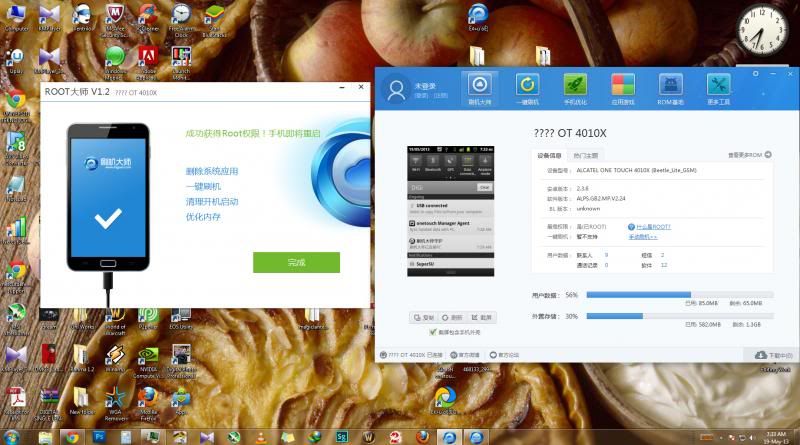
***end-copypaste***

babienn
post May 26 2013, 07:04 PM

On my way
****
Junior Member
510 posts

Joined: Nov 2011
QUOTE(bluehaze @ May 26 2013, 04:43 PM)
EM SIM ME Lock, theoretically... However, by jz uninstall it can't unlock the sim... We still need the unlock code... Previous posts stated that to permanently unlock the phone we need the unlock code and uninstall EM SIM ME after key in the code...  I haven't test it out though...

If you don't want to uninstall, freeze it will do...
*
Thanks. I haven't activate my Digi SIM yet, so I can't try whether it works or not.

QUOTE(MrMocha @ May 26 2013, 05:18 PM)
Another thing that bothers me.
After rooting and all,
everytime i restart/reboot the phone,
it WILL stuck on the alcatelonetouch logo.

Sometime after the 2nd restart, then it will load as normal.

Now, the question is, is that normal?
If not, then i might need to reflash and do again from scratch. =_=
*
Something's wrong...I rooted using ishuaji and no reboot issue like yours. sweat.gif

This post has been edited by babienn: May 26 2013, 08:50 PM
ntuser88
post May 26 2013, 08:29 PM

New Member
*
Junior Member
23 posts

Joined: May 2013


QUOTE(babienn @ May 26 2013, 07:04 PM)
Thanks. I haven't activate my Digi SIM yet, so I can't try whether it works or not.
Something's wrong...I rooted using ishuaji and reboot issue like yours.  sweat.gif
*
owh...i think u just got a bad luck.. maybe u can reflash and root with another options like mygun or anything... i used ishuaji.. and three phone succeed with this way... hmm.gif

This post has been edited by ntuser88: May 26 2013, 08:33 PM
old_calculator
post May 26 2013, 08:29 PM

Don't go away
*****
Senior Member
980 posts

Joined: Nov 2007
From: Kuantan, Pahang

I wanna ask u guys, for a rm50 phone, how is the performance compared to say.. Galaxy Y?

I think both of them more or less the same spec but here the alcatel wins the price hands down laugh.gif
babienn
post May 26 2013, 08:51 PM

On my way
****
Junior Member
510 posts

Joined: Nov 2011
QUOTE(ntuser88 @ May 26 2013, 08:29 PM)
owh...i think u just got a bad luck.. maybe u can reflash and root with another options like mygun or anything...  i used ishuaji.. and three phone succeed with this way... hmm.gif
*
Ah I'm sorry, I missed out the word "no". sweat.gif
Actually, no problem after rooting. My phone works just fine. Sorry for my mistake... sweat.gif sweat.gif sweat.gif
ninask
post May 26 2013, 08:51 PM

Getting Started
**
Junior Member
289 posts

Joined: Aug 2009


QUOTE(MrMocha @ May 26 2013, 06:50 PM)
The good thing about this phone is that, it gives a feeling of do-whatever-i-want-even-if-its-bricked-also-not-too-sad.

Advantage to me as this is my 1st experience fiddling with android sys.

Here is the guide i found on the net on how to remove bloatwares. the steps are logic enough.

But, yeah, there's a 'but', the step on 'choose Root Explorer', i got a 'failed' msg. Sure the root permission is granted, but it is something about "sorry test failed, this feature cannot being run on your phone"

Even if i bypass that step, directly want to delete the apk file, nuh... cannot also.
Cannot delete, cannot move, only can freeze.

cry.gif

to those who might got lucky, here's the step by step.

***(Copypaste)****

Explanation
Alcatel included a new partition where are the most system apps (/custpack partition). For this reason apps such as Root Uninstaller don't work completely, although detect the apps, they are not able to uninstall apps because they are programmed to search in /system and /data partitions...

You will learn to uninstall them manually, in a little long but safe method.

Steps
For example, I will uninstall the application: Pinball.

1. In ES File Explorer press Menu button (top left corner) -> Tools and choose Root Explorer, root permission will prompt you, accept.
Note: This step is not necessary if you're just going to uninstall applications of the /custapack partition.

2. Return to the main screen and click on Bookmarks -> / (phone icon).

3. Find the custpack folder and then app. Here are the most of system apps.

4. Search Pinball.apk app (name can vary), hold down on the app until it pops the context menu, then choose Delete and press OK.
Note: Rather than delete the application, you can cut and save it on the SD card to have a backup in case you want in the future reuse it.

5. Exit Es File Explorer and run Link2SD, press Menu -> More and Clear Dalvik-cache.

6. Link2SD will search unnecessary cache, and will let you know if it find something, Press OK.

7.That's it, now you have to restart your phone.

***end-copypaste***
*
I just use link2sd. Convert to system app > convert to user app > uninstall. Cloud backup & apps on sd were abit tricky tho.
MrMocha
post May 26 2013, 09:12 PM

Getting Started
**
Junior Member
193 posts

Joined: May 2013
QUOTE(old_calculator @ May 26 2013, 08:29 PM)
I wanna ask u guys, for a rm50 phone, how is the performance compared to say.. Galaxy Y?

I think both of them more or less the same spec but here the alcatel wins the price hands down laugh.gif
*
The performance is damn worth it for rm50.

The screen quality is nothing to write home about.
Just enough, but definitely not razor sharp. (2/10 of SuperAmoled perhaps?)

Camera wise... freaking forget it. seriously. Ignore it. (unless you are a fan of 3gp)

as a 3rd backup phone, good enough.
Battery hold almost 24hr. depending on how heavy u use it.

Just the frequent insufficient memory is kind of annoying. Even when you move the apps to SD, sometime to install certain apps, we still need a certain space on internal memory.
If not, cannot proceed in installing em.

this "insufficient storage available" problem is quite popular among android user, yes, eventhough you got how many free GB on SD.

hmm... sooner or later, someone might need to do step by step of setting up this phone to be the smoothest rm50 machine.
A bare minimum with no bloatware and enough to run standard app like those FB, Whatsapp and all. biggrin.gif
mastering89
post May 26 2013, 09:37 PM

miao miao
*******
Senior Member
2,546 posts

Joined: Jan 2009
From: Cyberjaya
Mine running solely for instagram whatsapp waze shazam and occasional radio (no need earphone to activate, good wut!). with installed go locker , go theme launcher. still smooth as butter (after remove n freezing some of those bloatwares , have cleared ram around 140/2xxmb)

i suggest that for facebook twitter just use the mobile browser, good enuf for twitter. save space and ram summore biggrin.gif
!@#$%^
post May 26 2013, 09:38 PM

Safe Trader
********
All Stars
17,497 posts

Joined: Feb 2006
From: KL
QUOTE(mastering89 @ May 26 2013, 09:37 PM)
Mine running solely for instagram whatsapp waze shazam and occasional radio (no need earphone to activate, good wut!). with installed go locker , go theme launcher. still smooth as butter (after remove n freezing some of those bloatwares , have cleared ram around 140/2xxmb)

i suggest that for facebook twitter just use the mobile browser, good enuf for twitter. save space and ram summore biggrin.gif
*
I only use it for whatsapp, browsing and GPS at most. Facebook app definitely no-no. LOL. Using Xperia Launcher about 8mb ram. Quite light
mastering89
post May 26 2013, 09:47 PM

miao miao
*******
Senior Member
2,546 posts

Joined: Jan 2009
From: Cyberjaya
tried the live wallpaper, the S3 water touch thingy. eat too much battery and ram sweat.gif
also did the benchmark using Antutu, this guy beat SamsungGalaxy S (the first) flex.gif
aku_dia
post May 26 2013, 09:54 PM

Regular
******
Senior Member
1,041 posts

Joined: Jun 2009
can anybody help me...
how to install official rom for this phone..."wrong phone model" using one touch upgrade s software.. want to get sim unlock to use maxis with it... no need to root or flash custom rom
MrMocha
post May 26 2013, 10:18 PM

Getting Started
**
Junior Member
193 posts

Joined: May 2013
QUOTE(aku_dia @ May 26 2013, 09:54 PM)
can anybody help me...
how to install official rom for this phone..."wrong phone model" using one touch upgrade s software.. want to get sim unlock to use maxis with it... no need to root or flash custom rom
*
Perhaps you are using wrong manager.

Download Here
faux_pas
post May 26 2013, 10:47 PM

New Member
*
Junior Member
13 posts

Joined: May 2013
QUOTE(alexanderclz @ May 26 2013, 09:38 PM)
I only use it for whatsapp, browsing and GPS at most. Facebook app definitely no-no. LOL. Using Xperia Launcher about 8mb ram. Quite light
*
im using mihome launcher. i think its much much more lighter than golauncher and experia launcher. icon_rolleyes.gif thumbup.gif
old_calculator
post May 26 2013, 11:45 PM

Don't go away
*****
Senior Member
980 posts

Joined: Nov 2007
From: Kuantan, Pahang

QUOTE(MrMocha @ May 26 2013, 09:12 PM)
The performance is damn worth it for rm50.

» Click to show Spoiler - click again to hide... «


hmm... sooner or later, someone might need to do step by step of setting up this phone to be the smoothest rm50 machine.
A bare minimum with no bloatware and enough to run standard app like those FB, Whatsapp and all.  biggrin.gif
*
Nice review there man. By the looks of it, the best rm50 spent on phone probably nod.gif
jayXzMx
post May 27 2013, 01:33 AM

Getting Started
**
Junior Member
100 posts

Joined: Mar 2013
QUOTE(old_calculator @ May 26 2013, 11:45 PM)
Nice review there man. By the looks of it, the best rm50 spent on phone probably  nod.gif
*
By the way u can use link2sd and swapper (need root permission) then u can have alot of apps and ur ram will extended depend on ur setting. smile.gif
!@#$%^
post May 27 2013, 02:12 AM

Safe Trader
********
All Stars
17,497 posts

Joined: Feb 2006
From: KL
QUOTE(jayXzMx @ May 27 2013, 01:33 AM)
By the way u can use link2sd and swapper (need root permission) then u can have alot of apps and ur ram will extended depend on ur setting. smile.gif
*
AFAIK only can increase 'internal memory'. Care to explain more about the RAM?
ZodeHide
post May 27 2013, 03:55 AM

New Member
*
Junior Member
5 posts

Joined: May 2013


Hello guys,how about changing the fonts in this phone..anyone know how?

girlgeneration
post May 27 2013, 04:15 AM

New Member
*
Newbie
3 posts

Joined: May 2013
how long time taken to flash this phone using onetouch upgrade software??? o.O
ZodeHide
post May 27 2013, 04:36 AM

New Member
*
Junior Member
5 posts

Joined: May 2013


info for those who were thinking in expanding this phone RAM ..this phone kernel is not swap compatible..means u cant add more RAM using RAM Expander apps..just use Link2sd apps and froze those unwanted things or either delete it to light up ur phone RAM..i manage to free my RAM up to 40mb and still using NextlauncherLite,Golocker,Wechat plus widgets and it runs smoothly like butter on a hot pan..hehe..im really satisfied with this phone,50 ringgit only meh~
naruto_412
post May 27 2013, 10:20 AM

Getting Started
**
Junior Member
102 posts

Joined: Dec 2008
From: klang selangor


anyone try waze on it ? thinking to get this phone for gps purpose ? btw does the gps work offline with such as papago apps . or tom tom ?
!@#$%^
post May 27 2013, 10:43 AM

Safe Trader
********
All Stars
17,497 posts

Joined: Feb 2006
From: KL
QUOTE(naruto_412 @ May 27 2013, 10:20 AM)
anyone try waze on it ? thinking to get this phone for gps purpose ? btw does the gps work offline with such as papago apps . or tom tom ?
*
works with papago. but might need to use gps test for faster logon to the satellites
naruto_412
post May 27 2013, 10:48 AM

Getting Started
**
Junior Member
102 posts

Joined: Dec 2008
From: klang selangor


QUOTE(alexanderclz @ May 27 2013, 11:43 AM)
works with papago. but might need to use gps test for faster logon to the satellites
*
what do u means by gps test ?
!@#$%^
post May 27 2013, 10:50 AM

Safe Trader
********
All Stars
17,497 posts

Joined: Feb 2006
From: KL
QUOTE(naruto_412 @ May 27 2013, 10:48 AM)
what do u means by gps test ?
*
It's an android app. Not only it functions to test whether your phone's GPS is working, it also helps to logon to the satellites.

https://play.google.com/store/apps/details?...s.gpstest&hl=en
naruto_412
post May 27 2013, 10:58 AM

Getting Started
**
Junior Member
102 posts

Joined: Dec 2008
From: klang selangor


didnt know such apps exist . thanks btw .
old_calculator
post May 27 2013, 11:48 AM

Don't go away
*****
Senior Member
980 posts

Joined: Nov 2007
From: Kuantan, Pahang

QUOTE(jayXzMx @ May 27 2013, 01:33 AM)
By the way u can use link2sd and swapper (need root permission) then u can have alot of apps and ur ram will extended depend on ur setting. smile.gif
*
QUOTE(ZodeHide @ May 27 2013, 04:36 AM)
info for those who were thinking in expanding this phone RAM ..this phone kernel is not swap compatible..means u cant add more RAM using RAM Expander apps..just use Link2sd apps and froze those unwanted things or either delete it to light up ur phone RAM..i manage to free my RAM up to 40mb and still using NextlauncherLite,Golocker,Wechat plus widgets and it runs smoothly like butter on a hot pan..hehe..im really satisfied with this phone,50 ringgit only meh~
*
Thanks for the tips dude thumbup.gif
Could be handy in the future biggrin.gif
bluehaze
post May 27 2013, 02:53 PM

New Member
*
Junior Member
21 posts

Joined: May 2013


QUOTE(alexanderclz @ May 27 2013, 10:50 AM)
It's an android app. Not only it functions to test whether your phone's GPS is working, it also helps to logon to the satellites.

https://play.google.com/store/apps/details?...s.gpstest&hl=en
*
One thing I would like to point out is: GPS test/GPS status and toolbox is not an apps which speeds up satellite lock on. It is an apps which measure satellite signals (sorry for busting the myth). Try read the apps description...

To speed up GPS lock on speed, we need the help of AGPS. In Samsung phone, we modify the gps.conf file, by directly telling the phone which APGS server it should access (I'll not further discuss on this matter, refer XDA).

In Alcatel, the GPS lock on is assisted by the GPS EPO assistance and AGPS. EPO will download the prediction of the GPS satellite location telling the phone which satellites to lock on. However, I don't find this efficient as I still have to wait for a long long long time for the satellites to be locked on, not sure is it due to my phone or what (you guys can try turn it on in setting>location). One thing we can do is try modifying the agps_profiles_conf.xml specifying the correct AGPS server the phone should connect to. Recently I have been busy, didn't have time to experiment with it, maybe any of you can try?
vampire_empirez
post May 27 2013, 03:01 PM

Getting Started
**
Junior Member
131 posts

Joined: Oct 2011


QUOTE(mR.hyDE @ Apr 29 2013, 02:13 AM)
to gain superuser at this alcatel 4010x (easier method)
http://www.mgyun.com/
DO THIS AT UR OWN RISK

in my case i have did this twice in 2 sets
-root it in current using state or u in factory reseted state both fine
-installed pdanet for android 4.12
-installed alcatel one touch manager
-and the most important root tools->刷机大师

if u cant read chinese/no experince on rooting please refer picture i had uploaded
1st- download the root tool from this website http://www.mgyun.com/
Attached Image
then install it on ur computer

2nd- in the phone pls check/tick the USB DEBUGGING(always check this when u root any phone) under phone setting>application>development

3rd- launch 刷机大师 and connect ur phone
Attached Image
connecting...
Attached Image
this mean box showing current root status=NO(one click root)
so click the red boxed area

4th- confirmation before root>click the red area to confirm root the phone
Attached Image
ps:it tells process will reboot ur phone(of course u can click the cancel right beside if u will lose ur ball when the phone happen sudden reboot)

5th- checking and all bla bla bla rooting process (takes around a minutes in my 2nd gen core i7 )
Attached Image

6th- phone rooted when on the 2nd boot with around 10 usb plugin and out sound around 10times please check the status same as mine means ur phone are ROOTED
Attached Image

for UNROOTING factory reset not working , i used the ONE TOUCH UPGRADE S 2.7.5 to reflash stock rom

beside i have tested the recovery provided by this 刷机大师 software Attached Image
-factory reset
-backup(file store at /sdcard)(takes more than 5 mins)
-restore(choose a file named userdata_xxxxxx_xxxxx.backup)
so,i guess this is the noob proof guide i can provide,any problem on the tutorial pm me to change,goodluck
*
im lost right now. could u brief me in detail since i don't understand Chinese language
!@#$%^
post May 27 2013, 03:19 PM

Safe Trader
********
All Stars
17,497 posts

Joined: Feb 2006
From: KL
QUOTE(bluehaze @ May 27 2013, 02:53 PM)
One thing I would like to point out is: GPS test/GPS status and toolbox is not an apps which speeds up satellite lock on. It is an apps which measure satellite signals (sorry for busting the myth). Try read the apps description...

To speed up GPS lock on speed, we need the help of AGPS. In Samsung phone, we modify the gps.conf file, by directly telling the phone which APGS server it should access (I'll not further discuss on this matter, refer XDA).

In Alcatel, the GPS lock on is assisted by the GPS EPO assistance and AGPS. EPO will download the prediction of the GPS satellite location telling the phone which satellites to lock on. However, I don't find this efficient as I still have to wait for a long long long time for the satellites to be locked on, not sure is it due to my phone or what (you guys can try turn it on in setting>location). One thing we can do is try modifying the agps_profiles_conf.xml specifying the correct AGPS server the phone should connect to. Recently I have been busy, didn't have time to experiment with it, maybe any of you can try?
*
up to you to believe it or not. offline apps like Papago sometimes have problem locking onto the signal. GPS Test measures satellite signals (grey colored bars) and once they lock onto them, it shows colored bars.

how do i know this? because those who uses ninetology has the same problem with locking onto the signal. GPS Test indirectly detect and lock the satellite. and once the satellite is locked, on your Papago and it will lock right away. try it yourself. i on my papago for 10 minutes without aid and it doesn't lock.

As for AGPS, it requires data if i'm not wrong. And while changing the profile file might help, for most of the new users, i'd recommend you to lock the signal with GPS Test then proceed to your GPS app. If it really doesn't work, then you may try the more complicated methods.

Hope this helps to clear up some doubts.
hasnol
post May 27 2013, 04:14 PM

New Member
*
Junior Member
8 posts

Joined: Feb 2006
Hello everybody.. I'm new owner of white Alcatel One Touch Glory 2s. Already use it for 3 days.. Phone memory almost full after install whatsapp, wechat and line.. Must root it.. he he..

Please teach me how.. Thanks..
hasnol
post May 27 2013, 04:16 PM

New Member
*
Junior Member
8 posts

Joined: Feb 2006
Sorry, Anybody have try this technique? I copy it from xdadevelopers


Default ROOT ALCATEL 4010x
OK.. i have done working on ishuaji root tool, ive change the shell root to english version which is original from superuser DEV. hehehehe.. @Mr.Hyde.. can u post the step for me.. im to lazy to post with picture instruction.. plus not understand chinese.. hehehe..

here the step..

1st google superuser binary download, download from superuser website better.

2nd : download ishuaji root tool
HTML Code:

http://app.down.ishuaji.cn/lvdouapp/root/ishuaji_root.exe

3rd : install root tool

4th : open superuser binary via zip program

5th : open My Computer and go to this directory : C:\Program Files (x86)\RootTool\Android_Root (windows 8/7) C:\Program Files \RootTool\Android_Root (windows XP)

6th : delete ld_superuser.apk inside the folder or u can move to other folder as a backup (recommended if anything goes wrong n u can use back this file)

7th : replace with superuser binary that u have downloaded (just drag n drop) then RENAME it to ld_superuser.apk


Then run the root tool as per normal. and root ur device just by clicking the green button. wait unil it finish. and u will have normal superuser which is in English.


HAVE FUN GUYS.. hehhehe

This post has been edited by hasnol: May 27 2013, 04:17 PM
xiaosuee
post May 27 2013, 05:47 PM

New Member
*
Newbie
1 posts

Joined: Jul 2011


can it be unroot ?
jayXzMx
post May 27 2013, 05:50 PM

Getting Started
**
Junior Member
100 posts

Joined: Mar 2013
QUOTE(ZodeHide @ May 27 2013, 04:36 AM)
info for those who were thinking in expanding this phone RAM ..this phone kernel is not swap compatible..means u cant add more RAM using RAM Expander apps..just use Link2sd apps and froze those unwanted things or either delete it to light up ur phone RAM..i manage to free my RAM up to 40mb and still using NextlauncherLite,Golocker,Wechat plus widgets and it runs smoothly like butter on a hot pan..hehe..im really satisfied with this phone,50 ringgit only meh~
*
ermmmm.. but i use swapper and i get more free ram than u.. 75++mb with holo launcher go sms, other additional apps. rclxub.gif
jayXzMx
post May 27 2013, 05:53 PM

Getting Started
**
Junior Member
100 posts

Joined: Mar 2013
QUOTE(hasnol @ May 27 2013, 04:16 PM)
Sorry, Anybody have try this technique? I copy it from xdadevelopers
Default ROOT ALCATEL 4010x
OK.. i have done working on ishuaji root tool, ive change the shell root to english version which is original from superuser DEV. hehehehe.. @Mr.Hyde.. can u post the step for me.. im to lazy to post with picture instruction.. plus not understand chinese.. hehehe..

here the step..

1st google superuser binary download, download from superuser website better.

2nd : download ishuaji root tool
HTML Code:

http://app.down.ishuaji.cn/lvdouapp/root/ishuaji_root.exe

3rd : install root tool

4th : open superuser binary via zip program

5th : open My Computer and go to this directory : C:\Program Files (x86)\RootTool\Android_Root (windows 8/7) C:\Program Files \RootTool\Android_Root (windows XP)

6th : delete ld_superuser.apk inside the folder or u can move to other folder as a backup (recommended if anything goes wrong n u can use back this file)

7th : replace with superuser binary that u have downloaded (just drag n drop) then RENAME it to ld_superuser.apk
Then run the root tool as per normal. and root ur device just by clicking the green button. wait unil it finish. and u will have normal superuser which is in English.
HAVE FUN GUYS.. hehhehe
*
boy... actually u copy my post and its already posted here just need to search in early post.. ofcuz its working buddy.. u also can use the other root tool that post by Mr.hyde. thumbup.gif
!@#$%^
post May 27 2013, 05:55 PM

Safe Trader
********
All Stars
17,497 posts

Joined: Feb 2006
From: KL
QUOTE(xiaosuee @ May 27 2013, 05:47 PM)
can it be unroot ?
*
got to reflash with alcatel one touch upgrade. can be found on the 1st page
shafey_87
post May 27 2013, 06:34 PM

New Member
*
Junior Member
7 posts

Joined: May 2013
skrg aku sudah root dan buat link2SD..memang puas hati..
root guan kaedah mygun dan link2sd belajar disini..LINK2SD

apa advantage aku dapat bila dah root dan link2SD..

untuk root,confirm remove apps stock yang confirm tak guna punya..
yang bestnya bila guna link2SD..setakat nie sudah mcm2 apps install..contohnya..

Bejeweled 2
Can knockdown 2
Castle TD
Clean Master
Cut The Rope
Dolphin Browser
Fruit Ninja
Galaxy S4 HD Multi Theme
GO Launcher
LiveScore
Lucky Patcher
Mobile Counter Pro
Monster Zuma
mSecure
MX Player Pro
PicFrame
Pou
Poweramp
Titanium Backup
TubeMate
Viber
WeChat
WhatsApp

Dan berapa balance memori internal selepas install apps nie..??
68MB FREE...!!!! AWESOME for noob android..hehehehe..
jayXzMx
post May 27 2013, 06:40 PM

Getting Started
**
Junior Member
100 posts

Joined: Mar 2013
Errmmmmm... guys.. anyone has pulled out official recovery mode for this phone, i have flashed other CWM thats not working for this rom plus this phone cannot be detect by PC anymore because i removed app2sd or something to do with adb. pffftttt.. now i dont have any recovery.. hahahhaa
joe405
post May 27 2013, 07:45 PM

Getting Started
**
Junior Member
239 posts

Joined: Nov 2008
From: Old Kerepot


QUOTE(shafey_87 @ May 27 2013, 06:34 PM)
skrg aku sudah root dan buat link2SD..memang puas hati..
root guan kaedah mygun dan link2sd belajar disini..LINK2SD

apa advantage aku dapat bila dah root dan link2SD..

untuk root,confirm remove apps stock yang confirm tak guna punya..
yang bestnya bila guna link2SD..setakat nie sudah mcm2 apps install..contohnya..

Bejeweled 2
Can knockdown 2
Castle TD
Clean Master
Cut The Rope
Dolphin Browser
Fruit Ninja
Galaxy S4 HD Multi Theme
GO Launcher
LiveScore
Lucky Patcher
Mobile Counter Pro
Monster Zuma
mSecure
MX Player Pro
PicFrame
Pou
Poweramp
Titanium Backup
TubeMate
Viber
WeChat
WhatsApp

Dan berapa balance memori internal selepas install apps nie..??
68MB FREE...!!!! AWESOME for noob android..hehehehe..
*
app ape yg ko uninstall?

MrMocha
post May 27 2013, 07:48 PM

Getting Started
**
Junior Member
193 posts

Joined: May 2013
QUOTE(jayXzMx @ May 27 2013, 06:40 PM)
Errmmmmm... guys.. anyone has pulled out official recovery mode for this phone, i have flashed other CWM thats not working for this rom plus this phone cannot be detect by PC anymore because i removed app2sd or something to do with adb. pffftttt.. now i dont have any recovery.. hahahhaa
*
woooboi... sounds like you bricked your phone. blink.gif

I wonder if there's a way coming back from the abyss.
jayXzMx
post May 27 2013, 08:19 PM

Getting Started
**
Junior Member
100 posts

Joined: Mar 2013
QUOTE(MrMocha @ May 27 2013, 07:48 PM)
woooboi... sounds like you bricked your phone.  blink.gif

I wonder if there's a way coming back from the abyss.
*
HEHEHE.. the phone not bricked, just dont have recovery tongue.gif but still can use.. im looking for CWM right now.. will update if successfully.. mod mod mod mod.. need alot of time n im lazy.. haha
shafey_87
post May 27 2013, 08:33 PM

New Member
*
Junior Member
7 posts

Joined: May 2013
QUOTE(joe405 @ May 27 2013, 07:45 PM)
app ape yg ko uninstall?
*
apa yang aku uninstall..?? boleh tengok screenshot yang aku buat nie..
tak ada freeze guna titanium backup..semua dh uninstall..

user posted imageuser posted image
user posted image

joe405
post May 27 2013, 08:37 PM

Getting Started
**
Junior Member
239 posts

Joined: Nov 2008
From: Old Kerepot


QUOTE(shafey_87 @ May 27 2013, 08:33 PM)
apa yang aku uninstall..?? boleh tengok screenshot yang aku buat nie..
tak ada freeze guna titanium backup..semua dh uninstall..

user posted imageuser posted image
user posted image
*
ko uninstall kat setting ke camner?

sorry soalan noob
MrMocha
post May 27 2013, 08:45 PM

Getting Started
**
Junior Member
193 posts

Joined: May 2013
QUOTE(shafey_87 @ May 27 2013, 08:33 PM)
apa yang aku uninstall..?? boleh tengok screenshot yang aku buat nie..
tak ada freeze guna titanium backup..semua dh uninstall..

user posted imageuser posted image
user posted image
*
Gaya macam masih ada je custpack app.

-Battery Save (aku pun simpan. Sbb agak berguna ntk kill apps)
-Wireless Key (still thinking nak keep or not.)

my delete: (forgot what's the actual name, so i'm guessing here)
- Tunes ringtone apa ntah tu.
- Maps. (annoying update)
- Street View
- few more... damn... so forgetful nowadays....
!@#$%^
post May 27 2013, 08:58 PM

Safe Trader
********
All Stars
17,497 posts

Joined: Feb 2006
From: KL
how to remove wireless keyboard? which apk
jayXzMx
post May 27 2013, 09:06 PM

Getting Started
**
Junior Member
100 posts

Joined: Mar 2013
For those who want to uninstall system apps,

root permission required*

use this apps

NoBloat
master uninstaller
link2sd (also can uninstall and freeze apps)

OptimusStar
post May 27 2013, 09:24 PM

Enthusiast
*****
Senior Member
801 posts

Joined: Nov 2012
I cant use my keyboard it seems i unistalled the app for keyboard input choice.
Anyone here can recommend me which app I need to fix this ?
MrMocha
post May 27 2013, 09:26 PM

Getting Started
**
Junior Member
193 posts

Joined: May 2013
QUOTE(OptimusStar @ May 27 2013, 09:24 PM)
I cant use my keyboard it seems i unistalled the app for keyboard input choice.
Anyone here can recommend me which app I need to fix this ?
*
I replace the stock keyboard with SwiftKey keyboard. (awesomely predictive. Got English and Malay)
The stock one keep mistyping for some reason for the key near the bezel.
ninask
post May 27 2013, 10:33 PM

Getting Started
**
Junior Member
289 posts

Joined: Aug 2009


QUOTE(OptimusStar @ May 27 2013, 09:24 PM)
I cant use my keyboard it seems i unistalled the app for keyboard input choice.
Anyone here can recommend me which app I need to fix this ?
*

Ha I messed up my touchpal just now, uninstalled the whole thing including language pack, and downloaded an old classic version directly frm Touchpal's site. Installed the apk and boom everything's good.
doce
post May 27 2013, 10:57 PM

Getting Started
**
Junior Member
52 posts

Joined: May 2013
Hi, purposely created an account on this forum just wanted to ask you mates, is there any custom ROM available for this phone?
Thank you for your answer.
mastering89
post May 27 2013, 11:02 PM

miao miao
*******
Senior Member
2,546 posts

Joined: Jan 2009
From: Cyberjaya
Try this Smart Launcher , light fast and cool biggrin.gif
http://www.redmondpie.com/smart-launcher-f...er-replacement/

user posted image
Faeez Ezuan
post May 27 2013, 11:10 PM

Getting Started
**
Junior Member
61 posts

Joined: Feb 2011
QUOTE(shafey_87 @ May 27 2013, 08:33 PM)
apa yang aku uninstall..?? boleh tengok screenshot yang aku buat nie..
tak ada freeze guna titanium backup..semua dh uninstall..

user posted imageuser posted image
user posted image
*
knp perlu pakai pdanet sedangkan dlm wireless punye setting dah ade hotspot... useless la app tu... unistall je
ninask
post May 27 2013, 11:14 PM

Getting Started
**
Junior Member
289 posts

Joined: Aug 2009


QUOTE(Faeez Ezuan @ May 27 2013, 11:10 PM)
knp perlu pakai pdanet sedangkan dlm wireless punye setting dah ade hotspot... useless la app tu... unistall je
*
I think it was needed during rooting if u follow mr.hyde's guide. I didnt install it during 1st try and failed. Lepas rooted, I think it's safe to uninstall.
faux_pas
post May 27 2013, 11:23 PM

New Member
*
Junior Member
13 posts

Joined: May 2013
QUOTE(mastering89 @ May 27 2013, 11:02 PM)
Try this Smart Launcher , light fast and cool biggrin.gif
http://www.redmondpie.com/smart-launcher-f...er-replacement/

user posted image
*
so far dis is the lightest launcher and i'm loving it. biggrin.gif biggrin.gif
!@#$%^
post May 27 2013, 11:28 PM

Safe Trader
********
All Stars
17,497 posts

Joined: Feb 2006
From: KL
QUOTE(faux_pas @ May 27 2013, 11:23 PM)
so far dis is the lightest launcher and i'm loving it.  biggrin.gif  biggrin.gif
*
how much ram it uses?
joe405
post May 27 2013, 11:57 PM

Getting Started
**
Junior Member
239 posts

Joined: Nov 2008
From: Old Kerepot


berjaya root!!

use mygun method
hurricane21
post May 27 2013, 11:58 PM

Senior Probation
******
Senior Member
1,388 posts

Joined: Feb 2006
From: Southern Region


Just got my rm50 alcatel today, pure white, yet to check it out, just back from work laugh.gif

No ics 4.0 for us right? Anyway the size is great for a backup phone, dual sim somemore. smile.gif

Still got many things to learn from you guys notworthy.gif
MrMocha
post May 28 2013, 12:01 AM

Getting Started
**
Junior Member
193 posts

Joined: May 2013
QUOTE(hurricane21 @ May 27 2013, 11:58 PM)
Just got my rm50 alcatel today, pure white, yet to check it out, just back from work laugh.gif

No ics 4.0 for us right? Anyway the size is great for a backup phone, dual sim somemore. smile.gif

Still got many things to learn from you guys notworthy.gif
*
hmm.gif Dual sim?
ninask
post May 28 2013, 12:03 AM

Getting Started
**
Junior Member
289 posts

Joined: Aug 2009


QUOTE(hurricane21 @ May 27 2013, 11:58 PM)
Just got my rm50 alcatel today, pure white, yet to check it out, just back from work laugh.gif

No ics 4.0 for us right? Anyway the size is great for a backup phone, dual sim somemore. smile.gif

Still got many things to learn from you guys notworthy.gif
*
dual sim? tak dapat jack. dont tell me u got the 4030 model?
hurricane21
post May 28 2013, 12:06 AM

Senior Probation
******
Senior Member
1,388 posts

Joined: Feb 2006
From: Southern Region


QUOTE(ninask @ May 28 2013, 12:03 AM)
dual sim? tak dapat jack. dont tell me u got the 4030 model?
*
no dual sim? because havent unbox my set and the salesguy told me its dual sim hmm.gif rclxub.gif
just grab and go that time.

if he cheat me also nevermind cause only rm50 laugh.gif
mr_syAmZ
post May 28 2013, 12:24 AM

New Member
*
Newbie
2 posts

Joined: May 2013


QUOTE(ZodeHide @ May 27 2013, 03:55 AM)
Hello guys,how about changing the fonts in this phone..anyone know how?
*
try font installer or rom toolbox from market
Faeez Ezuan
post May 28 2013, 01:10 AM

Getting Started
**
Junior Member
61 posts

Joined: Feb 2011
QUOTE(ninask @ May 27 2013, 11:14 PM)
I think it was needed during rooting if u follow mr.hyde's guide. I didnt install it during 1st try and failed. Lepas rooted, I think it's safe to uninstall.
*
the tutorial is not using the pdanet bro... is useless to install this app... im still find the script to change from internal memory swap with external memory... mybe gigerbread is not support... must try find the rom jelly bean version for this phone
azha1234
post May 28 2013, 04:41 PM

New Member
*
Junior Member
15 posts

Joined: Apr 2013
DONE ROOT... are there custom ROM for this cutie phone?
wanfumi
post May 28 2013, 04:44 PM

Getting Started
**
Junior Member
122 posts

Joined: Feb 2006


which method did u used?


QUOTE(azha1234 @ May 28 2013, 04:41 PM)
DONE ROOT... are there custom ROM for this cutie phone?
*
s_nicteam
post May 28 2013, 04:47 PM

New Member
*
Junior Member
20 posts

Joined: Dec 2008
semalam pegi cari di alamanda,putrajaya..habis stock..ada sesiapa tahu dimana boleh dapatkan Alcatel One Touch ni..teringin plak nak dapatkan satu..
ninask
post May 28 2013, 04:52 PM

Getting Started
**
Junior Member
289 posts

Joined: Aug 2009


QUOTE(s_nicteam @ May 28 2013, 04:47 PM)
semalam pegi cari di alamanda,putrajaya..habis stock..ada sesiapa tahu dimana boleh dapatkan Alcatel One Touch ni..teringin plak nak dapatkan satu..
*
Try here

From 10am - 6pm at their office in kota kemuning, near mcd.

From 6pm - 11pm at Uitm Shah Alam, dataran cendiakawan or something.

I assume they are from DiGi, since most of the staff were wearing DiGi's tees when I got there.
azha1234
post May 28 2013, 04:58 PM

New Member
*
Junior Member
15 posts

Joined: Apr 2013
QUOTE(wanfumi @ May 28 2013, 04:44 PM)
which method did u used?
*
i use mygun. is very easy. follow the picture just click and wait. then DONE ROOT.

3 Pages  1 2 3 >Top
Topic ClosedOptions
 

Change to:
| Lo-Fi Version
0.2690sec    1.26    6 queries    GZIP Disabled
Time is now: 1st December 2025 - 04:16 PM