Welcome Guest ( Log In | Register )

Bump Topic Topic Closed RSS Feed
127 Pages « < 23 24 25 26 27 > » Bottom

Outline · [ Standard ] · Linear+

 Tp LInk TL-MR3420 Owner CLub V2.5, need a pro here

views
     
0168257061
post Apr 11 2013, 10:42 PM

EimiFukada
********
All Stars
14,242 posts

Joined: Jul 2007
From: JAVABUS


got very noob question here,
after flashed openwrt, the modem managed to auto connect after i set the apn things.

then after i restart router, it doesn't auto connect already.

just want to ask how to connect the modem ?
chuahcs79
post Apr 11 2013, 10:45 PM

Look at all my stars!!
Group Icon
Elite
6,931 posts

Joined: Apr 2011
From: Bolehland for sure ^_^


QUOTE(0168257061 @ Apr 11 2013, 10:42 PM)
got very noob question here,
after flashed openwrt, the modem managed to auto connect after i set the apn things.

then after i restart router, it doesn't auto connect already.

just want to ask how to connect the modem ?
*
u flashing the openwrt barrier breaker or ?

restart your router again, it should be auto detect and connect all time notworthy.gif
0168257061
post Apr 11 2013, 10:46 PM

EimiFukada
********
All Stars
14,242 posts

Joined: Jul 2007
From: JAVABUS


QUOTE(chuahcs79 @ Apr 11 2013, 10:45 PM)
u flashing the openwrt barrier breaker or ?

restart your router again, it should be auto detect and connect all time  notworthy.gif
*
barrier breaker it is
blacktubi
post Apr 11 2013, 10:48 PM

-
Group Icon
Elite
8,415 posts

Joined: Jul 2008

QUOTE(0168257061 @ Apr 11 2013, 10:42 PM)
got very noob question here,
after flashed openwrt, the modem managed to auto connect after i set the apn things.

then after i restart router, it doesn't auto connect already.

just want to ask how to connect the modem ?
*
Go settings, did you tick bring up on boot

Tick it
0168257061
post Apr 11 2013, 11:11 PM

EimiFukada
********
All Stars
14,242 posts

Joined: Jul 2007
From: JAVABUS


QUOTE(blacktubi @ Apr 11 2013, 10:48 PM)
Go settings, did you tick bring up on boot

Tick it
*
by default they are ticked.
I am not quite sure what happened here.

but when i go to network status, it said no modem present sweat.gif
while first time still managed to connect
blacktubi
post Apr 11 2013, 11:15 PM

-
Group Icon
Elite
8,415 posts

Joined: Jul 2008

QUOTE(0168257061 @ Apr 11 2013, 11:11 PM)
by default they are ticked.
I am not quite sure what happened here.

but when i go to network status, it said no modem present  sweat.gif
while first time still managed to connect
*
Did it get detected when you power cycle?

Or try use the reboot in the router
0168257061
post Apr 11 2013, 11:19 PM

EimiFukada
********
All Stars
14,242 posts

Joined: Jul 2007
From: JAVABUS


QUOTE(blacktubi @ Apr 11 2013, 11:15 PM)
Did it get detected when you power cycle?

Or try use the reboot in the router
*
the blink is showing it is ready to be connected, but it just won't.
I will try other method then hmm.gif
0168257061
post Apr 11 2013, 11:34 PM

EimiFukada
********
All Stars
14,242 posts

Joined: Jul 2007
From: JAVABUS


I try flash back to stock firmware first. Changing modem still the same.
chuahcs79
post Apr 11 2013, 11:36 PM

Look at all my stars!!
Group Icon
Elite
6,931 posts

Joined: Apr 2011
From: Bolehland for sure ^_^


QUOTE(0168257061 @ Apr 11 2013, 11:19 PM)
the blink is showing it is ready to be connected, but it just won't.
I will try other method then  hmm.gif
*
what usb modem u are using ? hmm.gif
0168257061
post Apr 11 2013, 11:39 PM

EimiFukada
********
All Stars
14,242 posts

Joined: Jul 2007
From: JAVABUS


QUOTE(chuahcs79 @ Apr 11 2013, 11:36 PM)
what usb modem u are using ?  hmm.gif
*
E372 and E367
chuahcs79
post Apr 11 2013, 11:51 PM

Look at all my stars!!
Group Icon
Elite
6,931 posts

Joined: Apr 2011
From: Bolehland for sure ^_^


QUOTE(0168257061 @ Apr 11 2013, 11:39 PM)
E372 and E367
*
both of those model should be auto detect and auto dial connection,..

which openwrt bb u download ?

it is under the warning experimental or above ? hmm.gif
0168257061
post Apr 12 2013, 12:06 AM

EimiFukada
********
All Stars
14,242 posts

Joined: Jul 2007
From: JAVABUS


QUOTE(chuahcs79 @ Apr 11 2013, 11:51 PM)
both of those model should be auto detect and auto dial connection,..

which openwrt bb u download ?

it is under the warning experimental or above ?  hmm.gif
*
the one u provided, yea it is under the red word as u mentioned.
now it seems connected again, let me monitor what's the situation first.

if i want to reconnect my modem, what should i do ?
chuahcs79
post Apr 12 2013, 12:13 AM

Look at all my stars!!
Group Icon
Elite
6,931 posts

Joined: Apr 2011
From: Bolehland for sure ^_^


QUOTE(0168257061 @ Apr 12 2013, 12:06 AM)
the one u provided, yea it is under the red word as u mentioned.
now it seems connected again, let me monitor what's the situation first.

if i want to reconnect my modem, what should i do ?
*
so far i dont see the connect button, because the dairyman from canada original programmer create the modem section, so it is in auto,..

or u can manually create a 3G connection in network interface section and manually connect ,..

for that, i think u need to reboot your router,.

or u can flash back to older openwrt altittude adjustment and there is option to connect manually,..

This post has been edited by chuahcs79: Apr 12 2013, 12:15 AM
DoomGuard
post Apr 12 2013, 12:13 AM

Casual
***
Junior Member
338 posts

Joined: Apr 2007
QUOTE(chuahcs79 @ Apr 11 2013, 07:58 PM)
if u flash to openwrt barrier breaker, then no need to set, it is auto, as long as u set keep the connection alive with restart.//
*
i am on blackwidow openwrt. btw, where to get barrier breaker?
chuahcs79
post Apr 12 2013, 12:14 AM

Look at all my stars!!
Group Icon
Elite
6,931 posts

Joined: Apr 2011
From: Bolehland for sure ^_^


QUOTE(DoomGuard @ Apr 12 2013, 12:13 AM)
i am on blackwidow openwrt. btw, where to get barrier breaker?
*
it is here -> http://www.rfactory.org/OpenWRT/index.html

download those experimental under the red warning word,.. ( is the latest one ) notworthy.gif
digilife
post Apr 12 2013, 12:21 AM

The MNP guy, its me yeah.
*******
Senior Member
8,025 posts

Joined: Feb 2005
From: Planet Boleland


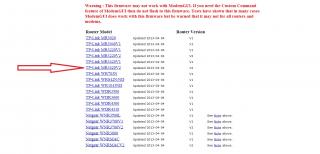
Flash this one , if you are on MR3420 V2 , else use the one that correspond to your Router Model no and Version


Attached Image
chuahcs79
post Apr 12 2013, 02:02 AM

Look at all my stars!!
Group Icon
Elite
6,931 posts

Joined: Apr 2011
From: Bolehland for sure ^_^


for anyone who using TL-MR11U V1 or V2,.. if u want to flash to english firmware web interfaces of TL-MR3040 ,..

u can use the modify header software ,..

i can let you know the detail and step,.. notworthy.gif

This post has been edited by chuahcs79: Apr 12 2013, 02:03 AM
Wahroonga Farm
post Apr 12 2013, 06:51 AM

Getting Started
**
Junior Member
97 posts

Joined: Feb 2013


Hi Guys 'n gals,

BlackWidow Experimental 2013-04-04 is a proven stable release, so please use this version as it currently provides the best modem support and the best Modem information.

It has a few bugs, but nothing that prevents connection for the currently supported modems.

Dairyman is currently working on a couple of tricky modems which use a web interface for management, rather than a connection manager. As this will be the way of future modems, it is an important issue to tackle.

A stable BlackWidow (non-experimental) release will no doubt come in due course.

The other major job on the 'to do list' is SMS capability via the ROOTer.

PS It'd be helpful if you identify the actual Blackwidow ROOTer firmware ID that you are using, so that we can track what is working. Barrier Breaker doesn't mean much. smile.gif

There are other developments ongoing so stay tuned.

The ROOTer WIKI gives a run down of the ROOTer software evolution and the ROOTer User Index shows some of our Beta testers.

This post has been edited by Wahroonga Farm: Apr 12 2013, 07:06 AM

digilife
post Apr 12 2013, 08:19 AM

The MNP guy, its me yeah.
*******
Senior Member
8,025 posts

Joined: Feb 2005
From: Planet Boleland


QUOTE(Wahroonga Farm @ Apr 12 2013, 06:51 AM)
Hi Guys 'n gals,

BlackWidow Experimental 2013-04-04 is a proven stable release, so please use this version as it currently provides the best modem support and the best Modem information.

It has a few bugs, but nothing that prevents connection for the currently supported modems.

Dairyman is currently working on a couple of tricky modems which use a web interface for management, rather than a connection manager. As this will be the way of future modems, it is an important issue to tackle.

A stable BlackWidow (non-experimental) release will no doubt come in due course.

The other major job on the 'to do list' is SMS capability via the ROOTer.

PS It'd be helpful if you identify the actual Blackwidow ROOTer firmware ID that you are using, so that we can track what is working. Barrier Breaker doesn't mean much. smile.gif

There are other developments ongoing so stay tuned.

The ROOTer WIKI gives a run down of the ROOTer software evolution and the ROOTer User Index shows some of our Beta testers.
*
Is there any intention to port this latest Barrier Breaker onto TP Link TD-W8968 ?

This router Factory FW already support USB Modems but just that the speed sucks.

Thanks
DairymanCanada
post Apr 12 2013, 08:38 AM

New Member
*
Junior Member
17 posts

Joined: Feb 2013
QUOTE(digilife @ Apr 11 2013, 05:19 PM)
Is there any intention to port this latest Barrier Breaker onto TP Link TD-W8968 ?

This router Factory FW already support USB Modems but just that the speed sucks.

Thanks
*
That router is currently unsupported by OpenWRT so we can't make firmware for it.

127 Pages « < 23 24 25 26 27 > » Top
Topic ClosedOptions
 

Change to:
| Lo-Fi Version
0.0231sec    0.47    6 queries    GZIP Disabled
Time is now: 13th December 2025 - 01:11 PM