Welcome Guest ( Log In | Register )

Bump Topic Topic Closed RSS Feed
127 Pages « < 25 26 27 28 29 > » Bottom

Outline · [ Standard ] · Linear+

 Tp LInk TL-MR3420 Owner CLub V2.5, need a pro here

views
     
stevenlys
post Apr 13 2013, 12:14 PM

Enthusiast
*****
Senior Member
846 posts

Joined: Apr 2005
From: Subang Jaya


Hi, noob here and need some guide from guru, i bought a K5005 which is a K5005 and not E398 and the device is able to connect to maxis through PC and TP link MR3040 but not in MR3420 V2. I've already Update the firmware and downloaded a Modem file for K5005 from Germen side BIN file and upload it but still not working it just says identifying for very long time. Please guide me how to make it work with K5005 . May i know is the E398 work with the MR3420 without any work just plug and play? thanks
Wahroonga Farm
post Apr 13 2013, 04:53 PM

Getting Started
**
Junior Member
97 posts

Joined: Feb 2013


Bit of a jump around on this latest release. tongue.gif

There was a another little bug with 2013-04-13 that affected some E3276 modems.

This is now fixed.

Please re-download 2013-04-13 to access the fix and the following new feature:

A new Modem->Custom page where you can enter AT Commands, execute them and see the response from the modem. It waits until the status update is finished then runs the command you entered and updates the output box.

It's just as good as ModemGUI but no chance of a command collision here.

user posted image

The windows based modem Gui is now obsolete. smile.gif
Wahroonga Farm
post Apr 13 2013, 04:58 PM

Getting Started
**
Junior Member
97 posts

Joined: Feb 2013


QUOTE(maxcheam @ Apr 13 2013, 03:08 PM)
I'd really like to see LuCI's DDNS package preloaded in future ROOTer versions. I have to manually add this package every time I upgrade to a newer build, but I can't do it manually for a few routers that are located at remote locations.

Again, appreciate all the works that you all have done on top of the original OpenWRT firmware. wink.gif
*
Dairyman should pop in on this one.

Cheers

PS and thanks for all your testing. rclxms.gif

maxcheam
post Apr 13 2013, 06:27 PM

Casual
***
Junior Member
384 posts

Joined: Jan 2006
From: Penang


QUOTE(Wahroonga Farm @ Apr 13 2013, 04:53 PM)
Bit of a jump around on this latest release.  tongue.gif

There was a another little bug with 2013-04-13 that affected some E3276 modems.

This is now fixed.

Please re-download 2013-04-13 to access the fix and the following new feature:

A new Modem->Custom page where you can enter AT Commands, execute them and see the response from the modem. It waits until the status update is finished then runs the command you entered and updates the output box.

It's just as good as ModemGUI but no chance of a command collision here.

user posted image

The windows based modem Gui is now obsolete. smile.gif
*
Nice, will try it out soon.

By the way, if my sim card is pin code lock enabled, anywhere I can put the pin code, either via GUI or custom scripts? Thanks in advance!
Wahroonga Farm
post Apr 13 2013, 06:48 PM

Getting Started
**
Junior Member
97 posts

Joined: Feb 2013


QUOTE(maxcheam @ Apr 13 2013, 09:27 PM)
Nice, will try it out soon.

By the way, if my sim card is pin code lock enabled, anywhere I can put the pin code, either via GUI or custom scripts? Thanks in advance!
*
Good question.

I guess it won't worry too many, but those swapping phone sims around and using usb modems portable, would probably need/ like it.

Dairyman likes a new challenge. tongue.gif

maxcheam
post Apr 13 2013, 08:58 PM

Casual
***
Junior Member
384 posts

Joined: Jan 2006
From: Penang


QUOTE(Wahroonga Farm @ Apr 13 2013, 06:48 PM)
Good question.

I guess it won't worry too many, but those swapping phone sims around and using usb modems portable, would probably need/ like it.

Dairyman likes a new challenge.  tongue.gif
*
My scenario would be: I have a few remotely located routers, I'd need to secure my SIM cards with pin code lock to avoid anyone who might steal it and do massive damage to my bills. I know the pin codes are easy to crack but it should grant me enough time to aware that it's stolen and request the SIM card to be barred.

I'm supposed I'm the odd one out. tongue.gif

I tried to add this option in /etc/config/cbi_file & cbi_file1 but it didn't help:
option pincode '1234'

I guess it's not the right code or location.
Well, we'll see if Dairyman can work some magic. notworthy.gif
DairymanCanada
post Apr 13 2013, 11:58 PM

New Member
*
Junior Member
17 posts

Joined: Feb 2013
QUOTE(maxcheam @ Apr 13 2013, 05:58 AM)
My scenario would be: I have a few remotely located routers, I'd need to secure my SIM cards with pin code lock to avoid anyone who might steal it and do massive damage to my bills. I know the pin codes are easy to crack but it should grant me enough time to aware that it's stolen and request the SIM card to be barred.

I'm supposed I'm the odd one out. tongue.gif

I tried to add this option in /etc/config/cbi_file & cbi_file1 but it didn't help:
option pincode '1234'

I guess it's not the right code or location.
Well, we'll see if Dairyman can work some magic.  notworthy.gif
*
I can be done but I haven't added all the pieces for this at this time.

It seemed a low priority item since no one had ever mentioned it before.

This can be a feature in the next version, which will be called Huntsman.

BlackWidow is now feature locked and will be the stable release from this time on.

I will add the DDNS package to Huntsman as long as it does turn out to be a memory hog. Doesn't look like it should be but you never know.
Wahroonga Farm
post Apr 14 2013, 05:44 AM

Getting Started
**
Junior Member
97 posts

Joined: Feb 2013


The master has spoken. rclxm9.gif
Wahroonga Farm
post Apr 14 2013, 06:59 AM

Getting Started
**
Junior Member
97 posts

Joined: Feb 2013


The last stable BlackWidow release, 2013-04-13, is now frozen.

A new ROOTer release; Huntsman is now available user posted image

See Dairymans website

Huntsman 2013-04-14

The new features are :

Addition of the DDNS Client package.

SIM Pin unlock code support for all modem protocols except those with QMI (future Huntsman release).

Support for the re-flashed E3276 that requires a different Comm port for its connection.

It's longer, lower, wider, faster than ever before. See it at your local dealer. tongue.gif

user posted image

user posted image

This post has been edited by Wahroonga Farm: Apr 14 2013, 11:05 AM
maxcheam
post Apr 14 2013, 11:35 AM

Casual
***
Junior Member
384 posts

Joined: Jan 2006
From: Penang


QUOTE(DairymanCanada @ Apr 13 2013, 11:58 PM)
I can be done but I haven't added all the pieces for this at this time.

It seemed a low priority item since no one had ever mentioned it before.

This can be a feature in the next version, which will be called Huntsman.

BlackWidow is now feature locked and will be the stable release from this time on.

I will add the DDNS package to Huntsman as long as it does turn out to be a memory hog. Doesn't look like it should be but you never know.
*
great work there as usual! thumbup.gif

I'm now using Huntsman on all my TP-Link Routers. DDNS works as expected. rclxm9.gif
digilife
post Apr 14 2013, 01:04 PM

The MNP guy, its me yeah.
*******
Senior Member
8,025 posts

Joined: Feb 2005
From: Planet Boleland


QUOTE(DairymanCanada @ Apr 13 2013, 11:58 PM)
I can be done but I haven't added all the pieces for this at this time.

It seemed a low priority item since no one had ever mentioned it before.

This can be a feature in the next version, which will be called Huntsman.

BlackWidow is now feature locked and will be the stable release from this time on.

I will add the DDNS package to Huntsman as long as it does turn out to be a memory hog. Doesn't look like it should be but you never know.
*
I am still on BW Barrier Breaker and i noticed that the "always on" feature dun work sometimes cause i can see the LED indicator of the modem fall back to slow speed color when my connection is left idle.

Abt the latest Huntsman, i will try it out and see if the "Always On" can sustain.

I wonder if you would include support for YES 4G Go Dongle in future. I understands that currently Vigofly and Mikrotik RB750 2HnD does have support for the YES Go Dongle.

Most of all i would like to say a Big Thank You for your Excellent work.

notworthy.gif notworthy.gif


digilife
post Apr 14 2013, 01:54 PM

The MNP guy, its me yeah.
*******
Senior Member
8,025 posts

Joined: Feb 2005
From: Planet Boleland


I am using E398 and my QoS is 42000kbps on download and 8640 on upload when i plug in the modem direct into the usb port.

Why is it when i use this modem on BW BB 2013-04-12 the QoS becomes 8640/8640 , my question is can i set the QoS on the Router to 42000/8640 ? If Yes, how can i do it ?

Attached Image

thanks


Wahroonga Farm
post Apr 14 2013, 05:07 PM

Getting Started
**
Junior Member
97 posts

Joined: Feb 2013


QUOTE(digilife @ Apr 14 2013, 04:54 PM)
Why is it when i use this modem on BW BB 2013-04-12 the QoS becomes 8640/8640 , my question is can i set the QoS on the Router to 42000/8640 ?  If Yes, how can i do it ?

thanks
*
Hi,

BW 21013-04-12 was a faulty image and only briefly available. It was too large for the 4Mb flash ram.

Please move up to the latest Huntsman.

Cheers

John k

This post has been edited by Wahroonga Farm: Apr 14 2013, 05:08 PM
digilife
post Apr 14 2013, 05:15 PM

The MNP guy, its me yeah.
*******
Senior Member
8,025 posts

Joined: Feb 2005
From: Planet Boleland


QUOTE(Wahroonga Farm @ Apr 14 2013, 05:07 PM)
Hi,

BW 21013-04-12 was a faulty image and only briefly available. It was too large for the 4Mb flash ram.

Please move up to the latest Huntsman.

Cheers

John k
*
alrite , will do so tmr morning, now outside

will the QoS be able to overcome ?

thanks


Wahroonga Farm
post Apr 14 2013, 05:25 PM

Getting Started
**
Junior Member
97 posts

Joined: Feb 2013


QUOTE(digilife @ Apr 14 2013, 08:15 PM)
alrite , will do so tmr morning, now outside

will the QoS be able to overcome ?

thanks
*
Not sure,

Many of the features are untested. blush.gif

So any bug reports are very valuable.

Please update and report back.

Cheers
digilife
post Apr 14 2013, 05:31 PM

The MNP guy, its me yeah.
*******
Senior Member
8,025 posts

Joined: Feb 2005
From: Planet Boleland


QUOTE(Wahroonga Farm @ Apr 14 2013, 05:25 PM)
Not sure,

Many of the features are untested.  blush.gif

So any bug reports are very valuable.

Please update and report back.

Cheers
*
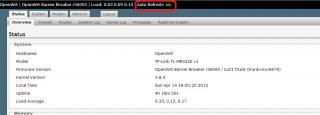
Currently between AA and BB is that on BB, the " Auto refresh ON " is not fully working.

smile.gif
Wahroonga Farm
post Apr 14 2013, 05:54 PM

Getting Started
**
Junior Member
97 posts

Joined: Feb 2013


What is Auto Refresh ON?
digilife
post Apr 14 2013, 06:07 PM

The MNP guy, its me yeah.
*******
Senior Member
8,025 posts

Joined: Feb 2005
From: Planet Boleland


QUOTE(Wahroonga Farm @ Apr 14 2013, 05:54 PM)
What is Auto Refresh ON?
*
This is it

Attached Image

Btw, how to use this BB with OpenVPN or does it support OpenVPN ?

Thanks
khairilyazit
post Apr 14 2013, 11:09 PM

Casual
***
Junior Member
406 posts

Joined: Sep 2010
From: Papar, Sabah


Huntsman seems to have a huge speed advantage over BW on modem detection and connection.. no bugs encountered so far on MR3020+MF680
chuahcs79
post Apr 15 2013, 01:16 AM

Look at all my stars!!
Group Icon
Elite
6,931 posts

Joined: Apr 2011
From: Bolehland for sure ^_^


yeah the huntsman version is superb, detect, dial and connect your modem in second

so far is working for on my mr3040V1 + Huawei E1820

127 Pages « < 25 26 27 28 29 > » Top
Topic ClosedOptions
 

Change to:
| Lo-Fi Version
0.0222sec    0.87    6 queries    GZIP Disabled
Time is now: 16th December 2025 - 02:25 PM