

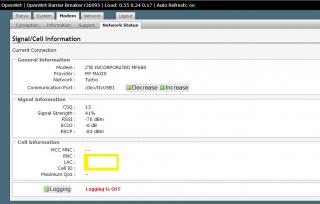
comes with Cell Id + Network info and modem is auto set unlike AA
Tp LInk TL-MR3420 Owner CLub V2.5, need a pro here
|
|
 Apr 10 2013, 04:05 PM Apr 10 2013, 04:05 PM
Return to original view | Post
#1
|
 
Senior Member
8,025 posts Joined: Feb 2005 From: Planet Boleland  
|
just upgraded my MR3420 V1 to OpenWRT BW 04042013
comes with Cell Id + Network info and modem is auto set unlike AA
|
|
|
|
|
|
Apr 10 2013, 04:21 PM
Return to original view | Post
#2
|
|
Senior Member
8,025 posts Joined: Feb 2005 From: Planet Boleland
|
QUOTE(chuahcs79 @ Apr 10 2013, 04:12 PM) everything come together in that firmware right ? no need to install seperate update ? http://www.rfactory.org/OpenWRT/index.htmlany link ?  noobs like me also can flash my Mr3420 in less than 20mins , very easy , just follow the instructions only  |
|
|
Apr 10 2013, 11:42 PM
Return to original view | Post
#3
|
|
Senior Member
8,025 posts Joined: Feb 2005 From: Planet Boleland
|
bro, pls edit your cell id
 |
|
|
Apr 11 2013, 09:06 AM
Return to original view | Post
#4
|
|
Senior Member
8,025 posts Joined: Feb 2005 From: Planet Boleland
|
QUOTE(unknownhammie @ Apr 11 2013, 08:27 AM) Finally MR3420, works with K5005... 10mbps+.. usually 4-7mbps your MR3420 got flash OpenWRT ? |
|
|
Apr 11 2013, 08:30 PM
Return to original view | Post
#5
|
|
Senior Member
8,025 posts Joined: Feb 2005 From: Planet Boleland
|
QUOTE(blacktubi @ Apr 11 2013, 08:25 PM) Stay with your current one is what I recommend Flashing 1043ND to Black Widow will have usb modem support ? Reasons : specification almost same, you should upgrade Mikrotik or highend Asus model 1043ND looks nice too I feel like doing it to my 1043ND |
|
|
Apr 11 2013, 08:56 PM
Return to original view | Post
#6
|
|
Senior Member
8,025 posts Joined: Feb 2005 From: Planet Boleland
|
QUOTE(arif48 @ Apr 11 2013, 08:49 PM) hello. simcard got pin ?just bought mr3420 v2 this afternoon. trying to use with digi zte mf190 modem. the router automatically detect the broadband setting but it is stuck at connecting. can anyone help? and also i'm using celcom sim card if that help anything. please help me...  |
|
|
|
|
|
Apr 12 2013, 12:21 AM
Return to original view | Post
#7
|
|
Senior Member
8,025 posts Joined: Feb 2005 From: Planet Boleland
|
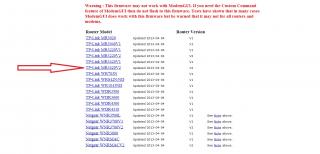
Flash this one , if you are on MR3420 V2 , else use the one that correspond to your Router Model no and Version
|
|
|
Apr 12 2013, 08:19 AM
Return to original view | Post
#8
|
|
Senior Member
8,025 posts Joined: Feb 2005 From: Planet Boleland
|
QUOTE(Wahroonga Farm @ Apr 12 2013, 06:51 AM) Hi Guys 'n gals, Is there any intention to port this latest Barrier Breaker onto TP Link TD-W8968 ?BlackWidow Experimental 2013-04-04 is a proven stable release, so please use this version as it currently provides the best modem support and the best Modem information. It has a few bugs, but nothing that prevents connection for the currently supported modems. Dairyman is currently working on a couple of tricky modems which use a web interface for management, rather than a connection manager. As this will be the way of future modems, it is an important issue to tackle. A stable BlackWidow (non-experimental) release will no doubt come in due course. The other major job on the 'to do list' is SMS capability via the ROOTer. PS It'd be helpful if you identify the actual Blackwidow ROOTer firmware ID that you are using, so that we can track what is working. Barrier Breaker doesn't mean much. There are other developments ongoing so stay tuned. The ROOTer WIKI gives a run down of the ROOTer software evolution and the ROOTer User Index shows some of our Beta testers. This router Factory FW already support USB Modems but just that the speed sucks. Thanks |
|
|
Apr 12 2013, 09:07 AM
Return to original view | Post
#9
|
|
Senior Member
8,025 posts Joined: Feb 2005 From: Planet Boleland
|
QUOTE(DairymanCanada @ Apr 12 2013, 08:38 AM) That router is currently unsupported by OpenWRT so we can't make firmware for it. Any intention to port OpenWRT into this model?Thanks  |
|
|
Apr 12 2013, 09:13 AM
Return to original view | Post
#10
|
|
Senior Member
8,025 posts Joined: Feb 2005 From: Planet Boleland
|
QUOTE(Wahroonga Farm @ Apr 12 2013, 09:10 AM) That's up to the OpenWRT development team. I guess i should email them to do it.Not in our space. Thanks for the head up. |
|
|
Apr 12 2013, 06:22 PM
Return to original view | Post
#11
|
|
Senior Member
8,025 posts Joined: Feb 2005 From: Planet Boleland
|
QUOTE(xplayxtreme @ Apr 12 2013, 05:23 PM) why when maxis network is 3g the rssi is 60-70 but when its turbo, the rssi rise to 90? different Cell , maybe  lower rssi is 3G cell which is nearer to you higher rssi is highspeed cell/ DC-HSPA which is further away take note of the Cell ID , is it the same ? |
|
|
Apr 12 2013, 08:09 PM
Return to original view | Post
#12
|
|
Senior Member
8,025 posts Joined: Feb 2005 From: Planet Boleland
|
I was using Black Widow since Wed and i noticed that sometimes my connection freezes and have to manually off > on to resume my connection and the Purple does turns to solid blue and Hanged.
Now i am using back AA and so far so good. So those of you that is using AA, try BW BB at your own risk. Btw, i have 2 # Mr3420 one on AA and one on BW BB. This is my AA 
|
|
|
Apr 12 2013, 08:24 PM
Return to original view | Post
#13
|
|
Senior Member
8,025 posts Joined: Feb 2005 From: Planet Boleland
|
QUOTE(xplayxtreme @ Apr 12 2013, 08:14 PM) does AA comes with Cell information as well? No, but its more stable ~ from my experience.This my BB screenshot 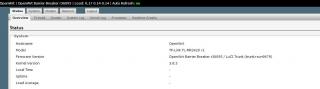
This post has been edited by digilife: Apr 12 2013, 08:24 PM |
|
|
|
|
|
Apr 13 2013, 07:29 AM
Return to original view | Post
#14
|
|
Senior Member
8,025 posts Joined: Feb 2005 From: Planet Boleland
|
QUOTE(Wahroonga Farm @ Apr 13 2013, 06:09 AM) BlackWidow Experimental 2013-04-12 – The Network Status page should show all the data for all modems now (excepting MCC/MNC and QOS which are tower dependent, the Add Modem Support page is working again so you can specify the Data Port for PPP modems and the Communication Port for all modems, added a "reset to original" function to the reset button so, if you hold it in for 20-60 secs, it will reset the firmware back to the state it was when you flashed it, changed Keep Alive so it reboots the router if the connection is dropped rather than restarting the WAN, Support for tethered Android phones is in place. The Network Status page doesn't work for this but you can get internet from your phone and there are probably other things done to it that I can't remember any more but those are the highlights. This is going to be Exciting. More parameters to play play again. HERE The ROOTer WIKI gives a run down of the ROOTer software evolution and the ROOTer User Index shows some of our Beta testers. Updated : I just flashed my 1043ND to latest BB 2013-04-12 and in the process enabled USB Modem support onto this 1043ND ( factory FW do not support USB modem ) So far so good, smooth and Purple LED on MF680 always ~ all auto detect , can even connect on default APN Goam.net......    (Android PING is bad because a lot of updating is running in the background when i do this speedtest , and Android eats a lot of Bandwidth + Quota too ) 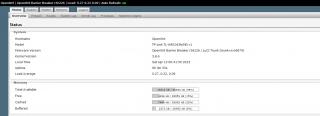
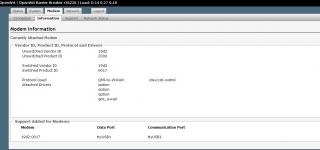
A big THANK YOU to the Development Team @ OpenWRT Thanks This post has been edited by digilife: Apr 13 2013, 09:17 AM |
|
|
Apr 14 2013, 01:04 PM
Return to original view | Post
#15
|
|
Senior Member
8,025 posts Joined: Feb 2005 From: Planet Boleland
|
QUOTE(DairymanCanada @ Apr 13 2013, 11:58 PM) I can be done but I haven't added all the pieces for this at this time. I am still on BW Barrier Breaker and i noticed that the "always on" feature dun work sometimes cause i can see the LED indicator of the modem fall back to slow speed color when my connection is left idle.It seemed a low priority item since no one had ever mentioned it before. This can be a feature in the next version, which will be called Huntsman. BlackWidow is now feature locked and will be the stable release from this time on. I will add the DDNS package to Huntsman as long as it does turn out to be a memory hog. Doesn't look like it should be but you never know. Abt the latest Huntsman, i will try it out and see if the "Always On" can sustain. I wonder if you would include support for YES 4G Go Dongle in future. I understands that currently Vigofly and Mikrotik RB750 2HnD does have support for the YES Go Dongle. Most of all i would like to say a Big Thank You for your Excellent work. |
|
|
Apr 14 2013, 01:54 PM
Return to original view | Post
#16
|
|
Senior Member
8,025 posts Joined: Feb 2005 From: Planet Boleland
|
I am using E398 and my QoS is 42000kbps on download and 8640 on upload when i plug in the modem direct into the usb port.
Why is it when i use this modem on BW BB 2013-04-12 the QoS becomes 8640/8640 , my question is can i set the QoS on the Router to 42000/8640 ? If Yes, how can i do it ? 
thanks |
|
|
Apr 14 2013, 05:15 PM
Return to original view | Post
#17
|
|
Senior Member
8,025 posts Joined: Feb 2005 From: Planet Boleland
|
QUOTE(Wahroonga Farm @ Apr 14 2013, 05:07 PM) Hi, alrite , will do so tmr morning, now outsideBW 21013-04-12 was a faulty image and only briefly available. It was too large for the 4Mb flash ram. Please move up to the latest Huntsman. Cheers John k will the QoS be able to overcome ? thanks |
|
|
Apr 14 2013, 05:31 PM
Return to original view | Post
#18
|
|
Senior Member
8,025 posts Joined: Feb 2005 From: Planet Boleland
|
QUOTE(Wahroonga Farm @ Apr 14 2013, 05:25 PM) Not sure, Currently between AA and BB is that on BB, the " Auto refresh ON " is not fully working.Many of the features are untested.  So any bug reports are very valuable. Please update and report back. Cheers |
|
|
Apr 14 2013, 06:07 PM
Return to original view | Post
#19
|
|
Senior Member
8,025 posts Joined: Feb 2005 From: Planet Boleland
|
QUOTE(Wahroonga Farm @ Apr 14 2013, 05:54 PM) What is Auto Refresh ON? This is it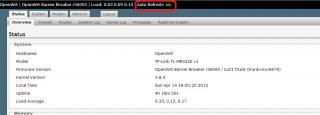
Btw, how to use this BB with OpenVPN or does it support OpenVPN ? Thanks |
|
|
Apr 15 2013, 01:28 AM
Return to original view | Post
#20
|
|
Senior Member
8,025 posts Joined: Feb 2005 From: Planet Boleland
|
Huntsman 2013-04-14, is smooth on my 1043ND but the "Keep Alive" although selected will make the modem to fall back to WDCMA and not DC-HSPA+ always , anyone can help?
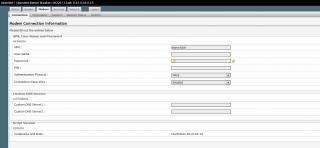
and QoS is still 8640/8640 where DC-HSPA+ should be 42000/8640 
 |
|
Topic ClosedOptions
|
| Change to: |  0.0469sec 0.0469sec
 0.72 0.72
 7 queries 7 queries
 GZIP Disabled GZIP Disabled
Time is now: 9th December 2025 - 07:12 PM |
 Quote
Quote