Welcome Guest ( Log In | Register )

Bump Topic Topic Closed RSS Feed
127 Pages « < 59 60 61 62 63 > » Bottom

Outline · [ Standard ] · Linear+

 Tp LInk TL-MR3420 Owner CLub V2.5, need a pro here

views
     
chuahcs79
post Jun 15 2013, 05:07 PM

Look at all my stars!!
Group Icon
Elite
6,931 posts

Joined: Apr 2011
From: Bolehland for sure ^_^


QUOTE(Wahroonga Farm @ Jun 15 2013, 04:20 PM)
Hi

I use manual channel selection and don't see that problem.

user posted image

Channel 11 (703n)

user posted image

150n 40Mhz works perfectly and fast. smile.gif

Cheers

John k
*
one thing different is using the stock firmware on Auto channel, it will auto switch to channel which less interference channel for you,..

but on rooter wise, it didnt,.. no matter how many time i reboot it always stuck at same channel sweat.gif
Wahroonga Farm
post Jun 16 2013, 06:36 AM

Getting Started
**
Junior Member
97 posts

Joined: Feb 2013


QUOTE(chuahcs79 @ Jun 15 2013, 08:07 PM)
one thing different is using the stock firmware on Auto channel, it will auto switch to channel which less interference channel for you,..

but on rooter wise, it didnt,.. no matter how many time i reboot it always stuck at same channel  sweat.gif
*
That seems to be the case. cry.gif

I'd rather do it manually. thumbup.gif

inSSIDer shows exactly what is happening.

If you have neighbouring interfering channels, pick the channel with the lowest level and camp right on top of it, for the lowest interference.

PS the LUCI interface is selectable in recent versions and will swap to the one I displayed in the next release I think.

Change it manually by going to System->System->Language and Style and changing the Design. It won't happen until you reboot the router after you save the change.
Wahroonga Farm
post Jun 16 2013, 12:17 PM

Getting Started
**
Junior Member
97 posts

Joined: Feb 2013


Huntsman 2013-06-16a is released.

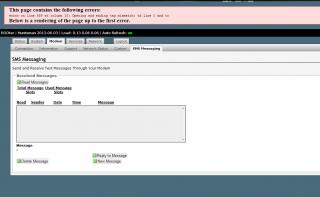
The long awaited SMS messaging arrives. Network Status information is now only active when visiting the Network Status page. The modem is only sent signal commands when you are on the Network Status page and there is a delay while the data is gathered when you first go to the page. This eases the load on the modem and the possibility of modem communication conflicts. Enjoy!

Notes:
The SMS feature may not work correctly for all SIMs and modems. Please advise any SMS bug reports. To make flash RAM room for the SMS feature 4Mb routers only have IPv4 support in this version. 8Mb still support IPv6.

Current reported issues with this release:
Luci may lock up "problem loading page", but internet connection is fine. It appears to be a consequence of OpenWRT Version R36713. A fix is available and a new release is on the way shortly (2013-06-17).

Visit the usual places.

WIKI change log - http://whirlpool.net.au/wiki/wiki_rooter_pg4

Of Modems and Men - http://ofmodemsandmen.com/index.html
digilife
post Jun 16 2013, 03:01 PM

The MNP guy, its me yeah.
*******
Senior Member
8,025 posts

Joined: Feb 2005
From: Planet Boleland


QUOTE(Wahroonga Farm @ Jun 16 2013, 12:17 PM)
Huntsman 2013-06-16a is released.

The long awaited SMS messaging arrives. Network Status information is now only active when visiting the Network Status page. The modem is only sent signal commands when you are on the Network Status page and there is a delay while the data is gathered when you first go to the page. This eases the load on the modem and the possibility of modem communication conflicts. Enjoy!

Notes:
The SMS feature may not work correctly for all SIMs and modems. Please advise any SMS bug reports. To make flash RAM room for the SMS feature 4Mb routers only have IPv4 support in this version. 8Mb still support IPv6.

Current reported issues with this release:
Luci may lock up "problem loading page", but internet connection is fine. It appears to be a consequence of OpenWRT Version R36713. A fix is available and a new release is on the way shortly (2013-06-17).

Visit the usual places.

WIKI change log - http://whirlpool.net.au/wiki/wiki_rooter_pg4

Of Modems and Men - http://ofmodemsandmen.com/index.html
*
Downloaded 2013-06-16a for MR3420 and 1043ND

For 1043ND, onced flashed , its 2013-06-16a as expected.

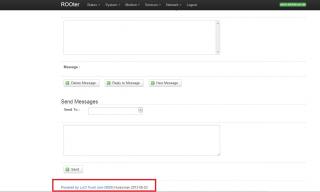
But for MR3420 even though you flashed the newly downloaded file, its shows in the interface that it is 2013-06-03 although you have the sms feature doh.gif
fitzhex
post Jun 16 2013, 03:06 PM

On my way
****
Senior Member
550 posts

Joined: Aug 2008
From: From:From:From:From:From:


i no like the new interface, trying to change it at >Language and Style wont change it back to old interface.
digilife
post Jun 16 2013, 03:41 PM

The MNP guy, its me yeah.
*******
Senior Member
8,025 posts

Joined: Feb 2005
From: Planet Boleland


QUOTE(digilife @ Jun 16 2013, 03:01 PM)
Downloaded 2013-06-16a for MR3420 and 1043ND

For 1043ND, onced flashed , its 2013-06-16a as expected.

But for MR3420 even though you flashed the newly downloaded file, its shows in the interface that  it is 2013-06-03 although you have the sms feature  doh.gif
*
Attached Image
Wahroonga Farm
post Jun 16 2013, 04:57 PM

Getting Started
**
Junior Member
97 posts

Joined: Feb 2013


QUOTE(fitzhex @ Jun 16 2013, 06:06 PM)
i no like the new interface, trying to change it at >Language and Style wont change it back to old interface.
*
Yes I recollect DM saying this was missing. sad.gif

It'll be back in the next ROOter release ... which will be very soon. smile.gif
Wahroonga Farm
post Jun 16 2013, 05:00 PM

Getting Started
**
Junior Member
97 posts

Joined: Feb 2013


QUOTE(digilife @ Jun 16 2013, 06:01 PM)
Downloaded 2013-06-16a for MR3420 and 1043ND

For 1043ND, onced flashed , its 2013-06-16a as expected.

But for MR3420 even though you flashed the newly downloaded file, its shows in the interface that  it is 2013-06-03 although you have the sms feature  doh.gif
*
Well spotted. I'll let the boss know. notworthy.gif
iOnicStorm
post Jun 16 2013, 06:02 PM

New Member
*
Junior Member
18 posts

Joined: Nov 2008
From: Malaysia


QUOTE(ioi84 @ Jun 13 2013, 11:15 PM)
Hi sifus.
I'm a new user of this interesting router. (MR3420 v2 + E398)
So, I need help from sifus here. notworthy.gif
Is it normal after I flashed to latest Huntsman, my router will only got 27% space left?
*
ROOter firmware packs everything in the 4MB flash memory so that users need no extra hard works in order to use high speed 3G/4G internet out-of-the-box. Or, you can flash the vanilla OpenWRT image, which left users with over 1MB+ space on the JFFS2 partition, but require some hard works on the users' side, in order to get it working. Your choice. smile.gif


QUOTE(ioi84 @ Jun 14 2013, 03:16 PM)
Hi.
I'm using latest Huntsman and noticed that under Software, free space reduced from time to time without changing any setting.

What's the problem?
*
QUOTE(ioi84 @ Jun 14 2013, 04:07 PM)
FYI, I didn't touch any advance setting or modified anything yet (n00b user) tongue.gif
*
QUOTE(ioi84 @ Jun 14 2013, 09:36 PM)
After shutting down router for a while (after on for 2 days), looks like free space increase back to default.
*
Nice observation!

I think this could be due to how wear leveling, journaling and compression in actions on the JFFS2 file system, where OpenWRT Linux writes its configuration data on (/etc/config).

The Flash Memory used on the router is a kind of Memory Technology Device (MTD), which is a totally different beasts than the traditional magnetic storage we're familiar with. It has limited write cycles (usually a few thousand to 10,000+ writes per block). It requires special file system support in order to use it efficiently, and also to extend it's working life-span.

When users "save" their "settings", configuration data is written to the JFFS2 partition, where "old" data is deleted, and "new" data is written to different blocks. The "deleted" blocks are not actually deleted but being marked as "invalid". That's why users will see a decrease in space over time, due to wear leveling and journaling. But after a reboot, the space is claimed back, where some "recycling" mechanism kicks in.

I'm no Linux guru though. This is just my hypothesis based on my understanding of information on the Internet. Correct me if I'm wrong.

ppijat
post Jun 17 2013, 12:28 PM

New Member
*
Newbie
0 posts

Joined: Jun 2013
QUOTE(digilife @ Jun 5 2013, 02:53 PM)
N16 have different OpenWRT FW but not ROOter

But, sincerely ASUSWRT is superb enough, Currently this is my faster Router ~ meaning it return my best speed on a USB Modem dial in, Only 1043ND ROOter come close behind it, MR3420, HW550 , TD-W8968. MR3220, Hame A1 and E355 semua no fight at all........ biggrin.gif
*
I already survey about this router. I think new asus router - RT-N66U is better performance and powerful than RT-N16. It Nvram can go up to 64K. I already buy Rt-n16. I must buy RT-N66U cause it can support all package i want(openvpn,etc)without support flash drive to jffs. Who want buy my RT-N16?hehehe...
digilife
post Jun 17 2013, 01:39 PM

The MNP guy, its me yeah.
*******
Senior Member
8,025 posts

Joined: Feb 2005
From: Planet Boleland


QUOTE(ppijat @ Jun 17 2013, 12:28 PM)
I already survey about this router. I think new asus router - RT-N66U is better performance and powerful than RT-N16. It Nvram can go up to 64K. I already buy Rt-n16. I must buy RT-N66U cause it can support all package i want(openvpn,etc)without support flash drive to jffs. Who want buy my RT-N16?hehehe...
*
If there is Proton Preve and Proton Saga, would you go for Saga if your pocket can afford a Preve ?

But If you have the Bang in your pocket , go for Draytek 2130n thumbup.gif

Draytek 2130n

thumbup.gif
chuahcs79
post Jun 17 2013, 04:08 PM

Look at all my stars!!
Group Icon
Elite
6,931 posts

Joined: Apr 2011
From: Bolehland for sure ^_^


QUOTE(digilife @ Jun 17 2013, 01:39 PM)
If there is Proton Preve and Proton Saga, would you go for Saga if your pocket can afford a Preve ?

But If you have the Bang in your pocket , go for Draytek 2130n  thumbup.gif

Draytek 2130n

thumbup.gif
*
so overkill for a 3G connection doh.gif sweat.gif
digilife
post Jun 17 2013, 04:25 PM

The MNP guy, its me yeah.
*******
Senior Member
8,025 posts

Joined: Feb 2005
From: Planet Boleland


QUOTE(chuahcs79 @ Jun 17 2013, 04:08 PM)
so overkill for a 3G connection  doh.gif  sweat.gif
*
who cares when you have the Bang of the Bucks biggrin.gif

moreover its Fibre Proof too and Maxis LTE will only be a backup only because Fibre is more stable than LTE when Ah bengs and Ah lians start using LTE
ioi84
post Jun 17 2013, 06:29 PM

Getting Started
**
Junior Member
84 posts

Joined: Feb 2013
From: North Malaysia


QUOTE(iOnicStorm @ Jun 16 2013, 06:02 PM)
» Click to show Spoiler - click again to hide... «


Nice explanation sir. thumbup.gif
Really help me to understand how this router worked.
By the way, of coz I'm a satisfied user of Huntsman. biggrin.gif
Just need an explanation from someone expert only (just like u did).
TQ

chuahcs79
post Jun 17 2013, 06:34 PM

Look at all my stars!!
Group Icon
Elite
6,931 posts

Joined: Apr 2011
From: Bolehland for sure ^_^


QUOTE(digilife @ Jun 17 2013, 04:25 PM)
who cares when you have the Bang of the Bucks  biggrin.gif

moreover its Fibre Proof too and Maxis LTE will only be a backup only because Fibre is more stable than LTE when Ah bengs and Ah lians start using LTE
*
malaysia system no matte fibre, ADSL, 3G 4G, CDMA, all wont be stable,.. LOL,. sweat.gif


khairilyazit
post Jun 17 2013, 07:21 PM

Casual
***
Junior Member
406 posts

Joined: Sep 2010
From: Papar, Sabah


the newesr huntsman seems to be unstable.. having disconnection every 10-20 minutes..
using zte mf680, anybody else?
digilife
post Jun 17 2013, 08:15 PM

The MNP guy, its me yeah.
*******
Senior Member
8,025 posts

Joined: Feb 2005
From: Planet Boleland


QUOTE(khairilyazit @ Jun 17 2013, 07:21 PM)
the newesr huntsman seems to be unstable.. having disconnection every 10-20 minutes..
using zte mf680, anybody else?
*
Fine on MF820D , Network Problem kot smile.gif
khairilyazit
post Jun 18 2013, 07:35 AM

Casual
***
Junior Member
406 posts

Joined: Sep 2010
From: Papar, Sabah


QUOTE(digilife @ Jun 17 2013, 08:15 PM)
Fine on MF820D , Network Problem kot  smile.gif
*
Maybe... but older one is more stable.. ppp method no disconnect at all.. probably usb power issues...
digilife
post Jun 18 2013, 07:44 AM

The MNP guy, its me yeah.
*******
Senior Member
8,025 posts

Joined: Feb 2005
From: Planet Boleland


QUOTE(khairilyazit @ Jun 18 2013, 07:35 AM)
Maybe... but older one is more stable.. ppp method no disconnect at all.. probably usb power issues...
*
So PPP connect is stable

thumbup.gif

btw, Wahroonga i observed that my 1043ND also shows this on HM 2013-03-16a

Attached Image


Shaney
post Jun 18 2013, 08:58 AM

Getting Started
**
Junior Member
279 posts

Joined: Nov 2008
From: Heart <3


Hey guys.
Just curious is it possible to use e398 + lte sim card with tlmr-3420 v1.2 stock firmware ?
Will the tp link be the bottleneck for everything ?

If yes, can I know how to maximize the lte speed with using bac the 3420 v1.2 instead of buying the v2 ?

Hope all sifus can help me out smile.gif

This post has been edited by Shaney: Jun 18 2013, 08:58 AM

127 Pages « < 59 60 61 62 63 > » Top
Topic ClosedOptions
 

Change to:
| Lo-Fi Version
0.0303sec    0.25    6 queries    GZIP Disabled
Time is now: 6th December 2025 - 09:36 AM