

QUOTE(Zot @ Jan 17 2019, 04:26 PM)

Hard to point point specifically but apparently the Asus is not performing to its specification.

Can you check what is the established connection speed between your Asus router and your laptop?


Home Networking ASUS Malaysia Networking User & Technical Support, Managed by ASUS Malaysia Representative
|
|
 Jan 17 2019, 04:28 PM Jan 17 2019, 04:28 PM
|
 
Senior Member
2,734 posts Joined: Mar 2008 
|
QUOTE(Zot @ Jan 17 2019, 04:26 PM) Hard to point point specifically but apparently the Asus is not performing to its specification. Can you check what is the established connection speed between your Asus router and your laptop? |
|
|
|
|
|
Jan 17 2019, 04:31 PM
|

Senior Member
7,938 posts Joined: Mar 2014
|
QUOTE(eclectice @ Jan 17 2019, 04:28 PM) WAN and LAN1 is at 1 Gbps. LAN1 is connected to the laptop via Cat5E cable. WAN is from BTU with Cat5e cable as well. Ohh.. I think I misunderstood. What you were saying was that the test was on LAN port, not even wireless, right? I thought it was the wireless speed.  I would say that the unit is not performing |
|
|
Jan 17 2019, 04:33 PM
|
|
Senior Member
2,734 posts Joined: Mar 2008
|
QUOTE(Zot @ Jan 17 2019, 04:31 PM) Ohh.. I think I misunderstood. What you were saying was that the test was on LAN port, not even wireless, right? I thought it was the wireless speed. It looks like it...Probably, I will RMA soon. I would say that the unit is not performing |
 |
Jan 17 2019, 04:47 PM
|

Senior Member
2,319 posts Joined: Mar 2010
|
QUOTE(eclectice @ Jan 17 2019, 04:33 PM) It looks like it...Probably, I will RMA soon. Hi eclectice,Is the router factory reset before? Can you try setting the DNS of the router and test again? And when you doing the testing, can you go to the Status at the network MAP and monitor the CPU usage. Thank you |
|
|
Jan 17 2019, 04:52 PM
|
|
Senior Member
2,734 posts Joined: Mar 2008
|
QUOTE(ASUSmy @ Jan 17 2019, 04:47 PM) Hi eclectice, I think I had done a factory reset before. Is the router factory reset before? Can you try setting the DNS of the router and test again? And when you doing the testing, can you go to the Status at the network MAP and monitor the CPU usage. Thank you What is the DNS of the router: should I set the router to use ISP (auto) or set it to use Google DNS? Or, do you mean to set the DNS from my laptop TCP/IP properties? What do you expect from the CPU usage: any possible high consumption? I will do this when I am at home. This post has been edited by eclectice: Jan 17 2019, 04:53 PM |
|
|
Jan 17 2019, 05:18 PM
|
|
Senior Member
2,734 posts Joined: Mar 2008
|
QUOTE(eclectice @ Jan 17 2019, 04:52 PM) I think I had done a factory reset before. OH, I forgot that I have Asus Router app. Currently, this is the CPU usage:What is the DNS of the router: should I set the router to use ISP (auto) or set it to use Google DNS? Or, do you mean to set the DNS from my laptop TCP/IP properties? What do you expect from the CPU usage: any possible high consumption? I will do this when I am at home. 
|
|
|
|
|
|
Jan 17 2019, 05:44 PM
|
|
Senior Member
2,319 posts Joined: Mar 2010
|
QUOTE(eclectice @ Jan 17 2019, 04:52 PM) I think I had done a factory reset before. Hi eclectice,What is the DNS of the router: should I set the router to use ISP (auto) or set it to use Google DNS? Or, do you mean to set the DNS from my laptop TCP/IP properties? What do you expect from the CPU usage: any possible high consumption? I will do this when I am at home. You can try set the Google DNS on the ASUS router. And as for the CPU usage, try monitor the usage when you doing the speedtest. Thank you |
|
|
Jan 17 2019, 05:49 PM
|

Junior Member
393 posts Joined: May 2008 From: Sungai Petani 
|
Hi i bought asus blue cave recently from Amazon. I have trouble setting up internet. I set in pppoe mode but internet is not connecting , it works with my tp link router. Also my router keeps factory resetting everytime i reboot.
|
|
|
Jan 17 2019, 05:57 PM
|
|
Senior Member
2,734 posts Joined: Mar 2008
|
QUOTE(ASUSmy @ Jan 17 2019, 05:44 PM) Hi eclectice, It is already using Google DNS...You can try set the Google DNS on the ASUS router. And as for the CPU usage, try monitor the usage when you doing the speedtest. Thank you Anyway, I will monitor CPU usage while doing the speedtest. |
|
|
Jan 17 2019, 06:02 PM
|

Senior Member
2,318 posts Joined: Dec 2012
|
QUOTE(devkamal @ Jan 17 2019, 05:49 PM) Hi i bought asus blue cave recently from Amazon. I have trouble setting up internet. I set in pppoe mode but internet is not connecting , it works with my tp link router. Also my router keeps factory resetting everytime i reboot. Go setting LAN - IPTV - choose ur internet profile accordingly. |
|
|
Jan 17 2019, 06:08 PM
|
|
Junior Member
393 posts Joined: May 2008 From: Sungai Petani
|
QUOTE(SzeMeng76 @ Jan 17 2019, 06:02 PM) Go setting LAN - IPTV - choose ur internet profile accordingly. I do that and it factory resets. |
|
|
Jan 17 2019, 06:10 PM
|
|
Senior Member
2,318 posts Joined: Dec 2012
|
QUOTE(devkamal @ Jan 17 2019, 06:08 PM) I do that and it factory resets. Erm I'm not understand your answer. Means you press that and your router factory reset?Can show your screenshot of router setting? 
This post has been edited by SzeMeng76: Jan 17 2019, 06:11 PM |
|
|
Jan 17 2019, 06:11 PM
|
|
Junior Member
393 posts Joined: May 2008 From: Sungai Petani
|
QUOTE(SzeMeng76 @ Jan 17 2019, 06:10 PM) Erm I'm not understand your answer. Means you press that and your router factory reset? When i choose the isp profile for stb, it resets to factory settings, means i need to start over. Can show your screenshot of router setting? 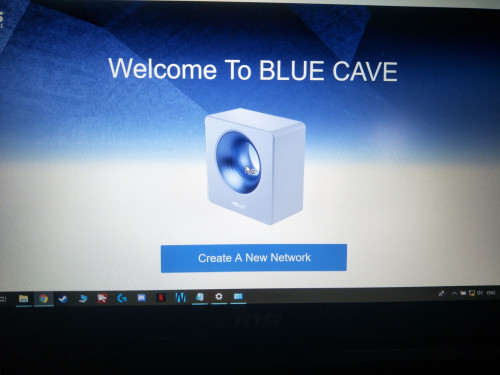 I start back from here. |
|
|
|
|
|
Jan 17 2019, 06:13 PM
|
|
Senior Member
2,318 posts Joined: Dec 2012
|
QUOTE(devkamal @ Jan 17 2019, 06:11 PM) When i choose the isp profile for stb, it resets to factory settings, means i need to start over. Huh then this is so strange. U try to setup again and press the ISP profile again.I start back from here. If issue still exist, you may need to get help from ASUSmy. Without tagging the ISP profile, your internet wont be connected. This post has been edited by SzeMeng76: Jan 17 2019, 06:14 PM |
|
|
Jan 17 2019, 06:16 PM
|
|
Junior Member
393 posts Joined: May 2008 From: Sungai Petani
|
QUOTE(SzeMeng76 @ Jan 17 2019, 06:13 PM) Huh then this is so strange. U try to setup again and press the ISP profile again. Im trying to update the firmware first. Then i will do what u suggest.If issue still exist, you may need to get help from ASUSmy. Without tagging the ISP profile, your internet wont be connected. |
|
|
Jan 18 2019, 10:43 AM
|
|
Senior Member
2,734 posts Joined: Mar 2008
|
QUOTE(ASUSmy @ Jan 17 2019, 05:44 PM) Hi eclectice, Here are a few speedtest tests and cpu usage on LAN1:You can try set the Google DNS on the ASUS router. And as for the CPU usage, try monitor the usage when you doing the speedtest. Thank you CPU #1 
Result #1 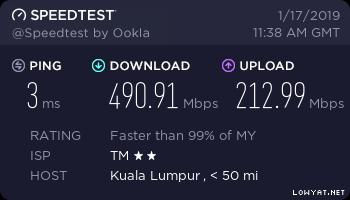 CPU #2 
Result #2  This post has been edited by eclectice: Jan 18 2019, 10:45 AM |
|
|
Jan 18 2019, 12:02 PM
|
|
Newbie
17 posts Joined: Jun 2012
|
Hi @ASUSmy,
I found that after I updated firmware of my ASUS DSL-AC52U Dual-Band Wireless-AC750 Gigabit VDSL2/ADSL2+ Modem Router to latest version (1.1.2.3_617-gfa1b634 2018/12/05 at the time of writing) , my laptop with Killer Wireless 1535 no longer able to use 5GHz band to surf internet. Currently I only can use internet with 2.4 GHz band. This post has been edited by optimisez: Jan 18 2019, 12:06 PM |
|
|
Jan 18 2019, 01:15 PM
|
|
Senior Member
3,037 posts Joined: Dec 2011
|
QUOTE(optimisez @ Jan 18 2019, 12:02 PM) Hi @ASUSmy, Got hard reset?I found that after I updated firmware of my ASUS DSL-AC52U Dual-Band Wireless-AC750 Gigabit VDSL2/ADSL2+ Modem Router to latest version (1.1.2.3_617-gfa1b634 2018/12/05 at the time of writing) , my laptop with Killer Wireless 1535 no longer able to use 5GHz band to surf internet. Currently I only can use internet with 2.4 GHz band. |
|
|
Jan 18 2019, 02:14 PM
|
|
Senior Member
2,319 posts Joined: Mar 2010
|
QUOTE(eclectice @ Jan 18 2019, 10:43 AM) Here are a few speedtest tests and cpu usage on LAN1: Hi eclectice,CPU #1
Result #1 CPU #2
Result #2 Thank you for the result, it seen like the CPU didn't reach 100% when doing the speedtest. May I ask, do you try using back the TM DNS to do the speedtest? Thank you |
|
|
Jan 18 2019, 02:34 PM
|
|
Senior Member
2,734 posts Joined: Mar 2008
|
QUOTE(ASUSmy @ Jan 18 2019, 02:14 PM) Hi eclectice, Not yet, because I had other things to attend to after doing the tests. I will try if I have the time.Thank you for the result, it seen like the CPU didn't reach 100% when doing the speedtest. May I ask, do you try using back the TM DNS to do the speedtest? Thank you This post has been edited by eclectice: Jan 18 2019, 02:35 PM |
| Change to: |  0.0223sec 0.0223sec
 0.33 0.33
 6 queries 6 queries
 GZIP Disabled GZIP Disabled
Time is now: 14th December 2025 - 09:20 PM |
 Quote
Quote