Welcome Guest ( Log In | Register )

826 Pages « < 467 468 469 470 471 > » Bottom

Outline · [ Standard ] · Linear+

Home Networking ASUS Malaysia Networking User & Technical Support, Managed by ASUS Malaysia Representative

views
     
nitehawk
post Nov 5 2018, 05:34 PM

On my way
****
Senior Member
699 posts

Joined: May 2006


If I configure my RT-AC55UHP router using built-in OpenVPN client, can allow some devices' (either same subnet or different subnet) traffic to pass through the VPN?


AVFAN
post Nov 5 2018, 10:37 PM

20k VIP Club
*********
All Stars
24,455 posts

Joined: Nov 2010
calling:
QUOTE(ASUSmy @ Oct 29 2018, 10:41 AM)

QUOTE(Hutchy @ Nov 3 2018, 03:26 PM)
Friends I have a weird experience with my Asus router. I have a Unifi Turbo 500Mbps plan and my router is Asus RT-AC55UHP and with a CAT6 ethernet cable the max speed i get is less than 250Mbps, i launched a complaint with Unifi and they sent their technicians to check and the guys who came to check the issue suggested to used my stock Unifi router which is Dlink DIR-850L and to everyones surprise i was getting 500+Mbps speed with the Dlink router.

So here is my confusion i thought the Asus RT-AC55UHP was an advanced router as compared to the DIR-850L and the technicians from unifi also agreed but none of us were able to say why the ASUS router cannot even reach 300Mbps while the Dlink obtained 500+Mbps speed consistently. Any thoughts on this? FYI i have the latest firmware, tried factory resetting the router and configured it fresh but it still cannot reach the speed above 250Mbps. One of the other forum member suggested me to do a 30 30 30 reset and after that i am now getting speeds upto 320Mbps which is better than the previous speed of less than 250 Mbps. Is it an issue with the router itself where i cannot get speeds of 500Mbps?
*
this is interesting... i got turbo-ed 800mbps today, using rtac1300uhp which is in same category as ac55uhp, more or less.

the router seems able to do up to 500mbps only with LAN; upload is fine, 20x mbps.

i replaced it with TPlink ac1200 stock router, it did up to 650mbps.

WIFI... the 1300uhp does better - 300 DL/100 UL vs 2xx/xx.

wifi is acceptable, but how come a supposedly gigbit router can't do 800mbps?

modem->router cable is cat5e; router->device cable cat6; using current 8375 firmware.

not satisfied with the stock router, i will complain and see what unifi say.

for now, i like to know if i am missing something about the asus.. anything i should check?


voncrane
post Nov 5 2018, 11:31 PM

Noir et fier!
*******
Senior Member
7,120 posts

Joined: Oct 2011
From: Wakanda


QUOTE(AVFAN @ Nov 5 2018, 10:37 PM)
calling:

this is interesting... i got turbo-ed 800mbps today, using rtac1300uhp which is in same category as ac55uhp, more or less.

the router seems able to do up to 500mbps only with LAN; upload is fine, 20x mbps.

i replaced it with TPlink ac1200 stock router, it did up to 650mbps.

WIFI... the 1300uhp does better - 300 DL/100 UL vs 2xx/xx.

wifi is acceptable, but how come a supposedly gigbit router can't do 800mbps?

modem->router cable is cat5e; router->device cable cat6; using current 8375 firmware.

not satisfied with the stock router, i will complain and see what unifi say.

for now, i like to know if i am missing something about the asus.. anything i should check?
*
Cuz theoretical speeds bruh... I think it's safe to say that all routers simply can't achieve the manufacturer stated speeds simply cuz our environments aren't a clean lab, as used for testing. Besides, most router's advertised speeds are a total of theoretically achievable speeds on both 2.4Ghz and 5Ghz combined. Marketing trick..

Congrats on finally being turboed.. Can relax now?..? tongue.gif
AVFAN
post Nov 6 2018, 01:42 AM

20k VIP Club
*********
All Stars
24,455 posts

Joined: Nov 2010
QUOTE(voncrane @ Nov 5 2018, 11:31 PM)
Cuz theoretical speeds bruh... I think it's safe to say that all routers simply can't achieve the manufacturer stated speeds simply cuz our environments aren't a clean lab, as used for testing. Besides, most router's advertised speeds are a total of theoretically achievable speeds on both 2.4Ghz and 5Ghz combined. Marketing trick..

Congrats on finally being turboed.. Can relax now?..?  tongue.gif
*
getting what they promised wasn't w/o trouble, had to make quite a bit of noise.

that was to get into a better bargaining position.

next is to downgrade to 300 at lower price - that speed is ideal to me.
niclas
post Nov 6 2018, 04:18 AM

Getting Started
**
Junior Member
102 posts

Joined: Mar 2006
From: Johor Bahru


Upgraded to RTAC5300 Today with my Unifi 800mbps (Previously with Stock Dlink DIR850L)

However only able to hit 480Mbps DL Speed on Speed test while 220Mbps on UL speed.

Been seeing so many forumers able to hit above 650mbps with similar setting... Any idea on it ?


Thanks 😋
voncrane
post Nov 6 2018, 08:04 AM

Noir et fier!
*******
Senior Member
7,120 posts

Joined: Oct 2011
From: Wakanda


QUOTE(AVFAN @ Nov 6 2018, 01:42 AM)
getting what they promised wasn't w/o trouble, had to make quite a bit of noise.

that was to get into a better bargaining position.

next is to downgrade to 300 at lower price - that speed is ideal to me.
*
Typical.. No make noise, they just continue to overcharge or undersupply. Minority only gets satisfaction without fuss. Should be easy to downgrade later on.. Worst case, contract resets.

QUOTE(niclas @ Nov 6 2018, 04:18 AM)
Upgraded to RTAC5300 Today with my Unifi 800mbps (Previously with Stock Dlink DIR850L)

However only able to hit 480Mbps DL Speed on Speed test while 220Mbps on UL speed.

Been seeing so many forumers able to hit above 650mbps with similar setting... Any idea on it ?
Thanks 😋
*
Receiving device? Wired?
fumie
post Nov 6 2018, 08:56 AM

Getting Started
**
Junior Member
55 posts

Joined: Nov 2008
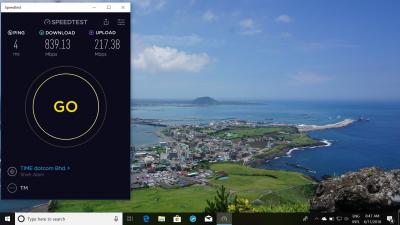
Thanks UNIFI just got TURBO!Attached Image
fumie
post Nov 6 2018, 09:11 AM

Getting Started
**
Junior Member
55 posts

Joined: Nov 2008
QUOTE(niclas @ Nov 6 2018, 05:18 AM)
Upgraded to RTAC5300 Today with my Unifi 800mbps (Previously with Stock Dlink DIR850L)

However only able to hit 480Mbps DL Speed on Speed test while 220Mbps on UL speed.

Been seeing so many forumers able to hit above 650mbps with similar setting... Any idea on it ?
Thanks 😋
*
Try change to 20mhz
AVFAN
post Nov 6 2018, 12:39 PM

20k VIP Club
*********
All Stars
24,455 posts

Joined: Nov 2010
QUOTE(ASUSmy @ May 30 2018, 11:37 AM)
Hi AVFAN,

I believe the 1.0.0.9 is the software version, you can still install it, if the current driver is newer than the one you wish to install, normally windows will ask your permission first.

Thank you
*
like to come back to u after so long! biggrin.gif

becos i did not change firmware until now... wanted to see if it will give me improvement for new unifi 800mbps speed.

using rtac1300uhp with is AC55 adaptor.

yes, it is newer than the one i had original, installed.

it does a better job, more stable - now consistently getting 2xx mbps DL at 55ft wifi.

UL is full 200mbps.

1009 is the latest, no more.
https://www.asus.com/my/Networking/USBAC55/...pDesk_Download/


* please respond to my other post about 1300uhp's LAN speed issue, TQ.

This post has been edited by AVFAN: Nov 6 2018, 12:41 PM
niclas
post Nov 6 2018, 12:48 PM

Getting Started
**
Junior Member
102 posts

Joined: Mar 2006
From: Johor Bahru


QUOTE(voncrane @ Nov 6 2018, 08:04 AM)
Typical.. No make noise, they just continue to overcharge or undersupply. Minority only gets satisfaction without fuss. Should be easy to downgrade later on.. Worst case, contract resets.
Receiving device? Wired?
*
Receiving devices is wired. 🤕😣
niclas
post Nov 6 2018, 12:49 PM

Getting Started
**
Junior Member
102 posts

Joined: Mar 2006
From: Johor Bahru


QUOTE(fumie @ Nov 6 2018, 09:11 AM)
Try change to 20mhz
*
Currently using Tri Band smart connect, been change to dual band and use 20mhz channel and still hit 650mbps 😫
AVFAN
post Nov 6 2018, 02:09 PM

20k VIP Club
*********
All Stars
24,455 posts

Joined: Nov 2010
QUOTE(niclas @ Nov 6 2018, 12:48 PM)
Receiving devices is wired. 🤕😣
*
QUOTE(niclas @ Nov 6 2018, 12:49 PM)
Currently using Tri Band smart connect, been change to dual band and use 20mhz channel and still hit 650mbps 😫
*
i dun follow...

what has 20mhz, 80mhz, dual band got to do with WIRED or lan devices performance?
pl95077
post Nov 6 2018, 02:12 PM

Getting Started
**
Junior Member
245 posts

Joined: Feb 2010
QUOTE(niclas @ Nov 6 2018, 05:18 AM)
Upgraded to RTAC5300 Today with my Unifi 800mbps (Previously with Stock Dlink DIR850L)

However only able to hit 480Mbps DL Speed on Speed test while 220Mbps on UL speed.

Been seeing so many forumers able to hit above 650mbps with similar setting... Any idea on it ?
Thanks 😋
*
Assumed you are saying wireless connection. If is wireless connection, pls check your client spec.

In order to get 800Mbps both your router and client have to be capable too.
strafez
post Nov 6 2018, 07:31 PM

Getting Started
**
Junior Member
76 posts

Joined: Jul 2009
Hi All,

I'm having exactly this issue quoted below but its on my RT-N12HP B1 renewing lease...... expired., as I've upgraded my router to ac86u I moved this to my rental unit and now having this issue, once i swapped back to the TM router the internet works fine. Any Pros here could help me out pls?

Thank you very much!

QUOTE(mingxhin @ Apr 10 2015, 06:44 PM)
Hi ASUSmy,

I am facing the same issue using ASUS RT-N18U. During the initial setup connected via LAN cable, after entering Unifi username and password I got the same error "Server not found".

I followed the steps provided, skip to manual setup and also updated to the latest firmware FW_RT_N18U_30043763754, but still have no Internet access, even though the Network Map page show internet status as connected but notice the lease time is stuck at renewing and lease expires is expired.

I revert back to use TM router and no problems connecting to the Internet. Please help. Thanks.

[attachmentid=4406198]
*
TSASUSmy
post Nov 7 2018, 10:16 AM

Look at all my stars!!
*******
Senior Member
2,319 posts

Joined: Mar 2010
QUOTE(strafez @ Nov 6 2018, 07:31 PM)
Hi All,

I'm having exactly this issue quoted below but its on my RT-N12HP B1 renewing lease...... expired., as I've upgraded my router to ac86u I moved this to my rental unit and now having this issue, once i swapped back to the TM router the internet works fine. Any Pros here could help me out pls?

Thank you very much!
*
Hi strafez,

Please double check the UNIFI account user name and password are correct.

Do a factory reset and redo the setup.

And try go to the WAN->Internet Connection-> MAC Address click on the MAC Clone button then apply.

If the problem still persist, please PM me your system log and setting file to me.

Thank you
TSASUSmy
post Nov 7 2018, 10:27 AM

Look at all my stars!!
*******
Senior Member
2,319 posts

Joined: Mar 2010
QUOTE(AVFAN @ Nov 6 2018, 12:39 PM)
like to come back to u after so long! biggrin.gif

becos i did not change firmware until now... wanted to see if it will give me improvement for new unifi 800mbps speed.

using rtac1300uhp with is AC55 adaptor.

yes, it is newer than the one i had original, installed.

it does a better job, more stable - now consistently getting 2xx mbps DL at 55ft wifi.

UL is full 200mbps.

1009 is the latest, no more.
https://www.asus.com/my/Networking/USBAC55/...pDesk_Download/
* please respond to my other post about 1300uhp's LAN speed issue, TQ.
*
Hi AVFAN,

I am checking with my RD when it will upload on the website for public download.

Will get a beta firmware from them if it going to be sometime.

Thank you
TSASUSmy
post Nov 7 2018, 10:34 AM

Look at all my stars!!
*******
Senior Member
2,319 posts

Joined: Mar 2010
QUOTE(nitehawk @ Nov 5 2018, 05:34 PM)
If I configure my RT-AC55UHP router using built-in OpenVPN client, can allow some devices' (either same subnet or different subnet) traffic to pass through the VPN?
*
Hi nitehawk,

We don't have the option to allow specific devices to pass trough the VPN once the VPN Client are connected to VPN server.

All devices will be in the VPN environment.

Thank you
AVFAN
post Nov 7 2018, 10:39 AM

20k VIP Club
*********
All Stars
24,455 posts

Joined: Nov 2010
QUOTE(ASUSmy @ Nov 7 2018, 10:27 AM)
Hi AVFAN,

I am checking with my RD when it will upload on the website for public download.

Will get a beta firmware from them if it going to be sometime.

Thank you
*
thanks for response.

new update... do u mean for rtac1300uhp or ac55?
TSASUSmy
post Nov 7 2018, 10:48 AM

Look at all my stars!!
*******
Senior Member
2,319 posts

Joined: Mar 2010
QUOTE(hghg.hg @ Nov 2 2018, 09:17 PM)
Tried the beta firmware 9.0.0.4.382_51085 for ac55uhp.
Tried a couple of setting to get highest speed. I need to disabled the QoS manager to get 290+mbps download speed. Even i set 500mb for up and down in the QoS, bandwidth stay at 80+mbps for download.
All above tested on 5ghz bandwidth. For 2.4Ghz, with or without QoS, the download speed remain 90mbps. Was the beta firmware just fix the download speed for 5ghz? Or I miss some configuration?

5ghz with QoS disabled:
[attachmentid=10095017]

2.4ghz with Qos disabled:
[attachmentid=10095018]
*
Hi hghg.hg,

The beta firmware are for the LAN connection speedtest that cannot reach 800Mbps.

May I know what is the LAN speed that you get?

And what device that you used to test the 5GHz speed.

Thank you
TSASUSmy
post Nov 7 2018, 10:49 AM

Look at all my stars!!
*******
Senior Member
2,319 posts

Joined: Mar 2010
QUOTE(AVFAN @ Nov 7 2018, 10:39 AM)
thanks for response.

new update... do u mean for rtac1300uhp or ac55?
*
RT-AC55UHP, RT-AC58U and the RT-AC1300UHP too.

Thank you

826 Pages « < 467 468 469 470 471 > » Top
 

Change to:
| Lo-Fi Version
0.0242sec    0.57    6 queries    GZIP Disabled
Time is now: 10th December 2025 - 03:41 PM