Outline ·
[ Standard ] ·
Linear+
Home Networking ASUS Malaysia Networking User & Technical Support, Managed by ASUS Malaysia Representative
|
cskean
|
 Oct 29 2018, 07:02 PM Oct 29 2018, 07:02 PM
|

|
QUOTE(ASUSmy @ Oct 29 2018, 10:30 AM) Hi cskean, It is estimated to be available around December 2018. Do follow our FB for more updates. Thank you Any idea about the RRP for this device? |
|
|
|
|
|
bjohnxbjohn
|
Oct 29 2018, 09:17 PM
|
Getting Started

|
Hi, I'm looking for tethering solution from mobile phone.
I read some articles that asuswrt can set android phone tethering internet through USB port.
Has anyone tried to use mobile phone tether internet to RT-N14UHP and share WiFi?
|
|
|
|
|
|
pl95077
|
Nov 1 2018, 02:40 PM
|
Getting Started
|
QUOTE(bjohnxbjohn @ Oct 29 2018, 10:17 PM) Hi, I'm looking for tethering solution from mobile phone. I read some articles that asuswrt can set android phone tethering internet through USB port. Has anyone tried to use mobile phone tether internet to RT-N14UHP and share WiFi? Here you go.. Attached File(s) Andriod_Phone_USB_Tethering_setup_guide.pdf
 ( 1.18mb )
Number of downloads: 15 |
|
|
|
|
|
bjohnxbjohn
|
Nov 1 2018, 10:15 PM
|
Getting Started
|
QUOTE(pl95077 @ Nov 1 2018, 03:40 PM) Thanks friend. So, this router confirm works with android phone, right? |
|
|
|
|
|
voncrane
|
Nov 1 2018, 11:52 PM
|
|
|
QUOTE(bjohnxbjohn @ Nov 1 2018, 10:15 PM) Thanks friend. So, this router confirm works with android phone, right? Err, you've got the router, phone and guide.. What else stops you from trying it out yourself?  |
|
|
|
|
|
junclj
|
Nov 2 2018, 09:01 AM
|
|
|
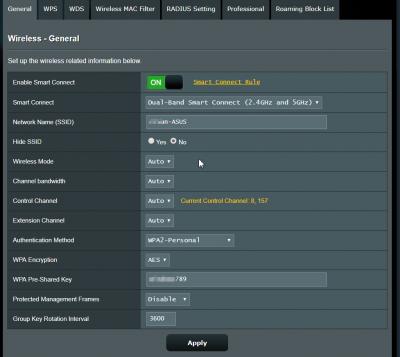
QUOTE(angelic88 @ Oct 28 2018, 12:03 PM) Recently I ran into this problem where iPhone switching between 2.4ghz and 5ghz (same ssid) will have a short 5-10 second reconnection downtime Before this it was working fine as seamlessly Recently upgraded to unifi 500Mbps Router is N66u Anyone face this issue before ? Hi, if you want to set your 2.4 & 5GHz both to same SSID, perhaps you need to buy a higher-end router. RT-AC86U got the smart connect feature which allow you to connect both 2.4Ghz and 5GHz without reconnection downtime issue. Here is the feature to solve 2.4Ghz & 5Ghz problem. When I go far will automatic switch to 2.4GHz and go near will automatic switch to 5GHz. 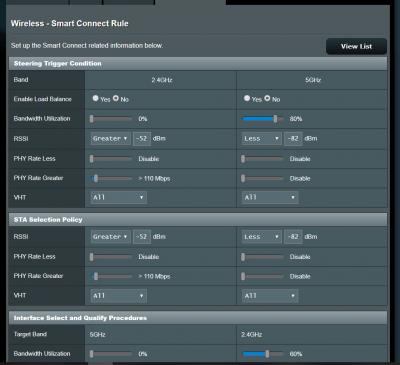
|
|
|
|
|
|
hghg.hg
|
Nov 2 2018, 11:44 AM
|
New Member
|
Hi,
Just upgraded/boosted with Unifi 300mb. TM tehcnician changed the equipment and with TM Dlink DIR 842 router. tested and can get 280++ MB dl and 50 MB upload speed. I switched back to my Asus router AC55UHP but only can get max 120++ MB dl and 50 MB upload speed on 5GHz band. Do I need to reset the Asus router setting and reconfigure again to get higher download speed? I checked that this AC55UHP is a AC1200 gigabit router and support up to 867MBps on the 5GHz band. Anyone have the same problem or tips to fix it?
|
|
|
|
|
|
blacktubi
|
Nov 2 2018, 11:54 AM
|
-

|
QUOTE(hghg.hg @ Nov 2 2018, 11:44 AM) Hi, Just upgraded/boosted with Unifi 300mb. TM tehcnician changed the equipment and with TM Dlink DIR 842 router. tested and can get 280++ MB dl and 50 MB upload speed. I switched back to my Asus router AC55UHP but only can get max 120++ MB dl and 50 MB upload speed on 5GHz band. Do I need to reset the Asus router setting and reconfigure again to get higher download speed? I checked that this AC55UHP is a AC1200 gigabit router and support up to 867MBps on the 5GHz band. Anyone have the same problem or tips to fix it? Update it to the latest firmware. |
|
|
|
|
|
hghg.hg
|
Nov 2 2018, 12:02 PM
|
New Member
|
QUOTE(blacktubi @ Nov 2 2018, 11:54 AM) Update it to the latest firmware. Thanks, will try that  |
|
|
|
|
|
hghg.hg
|
Nov 2 2018, 09:17 PM
|
New Member
|
Tried the beta firmware 9.0.0.4.382_51085 for ac55uhp. Tried a couple of setting to get highest speed. I need to disabled the QoS manager to get 290+mbps download speed. Even i set 500mb for up and down in the QoS, bandwidth stay at 80+mbps for download. All above tested on 5ghz bandwidth. For 2.4Ghz, with or without QoS, the download speed remain 90mbps. Was the beta firmware just fix the download speed for 5ghz? Or I miss some configuration? 5ghz with QoS disabled: 
2.4ghz with Qos disabled: 
|
|
|
|
|
|
bjohnxbjohn
|
Nov 2 2018, 11:59 PM
|
Getting Started
|
QUOTE(voncrane @ Nov 2 2018, 12:52 AM) Err, you've got the router, phone and guide.. What else stops you from trying it out yourself? As I couldn't get the speed I want. Phone Huawei Mate 10 Router Asus N14UHP Digi Infinite 80 (capped at 10Mbps) If i tested it from the phone 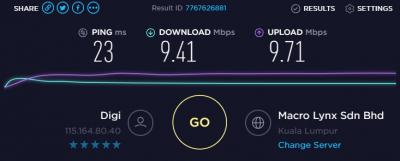
If i tested it phone + router 
Any tweak i can do? I'm not good in networking stuff. |
|
|
|
|
|
voncrane
|
Nov 3 2018, 08:14 AM
|
|
|
QUOTE(bjohnxbjohn @ Nov 2 2018, 11:59 PM) As I couldn't get the speed I want. Phone Huawei Mate 10 Router Asus N14UHP Digi Infinite 80 (capped at 10Mbps) If i tested it from the phone
If i tested it phone + router
Any tweak i can do? I'm not good in networking stuff. IMO, getting 9/10 from the router is superb d.. Can't always be 10/10 100% of the time.. Remember, even fiberized networks suffer much less mobile data, which is prone to far more interference. So accept the win and carry on. |
|
|
|
|
|
bjohnxbjohn
|
Nov 3 2018, 08:25 AM
|
Getting Started
|
QUOTE(voncrane @ Nov 3 2018, 09:14 AM) IMO, getting 9/10 from the router is superb d.. Can't always be 10/10 100% of the time.. Remember, even fiberized networks suffer much less mobile data, which is prone to far more interference. So accept the win and carry on. Okey, thanks. |
|
|
|
|
|
blacktubi
|
Nov 3 2018, 11:56 AM
|
-
|
QUOTE(hghg.hg @ Nov 2 2018, 09:17 PM) Tried the beta firmware 9.0.0.4.382_51085 for ac55uhp. Tried a couple of setting to get highest speed. I need to disabled the QoS manager to get 290+mbps download speed. Even i set 500mb for up and down in the QoS, bandwidth stay at 80+mbps for download. All above tested on 5ghz bandwidth. For 2.4Ghz, with or without QoS, the download speed remain 90mbps. Was the beta firmware just fix the download speed for 5ghz? Or I miss some configuration? 5ghz with QoS disabled:
2.4ghz with Qos disabled:
2.4Ghz is overcrowded so it will be slow no matter what router you use |
|
|
|
|
|
Hutchy
|
Nov 3 2018, 03:26 PM
|
New Member
|
Friends I have a weird experience with my Asus router. I have a Unifi Turbo 500Mbps plan and my router is Asus RT-AC55UHP and with a CAT6 ethernet cable the max speed i get is less than 250Mbps, i launched a complaint with Unifi and they sent their technicians to check and the guys who came to check the issue suggested to used my stock Unifi router which is Dlink DIR-850L and to everyones surprise i was getting 500+Mbps speed with the Dlink router.
So here is my confusion i thought the Asus RT-AC55UHP was an advanced router as compared to the DIR-850L and the technicians from unifi also agreed but none of us were able to say why the ASUS router cannot even reach 300Mbps while the Dlink obtained 500+Mbps speed consistently. Any thoughts on this? FYI i have the latest firmware, tried factory resetting the router and configured it fresh but it still cannot reach the speed above 250Mbps. One of the other forum member suggested me to do a 30 30 30 reset and after that i am now getting speeds upto 320Mbps which is better than the previous speed of less than 250 Mbps. Is it an issue with the router itself where i cannot get speeds of 500Mbps?
|
|
|
|
|
|
voncrane
|
Nov 3 2018, 03:35 PM
|
|
|
QUOTE(Hutchy @ Nov 3 2018, 03:26 PM) Friends I have a weird experience with my Asus router. I have a Unifi Turbo 500Mbps plan and my router is Asus RT-AC55UHP and with a CAT6 ethernet cable the max speed i get is less than 250Mbps, i launched a complaint with Unifi and they sent their technicians to check and the guys who came to check the issue suggested to used my stock Unifi router which is Dlink DIR-850L and to everyones surprise i was getting 500+Mbps speed with the Dlink router. So here is my confusion i thought the Asus RT-AC55UHP was an advanced router as compared to the DIR-850L and the technicians from unifi also agreed but none of us were able to say why the ASUS router cannot even reach 300Mbps while the Dlink obtained 500+Mbps speed consistently. Any thoughts on this? FYI i have the latest firmware, tried factory resetting the router and configured it fresh but it still cannot reach the speed above 250Mbps. One of the other forum member suggested me to do a 30 30 30 reset and after that i am now getting speeds upto 320Mbps which is better than the previous speed of less than 250 Mbps. Is it an issue with the router itself where i cannot get speeds of 500Mbps? If i recall correctly, there's a beta fw that might help? On mobile and can't search for the specific post with the download link.. Perhaps you can try that.. |
|
|
|
|
|
KIntos
|
Nov 4 2018, 04:33 PM
|
|
|
Hi. I need some some advise here.
I have ac86u as main, ac68u or 66u as a repeater.
Both repeater connected to ac86u thru 5ghz.
Somehow my xiaomi a1 keep getting wifi signal disconnection every 30sec once connected to repeater ssid or main unit ssid.
IOS phone no such issue. Only happened on xiaomi a1.
|
|
|
|
|
|
pl95077
|
Nov 5 2018, 01:54 PM
|
Getting Started
|
QUOTE(Hutchy @ Nov 3 2018, 04:26 PM) Friends I have a weird experience with my Asus router. I have a Unifi Turbo 500Mbps plan and my router is Asus RT-AC55UHP and with a CAT6 ethernet cable the max speed i get is less than 250Mbps, i launched a complaint with Unifi and they sent their technicians to check and the guys who came to check the issue suggested to used my stock Unifi router which is Dlink DIR-850L and to everyones surprise i was getting 500+Mbps speed with the Dlink router. So here is my confusion i thought the Asus RT-AC55UHP was an advanced router as compared to the DIR-850L and the technicians from unifi also agreed but none of us were able to say why the ASUS router cannot even reach 300Mbps while the Dlink obtained 500+Mbps speed consistently. Any thoughts on this? FYI i have the latest firmware, tried factory resetting the router and configured it fresh but it still cannot reach the speed above 250Mbps. One of the other forum member suggested me to do a 30 30 30 reset and after that i am now getting speeds upto 320Mbps which is better than the previous speed of less than 250 Mbps. Is it an issue with the router itself where i cannot get speeds of 500Mbps? Luckily still can find the beta FW of RT-AC55UHP from previous shared, please download and upgrade from below link: https://www.asuswebstorage.com/navigate/s/B...8A1EEFE35D1B98Y |
|
|
|
|
|
pl95077
|
Nov 5 2018, 01:58 PM
|
Getting Started
|
QUOTE(KIntos @ Nov 4 2018, 05:33 PM) Hi. I need some some advise here. I have ac86u as main, ac68u or 66u as a repeater. Both repeater connected to ac86u thru 5ghz. Somehow my xiaomi a1 keep getting wifi signal disconnection every 30sec once connected to repeater ssid or main unit ssid. IOS phone no such issue. Only happened on xiaomi a1. Bro, since you have all high-end router with you, you use try on AiMesh instead of used them as repeater. What a waste. Upgrade all your router FW. Setup a main router, then from main router you can add the others routers. AiMesh setup guide: https://www.youtube.com/watch?v=s-ctu96lgyI |
|
|
|
|
|
KIntos
|
Nov 5 2018, 04:44 PM
|
|
|
QUOTE(pl95077 @ Nov 5 2018, 01:58 PM) Bro, since you have all high-end router with you, you use try on AiMesh instead of used them as repeater. What a waste. Upgrade all your router FW. Setup a main router, then from main router you can add the others routers. AiMesh setup guide: https://www.youtube.com/watch?v=s-ctu96lgyINot thay i donu about aimesh. Ac66u no aimesh. 68u is on merlin. Dont ask me to revert to global fw for ac68u. Its cant be revert to global fw. |
|
|
|
|



 Quote
Quote


 0.0271sec
 0.90
0.90
 6 queries
 GZIP Disabled