Welcome Guest ( Log In | Register )

826 Pages « < 462 463 464 465 466 > » Bottom

Outline · [ Standard ] · Linear+

Home Networking ASUS Malaysia Networking User & Technical Support, Managed by ASUS Malaysia Representative

views
     
afif92
post Oct 18 2018, 02:44 PM

Casual
***
Junior Member
374 posts

Joined: Mar 2010
QUOTE(Eternalgl0ry @ Oct 18 2018, 02:44 PM)
can you use asus routers from singapore in malaysia?

I am trying to buy this router GT-ac5300 but no one sells it
*
Yes you can.. Asus router use global firmware..
tomastan4134
post Oct 19 2018, 12:19 PM

Enthusiast
*****
Senior Member
830 posts

Joined: Mar 2014
anyone know the asus rt-ac88u can support unifi's playtv/hypptv? how to configure in router setting?

is there a specific lan port for unifi IPTV? coz there got 8 lan ports.

normal asus router will specify lan 4 - unifi IPTV.

please help?
junclj
post Oct 19 2018, 12:34 PM

Look at all my stars!!
*******
Senior Member
2,348 posts

Joined: Apr 2008


QUOTE(tomastan4134 @ Oct 19 2018, 12:19 PM)
anyone know the asus rt-ac88u can support unifi's playtv/hypptv?  how to configure in router setting?

is there a specific lan port for unifi IPTV?  coz  there got 8 lan ports. 

normal asus router  will specify lan 4 - unifi IPTV.

please help?
*
you may check inside LAN > IPTV, the setting "IPTV STB Port" will tell you which port was set to IPTV.
LAN4 or LAN8, you may refers to there.
tomastan4134
post Oct 19 2018, 01:01 PM

Enthusiast
*****
Senior Member
830 posts

Joined: Mar 2014
QUOTE(junclj @ Oct 19 2018, 12:34 PM)
you may check inside LAN > IPTV, the setting "IPTV STB Port" will tell you which port was set to IPTV.
LAN4 or LAN8, you may refers to there.
*
okie thanks.

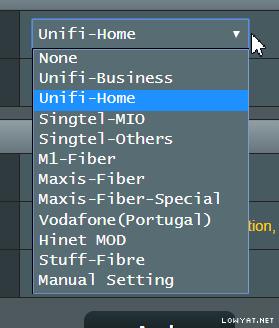
does the ac88u have the default unifi setting build in? or need to configure it manually
junclj
post Oct 19 2018, 01:20 PM

Look at all my stars!!
*******
Senior Member
2,348 posts

Joined: Apr 2008


QUOTE(tomastan4134 @ Oct 19 2018, 01:01 PM)
okie  thanks. 

does the ac88u have the default unifi setting build in?  or need to configure it manually
*
it is global firmware. If you plug to a TM BTU, the Asus router will automatically detect your line is belong to certain fiber optics region.

Attached Image
chiafoo
post Oct 19 2018, 01:34 PM

Casual
***
Junior Member
450 posts

Joined: Jan 2007


QUOTE(voncrane @ Oct 18 2018, 01:27 PM)
It's an older N router.. Expected.. Time for an AC router.
*
Becoz rt-n12 WAN port is 100M not Gigabit Ethernet . For 300Mbps Wireless , u can max it up with file sharing within local network WIFI devices only lol .

Intro u try tis Youhua wr1200js flash to openwrt , less thn rm100 from taobao .

https://klseet.com/268-openwrt/openwrt-devi...0js-unifi-ready
https://klseet.com/5-tm-unifi/unifi-general...openwrt-devices

tomastan4134
post Oct 19 2018, 01:37 PM

Enthusiast
*****
Senior Member
830 posts

Joined: Mar 2014
QUOTE(junclj @ Oct 19 2018, 01:20 PM)
it is global firmware. If you plug to a TM BTU, the Asus router will automatically detect your line is belong to certain fiber optics region.

Attached Image
*
okie thanks
anfernee
post Oct 19 2018, 02:18 PM

Getting Started
**
Junior Member
142 posts

Joined: Apr 2006
QUOTE(ASUSmy @ Oct 11 2018, 10:27 AM)
Hi All,

For those who are using RT-AC58U or RT-AC55UHP router and have trouble getting the high speed using LAN, you can try updating the beta firmware below. Do let me know is you have any problem with the firmware.

https://www.asuswebstorage.com/navigate/s/B...8A1EEFE35D1B98Y

As for the RT-AC86U HyppTV problem, we are looking at the problem now. We will get back to you ASAP.

Thank you all for your patient.
*
Thank you for providing this beta firmware for the RT-AC55UHP, it solved my slow speed problem for the Unifi 800mbps. I was only getting 360Mbps++ before this update, now I can get 800Mbps.

Below is the screenshot of the speedtest after updating to the beta firmware.


user posted image

This post has been edited by anfernee: Oct 20 2018, 02:25 AM
voncrane
post Oct 19 2018, 03:32 PM

Noir et fier!
*******
Senior Member
7,120 posts

Joined: Oct 2011
From: Wakanda


QUOTE(chiafoo @ Oct 19 2018, 01:34 PM)
Becoz rt-n12 WAN port  is 100M not Gigabit Ethernet . For 300Mbps Wireless , u can max it up with file sharing within local network WIFI devices only lol .

Intro u try tis  Youhua wr1200js flash to openwrt , less thn rm100 from taobao .

https://klseet.com/268-openwrt/openwrt-devi...0js-unifi-ready
https://klseet.com/5-tm-unifi/unifi-general...openwrt-devices
*
Err, wrong person to reply to.. Not the one with the issue.
z3r0717
post Oct 19 2018, 04:29 PM

Gundam needs to pee too
*******
Senior Member
2,239 posts

Joined: Jun 2006
From: K.L


QUOTE(Eternalgl0ry @ Oct 18 2018, 02:44 PM)
can you use asus routers from singapore in malaysia?

I am trying to buy this router GT-ac5300 but no one sells it
*
Viewnet@Lowyat does.
sheemmet
post Oct 19 2018, 06:05 PM

Casual
***
Junior Member
380 posts

Joined: Jul 2014
QUOTE(Eternalgl0ry @ Oct 18 2018, 02:44 PM)
can you use asus routers from singapore in malaysia?

I am trying to buy this router GT-ac5300 but no one sells it
*
https://www.lazada.com.my/products/asus-gt-...6f03XMu4Ji&mp=1

ASUS Certified Store in lazada has it , Up to 12 months, as low as RM210.67 per month.
icon_idea.gif
Eternalgl0ry
post Oct 20 2018, 02:08 AM

Casual
***
Junior Member
463 posts

Joined: Aug 2016
I asked and all say pre order only =,=

No stock. if the router in singapore can be use for unifi would be much better because i have a cousin who travel there every few days
nitehawk
post Oct 20 2018, 12:43 PM

On my way
****
Senior Member
699 posts

Joined: May 2006


With RT-AC55UHP, can I configure the VPN client & use static route to allow a specific IP or subnet to access via the VPN tunnel?
junclj
post Oct 20 2018, 12:57 PM

Look at all my stars!!
*******
Senior Member
2,348 posts

Joined: Apr 2008


QUOTE(Eternalgl0ry @ Oct 20 2018, 02:08 AM)
I asked and all say pre order only =,=

No stock. if the router in singapore can be use for unifi  would be much better because i have a cousin who travel there every few days
*
Buy from China sure got stock. I don't mind if no warranty to claim because I have confident on Asus routers. Just attach fan on the router to avoid heating.
myc2d
post Oct 20 2018, 05:33 PM

New Member
*
Junior Member
14 posts

Joined: Aug 2007


I am using AC68U with hard disk attached, today when i try to access the samba from my laptop (win10) using 10.168.1.1 (router ip) , it prompted that the router needs smb2 or higher. May i know how can i enable smb2 on the router ?
jusbella
post Oct 20 2018, 06:51 PM

Look at all my stars!!
*******
Senior Member
3,037 posts

Joined: Dec 2011


QUOTE(myc2d @ Oct 20 2018, 05:33 PM)
I am using AC68U with hard disk attached, today when i try to access the samba from my laptop (win10) using 10.168.1.1 (router ip) , it prompted that the router needs smb2 or higher. May i know how can i enable smb2 on the router ?
*
Its ur windows disabled SMB v1, you need to enable it then you can access it.

U need to click RUN, then enter "optionalfeatures.exe" without quote, den enter, then scroll till you founded SMB 1.0/CIFS File Sharing support, then expand it, then tick CLIENT only, den done.

Be reminded there is worse exploit in smb v1, tat why Microsoft disable it by default, if your pc is not turn on 24 hours then its safe to use. Otherwise, use at ur own risk.

voncrane
post Oct 20 2018, 08:57 PM

Noir et fier!
*******
Senior Member
7,120 posts

Joined: Oct 2011
From: Wakanda


QUOTE(jusbella @ Oct 20 2018, 06:51 PM)
Its ur windows disabled SMB v1, you need to enable it then you can access it.

U need to click RUN, then enter "optionalfeatures.exe" without quote, den enter, then scroll till you founded SMB 1.0/CIFS File Sharing support, then expand it, then tick CLIENT only, den done.

Be reminded there is worse exploit in smb v1, tat why Microsoft disable it by default, if your pc is not turn on 24 hours then its safe to use. Otherwise, use at ur own risk.
*
Any idea which decent routers support smb2?
jusbella
post Oct 20 2018, 09:00 PM

Look at all my stars!!
*******
Senior Member
3,037 posts

Joined: Dec 2011


QUOTE(voncrane @ Oct 20 2018, 08:57 PM)
Any idea which decent routers support smb2?
*
Currently no.

But there is custom firmware for asus, Merlin firmware, do it if you comfortable. But not all Asus model supported.
erik8lyt
post Oct 23 2018, 07:12 PM

Enthusiast
*****
Senior Member
715 posts

Joined: Jan 2008


user posted image

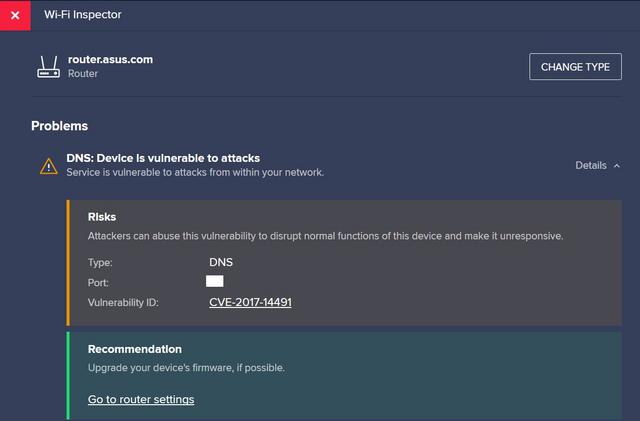
This is the result I got after the scan using Avast Wi-Fi Inspector. I checked that I'm using the latest firmware from the Asus Malaysia website and there is no need to upgrade. Should I just ignore it?

This post has been edited by erik8lyt: Oct 23 2018, 07:13 PM
jusbella
post Oct 23 2018, 08:23 PM

Look at all my stars!!
*******
Senior Member
3,037 posts

Joined: Dec 2011


QUOTE(erik8lyt @ Oct 23 2018, 07:12 PM)
user posted image

This is the result I got after the scan using Avast Wi-Fi Inspector. I checked that I'm using the latest firmware from the Asus Malaysia website and there is no need to upgrade. Should I just ignore it?
*
That's for enterprise user only. You can ignore if you not using for 24/7 without turn off.

If you need protect from those attack, you need have Firewall hardware, and install End Point security protection.

826 Pages « < 462 463 464 465 466 > » Top
 

Change to:
| Lo-Fi Version
0.0304sec    0.34    6 queries    GZIP Disabled
Time is now: 13th December 2025 - 08:36 PM