

maybe..need check my bro pc..
Home Networking ASUS Malaysia Networking User & Technical Support, Managed by ASUS Malaysia Representative
Home Networking ASUS Malaysia Networking User & Technical Support, Managed by ASUS Malaysia Representative
|
|
 Jan 13 2016, 10:22 PM Jan 13 2016, 10:22 PM
Show posts by this member only | IPv6 | Post
#4101
|
 
Senior Member
6,779 posts Joined: Jan 2009 From: SEGI Heaven  
|
maybe..need check my bro pc..
|
|
|
|
|
|
Jan 13 2016, 11:45 PM
Show posts by this member only | IPv6 | Post
#4102
|

Junior Member
116 posts Joined: Oct 2015
|
QUOTE(ASUSmy @ Jan 13 2016, 01:39 PM) Hi ericlawyh, Hello ASUSmyThank you for the information, may I know when you connected to the 5GHz, what is the data rate that you get for your WiFi. Thank you  With 5G wireless LAN connection speed of 300Mbps, what is the maximum the NAS transfer speed (with connected USB 3.0 HDD) can be handled by RT-AC1200HP? 
This post has been edited by ericlawyh: Jan 14 2016, 02:54 PM |
|
|
Jan 14 2016, 12:25 AM
Show posts by this member only | IPv6 | Post
#4103
|

Junior Member
101 posts Joined: Sep 2008
|
hello may i know.. is there any solution for my issue on asus dsl-n12e.. the lan port is not working at all... no green light, my ethernet status in cable unplugged... wireless is working fine..
Thanks.. |
|
|
Jan 14 2016, 12:42 AM
|

Senior Member
2,410 posts Joined: Jan 2003 From: Selangor
|
QUOTE(ASUSmy @ Jan 13 2016, 01:30 PM) Hi Netto Hikari, lagi teruk. cannot even update the firmware. i downloaded the firmware, ASUS RT-N18U Firmware version 3.0.0.4.378.9459, but it still remains version 3.0.0.4.374_4983 Can you try updating the firmware to the latest and do a factory reset. If still cannot, can you provide me your setting and log files from the router and I will help you check. I will PM you my e-mail address. Thank you.  |
|
|
Jan 14 2016, 08:08 AM
|

Senior Member
3,034 posts Joined: Dec 2011
|
Try another lan port.
If other port working, means the lan port u plug in spoilt, no way to repair it, need replacement or buy new one. QUOTE(bilaman @ Jan 14 2016, 12:25 AM) hello may i know.. is there any solution for my issue on asus dsl-n12e.. the lan port is not working at all... no green light, my ethernet status in cable unplugged... wireless is working fine.. Thanks.. |
 |
Jan 14 2016, 10:16 AM
|

Senior Member
2,319 posts Joined: Mar 2010
|
QUOTE(ycs @ Jan 13 2016, 05:27 PM) @ASUSmy, Hi ycs,bit torent on N56U Firmware Version:3.0.0.4.378_4850 router seems cannot max out download speed, no QOS is there any extra settings needed? May I know what is your Internet package and what is the speed that you get when doing the download? Has you tried other torrent with higher seed? Thank you |
|
|
|
|
|
Jan 14 2016, 10:43 AM
|
|
Senior Member
2,319 posts Joined: Mar 2010
|
QUOTE(Netto Hikari @ Jan 14 2016, 12:42 AM) lagi teruk. cannot even update the firmware. i downloaded the firmware, ASUS RT-N18U Firmware version 3.0.0.4.378.9459, but it still remains version 3.0.0.4.374_4983 Hi Netto Hikari, RT-N18U is special a bit, you will need to upgrade to version 3.0.0.4.378.8041 first then only you can update to the latest version. Thank you |
|
|
Jan 14 2016, 12:21 PM
|
|
Junior Member
101 posts Joined: Sep 2008
|
QUOTE(jusbella @ Jan 14 2016, 08:08 AM) Try another lan port. mine all 4 lan ports now working... is it normal for all lan port damage all at once..?If other port working, means the lan port u plug in spoilt, no way to repair it, need replacement or buy new one. |
|
|
Jan 14 2016, 12:24 PM
|
|
Senior Member
3,034 posts Joined: Dec 2011
|
No. Only one port spoilt..
QUOTE(bilaman @ Jan 14 2016, 12:21 PM) mine all 4 lan ports now working... is it normal for all lan port damage all at once..? |
|
|
Jan 14 2016, 12:43 PM
|
|
Junior Member
32 posts Joined: Aug 2015
|
QUOTE(Skoosha @ Jan 12 2016, 02:33 AM) Was wondering the same myself... I just dug out my old 12 HP after having some problems with the D-link AC 750 (Dir 816). The answer to your question will depend on what Revision of RTN 12HP you got.. If you have the B1 you can flash the latest which is 3.0.0.4.378.9443. MYAsus,This leads to my question addressed to ASUS MY.. Both revision of the router started of using same firmware version numbers, with the first upgrade to 4018 fixing the same issues.. The B1 then got 3 more updates to the current 9443 with numerous security and other upgrades... Does this mean that the non B1 revision is still lacking the following?? ASUS RT-N12HP_B1 Firmware version 3.0.0.4.378.7449 Security fixes - Enhanced the login authentication strength and fixed related issues. - Forced administrator to change the default password "admin" in internet setup wizard. - Added protection mechanism for GUI login brute-force attack for login username and password. - Administrator can assign a specified IP to login GUI in Administration > System > "Allow only specified IP. - Fixed CSRF and XSS vulnerability when router is in default status. - Fixed infosvr security issue. ASUS RT-N12HP_B1 Firmware version 3.0.0.4.378.9165 Security Fixes - Fixed CVE-2015-6949 buffer overflow issue, special thanks for Elvis Collado at Praetorian. - Fixed Web server Accept-Language buffer overflow, special thanks for Elvis Collado at DVLabs. - Fixed Web server URL handler buffer overflow special thanks for Elvis Collado at DVLabs. - Fixed CSRF and XSS vulnerability. - Fixed infosvr security issue - Enhanced router login password and wireless password (WPA2) strength check method to against brute-force attack. - Reject administrator to set too easy to guess login and wireless password to avoid brute-force attack. ASUS RT-N12HP B1 Firmware version 3.0.0.4.378.9443 Security fixes: - Fixed User-Agent buffer overflow. - Fixed null ptr dereference in https issue. - Fixed buffer overflow issues. - Modified brute-force protection mechanism in router login page. - Fixed CVE-2015-6949 buffer overflow issue. - Fixed Web server Accept-Language buffer overflow. - Fixed Web server URL handler buffer overflow. - Fixed CSRF and XSS vulnerability. - Enhanced router login password and wireless password(WPA2) strength check method to against brute-force attack. - Reject administrator to set too easy to guess login and wireless password to avoid brute-force attack. - Fixed CSRF and XSS vulnerability when router is in default status (user does not set the router yet).. As you can see there has been extensive work to get the B1 Patched and updated.... Is the non B1 Rev safe to use without all these security updates?? Thanks for your help Roger Have you had a chance to look into this yet? Cheers |
|
|
Jan 14 2016, 12:46 PM
|

Senior Member
749 posts Joined: Apr 2008
|
Is there any firmware upgrade for AC1200HP? Saw Padavan firmware but not sure I can upgrade using that third party FW or not..
 |
|
|
Jan 14 2016, 02:51 PM
|
|
Junior Member
116 posts Joined: Oct 2015
|
QUOTE(roxx @ Jan 14 2016, 12:46 PM) Is there any firmware upgrade for AC1200HP? Saw Padavan firmware but not sure I can upgrade using that third party FW or not.. Do you manage to utilize the AC1200HP's NAS capability?Based on my personal usage, its performance sucks. - Wireless file transfer using normal Windows Explorer Copy & Paste: 1.74MB/s - Wireless file transfer using SCP Protocol: 0.05625MB/s Download, 0.0875MB/s Upload |
|
|
Jan 14 2016, 03:25 PM
|
|
Junior Member
101 posts Joined: Sep 2008
|
QUOTE(jusbella @ Jan 14 2016, 12:24 PM) No. Only one port spoilt.. Sorry typo... all 4 lan port NOT working.....  |
|
|
|
|
|
Jan 14 2016, 03:30 PM
|
|
Senior Member
3,034 posts Joined: Dec 2011
|
Den its might the chip that control all lan port is malfunction.
QUOTE(bilaman @ Jan 14 2016, 03:25 PM) Sorry typo... all 4 lan port NOT working..... |
|
|
Jan 14 2016, 04:04 PM
|
|
Senior Member
749 posts Joined: Apr 2008
|
QUOTE(ericlawyh @ Jan 14 2016, 02:51 PM) Do you manage to utilize the AC1200HP's NAS capability? Not using NAS currently bro.. Will try that function maybe this week.. Based on my personal usage, its performance sucks. - Wireless file transfer using normal Windows Explorer Copy & Paste: 1.74MB/s - Wireless file transfer using SCP Protocol: 0.05625MB/s Download, 0.0875MB/s Upload |
|
|
 Jan 14 2016, 06:46 PM Jan 14 2016, 06:46 PM
|

Junior Member
245 posts Joined: Feb 2010
|
QUOTE(ericlawyh @ Jan 14 2016, 03:51 PM) Do you manage to utilize the AC1200HP's NAS capability? Play with my RT-AC1200HP, my RT-AC1200HP more powerful Based on my personal usage, its performance sucks. - Wireless file transfer using normal Windows Explorer Copy & Paste: 1.74MB/s - Wireless file transfer using SCP Protocol: 0.05625MB/s Download, 0.0875MB/s Upload  - Wireless file transfer using normal Windows Explorer Copy & Paste: 3.08MB/s Attached thumbnail(s) 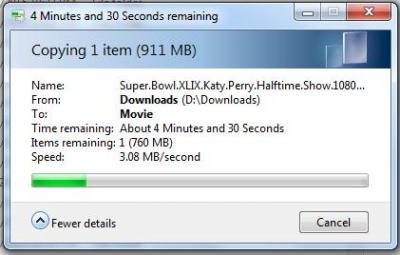
|
|
|
Jan 14 2016, 06:53 PM
Show posts by this member only | IPv6 | Post
#4117
|
 
Elite
4,619 posts Joined: Jul 2011
|
QUOTE(pl95077 @ Jan 14 2016, 06:46 PM) Play with my RT-AC1200HP, my RT-AC1200HP more powerful what wifi adapter are you using, that is awfully slow for a AC capable device. I can get 4-6 mBps easily even on 802.11n - Wireless file transfer using normal Windows Explorer Copy & Paste: 3.08MB/s |
|
|
Jan 14 2016, 08:05 PM
|

Newbie
4 posts Joined: May 2015
|
QUOTE(kokmengng @ Apr 6 2015, 10:58 AM) This issue is quite similar to mine. I also tried to re-create the whole connection but was stuck at the step after i key in my unifi id and password. Hi may I know how you guys fix it? Coz recently I'm facing this problem too.After I key in my unifi username and password loading awhile then server not found.  Thank you This post has been edited by D96: Jan 14 2016, 08:10 PM |
|
|
Jan 14 2016, 08:14 PM
|
|
Senior Member
3,034 posts Joined: Dec 2011
|
F5 to refresh n press YES to cont.
QUOTE(D96 @ Jan 14 2016, 08:05 PM) Hi may I know how you guys fix it? Coz recently I'm facing this problem too. After I key in my unifi username and password loading awhile then server not found. Thank you |
|
|
Jan 15 2016, 01:42 AM
|

Junior Member
324 posts Joined: Jan 2006
|
QUOTE(rjflyguy @ Jan 9 2016, 01:36 AM) Thank you bro. Will try tomorrow morning the beta firmware.... Hi AsusMy,I have been running the new Beta firmware for RT-AC55UHP and everything seems fine and dandy.... All functions and features that I used is working as expected. Just 1 question though, do I need to do hard reset after the firmware upgrade? Thanks bro... -RJ- |
| Change to: |  0.0239sec 0.0239sec
 0.76 0.76
 6 queries 6 queries
 GZIP Disabled GZIP Disabled
Time is now: 9th December 2025 - 11:50 PM |
 Quote
Quote