Welcome Guest ( Log In | Register )

Outline · [ Standard ] · Linear+

Home Networking ASUS Malaysia Networking User & Technical Support, Managed by ASUS Malaysia Representative

views
     
mwtang
post Oct 16 2014, 04:03 PM

Enthusiast
*****
Senior Member
765 posts

Joined: May 2005
Hi ASUSmy

Just got myself a RT-AC68 router.

The latest firmware RT-AC68U - 3.0.0.4.376.1663 , does it have problems with UNIFI ? I was told not to upgrade it.

Thanks

mwtang
post Oct 16 2014, 05:29 PM

Enthusiast
*****
Senior Member
765 posts

Joined: May 2005
QUOTE(sHawTY @ Oct 16 2014, 05:17 PM)
Not to upgrade to what?
I'm using RT-AC68U too & it's working fine with my UniFi 10Mb/s.

But I no longer use official ASUS firmware.
I'm using AsusWRT-Merlin 376.47.
*
thanks !

Merlin, yea reading it. not good at configuring it .


mwtang
post Oct 16 2014, 05:50 PM

Enthusiast
*****
Senior Member
765 posts

Joined: May 2005
QUOTE(sHawTY @ Oct 16 2014, 05:37 PM)
Setting up AsusWRT-Merlin is the same as setting up Asus official firmware.
The differences between those 2 firmwares is AsusWRT-Merlin offers extra features & bug fixes that official Asus official firmware doesn't have.
*
thanks buddy, will give it a go. !

mwtang
post Oct 22 2014, 01:30 PM

Enthusiast
*****
Senior Member
765 posts

Joined: May 2005
Hi . Anyone aetup IPv6 on their asus router for unifi?
Would appreciate some guide lines

Thanks in advance

Am using the ac87u
mwtang
post Oct 23 2014, 05:04 PM

Enthusiast
*****
Senior Member
765 posts

Joined: May 2005
QUOTE(aidilaidilaidil @ Oct 23 2014, 04:25 PM)
1) Go to IPv6
2) Connection type : Native
3) Interface : PPP

That's all. BTW u using stock Asus firmware or merlin firmware?
*
am using stock Asus firmware
mwtang
post Oct 23 2014, 06:22 PM

Enthusiast
*****
Senior Member
765 posts

Joined: May 2005
QUOTE(mwtang @ Oct 23 2014, 05:04 PM)
am using stock Asus firmware
*
got it working IPV6
mwtang
post Oct 23 2014, 08:55 PM

Enthusiast
*****
Senior Member
765 posts

Joined: May 2005
QUOTE(aidilaidilaidil @ Oct 23 2014, 07:06 PM)
Your RT-AC87U will run cooler if it stands vertical like RT-AC68U.
*
If only it can stand . Using my ac68 as repeater mode
mwtang
post Oct 23 2014, 11:24 PM

Enthusiast
*****
Senior Member
765 posts

Joined: May 2005
QUOTE(aidilaidilaidil @ Oct 23 2014, 11:13 PM)
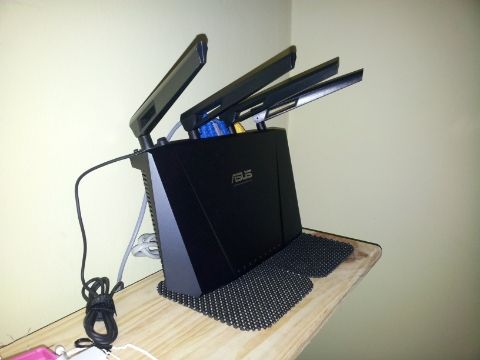
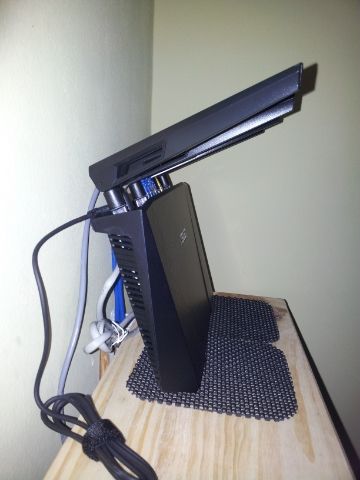
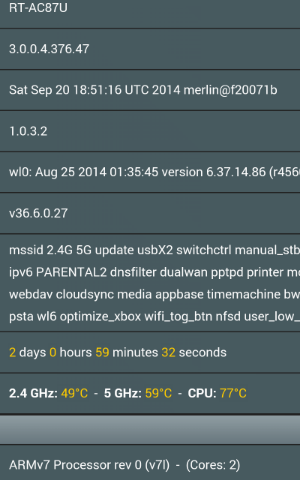
DIY  tongue.gif . Put it on a frame / souvenir stand or lean it againts the wall like I do.

Horizontal position:
2Ghz : > 52°c
5Ghz : > 65°c
CPU : > 80°c

Vertical position:
2Ghz : < 50°c
5Ghz : < 62°c
CPU : < 75°c
*
PICS !!!

mwtang
post Oct 24 2014, 07:35 AM

Enthusiast
*****
Senior Member
765 posts

Joined: May 2005
QUOTE(aidilaidilaidil @ Oct 24 2014, 12:23 AM)
user posted image

user posted image

user posted image
*
cool !!!

mwtang
post Nov 1 2014, 03:11 PM

Enthusiast
*****
Senior Member
765 posts

Joined: May 2005
hi all,

need some advise here please. Please do excuse my lousy network drawing. This is the best i can explain.


Current Setup.

1. Living Room. Modem Router sits on WP1, connected to BTU via CAT 5E1 using AC87.

2. Upstairs . Wireless Extender using AC68.

3. Study Room. None.

Using single SSID.


Proposed setup. Refer to attachement


1. Modem Router sits in utility room. ( Dunno which modem/router to use). Will NOT be using wireless here. just to dial up to Unifi

2. Living room. AC87?AC68? as AP connected to Modem Router at Utility Room via CAT 5E1 plus wireless here.

3. Study room. Connect to Modem Router at Utility Room via CAT 5E2 and join the current wifi signal.

4. Upstairs. Connect to Modem Router at Utility Room via CAT 5E3 and join the current wifi signal.

Prefer single SSID.


MY apology if the details above are not clear.

What i have in my hand now is :-

1. AC87U
2. AC68U
3. RTN14UHP
4. Airport Extreme
5. Airport Express

The question is which one should i use as modem and which one to use as APs or should i get another ASUS modem ?

my Living Room, i have it currently wired up (Ethernet)my PS4 and Apple TV

my Study room I plan to have my IMAC and printers sitting in there.


Thanks all !!! looking forward for all the replies.

This post has been edited by mwtang: Nov 1 2014, 03:17 PM


Attached File(s)
Attached File  Home_Network.pdf ( 66.88k ) Number of downloads: 15

mwtang
post Nov 12 2014, 04:59 PM

Enthusiast
*****
Senior Member
765 posts

Joined: May 2005
QUOTE(ezpoir @ Nov 12 2014, 02:19 PM)
Good day everyone, I've been facing a problem with my wifi connection for the past few weeks.

ASUS, please refer to this thread for my problem,

ASUS RT-N14UHP PROBLEM

I've gotten some help from the replies in that thread, and I've done everything I've been suggested to do,
but my problem still persists.

It has gotten slightly better, after doing everything I've been told to in that thread, but the problem still persists and it comes now and then, inconstantly.

I really hope to get this problem solved AS SOON AS POSSIBLE, it has been a long time and it is really frustrating.

I hope to get a reply soon, thank you!
[SIZE=14]
*
try this

http://www.digitaltrends.com/mobile/ios-8-problems/2/


mwtang
post Nov 22 2014, 01:42 PM

Enthusiast
*****
Senior Member
765 posts

Joined: May 2005
QUOTE(sHawTY @ Nov 22 2014, 11:02 AM)
AsusWRT-Merlin 376.48 STABLE Update 3 has been released exclusively for RT-N16, RT-N66U & RT-AC66U.

Changelog:
CODE
376.48_3 (20-Nov-2014)
  - FIXED: NAT loopback was broken on MIPS devices
           (backported Asus fix from 376_3626)

*
Cool will update shortly
mwtang
post Nov 23 2014, 02:23 PM

Enthusiast
*****
Senior Member
765 posts

Joined: May 2005
QUOTE(sHawTY @ Nov 22 2014, 11:02 AM)
AsusWRT-Merlin 376.48 STABLE Update 3 has been released exclusively for RT-N16, RT-N66U & RT-AC66U.

Changelog:
CODE
376.48_3 (20-Nov-2014)
  - FIXED: NAT loopback was broken on MIPS devices
           (backported Asus fix from 376_3626)

*
where to find update 3? i search the https://www.mediafire.com/folder/bkfq2a6aeb...n#qc4e5xc252czd

it still shows RT-AC68U_3.0.0.4_376.48_1.zip which i am currently using.

thanks
mwtang
post Nov 23 2014, 02:35 PM

Enthusiast
*****
Senior Member
765 posts

Joined: May 2005
QUOTE(sHawTY @ Nov 23 2014, 02:27 PM)
You didn't read my post thoroughly bro. laugh.gif
*
my bad....too excited when i glance through your post..
mwtang
post Oct 7 2024, 05:37 PM

Enthusiast
*****
Senior Member
765 posts

Joined: May 2005
Hi all, noobie here

Need so kind advise here please. Just bought myself a pair of Xt8 and upgraded to UNIFI 1GB using the ONR FX3060V modem provided by TM. Current Setup - 3 AC68u running on AP Mode (wired) to 3 different rooms.

Advise needed in replacing the AC68u to XT8.

1. Possible to run 3 XT8 units as APs and still use the zenwifi ?
2. or 1 Asus Router (as AP) with AX capabilities and 2 XT8 as APs with Zenwifi
3. Wired or the dedicated wireless backhaul would be a better option ?

I found out this post that can its better to use bridge the FX3060V to Asus modem, anyone setup this way please ?

https://forum.lowyat.net/index.php?showtopi...#entry109336492


Thanks and appreciate your advise

This post has been edited by mwtang: Oct 7 2024, 05:41 PM
mwtang
post Oct 7 2024, 06:09 PM

Enthusiast
*****
Senior Member
765 posts

Joined: May 2005
QUOTE(blacktubi @ Oct 7 2024, 05:46 PM)
My recommendation is use back your old fibre modem from TM (it still works) rather than using the D-Link combo box that's prone to speed drop issue

Use 1 unit of XT8 as the main unit on PPPOE mode

Use another unit of XT8 as the mesh node with wired backhaul

By doing this you can get seamless roaming rather than the old school AP mode

Remember to turn on wired backhaul mode on AiMesh settings once you do this
*
Thanks for the quick response . My old modem is the UNOU ZTE ZXHN P820 model . Was told it won’t get 1gb but around 900mb . If so am ok with that .
mwtang
post Oct 8 2024, 12:11 AM

Enthusiast
*****
Senior Member
765 posts

Joined: May 2005
QUOTE(blacktubi @ Oct 7 2024, 08:02 PM)
It should reach 930Mbps

You can reach 1000Mbps and beyond with the D-Link combo box?
*
u are right, best on wired with the dlunk combo still max at 970mb. Would it be better to bridge the Dlink ? or use the previous modem please. ?
mwtang
post Oct 8 2024, 11:20 AM

Enthusiast
*****
Senior Member
765 posts

Joined: May 2005
QUOTE(blacktubi @ Oct 8 2024, 10:43 AM)
I would prefer to reuse the old modem as it's probably more reliable

Tons of complain on the D-Link ONU dropping speed on the Unifi thread
*
thank you ! for the recommendation. all i have to do is just plug back in the old modem and configure the asus xt8 ya ?
mwtang
post Dec 19 2024, 05:13 PM

Enthusiast
*****
Senior Member
765 posts

Joined: May 2005
QUOTE(Susuwatari @ Dec 19 2024, 05:03 PM)
Same for me, mine is ET12. Tried both custom and Unifi business profile but still not working.
*
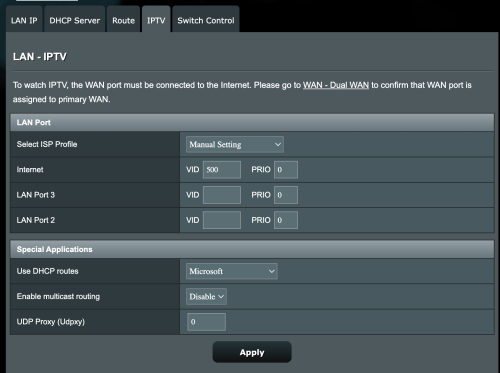
try this . manual setting on the ISP. I did this on my xt8

user posted image

This post has been edited by mwtang: Dec 19 2024, 05:13 PM


Change to:
| Lo-Fi Version
0.0451sec    0.47    7 queries    GZIP Disabled
Time is now: 4th December 2025 - 08:03 PM