Outline ·
[ Standard ] ·
Linear+
Configure Huawei ONT HG8145X6 as modem only, Time FB, Bridge Mode
|
TSspamfish
|
 Oct 31 2022, 11:55 PM, updated 2y ago Oct 31 2022, 11:55 PM, updated 2y ago
|
Getting Started


|
Anyone out there can lend a helping hand on how to disable the Huawei ONT as a router and make it into Modem mode only. As I want to use my own Asus XT8 to manage the wifi and PPOE settings.
This post has been edited by spamfish: Jul 13 2024, 12:00 PM
|
|
|
|
|
|
Sam Leong
|
Nov 1 2022, 06:07 AM
|
|
|
QUOTE(spamfish @ Oct 31 2022, 11:55 PM) Anyone out there can lend a helping hand on how to disable the Huawei ONT as a router and make it into Modem mode only. As I want to use my own Asus XT8 to manage the wifi and PPOE settings. call TIME cs to change to bridge mode |
|
|
|
|
|
TSspamfish
|
Nov 18 2022, 02:53 AM
|
Getting Started
|
QUOTE(Sam Leong @ Nov 1 2022, 06:07 AM) call TIME cs to change to bridge mode manage to call TIME cs to change the mode. After that I tried to plug in my router to LAN1 of the ONT with PPOE user name / pswd. Does not seem to work. Any hint? |
|
|
|
|
|
Seng89
|
Nov 18 2022, 04:42 PM
|
|
|
QUOTE(spamfish @ Nov 18 2022, 02:53 AM) manage to call TIME cs to change the mode. After that I tried to plug in my router to LAN1 of the ONT with PPOE user name / pswd. Does not seem to work. Any hint? I'm also want to know. Not sure how the cabiings to plug etc. |
|
|
|
|
|
TSspamfish
|
Nov 19 2022, 12:12 AM
|
Getting Started
|
QUOTE(Seng89 @ Nov 18 2022, 04:42 PM) I'm also want to know. Not sure how the cabiings to plug etc. cabling is straigh foward. Should be from your own brand router WAN port to the Huawei ONT LAN1. But it also depends on how you config the ONT port tagging. I cant still get it to work though. |
|
|
|
|
|
SUSpetpenyubobo
|
Nov 19 2022, 02:10 PM
|
|
|
QUOTE(spamfish @ Nov 18 2022, 02:53 AM) manage to call TIME cs to change the mode. After that I tried to plug in my router to LAN1 of the ONT with PPOE user name / pswd. Does not seem to work. Any hint? No DO NOT set your 3rd party router using PPPoE for its WAN connection. You need to set it as dynamic IP WAN type as authentication is already done by your TIME supplied Huawei router turned into bridged mode. TIME does not use the obsolete PPPoE for authentication unlike TM Unifi. Authentication is done on its server side to assign IPs to its router/ONTs. We call this method IPoE. https://vasexperts.com/resources/glossary/ipoe/ |
|
|
|
|
|
Gaara92
|
Nov 19 2022, 03:39 PM
|
|
|
QUOTE(petpenyubobo @ Nov 19 2022, 02:10 PM) No DO NOT set your 3rd party router using PPPoE for its WAN connection. You need to set it as dynamic IP WAN type as authentication is already done by your TIME supplied Huawei router turned into bridged mode. TIME does not use the obsolete PPPoE for authentication unlike TM Unifi. Authentication is done on its server side to assign IPs to its router/ONTs. We call this method IPoE. https://vasexperts.com/resources/glossary/ipoe/Some of them still using PPPoE, but with implemented VLAN id of 499. You may need to put VLAN id. |
|
|
|
|
|
TSspamfish
|
Nov 19 2022, 03:43 PM
|
Getting Started
|
QUOTE(Gaara92 @ Nov 19 2022, 03:39 PM) Some of them still using PPPoE, but with implemented VLAN id of 499. You may need to put VLAN id. i did read somewhere on reddit, u need to turn on vlan on 3rd party router to get it to work. |
|
|
|
|
|
Gaara92
|
Nov 19 2022, 03:55 PM
|
|
|
QUOTE(spamfish @ Nov 19 2022, 03:43 PM) i did read somewhere on reddit, u need to turn on vlan on 3rd party router to get it to work. TS should check on his Huawei ONT whether it have VLAN or not. It will show something like this 499/0 |
|
|
|
|
|
TSspamfish
|
Nov 19 2022, 04:10 PM
|
Getting Started
|
QUOTE(petpenyubobo @ Nov 19 2022, 02:10 PM) No DO NOT set your 3rd party router using PPPoE for its WAN connection. You need to set it as dynamic IP WAN type as authentication is already done by your TIME supplied Huawei router turned into bridged mode. TIME does not use the obsolete PPPoE for authentication unlike TM Unifi. Authentication is done on its server side to assign IPs to its router/ONTs. We call this method IPoE. https://vasexperts.com/resources/glossary/ipoe/thank you for the suggestion...let me try it out. |
|
|
|
|
|
SUSpetpenyubobo
|
Nov 19 2022, 04:20 PM
|
|
|
QUOTE(Gaara92 @ Nov 19 2022, 03:39 PM) Some of them still using PPPoE, but with implemented VLAN id of 499. You may need to put VLAN id. Usually if you're using an ISP other than TIME on their network then only you'd need to put in the VLAN to separate the traffic. If you're using Time Fibre ISP just like Allo where you're using the incumbent ISP, City Broadband then no need VLAN. The IPoE authentication is already done and untagged by bridged device itself except the LAN routing part and DHCP assignment. |
|
|
|
|
|
dengko
|
Feb 15 2023, 05:44 PM
|
New Member
|
This is how i do it
Time modem HG8145X6
Tplink router AX73
step 1: call TIME cs ask to change to bridge mode
step 2: go to modem admin panel, disable wifi
step 3: connect LAN1 modem to WAN port router
step 4: inside router admin panel, change connection type to pppoe and insert your time user:pass credential
done
|
|
|
|
|
|
jsnkok
|
Mar 10 2023, 11:12 AM
|
|
|
QUOTE(dengko @ Feb 15 2023, 05:44 PM) This is how i do it Time modem HG8145X6 Tplink router AX73 step 1: call TIME cs ask to change to bridge mode step 2: go to modem admin panel, disable wifi step 3: connect LAN1 modem to WAN port router step 4: inside router admin panel, change connection type to pppoe and insert your time user:pass credential done Yup this works for me as well. Same setup |
|
|
|
|
|
nodeffect
|
Sep 14 2023, 10:33 PM
|
|
|
QUOTE(dengko @ Feb 15 2023, 05:44 PM) This is how i do it Time modem HG8145X6 Tplink router AX73 step 1: call TIME cs ask to change to bridge mode step 2: go to modem admin panel, disable wifi step 3: connect LAN1 modem to WAN port router step 4: inside router admin panel, change connection type to pppoe and insert your time user:pass credential done may I know why need to call them to change to bridge mode ? cuz I can change the mode in the modem settings.. pls enlighten me, thx |
|
|
|
|
|
ChenKaiWen
|
Sep 14 2023, 10:37 PM
|
|
|
QUOTE(nodeffect @ Sep 14 2023, 10:33 PM) may I know why need to call them to change to bridge mode ? cuz I can change the mode in the modem settings.. pls enlighten me, thx How can you change it? Majority of the settings including bridge mode is not available using the credentials on the sticker. It's only available through another username with a password only TIME knows and remote access by TIME themselves. Me, myself had tried editing HTML. Plenty of settings were revealed. Doing anything will result in an error. |
|
|
|
|
|
nodeffect
|
Sep 14 2023, 11:02 PM
|
|
|
QUOTE(ChenKaiWen @ Sep 14 2023, 10:37 PM) How can you change it? Majority of the settings including bridge mode is not available using the credentials on the sticker. It's only available through another username with a password only TIME knows and remote access by TIME themselves. Me, myself had tried editing HTML. Plenty of settings were revealed. Doing anything will result in an error. I dont know man, i ask the installer to give me the access to the modem, then he just give me... im quite sure that I can change it... thats why im curious why so many people here say we need to call... correct me if im wrong... pls see screenshot below 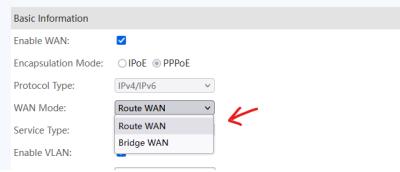
|
|
|
|
|
|
TSspamfish
|
Sep 14 2023, 11:18 PM
|
Getting Started
|
QUOTE(nodeffect @ Sep 14 2023, 11:02 PM) I dont know man, i ask the installer to give me the access to the modem, then he just give me... im quite sure that I can change it... thats why im curious why so many people here say we need to call... correct me if im wrong... pls see screenshot below
yes confirm need to call customer service and ask them to enable for you. |
|
|
|
|
|
nodeffect
|
Sep 14 2023, 11:32 PM
|
|
|
QUOTE(spamfish @ Sep 14 2023, 11:18 PM) yes confirm need to call customer service and ask them to enable for you. wait, i can change the settings there, still need to call ? im so confused |
|
|
|
|
|
TSspamfish
|
Sep 14 2023, 11:50 PM
|
Getting Started
|
QUOTE(nodeffect @ Sep 14 2023, 11:32 PM) wait, i can change the settings there, still need to call ? im so confused I change to Time fibre. their ONT is modem + router so they need to enable something from their side to make it work. |
|
|
|
|
|
ChenKaiWen
|
Sep 15 2023, 06:08 AM
|
|
|
QUOTE(nodeffect @ Sep 14 2023, 11:02 PM) I dont know man, i ask the installer to give me the access to the modem, then he just give me... im quite sure that I can change it... thats why im curious why so many people here say we need to call... correct me if im wrong... pls see screenshot below
Nobody here had ever gotten access that's why. Can you tell us the username and password? |
|
|
|
|



 Quote
Quote




 0.0257sec
 0.77
0.77
 6 queries
 GZIP Disabled