Welcome Guest ( Log In | Register )

Bump Topic Topic Closed RSS Feed
8 Pages  1 2 3 > » Bottom

Outline · [ Standard ] · Linear+

 Lenovo IdeaPad Y Series Thread v2, When Y480/580 meet Y400/500

views
     
mrl
post Dec 8 2012, 09:30 AM

Enthusiast
*****
Senior Member
977 posts

Joined: Jan 2009
From: In the middle...


Congratulations for the new thread!!! rclxms.gif

been waiting for quite some time for you guys to open up new threads before joining in... tongue.gif

Been owning Y580 for quite some time already and all I can say is I'm impressed with the value vs performance of this laptop... Coming from desktop gaming, I'm pretty much satisfied with this laptop..

I'm still curious though on few things... one thing is extra cooling. Of course by default this laptop is not that hot (though I'm pretty nervous when I run it first time because I'm used to having 38'C CPU idling on my desktop) but any good extra cooler suggestion? I'm on Targus Chillmat at the moment and I dont really notice much improvement in cooling actually...

Another thing is, we all know that gtx660m is capable of running 3d vision, but I wonder if anybody has tried that?
mrl
post Dec 8 2012, 02:03 PM

Enthusiast
*****
Senior Member
977 posts

Joined: Jan 2009
From: In the middle...


QUOTE(kuroneko0509 @ Dec 8 2012, 09:39 AM)
well, most of us use CM Notepal U3 for our Y580 because of adjustable fan position. It do helps a bit in cooling our laptop smile.gif

As for that 3d vision, i dunno... never tested it
*
Other than CM anybody tried any other brand?

Looking at the spec of y500, dual gpu setup looks good.... wonder how's the benchmark... drool.gif
mrl
post Dec 9 2012, 12:07 AM

Enthusiast
*****
Senior Member
977 posts

Joined: Jan 2009
From: In the middle...


QUOTE(jslut @ Dec 8 2012, 04:25 PM)
hey yall, new user smile.gif

currently scanning for virus using mse after uninstalling mcafee. shame it's a 3 year subscription
*
Is it 3 year subscription FOC?

The worst an antivirus can be is, just like McAfee... My office use it, no way to disable it, and what happen is headache all the time... rclxub.gif
mrl
post Dec 9 2012, 03:03 PM

Enthusiast
*****
Senior Member
977 posts

Joined: Jan 2009
From: In the middle...


QUOTE(mengfart @ Dec 9 2012, 12:54 PM)
Hey guys,

My Y580 is running slower when not charging.
Like when im not charging the game will feel more laggy than when i'm charging. Anyone having this problem ?

Windows 8 .

I think the lenovo battery saver is the cause.

any advise ?

Thanks
*
yeah, i think it's normal... I have the same problem... already on High Performance profile but the real performance only comes after I plugged in the AC... so I just leave it plugged in and take out the battery...

QUOTE(sss2sssss @ Dec 9 2012, 01:38 PM)
Well the Lenovo Dynamic Graphic is the Kepler GPU boost function enabled plan, even though u din open it u also can play ur game, but open it ur GPU will be boost to 885MHz(GPU and Shader clock) instead of 745MHz(GPU and Shader clock)
*
Good news indeed... i thought they just want to prevent quick battery drain by reducing performance while on battery... thumbup.gif

Probably can try later when I'm back at home...
mrl
post Dec 10 2012, 12:23 AM

Enthusiast
*****
Senior Member
977 posts

Joined: Jan 2009
From: In the middle...


QUOTE(FauxHawk @ Dec 9 2012, 10:31 PM)
Also, anybody else got problems with windows update?
*
When i was on win7 i end up disabling windows update because it keeps on restarting just to install the failed update... i think it's the bloatware is the culprits... once i clean install win8, no more problem...

QUOTE(dont8cum @ Dec 9 2012, 10:46 PM)
i'm thinking of getting one. either y580 or y500. which one is a better buy?
580 has a 660M, but i heard that 500 has better cooling system?

wanna game with this laptop. mostly wanna connect to my 1080p HDTV.
thanks
*
QUOTE(Jet23sky @ Dec 9 2012, 11:41 PM)
+1. I'm thinking of getting Y580, but I saw Y500 can do SLI 550M by sacrificing the drive bay. Looks awesome...
*
If you dont plan to use optical, get y500 sli... the performance is awesome!

Or else, just get y580, you'll have better performance....

QUOTE(jslut @ Dec 9 2012, 11:42 PM)
don't forget me to guys biggrin.gif

btw no one else upgraded to windows 8?
*
QUOTE(XionCity @ Dec 9 2012, 11:56 PM)
how is the respond of windows 8?
*
I do upgrade and i'm liking it so far... what i dont like is the swipe gesture on the touchpad is using too much space on the edge and it's quite difficult to move the pointer without activating charm bar by mistake... at least that's what happened to me and i didnt find the option to adjust it


Added on December 10, 2012, 12:26 am
QUOTE(dont8cum @ Dec 10 2012, 12:18 AM)
why is it so cheap..

i'm afraid maybe cannot last long one? you know, stuff that cheap usually..
*
Maybe because it doesnt have al that fancy stuff like msi and alienware?

If you take a look at the sager range, it's almost similar... my friend own one sager and he likes it so far... and it was way cheaper compared to other brand at that time, and surely it's least fancy laptop around...

This post has been edited by mrl: Dec 10 2012, 12:26 AM
mrl
post Dec 11 2012, 04:44 AM

Enthusiast
*****
Senior Member
977 posts

Joined: Jan 2009
From: In the middle...


QUOTE(blackbird964 @ Dec 11 2012, 02:51 AM)
hi! my Y580 WEI score in windows 8 for graphics 4.9 only is it because i didnt turn off hd4000? the score should be around 7.2 in windows 7 right? thanks!


Added on December 11, 2012, 3:05 amcan add me in the owner list as well?
*
You can set in nvidia ctrl pnl to prefer nvidia and do retest...
mrl
post Dec 12 2012, 12:13 AM

Enthusiast
*****
Senior Member
977 posts

Joined: Jan 2009
From: In the middle...


QUOTE(liptonpc @ Dec 11 2012, 05:46 PM)
Dear all users of y480/y580,

i need some your information about both of y480 and 580. until now is it got any problem with your lappy? i heard some issue from wifi or signal, some from lcd, some from temperature so high...is it normally with y480/580? how high temperature in your lappy? how heavy 480 and 580 compare with asus G50? the screen of 480 is it good ? and any issue of both 480 and 580?

last ^^, any seller are you recommend?

Thanks all ^^!!
*
QUOTE(liptonpc @ Dec 11 2012, 10:27 PM)
any user y480 got any issue about this lappy ??? @_@need some info before made decision...thanks all
*
I'm a user of Y580 myself, been owning this cool laptop like 2 months++ already...

WiFi issue is because of the wifi card spec... it's only capable up to 72Mbps... but signal strength, data throughput, I have no problem at all... this is already faster than my previous wifi adapter I used on my desktop before, so I have no complain... signal strength is definitely better than my Note 5.3" and have no problem at all...

temperature wise, it might be high if you come from desktop scene and customized to get better cooling, but all in all I think this laptop is pretty good... I'm running high performance profile all the time and my HDD is within 42'C and CPU is within 40-45'C with normal operation which is normal for laptop with this size... gaming will get a lil bit higher if I push it too much, like 60'C CPU, HDD probably in 50'C range... palm rest and keyboard is a little warm for gaming but it's not hot... but warm enough to make me feel uncomfortable (maybe because I'm used to external keyboard so my expectation on heat while gaming is different) so I normally use my BlackWidow/Nostromo for gaming... some would say the temperature of HDD is dangerously high that it might shorten the lifespan of the HDD, I'm not really have a big concern on that, I store my data on my NAS and clouds... but you can always relocate the HDD to optical bay and have cooler HDD...

I can't compare the weight with G50 coz I've never used one, but for me this is much better than carrying desktop all around when travelling...

Screen, for my Y580 it's FHD so it's quite good... viewing angle is not that bad for me (i think i dont have problem in that region) but some people do say some other screens have better viewing angle... but if I want to compare this laptop's screen with my previous LG monitor, this screen rocks better...

Any issue? so far, none... hardware wise, this laptop is great... software wise, you might want to remove the bundled McAfee... it's one of the biggest headache on my work laptop... other than that I pretty much like the bloatwares, especially the power management thingy... but if you are upgrading to Win8, none of those will work and actually gives you a lot of error, it's better to do clean installation and install the apps for win8... so far, Lenovo only has one and it's for the power management (yeayyyy laugh.gif )


mrl
post Dec 12 2012, 09:28 AM

Enthusiast
*****
Senior Member
977 posts

Joined: Jan 2009
From: In the middle...


QUOTE(XionCity @ Dec 12 2012, 09:19 AM)
upgraded to WIndows 8 Pro...
what a GREAT disappointment...
Lots of Lenovo build in programs can't be used, Bitdefender AV 2013 plus also got problem, lots of werfault problems, windows defender can't run...now trying downloading avira free and use
I can't even change my user account picture!!
*
faced similar problems as you, what I did is, clean installation of windows 8, then download new apps specifically build for Win8... Lenovo Power Management for Win8 is available and working flawlessly...

nothing new, I faced problems when upgrading from Vista to 7 as I recalled, and also from XP to Vista... so, yeah... so far the real permanent solution is to do clean installation... upgrading is just going to mess with the system and I blame the incompetent advisor for not properly detecting problems beforehand and tells me everything is going to be alright...
mrl
post Dec 12 2012, 11:02 AM

Enthusiast
*****
Senior Member
977 posts

Joined: Jan 2009
From: In the middle...


QUOTE(jslut @ Dec 12 2012, 10:54 AM)
ouch sweat.gif looks like better switch to SSD

although i'm still in dilemma. i am thinking of upgrading to windows 8. but i'm worried with incompatibilities of apps and hardware. if i were to switch, i was thinking of dual booting win7 & win 8. however, i can only do that if i buy seperate win8, not just upgrade.

some more can't decide on SSD capacity, alwasy wondering whether 120G or 180G enough or not. some more read a review on new SSD version coming out, especially Intel's 335 SSD.

haih decisions decisions  rclxub.gif
*
I thought it's possible to install dual-boot with the upgrade pack? coz I can do clean installation on empty hdd with the upgrade pack priced RM50...
mrl
post Dec 12 2012, 11:26 AM

Enthusiast
*****
Senior Member
977 posts

Joined: Jan 2009
From: In the middle...


QUOTE(jslut @ Dec 12 2012, 11:07 AM)
well i still have my collection of mp3s and ios apps that i need to put in main SSD, so that ican finally sync my iStuffs... haven't synched for almost a month already sweat.gif

Best choice for me is to go for 240GB but the price..  doh.gif

mrl: really? hmm, got the link? gonna read a bit more on it
*
I dont have any link.. but it's my assumption from my experience... could be wrong but until someone proves it's wrong, I think that's the way to go...

My current installation of Win8 is actually from the RM50 upgrade offer and I did clean installation from DVD that I burnt after I download it (come to think of it, where did I keep the DVD.... sweat.gif ) at first I thought I can't do clean installation directly and need to upgrade after I restore Win7 first, but I give it a try anyway and it works flawlessly (and I'm glad or else I had to find another bloatware free Win7 first))

So, I figured you should be able to do dual-booting from that clean installation as well (though I'm not 100% sure on the steps) unless Microsoft did put some restrictions on the upgrade pack copies to prevent dual-booting...

QUOTE(XionCity @ Dec 12 2012, 11:09 AM)
SSD is always best for boot and system drives, not storage...
typical storage, flashdrives or pendrives are more than enough, cause they're not using mechanical too...i always prefer flashdrives and memory cards(class 10)


Added on December 12, 2012, 11:10 amjust that sometimes, we waste more money on flashdrives/pendrives/memory cards to get the capacity we wanted using external HDD, but USB3.0 turbo speed buffalo ext HDD never let me down smile.gif
*
that's why I dont really mind with the 500GB HDD staying wherever it is... stored important data inside my NAS and clouds, whatever inside the local HDD is only for immediate needs... if it's dead early, that's when I claimed the warranty and grabbed the SSD... laugh.gif
mrl
post Dec 12 2012, 11:55 AM

Enthusiast
*****
Senior Member
977 posts

Joined: Jan 2009
From: In the middle...


QUOTE(jslut @ Dec 12 2012, 11:40 AM)
hmm i see, looks like i'm seraching some more..

btw did microsoft give you new serial key for win8 or do they convert the win7 one?


Added on December 12, 2012, 11:43 am

well true, looks like i have to invest in SSD and caddy. next month hopefully

btw, how the heck do i do this reply with multi quotes? it's driving me craze  doh.gif
*
I believe i got a new serial key...

QUOTE(jslut @ Dec 12 2012, 11:51 AM)
do i do that after posting my first reply??
*
Before you start replying, hit quote button at each post and click add reply at the bottom...
mrl
post Dec 12 2012, 12:12 PM

Enthusiast
*****
Senior Member
977 posts

Joined: Jan 2009
From: In the middle...


QUOTE(jslut @ Dec 12 2012, 12:01 PM)
hmm i see, then dual booting is a workable idea after all. i was worried if they just use the old key then no way i can dual boot unless buy a new win7.

by the way guys, we should put some links in the first few posts the TS reserved.. especially links to drivers for win7 & win8, tips & tricks in using the lappy etc.

what do you guys think?
*
if that's your concern, then the key that I have is totally a new key... but whether the old Win7 key will be invalidated or not, I have no idea... sweat.gif
mrl
post Dec 12 2012, 03:17 PM

Enthusiast
*****
Senior Member
977 posts

Joined: Jan 2009
From: In the middle...


QUOTE(cheemm @ Dec 12 2012, 02:40 PM)
hi all,

any1 pls intro me some games suitable for females play 1... so that can testing my gt650m too!!  tongue.gif

thanks~~~~~
*
QUOTE(cheemm @ Dec 12 2012, 02:56 PM)
lol

except fighting, any other? (car racing, bla bla)

sweat.gif
*
QUOTE(tennytyy @ Dec 12 2012, 03:12 PM)
Assassin's Creed 3 or COD:BO2.
Those are the games my gf is playing currently.
*
AC3 might be suitable... but one that I can recommend you is, The Sims 3 + all expansions...

car racing, NFS Most Wanted 2012...

First person games, Portal 2
mrl
post Dec 13 2012, 12:54 AM

Enthusiast
*****
Senior Member
977 posts

Joined: Jan 2009
From: In the middle...


QUOTE(cheemm @ Dec 12 2012, 03:50 PM)
btw, when play those game, default set it to Highest or Lowest or Medium?

shakehead.gif
*
QUOTE(sss2sssss @ Dec 12 2012, 04:43 PM)
So far I can set almost game to highest graphic setting(except Far Cry 3 which only can until high, and Black Ops 2 u need to set ur shadow level to medium)


Added on December 12, 2012, 4:43 pmAnd also please update ur NVIDIA driver to 310.70
*
I normally run medium or high with 1600x900 resolution to maintain higher framerate except for certain games, portal 2 i used the highest since it's an old game, maintaining 60fps is not really a problem... bf3 i used medium before but just start trying lowest setting now, probably going to drop the resolution more... ac3 it's around mid if i'm not mistaken...

But still, it depends on your preference... some can play with lower framerate, some cannot... i myself used to my desktop pc running games at 50fps and above, so playing with lower is a little bit uncomfortable for me... tongue.gif
mrl
post Dec 15 2012, 09:53 AM

Enthusiast
*****
Senior Member
977 posts

Joined: Jan 2009
From: In the middle...


QUOTE(cheemm @ Dec 15 2012, 09:25 AM)
i installed openhardwaremonitor and it's work! show me all the temp!! thanks!!

so will uninstall hwmonitor.  sweat.gif

what's the normal temp for CPU, GPU and HDD?
*
on idling (okay, not exactly idle... Chrome, Steam, Razer Game Booster, MPC is running):-

CPU = 47'C - 50'C
HDD = 40'C
GPU = 38'C

Running games
CPU = 98'C max sweat.gif
HDD = 52'C max
GPU = 67'C max
mrl
post Dec 15 2012, 11:17 AM

Enthusiast
*****
Senior Member
977 posts

Joined: Jan 2009
From: In the middle...


QUOTE(chopin @ Dec 15 2012, 10:11 AM)
hi may i know these temps are achieved with air-con and/or with cooling pad?
*
I dont use air-cond... I'm in US right now and the temp here right now is cold... I'm pretty sure the temp in the room my laptop is located in is at least 20'C....

And it is sitting Targus ChillMat at the bottom... but I dont think that actually helps much...
mrl
post Dec 17 2012, 04:26 AM

Enthusiast
*****
Senior Member
977 posts

Joined: Jan 2009
From: In the middle...


QUOTE(chopin @ Dec 16 2012, 10:38 PM)
yeah you are right. dun listen to those sale boys b*llsh*ng, they don't know a thing if they r trying to tell you LED mon is not LCD mon. but then again, almost all manufacturers are now making LCD with LED backlights, only older ones or 2nd hand units still can find LCD with CCFL backlight, so this knowledge is not very important now. anyway, for more info:

http://www.screentekinc.com/backlight-ccfl...explained.shtml
*
I blame the manufacturer for selling "LED TV" because we can't change sales person's ignorant... tongue.gif
mrl
post Dec 18 2012, 05:58 AM

Enthusiast
*****
Senior Member
977 posts

Joined: Jan 2009
From: In the middle...


QUOTE(myotgo @ Dec 17 2012, 05:42 PM)
this is for y500 or what?
are u using ssd?
*
QUOTE(sss2sssss @ Dec 17 2012, 06:04 PM)
That's Microsoft offer one...lol
I'm using Y480+SSD....
*
Yes, it's microsoft offer... if you own win8 pro you can upgrade to media center pack for free in limited time... i think the offer is still on... but i dont know when to use media center... last time in win7 I can watch iptv via media center (cbs is one of the channel i watched) but in win8 there's no internet tv channel anymore...
mrl
post Dec 20 2012, 10:51 AM

Enthusiast
*****
Senior Member
977 posts

Joined: Jan 2009
From: In the middle...


QUOTE(xyz_cityhunter @ Dec 20 2012, 09:47 AM)
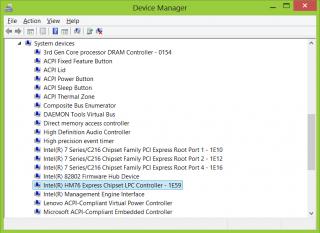
Anyone can confirm that the Y580 is using Intel HM76 chipset? I read it somewhere but forgot where... =P
*
confirmed

Attached Image
mrl
post Dec 21 2012, 09:09 AM

Enthusiast
*****
Senior Member
977 posts

Joined: Jan 2009
From: In the middle...


QUOTE(vetkin_gray @ Dec 21 2012, 05:56 AM)
hi im planning to buy a y580. what are the upgrades that i should go for? i'm reading some things like upgrading the ram and msata hdd or something like that. should i get the 16 gb ram and ssd option? what are the recommended upgrades as I don't want to go overboard with the upgrades.
*
I dont think there's much thing to upgrade other than what you have mentioned?

SSD/bigger HDD
more spacious RAM
some suggest WiFi cards
defnitely a good laptop cooler


QUOTE(capix @ Dec 21 2012, 07:23 AM)
My y580 is lag even only play fifa2013...is it hardwarr or software problem...help
*
Your gfx driver is latest? you sure it's running on nVidia instead of integrated Intel?

btw, I increased my room temperature a little bit now I'm worried about the temperature... CPU idling at 50'C++... other than that, I'm not worried much... so I'm stuck between being freezed in my own apartment or warmer temperature...

This post has been edited by mrl: Dec 21 2012, 09:10 AM

8 Pages  1 2 3 > » Top
Topic ClosedOptions
 

Change to:
| Lo-Fi Version
0.0537sec    0.56    7 queries    GZIP Disabled
Time is now: 1st December 2025 - 08:17 PM