Outline ·
[ Standard ] ·
Linear+
Tp LInk TL-MR3420 Owner CLub V2
|
greenlp_87
|
 Dec 26 2012, 05:07 PM Dec 26 2012, 05:07 PM
|

|
QUOTE(digilife @ Dec 26 2012, 04:30 PM) Nope, heard that it have some issues with some modems , i actually using HW550/Mr3420 to dial in, then LAN out to a D Link DDWRT flashed router to play around with DNS Forwarding  so u using ddwrt fw rite on ur router? |
|
|
|
|
|
TSchuahcs79
|
Dec 26 2012, 06:08 PM
|
Look at all my stars!!

|
just did some feedback on V1 ( openwrt ) / V2 + E398 modem on -> http://forum.lowyat.net/index.php?showtopi...&#entry57075748 |
|
|
|
|
|
greenlp_87
|
Dec 26 2012, 06:21 PM
|
|
|
QUOTE(chuahcs79 @ Dec 26 2012, 06:08 PM) just did some feedback on V1 ( openwrt ) / V2 + E398 modem on -> http://forum.lowyat.net/index.php?showtopi...&#entry57075748nice review..  |
|
|
|
|
|
TSchuahcs79
|
Dec 26 2012, 08:04 PM
|
Look at all my stars!!
|
QUOTE(greenlp_87 @ Dec 26 2012, 06:21 PM) nice review.. just trying to do my part by feed back to blacktubi,. still tweaking,. wondering what kind of speed later morning, thanks to him for sure,..  |
|
|
|
|
|
greenlp_87
|
Dec 26 2012, 08:06 PM
|
|
|
QUOTE(chuahcs79 @ Dec 26 2012, 08:04 PM) just trying to do my part by feed back to blacktubi,. still tweaking,. wondering what kind of speed later morning, thanks to him for sure,.. wait for gaji then i pay him...wonder hows my speed later after using this monster..hehe |
|
|
|
|
|
MaGNiFiCo
|
Dec 26 2012, 08:45 PM
|
|
|
chuah your review using the e398 is without the panel is it?
|
|
|
|
|
|
fatani
|
Dec 26 2012, 10:33 PM
|
Getting Started

|
with e173 and mr3420.. this is the highest speed that i managed to achieve so far..is this acceptable for 7.2mbs dongle?  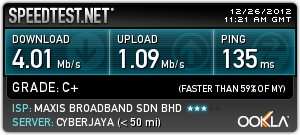 |
|
|
|
|
|
MaGNiFiCo
|
Dec 26 2012, 10:49 PM
|
|
|
@fatani yours same like mine..it is acceptable but your ping quite high tho |
|
|
|
|
|
garytey
|
Dec 27 2012, 05:42 PM
|
|
|
been on latest firmware for MR3420 v2 and E398 latest firmware for the first night, 2 dc meaning modem need to restart twice. anybody experience the same??
|
|
|
|
|
|
bosouman
|
Dec 27 2012, 06:44 PM
|
|
|
so.. i tried e398 on my mr3420..
idk what happen.. but i can't access my tplink dashboard via wifi and LAN..
reseted my router. and only LAN can access dashboard.
plug-in my modem.. anddddddddd.......darkishblue/light blue light..
but no internet connection...frustrated edi... any tips?
This post has been edited by bosouman: Dec 27 2012, 07:03 PM
|
|
|
|
|
|
blacktubi
|
Dec 27 2012, 07:28 PM
|
-
|
QUOTE(bosouman @ Dec 27 2012, 06:44 PM) so.. i tried e398 on my mr3420.. idk what happen.. but i can't access my tplink dashboard via wifi and LAN.. reseted my router. and only LAN can access dashboard. plug-in my modem.. anddddddddd.......darkishblue/light blue light.. but no internet connection...frustrated edi... any tips? Please update the firmware of E398 @ Wiki thread Then Factory reset and try again It works well on my MR3420 V1.3 tho  Never D/C or whatever else |
|
|
|
|
|
bosouman
|
Dec 27 2012, 07:32 PM
|
|
|
QUOTE(blacktubi @ Dec 27 2012, 07:28 PM) Please update the firmware of E398 @ Wiki thread Then Factory reset and try again It works well on my MR3420 V1.3 tho Never D/C or whatever else done with the update... may i ask something? how to factory reset huawei e398...  as i remembered on older/previous modem there's a file on the modem itself to reset it. i can't seem to find mine  |
|
|
|
|
|
digilife
|
Dec 27 2012, 07:39 PM
|
|
|
QUOTE(bosouman @ Dec 27 2012, 07:32 PM) done with the update... may i ask something? how to factory reset huawei e398... as i remembered on older/previous modem there's a file on the modem itself to reset it. i can't seem to find mine no need factory reset E398, just update TubiTubi's file, kautim and which Version is your MR3420? V1 = 192.168.1.1 V2 = 192.168.0.1 This post has been edited by digilife: Dec 27 2012, 07:40 PM |
|
|
|
|
|
bosouman
|
Dec 27 2012, 07:43 PM
|
|
|
QUOTE(digilife @ Dec 27 2012, 07:39 PM) no need factory reset E398, just update TubiTubi's file, kautim and which Version is your MR3420? V1 = 192.168.1.1 V2 = 192.168.0.1 well the back of the router states V1.3 
|
|
|
|
|
|
digilife
|
Dec 27 2012, 07:53 PM
|
|
|
QUOTE(bosouman @ Dec 27 2012, 07:43 PM) well the back of the router states V1.3
yours router is called V1.xxand your FW is outdated download and upgrade it now, later should be fine, available at post#1 remember its 192.168.1.1 to access the interface |
|
|
|
|
|
bosouman
|
Dec 27 2012, 07:56 PM
|
|
|
QUOTE(digilife @ Dec 27 2012, 07:53 PM) yours router is called V1.xxand your FW is outdated download and upgrade it now, later should be fine, available at post#1 remember its 192.168.1.1 to access the interface outdated?????  well i thought from the my tp-link website the latest FW is TL-MR3420_V1_120523 released on 5/23/2012 |
|
|
|
|
|
digilife
|
Dec 27 2012, 08:00 PM
|
|
|
QUOTE(bosouman @ Dec 27 2012, 07:56 PM) outdated????? well i thought from the my tp-link website the latest FW is TL-MR3420_V1_120523 released on 5/23/2012 sorry bro, i misread yours V1 and V2 V2 have 2012 Dec FW yeah yours is the newest on V1, maybe you should upload the bin file ( e398 bin file ) |
|
|
|
|
|
greenlp_87
|
Dec 27 2012, 08:02 PM
|
|
|
QUOTE(digilife @ Dec 27 2012, 08:00 PM) sorry bro, i misread yours V1 and V2 V2 have 2012 Dec FW yeah yours is the newest on V1, maybe you should upload the bin file ( e398 bin file ) if using openwrt fw with e398 do i need to change setting on the v1 router? |
|
|
|
|
|
bosouman
|
Dec 27 2012, 08:10 PM
|
|
|
QUOTE(digilife @ Dec 27 2012, 08:00 PM) sorry bro, i misread yours V1 and V2 V2 have 2012 Dec FW yeah yours is the newest on V1, maybe you should upload the bin file ( e398 bin file ) with and without bin tested... and still  maybe my router is kong edi.. like 5days off EDIT: just noticed that the bin file from chuah.. and i downloaded ain't the same. gonna test it out..pray it'll work This post has been edited by bosouman: Dec 27 2012, 08:11 PM |
|
|
|
|
|
greenlp_87
|
Dec 27 2012, 08:14 PM
|
|
|
QUOTE(bosouman @ Dec 27 2012, 08:10 PM) with and without bin tested... and still maybe my router is kong edi.. like 5days off EDIT: just noticed that the bin file from chuah.. and i downloaded ain't the same. gonna test it out..pray it'll work otherwise u can call chuah to teamview u n help u out setting the modem.. |
|
|
|
|



 Quote
Quote


 0.0314sec
 0.84
0.84
 6 queries
 GZIP Disabled