Outline ·
[ Standard ] ·
Linear+
Tp LInk TL-MR3420 Owner CLub V2
|
digilife
|
 Nov 20 2012, 01:21 PM Nov 20 2012, 01:21 PM
|

|
Lipoting into an AWESOME THREAD Kudos to TS 
Added on November 20, 2012, 1:28 pmQUOTE(chulk @ Nov 20 2012, 08:32 AM) who dare and who qualify to buka?  Buka Sape and Apo, cakap betui betui la bang............ Now the best combo is use 2 Routers, one to suck the 3G signal kawkaw and another one for Routing to WiFi/Lan, meaning more power to do 2 delicate task, 1, to pull in the strongest signal and another to do the Routing to destination devices....... This post has been edited by digilife: Nov 20 2012, 01:28 PM |
|
|
|
|
|
digilife
|
Nov 20 2012, 02:25 PM
|
|
|
QUOTE(blacktubi @ Nov 20 2012, 02:22 PM) Sometime long =/= power  High dBi of Omni the narrower the beam width High dBi of Omni the narrower the beam width  meaning ?  |
|
|
|
|
|
digilife
|
Nov 20 2012, 03:05 PM
|
|
|
QUOTE(blacktubi @ Nov 20 2012, 02:47 PM) Not trully essential Since 1043ND normally power is already powerful enough for an average house  Since i separate the WiFi and 3G reception into 2 routers, i get better WiFi signal, not tested with the Gigabit Lan port + cat6e cable as i am short of cable now. Will do so later next morning as i am in my work place now... But definitely much better than using only a single router........... Can teach me how to OpenWRT my WR1043ND ?  |
|
|
|
|
|
digilife
|
Nov 20 2012, 06:23 PM
|
|
|
QUOTE(stevenlee @ Nov 20 2012, 06:11 PM) able to surf now able i tick the firewall on wan... but some how the speed just 2mbps >_< after 3 router change i suspecting my usb wifi not compatible with dlink router i guess  by tonite , i can help you to confirm, its Router's problem or WiFi adaptor/network card's problem  |
|
|
|
|
|
digilife
|
Nov 20 2012, 07:52 PM
|
|
|
Mr3420 + WR1043ND + 8dBi antenna  |
|
|
|
|
|
digilife
|
Nov 20 2012, 08:12 PM
|
|
|
QUOTE(stevenlee @ Nov 20 2012, 08:06 PM) what modem u using bro? MF680? my MF680 damm hot.....can burn ur hand when touch -.- ur 8dbi antenna is attach to 3g modem or router? mf680, dun care hot as i dun hold it one  there you go............ 
|
|
|
|
|
|
digilife
|
Nov 20 2012, 08:29 PM
|
|
|
QUOTE(hairul @ Nov 20 2012, 08:16 PM) OpenWRT Report In :-) This is easier way to upgrade Tools Needed 1) MR3420 2) 2nd Router + 3G Modem This is my step : - 1) Login Standard Firmware And Upgrade Openwrt Firmware. Then Reboot And Set Router Password (Dont Plug Any Network cable From Router No 2) 2) Plug Network Cable From 2nd Router with 3G Modem to MR3420 WAN Port3) Ping 8.8.8.8 1st. When Internet Available (Ping Got Reply) ,Then Run Putty and Go to 192.168.1.1 4) Copy Paste this into Putty1st Stepopkg update2nd Stepopkg install chat comgt kmod-usb-acm kmod-usb-serial kmod-usb-serial-option kmod-usb-uhci libusb luci-proto-3g mini-sendmail usb-modeswitch usb-modeswitch-data kmod-usb2 kmod-usb-ohci kmod-usb-serial-wwan5) Reboot And Login 6) Go To Network>Interface>Edit WAN 7) Switch Protocol And Choose UMTS/GORS/EV-DO and Fill-up APN & Others. 8) Setting WIFI ETC and Reboot Again 9) Use Abang, where to download the necessary files and one more thing, if i wan to flash OpenWRT onto my WR1043ND, same steps too? |
|
|
|
|
|
digilife
|
Nov 20 2012, 08:55 PM
|
|
|
Now peak period rite But, twin Router + 8dBi does the JOB well  |
|
|
|
|
|
digilife
|
Nov 21 2012, 02:41 PM
|
|
|
guys, today my MR3420 V1 totally no response on my modems, wat could be the problem, use LAN connect to PC , key in 192.168.1.1 , no response at all
it was all okay as i still use it to LAN OUT ONLY to WR1043ND yesterday, how to reset the router?
thanks
|
|
|
|
|
|
digilife
|
Nov 21 2012, 03:26 PM
|
|
|
QUOTE(blacktubi @ Nov 21 2012, 02:45 PM) I assume there was a hole for reset at the back right What came out when ipconfig @ CMD  i guess i knoe the reason why now i reset my pc , it is okay now i was using this MR3420 V1 to LAN out to TD8968 , I guess there was a conflict with 192.168.1.1 as both shared the same log in IP........ I have used MR3420 with MR3420 V2 , no conflict as V1 is 192.168.1.1 and V2 192.168.0.1 but these 2 MR3420 V1 and TD8968 shared the same IP even Mr3420 V1 or V2 dun conflict with HW550 cause HW550 IP is 192.168.2.1 |
|
|
|
|
|
digilife
|
Nov 21 2012, 04:49 PM
|
|
|
QUOTE(redyakuza87 @ Nov 21 2012, 04:29 PM) What i have in mind now MF680 >HW550> LAN~ WR1043ND > LAN~Gigabit Switch > LAN Linksys DDWRT > WiFi Why I WR1043ND > LAN~Gigabit Switch > LAN Linksys DDWRT, because all these 3 devices support Gigabit data transfer
Added on November 21, 2012, 5:02 pmSometimes somehow our connection is very good BUT our devices are not translating those good speed onto our pc. We have to use the best means to maximise it. How to do it depends on you and your devices, and having said so, i am getting stuff like Car6E Cable, USB3.0 extension cable, Panel Antenna, Gigabit Switch, DDWRT flashed Routers to test out the ultimate combination.  This post has been edited by digilife: Nov 21 2012, 05:02 PM This post has been edited by digilife: Nov 21 2012, 05:02 PM |
|
|
|
|
|
digilife
|
Nov 21 2012, 05:44 PM
|
|
|
using MF680 >HW550> LAN~ WR1043ND > WiFi Only  take2, after some interval  normally with one router , it max out at 6~7Mbps here ( at this time )  i am now waiting for some more devices (toys, will let you knoe the result on Sat ) |
|
|
|
|
|
digilife
|
Nov 23 2012, 09:05 AM
|
|
|
|
|
|
|
|
|
digilife
|
Nov 23 2012, 05:36 PM
|
|
|
For those of you who wan to use the 2 routers trick, make sure both router dun share the same log in IP eg: MR3420 V1 log in IP is 192.168.1.1 and MR3420 V2 is 192.168.0.1 , this combo is fine  I tested MR3420 V1 and WR1043ND ( both shared the same log-in IP of 192.168.1.1) , this wont work I bought another used DDWRT Flashed Dlink , and it rocks as i use MR3420 V1 to dial in and LAN out into the Dlink (192.168.0.1) to wifi out.......~ this one more Geng as it have 32MB of flash memory , more options to tweak tweak , "damage to my wallet" = rm50 
@Chuah, get one before its too late when everyone knoe how to sapu them them from garage sale....... My second DDWRT router have newer FW compared to the first one...... |
|
|
|
|
|
digilife
|
Nov 23 2012, 05:51 PM
|
|
|
QUOTE(chuahcs79 @ Nov 23 2012, 05:37 PM) well if u havent install any packages then no need setting for DHCP but if u already seting your 3G WAN, then u have to change the protocol back to DHCP Client
Added on November 23, 2012, 5:39 pmno thanks to DDWRT,... no fail safe, when brick = 100% death my IP been on for : Online Time: 2 day(s) 15:32:56 my openwrt + stockfirmware speed :  so your DDwrt speed le ? You dun need to flash DDWRT yourself, just sapu one from Garage Sale , price range from rm50~rm80 je Speed wise is so so only on RSSI of 93dBi ( no antenna , no fan ) , btw this Dlink power adaptor utilise a 2.5A compare to MR3420 1.0A, imagine its immense power  Ping is good, on WiFi of the tiny antenna of the Dlink. 
|
|
|
|
|
|
digilife
|
Nov 23 2012, 06:31 PM
|
|
|
QUOTE(chuahcs79 @ Nov 23 2012, 06:05 PM) if only act as a pure wireless router, any brand will do,. no need high power 2.5A anyway,. unless u try your DDWRT with 3G then that's a whole different story, Look at it this way, Your OpenWRT router+modem dial into maxis on a shared power of 1A, which I believe is "under power". I believe you should use the 2 Router way. . Mine is a little bit different , the MF680+MR3420 combined as a "oversized modem" that is powered by a 1A adaptor dial into Maxis and supply the Internet signal into a DDWRT Dlink via a Cat6e LAN Cable. The "oversized modem is AC powered by a 1A adaptor ( converter that convert 240V of Alternate Current (AC) into 12V , 1A of Direct Current(DC). The Dlink utilise it full power (2.5A) to process the Internet signal supported by the DDWRT Enhanced Firmware and release it via WiFi to my laptop. Hence i get a more stable and uniform WiFi signal.........and DDWRT have more options for you to tweak,play and modify although i dun exactly knoe what those extra functions are for  |
|
|
|
|
|
digilife
|
Nov 23 2012, 07:12 PM
|
|
|
QUOTE(chuahcs79 @ Nov 23 2012, 06:36 PM) unless u have try DDwrt with 3G, otherwise that will prove nothing much, V2 alone can handle dialing + wifi N and still stable too ( which i tested before ) I already explained very clearly using MR3420+MF680 as a 3G source, you still can't read me? I guess i have to find this to plug it into my DDWRT's flashed Router's WAN port to see if it supports it. LAN male to USB female adaptor Modem on one end and WAN plug on the other, you never knoe DDWRT dun support tilll you tried....... 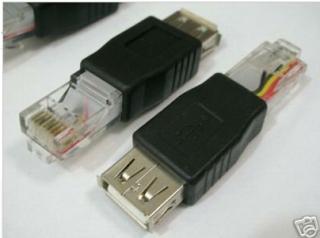 This post has been edited by digilife: Nov 23 2012, 07:14 PM
 |
|
|
|
|
|
digilife
|
Nov 23 2012, 07:21 PM
|
|
|
QUOTE(blacktubi @ Nov 23 2012, 07:16 PM) Your router is running DD-WRT r14896 which is extremely old It is very easy to upgrade actually, just upload something like a usual firmware upgrade
Added on November 23, 2012, 7:16 pmDidn't support Is it as simple as Upgrade it like TP Link stock FW? btw, i wan to poison Chuah with this Super Channel 
|
|
|
|
|
|
digilife
|
Nov 23 2012, 07:34 PM
|
|
|
QUOTE(blacktubi @ Nov 23 2012, 07:29 PM) Oops  That's why I mentioned try at own risk. No warranty
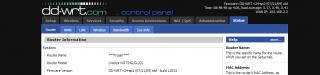
Added on November 23, 2012, 7:30 pmI am inside a Kampung now My E355 dialed with by my humble Power Bank  Thanks BT, its easy like you mentioned, i dare not flash from Custom > DDWRT cause scare headache as i am not good at these kind of stuff but as you mentioned, yeah its easy to upgrade the FW myself 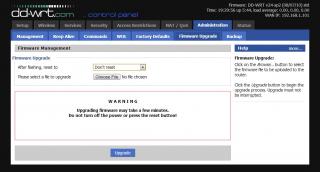
@Chuah, i dun need to convince you but i wan to make you lololuen , as i knoe your are like this now  : |
|
|
|
|



 Quote
Quote




 0.0353sec
 0.43
0.43
 7 queries
 GZIP Disabled