Welcome Guest ( Log In | Register )

Bump Topic Topic Closed RSS Feed
117 Pages « < 31 32 33 34 35 > » Bottom

Outline · [ Standard ] · Linear+

 Google NEXUS 7 Official Thread @V2, Officially available in msia! RM999/16GB

views
     
eugenecctan
post Sep 24 2012, 10:11 AM

Wee Wang Wang
******
Senior Member
1,058 posts

Joined: Nov 2009


Hi guys, I have refreshed the page and try again, now it is working. Should I follow the steps suggested at the link below to claim my $25.

http://www.shahz.net/android/25-dollars-go...outside-us.html

Any better suggestion?


Added on September 24, 2012, 10:12 am
QUOTE(tcmean @ Sep 24 2012, 10:10 AM)
Because you haven't install Google Wallet on your Nexus 7 and activate it. This is Google Wallet on mobile device. It's a different 1.

If you have successfully purchased apps with the $25 credit then what's the problem now?
*
:S, I purchased a few apps with my credit card lar... Not the claimed $25.

This post has been edited by eugenecctan: Sep 24 2012, 10:12 AM
tcmean
post Sep 24 2012, 10:12 AM

On my way
****
Senior Member
561 posts

Joined: Jan 2003
QUOTE(eugenecctan @ Sep 24 2012, 10:07 AM)
?? I already activated my Nexus 7, but not yet claimed the $25 credits, btw, it has nothing to do with changing my default country right? I am able to change the shipping address. But not the home address..
*
You should get the credit once you activated your Nexus 7 through VPN. You should have receive the credit already.

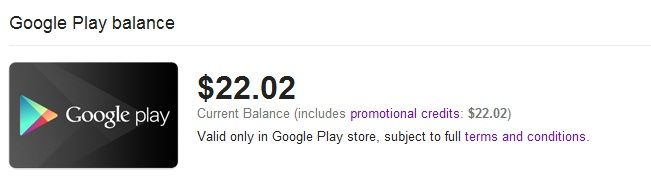
To check, go to http://www.google.com/wallet/ then Payment Method, see if you have Google play balance in the list.

user posted image

If you don't have yet, then follow the steps on the 1st page. Reset it and sign in through VPN

This post has been edited by tcmean: Sep 24 2012, 10:16 AM
eugenecctan
post Sep 24 2012, 10:15 AM

Wee Wang Wang
******
Senior Member
1,058 posts

Joined: Nov 2009


QUOTE(tcmean @ Sep 24 2012, 10:12 AM)
You should get the credit once you activated your Nexus 7. You should have receive the credit already.

To check, go to http://www.google.com/wallet/ then Payment Method, see if you have Google play balance in the list.
*
Btw, activated meant sign up with google account? Previously I have activated the device without trying to claim the $25. Am I still able to claim it now?
benny888
post Sep 24 2012, 10:19 AM

Gadget Freak
Group Icon
Elite
27,801 posts

Joined: Jun 2007
From: Johor


QUOTE(eugenecctan @ Sep 24 2012, 10:15 AM)
Btw, activated meant sign up with google account? Previously I have activated the device without trying to claim the $25. Am I still able to claim it now?
*
You will see the US$ 25 in your Google account if you have successfully claim it
You cannot redo it again if you have successfully done and claim it once

You can follow shahz blog on how to get the US$25
When you want to buy apps - choose from your US$25 credit not your credit card
If you wish to buy books, movies, videos you need to be connected through VPN as these are restricted to US based accounts only

This post has been edited by benny888: Sep 24 2012, 10:21 AM
tcmean
post Sep 24 2012, 10:24 AM

On my way
****
Senior Member
561 posts

Joined: Jan 2003
QUOTE(eugenecctan @ Sep 24 2012, 10:15 AM)
Btw, activated meant sign up with google account? Previously I have activated the device without trying to claim the $25. Am I still able to claim it now?
*
If you dont have $25 Google play balance listed in your Payment method, then you can start following the guide to get the credit. (Please check this over the website on your computer/mobile device, not the Wallet app in your Nexus 7)

$25 will be credited to your account immediately once you have activated your Nexus 7 on a US VPN. You mentioned that you have activated once. But, I guess it wasn't through a US VPN.

This post has been edited by tcmean: Sep 24 2012, 10:27 AM
eugenecctan
post Sep 24 2012, 10:26 AM

Wee Wang Wang
******
Senior Member
1,058 posts

Joined: Nov 2009


QUOTE(tcmean @ Sep 24 2012, 10:24 AM)
If you dont have $25 Google play balance listed in your Payment method, then you can start following the guide to get the credit.

$25 will be credited to your account immediately once you have activated your Nexus 7 on a US VPN. You mentioned that you have activated once. But, I guess it wasn't through a US VPN.
*
Yes, so now I have to master reset first right? before I try to activate again through a US VPN?


Added on September 24, 2012, 10:27 amThanks guys, all of you are very helpful smile.gif

This post has been edited by eugenecctan: Sep 24 2012, 10:27 AM
TSmtxx
post Sep 24 2012, 10:34 AM

Look at all my stars!!
*******
Senior Member
5,011 posts

Joined: Aug 2011
QUOTE(tcmean @ Sep 24 2012, 09:43 AM)
I guess everyone missed out the most important step in claiming $25 Google Play Credit.

The most important step would be setting up your Google Wallet account with the country as United States. If your home country is set as Malaysia, you will need to change it before you claim the credit. After you have claim that, you will not be able to change the home country anymore. Your Google Play Credit will be locked to your home country's Play store only.
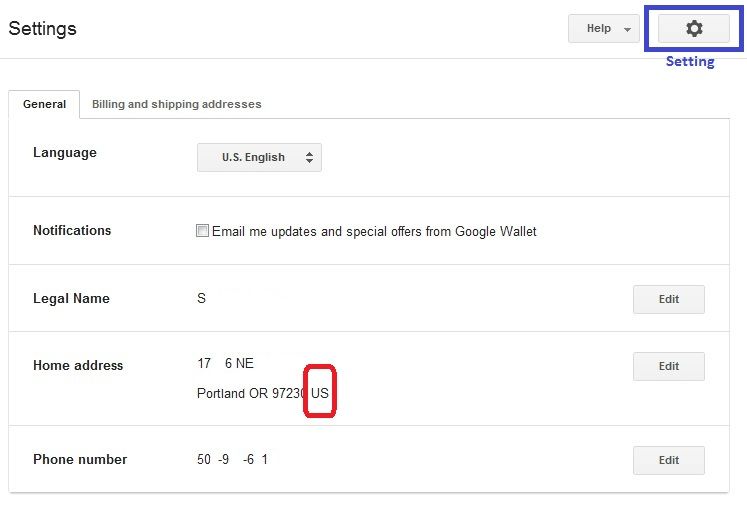
user posted image

For those that are having RBC error, you should have your home country set other than US, UK or any other countries that have Play store available.

If you missed this step, you will still get your $25 credit. But, you will not be able to use it at all.

I would recommend everyone to go to Google Wallet (http://www.google.com/wallet/) first to check if you have your home country set correctly before powering on your Nexus to activate.
*
thanks for the tips, added to the instructions at first page.


Added on September 24, 2012, 10:37 am
QUOTE(eugenecctan @ Sep 24 2012, 09:48 AM)
Do I need to master reset again to claim for the $25 credit? Please direct me a method without master reset. Thanks.


Added on September 24, 2012, 9:48 amBtw, my Nexus 7 screen has screen flickering issue, anyone have the same problem?

I've found out from Mr google that weak wifi signal might cause screen flickering on nexus 7. What should I do?
*
the screen flicker happens when wifi signal is low, and screen brightness low.
tune up the brightness and its ok.

not really an issue for me, my wifi signal is strong. :-)
how bad is your flicker? i have to go out of my house in the night only i notice the flicker,
very mild flicker every second, barely noticeable.

This post has been edited by mtxx: Sep 24 2012, 10:37 AM

readix
post Sep 24 2012, 10:44 AM

Casual
***
Junior Member
305 posts

Joined: Jan 2003


senQ FB:
The price will be; RCP: RM999
Warranty : 1+1 ( for PlusOne Members )
The stock arrival estimated on end of next week.
7 minutes ago
un_id
post Sep 24 2012, 10:48 AM

music is soul's food
*******
Senior Member
7,106 posts

Joined: Sep 2010
ermmm.. where is my Google Wallet app? hmm.gif

correct me if i'm wrong, i remember there is a Google Wallet app in this tablet when i first setting this tablet before. In the app, can put in c.c and reward cards etc. but now, i'm trying to find the app but there is none... unsure.gif

can anyone advice? where can i access the Wallet account now? weird la..
eugenecctan
post Sep 24 2012, 10:51 AM

Wee Wang Wang
******
Senior Member
1,058 posts

Joined: Nov 2009


QUOTE(mtxx @ Sep 24 2012, 10:34 AM)
thanks for the tips, added to the instructions at first page.


Added on September 24, 2012, 10:37 am

the screen flicker happens when wifi signal is low, and screen brightness low.
tune up the brightness and its ok.

not really an issue for me, my wifi signal is strong. :-)
how bad is your flicker? i have to go out of my house in the night only i notice the flicker,
very mild flicker every second, barely noticeable.
*
The flickering is not very bad, it is just like a horizontal refresh line that happen randomly across the screen, sometimes it happens every 5 minutes, but no matter what, IT DOES happen....
tcmean
post Sep 24 2012, 10:54 AM

On my way
****
Senior Member
561 posts

Joined: Jan 2003
I just found out that I'm now able to change home country in my Google Wallet. It wasn't allowed before that because of Google play balance in my account.

Could anyone with RBC error like the following try to change home country to US and try to purchase apps?
QUOTE
This payment method cannot be used for this purchase (RBC)


This post has been edited by tcmean: Sep 24 2012, 10:54 AM
Kylin
post Sep 24 2012, 11:04 AM

Getting Started
**
Junior Member
65 posts

Joined: Apr 2012

QUOTE(CyberKewl @ Sep 23 2012, 07:45 PM)
no slowdowns compared to when u first got the device? could you do an androbench benchmark?
*
Did the benchmark at 751MB space left.

user posted image

user posted image
un_id
post Sep 24 2012, 11:05 AM

music is soul's food
*******
Senior Member
7,106 posts

Joined: Sep 2010
QUOTE(un_id @ Sep 24 2012, 10:48 AM)
ermmm.. where is my Google Wallet app? hmm.gif

correct me if i'm wrong, i remember there is a Google Wallet app in this tablet when i first setting this tablet before. In the app, can put in c.c and reward cards etc. but now, i'm trying to find the app but there is none... unsure.gif

can anyone advice? where can i access the Wallet account now? weird la..
*
solved.. yawn.gif yawn.gif

it was freeze by Titanium Backup.. LOL.. but, its weird because i never freeze anything with Titanium Backup, i just install it and do nothing with it. hmm.gif the Titanium Backup also freeze other native apps such as Google Play Book, Google Play Magazine and Google Play Movies. Did the Titanium Backup will auto freeze these apps by default??
mikeeeee
post Sep 24 2012, 11:07 AM

*~Tien9Chi~*
*******
Senior Member
3,026 posts

Joined: Oct 2004
From: KL, Penang & JB


QUOTE(un_id @ Sep 24 2012, 11:05 AM)
solved..  yawn.gif  yawn.gif

it was freeze by Titanium Backup.. LOL.. but, its weird because i never freeze anything with Titanium Backup, i just install it and do nothing with it.  hmm.gif  the Titanium Backup also freeze other native apps such as Google Play Book, Google Play Magazine and Google Play Movies. Did the Titanium Backup will auto freeze these apps by default??
*
it was freezed by Google upon detecting you are not from US not Titanium's fault hahaha


un_id
post Sep 24 2012, 11:09 AM

music is soul's food
*******
Senior Member
7,106 posts

Joined: Sep 2010
QUOTE(mikeeeee @ Sep 24 2012, 11:07 AM)
it was freezed by Google upon detecting you are not from US not Titanium's fault hahaha
*
hahaha tot so.. open the Wallet app it said cannot be use in this region..

This post has been edited by un_id: Sep 24 2012, 11:10 AM
TSmtxx
post Sep 24 2012, 11:18 AM

Look at all my stars!!
*******
Senior Member
5,011 posts

Joined: Aug 2011
QUOTE(un_id @ Sep 24 2012, 11:09 AM)
hahaha tot so.. open the Wallet app it said cannot be use in this region..
*
open browser, go google for "google wallet", can do from your PC or tablet.
log in and make the changes you want. no need the app smile.gif
eugenecctan
post Sep 24 2012, 11:28 AM

Wee Wang Wang
******
Senior Member
1,058 posts

Joined: Nov 2009


Hey guys, please recommend some high requirement games, that can only play using Tegra 3 quad core processor. I love Asphalt 7, but it can run very smooth using my samsung Note. I want to feel the power of quad core. tongue.gif
rodent
post Sep 24 2012, 11:46 AM

New Member
*
Junior Member
8 posts

Joined: Sep 2007


QUOTE(eugenecctan @ Sep 24 2012, 11:28 AM)
Hey guys, please recommend some high requirement games, that can only play using Tegra 3 quad core processor. I love Asphalt 7, but it can run very smooth using my samsung Note. I want to feel the power of quad core. tongue.gif
*
Here are five games that are optimized for Tegra 3:

http://www.slashgear.com/nvidia-unveils-fi...at-e3-05232222/

I believe there are a few more, you can try download the TegraZone app from Play Store to find out more...
chewlee
post Sep 24 2012, 12:20 PM

On my way
****
Senior Member
616 posts

Joined: Jun 2008
Any idea where can i buy the OTG cable and the OTG card reader.


soulseeker6187
post Sep 24 2012, 12:53 PM

Look at all my stars!!
*******
Senior Member
2,774 posts

Joined: Jun 2009


QUOTE(chewlee @ Sep 24 2012, 12:20 PM)
Any idea where can i buy the OTG cable and the OTG card reader.
*
here:
http://forum.lowyat.net/MobilePhonesandRelatedAccessories

117 Pages « < 31 32 33 34 35 > » Top
Topic ClosedOptions
 

Change to:
| Lo-Fi Version
0.0206sec    0.68    6 queries    GZIP Disabled
Time is now: 18th December 2025 - 11:59 AM